URLs in my emails not "clickable"

StickMaker

New member
Local time
7:45 AM
Messages
82
When I put a URL into an email, I expect it to be clickable, even if it is in my SIGNATURE. (options/mail/signatures) So, I send my mail in "Rich text (HTML)" format rather than "Plain Text."

Yet, they are (usually) NOT clickable. How can I set it to ALWAYS send ""Rich text (HTML)"" AND have all links clickable?

thank you.
 

My Computer My Computer

OS
Windows 7
What email service are you using?

With windows live mail 2011. On new email page, you click messages and then plain text and make sure you are set up for html.
 

My Computer My Computer

Computer type
PC/Desktop
Computer Manufacturer/Model Number
Dell XPS 420
OS
Windows 10, Home Clean Install
CPU
Intel Core2 processsor Q8200(2.33Ghz 1333FSB) Quad Core Tech
Motherboard
Dell
Memory
6 gb
Graphics Card(s)
ATI Radeon 256MB HD3650
Sound Card
Intergrated 7.1 Channel Audio
Monitor(s) Displays
Dell SP2009W 20"
Hard Drives
640 GB Serial ATA Hard drive
Cooling
Fan
Keyboard
Dell USB Keyboard
Mouse
Dell Premium Optical USB
Internet Speed
DSL 2.85
Thank you for that Richard. I should have mentioned that yes, I do use Windows Live Mail 2011. OK, so on the "New Message" I want to make sure it SHOWS "RICH text" and the links will be clickable. Yes, that works even though that is COUNTER-intuitive, imho. So how can I make it use "Rich text" automatically on ALL emails rather than me having to select Rich every time?
 

My Computer My Computer

OS
Windows 7
Im using 2011. I did it once and it works for all mail
Just so you know, when you write an email t does not work unless you try it in the sent mail folder.
 

My Computer My Computer

Computer type
PC/Desktop
Computer Manufacturer/Model Number
Dell XPS 420
OS
Windows 10, Home Clean Install
CPU
Intel Core2 processsor Q8200(2.33Ghz 1333FSB) Quad Core Tech
Motherboard
Dell
Memory
6 gb
Graphics Card(s)
ATI Radeon 256MB HD3650
Sound Card
Intergrated 7.1 Channel Audio
Monitor(s) Displays
Dell SP2009W 20"
Hard Drives
640 GB Serial ATA Hard drive
Cooling
Fan
Keyboard
Dell USB Keyboard
Mouse
Dell Premium Optical USB
Internet Speed
DSL 2.85
OK I found it
On the inbox page
upper left small envelope click on it
options
mail
send
Then check formattting.

It seems that the above setting overrides the previous information.
 

My Computer My Computer

Computer type
PC/Desktop
Computer Manufacturer/Model Number
Dell XPS 420
OS
Windows 10, Home Clean Install
CPU
Intel Core2 processsor Q8200(2.33Ghz 1333FSB) Quad Core Tech
Motherboard
Dell
Memory
6 gb
Graphics Card(s)
ATI Radeon 256MB HD3650
Sound Card
Intergrated 7.1 Channel Audio
Monitor(s) Displays
Dell SP2009W 20"
Hard Drives
640 GB Serial ATA Hard drive
Cooling
Fan
Keyboard
Dell USB Keyboard
Mouse
Dell Premium Optical USB
Internet Speed
DSL 2.85
This is a poor way to program an email client, I think, Richard. I make a message, it says "Rich text" yet it is NOT. I cannot insert an image and cannot change font etc. Further, even if I make one email showing Rich, it does not remember that for my
next email.

I made one new email message, changed it to show "Rich text" and clicked "Send." Immediately I made another message and it showed "Plain text."

I dream of Outlook Express. Windows Live sucks in a lot of ways; the Windows Live Movie Maker was a huge step backward too. So sad.
 

My Computer My Computer

OS
Windows 7
OK I found it
On the inbox page
upper left small envelope click on it
options
mail
send
Then check formattting.

It seems that the above setting overrides the previous information.

I had done all that a long time ago, Richard, for each of my five email addies. No good.
 

My Computer My Computer

OS
Windows 7
OK I found it
On the inbox page
upper left small envelope click on it
options
mail
send
Then check formattting.

It seems that the above setting overrides the previous information.

Did you try this?
 

My Computer My Computer

Computer type
PC/Desktop
Computer Manufacturer/Model Number
Dell XPS 420
OS
Windows 10, Home Clean Install
CPU
Intel Core2 processsor Q8200(2.33Ghz 1333FSB) Quad Core Tech
Motherboard
Dell
Memory
6 gb
Graphics Card(s)
ATI Radeon 256MB HD3650
Sound Card
Intergrated 7.1 Channel Audio
Monitor(s) Displays
Dell SP2009W 20"
Hard Drives
640 GB Serial ATA Hard drive
Cooling
Fan
Keyboard
Dell USB Keyboard
Mouse
Dell Premium Optical USB
Internet Speed
DSL 2.85
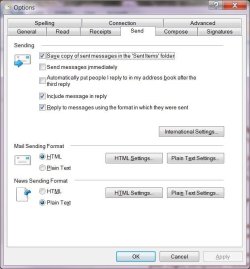
Not sure what you mean by "check formatting" Richard. I did choose "HTML" for "Mail Sending Format."

See attached picture, please.
 

My Computer My Computer

OS
Windows 7
No picture
 

My Computer My Computer

Computer type
PC/Desktop
Computer Manufacturer/Model Number
Dell XPS 420
OS
Windows 10, Home Clean Install
CPU
Intel Core2 processsor Q8200(2.33Ghz 1333FSB) Quad Core Tech
Motherboard
Dell
Memory
6 gb
Graphics Card(s)
ATI Radeon 256MB HD3650
Sound Card
Intergrated 7.1 Channel Audio
Monitor(s) Displays
Dell SP2009W 20"
Hard Drives
640 GB Serial ATA Hard drive
Cooling
Fan
Keyboard
Dell USB Keyboard
Mouse
Dell Premium Optical USB
Internet Speed
DSL 2.85
hmmmmm; I'll try that again. OK, did that and below this it does show, again, under "Attach Files" the name of the file, "richard.jpg (59.4KB)"
 

Attachments

  • richard.jpg
    richard.jpg
    48.5 KB · Views: 17

My Computer My Computer

OS
Windows 7
OK you seem to be set up ok.

Now one question. How do you know you cant send HTML?
 

My Computer My Computer

Computer type
PC/Desktop
Computer Manufacturer/Model Number
Dell XPS 420
OS
Windows 10, Home Clean Install
CPU
Intel Core2 processsor Q8200(2.33Ghz 1333FSB) Quad Core Tech
Motherboard
Dell
Memory
6 gb
Graphics Card(s)
ATI Radeon 256MB HD3650
Sound Card
Intergrated 7.1 Channel Audio
Monitor(s) Displays
Dell SP2009W 20"
Hard Drives
640 GB Serial ATA Hard drive
Cooling
Fan
Keyboard
Dell USB Keyboard
Mouse
Dell Premium Optical USB
Internet Speed
DSL 2.85
Only, Richard, because I realized that the URLs I had in my website were not clickable, SOME of the time. It seems that if I have "Plain text" showing in the "New Message" then they will NOT be clickable and it it shows "Rich text" they are. I want them all, to always be clickable no matter which email addy I send from, and all replies as well.
 

My Computer My Computer

OS
Windows 7
TBH, I running out of ideas. Why not try setting send news HTML and see what happens.
 

My Computer My Computer

Computer type
PC/Desktop
Computer Manufacturer/Model Number
Dell XPS 420
OS
Windows 10, Home Clean Install
CPU
Intel Core2 processsor Q8200(2.33Ghz 1333FSB) Quad Core Tech
Motherboard
Dell
Memory
6 gb
Graphics Card(s)
ATI Radeon 256MB HD3650
Sound Card
Intergrated 7.1 Channel Audio
Monitor(s) Displays
Dell SP2009W 20"
Hard Drives
640 GB Serial ATA Hard drive
Cooling
Fan
Keyboard
Dell USB Keyboard
Mouse
Dell Premium Optical USB
Internet Speed
DSL 2.85
Are we having fun yet, Richard? OK, I set the "news" for Rich as well but that did not help either.

Guess just one more bug in WLM that we have to struggle with. OR go Thunderbird.
 

My Computer My Computer

OS
Windows 7

My Computer My Computer

Computer type
PC/Desktop
Computer Manufacturer/Model Number
Dell XPS 420
OS
Windows 10, Home Clean Install
CPU
Intel Core2 processsor Q8200(2.33Ghz 1333FSB) Quad Core Tech
Motherboard
Dell
Memory
6 gb
Graphics Card(s)
ATI Radeon 256MB HD3650
Sound Card
Intergrated 7.1 Channel Audio
Monitor(s) Displays
Dell SP2009W 20"
Hard Drives
640 GB Serial ATA Hard drive
Cooling
Fan
Keyboard
Dell USB Keyboard
Mouse
Dell Premium Optical USB
Internet Speed
DSL 2.85
To set the default format for emails in Windows Live Mail, how about the following:
Click on the down arrow beside the icon in the blue block at the upper left. From the dropdown menu select Options-->Mail-->Send-->Mail Sending Format-->HTML. That should set the default format for new messages to HTML unless that setting is contradicted by some other setting selected on the "Sending" page.

As to whether links inserted, including email addresses, are really links and not just underlined text, the link can be tested by Control-Clicking on it from within the draft email.
 

My Computer My Computer

Computer Manufacturer/Model Number
Toshiba Satellite L500
OS
Windows 7 Pro x64
Memory
4 GB
Sound Card
Realtek
Thanks, fellow Booklover. If you look at the image I sent you'll see that I do have "HTML" marked for both Mail and News. I also have a check beside "Reply to messsages using the format in which they were sent" and YES, I think I should REMOVE that one. BUT, when I start NEW messages, it will not remember to use HTML format.
 

My Computer My Computer

OS
Windows 7
I apologize for not editing my post. At the time I posted I hadn't discovered P2 of this thread (I'm pretty new to this forum and not quite familiar with everything - apologies for not editing) but did see it later and should have edited.

Before I posted I created and sent to myself from Windows Live Mail a couple of messages with no special settings -- just what my defaults are -- what I posted. Before sending the message I tested both the email address I included in the text and the other links I included, using the CNTRL-click, just to be sure I could duplicate what I was about to post.

When I ctrl-clicked on the included email address from within the draft message, a new email opened with the email address as the addressee. When I ctrl-clicked on the link, I was immediately taken to that site.

That's really a puzzle about your WLM not retaining your settings. Right now have no further ideas but will see if anything occurs to me.
 

My Computer My Computer

Computer Manufacturer/Model Number
Toshiba Satellite L500
OS
Windows 7 Pro x64
Memory
4 GB
Sound Card
Realtek
Back
Top