SATA Drivers - Slipstream into Windows XP CD

How to slipstream SATA drivers into Windows XP setup CD, on your dual boot PC with Windows 7 or Vista

When you install Win XP, setup can not find your Hard Drive.

1.PNG

2.PNG


1) Download & Install nLite
nLite - Deployment Tool for the bootable Unattended Windows installation

2) Make a new folder for your Windows XP image.
Note: for this example, I am using the name Win XP Sata.

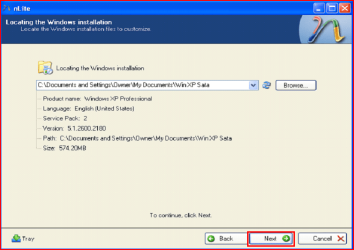
3) Insert XP CD & start nLite

4) Click Next.
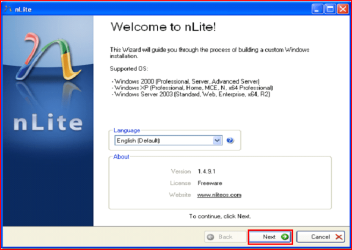
3.PNG
5) Choose your Windows XP image folder, & Click Next, than OK.
Note: nLite will put the image into your folder.
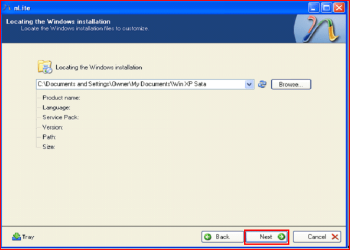
4.PNG

5.PNG
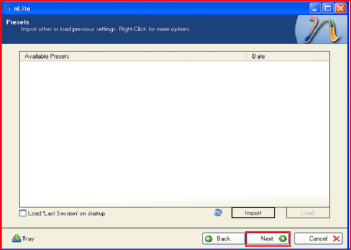
6) Click Next.
6.PNG
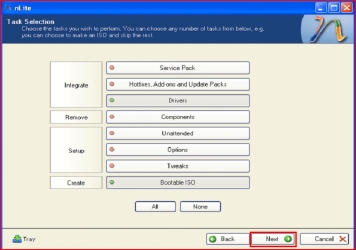
7) Click Next.
7.PNG
8) Choose Integrate Drivers & Create Bootable ISO
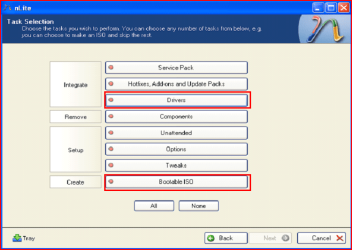
8.PNG
9) Click Next.
9.PNG
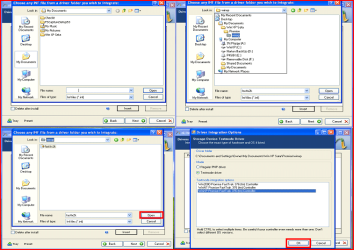
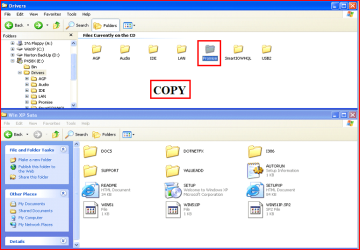
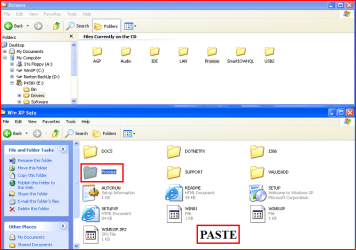
10) Copy & Paste your Sata Driver to your image folder.
Note: for this example, I am using Promise Fastrak 376.
10.PNG

11.PNG
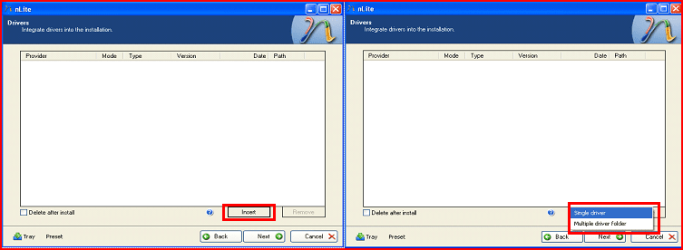
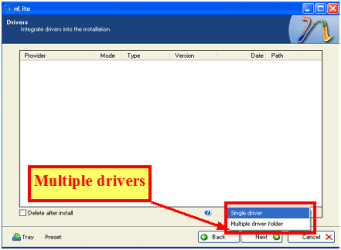
11) Click Insect, than Single Driver.
12.PNG
12) Locate your Sata Setup Inf file.
Click Open, than OK.
Note: for this example the file is called fasttx2k.
Note: for this example, I am using Promise Fastrak 376.
13.PNG
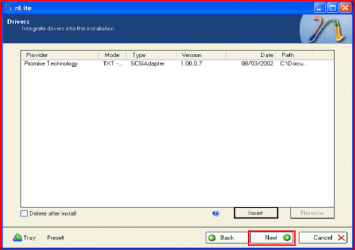
13) Click Next.
14.PNG
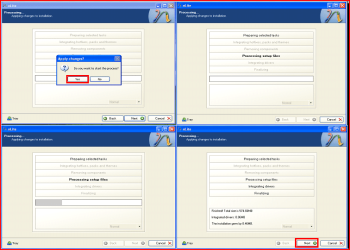
14) Click Yes, than Next.
15.PNG
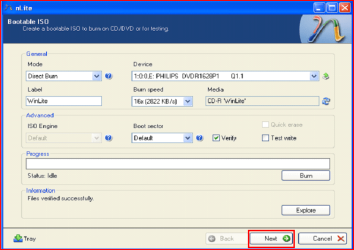
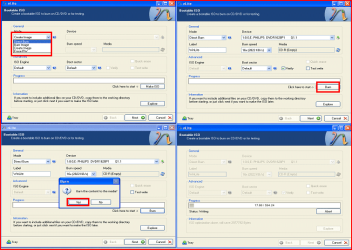
15) Choose Direct Burn.
Click Burn, than Yes.
Note: nLite will now burn your new CD.
16.PNG
16) Click Next.
17.PNG
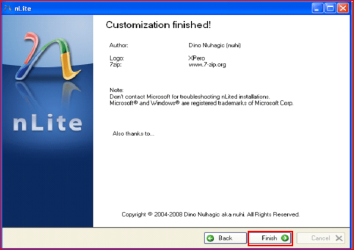
17) Click Finish.
18.PNG
Your Sata drive will now show up in setup.
19.PNG

 
Last edited by a moderator:
I took a look at the mother board driver CD and found that it has a folder named RAID with a jmb363 folder inside..
and a driver folder, may be this is what i need?
Your file i did not found, not i on the site and not in the disk..

ASUSTeK Computer Inc.

P5K-E/WIFI-AP

Capture1.PNG

P5K-E

Capture2.PNG
 

My Computer My Computer

OS
ME/XP/Vista/Win7
I have looked every where and still did not found that download.. i have P5K with out that 'e' ..
 

My Computer My Computer

OS
Windows 7 x64 ultimate
And?.. its a driver cd with option for F6 with floppy disk which i don't have..

Any ways thank you for the help but its a no go.. drivers are just stronger then me..
 

My Computer My Computer

OS
Windows 7 x64 ultimate
Enter BIOS and do the following:

Enter Integrated Peripherals>On-Chip IDE Configuration
On-Chip ATA(s) Operate Mode:[Native Mode]
ATA Configuration:[P-ATA Only]
S-ATA Keep Enabled:[Yes]
P-ATA Keep Enabled:(not available)
P-ATA Channel Selection:[Both]
Combined Mode Option:(not available)
S-ATA Ports Definition:P0-3rd. / P1-4th or P0-1st. / P1-2nd.

but i use this to
ms=6788 or 848P Neo desktop machng
its works for me credites go to thunder in msi -forum
 

My Computer My Computer

Computer Manufacturer/Model Number
DELL
OS
windows 7
CPU
Intel® Core™ i3-330M (3M Cache, 2.13 GHz)
Motherboard
dell inc .03C6YH
Memory
4Gb DDR3
Graphics Card(s)
ATI Mobility Radeon HD 5470
Sound Card
onboard
Monitor(s) Displays
pnp moniter
Hard Drives
samsun 300gb
Internet Speed
512kpbs
Hi
I made the iso cd, booted from it, but it gave me an error, "The iaStor.sys file is corrupted".
CPU-Z shows that I have an Intel P35/G33/G31 chipset.
I downloaded the drivers from http://downloadcenter.intel.com/SearchResult.aspx?lang=eng&ProductFamily=Chipsets&ProductLine=Chipset+Software&ProductProduct=Intel%C2%AE+Rapid+Storage+Technology+%28Intel%C2%AE+RST%29&ProdId=2101&LineId=1090&FamilyId=40
The 64-bit version since I have Windows 7 Home Premium 64-bit.
Did I download the wrong file or do something wrong?
Thanks in advance.
 

My Computer My Computer

OS
Windows 7 Home Premium 64bit
Hi
I made the iso cd, booted from it, but it gave me an error, "The iaStor.sys file is corrupted".
CPU-Z shows that I have an Intel P35/G33/G31 chipset.
I downloaded the drivers from http://downloadcenter.intel.com/Sea...tel®+RST)&ProdId=2101&LineId=1090&FamilyId=40
The 64-bit version since I have Windows 7 Home Premium 64-bit.
Did I download the wrong file or do something wrong?
Thanks in advance.

First check for all the Win XP drivers for your hardware on the manufacturer's web site.
If your Win XP CD, does not support your Sata Controller, you will need to load drivers to uses at F6.
Load Sata Controller drivers with a floppy disk is the best way.
http://www.sevenforums.com/tutorials/66010-sata-drivers-load-windows-xp-setup-dual-boot.html

If you have a Intel Sata Controller.
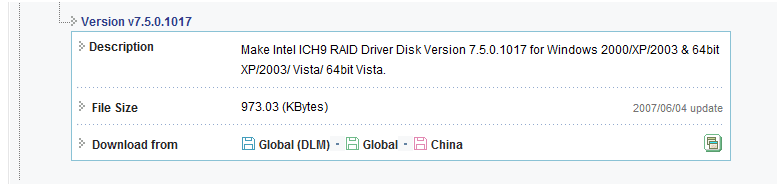
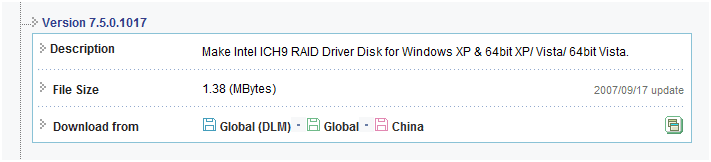
You can download your F6 Sata Controller drivers from here:

Intel Sata Controller Drivers

Can you post your specs.
http://www.sevenforums.com/general-discussion/22550-filling-out-system-specs.html
http://www.sevenforums.com/hardware-devices/6936-dont-know-what-hardware-you-have.html
VistaForums SysInfo Tool - Vista Forums

Do you slipsteam all sata conrtroller model's in.
 

My Computer My Computer

OS
ME/XP/Vista/Win7
when i inserted the disk ,when they say setup is loading windows the com crashes.I use Gateway sx 2850.Help!!!:confused:The xp disk has no drivers because when i put the drivers in the :orb:7 com dont boot from it anymore...
 

My Computer My Computer

OS
Windows 7 Home Premium 32bit
when i inserted the disk ,when they say setup is loading windows the com crashes.I use Gateway sx 2850.Help!!!:confused:The xp disk has no drivers because when i put the drivers in the :orb:7 com dont boot from it anymore...

First check for all the Win XP drivers for your hardware on the manufacturer's web site.
If your Win XP CD, does not support your Sata Controller, you will need to load drivers to uses at F6.
Load Sata Controller drivers with a floppy disk is the best way.
http://www.sevenforums.com/tutorials/66010-sata-drivers-load-windows-xp-setup-dual-boot.html
OR
http://www.sevenforums.com/tutorials/72185-sata-drivers-slipstream-into-windows-xp-cd.html

Your Gateway sx 2850 has a Intel Sata Controller.
You can download your F6 Sata Controller drivers from here:
Gateway Support - Downloads & Support Documents - Desktop / SX Series / SX2850
 

My Computer My Computer

OS
ME/XP/Vista/Win7
But I dont understand why it crashes instead of showing that no sata drivers are loaded???
 

My Computer My Computer

OS
Windows 7 Home Premium 32bit
But I dont understand why it crashes instead of showing that no sata drivers are loaded???

Take a look at step 11.(option Multple Drivers)

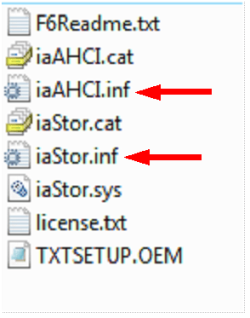
Choose both setup inf files.
Choose all drivers.
Choose all sata controllers.

Capture3-1.PNG

Capture222.PNG


Where did you buy your WinXP CD from?
 

My Computer My Computer

OS
ME/XP/Vista/Win7
Slipstreaming a pre SP2 XP

I want to build a dualboot Win7/XP sytem. I have a pre SP2 version of XP and think I will have to slipstream the SATA drivers.
My question is do I have to slipstream either SP2. or SP3 and the sata drivers in one operation?
Thanks
 

My Computer My Computer

OS
Win 7 64 bit
CPU
Phenom II 955
Motherboard
A780L3L
Memory
Corsair 4 GB
Hard Drives
Hitachi Deskstar
I want to build a dualboot Win7/XP sytem. I have a pre SP2 version of XP and think I will have to slipstream the SATA drivers.
My question is do I have to slipstream either SP2. or SP3 and the sata drivers in one operation?
Thanks

No,you do not need to slipstream SP1,SP2,or SP3.
You can download SP1,SP2,& SP3, from Microsoft Download Center.

First check for all the Win XP drivers for your hardware on the manufacturer's web site.
If your Win XP CD, does not support your Sata Controller, you will need to load drivers to uses at F6.
Load Sata Controller drivers with a floppy disk is the best way.
http://www.sevenforums.com/tutorials/66010-sata-drivers-load-windows-xp-setup-dual-boot.html
OR
http://www.sevenforums.com/tutorials/72185-sata-drivers-slipstream-into-windows-xp-cd.html
 

My Computer My Computer

OS
ME/XP/Vista/Win7
:cry::banghead:i inserted the drivers but it still do not work...HELP!
 

My Computer My Computer

OS
Windows 7 Home Premium 32bit
Error message is 0x(some zeros )7B
 

My Computer My Computer

OS
Windows 7 Home Premium 32bit
Error message is 0x(some zeros )7B

As you recieve the same error message with a floppy disk,
1) Make sure you are using right drivers.

2) If you are using more than 4gb of ram, use XP Mode.
http://www.sevenforums.com/tutorials/8247-windows-xp-mode-install-setup.html
http://www.sevenforums.com/tutorials/8254-windows-virtual-pc-create-virtual-machine.html

3) Check for mismatching ram sticks.

If none of above.
4) Check your ram with
http://www.sevenforums.com/tutorials/715-memory-diagnostics-tool.html?ltr=M
Memtest86+ - Advanced Memory Diagnostic Tool

5) Check your HD with the manufacturer's diagnostic tools.
Hard Drive Diagnostics Tools and Utilities (Storage) - TACKtech Corp.
HD Diagnostic
 

My Computer My Computer

OS
ME/XP/Vista/Win7
If i use xp mode it will die if 7 dies.:drool::drool::drool::drool::drool::drool:Memory fine HDD fine.What next?Help!!!:busted:the drivers are correct
 

My Computer My Computer

OS
Windows 7 Home Premium 32bit
Back
Top