
Solved NEW PC connects to network but NOT internet

ashlyquin

New member
Local time
2:04 PM
Messages
3
***I have looked thru the forum and have not been able to find my specific issue, although many seem to have similiar problems***

Hello everyone, I have a brand spanking new Gateway DX-4840 desktop computer. It has an Intel core i5 cpu, 650 @ 3.2Ghz, 6GB ram, 64 bit OS. It still has the 'new computer smell", however, Window 7 is not making it easy to remain. :sarc:

No apps have been installed except what came on the PC.

DHCP is enabled and I am recieveing an IP address, I can view my network of XP machines fine, I can connect to the company file server and do everything that I should be able to do. I can ping internal computers with no issue.

This computer is in the workgroup as everyone else.

I have tried to uninstall/delete network adaptor/restart and let windows reinstall the software and no success.

This comes down to ZERO internet access.

Please help.

I appreciate all replies.

Steve


BTW, wireless is NOT an option. Only hardwire is. The LAN wire I am using connects all computers flawlessly EXCEPT the Windows 7 desktop.
 

Attachments
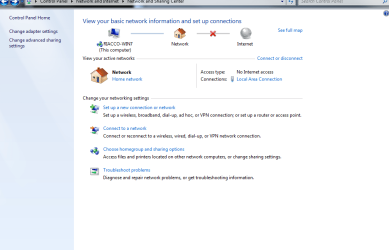
  • win7.png
    win7.png
    33.3 KB · Views: 85

My Computer My Computer

At a glance

64 bit Windows 7 Home Premiumintel core i5 650 @ 3.2GHz6gbNVIDIA GeFORCE 315
Computer Manufacturer/Model Number
Gateway DX-4840
OS
64 bit Windows 7 Home Premium
CPU
intel core i5 650 @ 3.2GHz
Motherboard
Intel
Memory
6gb
Graphics Card(s)
NVIDIA GeFORCE 315
Sound Card
NVIDIA HIGH DEF AUDIO AND REALTEK HIGH DEF.
Monitor(s) Displays
Dual Acer x223w
Screen Resolution
1680x1050
Hard Drives
western digital 1 terabyte drive
Cooling
std
Keyboard
std
Mouse
std
Internet Speed
T1
Hi ashlyquin,
I had a friend who had the same scenario. The PC came with Norton Anti Virus/Security (or Macfee) and so they uninstalled it then rebooted and they were able to gain internet access.
Raj
 

My Computer My Computer

At a glance

Windows 7 Ultimate 32bit
OS
Windows 7 Ultimate 32bit
Thank you for your suggestion. I did this and no change.

Anyone else with a suggestion?
 

My Computer My Computer

At a glance

64 bit Windows 7 Home Premiumintel core i5 650 @ 3.2GHz6gbNVIDIA GeFORCE 315
Computer Manufacturer/Model Number
Gateway DX-4840
OS
64 bit Windows 7 Home Premium
CPU
intel core i5 650 @ 3.2GHz
Motherboard
Intel
Memory
6gb
Graphics Card(s)
NVIDIA GeFORCE 315
Sound Card
NVIDIA HIGH DEF AUDIO AND REALTEK HIGH DEF.
Monitor(s) Displays
Dual Acer x223w
Screen Resolution
1680x1050
Hard Drives
western digital 1 terabyte drive
Cooling
std
Keyboard
std
Mouse
std
Internet Speed
T1
Do you know the IP address of your DHCP server? I had similar problem and corrected it by going into my IPV 4 properties, selecting the advanced options and adding the IP of DHCP server to the Gateway Address.
 

My Computer My Computer

At a glance

Windows 7 SP1 x64AMD 9850 X4CorsairATI Radeon
Computer Manufacturer/Model Number
Home Built
OS
Windows 7 SP1 x64
CPU
AMD 9850 X4
Motherboard
ASUS
Memory
Corsair
Graphics Card(s)
ATI Radeon
Sound Card
Sigmatel
Monitor(s) Displays
Dell
Screen Resolution
1600X900
Hard Drives
(1) WD 1TB
Cooling
Corsair H60
Internet Speed
UVerse 12MB
Hello there, your problem may be the fact that your TCP/IP stacks and Winsock configurations are somehow damaged.

To solve this, follow the next steps:

1) go to start, type "cmd" in the search bar (without quotes), right click it and "run as administrator".
2) type this: "ipconfig /release" (w/o quotes) and press enter.
3) now type: "ipconfig /flushdns" (w/o quotes) and press enter.
4) now: "ipconfig /renew" and press enter.

If that doesn't solve it, do the following

1) type on the CMD window: "netsh winsock reset catalog" and press enter.
2) after done, type: "netsh int ip reset reset.log" and press enter.

Reboot and check if everything works!

And of course, report back... please :)
 

My Computer My Computer

At a glance

Windows
Computer type
PC/Desktop
OS
Windows
PUNK!! Thank you!!

First off, thank you to everyone for your help. PUNK is the winner in this case and provided the solution I needed in this case. Thank you again everyone!!

Steve


Hello there, your problem may be the fact that your TCP/IP stacks and Winsock configurations are somehow damaged.

To solve this, follow the next steps:

1) go to start, type "cmd" in the search bar (without quotes), right click it and "run as administrator".
2) type this: "ipconfig /release" (w/o quotes) and press enter.
3) now type: "ipconfig /flushdns" (w/o quotes) and press enter.
4) now: "ipconfig /renew" and press enter.

If that doesn't solve it, do the following

1) type on the CMD window: "netsh winsock reset catalog" and press enter.
2) after done, type: "netsh int ip reset reset.log" and press enter.

Reboot and check if everything works!

And of course, report back... please :)
 

My Computer My Computer

At a glance

64 bit Windows 7 Home Premiumintel core i5 650 @ 3.2GHz6gbNVIDIA GeFORCE 315
Computer Manufacturer/Model Number
Gateway DX-4840
OS
64 bit Windows 7 Home Premium
CPU
intel core i5 650 @ 3.2GHz
Motherboard
Intel
Memory
6gb
Graphics Card(s)
NVIDIA GeFORCE 315
Sound Card
NVIDIA HIGH DEF AUDIO AND REALTEK HIGH DEF.
Monitor(s) Displays
Dual Acer x223w
Screen Resolution
1680x1050
Hard Drives
western digital 1 terabyte drive
Cooling
std
Keyboard
std
Mouse
std
Internet Speed
T1
Glad to read the issue is now solved, i guess this thread can be marked as solved :)
 

My Computer My Computer

At a glance

Windows
Computer type
PC/Desktop
OS
Windows
Old thread but very useful

Thanks to Punkster. The Winsock refresh tip was very useful to me while fixing a clients computer!!
 

My Computer My Computer

At a glance

New Jersey
Computer type
PC/Desktop
OS
New Jersey
Back
Top