2.4Ghz vs 5Ghz puzzle?

My best guess is the "auto" part of the Auto B,G,N setting. Its switching to G automatically for some reason. On my D-Link the options are B, G, or N ONLY, or mixed G + B, N + G, and N + G + B. Currently I'm set to "Mixed N + G". Turn off all your G only clients, reboot the router, and see what happens.
 

My Computer My Computer

At a glance

Windows 10 Education 64 bitAMD Phenom II X4 980 Black Edition Deneb 3.7GHz8GB 4GBx2 Kingston PC10600 DDR3 1333 MemoryZotac NVIDIA Geforce GT640 2 Gig DDR3 PCIe
Computer type
PC/Desktop
Computer Manufacturer/Model Number
Home Built
OS
Windows 10 Education 64 bit
CPU
AMD Phenom II X4 980 Black Edition Deneb 3.7GHz
Motherboard
Asus M4N68T-M V2 µATX Motherboard
Memory
8GB 4GBx2 Kingston PC10600 DDR3 1333 Memory
Graphics Card(s)
Zotac NVIDIA Geforce GT640 2 Gig DDR3 PCIe
Sound Card
VIA VT1708s High Definition Audio 8-channel Onboard
Monitor(s) Displays
22" LG E2242 1080p and 2 19" I-INC AG191D
Screen Resolution
1280x1024 - 1920x1080 - 1280x1024
Hard Drives
Crucial M100 256 GB SSD and 500 GB WD Blue SATA
PSU
Thermaltake TR 620
Case
Power Up Black ATX Mid-Tower Case
Cooling
Stock heatsink and fan
Keyboard
Logitech Wireless K350 Wave
Mouse
Logitech Wireless M570 Trackman Wheel
Internet Speed
80 Mbps Down 30 Mbps Up
Antivirus
Windows Defender
Browser
Internet Explorer 11
Other Info
HP DVD1040e Lightscribe - External USB2
My best guess is the "auto" part of the Auto B,G,N setting. Its switching to G automatically for some reason. On my D-Link the options are B, G, or N ONLY, or mixed G + B, N + G, and N + G + B. Currently I'm set to "Mixed N + G". Turn off all your G only clients, reboot the router, and see what happens.

i've already done that. Think the solution is to buy a double band router right? what about trendnet?
 

My Computer My Computer

At a glance

Microsoft Windows 7 Ultimate 64 bits 7601 Mul...Intel(R) Core(TM) i7-3770K CPU @ 3.50GHz8.00 GBNVIDIA GeForce GTX 670
Computer type
PC/Desktop
Computer Manufacturer/Model Number
Custom Build
OS
Microsoft Windows 7 Ultimate 64 bits 7601 Multiprocessor Free Service Pack 1
CPU
Intel(R) Core(TM) i7-3770K CPU @ 3.50GHz
Motherboard
ASUSTeK Computer INC. P8Z68-V PRO GEN3
Memory
8.00 GB
Graphics Card(s)
NVIDIA GeForce GTX 670
Sound Card
Omega Striker
Monitor(s) Displays
Viewsonic vx2250wm
Screen Resolution
1920 x 1080 x 32 bits (4294967296 colors) @ 60 Hz
Hard Drives
V9CPETXT
Seagate 1TB.
PSU
Corsair Gold Series AX850
Case
nvidia 690 advanced II
Cooling
Air
TrendNet or D-Link IMO. The Linksys routers have gone to crap it seems and Belkin... I use one and it's definitely below par, but it's not mine so I can't replace it. Be prepared to pay at least $120 USD for a good one. It is worth the investment.
 

My Computer My Computer

At a glance

Windows 7 Ultimate 64-bitAMD Phenom II X6 1090T 3.2GHZG.SKILL RipJaw 3x2GB DDR3-10662x HIS Radeon HD 6850 1 GB
OS
Windows 7 Ultimate 64-bit
CPU
AMD Phenom II X6 1090T 3.2GHZ
Motherboard
MSI 890FXA-GD70
Memory
G.SKILL RipJaw 3x2GB DDR3-1066
Graphics Card(s)
2x HIS Radeon HD 6850 1 GB
Sound Card
VIA 8-channel
Monitor(s) Displays
2x 20 inch Acer LCDs, 1x 32" Sony LCD TV
Screen Resolution
4480x900
Hard Drives
1x Crucial 64GB SSD
3x 1TB HDDs (WD, Seagate, Hitatchi)
1x 500GB Seagate External
PSU
Kingwin 1000W Modular
Case
Coolermaster HAF 932
Cooling
1x 120mm, 3x 200mm, CoolerMaster Hyper 212+
Keyboard
Microsoft Wireless Keyboard 1000
Mouse
Microsoft Wiresless Mouse 5000
Internet Speed
20mbps
Other Info
Samsung BD-ROM/DVD-RW
My next router will be dual band. Just keep in mind you'll need wifi cards that can also use the 5 GHz band. I haven't seen a lot of those, mostly USB too. I'd rather have a PCI or PCIe card myself. You don't have to go dual band to get N. My DIR-655 is a wireless N router and it isn't dual band.
 

My Computer My Computer

At a glance

Windows 10 Education 64 bitAMD Phenom II X4 980 Black Edition Deneb 3.7GHz8GB 4GBx2 Kingston PC10600 DDR3 1333 MemoryZotac NVIDIA Geforce GT640 2 Gig DDR3 PCIe
Computer type
PC/Desktop
Computer Manufacturer/Model Number
Home Built
OS
Windows 10 Education 64 bit
CPU
AMD Phenom II X4 980 Black Edition Deneb 3.7GHz
Motherboard
Asus M4N68T-M V2 µATX Motherboard
Memory
8GB 4GBx2 Kingston PC10600 DDR3 1333 Memory
Graphics Card(s)
Zotac NVIDIA Geforce GT640 2 Gig DDR3 PCIe
Sound Card
VIA VT1708s High Definition Audio 8-channel Onboard
Monitor(s) Displays
22" LG E2242 1080p and 2 19" I-INC AG191D
Screen Resolution
1280x1024 - 1920x1080 - 1280x1024
Hard Drives
Crucial M100 256 GB SSD and 500 GB WD Blue SATA
PSU
Thermaltake TR 620
Case
Power Up Black ATX Mid-Tower Case
Cooling
Stock heatsink and fan
Keyboard
Logitech Wireless K350 Wave
Mouse
Logitech Wireless M570 Trackman Wheel
Internet Speed
80 Mbps Down 30 Mbps Up
Antivirus
Windows Defender
Browser
Internet Explorer 11
Other Info
HP DVD1040e Lightscribe - External USB2
TrendNet or D-Link IMO. The Linksys routers have gone to crap it seems and Belkin... I use one and it's definitely below par, but it's not mine so I can't replace it. Be prepared to pay at least $120 USD for a good one. It is worth the investment.

yep i know, gonna insist with my ISP about what is happening.
Thanks.

My next router will be dual band. Just keep in mind you'll need wifi cards that can also use the 5 GHz band. I haven't seen a lot of those, mostly USB too. I'd rather have a PCI or PCIe card myself. You don't have to go dual band to get N. My DIR-655 is a wireless N router and it isn't dual band.

Yep i know that too adapaters included $$$$$.
But is a must for me to have a dual band simultaniously router, in the 5GH band i could get my pc's to download at 40mb and the old devices can work in the old frequency.

N alone wouldn't work cause if i connect a G device all the speeds drops down to G Speeds right?

Thanks
 

My Computer My Computer

At a glance

Microsoft Windows 7 Ultimate 64 bits 7601 Mul...Intel(R) Core(TM) i7-3770K CPU @ 3.50GHz8.00 GBNVIDIA GeForce GTX 670
Computer type
PC/Desktop
Computer Manufacturer/Model Number
Custom Build
OS
Microsoft Windows 7 Ultimate 64 bits 7601 Multiprocessor Free Service Pack 1
CPU
Intel(R) Core(TM) i7-3770K CPU @ 3.50GHz
Motherboard
ASUSTeK Computer INC. P8Z68-V PRO GEN3
Memory
8.00 GB
Graphics Card(s)
NVIDIA GeForce GTX 670
Sound Card
Omega Striker
Monitor(s) Displays
Viewsonic vx2250wm
Screen Resolution
1920 x 1080 x 32 bits (4294967296 colors) @ 60 Hz
Hard Drives
V9CPETXT
Seagate 1TB.
PSU
Corsair Gold Series AX850
Case
nvidia 690 advanced II
Cooling
Air
I've heard it said that a G device on an N network would cause the network to go to G speeds but I haven't tried to prove it one way or the other. One thing to keep in mind is your not likely to exceed G speeds downloading anything off of the Internet. The only time you will benefit from the N speeds is file transfers from PC to PC on your LAN. And then they would both have to be N devices. Having an N versus G router isn't going to speed up your internet connection to your ISP. I'm on a high speed cable connection and I'm capped at 15 megabits per second. I don't even come close to maxing out 54 Mbps G wifi. I do at times transfer large amounts of data from PC to PC over my wifi network. Thats when I appreciate having N.
 

My Computer My Computer

At a glance

Windows 10 Education 64 bitAMD Phenom II X4 980 Black Edition Deneb 3.7GHz8GB 4GBx2 Kingston PC10600 DDR3 1333 MemoryZotac NVIDIA Geforce GT640 2 Gig DDR3 PCIe
Computer type
PC/Desktop
Computer Manufacturer/Model Number
Home Built
OS
Windows 10 Education 64 bit
CPU
AMD Phenom II X4 980 Black Edition Deneb 3.7GHz
Motherboard
Asus M4N68T-M V2 µATX Motherboard
Memory
8GB 4GBx2 Kingston PC10600 DDR3 1333 Memory
Graphics Card(s)
Zotac NVIDIA Geforce GT640 2 Gig DDR3 PCIe
Sound Card
VIA VT1708s High Definition Audio 8-channel Onboard
Monitor(s) Displays
22" LG E2242 1080p and 2 19" I-INC AG191D
Screen Resolution
1280x1024 - 1920x1080 - 1280x1024
Hard Drives
Crucial M100 256 GB SSD and 500 GB WD Blue SATA
PSU
Thermaltake TR 620
Case
Power Up Black ATX Mid-Tower Case
Cooling
Stock heatsink and fan
Keyboard
Logitech Wireless K350 Wave
Mouse
Logitech Wireless M570 Trackman Wheel
Internet Speed
80 Mbps Down 30 Mbps Up
Antivirus
Windows Defender
Browser
Internet Explorer 11
Other Info
HP DVD1040e Lightscribe - External USB2
I've heard it said that a G device on an N network would cause the network to go to G speeds but I haven't tried to prove it one way or the other. One thing to keep in mind is your not likely to exceed G speeds downloading anything off of the Internet. The only time you will benefit from the N speeds is file transfers from PC to PC on your LAN. And then they would both have to be N devices. Having an N versus G router isn't going to speed up your internet connection to your ISP. I'm on a high speed cable connection and I'm capped at 15 megabits per second. I don't even come close to maxing out 54 Mbps G wifi. I do at times transfer large amounts of data from PC to PC over my wifi network. Thats when I appreciate having N.

Hi Alpha,

Interesting, i understand what you said whatever let me explain better.

My ISP offers me an internet package (40mb down/ 2mb up). Well with an ethernet cable no problem i reach those speeds however wirelessly i only get 19mb. Are you telling me that is normal? the max worlwide wirelessly internet speed is 19mb????? that can't be possible.
 

My Computer My Computer

At a glance

Microsoft Windows 7 Ultimate 64 bits 7601 Mul...Intel(R) Core(TM) i7-3770K CPU @ 3.50GHz8.00 GBNVIDIA GeForce GTX 670
Computer type
PC/Desktop
Computer Manufacturer/Model Number
Custom Build
OS
Microsoft Windows 7 Ultimate 64 bits 7601 Multiprocessor Free Service Pack 1
CPU
Intel(R) Core(TM) i7-3770K CPU @ 3.50GHz
Motherboard
ASUSTeK Computer INC. P8Z68-V PRO GEN3
Memory
8.00 GB
Graphics Card(s)
NVIDIA GeForce GTX 670
Sound Card
Omega Striker
Monitor(s) Displays
Viewsonic vx2250wm
Screen Resolution
1920 x 1080 x 32 bits (4294967296 colors) @ 60 Hz
Hard Drives
V9CPETXT
Seagate 1TB.
PSU
Corsair Gold Series AX850
Case
nvidia 690 advanced II
Cooling
Air
I've heard it said that a G device on an N network would cause the network to go to G speeds but I haven't tried to prove it one way or the other. One thing to keep in mind is your not likely to exceed G speeds downloading anything off of the Internet. The only time you will benefit from the N speeds is file transfers from PC to PC on your LAN. And then they would both have to be N devices. Having an N versus G router isn't going to speed up your internet connection to your ISP. I'm on a high speed cable connection and I'm capped at 15 megabits per second. I don't even come close to maxing out 54 Mbps G wifi. I do at times transfer large amounts of data from PC to PC over my wifi network. Thats when I appreciate having N.

Hi Alpha,

Interesting, i understand what you said whatever let me explain better.

My ISP offers me an internet package (40mb down/ 2mb up). Well with an ethernet cable no problem i reach those speeds however wirelessly i only get 19mb. Are you telling me that is normal? the max worlwide wirelessly internet speed is 19mb????? that can't be possible.

I think you are confusing "Wireless internet speed" with wireless NETWORK speed.

You can have a 40mbit down link, you could even have a 4 billion mbit down link, but what you will actually get is based on the slowest piece in the link.

Think of it this way...

Your internet connection from your modem to your ISP is like a 10 lane high way. Once it enters your home, through your modem, to your router it splits two ways. The Ethernet direction is 10 lanes and the wireless direction in 10 lanes but four of them are closed for construction.
 

My Computer My Computer

At a glance

Windows 7 Ultimate 64-bitAMD Phenom II X6 1090T 3.2GHZG.SKILL RipJaw 3x2GB DDR3-10662x HIS Radeon HD 6850 1 GB
OS
Windows 7 Ultimate 64-bit
CPU
AMD Phenom II X6 1090T 3.2GHZ
Motherboard
MSI 890FXA-GD70
Memory
G.SKILL RipJaw 3x2GB DDR3-1066
Graphics Card(s)
2x HIS Radeon HD 6850 1 GB
Sound Card
VIA 8-channel
Monitor(s) Displays
2x 20 inch Acer LCDs, 1x 32" Sony LCD TV
Screen Resolution
4480x900
Hard Drives
1x Crucial 64GB SSD
3x 1TB HDDs (WD, Seagate, Hitatchi)
1x 500GB Seagate External
PSU
Kingwin 1000W Modular
Case
Coolermaster HAF 932
Cooling
1x 120mm, 3x 200mm, CoolerMaster Hyper 212+
Keyboard
Microsoft Wireless Keyboard 1000
Mouse
Microsoft Wiresless Mouse 5000
Internet Speed
20mbps
Other Info
Samsung BD-ROM/DVD-RW
Aside form the speed test, when in normal daily internet use do you even come close to hitting your 40 Mbps download speed? I would think not very often if at all. The 20 Mbps you are getting over wireless is likely more than fast enough for normal daily Internet use. Don't get me wrong, faster is better, thats why I went N. I do some large file transfers over wireless from time to time, so the faster the better. As far as your actual wireless speed versus advertised speed there are a lot of factors that can influence it. Just enabling encryption adds overhead. Now some of the data sent is used for house keeping/security info. Also interference from other networks, cordless phones, microwaves etc can cause data errors and the need fro retransmission of packets. Where your router is compared to where your PC is also factors in. Anyway there are a whole lot of things that can cause you to only get say 20 Mbps on wireless G. Every bodies situation is different. Some people may get more than that, some less. The max worldwide wireless speed is not 19 Mbps. :)
 

My Computer My Computer

At a glance

Windows 10 Education 64 bitAMD Phenom II X4 980 Black Edition Deneb 3.7GHz8GB 4GBx2 Kingston PC10600 DDR3 1333 MemoryZotac NVIDIA Geforce GT640 2 Gig DDR3 PCIe
Computer type
PC/Desktop
Computer Manufacturer/Model Number
Home Built
OS
Windows 10 Education 64 bit
CPU
AMD Phenom II X4 980 Black Edition Deneb 3.7GHz
Motherboard
Asus M4N68T-M V2 µATX Motherboard
Memory
8GB 4GBx2 Kingston PC10600 DDR3 1333 Memory
Graphics Card(s)
Zotac NVIDIA Geforce GT640 2 Gig DDR3 PCIe
Sound Card
VIA VT1708s High Definition Audio 8-channel Onboard
Monitor(s) Displays
22" LG E2242 1080p and 2 19" I-INC AG191D
Screen Resolution
1280x1024 - 1920x1080 - 1280x1024
Hard Drives
Crucial M100 256 GB SSD and 500 GB WD Blue SATA
PSU
Thermaltake TR 620
Case
Power Up Black ATX Mid-Tower Case
Cooling
Stock heatsink and fan
Keyboard
Logitech Wireless K350 Wave
Mouse
Logitech Wireless M570 Trackman Wheel
Internet Speed
80 Mbps Down 30 Mbps Up
Antivirus
Windows Defender
Browser
Internet Explorer 11
Other Info
HP DVD1040e Lightscribe - External USB2
I've heard it said that a G device on an N network would cause the network to go to G speeds but I haven't tried to prove it one way or the other. One thing to keep in mind is your not likely to exceed G speeds downloading anything off of the Internet. The only time you will benefit from the N speeds is file transfers from PC to PC on your LAN. And then they would both have to be N devices. Having an N versus G router isn't going to speed up your internet connection to your ISP. I'm on a high speed cable connection and I'm capped at 15 megabits per second. I don't even come close to maxing out 54 Mbps G wifi. I do at times transfer large amounts of data from PC to PC over my wifi network. Thats when I appreciate having N.

Hi Alpha,

Interesting, i understand what you said whatever let me explain better.

My ISP offers me an internet package (40mb down/ 2mb up). Well with an ethernet cable no problem i reach those speeds however wirelessly i only get 19mb. Are you telling me that is normal? the max worlwide wirelessly internet speed is 19mb????? that can't be possible.

I think you are confusing "Wireless internet speed" with wireless NETWORK speed.

You can have a 40mbit down link, you could even have a 4 billion mbit down link, but what you will actually get is based on the slowest piece in the link.

Think of it this way...

Your internet connection from your modem to your ISP is like a 10 lane high way. Once it enters your home, through your modem, to your router it splits two ways. The Ethernet direction is 10 lanes and the wireless direction in 10 lanes but four of them are closed for construction.

Hi Johnathan, nop i'm not confusing them i know they are different. I have FTTH. I know wirelessly you loose some speed but here im loosing the half. and i want to improve that. There is no way to improve that?

Aside form the speed test, when in normal daily internet use do you even come close to hitting your 40 Mbps download speed? I would think not very often if at all. The 20 Mbps you are getting over wireless is likely more than fast enough for normal daily Internet use. Don't get me wrong, faster is better, thats why I went N. I do some large file transfers over wireless from time to time, so the faster the better. As far as your actual wireless speed versus advertised speed there are a lot of factors that can influence it. Just enabling encryption adds overhead. Now some of the data sent is used for house keeping/security info. Also interference from other networks, cordless phones, microwaves etc can cause data errors and the need fro retransmission of packets. Where your router is compared to where your PC is also factors in. Anyway there are a whole lot of things that can cause you to only get say 20 Mbps on wireless G. Every bodies situation is different. Some people may get more than that, some less. The max worldwide wireless speed is not 19 Mbps. :)

When downloading a file at 2MB or 4MB the second is better. For surfing its the same i agree in that. When you have various users doing stuff..... 4MB is better.

Just enabling encryption adds overhead

even with non security at all i get 20mb.

Where your router is compared to where your PC is also factors in
Im at 2 meters from the router even if im at 10 cm of the anthena im still getting the same.

Also interference from other networks, cordless phones, microwaves etc can cause data errors and the need fro retransmission of packets.
Im not loosing any packets, no cordless phones functioning.

Thanks for your help guys both.

What i wanted to know if buying a n double band simultanously router would improve my internet wireless speeds...

What about buyin this:
TEW-673GRU_d1_1.jpg

TEW-673GRU (Version v1.0R)

and this

TEW-664UB_d1_1.jpg

TEW-664UB (Version v1.0R)

Would that help? they are expensive though...
 
Last edited:

My Computer My Computer

At a glance

Microsoft Windows 7 Ultimate 64 bits 7601 Mul...Intel(R) Core(TM) i7-3770K CPU @ 3.50GHz8.00 GBNVIDIA GeForce GTX 670
Computer type
PC/Desktop
Computer Manufacturer/Model Number
Custom Build
OS
Microsoft Windows 7 Ultimate 64 bits 7601 Multiprocessor Free Service Pack 1
CPU
Intel(R) Core(TM) i7-3770K CPU @ 3.50GHz
Motherboard
ASUSTeK Computer INC. P8Z68-V PRO GEN3
Memory
8.00 GB
Graphics Card(s)
NVIDIA GeForce GTX 670
Sound Card
Omega Striker
Monitor(s) Displays
Viewsonic vx2250wm
Screen Resolution
1920 x 1080 x 32 bits (4294967296 colors) @ 60 Hz
Hard Drives
V9CPETXT
Seagate 1TB.
PSU
Corsair Gold Series AX850
Case
nvidia 690 advanced II
Cooling
Air
Compared to what you have now I would think anything would be better. Its impossible for me to say (for sure) that what you posted above would be better. I've never used it. All I can tell you is to read some reviews before you buy it.
You might be interested to have a look around here too. Real Help For Your Small Network - SmallNetBuilder Lots of info and reviews too.
 

My Computer My Computer

At a glance

Windows 10 Education 64 bitAMD Phenom II X4 980 Black Edition Deneb 3.7GHz8GB 4GBx2 Kingston PC10600 DDR3 1333 MemoryZotac NVIDIA Geforce GT640 2 Gig DDR3 PCIe
Computer type
PC/Desktop
Computer Manufacturer/Model Number
Home Built
OS
Windows 10 Education 64 bit
CPU
AMD Phenom II X4 980 Black Edition Deneb 3.7GHz
Motherboard
Asus M4N68T-M V2 µATX Motherboard
Memory
8GB 4GBx2 Kingston PC10600 DDR3 1333 Memory
Graphics Card(s)
Zotac NVIDIA Geforce GT640 2 Gig DDR3 PCIe
Sound Card
VIA VT1708s High Definition Audio 8-channel Onboard
Monitor(s) Displays
22" LG E2242 1080p and 2 19" I-INC AG191D
Screen Resolution
1280x1024 - 1920x1080 - 1280x1024
Hard Drives
Crucial M100 256 GB SSD and 500 GB WD Blue SATA
PSU
Thermaltake TR 620
Case
Power Up Black ATX Mid-Tower Case
Cooling
Stock heatsink and fan
Keyboard
Logitech Wireless K350 Wave
Mouse
Logitech Wireless M570 Trackman Wheel
Internet Speed
80 Mbps Down 30 Mbps Up
Antivirus
Windows Defender
Browser
Internet Explorer 11
Other Info
HP DVD1040e Lightscribe - External USB2
Thanks mate.
 

My Computer My Computer

At a glance

Microsoft Windows 7 Ultimate 64 bits 7601 Mul...Intel(R) Core(TM) i7-3770K CPU @ 3.50GHz8.00 GBNVIDIA GeForce GTX 670
Computer type
PC/Desktop
Computer Manufacturer/Model Number
Custom Build
OS
Microsoft Windows 7 Ultimate 64 bits 7601 Multiprocessor Free Service Pack 1
CPU
Intel(R) Core(TM) i7-3770K CPU @ 3.50GHz
Motherboard
ASUSTeK Computer INC. P8Z68-V PRO GEN3
Memory
8.00 GB
Graphics Card(s)
NVIDIA GeForce GTX 670
Sound Card
Omega Striker
Monitor(s) Displays
Viewsonic vx2250wm
Screen Resolution
1920 x 1080 x 32 bits (4294967296 colors) @ 60 Hz
Hard Drives
V9CPETXT
Seagate 1TB.
PSU
Corsair Gold Series AX850
Case
nvidia 690 advanced II
Cooling
Air
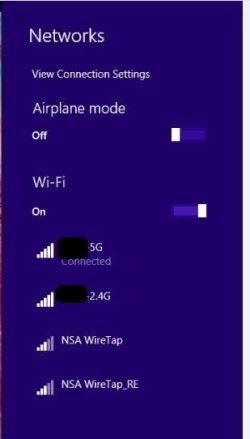
I have a Dual Band Netgear WNDR3700v4 and until today, I never saw both bands available and selectable.

I'm in the process or reinstalling Windows 8.1 Pro X64 on my Grandson's Toshiba Satellite A305-S6872 laptop. It has a Intel WiFi Link 5100 AGN wireless card.

Its sees both the 2.4 and 5Ghz bands for my router and I can switch between them just by selecting and Connecting.

My Dell Inspiron 15R sees only the 2.4Ghz band and it has a Intel Centrino Wireless N 2230 card. Intel site says:

802.11bgn, 2x2, dual stream delivers up to 300 Mbps speed


View attachment 359386
 

Attachments

  • Capture.JPG
    Capture.JPG
    17.7 KB · Views: 9

My Computer My Computer

At a glance

Windows 10 Pro X64Intel Quad Core i7-4770 @ 3.4Ghz16.0GB PC3-12800 DDR3 SDRAM 1600 MHzIntel Integrated HD Graphics
Computer type
PC/Desktop
Computer Manufacturer/Model Number
Lenovo IdeaCenter 450
OS
Windows 10 Pro X64
CPU
Intel Quad Core i7-4770 @ 3.4Ghz
Memory
16.0GB PC3-12800 DDR3 SDRAM 1600 MHz
Graphics Card(s)
Intel Integrated HD Graphics
Sound Card
Realtek HD Audio
Monitor(s) Displays
HP 22" LCD
Screen Resolution
1680 x 1050
Hard Drives
250GB Samsung EVO SATA-3 SSD
2TB Seagate ST2000DM001 SATA-2
1.5TB Seagate ST3150041AS SATA
Keyboard
Dell USB
Mouse
Lenovo USB
Internet Speed
Cable via Road Runner 3MB Upload, 30MB Download
Antivirus
Windows Defender, MBAM Pro, MBAE
Browser
Seamonkey
Other Info
UEFI/GPT
PLDS DVD-RW DH16AERSH
Back
Top