
Folders and file without extension!!

bigmamamonk

New member
Local time
1:08 PM
Messages
23
Hello everyone!

I'm having problems having folders and files with the same name on the same path!!

Is this just a Windows 7 problem?? :confused:

I really need someone's help!

edit: sorry for the confusion... the 1st item is a file and the 2nd item is a folder
 

Attachments
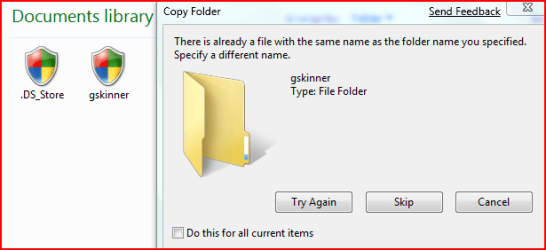
  • problem.PNG
    problem.PNG
    12.1 KB · Views: 43
Last edited:

My Computer

OS
Windows 7
Hi bigmamamonk,

Not sure I follow.

Is there another file with the same name as the folder name ? Or is 7000 making it up?

SIW2
 

My Computers

System One System Two

  • Computer type
    PC/Desktop
    OS
    7 X64
    CPU
    i5 8400
    Motherboard
    gigabyte b365m ds3h
    Memory
    2x8gb 3200mhz
    Hard Drives
    various
    PSU
    pure power 11 400w cm
    Case
    Coolermaster
    Cooling
    cryorig m9i
  • Computer type
    PC/Desktop
    OS
    7x64
    CPU
    g5400
    Motherboard
    ga b365m ds3h
    Memory
    8gb ddr4 2400
    PSU
    xfx pro 450w
Hi bigmamamonk,

Not sure I follow.

Is there another file with the same name as the folder name ? Or is 7000 making it up?

SIW2

a file with the same name already exists,

thanks for your interest :)
 

My Computer

OS
Windows 7
You cannot have two items in the same folder with the same name. As far as I know you've never been able to. In this regard driver and driver.jpg and driver.png are three separate files. If you have a file 'driver.jpg' you cannot create a folder by that name or vice versa.

Gary
 

My Computer

Computer Manufacturer/Model Number
Dell XPS420
OS
Vista Ult 64 bit Seven Ult RTM x64
CPU
Intel Core2 Quad Q6600 2.40 gigahertz
Memory
Crucial Ballistix 4x2GB PC2 6400
Graphics Card(s)
NVIDIA GeForce 8600 GTS 256 MB
Sound Card
Creative SB X-Fi audio
Monitor(s) Displays
HP w2207 + HPvs15
Screen Resolution
1680x1050 + 1024x768
Hard Drives
2-WD5000AAKS-500 GB
WD5000AAV-500 GB external
Keyboard
Microsoft Comfort Curve
Mouse
MX Revolution
Other Info
Wacom Intuos 2 Graphics Tablet
Experience Index=5.5
You cannot have two items in the same folder with the same name. As far as I know you've never been able to. In this regard driver and driver.jpg and driver.png are three separate files. If you have a file 'driver.jpg' you cannot create a folder by that name or vice versa.

Gary

one is a file
the other is a folder :confused:

sorry for the confusion
 

My Computer

OS
Windows 7
Not sure why it's not letting you do that.

I just created a folder named 1610.txt into which I moved a file named 1610.txt, without any problem.

1610.txt2009-01-04_194027.jpg

SIW2
 

My Computers

System One System Two

  • Computer type
    PC/Desktop
    OS
    7 X64
    CPU
    i5 8400
    Motherboard
    gigabyte b365m ds3h
    Memory
    2x8gb 3200mhz
    Hard Drives
    various
    PSU
    pure power 11 400w cm
    Case
    Coolermaster
    Cooling
    cryorig m9i
  • Computer type
    PC/Desktop
    OS
    7x64
    CPU
    g5400
    Motherboard
    ga b365m ds3h
    Memory
    8gb ddr4 2400
    PSU
    xfx pro 450w
one is a file
the other is a folder :confused:

sorry for the confusion

Doesn't matter. They still cannot have exactly the same name. I'm in Vista now and you can't do it here either. Else you have 2 items with the exact same path.

SIW2, you can put one inside the other, they don't both have the same path,but you cannot put them both into the same folder. Example: C:\driver.txt (a folder) and C:\driver.txt (the file). Consider the full path of the file or folder as the full name of the file or folder and you can't have duplicates.

Gary
 

My Computer

Computer Manufacturer/Model Number
Dell XPS420
OS
Vista Ult 64 bit Seven Ult RTM x64
CPU
Intel Core2 Quad Q6600 2.40 gigahertz
Memory
Crucial Ballistix 4x2GB PC2 6400
Graphics Card(s)
NVIDIA GeForce 8600 GTS 256 MB
Sound Card
Creative SB X-Fi audio
Monitor(s) Displays
HP w2207 + HPvs15
Screen Resolution
1680x1050 + 1024x768
Hard Drives
2-WD5000AAKS-500 GB
WD5000AAV-500 GB external
Keyboard
Microsoft Comfort Curve
Mouse
MX Revolution
Other Info
Wacom Intuos 2 Graphics Tablet
Experience Index=5.5
Hi bigmamamonk,

Gary's right, of course . Didn't follow exactly what you were trying to do.

You would need to rename one of them.

SIW2
 

My Computers

System One System Two

  • Computer type
    PC/Desktop
    OS
    7 X64
    CPU
    i5 8400
    Motherboard
    gigabyte b365m ds3h
    Memory
    2x8gb 3200mhz
    Hard Drives
    various
    PSU
    pure power 11 400w cm
    Case
    Coolermaster
    Cooling
    cryorig m9i
  • Computer type
    PC/Desktop
    OS
    7x64
    CPU
    g5400
    Motherboard
    ga b365m ds3h
    Memory
    8gb ddr4 2400
    PSU
    xfx pro 450w
This has never been possible - on any version of Windows. Technically files, folders, shortcuts, etc.. are all the same thing at the disk level. The allocation table can't differentiate between abc.def regardless of whether it's a file or a folder. It doesn't become a "directory" until Windows can read its file attributes after it has read it off the disk.
 

My Computer

Computer Manufacturer/Model Number
Dell PowerEdge 1900
OS
ESXi 3, VistaSP1, VistaSP2 Beta, XPSP3, Win7 build 7000, SBS2003, SBS2008
CPU
(2) Quad core Xeon E5310 - 1.6GHz
Motherboard
OEM
Memory
8 Gig DDR2 ECC PC5300
Graphics Card(s)
Integrated
Sound Card
None
Hard Drives
(2) 250 Gig 15,000 RPM SAS - RAID1
Case
Full Size Server Tower
Cooling
(6) 92MM Fans
Internet Speed
TW Premium - 1Meg up, 15MEG Down
Back
Top
