Windows 7 SP1 Disk Cleanup Tool

How Use the Windows 7 SP1 Disk Cleanup Tool

   Information
This will show you how to run the Windows 7 SP1 cleanup tool to permanently remove the backed up files created during the installation of the Windows 7 SP1 to gain back more hard drive space, and remove the Service Pack for Microsoft Windows (KB976932) entry in Installed Updates.

You must be logged in as an administrator to be able to do this tutorial.

   Note
The Windows 7 SP1 disk cleanup tool gave me back around 1.5 GB on my hard drive. This amount may vary on your computer.

To see how much space you recovered, make a note of how much free space you have on the C:/ drive in Computer before and after you run the Windows 7 SP1 cleanup tool. Afterwards, please post and let us know how much space you have recovered.
   Warning
It is recommended to wait about a week after installing SP1 to see how your Windows 7 is running with SP1 installed before deleting the SP1 backups as in the tutorial below. This way if you discover a issue, you will still have the option to uninstall SP1 if need be.

Once you delete the SP1 backup files, you will no longer be able to uninstall the Windows 7 SP1 afterwards. The only option would be a clean install or custom install.


OPTION ONE

Delete Windows 7 SP1 Backup Files Using Disk Cleanup

1. Open Disk Cleanup.

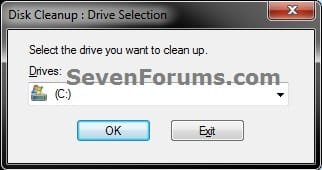
2. Select the drive (ex: C: ) that your Windows 7 is installed on, and click on OK. (see screenshot below) Step1.jpg
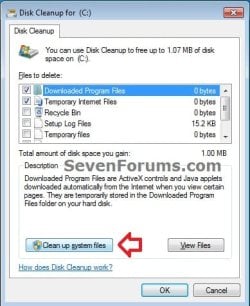
3. Click on the Clean up system files button. (see screenshot below) Step-2.jpg
4. If prompted by UAC, then click on Yes.

5. Select the drive (ex: C: ) that your Windows 7 is installed on, and click on OK. (see screenshot below) Step1.jpg
6. Check the Service Pack Backup Files box and click on OK. (see screenshot below) Step3.jpg
7. Click on Delete Files. (see screenshot below) Step4.jpg

8. The SP1 backup files will now be deleted. You will now no longer be able to uninstall the Windows 7 SP1, but have gained around 1 GB of hard drive space back.


OPTION TWO

Delete Windows 7 SP1 Backup Files Using a Elevated Command Prompt

1. Open a elevated command prompt (Run as administrator).

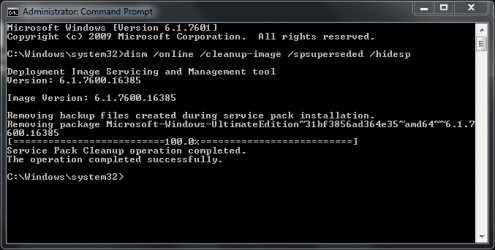
2. In the elevated command prompt, copy and paste the command below and press enter. (see screenshot below) dism /online /cleanup-image /spsuperseded /hidesp
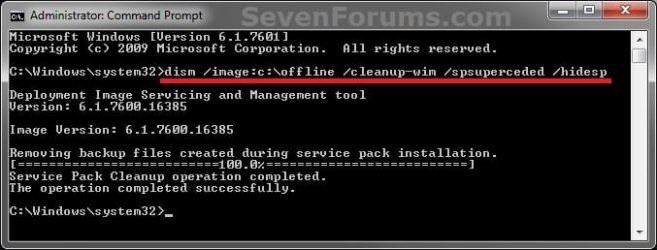
CMD.jpg
3. After a few moments, you will see the The Operation completed successfully message. (see screenshot above)

4. Close the elevated command prompt. You will now no longer be able to uninstall the Windows 7 SP1, but have gained around 1 GB of hard drive space back.


OPTION THREE

Delete Windows 7 SP1 Backup Files Using a Command Prompt at Boot


NOTE: This option will also work on a slipstream Windows 7 SP1 installation at boot. 1. Open a command prompt at boot. (click on link for how)

2. To Verify the Windows 7 Drive Letter at Boot
NOTE: This needs to be done since the Windows 7 drive letter may not be C: if you have the 100 MB System Reserver partition created during installation, or if you multiboot with more than one operating system. A) In the command prompt, type diskpart and press Enter. (see screenshot below)

B) In the command prompt, type list volume and press Enter.

C) Make note of the drive letter (ex: D ) that you have Windows 7 installed on.
NOTE: It helps to look at the drive size and label to help ID the Windows 7 partition/drive.

D) In the command prompt, type exit and press Enter. Slipstream-1.jpg
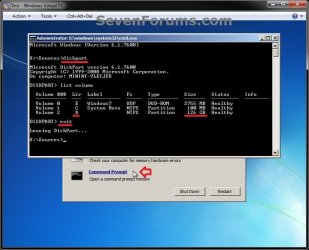
E) Continue on to step 3.
3. To Delete the Windows 7 SP1 Backup Files at Boot A) In the command prompt, type the command below and press Enter. (see screenshot below)
NOTE: Substitute D: in the command below with the drive letter of your Windows 7 from step 2C above instead.
Code:
dism /image:[COLOR=red][B]D:[/B][/COLOR] /cleanup-image /spsuperseded /hidesp
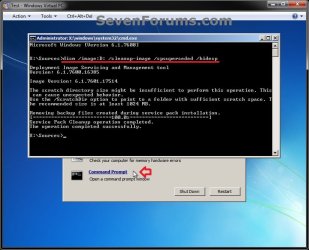
Slipstream-2.jpg
B) After a few moments, you will see the The Operation completed successfully message. (see screenshot above)

C) Close the command prompt window, and restart the computer. You will now no longer be able to uninstall the Windows 7 SP1, but have gained around 1 GB of hard drive space back.
That's it,
Shawn


Last edited:
I still have these 980Mb of service pack backup files showing in disk cleanup and cannot either remove them or even find them.There must be a problem either with rt7 Lite or with disk clean up detecting false files with my integrated iso.Has anyone else done a clean install with a slipstreamed sp1 dvd and encountered the same.
I will be glad when the official Iso is released

Windows will imagine certain things..I am sure iso would be around the same size as well..
 

My Computer

Computer Manufacturer/Model Number
aspire 5920
OS
Windows 8 Professional x64
CPU
core 2 duo T5550
Memory
4 GB
Graphics Card(s)
GMA X3100
Hard Drives
160 GB + 320 GB
Internet Speed
2 mbps
It does look that way Bagavan because ive searched the machine and can find no such files.Im dissappointed more than anything as this was the first time ive done integration and i cant get a conclusive answer as too whether its the dvd or disk cleanup thats wrong.Im gonna scrap that disk and wait for the integrated iso to be released and go with that one.

Danny
 

My Computer

Computer Manufacturer/Model Number
acer aspire 5935g
OS
Windows 7 Home Premium x64 SP1
CPU
intel(R)core(TM)2 duo CPU T6600 @ 2.20GHz
Motherboard
intel gm45/gm47 revision 07
Memory
3 gb ddr3
Graphics Card(s)
ati radeon hd4570/512mb
Monitor(s) Displays
lop156wh2-tle1 15.3 flat
Screen Resolution
1366x768
Hard Drives
OCZ-Agility3 60gig ssd
320gig external hdd
500gig external hdd
Mouse
Optical
Internet Speed
30Mbps Down/30Mbps Up
Did you try running dism in an elevated prompt?

Also, I think the backup files would be a restore point. Check SR points before you installed SP1.
 

My Computer

Computer Manufacturer/Model Number
Too many to describe...
OS
Windows 7 x64 pro/ Windows 7 x86 Pro/ XP SP3 x86
Did you try running dism in an elevated prompt?

Also, I think the backup files would be a restore point. Check SR points before you installed SP1.

Hi again Bill

Yes Bill tried that with no luck.There are no restore points prior as it was an integrated install so the sp1 went stright on.I did think along the same thing though thinking it may be a restore point but i deleted them all and the 980 Mb still shows in cleanup.There is no view files button option in disk cleanup for the back up files which is why im convinced there not there.Could it possibly be refering to a system image i made after the install??? I dont know im boggled with this one

Thanks Bill
 

My Computer

Computer Manufacturer/Model Number
acer aspire 5935g
OS
Windows 7 Home Premium x64 SP1
CPU
intel(R)core(TM)2 duo CPU T6600 @ 2.20GHz
Motherboard
intel gm45/gm47 revision 07
Memory
3 gb ddr3
Graphics Card(s)
ati radeon hd4570/512mb
Monitor(s) Displays
lop156wh2-tle1 15.3 flat
Screen Resolution
1366x768
Hard Drives
OCZ-Agility3 60gig ssd
320gig external hdd
500gig external hdd
Mouse
Optical
Internet Speed
30Mbps Down/30Mbps Up
OK heres another idea. :D Does that 980 mb show up in explorer or say in windirstat/treesize/spacemonger? If it does maybe you can finger it.

Also, try rounding up all the .bak files on the computer. :D
 

My Computer

Computer Manufacturer/Model Number
Too many to describe...
OS
Windows 7 x64 pro/ Windows 7 x86 Pro/ XP SP3 x86
OK heres another idea. :D Does that 980 mb show up in explorer or say in windirstat/treesize/spacemonger? If it does maybe you can finger it.

Also, try rounding up all the .bak files on the computer. :D


These are the only .Bak files search found and its not among them.

Is there a way to search via file size ie over say 900Mb
 
Last edited:

My Computer

Computer Manufacturer/Model Number
acer aspire 5935g
OS
Windows 7 Home Premium x64 SP1
CPU
intel(R)core(TM)2 duo CPU T6600 @ 2.20GHz
Motherboard
intel gm45/gm47 revision 07
Memory
3 gb ddr3
Graphics Card(s)
ati radeon hd4570/512mb
Monitor(s) Displays
lop156wh2-tle1 15.3 flat
Screen Resolution
1366x768
Hard Drives
OCZ-Agility3 60gig ssd
320gig external hdd
500gig external hdd
Mouse
Optical
Internet Speed
30Mbps Down/30Mbps Up
Something like size:>900 mb should work.

Also, I forgot, take a look in the dism log.
 

My Computer

Computer Manufacturer/Model Number
Too many to describe...
OS
Windows 7 x64 pro/ Windows 7 x86 Pro/ XP SP3 x86
Something like size:>900 mb should work.

Also, I forgot, take a look in the dism log.

Only these over 900mb in windows
Just looking through dism log

Thats a nice trick though will remember that one

Edit Cant see anything related in dism log but it is a bit of a minefield lol
 
Last edited:

My Computer

Computer Manufacturer/Model Number
acer aspire 5935g
OS
Windows 7 Home Premium x64 SP1
CPU
intel(R)core(TM)2 duo CPU T6600 @ 2.20GHz
Motherboard
intel gm45/gm47 revision 07
Memory
3 gb ddr3
Graphics Card(s)
ati radeon hd4570/512mb
Monitor(s) Displays
lop156wh2-tle1 15.3 flat
Screen Resolution
1366x768
Hard Drives
OCZ-Agility3 60gig ssd
320gig external hdd
500gig external hdd
Mouse
Optical
Internet Speed
30Mbps Down/30Mbps Up
Danny,

I would recommend to create a restore point before doing that in case it causes a problem or a mistake is made. This way you can easily do a system restore to fix it.

Since you used a slipstreamed Windows 7 w/SP1, this may be why you are having this issue.
 

My Computer

Computer type
PC/Desktop
Computer Manufacturer/Model Number
Self built custom
OS
64-bit Windows 11 Pro for Workstations
CPU
Intel i7-8700K OC'd to 5 GHz
Motherboard
ASUS ROG Maximus XI Formula Z390
Memory
64 GB (4x16GB) G.SKILL TridentZ RGB DDR4 3600 MHz
Graphics Card(s)
ASUS ROG-STRIX-GTX1080TI-O11G-GAMING
Sound Card
Integrated
Monitor(s) Displays
2 x Samsung Odyssey G7 27"
Screen Resolution
2560x1440
Hard Drives
1TB Samsung 990 PRO M.2,
4TB Samsung 990 PRO PRO M.2,
TerraMaster F8 SSD Plus NAS
PSU
Seasonic Prime Titanium 850W
Case
Thermaltake Core P3
Cooling
Corsair Hydro H115i
Keyboard
Logitech wireless K800
Mouse
Logitech MX Master 4
Internet Speed
2 Gb/s Download and 100 Mb/s Upload
Antivirus
Malwarebyte Anti-Malware Premium
Browser
Google Chrome
Other Info
Logitech Z625 speaker system,
Logitech BRIO 4K Pro webcam,
HP Color LaserJet Pro MFP M477fdn,
APC SMART-UPS RT 1000 XL - SURT1000XLI,
Galaxy S23 Plus phone
Danny,

I would recommend to create a restore point before doing that in case it causes a problem or a mistake is made. This way you can easily do a system restore to fix it.

Since you used a slipstreamed Windows 7 w/SP1, this may be why you are having this issue.


Sure thing Shaun
Im gonna wait until the iso is released and create a new sp1 disk. Im almost positive now the backup files are not there so there must be an error somewhere with Rt Lite at the point it should remove the files before finalising the slipstreamed iso.I remember the program did appear unresponsive on a couple of occasions whilst slipstreaming.
At least i can say ive had a go and to the most part it worked

Thanks all

Danny
 

My Computer

Computer Manufacturer/Model Number
acer aspire 5935g
OS
Windows 7 Home Premium x64 SP1
CPU
intel(R)core(TM)2 duo CPU T6600 @ 2.20GHz
Motherboard
intel gm45/gm47 revision 07
Memory
3 gb ddr3
Graphics Card(s)
ati radeon hd4570/512mb
Monitor(s) Displays
lop156wh2-tle1 15.3 flat
Screen Resolution
1366x768
Hard Drives
OCZ-Agility3 60gig ssd
320gig external hdd
500gig external hdd
Mouse
Optical
Internet Speed
30Mbps Down/30Mbps Up
Danny,

I would recommend to create a restore point before doing that in case it causes a problem or a mistake is made. This way you can easily do a system restore to fix it.

Since you used a slipstreamed Windows 7 w/SP1, this may be why you are having this issue.


Sure thing Shaun
Im gonna wait until the iso is released and create a new sp1 disk. Im almost positive now the backup files are not there so there must be an error somewhere with Rt Lite at the point it should remove the files before finalising the slipstreamed iso.I remember the program did appear unresponsive on a couple of occasions whilst slipstreaming.
At least i can say ive had a go and to the most part it worked

Thanks all

Danny

The first rounds of slipstreaming SP1 are bound to have a few bugs in it. At least you had fun with it though. :)
 
Last edited:

My Computer

Computer type
PC/Desktop
Computer Manufacturer/Model Number
Self built custom
OS
64-bit Windows 11 Pro for Workstations
CPU
Intel i7-8700K OC'd to 5 GHz
Motherboard
ASUS ROG Maximus XI Formula Z390
Memory
64 GB (4x16GB) G.SKILL TridentZ RGB DDR4 3600 MHz
Graphics Card(s)
ASUS ROG-STRIX-GTX1080TI-O11G-GAMING
Sound Card
Integrated
Monitor(s) Displays
2 x Samsung Odyssey G7 27"
Screen Resolution
2560x1440
Hard Drives
1TB Samsung 990 PRO M.2,
4TB Samsung 990 PRO PRO M.2,
TerraMaster F8 SSD Plus NAS
PSU
Seasonic Prime Titanium 850W
Case
Thermaltake Core P3
Cooling
Corsair Hydro H115i
Keyboard
Logitech wireless K800
Mouse
Logitech MX Master 4
Internet Speed
2 Gb/s Download and 100 Mb/s Upload
Antivirus
Malwarebyte Anti-Malware Premium
Browser
Google Chrome
Other Info
Logitech Z625 speaker system,
Logitech BRIO 4K Pro webcam,
HP Color LaserJet Pro MFP M477fdn,
APC SMART-UPS RT 1000 XL - SURT1000XLI,
Galaxy S23 Plus phone
The first rounds of slipstreaming SP1 are bound to have a few bugs in it. At least you had fun with it though. :)
Hi Brink

I had a really teribble experience of slipstreaming..RT 7 displayed it integrated successfully..when I tried it on my main system it got stuck in expanding files.So I have lost my hope in RT 7
 

My Computer

Computer Manufacturer/Model Number
aspire 5920
OS
Windows 8 Professional x64
CPU
core 2 duo T5550
Memory
4 GB
Graphics Card(s)
GMA X3100
Hard Drives
160 GB + 320 GB
Internet Speed
2 mbps
And how do you remove the entry from Control Panel > Programs and Features > Installed Updates?
The cleanup tool doesn't remove it.
 

My Computer

OS
Windows 7 Ultimate (64-bit)
Wok well for me.. Thanks
 

My Computer

OS
Windows 7 Ultimate X64 SP1
CPU
Phenom B55
Motherboard
DFI lanparty M2RS
Memory
Corsair XMS2 8GB
Graphics Card(s)
zotac 9800 GTX
Sound Card
-
Monitor(s) Displays
LG W2253S
Screen Resolution
1920 x 1080
Hard Drives
WDC 1TB Master, WDC 2TB Slave
PSU
Seasonic M12 520
Case
Simbadda :p
Cooling
Thermaltake Frio
Keyboard
-
Mouse
A4tech Glazer :p
You're most welcome BajolCool. Thanks for posting your results. :)
 

My Computer

Computer type
PC/Desktop
Computer Manufacturer/Model Number
Self built custom
OS
64-bit Windows 11 Pro for Workstations
CPU
Intel i7-8700K OC'd to 5 GHz
Motherboard
ASUS ROG Maximus XI Formula Z390
Memory
64 GB (4x16GB) G.SKILL TridentZ RGB DDR4 3600 MHz
Graphics Card(s)
ASUS ROG-STRIX-GTX1080TI-O11G-GAMING
Sound Card
Integrated
Monitor(s) Displays
2 x Samsung Odyssey G7 27"
Screen Resolution
2560x1440
Hard Drives
1TB Samsung 990 PRO M.2,
4TB Samsung 990 PRO PRO M.2,
TerraMaster F8 SSD Plus NAS
PSU
Seasonic Prime Titanium 850W
Case
Thermaltake Core P3
Cooling
Corsair Hydro H115i
Keyboard
Logitech wireless K800
Mouse
Logitech MX Master 4
Internet Speed
2 Gb/s Download and 100 Mb/s Upload
Antivirus
Malwarebyte Anti-Malware Premium
Browser
Google Chrome
Other Info
Logitech Z625 speaker system,
Logitech BRIO 4K Pro webcam,
HP Color LaserJet Pro MFP M477fdn,
APC SMART-UPS RT 1000 XL - SURT1000XLI,
Galaxy S23 Plus phone
I gained extra disk space after the SP1 install this way. But found that
sfc /scannow did not detect any file errors before the removal but did file fixes after the removal.
So I suggest running sfc /scannow after doing the disk cleanup.

I made some recent images before installing SP1 so my way of "uninstalling" will be to reimage. I hope I'm not missing something?
 

My Computer

Computer type
PC/Desktop
Computer Manufacturer/Model Number
Own build
OS
Windows 7x64 Home Premium SP1
CPU
Intel i7 2600k
Motherboard
ASUS P8Z68 Deluxe
Memory
G.Skill Ripjaws (DDR3-1600) 2x4GB
Graphics Card(s)
Nvidia GeForce GTS 450; Intel HD Graphics 3000(GT2+)
Monitor(s) Displays
Dell Ultrasharp IPS panel U2311H, Samsung SyncMaster P2350
Screen Resolution
1920x1080
Hard Drives
Samsung 850 Pro SSD 256GB, Samsung SSD 840 120GB, Seagates 1TB Barracuda ST31000528AS x2
PSU
Seasonic M12II 520W
Case
Lian Li Lancool PC-K60
Cooling
Case: 1x120mm, 3x140mm CPU: Hyper 212+
Keyboard
Logitech MK520 (wireless)
Mouse
Logitech MK520
Internet Speed
6-7 Mbps
Antivirus
Norton Security Premium, Malwarebytes on 2 (MSE on 3rd PC)
Browser
FireFox
Other Info
Audio: Logitech Z523 2.1
Interesting. Thank you for the tip MJF. :)
 

My Computer

Computer type
PC/Desktop
Computer Manufacturer/Model Number
Self built custom
OS
64-bit Windows 11 Pro for Workstations
CPU
Intel i7-8700K OC'd to 5 GHz
Motherboard
ASUS ROG Maximus XI Formula Z390
Memory
64 GB (4x16GB) G.SKILL TridentZ RGB DDR4 3600 MHz
Graphics Card(s)
ASUS ROG-STRIX-GTX1080TI-O11G-GAMING
Sound Card
Integrated
Monitor(s) Displays
2 x Samsung Odyssey G7 27"
Screen Resolution
2560x1440
Hard Drives
1TB Samsung 990 PRO M.2,
4TB Samsung 990 PRO PRO M.2,
TerraMaster F8 SSD Plus NAS
PSU
Seasonic Prime Titanium 850W
Case
Thermaltake Core P3
Cooling
Corsair Hydro H115i
Keyboard
Logitech wireless K800
Mouse
Logitech MX Master 4
Internet Speed
2 Gb/s Download and 100 Mb/s Upload
Antivirus
Malwarebyte Anti-Malware Premium
Browser
Google Chrome
Other Info
Logitech Z625 speaker system,
Logitech BRIO 4K Pro webcam,
HP Color LaserJet Pro MFP M477fdn,
APC SMART-UPS RT 1000 XL - SURT1000XLI,
Galaxy S23 Plus phone
Gained back 2.5gb!! :D
 

My Computer

Computer Manufacturer/Model Number
User build
OS
Win7 home 64bit
CPU
I7-860
Motherboard
Asus P7P55D-E Pro
Memory
8 Gb G-Skill DDR3-1600
Graphics Card(s)
GTX-460
Monitor(s) Displays
LG 24"
Hard Drives
Intel ssd 40gb
WD 1TB
PSU
650w Corsair
Case
Antec 300
Hello Falcon SR, and welcome to Seven Forums.

Wow, that's a lot. :party:
 

My Computer

Computer type
PC/Desktop
Computer Manufacturer/Model Number
Self built custom
OS
64-bit Windows 11 Pro for Workstations
CPU
Intel i7-8700K OC'd to 5 GHz
Motherboard
ASUS ROG Maximus XI Formula Z390
Memory
64 GB (4x16GB) G.SKILL TridentZ RGB DDR4 3600 MHz
Graphics Card(s)
ASUS ROG-STRIX-GTX1080TI-O11G-GAMING
Sound Card
Integrated
Monitor(s) Displays
2 x Samsung Odyssey G7 27"
Screen Resolution
2560x1440
Hard Drives
1TB Samsung 990 PRO M.2,
4TB Samsung 990 PRO PRO M.2,
TerraMaster F8 SSD Plus NAS
PSU
Seasonic Prime Titanium 850W
Case
Thermaltake Core P3
Cooling
Corsair Hydro H115i
Keyboard
Logitech wireless K800
Mouse
Logitech MX Master 4
Internet Speed
2 Gb/s Download and 100 Mb/s Upload
Antivirus
Malwarebyte Anti-Malware Premium
Browser
Google Chrome
Other Info
Logitech Z625 speaker system,
Logitech BRIO 4K Pro webcam,
HP Color LaserJet Pro MFP M477fdn,
APC SMART-UPS RT 1000 XL - SURT1000XLI,
Galaxy S23 Plus phone
I just ran the removal on my Dell computer. Gained back almost 3GB. But it said removing windows Ultimate files. I have Home Premium installed. It said the same on my computer which has Professional installed.
sp1 cleanup.PNG
 

My Computers

System One System Two

  • Computer type
    PC/Desktop
    Computer Manufacturer/Model Number
    ALWAYS UNDER CONSTRUCTION
    OS
    Windows 11 Pro
    CPU
    Ryzen 9 5900X
    Motherboard
    Asus X570 Crosshair Viii Hero
    Memory
    32GB G Skill DDR4-3600
    Graphics Card(s)
    EVGA RTX 3080 FTW 3 Ultra
    Sound Card
    On Board/Sennheiser PC37X Headset
    Monitor(s) Displays
    3 X Asus 27"
    Screen Resolution
    2560x1440
    Hard Drives
    2 X 1 TB NVME drives
    PSU
    EVGA 850
    Case
    Phanteks Eclipse P400A
    Cooling
    EVGA 280 AIO
    Keyboard
    Logitech G510s/ Logitech G13
    Mouse
    Logitech G502
    Internet Speed
    24/1
    Antivirus
    ESET/MBAM Pro/SAS Pro
    Browser
    Chrome/ Firefox/ Edge
  • Computer type
    Laptop
    System Manufacturer/Model Number
    Dell 16 Plus
    OS
    Windows 11 Pro
    CPU
    Intel Ultra 9 288V
    Memory
    32 GB LPDDR5X 8533
    Monitor(s) Displays
    16" Mini-LED HDR600 Touch 90 Hz
    Screen Resolution
    2560X1600
    Hard Drives
    1 TB NVME
Back
Top