Lack of Internet causes problems shutting down

Pickly

New member
Local time
11:41 AM
Messages
5
Posted this earlier in the crashes forum, didn't get too many responses, so trying here.

As the title says, I've been having an issue lately where, if the internet is not working, on the computer, it won't shut down, or at least will take a really, really, long time shutting down. I'm currently using a USB wireless device, windows home premium 64 bit, can look up other necessary information if needed.


As a related issue, I've also had trouble reconnecting sometimes. I have been able to do this once or twice, but never remember the steps exactly. It does seem that a lot of the internet control panel, plus the software for the wireless receiver, won't open or run when the connection disappears, although I'm not sure whether this is supposed to work this way and I'm missing the method that is supposed to be used, or whether this itself is a problem.

Thanks for any responses people can offer.
 

My Computer My Computer

At a glance

Windows 7 Premium home 64bit
OS
Windows 7 Premium home 64bit
You may need to have a look at your advanced power options for usb devices.

...and of course as always, updating related drivers and software from the manufacturer's website never hurts.
 

My Computer My Computer

At a glance

Windows 7 x64Intel i7 2600kG.skill Ripjaw 16gigs @ 1866Nvidia gtx580 (evga)
Computer Manufacturer/Model Number
Insane hobo technologies. ;-)
OS
Windows 7 x64
CPU
Intel i7 2600k
Motherboard
Asrock z68 extreme 4 gen 3
Memory
G.skill Ripjaw 16gigs @ 1866
Graphics Card(s)
Nvidia gtx580 (evga)
Sound Card
Integrated HD audio + hdmi
Monitor(s) Displays
24" ASUS widescreen + 42" insignia
Screen Resolution
1080p (1920x1080)
Hard Drives
128 Samsung 830
256 Samsung 840
3 x 1tb storage drive (various)
1 western digital 1tb (eSATA)
1 Seagate 1tb (eSATA)
PSU
1 kilowatt SLI/Crossfire rated Silverstone modular
Case
NZXT Phantom + additional 220 fan
Cooling
Zalmann
Keyboard
Microsoft wireless 3000 (v2)
Mouse
MS - wireless 5000 (bluetrack)
Internet Speed
depends on if you ask me or my provider.
Other Info
The above information is provided as is, and the author assumes no responsibility for issues it may cause with your sanity or fanboyism.
I see the option "USB selective suspend setting" in the advanced power savings options, is that the one you are talking about?

(Out of curiosity, how does this effect windows shutting down, plus the driver issues, if you know.)
 

My Computer My Computer

At a glance

Windows 7 Premium home 64bit
OS
Windows 7 Premium home 64bit
Dear Pickly,
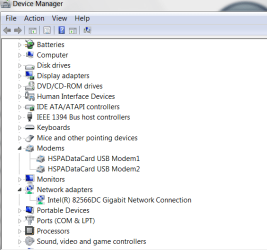
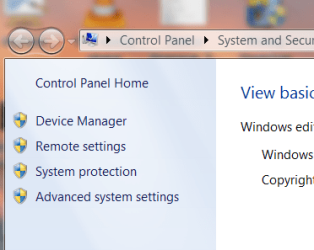
Welcome to Windows Seven forums! Kindly go to Device Manager (My Computer-->Right click--->Properties---> On the left hand side---->Device Manager). Under device Manager,click on "Modems" and "Network Adapters" and see if there are any "yellow" triangles or exclamation marks. If possible, kindly write down what exactly is written under those headings!

Do you have a wired internet connection at home or office,for checking out whether the wired connection works and the wifi modem is not!

Best wishes,
Sreedhav:)
 

Attachments

  • Device Manager_2011-02-19_12-16-10.png
    Device Manager_2011-02-19_12-16-10.png
    17.4 KB · Views: 4
  • System_2011-02-19_12-24-00.png
    System_2011-02-19_12-24-00.png
    20.8 KB · Views: 4

My Computer My Computer

At a glance

MS Windows 7 Home Premium 64-bit SP1IntelCore [email protected]; Sandy Bridge 32nm Tech.4096Mb RAM; Single ChannelDDR3@665MHz; DRAM F...AMD Radeon HD 6630M; GPU:Whistler;BIOS Core&m...
Computer Manufacturer/Model Number
Sony Vaio C series VPCCB35FN laptop
OS
MS Windows 7 Home Premium 64-bit SP1
CPU
IntelCore [email protected]; Sandy Bridge 32nm Tech.
Motherboard
Sony Vaio Version:C609NJYJ
Memory
4096Mb RAM; Single ChannelDDR3@665MHz; DRAM Freq:662MHz
Graphics Card(s)
AMD Radeon HD 6630M; GPU:Whistler;BIOS Core&mem Clock:123.36
Sound Card
REALTEK High Definition Audio Device; INTEL Display Card
Monitor(s) Displays
Generic PnP Intel HD;Resolution:1920*1040 Pixels; BPP:32bits
Screen Resolution
Current Resolution:1920*1080 Pixels; Monitor Frequency:60Hz
Hard Drives
Internal HD:TOSHIBA MK5061GSY; Real Size:488 GB;NTFS; 3 Partitions; SATA; HEADS:16

External HDD: WD Elements 1023 PORTABLE; Estimated Size: 1TB; NTFS; 3 Partitions
Cooling
Lateral Exhaust with a Cooling Pad Placed Beneath.
Keyboard
Logitech Bluetooth+ Generic Integrated K-B
Mouse
Logitech Bluetooth
Internet Speed
2MBPS
Other Info
1)Trend Micro Titanium Maximum Security Suite Version:3
2)SAS-PRO

3)MBAM--PRO


4)WATERFOX+IE9 +WOT+LINKEXTEND+ DRWEBCUREIT LINK CHECKER

5)SPYWAREBLASTER

6) WINPATROL PLUS

7) SANDBOXIE and
8) A BIT OF COMMON SENSE.
Dear Pickly,
what security software are in use on your PC? When i say that, i mean 1)Anti-spyware,2) anti-malware,3) Anti-Virus,4) Any 3rd party personal firewall and /or Router.

Or are you using MSE (Microsoft Security Essentials) and Windows Defender?

Regards,
DR.Sreedhav:cool:
 

My Computer My Computer

At a glance

MS Windows 7 Home Premium 64-bit SP1IntelCore [email protected]; Sandy Bridge 32nm Tech.4096Mb RAM; Single ChannelDDR3@665MHz; DRAM F...AMD Radeon HD 6630M; GPU:Whistler;BIOS Core&m...
Computer Manufacturer/Model Number
Sony Vaio C series VPCCB35FN laptop
OS
MS Windows 7 Home Premium 64-bit SP1
CPU
IntelCore [email protected]; Sandy Bridge 32nm Tech.
Motherboard
Sony Vaio Version:C609NJYJ
Memory
4096Mb RAM; Single ChannelDDR3@665MHz; DRAM Freq:662MHz
Graphics Card(s)
AMD Radeon HD 6630M; GPU:Whistler;BIOS Core&mem Clock:123.36
Sound Card
REALTEK High Definition Audio Device; INTEL Display Card
Monitor(s) Displays
Generic PnP Intel HD;Resolution:1920*1040 Pixels; BPP:32bits
Screen Resolution
Current Resolution:1920*1080 Pixels; Monitor Frequency:60Hz
Hard Drives
Internal HD:TOSHIBA MK5061GSY; Real Size:488 GB;NTFS; 3 Partitions; SATA; HEADS:16

External HDD: WD Elements 1023 PORTABLE; Estimated Size: 1TB; NTFS; 3 Partitions
Cooling
Lateral Exhaust with a Cooling Pad Placed Beneath.
Keyboard
Logitech Bluetooth+ Generic Integrated K-B
Mouse
Logitech Bluetooth
Internet Speed
2MBPS
Other Info
1)Trend Micro Titanium Maximum Security Suite Version:3
2)SAS-PRO

3)MBAM--PRO


4)WATERFOX+IE9 +WOT+LINKEXTEND+ DRWEBCUREIT LINK CHECKER

5)SPYWAREBLASTER

6) WINPATROL PLUS

7) SANDBOXIE and
8) A BIT OF COMMON SENSE.
Has it recently started happening? If so, see if you can use System Restore to restore the computer to an earlier working point.
 

My Computer My Computer

At a glance

Windows 7, Ubuntu 9.10, Vista2.4Ghz4GB512MB NVIDIA GeForce 9500M
Computer Manufacturer/Model Number
Acer Aspire 6920g
OS
Windows 7, Ubuntu 9.10, Vista
CPU
2.4Ghz
Motherboard
Acer Aspire 6920g
Memory
4GB
Graphics Card(s)
512MB NVIDIA GeForce 9500M
Sound Card
Integrated with Virtual Surround Sound & Dolby Home Theater
Hard Drives
320GB
@sreedhav: I'm not completely sure about protection software, I'll check it out and get back to the thread on that. (Some of the router details and firewall details I'm not completely sure of.)

@Undercover: I've had the computer for about 2 weeks, and the problem has been occurring for about one week. In the first week, the internet worked pretty much fine without any disconnects, while the second week is when it started getting erratic. The internet where I am is a bit erratic anyway, though, (for other computers and phones in the area, and for a previous computer I had.).
 

My Computer My Computer

At a glance

Windows 7 Premium home 64bit
OS
Windows 7 Premium home 64bit
Turns out I didn't have any antivirus on the computer at all, despite thinking I had.

Some software is installed now, and the computer was scanned. It seems to be working fine now, though I'll probably have the thread bookmarked in case something else happens.

Thanks for the help, everyone.
 

My Computer My Computer

At a glance

Windows 7 Premium home 64bit
OS
Windows 7 Premium home 64bit
Turns out I didn't have any antivirus on the computer at all, despite thinking I had.

Some software is installed now, and the computer was scanned. It seems to be working fine now, though I'll probably have the thread bookmarked in case something else happens.

Thanks for the help, everyone.

just in case, if you need a anti-virus protective, you can go to AVG Free - Antivirus Download | Free Virus Protection it is a free.
 

My Computer My Computer

At a glance

Windows 7 64 bit
OS
Windows 7 64 bit
Well, the problems have now started again even after getting anti-virus. (Internet shuts down, can't open any of the control panels or the USB device program, shutting down, sleeping, or logging off often doesn't work.)

Any other ideas of what might be causing these issues? (It seemed to happen after a system scan, which seems strange as a scan when I first got the program didn't cause any issues.)
 

My Computer My Computer

At a glance

Windows 7 Premium home 64bit
OS
Windows 7 Premium home 64bit
Back
Top