How to Enable Telnet Links in IE8?

popokrew

New member
Local time
5:35 PM
Messages
6
Hello All,

Just got on to Win 7 Enterprise 64 at work. I was able to add the registry hack for IE7 on Win XP to enable telnet:// links but this has proved to be an issue with IE8 in win7. Has anyone been able to get this to work? Ive been googling for a few days now and even searched the forums. I use SecureCRT and would like it to open when clicking a telnet://x.x.x.x link in IE8. Any help would be appreciated.

Thanks.
 

My Computer My Computer

At a glance

Windows 7 Enterprise 64-bit16G
Computer type
PC/Desktop
Computer Manufacturer/Model Number
HP EliteBook 850 G1
OS
Windows 7 Enterprise 64-bit
Memory
16G
Actually, you aren't actually using IE for telnet, it just calls the built in client so you are using a real client. It is an easier way to start the telnet client though.

There should not be a space in the word TELNET in the Registry Key name, the forum editor must have added that on the other site; happens here as well on lines longer than 75 characters that do not contain a space. That my be why it didn't work for you.
And the wording can be confusing. You create a new Dword value (the DWORD Name part) which contains Data (the DWORD Value part).
You can't rename the Default value.
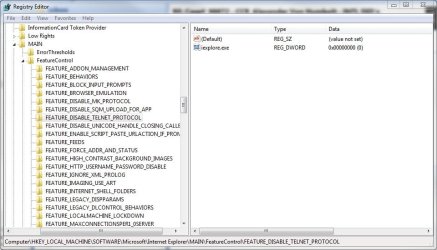
You right click in the right pane, point to New, click Dword value. A new Name will appear named New Value #1. Should already be highlighted ready to rename. Then name that new item iexplore.exe. You then double click it and set it to zero, though it should already be zero.

It does work for IE8.


You can copy the text in the following code block into Notepad, save it as a .reg file (Be sure to change the Save as Type box to All Files) and double click to create the entry. I've included a line to remove the one with the extraneous space if it exists.

Windows Registry Editor Version 5.00

[-HKEY_LOCAL_MACHINE\SOFTWARE\Microsoft\Internet Explorer\Main\FeatureControl\FEATURE_DISABLE_TELNE T_PROTOCOL]

[HKEY_LOCAL_MACHINE\SOFTWARE\Microsoft\Internet Explorer\Main\FeatureControl\FEATURE_DISABLE_TELNET_PROTOCOL]
"iexplore.exe"=dword:00000000

My telnet shell command already had the rundll32 part. That the website linked above doesn't have the correct value though. It should include the full path as that makes it harder for malware to interfere:
Windows Registry Editor Version 5.00

[HKEY_CLASSES_ROOT\telnet\shell\open\command]
@="\"C:\\WINDOWS\\system32\\rundll32.exe\" \"C:\\WINDOWS\\system32\\url.dll\",TelnetProtocolHandler %l"

Note that the last character is actually a lowercase letter L, not the number 1.
If your Windows folder is not on C: or is named something else, you'd need to modify that to match your system, or use this version which uses the %Systemroot% variable instead of hard coding the path:
Windows Registry Editor Version 5.00

[HKEY_CLASSES_ROOT\telnet\shell\open\command]
@=hex(2):25,00,53,00,79,00,73,00,74,00,65,00,6d,00,72,00,6f,00,6f,\
00,74,00,25,00,5c,00,73,00,79,00,73,00,74,00,65,00,6d,00,33,00,32,00,5c,00,\
72,00,75,00,6e,00,64,00,6c,00,6c,00,33,00,32,00,2e,00,65,00,78,00,65,00,20,\
00,25,00,53,00,79,00,73,00,74,00,65,00,6d,00,72,00,6f,00,6f,00,74,00,25,00,\
5c,00,73,00,79,00,73,00,74,00,65,00,6d,00,33,00,32,00,5c,00,75,00,72,00,6c,\
00,2e,00,64,00,6c,00,6c,00,2c,00,54,00,65,00,6c,00,6e,00,65,00,74,00,50,00,\
72,00,6f,00,74,00,6f,00,63,00,6f,00,6c,00,48,00,61,00,6e,00,64,00,6c,00,65,\
00,72,00,20,00,25,00,6c,00,00,00
 

My Computer My Computer

At a glance

Windows 7 Better then yours
OS
Windows 7 Better then yours
Sound Card
Sound blaster live!
Monitor(s) Displays
samsung SyncMaster T200
Screen Resolution
Better than yours
Keyboard
Pro
Mouse
Pro
Internet Speed
The fastes =) beat that
Thanks Pontii for your reply. Unfortunately it didnt help. When I tried it I didnt have the space on the "TELNET" key. Either way, I deleted the key, restarted, then setup a .reg file with your suggestions. It still gives me a "page cannot be displayed" error when trying telnet:// links. Any more ideas?
 

My Computer My Computer

At a glance

Windows 7 Enterprise 64-bit16G
Computer type
PC/Desktop
Computer Manufacturer/Model Number
HP EliteBook 850 G1
OS
Windows 7 Enterprise 64-bit
Memory
16G
Hey guys, I still am trying to get this to work. It works in IE8 64bit but not in the regular 32bit IE. Any ideas? I attached the screenshot of regedit where you see I have the key correct.
 

Attachments

  • telnet.jpg
    telnet.jpg
    70.1 KB · Views: 839

My Computer My Computer

At a glance

Windows 7 Enterprise 64-bit16G
Computer type
PC/Desktop
Computer Manufacturer/Model Number
HP EliteBook 850 G1
OS
Windows 7 Enterprise 64-bit
Memory
16G
Hey guys, I still am trying to get this to work. It works in IE8 64bit but not in the regular 32bit IE. Any ideas? I attached the screenshot of regedit where you see I have the key correct.
I'm also curious as to why telnet:// doesn't work in IE8 on 32-bit Vista or Windows 7 even after the above fixes.
 

My Computer My Computer

At a glance

Windows 8 Pro w/MC 32-bitIntel Atom 1.86 GHz2 GBIntel GMA 500
Computer type
PC/Desktop
Computer Manufacturer/Model Number
OQO 2+
OS
Windows 8 Pro w/MC 32-bit
CPU
Intel Atom 1.86 GHz
Motherboard
OQO 2+
Memory
2 GB
Graphics Card(s)
Intel GMA 500
Sound Card
IDT
Monitor(s) Displays
LCD
Screen Resolution
800 x 480 (portable) 1280 x 1024 (docked)
Hard Drives
64 GB SSD
PSU
9 Ah Battery (portable) or OQO Brick (docked)
Case
Shirt Pocket Sized
Cooling
Tiny Fan
Keyboard
Slide out (portable) DiNovo Edge (docked)
Mouse
Eraser head (portable) Logitech Bluetooth (docked)
Internet Speed
WWAN or 802.11G (portable) T1 (docked)
Browser
IE 10
Other Info
DVD-RW OQO Docking Station
To make it work on 32bit IE you need to make the same Registry changes to the wow6432node....
 

My Computer My Computer

At a glance

Windows 7 Pro x64
OS
Windows 7 Pro x64
To make it work on 32bit IE you need to make the same Registry changes to the wow6432node....
Can't find the string "wow6432" in the registry of Win7 32-bit.
 

My Computer My Computer

At a glance

Windows 8 Pro w/MC 32-bitIntel Atom 1.86 GHz2 GBIntel GMA 500
Computer type
PC/Desktop
Computer Manufacturer/Model Number
OQO 2+
OS
Windows 8 Pro w/MC 32-bit
CPU
Intel Atom 1.86 GHz
Motherboard
OQO 2+
Memory
2 GB
Graphics Card(s)
Intel GMA 500
Sound Card
IDT
Monitor(s) Displays
LCD
Screen Resolution
800 x 480 (portable) 1280 x 1024 (docked)
Hard Drives
64 GB SSD
PSU
9 Ah Battery (portable) or OQO Brick (docked)
Case
Shirt Pocket Sized
Cooling
Tiny Fan
Keyboard
Slide out (portable) DiNovo Edge (docked)
Mouse
Eraser head (portable) Logitech Bluetooth (docked)
Internet Speed
WWAN or 802.11G (portable) T1 (docked)
Browser
IE 10
Other Info
DVD-RW OQO Docking Station
Back
Top