I need a decent firewall suggestion

hkBattousai

New member
Member
Local time
12:39 AM
Messages
64
There are some software installed on my computer which are silently accessing the internet. This situation makes me worried about my security and privacy.

So, I need a firewall to block internet access of some of the software installed on my PC, which I would choose by hand. It must warn me whenever an application tries to access the internet, and let me choose whether to allow it or not. I don't want any firewall which doesn't have this feature.

In old days, there was a great firewall named "Symantec Personal Firewall". But there is no new version developed for years, and its older versions are not compatible with my current operating system.

Any suggestion will be appreciated.

(My OS: Windows 7 Ultimate x64)
 

My Computer My Computer

OS
Windows 7 Ultimate x64
CPU
Intel i5 750
Motherboard
Gigabyte P55A U3DR
Memory
2x2GB DDR3 Dual-kit
Graphics Card(s)
ATI Radeon HD4670
Sound Card
Onboard
Monitor(s) Displays
Samsung SyncMaster P2350
Hard Drives
Western Digital 1TB, 64MB cache, internal
Samsung Story 1.5TB, external
PSU
400W rated, 460W max
Case
CoolerMaster
Cooling
Air
I've been using Comodo firewall for the last couple of years, very reliable and very configurable. If you just want simple application blocking you could turn of the hips feature (defense+) which tends to bombard you with warning dialogues.


My Computer My Computer

OS
Windows 7 64
CPU
AMD Phenom II X4 Black Edition 940
Motherboard
Gigabyte GA-MA790X-UD3P
Memory
8 GB
Graphics Card(s)
Nvidia 8800GTS
Monitor(s) Displays
Benq G2420HDBL
Screen Resolution
1920x1080
Case
Lian-Li
Internet Speed
10/10 mb/s
Comodo D+ is what i recommend. It can be set for learning mode, Default mode, and my favorite, PARANOID mode:shock: If you dont allready have a real HIPS, i would suggest adding the D+ with the firewall. After learning your system Comodo becomes very silent, even with D+.
 

My Computer My Computer

OS
Win 7 64 premium
Other Info
7 fw, LUA, UAC on high, IE-9 w/ smartscreen on, SANDBOXIE
What you decide to use is whatever you feel comfortable with.

Comodo is highly configurable, although it would be best for you to d/l this and spend some time reading this. It's a long read, but it covers all aspects of configuring the firewall and defense+.

http://personalfirewall.comodo.com/Comodo_Internet_Security_User_Guide.pdf

Windows firewall is also configurable. Doing a search of this forum will yield some threads that can help you in configuring it.

Several threads have suggested that ZoneAlarm does not play well with Win 7 and causes BSOD's.

An then there's the option of a pay for security suite, like Norton 360, which has it's own firewall.
 

My Computer My Computer

Computer type
PC/Desktop
Computer Manufacturer/Model Number
Dell Hell oh Well
OS
Win 7 32 Home Premium, Win 7 64 Pro, Win 8.1, Win 10
CPU
Intel Core 2 Duo 2.93GHz
Memory
Not much with my ADHD
Graphics Card(s)
ATI Radeon HD 4350
Monitor(s) Displays
24" HDTV/Monitor
Screen Resolution
Blurry after a Scotch or 2
Hard Drives
1 HDD 250 GB, 1 HDD 1 TB, 3 - 1 TB Externals
Case
Don't get on my case...man :D
Cooling
I have an Air Conditioner & Diet Pepsi
Keyboard
Saitek Cyborg
Mouse
10 yr old MS optical mouse that still works
Internet Speed
Never fast enough
Antivirus
Various
Browser
Various
There are some software installed on my computer which are silently accessing the internet. This situation makes me worried about my security and privacy.

Any suggestion will be appreciated.

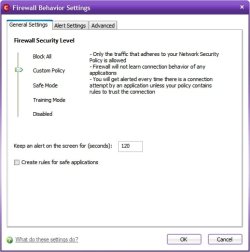
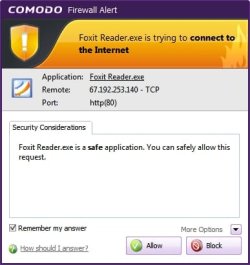
You're right this is a potentially serious problem, but there is a simple solution and that is to install the Comodo Firewall and set it to 'Custom Policy" Mode and it will not only stop all of the programs you have set it to prevent from accessing the internet, but it will also alert you each and every time any program which you have not given permission attempts to access the internet and then you can instruct the Comodo Firewall how to proceed.

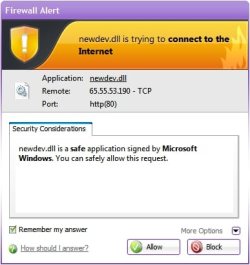
I am constantly surprised at the number of programs that try to access the internet. Comodo recently caught a new program that I had instslled trying to contact 2 different IP numbers each time it was started, but with a couple of clicks to Block their internet access Comodo will never let them access the internet. Nearly every new program I install wants to phone home during the installation and even plugging in or unplugging a USB device can prompt a call to Redmond and I just don't see why they need to know about it so I have the Comodo Firewall see that newdev.dll's phone home privileges are perminently suspended.

BTW all of this has nothing to do with Comodo Proactive Defense+ which controls which programs are allowed to access elevated privileges and can provide excellent protection with few pop-ups when set up correctly unless several new programs are installed every day which will create new pop-ups but once Defense+ has its orders it quietly carries out your instructions.

~Maxx~

ComodoFirewallLogo.png
 

Attachments

  • Firewall Custom Policy Mode.jpg
    Firewall Custom Policy Mode.jpg
    28.3 KB · Views: 12
  • newdev.dll callup.jpg
    newdev.dll callup.jpg
    23.7 KB · Views: 13
  • v5.0 Firewall Foxit Reader.jpg
    v5.0 Firewall Foxit Reader.jpg
    22.7 KB · Views: 10

My Computer My Computer

Computer Manufacturer/Model Number
HP HPE 270f
OS
Windows 7 x64 Home Premium
CPU
Intel Core i7 930 @ 2.8 Ghz Socket 1366 LGA
Motherboard
Pegatron Truckee v1.04E41
Memory
8 GB 1366 Mhz DDR3 (PC3-10700) RAM
Graphics Card(s)
ATI Radeon 5770 1 GB DDR5 RAM
Sound Card
Realtech High Definition
Monitor(s) Displays
32" Sony Bravia
Screen Resolution
1366 X 768
Hard Drives
Intel 25nm 120 GB Series 320 SSD HD Tune- 265 MBps Read/ 130 MBps Write

LaCie 1TB + 1TB RAID 0 eSATA Drive HD Tune- 160 MBps Read/ 90 MBps Write
Keyboard
Logitech Illuminated
Mouse
Logitech MX Revolution
Internet Speed
36.4 Mbps Maximum on a 37 Mbps Motorola SB501 Modem
Nearly every new program I install wants to phone home during the installation and even plugging in or unplugging a USB device can prompt a call to Redmond
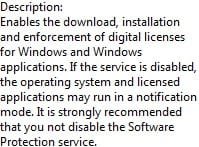
@ Maxxwire, are you talking about "Software Protection" in services?
 

Attachments

  • software protection.jpg
    software protection.jpg
    11 KB · Views: 415

My Computer My Computer

Computer type
PC/Desktop
Computer Manufacturer/Model Number
Bruce ... somewhere in his 40's
OS
Windows 7 Ultimate 32bit SP1
CPU
Intel(R) Core(TM)2 Quad CPU @ 2.40GHz, 2400 MHz
Motherboard
INTEL/D975XBX2
Memory
4 GB
Graphics Card(s)
ATI Radeon HD 2600 Pro
Monitor(s) Displays
Samsung SyncMaster 914v
Screen Resolution
1280 x 1024
Hard Drives
2/500GB each ... ST3500630AS ATA Device.
One is not connected
PSU
Rocketfish 700 W
Case
G.Skill Gigabyte Chassis
Keyboard
Standard PS/2 Keyboard
Mouse
Microsoft PS/2 Mouse
Internet Speed
DSL
Antivirus
Avira Internet Security
Browser
IE 11
Other Info
ATI HDMI Audio
Nearly every new program I install wants to phone home during the installation and even plugging in or unplugging a USB device can prompt a call to Redmond
@ Maxxwire, are you talking about "Software Protection" in services?

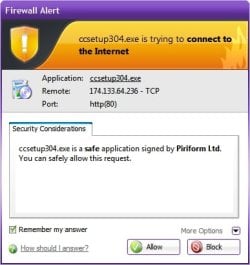
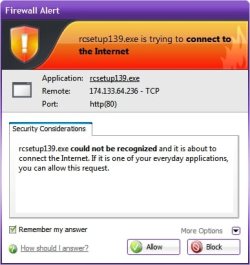
No, I was referring to how the Comodo Firewall when set in Custom Policy Mode will prevent any unauthorized access to the internet as when these 2 Piriform programs tried to 'phone home' during the installation process. As can be seen they were both trying to call the same number without success...

~Maxx~

ComodoFirewallLogo.png
 

Attachments

  • CCleaner.jpg
    CCleaner.jpg
    24.5 KB · Views: 6
  • Recuva.jpg
    Recuva.jpg
    25.7 KB · Views: 7

My Computer My Computer

Computer Manufacturer/Model Number
HP HPE 270f
OS
Windows 7 x64 Home Premium
CPU
Intel Core i7 930 @ 2.8 Ghz Socket 1366 LGA
Motherboard
Pegatron Truckee v1.04E41
Memory
8 GB 1366 Mhz DDR3 (PC3-10700) RAM
Graphics Card(s)
ATI Radeon 5770 1 GB DDR5 RAM
Sound Card
Realtech High Definition
Monitor(s) Displays
32" Sony Bravia
Screen Resolution
1366 X 768
Hard Drives
Intel 25nm 120 GB Series 320 SSD HD Tune- 265 MBps Read/ 130 MBps Write

LaCie 1TB + 1TB RAID 0 eSATA Drive HD Tune- 160 MBps Read/ 90 MBps Write
Keyboard
Logitech Illuminated
Mouse
Logitech MX Revolution
Internet Speed
36.4 Mbps Maximum on a 37 Mbps Motorola SB501 Modem
Oh, I see .... yeah, Avira Firewall pops up too to ask allow or deny.
 

My Computer My Computer

Computer type
PC/Desktop
Computer Manufacturer/Model Number
Bruce ... somewhere in his 40's
OS
Windows 7 Ultimate 32bit SP1
CPU
Intel(R) Core(TM)2 Quad CPU @ 2.40GHz, 2400 MHz
Motherboard
INTEL/D975XBX2
Memory
4 GB
Graphics Card(s)
ATI Radeon HD 2600 Pro
Monitor(s) Displays
Samsung SyncMaster 914v
Screen Resolution
1280 x 1024
Hard Drives
2/500GB each ... ST3500630AS ATA Device.
One is not connected
PSU
Rocketfish 700 W
Case
G.Skill Gigabyte Chassis
Keyboard
Standard PS/2 Keyboard
Mouse
Microsoft PS/2 Mouse
Internet Speed
DSL
Antivirus
Avira Internet Security
Browser
IE 11
Other Info
ATI HDMI Audio
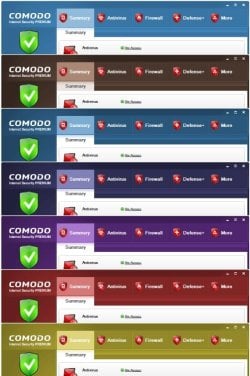
How did you get your Comodo Purple? mine's black
 

My Computer My Computer

Computer Manufacturer/Model Number
HP p6270z
OS
Windows 7 Home Premium x64
CPU
AMD Athlon II X4 620
Motherboard
Foxconn ALOE (CPU 1)
Memory
4.00GB Dual Channel DDR3 @ 666Mhz (9-9-9-24)
Graphics Card(s)
HD Radeon 4200 (Integrated)
Sound Card
Realtek High Definition Audio
Monitor(s) Displays
HP 2311 (1920x1080) @ 60Hz
Screen Resolution
1920x1080
Hard Drives
488GB Seagate ST3500418AS SCSI Disk Device (RAID)

My Computer My Computer

OS
Windows 7 Ultimate x64
CPU
Intel i5 750
Motherboard
Gigabyte P55A U3DR
Memory
2x2GB DDR3 Dual-kit
Graphics Card(s)
ATI Radeon HD4670
Sound Card
Onboard
Monitor(s) Displays
Samsung SyncMaster P2350
Hard Drives
Western Digital 1TB, 64MB cache, internal
Samsung Story 1.5TB, external
PSU
400W rated, 460W max
Case
CoolerMaster
Cooling
Air
Nearly every new program I install wants to phone home during the installation and even plugging in or unplugging a USB device can prompt a call to Redmond
@ Maxxwire, are you talking about "Software Protection" in services?

No, I was referring to how the Comodo Firewall when set in Custom Policy Mode will prevent any unauthorized access to the internet as when these 2 Piriform programs tried to 'phone home' during the installation process. As can be seen they were both trying to call the same number without success...

~Maxx~

ComodoFirewallLogo.png

Please keep in mind that a lot of these programs are not phoning home as a means of tracking your usage.

as shown above, they are simply doing a check for the latest version of the software. You can easily go into settings and tell it not to check.

Not everything is a threat.
 

My Computer My Computer

Computer Manufacturer/Model Number
Self Built
OS
Win 7 Ultimate 32bit
CPU
C2D E6600 2.4Ghz
Motherboard
Intel D965WH
Memory
4G Kingston KHX5400D2
Graphics Card(s)
EVGA GTX 570 HD SC (012-P3-1573-KR)
Sound Card
On-Board
Monitor(s) Displays
Samsung 226BW
Screen Resolution
1680 x 1050
Hard Drives
2 x 250 Seagate Barracuda
2 x 500 Seagate Barracuda (Raid1)
PSU
Corsair TX750W
Case
In-Win C589
Cooling
Stock Intel Cooling
Not everything is a threat.

The definition of Spyware is any program that tries to pass information to the internet without the computer operator's express permission. Now you're telling us that in your definition some Spyware is benign? Could you please show us your list of approved Spyware along with documented proof that its information gathering is not a threat?

I always instruct every program I install not to phone home for updates or for any other reason so please show us in exacting detail how you tell exactly packet for packet what these programs are communicating that makes you 100% sure that no personal information is being transmitted by these scores of programs that phone home without prior authorization many of which call even before they are installed or are you just using a 'hoping for the best' computer security strategy???

~Maxx~

ComodoFirewallLogo.png
 

My Computer My Computer

Computer Manufacturer/Model Number
HP HPE 270f
OS
Windows 7 x64 Home Premium
CPU
Intel Core i7 930 @ 2.8 Ghz Socket 1366 LGA
Motherboard
Pegatron Truckee v1.04E41
Memory
8 GB 1366 Mhz DDR3 (PC3-10700) RAM
Graphics Card(s)
ATI Radeon 5770 1 GB DDR5 RAM
Sound Card
Realtech High Definition
Monitor(s) Displays
32" Sony Bravia
Screen Resolution
1366 X 768
Hard Drives
Intel 25nm 120 GB Series 320 SSD HD Tune- 265 MBps Read/ 130 MBps Write

LaCie 1TB + 1TB RAID 0 eSATA Drive HD Tune- 160 MBps Read/ 90 MBps Write
Keyboard
Logitech Illuminated
Mouse
Logitech MX Revolution
Internet Speed
36.4 Mbps Maximum on a 37 Mbps Motorola SB501 Modem
You never said which AV program you are running. E.g in my NIS2011 I can make the same settings as in Commodo. Maybe you want to check with your AV program. Then you would not have to install another piece of software.
 

My Computer My Computer

Computer Manufacturer/Model Number
HP, Dell, Gateway, Toshiba - 4 laptops and 2 desktops
OS
Vista, Windows7, Mint Mate, Zorin, Windows 8
CPU
from 1.6GHz Duo to i7
Monitor(s) Displays
2x HP w2207
Hard Drives
5x HDD, 7x SSD, 12x Externals
Keyboard
with trackball - no mices
Mouse
Trackball mice
Internet Speed
DSL 6000
How did you get your Comodo Purple? mine's black

The Mindlessmissy themes for Comodo and instructions are in This Thread, but you will have to dig around to find the download link for the .zip file that used to be on the first page of the thread.

~Maxx~

ComodoFirewallLogo.png
 

Attachments

  • Themes__.jpg
    Themes__.jpg
    58 KB · Views: 8

My Computer My Computer

Computer Manufacturer/Model Number
HP HPE 270f
OS
Windows 7 x64 Home Premium
CPU
Intel Core i7 930 @ 2.8 Ghz Socket 1366 LGA
Motherboard
Pegatron Truckee v1.04E41
Memory
8 GB 1366 Mhz DDR3 (PC3-10700) RAM
Graphics Card(s)
ATI Radeon 5770 1 GB DDR5 RAM
Sound Card
Realtech High Definition
Monitor(s) Displays
32" Sony Bravia
Screen Resolution
1366 X 768
Hard Drives
Intel 25nm 120 GB Series 320 SSD HD Tune- 265 MBps Read/ 130 MBps Write

LaCie 1TB + 1TB RAID 0 eSATA Drive HD Tune- 160 MBps Read/ 90 MBps Write
Keyboard
Logitech Illuminated
Mouse
Logitech MX Revolution
Internet Speed
36.4 Mbps Maximum on a 37 Mbps Motorola SB501 Modem
You never said which AV program you are running. E.g in my NIS2011 I can make the same settings as in Commodo. Maybe you want to check with your AV program. Then you would not have to install another piece of software.

I literally run things as simple as possible and for me that means no cumbersome blacklist Antivirus program because by the time it reacts the computer is already infected. Two years ago I replaced my Antivirus with Sandboxie which prevents infection rather than telling me my computer is already infected.

SBLogo.png


Ever since then an ounce of Sandboxie prevention has been worth a pound of Antivirus cure! With Norton 2009 AV I had 3 infections in less than 1 year while Sandboxie has kept both of my computers 100% clean for almost 2 years!

~Maxx~

ComodoFirewallLogo.png


PS- Comodo is spelled with only 1 m.
 

My Computer My Computer

Computer Manufacturer/Model Number
HP HPE 270f
OS
Windows 7 x64 Home Premium
CPU
Intel Core i7 930 @ 2.8 Ghz Socket 1366 LGA
Motherboard
Pegatron Truckee v1.04E41
Memory
8 GB 1366 Mhz DDR3 (PC3-10700) RAM
Graphics Card(s)
ATI Radeon 5770 1 GB DDR5 RAM
Sound Card
Realtech High Definition
Monitor(s) Displays
32" Sony Bravia
Screen Resolution
1366 X 768
Hard Drives
Intel 25nm 120 GB Series 320 SSD HD Tune- 265 MBps Read/ 130 MBps Write

LaCie 1TB + 1TB RAID 0 eSATA Drive HD Tune- 160 MBps Read/ 90 MBps Write
Keyboard
Logitech Illuminated
Mouse
Logitech MX Revolution
Internet Speed
36.4 Mbps Maximum on a 37 Mbps Motorola SB501 Modem
I got rid of Sandboxie long time ago. Too inconvenient. I rather do frequent images - just in case. And NIS2011 has done a pretty decent job - up to now. I guess everybody has their own ways.
 

My Computer My Computer

Computer Manufacturer/Model Number
HP, Dell, Gateway, Toshiba - 4 laptops and 2 desktops
OS
Vista, Windows7, Mint Mate, Zorin, Windows 8
CPU
from 1.6GHz Duo to i7
Monitor(s) Displays
2x HP w2207
Hard Drives
5x HDD, 7x SSD, 12x Externals
Keyboard
with trackball - no mices
Mouse
Trackball mice
Internet Speed
DSL 6000
Not everything is a threat.

The definition of Spyware is any program that tries to pass information to the internet without the computer operator's express permission. Now you're telling us that in your definition some Spyware is benign? Could you please show us your list of approved Spyware along with documented proof that its information gathering is not a threat?

I always instruct every program I install not to phone home for updates or for any other reason so please show us in exacting detail how you tell exactly packet for packet what these programs are communicating that makes you 100% sure that no personal information is being transmitted by these scores of programs that phone home without prior authorization many of which call even before they are installed or are you just using a 'hoping for the best' computer security strategy???

~Maxx~

ComodoFirewallLogo.png
Im no king maker, but you win:DI am about as brainless as it gets when it comes to computers, but this even i get, and dont or cant understand why so many others that have mucho more computer smarts then i try to make a case against it.:shock: Most A/V's are there to tell you when you get infected.:shock:

 

My Computer My Computer

OS
Win 7 64 premium
Other Info
7 fw, LUA, UAC on high, IE-9 w/ smartscreen on, SANDBOXIE
I got rid of Sandboxie long time ago. Too inconvenient. I rather do frequent images - just in case. And NIS2011 has done a pretty decent job - up to now. I guess everybody has their own ways.
Pretty decent? Have you had something get through? Ive heard NIS 2011 was as good as it gets for complete A/V suites. Please share.
 

My Computer My Computer

OS
Win 7 64 premium
Other Info
7 fw, LUA, UAC on high, IE-9 w/ smartscreen on, SANDBOXIE
I got rid of Sandboxie long time ago. Too inconvenient. I rather do frequent images - just in case.

I have taken the time to learn how to use Sandboxie and I feel it has been worth it because I haven't had a single Malware detection on either of my computers since I started using it.

As far as frequent Windows partition imaging goes Macruim Reflect has saved my computer from more dangerous situations than I care to count! As an example after I found that Windows 7 SP1 had a critical bug I didn't even think about uninstalling it, but rather turned to the Macruim Reflect Image that I made just before installing SP1 and within 10 minutes the computer was back to running good ol' Win 7 RTM once again proving that Image restoration is the ultimate cure!

~Maxx~

Reflect_Logo_100-1.png
 

My Computer My Computer

Computer Manufacturer/Model Number
HP HPE 270f
OS
Windows 7 x64 Home Premium
CPU
Intel Core i7 930 @ 2.8 Ghz Socket 1366 LGA
Motherboard
Pegatron Truckee v1.04E41
Memory
8 GB 1366 Mhz DDR3 (PC3-10700) RAM
Graphics Card(s)
ATI Radeon 5770 1 GB DDR5 RAM
Sound Card
Realtech High Definition
Monitor(s) Displays
32" Sony Bravia
Screen Resolution
1366 X 768
Hard Drives
Intel 25nm 120 GB Series 320 SSD HD Tune- 265 MBps Read/ 130 MBps Write

LaCie 1TB + 1TB RAID 0 eSATA Drive HD Tune- 160 MBps Read/ 90 MBps Write
Keyboard
Logitech Illuminated
Mouse
Logitech MX Revolution
Internet Speed
36.4 Mbps Maximum on a 37 Mbps Motorola SB501 Modem
I got rid of Sandboxie long time ago. Too inconvenient. I rather do frequent images - just in case. And NIS2011 has done a pretty decent job - up to now. I guess everybody has their own ways.
Pretty decent? Have you had something get through? Ive heard NIS 2011 was as good as it gets for complete A/V suites. Please share.
On my my 3 main systems, I always used NIS. Never had a problem. On my other 3 systems I have experimented with MSE, McAfee and others. MSE was the only one that let 2 Trojans thru. But that could have been just bad luck.

I rely more on my images than on the AV programs. That always allows me to bail myself out.
 

My Computer My Computer

Computer Manufacturer/Model Number
HP, Dell, Gateway, Toshiba - 4 laptops and 2 desktops
OS
Vista, Windows7, Mint Mate, Zorin, Windows 8
CPU
from 1.6GHz Duo to i7
Monitor(s) Displays
2x HP w2207
Hard Drives
5x HDD, 7x SSD, 12x Externals
Keyboard
with trackball - no mices
Mouse
Trackball mice
Internet Speed
DSL 6000
Back
Top