What's the Best Anti-Malware?

- in all frankness is there a suite that is totally safe??

The key to being totally safe is in totally effective computer Virtualization. My nephew is currently serving in the US Military and was attached to a communications outfit in Iraq for 3 consecutive tours and when we were discussing computer security he told me that they operate their computers exclusively under Oracle software Virtualization with not so much as one mention of any civilian internet security program of course in his line of work they are doing more than just trying to avoid malicious code there are lives at stake.

~Maxx~
.
Win7_50.png
Im not trying to start something, but our military complex, D.O.D. contractors get hacked more than you will want to hear about.:shock::confused::cry:
 

My Computer My Computer

At a glance

Win 7 64 premium
OS
Win 7 64 premium
Other Info
7 fw, LUA, UAC on high, IE-9 w/ smartscreen on, SANDBOXIE
I would advise re-formatting your O.S. before trying Comodo, this is highly recommended to get the best results, and to make sure the hipps wont see any malware and think its part of your system.

Where did you get this notion from? I've been using scores of different versions of Comodo over the last 2 years and not have I ever had Defense+ mistake a system program for malware. I've also been frequenting the Comodo forum during that time and I have ever on any occasion heard the recommendation to reformat before installing Comodo, that's just a nonsensical suggestion.

~Maxx~

ComodoFirewallLogo.png
 

My Computer My Computer

At a glance

Windows 7 x64 Home PremiumIntel Core i7 930 @ 2.8 Ghz Socket 1366 LGA8 GB 1366 Mhz DDR3 (PC3-10700) RAMATI Radeon 5770 1 GB DDR5 RAM
Computer Manufacturer/Model Number
HP HPE 270f
OS
Windows 7 x64 Home Premium
CPU
Intel Core i7 930 @ 2.8 Ghz Socket 1366 LGA
Motherboard
Pegatron Truckee v1.04E41
Memory
8 GB 1366 Mhz DDR3 (PC3-10700) RAM
Graphics Card(s)
ATI Radeon 5770 1 GB DDR5 RAM
Sound Card
Realtech High Definition
Monitor(s) Displays
32" Sony Bravia
Screen Resolution
1366 X 768
Hard Drives
Intel 25nm 120 GB Series 320 SSD HD Tune- 265 MBps Read/ 130 MBps Write

LaCie 1TB + 1TB RAID 0 eSATA Drive HD Tune- 160 MBps Read/ 90 MBps Write
Keyboard
Logitech Illuminated
Mouse
Logitech MX Revolution
Internet Speed
36.4 Mbps Maximum on a 37 Mbps Motorola SB501 Modem
I be he;1283715 Im not trying to start something said:
I'm not talking about contractors, but rather about enlisted military personnel like my nephew and his brother who is in special opps use who use virtualized computers exclusively to thwart hacking.

~Maxx~

SBLogo.png
 

My Computer My Computer

At a glance

Windows 7 x64 Home PremiumIntel Core i7 930 @ 2.8 Ghz Socket 1366 LGA8 GB 1366 Mhz DDR3 (PC3-10700) RAMATI Radeon 5770 1 GB DDR5 RAM
Computer Manufacturer/Model Number
HP HPE 270f
OS
Windows 7 x64 Home Premium
CPU
Intel Core i7 930 @ 2.8 Ghz Socket 1366 LGA
Motherboard
Pegatron Truckee v1.04E41
Memory
8 GB 1366 Mhz DDR3 (PC3-10700) RAM
Graphics Card(s)
ATI Radeon 5770 1 GB DDR5 RAM
Sound Card
Realtech High Definition
Monitor(s) Displays
32" Sony Bravia
Screen Resolution
1366 X 768
Hard Drives
Intel 25nm 120 GB Series 320 SSD HD Tune- 265 MBps Read/ 130 MBps Write

LaCie 1TB + 1TB RAID 0 eSATA Drive HD Tune- 160 MBps Read/ 90 MBps Write
Keyboard
Logitech Illuminated
Mouse
Logitech MX Revolution
Internet Speed
36.4 Mbps Maximum on a 37 Mbps Motorola SB501 Modem
I would advise re-formatting your O.S. before trying Comodo, this is highly recommended to get the best results, and to make sure the hipps wont see any malware and think its part of your system.

Where did you get this notion from? I've been using scores of different versions of Comodo over the last 2 years and not have I ever had Defense+ mistake a system program for malware. I've also been frequenting the Comodo forum during that time and I have ever on any occasion heard the recommendation to reformat before installing Comodo, that's just a nonsensical suggestion.

~Maxx~

ComodoFirewallLogo.png
Didnt sound nonsensical to me, but you may be right. Dont remember where the suggestion came from, its been awhile since i read it.
 

My Computer My Computer

At a glance

Win 7 64 premium
OS
Win 7 64 premium
Other Info
7 fw, LUA, UAC on high, IE-9 w/ smartscreen on, SANDBOXIE
Dont remember where the suggestion came from, its been awhile since i read it.

I see. Well, all I'm saying is that I've never seen any such advise given on the Comodo forum. Before installing a new version of Comodo the previous version must be removed, but there is no reformatting of the Windows partition involved.

~Maxx~

ComodoFirewallLogo.png
 

My Computer My Computer

At a glance

Windows 7 x64 Home PremiumIntel Core i7 930 @ 2.8 Ghz Socket 1366 LGA8 GB 1366 Mhz DDR3 (PC3-10700) RAMATI Radeon 5770 1 GB DDR5 RAM
Computer Manufacturer/Model Number
HP HPE 270f
OS
Windows 7 x64 Home Premium
CPU
Intel Core i7 930 @ 2.8 Ghz Socket 1366 LGA
Motherboard
Pegatron Truckee v1.04E41
Memory
8 GB 1366 Mhz DDR3 (PC3-10700) RAM
Graphics Card(s)
ATI Radeon 5770 1 GB DDR5 RAM
Sound Card
Realtech High Definition
Monitor(s) Displays
32" Sony Bravia
Screen Resolution
1366 X 768
Hard Drives
Intel 25nm 120 GB Series 320 SSD HD Tune- 265 MBps Read/ 130 MBps Write

LaCie 1TB + 1TB RAID 0 eSATA Drive HD Tune- 160 MBps Read/ 90 MBps Write
Keyboard
Logitech Illuminated
Mouse
Logitech MX Revolution
Internet Speed
36.4 Mbps Maximum on a 37 Mbps Motorola SB501 Modem
Do you think its possible for Comodo D+ to be downloaded onto an infected
computer and viewing the malware as part of the system? or is that most likely only going to happen with a behavior blocker?
 

My Computer My Computer

At a glance

Win 7 64 premium
OS
Win 7 64 premium
Other Info
7 fw, LUA, UAC on high, IE-9 w/ smartscreen on, SANDBOXIE

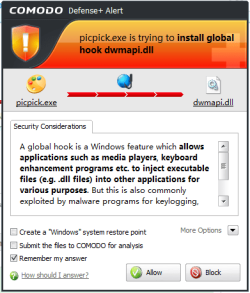
I be he- I think that you are somewhat confused about what the Comodo Defense+ Host Intrusion Prevention System actually does. HIPS is not a simple blacklist Antivirus that has a long list of known Malware that it uses to recognize Malware. In order to use HIPS software successfully the operator must have a basic knowledge of the computer's software because HIPS does not differentiate between system programs and suspect Malware it simply allerts the operator that a software which is not already on the approved run list is trying to gain an elevated privilege.

So in answer to your question HIPS is not an Antivirus therefore it does not know Malware from system software its only job is to notify the operator if unapproved software is trying to run on the computer so if Defense+ HIPS was downloaded to an infected computer without having been set up to recognize which programs were part of the system then it would give an alert for each and every program on the computer that tried to run whether it was Malware or not.

The proper way to run HIPS software is to first sanitize the computer of Malware
or better yet re-image the windows partition with a known clean copy of Windows or System Image and then run all of the programs that are used on the computer while Comodo Defense+ HIPS is in Training Mode and then when returned to Safe Mode Defense+ HIPS will provide a level of protection far more effective than UAC.

~Maxx~

ComodoFirewallLogo.png
 

Attachments

  • 1 Comodo D+.png
    1 Comodo D+.png
    16.8 KB · Views: 10

My Computer My Computer

At a glance

Windows 7 x64 Home PremiumIntel Core i7 930 @ 2.8 Ghz Socket 1366 LGA8 GB 1366 Mhz DDR3 (PC3-10700) RAMATI Radeon 5770 1 GB DDR5 RAM
Computer Manufacturer/Model Number
HP HPE 270f
OS
Windows 7 x64 Home Premium
CPU
Intel Core i7 930 @ 2.8 Ghz Socket 1366 LGA
Motherboard
Pegatron Truckee v1.04E41
Memory
8 GB 1366 Mhz DDR3 (PC3-10700) RAM
Graphics Card(s)
ATI Radeon 5770 1 GB DDR5 RAM
Sound Card
Realtech High Definition
Monitor(s) Displays
32" Sony Bravia
Screen Resolution
1366 X 768
Hard Drives
Intel 25nm 120 GB Series 320 SSD HD Tune- 265 MBps Read/ 130 MBps Write

LaCie 1TB + 1TB RAID 0 eSATA Drive HD Tune- 160 MBps Read/ 90 MBps Write
Keyboard
Logitech Illuminated
Mouse
Logitech MX Revolution
Internet Speed
36.4 Mbps Maximum on a 37 Mbps Motorola SB501 Modem
If, and only if, the user answers the pop-ups correctly, especially when the inevitable life changing pop-up rares its ugly head. Answer it correctly, advance to Go and collect $200, answer it wrong, and go directly to jail.
 

My Computer My Computer

At a glance

Windows 7 Home Premium x64 SP1
OS
Windows 7 Home Premium x64 SP1
I've been using Comodo everyday for 2 years on 2 computers and I have yet to see that 'life changing pop-up', but I'm not the least worried because like every other reasonably capable computer operator I have plenty of squeaky clean image backups stored on several inert drives that are just waiting to be restored in 10 minutes time making that jail sentence reserved specifically for those who are unprepared for any of the 100's of things that could instantly go horribly wrong with a computer without so much as the benefit of a pop-up warning.

~Maxx~

ComodoFirewallLogo.png
 

My Computer My Computer

At a glance

Windows 7 x64 Home PremiumIntel Core i7 930 @ 2.8 Ghz Socket 1366 LGA8 GB 1366 Mhz DDR3 (PC3-10700) RAMATI Radeon 5770 1 GB DDR5 RAM
Computer Manufacturer/Model Number
HP HPE 270f
OS
Windows 7 x64 Home Premium
CPU
Intel Core i7 930 @ 2.8 Ghz Socket 1366 LGA
Motherboard
Pegatron Truckee v1.04E41
Memory
8 GB 1366 Mhz DDR3 (PC3-10700) RAM
Graphics Card(s)
ATI Radeon 5770 1 GB DDR5 RAM
Sound Card
Realtech High Definition
Monitor(s) Displays
32" Sony Bravia
Screen Resolution
1366 X 768
Hard Drives
Intel 25nm 120 GB Series 320 SSD HD Tune- 265 MBps Read/ 130 MBps Write

LaCie 1TB + 1TB RAID 0 eSATA Drive HD Tune- 160 MBps Read/ 90 MBps Write
Keyboard
Logitech Illuminated
Mouse
Logitech MX Revolution
Internet Speed
36.4 Mbps Maximum on a 37 Mbps Motorola SB501 Modem
I be he- I think that you are somewhat confused about what the Comodo Defense+ Host Intrusion Prevention System actually does. HIPS is not a simple blacklist Antivirus that has a long list of known Malware that it uses to recognize Malware. In order to use HIPS software successfully the operator must have a basic knowledge of the computer's software because HIPS does not differentiate between system programs and suspect Malware it simply allerts the operator that a software which is not already on the approved run list is trying to gain an elevated privilege.

So in answer to your question HIPS is not an Antivirus therefore it does not know Malware from system software its only job is to notify the operator if unapproved software is trying to run on the computer so if Defense+ HIPS was downloaded to an infected computer without having been set up to recognize which programs were part of the system then it would give an alert for each and every program on the computer that tried to run whether it was Malware or not.

The proper way to run HIPS software is to first sanitize the computer of Malware
or better yet re-image the windows partition with a known clean copy of Windows or System Image and then run all of the programs that are used on the computer while Comodo Defense+ HIPS is in Training Mode and then when returned to Safe Mode Defense+ HIPS will provide a level of protection far more effective than UAC.

~Maxx~

ComodoFirewallLogo.png
This is what i was trying to say a couple of posts ago. Im not sure where the misunderstanding is, but thank you for takeing the time and responding.
 

My Computer My Computer

At a glance

Win 7 64 premium
OS
Win 7 64 premium
Other Info
7 fw, LUA, UAC on high, IE-9 w/ smartscreen on, SANDBOXIE
This is what i was trying to say a couple of posts ago. Im not sure where the misunderstanding is, but thank you for takeing the time and responding.

Just for the sake of clarity the best recommendation but certainly not mandatory is to re-image Windows after any Malware infection regardless of what Internet Security software is used.

Fortunately since I uninstalled Norton 2009 which allowed a Malware infection and 2 consecutive Hosts File Infections after which I was forced to reinstall Windows from scratch and started using Comodo and running my browsers in the virtual space of Sandboxie and I haven't had a single problem or even one detection of so much as a tracking cookie since and I have never been forced to re-image Windows because of a Malware infection since I started using Comodo 2 years ago on either one of my computers like I was forced to do when running Norton.

~Maxx~

ComodoFirewallLogo.png
 

My Computer My Computer

At a glance

Windows 7 x64 Home PremiumIntel Core i7 930 @ 2.8 Ghz Socket 1366 LGA8 GB 1366 Mhz DDR3 (PC3-10700) RAMATI Radeon 5770 1 GB DDR5 RAM
Computer Manufacturer/Model Number
HP HPE 270f
OS
Windows 7 x64 Home Premium
CPU
Intel Core i7 930 @ 2.8 Ghz Socket 1366 LGA
Motherboard
Pegatron Truckee v1.04E41
Memory
8 GB 1366 Mhz DDR3 (PC3-10700) RAM
Graphics Card(s)
ATI Radeon 5770 1 GB DDR5 RAM
Sound Card
Realtech High Definition
Monitor(s) Displays
32" Sony Bravia
Screen Resolution
1366 X 768
Hard Drives
Intel 25nm 120 GB Series 320 SSD HD Tune- 265 MBps Read/ 130 MBps Write

LaCie 1TB + 1TB RAID 0 eSATA Drive HD Tune- 160 MBps Read/ 90 MBps Write
Keyboard
Logitech Illuminated
Mouse
Logitech MX Revolution
Internet Speed
36.4 Mbps Maximum on a 37 Mbps Motorola SB501 Modem
Hmmm it has been years since I have used counter spy I will visit their site and may give this software a test run, I don't believe there is only one BEST but I do believe yo have to use at least a couple of different ones though just because other companies have different signature databases. For instance I use Emisisoft Emergency Kit and Trojan Hunter and Malware Bytes none of them are running they sit dormant till I think I should run a scan. The Outpost Security Suite I use for my main protection is always running it's malware scanner on "any access attempt" and I haven't had anything get by that as of yet, cause the other scanners don't show anything...So in my opinion just keep some of the best known on this site at easy access for yourself and don't only use just one cause one just can't cover everything, and I'm sure 0-day viruses are missed all the time by any type of software that we use even if heuristic's are used...;)
 

My Computer My Computer

At a glance

Windows 7 Ultimate x64I76 x 1.5V DDR3 DIMM sockets supporting up to 2...GeForce GTX 580
Computer Manufacturer/Model Number
Alienware
OS
Windows 7 Ultimate x64
CPU
I7
Motherboard
GA-X58-USB3
Memory
6 x 1.5V DDR3 DIMM sockets supporting up to 24 GB of system
Graphics Card(s)
GeForce GTX 580
Sound Card
Realtek ALC892 codec 2/4/5.1/7.1-channel
Monitor(s) Displays
NEC Display Solutions E321 Black 32"
Screen Resolution
1366 x 768
Hard Drives
OCZ Colossus LT Series OCZSSD2-1CLSLT1T 3.5" 1TB SATA II MLC Internal Solid State Drive
PSU
XFX Black Edition XPS-850W-BES 850W ATX12V
Case
Antec
Cooling
Zalman
Keyboard
Microsoft
Mouse
Microsoft
This is what i was trying to say a couple of posts ago. Im not sure where the misunderstanding is, but thank you for takeing the time and responding.

Just for the sake of clarity the best recommendation but certainly not mandatory is to re-image Windows after any Malware infection regardless of what Internet Security software is used.

Fortunately since I uninstalled Norton 2009 which allowed a Malware infection and 2 consecutive Hosts File Infections after which I was forced to reinstall Windows from scratch and started using Comodo and running my browsers in the virtual space of Sandboxie and I haven't had a single problem or even one detection of so much as a tracking cookie since and I have never been forced to re-image Windows because of a Malware infection since I started using Comodo 2 years ago on either one of my computers like I was forced to do when running Norton.

~Maxx~

ComodoFirewallLogo.png
Ive heard Norton 2011 is the best for people who feel safer running a A/V suit. Never tried it myself, but it does seem to have quite a following.
Right now i have MSE " to keep my computer happy " and Sandboxie to keep me happy. I even stopped scanning for malware since sandboxie wont even let a tracking cookie through.:D MSE has been dead silent, maybe i will get rid of it.
 

My Computer My Computer

At a glance

Win 7 64 premium
OS
Win 7 64 premium
Other Info
7 fw, LUA, UAC on high, IE-9 w/ smartscreen on, SANDBOXIE
Like I said earlier my experience with Norton was that I paid $60 to have it let my computer get infected 3 times in less than a year.

You might take a minute and read Tzuk's Notes About Sandboxie 64 bit Edition unless you've already figured out how to bypass the Windows 7 Kernel Patch Protection.

~Maxx~

ComodoFirewallLogo.png
 

My Computer My Computer

At a glance

Windows 7 x64 Home PremiumIntel Core i7 930 @ 2.8 Ghz Socket 1366 LGA8 GB 1366 Mhz DDR3 (PC3-10700) RAMATI Radeon 5770 1 GB DDR5 RAM
Computer Manufacturer/Model Number
HP HPE 270f
OS
Windows 7 x64 Home Premium
CPU
Intel Core i7 930 @ 2.8 Ghz Socket 1366 LGA
Motherboard
Pegatron Truckee v1.04E41
Memory
8 GB 1366 Mhz DDR3 (PC3-10700) RAM
Graphics Card(s)
ATI Radeon 5770 1 GB DDR5 RAM
Sound Card
Realtech High Definition
Monitor(s) Displays
32" Sony Bravia
Screen Resolution
1366 X 768
Hard Drives
Intel 25nm 120 GB Series 320 SSD HD Tune- 265 MBps Read/ 130 MBps Write

LaCie 1TB + 1TB RAID 0 eSATA Drive HD Tune- 160 MBps Read/ 90 MBps Write
Keyboard
Logitech Illuminated
Mouse
Logitech MX Revolution
Internet Speed
36.4 Mbps Maximum on a 37 Mbps Motorola SB501 Modem
Thanks, i am aware of the potential problem reguarding the 64 bit version, and as mentioned on their web site the 64 downloads with "dropped rights" enabled.
I also recommend people stop useing their admin account for surfing, and use the guest account or set up a LUA instead. This will help keep malware confined, and easier to deal with.:D If one is not useing Sandboxie i would also recommend adding Superantispyware free, and Malwarebytes free, as on demand only scanners:D
 

My Computer My Computer

At a glance

Win 7 64 premium
OS
Win 7 64 premium
Other Info
7 fw, LUA, UAC on high, IE-9 w/ smartscreen on, SANDBOXIE
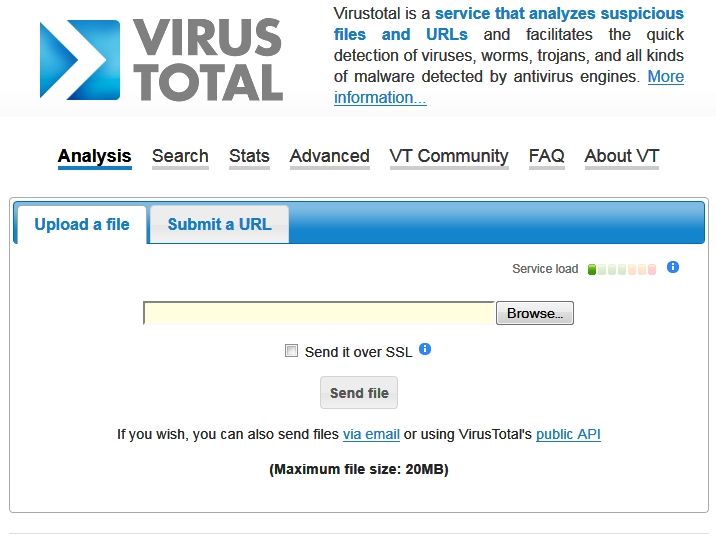
Malwarebytes is a great program I use it everyday to scan prospective downloads from the internet that are still in Sandboxie. For software that has been downloaded by one of my browsers into Sandboxie that is less than 20 MB in size I like to use Virus Total which scans each file using over 40 different antivirus engines and then renders a result, in that although Sandboxie will not let Malware alter the real computer great care must be taken when downloading software from Sandboxie into the computer to make sure that it is safe.

VTotal.jpg


Virus Total Uploader 2.0 even offers a context menu function that can be used to locate files that have been downloaded into Sandboxie and send them directly to Virus Total for evaluation right from the Sandboxie files to get 40+ opinions of how safe they are before downloading them into the computer.

~Maxx~

SBLogo.png
 

My Computer My Computer

At a glance

Windows 7 x64 Home PremiumIntel Core i7 930 @ 2.8 Ghz Socket 1366 LGA8 GB 1366 Mhz DDR3 (PC3-10700) RAMATI Radeon 5770 1 GB DDR5 RAM
Computer Manufacturer/Model Number
HP HPE 270f
OS
Windows 7 x64 Home Premium
CPU
Intel Core i7 930 @ 2.8 Ghz Socket 1366 LGA
Motherboard
Pegatron Truckee v1.04E41
Memory
8 GB 1366 Mhz DDR3 (PC3-10700) RAM
Graphics Card(s)
ATI Radeon 5770 1 GB DDR5 RAM
Sound Card
Realtech High Definition
Monitor(s) Displays
32" Sony Bravia
Screen Resolution
1366 X 768
Hard Drives
Intel 25nm 120 GB Series 320 SSD HD Tune- 265 MBps Read/ 130 MBps Write

LaCie 1TB + 1TB RAID 0 eSATA Drive HD Tune- 160 MBps Read/ 90 MBps Write
Keyboard
Logitech Illuminated
Mouse
Logitech MX Revolution
Internet Speed
36.4 Mbps Maximum on a 37 Mbps Motorola SB501 Modem
My sig is all I use and I've been Free of just about everything for quite a while
 

My Computer My Computer

At a glance

Windows 7 Home Premium x64AMD Athlon II X4 6204.00GB Dual Channel DDR3 @ 666Mhz (9-9-9-24)HD Radeon 4200 (Integrated)
Computer Manufacturer/Model Number
HP p6270z
OS
Windows 7 Home Premium x64
CPU
AMD Athlon II X4 620
Motherboard
Foxconn ALOE (CPU 1)
Memory
4.00GB Dual Channel DDR3 @ 666Mhz (9-9-9-24)
Graphics Card(s)
HD Radeon 4200 (Integrated)
Sound Card
Realtek High Definition Audio
Monitor(s) Displays
HP 2311 (1920x1080) @ 60Hz
Screen Resolution
1920x1080
Hard Drives
488GB Seagate ST3500418AS SCSI Disk Device (RAID)
My sig is all I use and I've been Free of just about everything for quite a while
With Norton & Comodo you might not even need common sence:shock:
 

My Computer My Computer

At a glance

Win 7 64 premium
OS
Win 7 64 premium
Other Info
7 fw, LUA, UAC on high, IE-9 w/ smartscreen on, SANDBOXIE
Malwarebytes is a great program I use it everyday to scan prospective downloads from the internet that are still in Sandboxie. For software that has been downloaded by one of my browsers into Sandboxie that is less than 20 MB in size I like to use Virus Total which scans each file using over 40 different antivirus engines and then renders a result, in that although Sandboxie will not let Malware alter the real computer great care must be taken when downloading software from Sandboxie into the computer to make sure that it is safe.

VTotal.jpg


Virus Total Uploader 2.0 even offers a context menu function that can be used to locate files that have been downloaded into Sandboxie and send them directly to Virus Total for evaluation right from the Sandboxie files to get 40+ opinions of how safe they are before downloading them into the computer.

~Maxx~

SBLogo.png
Virus total sounds like a fantastic idea. Great addition!
 

My Computer My Computer

At a glance

Win 7 64 premium
OS
Win 7 64 premium
Other Info
7 fw, LUA, UAC on high, IE-9 w/ smartscreen on, SANDBOXIE
I use Malwarebyte's Anti-Malware for long time and I must say that I am pleased with its features and effect of detection. For me it's the best, because I never had a problem with it.
 

My Computer My Computer

At a glance

Win 7 (x64)Intel Core 2 Duo E7500 2.93 GhzDDR2 2048 MBAti Radeon HD 4650
Computer Manufacturer/Model Number
Asus
OS
Win 7 (x64)
CPU
Intel Core 2 Duo E7500 2.93 Ghz
Motherboard
Asus P5KPL-AM EPU
Memory
DDR2 2048 MB
Graphics Card(s)
Ati Radeon HD 4650
Sound Card
-
Monitor(s) Displays
23"
Hard Drives
500GB WD Caviar Blue
PSU
Asus 500W
Case
Asus Vento
Cooling
Standard Intel CPU Fan
Keyboard
MS Industrials
Mouse
MS Industrials
Internet Speed
2 Mbps
Back
Top