i7 920 Ram Timings

randellfarrugia

New member
Member
Local time
2:15 AM
Messages
33
Hi, I have a set of 6gb (3x2gb) corsair xms 3 @ 1333mhz which are currently by default running at 1066 mhz. My CPU is Intel i7 920 currently at stock (2.66Ghz)

If I just arrange the timings from the bios will it cause any problems / damage ?
Are the timings related to the cpu clock ?

Thanks
 
Last edited:

My Computer My Computer

At a glance

Windows 7 Home Premium 64 bitIntel i7 920 @ 3.06 GHzCorsair XMS 3 Triple Channel 6GB - 1333mhz @ ...Gainward GTX 275 896MB
OS
Windows 7 Home Premium 64 bit
CPU
Intel i7 920 @ 3.06 GHz
Motherboard
Asus P6T SE
Memory
Corsair XMS 3 Triple Channel 6GB - 1333mhz @ 9-9-9-24 (1.5v)
Graphics Card(s)
Gainward GTX 275 896MB
Sound Card
Realtek HD Audio
Screen Resolution
1440x900
PSU
Coolermaster 850W Silent Pro
Cooling
Akasa Nero CPU Cooler
Other Info
Memory is currently at 1144mhz @ 8-8-8-20 (1.5v)
If you are running your I7-920 at its stock 2.66GHz, that means that the bus frequency is 133 MHz.

Your RAM is running at 8X that, 1066 Mhz.

You don't say what your motherboard is, but there may be a BIOS setting that allows you to set the RAM multiplier up to 10, to get 1333 MHz. I suggest that you set the RAM timings and voltage to their nominal values. If this is your RAM:

XMS3

it's 9-9-9-24 at 1.5V. (The page also tells that if you rely on the SPD seeings, you'll get 1066 MHz.)
 

My Computer My Computer

At a glance

Windows 7 Pro X64 SP1Intel Core I7-3930k16 GB Gskill DDR3-2133eVGA GTX680
Computer Manufacturer/Model Number
homegrown
OS
Windows 7 Pro X64 SP1
CPU
Intel Core I7-3930k
Motherboard
Asus P9X79 Pro
Memory
16 GB Gskill DDR3-2133
Graphics Card(s)
eVGA GTX680
Sound Card
Creative X-Fi Titanium
Monitor(s) Displays
As PA246Q
Screen Resolution
1920 X 1200
Hard Drives
Corsair Force GT, 120 GB
WDC 1.5TB Caviar Black
PSU
PCP&C Silencer 750 Crossfire
Case
Silverstone FT02
Cooling
Noctua NH-D14
Keyboard
cheap Logitech USB
Mouse
Microsoft Intellimouse Explorer (old optical) USB
Internet Speed
6Mb cable
Other Info
Pioneer BDR-205
Samsung SH-203B
Monsoon 5.1 speakers
yes that is my exact Ram
my motherboard is Asus P6T SE

in the bios setting I saw under DRAM Timings that for "locked CPU" only DDR3-800 and DDR3-1066 will work

I just need someone to confirm that changing the timings on the Ram will not damage my components.

Thanks
 

My Computer My Computer

At a glance

Windows 7 Home Premium 64 bitIntel i7 920 @ 3.06 GHzCorsair XMS 3 Triple Channel 6GB - 1333mhz @ ...Gainward GTX 275 896MB
OS
Windows 7 Home Premium 64 bit
CPU
Intel i7 920 @ 3.06 GHz
Motherboard
Asus P6T SE
Memory
Corsair XMS 3 Triple Channel 6GB - 1333mhz @ 9-9-9-24 (1.5v)
Graphics Card(s)
Gainward GTX 275 896MB
Sound Card
Realtek HD Audio
Screen Resolution
1440x900
PSU
Coolermaster 850W Silent Pro
Cooling
Akasa Nero CPU Cooler
Other Info
Memory is currently at 1144mhz @ 8-8-8-20 (1.5v)
Hi, I have a set of 6gb (3x2gb) corsair xms 3 @ 1333mhz which are currently by default running at 1066 mhz. My CPU is Intel i7 920 currently at stock (2.66Ghz)

If I just arrange the timings from the bios will it cause any problems / damage ?
Are the timings related to the cpu clock ?

Thanks

If the RAM you bought is supposed to run at 1333MHz than you'll have to "manually" set those parameters in the BIOS. By default any RAM running above 1066 will be set to 1066.

Example: I have corsair's Dominator Memory which runs at 1600MHz @1.65volts. If I don't use the memory's XMP profile or just let the board use it's default settings it will run my memory at 1066MHz @1.5volts - regardless of the fact that the memory is designed to run at 1600MHz @1.65volts. Therefore I have to either manually set my memory to its "performance" settings or use the memory's supported XMP profile with my MB allows.

In short if you want your memory to run at its supported speed of 1333MHz you're have to manully set it in the BIOS. In you case you want to set the speed at 1333MHz and leave the voltage at 1.5 according to the specs listed here - XMS3

Hope this helps.
 

My Computer My Computer

At a glance

Windows 10 ProIntel Core i7-4770K (3.5Ghz)32 gig Corsair Dominator Platinum (4x8Gig)Sapphire Tri-X R9 Fury
Computer type
PC/Desktop
Computer Manufacturer/Model Number
Custom built by me.
OS
Windows 10 Pro
CPU
Intel Core i7-4770K (3.5Ghz)
Motherboard
Gigabyte G1 Sniper 5 (F10 Bios)
Memory
32 gig Corsair Dominator Platinum (4x8Gig)
Graphics Card(s)
Sapphire Tri-X R9 Fury
Sound Card
Soundblaster ZXR
Monitor(s) Displays
NEC PA242W 24" LCD Monitor
Screen Resolution
1920 x 1200
Hard Drives
Primary - Samsung 850 Pro (512gig), Samsung 840 Pro (256gig), 2TB WD Caviar Black.
PSU
EVGA Supernova 1000 G2
Case
Cooler Master HAF X
Cooling
Corsair H100i with Corsair Air Series SP120 Quiet Fans
Keyboard
Logitech Wireless Wave
Mouse
Logitech Performance MX
Internet Speed
High Speed Cable
Antivirus
Norton Security
Browser
IE11
Other Info
Memory Timings - 1866MHz @ 9-9-9-27-1T @ 1.5 volts
Hi, I have a set of 6gb (3x2gb) corsair xms 3 @ 1333mhz which are currently by default running at 1066 mhz. My CPU is Intel i7 920 currently at stock (2.66Ghz)

If I just arrange the timings from the bios will it cause any problems / damage ?
Are the timings related to the cpu clock ?

Thanks

If the RAM you bought is supposed to run at 1333MHz than you'll have to "manually" set those parameters in the BIOS. By default any RAM running above 1066 will be set to 1066.

Example: I have corsair's Dominator Memory which runs at 1600MHz @1.65volts. If I don't use the memory's XMP profile or just let the board use it's default settings it will run my memory at 1066MHz @1.5volts - regardless of the fact that the memory is designed to run at 1600MHz @1.65volts. Therefore I have to either manually set my memory to its "performance" settings or use the memory's supported XMP profile with my MB allows.

In short if you want your memory to run at its supported speed of 1333MHz you're have to manully set it in the BIOS. In you case you want to set the speed at 1333MHz and leave the voltage at 1.5 according to the specs listed here - XMS3

Hope this helps.

Thanks, I will change it as soon as I get home, quick question :

will the difference be noticeable ?
 

My Computer My Computer

At a glance

Windows 7 Home Premium 64 bitIntel i7 920 @ 3.06 GHzCorsair XMS 3 Triple Channel 6GB - 1333mhz @ ...Gainward GTX 275 896MB
OS
Windows 7 Home Premium 64 bit
CPU
Intel i7 920 @ 3.06 GHz
Motherboard
Asus P6T SE
Memory
Corsair XMS 3 Triple Channel 6GB - 1333mhz @ 9-9-9-24 (1.5v)
Graphics Card(s)
Gainward GTX 275 896MB
Sound Card
Realtek HD Audio
Screen Resolution
1440x900
PSU
Coolermaster 850W Silent Pro
Cooling
Akasa Nero CPU Cooler
Other Info
Memory is currently at 1144mhz @ 8-8-8-20 (1.5v)
Thanks, I will change it as soon as I get home, quick question :

will the difference be noticeable ?

Generally yes, the faster your memory runs the better the performance - how much better is debatable. And really the only way to tell is to run benchmarks between the two.

However since you have faster memory, it should run at that speed ;)

Good luck.
 

My Computer My Computer

At a glance

Windows 10 ProIntel Core i7-4770K (3.5Ghz)32 gig Corsair Dominator Platinum (4x8Gig)Sapphire Tri-X R9 Fury
Computer type
PC/Desktop
Computer Manufacturer/Model Number
Custom built by me.
OS
Windows 10 Pro
CPU
Intel Core i7-4770K (3.5Ghz)
Motherboard
Gigabyte G1 Sniper 5 (F10 Bios)
Memory
32 gig Corsair Dominator Platinum (4x8Gig)
Graphics Card(s)
Sapphire Tri-X R9 Fury
Sound Card
Soundblaster ZXR
Monitor(s) Displays
NEC PA242W 24" LCD Monitor
Screen Resolution
1920 x 1200
Hard Drives
Primary - Samsung 850 Pro (512gig), Samsung 840 Pro (256gig), 2TB WD Caviar Black.
PSU
EVGA Supernova 1000 G2
Case
Cooler Master HAF X
Cooling
Corsair H100i with Corsair Air Series SP120 Quiet Fans
Keyboard
Logitech Wireless Wave
Mouse
Logitech Performance MX
Internet Speed
High Speed Cable
Antivirus
Norton Security
Browser
IE11
Other Info
Memory Timings - 1866MHz @ 9-9-9-27-1T @ 1.5 volts
hi, i set my ram to 1333mhz @ 9-9-9-24
but now i noticed that if i overclock the base clock of the cpu, the ram frequency will be set higher.. and i don't want that
but if i choose the option below it it will be something like 1220 mhz

Is this sort of directly proportional ? If I overclock my Cpu i have to decrease from the ram frequency ?
 

My Computer My Computer

At a glance

Windows 7 Home Premium 64 bitIntel i7 920 @ 3.06 GHzCorsair XMS 3 Triple Channel 6GB - 1333mhz @ ...Gainward GTX 275 896MB
OS
Windows 7 Home Premium 64 bit
CPU
Intel i7 920 @ 3.06 GHz
Motherboard
Asus P6T SE
Memory
Corsair XMS 3 Triple Channel 6GB - 1333mhz @ 9-9-9-24 (1.5v)
Graphics Card(s)
Gainward GTX 275 896MB
Sound Card
Realtek HD Audio
Screen Resolution
1440x900
PSU
Coolermaster 850W Silent Pro
Cooling
Akasa Nero CPU Cooler
Other Info
Memory is currently at 1144mhz @ 8-8-8-20 (1.5v)
or should i leave the ram @ 1066mhz and just overclock the cpu ? and it will automatically increase the ram frequency ?
 

My Computer My Computer

At a glance

Windows 7 Home Premium 64 bitIntel i7 920 @ 3.06 GHzCorsair XMS 3 Triple Channel 6GB - 1333mhz @ ...Gainward GTX 275 896MB
OS
Windows 7 Home Premium 64 bit
CPU
Intel i7 920 @ 3.06 GHz
Motherboard
Asus P6T SE
Memory
Corsair XMS 3 Triple Channel 6GB - 1333mhz @ 9-9-9-24 (1.5v)
Graphics Card(s)
Gainward GTX 275 896MB
Sound Card
Realtek HD Audio
Screen Resolution
1440x900
PSU
Coolermaster 850W Silent Pro
Cooling
Akasa Nero CPU Cooler
Other Info
Memory is currently at 1144mhz @ 8-8-8-20 (1.5v)
To answer your question - yes when you overclock you clock other things too. That's why it's important to have a basic understanding of overclocking - which also leads to why you want to manually set certain settings/voltages.

Now....

Before I can give you any overclocking advice you're going to have to post your specific system specs in your system specs profile. See my system specs.

Also you need to be comfortable with messing around with voltage settings in the BIOS. And be aware that settings for one person may not work for someone else - even if they have the exact system.

WIth that said you also need to have a basic understanding of what overclocking involves as you've found out that doing one thing can influence another.

Overclocking done wrong can damage/destroy your system.

Let me know.
 

My Computer My Computer

At a glance

Windows 10 ProIntel Core i7-4770K (3.5Ghz)32 gig Corsair Dominator Platinum (4x8Gig)Sapphire Tri-X R9 Fury
Computer type
PC/Desktop
Computer Manufacturer/Model Number
Custom built by me.
OS
Windows 10 Pro
CPU
Intel Core i7-4770K (3.5Ghz)
Motherboard
Gigabyte G1 Sniper 5 (F10 Bios)
Memory
32 gig Corsair Dominator Platinum (4x8Gig)
Graphics Card(s)
Sapphire Tri-X R9 Fury
Sound Card
Soundblaster ZXR
Monitor(s) Displays
NEC PA242W 24" LCD Monitor
Screen Resolution
1920 x 1200
Hard Drives
Primary - Samsung 850 Pro (512gig), Samsung 840 Pro (256gig), 2TB WD Caviar Black.
PSU
EVGA Supernova 1000 G2
Case
Cooler Master HAF X
Cooling
Corsair H100i with Corsair Air Series SP120 Quiet Fans
Keyboard
Logitech Wireless Wave
Mouse
Logitech Performance MX
Internet Speed
High Speed Cable
Antivirus
Norton Security
Browser
IE11
Other Info
Memory Timings - 1866MHz @ 9-9-9-27-1T @ 1.5 volts
To answer your question - yes when you overclock you clock other things too. That's why it's important to have a basic understanding of overclocking - which also leads to why you want to manually set certain settings/voltages.

Now....

Before I can give you any overclocking advice you're going to have to post your specific system specs in your system specs profile. See my system specs.

Also you need to be comfortable with messing around with voltage settings in the BIOS. And be aware that settings for one person may not work for someone else - even if they have the exact system.

WIth that said you also need to have a basic understanding of what overclocking involves as you've found out that doing one thing can influence another.

Overclocking done wrong can damage/destroy your system.

Let me know.

Specs Updated
 

My Computer My Computer

At a glance

Windows 7 Home Premium 64 bitIntel i7 920 @ 3.06 GHzCorsair XMS 3 Triple Channel 6GB - 1333mhz @ ...Gainward GTX 275 896MB
OS
Windows 7 Home Premium 64 bit
CPU
Intel i7 920 @ 3.06 GHz
Motherboard
Asus P6T SE
Memory
Corsair XMS 3 Triple Channel 6GB - 1333mhz @ 9-9-9-24 (1.5v)
Graphics Card(s)
Gainward GTX 275 896MB
Sound Card
Realtek HD Audio
Screen Resolution
1440x900
PSU
Coolermaster 850W Silent Pro
Cooling
Akasa Nero CPU Cooler
Other Info
Memory is currently at 1144mhz @ 8-8-8-20 (1.5v)
To answer your question - yes when you overclock you clock other things too. That's why it's important to have a basic understanding of overclocking - which also leads to why you want to manually set certain settings/voltages.

Now....

Before I can give you any overclocking advice you're going to have to post your specific system specs in your system specs profile. See my system specs.

Also you need to be comfortable with messing around with voltage settings in the BIOS. And be aware that settings for one person may not work for someone else - even if they have the exact system.

WIth that said you also need to have a basic understanding of what overclocking involves as you've found out that doing one thing can influence another.

Overclocking done wrong can damage/destroy your system.

Let me know.

Specs Updated
OK seeing that you have a 1366 chipset (core i7-900 series processor) yeah, upping the BCLK will definitely change the RAM settings so you'd definitely want to manually control them.

Not familiar with ASUS but on my Gigabyte board this is how I have my settings......
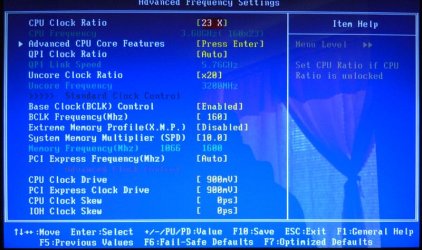
BIOS-Settings---Memory.jpg

To get to 3.68gig (3.8 turbo) I set my BCLK to 160 (160*23)

I then manually set my System Memory Multiplier (SPD) to match my memory speed of 1600 since that's what my memory is designed to run at. In this case it's 10 - 10*160=1600

I also manually set the Uncore Clock Ratio to 20 (which is 2 times the memory speed) In this case 2*10=20 = 20*160= 3200MHz

I also also manually set my memory voltage to 1.640v (which is within specs specs)

With this - I control how my memory is clocked and insure it's running at it's max without going over it's designed speed, or voltage rating.

Now bear in mind that I have an i7-950 chip, and my memory is Corsair's Dominator sticks which run at 1600MHz on 1.65 volts. Your chip and memory milage will be different.

The above setting work for me and I take no responsibility for any damages done to your system trying them. Sorry.

Anyway this is why I say you need to research overclocking - check these guides....

- 3 Step Guide To Overclock Your Core i3, i5, or i7 – Updated! | Overclockers
- Core i7 Overclocking Guide For Beginners

And I say again, overclocking done wrong can and will destroy your system.

Good luck

 

My Computer My Computer

At a glance

Windows 10 ProIntel Core i7-4770K (3.5Ghz)32 gig Corsair Dominator Platinum (4x8Gig)Sapphire Tri-X R9 Fury
Computer type
PC/Desktop
Computer Manufacturer/Model Number
Custom built by me.
OS
Windows 10 Pro
CPU
Intel Core i7-4770K (3.5Ghz)
Motherboard
Gigabyte G1 Sniper 5 (F10 Bios)
Memory
32 gig Corsair Dominator Platinum (4x8Gig)
Graphics Card(s)
Sapphire Tri-X R9 Fury
Sound Card
Soundblaster ZXR
Monitor(s) Displays
NEC PA242W 24" LCD Monitor
Screen Resolution
1920 x 1200
Hard Drives
Primary - Samsung 850 Pro (512gig), Samsung 840 Pro (256gig), 2TB WD Caviar Black.
PSU
EVGA Supernova 1000 G2
Case
Cooler Master HAF X
Cooling
Corsair H100i with Corsair Air Series SP120 Quiet Fans
Keyboard
Logitech Wireless Wave
Mouse
Logitech Performance MX
Internet Speed
High Speed Cable
Antivirus
Norton Security
Browser
IE11
Other Info
Memory Timings - 1866MHz @ 9-9-9-27-1T @ 1.5 volts
Seeing as you have an X58 Asus board I'm assuming your bios is somewhat similar to mine so...when you overclock your CPU using the multi/BCLK the ram will change speed as it is linked...if you only want to set your ram only to its default speed then there "may" be an option below the BCLK that will allow you to change your ram speed only.
they are
Dram frequency..default is auto..change that to your ram speed then
UCLK frequency..default is auto...change that to double your ram speed then reboot..
Worst thing that can happen is it won't boot..if that happens just go back into your bios and reset to auto and post back here.
 

My Computer My Computer

At a glance

Windows 7 Professional 64 bit930 i7 quad O/C 4ghzG Skill 3x2gb O/C to 1603mhz 1T timingEVGA 570
Computer Manufacturer/Model Number
home built
OS
Windows 7 Professional 64 bit
CPU
930 i7 quad O/C 4ghz
Motherboard
Asus P6X58D premium
Memory
G Skill 3x2gb O/C to 1603mhz 1T timing
Graphics Card(s)
EVGA 570
Sound Card
creative titanium
Monitor(s) Displays
samsung s23a950d..120hz 3D
Screen Resolution
1920x1080
Hard Drives
Western Digital 3X150 Velocoraptors in Raid 5
PSU
Antec Quattro 1000 watt
Case
Xigmatek Elysium
Cooling
Custom Loop..Kryos block.360rad..BP comp fittings etc
Keyboard
Razor arcosa
Mouse
Razer Diamondback
Internet Speed
Wireless so w/e I get at the time
Back
Top