To answer your question - yes when you overclock you clock other things too. That's why it's important to have a basic understanding of overclocking - which also leads to why you want to manually set certain settings/voltages.
Now....
Before I can give you any overclocking advice you're going to have to post your specific system specs in your system specs profile. See my system specs.
Also you need to be comfortable with messing around with voltage settings in the BIOS. And be aware that settings for one person may not work for someone else - even if they have the exact system.
WIth that said you also need to have a basic understanding of what overclocking involves as you've found out that doing one thing can influence another.
Overclocking done wrong can damage/destroy your system.
Let me know.
Specs Updated
OK seeing that you have a 1366 chipset (core i7-900 series processor) yeah, upping the BCLK will definitely change the RAM settings so you'd definitely want to
manually control them.
Not familiar with ASUS but on my Gigabyte board this is how I have my settings......
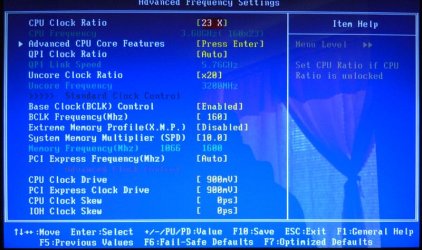
To get to 3.68gig (3.8 turbo) I set my BCLK to 160 (160*23)
I then manually set my
System Memory Multiplier (SPD) to match my memory speed of 1600 since that's what my memory is designed to run at. In this case it's 10 - 10*160=1600
I also manually set the
Uncore Clock Ratio to 20 (which is 2 times the memory speed) In this case 2*10=20 = 20*160= 3200MHz
I also also manually set my memory voltage to 1.640v (which is within specs specs)
With this - I control how my memory is clocked and insure it's running at it's max without going over it's designed speed, or voltage rating.
Now bear in mind that I have an i7-950 chip, and my memory is Corsair's Dominator sticks which run at 1600MHz on 1.65 volts. Your chip and memory milage will be different.
The above setting work for me and I take no responsibility for any damages done to your system trying them. Sorry.
Anyway this is why I say you need to research overclocking - check these guides....
-
3 Step Guide To Overclock Your Core i3, i5, or i7 – Updated! | Overclockers
-
Core i7 Overclocking Guide For Beginners
And I say again, overclocking done wrong can and will destroy your system.
Good luck



