Mozilla launches Firefox 4

Hardware acceleration uses your video card to help render web pages in your browser. Takes some of the load off your CPU.

Jim :geek:
 

My Computer My Computer

Computer type
PC/Desktop
Computer Manufacturer/Model Number
Home Built
OS
Windows 8.1 Pro w/Media Center 64bit, Windows 7 HP 64bit
CPU
Phenom II X6 1100T
Motherboard
ASUS M5A99X EVO
Memory
Crucial Balistic 8gb DDR3-1866 CL9
Graphics Card(s)
MSI R6850 Cyclone IGD5 PE
Sound Card
On Board
Monitor(s) Displays
ASUS VE258Q 25" LED with DVI-HDMI-DisplayPort
Screen Resolution
1920 x 1080
Hard Drives
Two WD Cavier Black 2TB Sata III, WD My Book Essential 2TB USB 3.0
PSU
Seasonic X650 80 Plus GOLD Modular
Case
Corsair 400R
Cooling
Antec Kuhler H2O 620, Two 120mm and four 140mm
Keyboard
Logitech K120
Mouse
Logitech Marble Mouse USB, Logitech Precision Game Pad
Internet Speed
15MB
Antivirus
Norton IS 2013, Malwarebytes Pro Beta 2
Browser
IE-11, FF-27
Other Info
APC UPS ES 750, Netgear WNR3500L Gigabit & Wireless N Router with SamKnows Test Program, Motorola SB6120 Gigabit Cable Modem. Brother HL-2170W Laser Printer, Epson V300 Scanner
Can someone please explain "hardware acceleration".What is it and how is it used.

Speeds up some actions, but also saddles you with Microsoft DirectWrite font rendering engine (same thing in IE 9 BTW).

To my eyes DirectWrite font rendering is just wrong. Fonts are all thicker and kerning is tighter so the letters run together. I find it less readable at all distances, so I shut off HW Acceleration to get rid of it. YMMV.
 

My Computer My Computer

OS
Windows 7 x64 Home Premium
CPU
Intel Q9400 @ 3.2 GHz
Motherboard
Gigabyte DS3L
Memory
6GB PC 6400
Graphics Card(s)
Nvidia 8800GT
Screen Resolution
1920x1200
Hard Drives
Dual WD Green 1TB
Internet Speed
10 Mb/s
Alright, so what are the "must haves" with FF4?
 

My Computer My Computer

Computer Manufacturer/Model Number
Self
OS
Main - Windows 7 Pro SP1 64-Bit; 2nd - Windows Server 2008 R2
CPU
Main - Core i7 2600K; 2nd - Core i7 920
Motherboard
Main - Asus P8Z68-V Pro/Gen3; 2nd - Gigabyte GA-EX58-UDR3
Memory
Main - 16GB Corsair Vengeance; 2nd - 12GB Corsair Vengeance
Graphics Card(s)
Main - XFX Radeon 6870 1GB; 2nd - XFX Radeon 4870 1GB
Sound Card
Both: Onboard Realtek Azalia
Monitor(s) Displays
Main - Hann 25" + I-INC 25" + Acer 23"; 2nd - Upgrading Soon
Screen Resolution
Main - 1920x1080 (All Three Monitors); 2nd - Upgrading Soon
Hard Drives
Main - (1) Crucial M4 128GB (Boot)
Main - (1) Seagate 2TB 64MB Cache (Data)
Main - (1) Seagate 2TB 64MB Cache (Data Backup)
2nd - (1) Intel X25-M SSD 80GB (Boot)
2nd - (3) Seagate 1TB 32MB Cache (Data Backup)
2nd - (1) Seagate 320GB (Because)
PSU
Main - OCZ 600W Modular; 2nd - OCZ 600W
Case
Main - Thermaltake Element G; 2nd - NZXT something or other
Cooling
Main - Corsair H80; 2nd - Prolimatech Megahalems
Keyboard
Main - Razer Reclusa; 2nd - Old MS Keyboard
Mouse
Main - Logitech MX Revolution; 2nd - Old MS Mouse
Internet Speed
20Mbps Time-Warner Cable
Stupid question time... Im running the RC2 and haven't been offered the update, is there meant to be an autoupdate? or do I have to uninstall/reinstall?
 

My Computer My Computer

Computer type
PC/Desktop
Computer Manufacturer/Model Number
Medion Erazer (note to self: insert model number) - with custom additions
OS
Windows 10 Pro x64
CPU
Intel Core i5 7400 @ 3.00GHz
Motherboard
OEM supllied with PC
Memory
8GB 2133Mhz DDR4 (OEM supplied)
Graphics Card(s)
Gygabyte Windforce GTX 1050Ti (Factory Overclocked)
Sound Card
Realtek
Monitor(s) Displays
Acer Al1980 + HKC
Screen Resolution
1360*768(HKC) / 1280*1024(Acer)
Hard Drives
1TB Toshiba
1TB WD Caviar Green
120GB Samsung Evo 840
PSU
OEM supplied (no power rating on case)
Case
OEM Supplied
Cooling
Stock
Keyboard
Logitech Wireless
Mouse
Logitect Wireless
Internet Speed
40Mb/s Down 10Mb/s Up
Antivirus
Defender
Browser
Firefox
Running 3.6xx I just did the

Help>>Check for updates

and it popped right up. :)
 

My Computer My Computer

Computer Manufacturer/Model Number
Self
OS
Main - Windows 7 Pro SP1 64-Bit; 2nd - Windows Server 2008 R2
CPU
Main - Core i7 2600K; 2nd - Core i7 920
Motherboard
Main - Asus P8Z68-V Pro/Gen3; 2nd - Gigabyte GA-EX58-UDR3
Memory
Main - 16GB Corsair Vengeance; 2nd - 12GB Corsair Vengeance
Graphics Card(s)
Main - XFX Radeon 6870 1GB; 2nd - XFX Radeon 4870 1GB
Sound Card
Both: Onboard Realtek Azalia
Monitor(s) Displays
Main - Hann 25" + I-INC 25" + Acer 23"; 2nd - Upgrading Soon
Screen Resolution
Main - 1920x1080 (All Three Monitors); 2nd - Upgrading Soon
Hard Drives
Main - (1) Crucial M4 128GB (Boot)
Main - (1) Seagate 2TB 64MB Cache (Data)
Main - (1) Seagate 2TB 64MB Cache (Data Backup)
2nd - (1) Intel X25-M SSD 80GB (Boot)
2nd - (3) Seagate 1TB 32MB Cache (Data Backup)
2nd - (1) Seagate 320GB (Because)
PSU
Main - OCZ 600W Modular; 2nd - OCZ 600W
Case
Main - Thermaltake Element G; 2nd - NZXT something or other
Cooling
Main - Corsair H80; 2nd - Prolimatech Megahalems
Keyboard
Main - Razer Reclusa; 2nd - Old MS Keyboard
Mouse
Main - Logitech MX Revolution; 2nd - Old MS Mouse
Internet Speed
20Mbps Time-Warner Cable
Stupid question time... Im running the RC2 and haven't been offered the update, is there meant to be an autoupdate? or do I have to uninstall/reinstall?
I think you need to click help and check for updates to get your updated to FF4
 

My Computer My Computer

Computer Manufacturer/Model Number
custom build
OS
Windows 7 Pro X64
CPU
AMD Phenom II X4 975 Black Edition
Motherboard
MSI 870A-G54 (FX)
Memory
CORSAIR Vengeance 8GB (2 x 4GB) 240-Pin DDR3 SDRAM DDR3 1600
Graphics Card(s)
ASUS EN9800GT HB/HTDI/512M GeForce 9800 GT 512MB 256-bit GDD
Sound Card
Realtek ALC892
Monitor(s) Displays
Viewsonic 19' 16:10
Screen Resolution
1680X1050
Hard Drives
Western Digital Caviar Black WD6401AALS 640GB 7200 RPM SATA,
Western Digital Caviar Black 1TB 7200RPM SATA
PSU
Thermaltake Purepower W0100RU 500W ATX 12V
Case
COOLER MASTER Elite RC-331-KKN1-GP Black SECC ATX Mid Tower
Cooling
Nothing beyond what etch part came with
Keyboard
Logitech G11
Mouse
USB Logitech gaming mouse
Internet Speed
Cable
Other Info
New CPU, Motherboard, and Ram installed 02/2012

Logitech G35 Headset
The HTML5 video support is great (better than I expected), it looks like I won't need to leave the flash player installed on my two guest computers' soon.
 

My Computer My Computer

Computer Manufacturer/Model Number
HP DV6 1330sa
OS
Windows 7 Professional 64 Bit SP1
CPU
INTEL DUAL CORE 2.1Ghz
Motherboard
N/A
Memory
4GB DDR3
Graphics Card(s)
INTEL
Sound Card
LAPTOP
Monitor(s) Displays
2
Screen Resolution
3200x1080
Hard Drives
250GB
PSU
LAPTOP
Case
LAPTOP
Cooling
LAPTOP
Keyboard
SOLID YEAR 260U
Mouse
USB
Internet Speed
20 MB/S
Can someone provide a link or two of sites that supposedly have blurry fonts?

I have H/W accel enabled and I haven't seen a single blurry font :huh:
 

My Computer My Computer

Computer type
PC/Desktop
Computer Manufacturer/Model Number
Systems by SmartEyeball
OS
8 Pro x64
CPU
i7 3770K 4.6GHz
Motherboard
ASUS P8Z77 WS
Memory
16GB G.Skill Trident X 2666mhz
Graphics Card(s)
x2 EVGA 780 Ti Superclocked SLI
Sound Card
SB X-FI Surround 5.1 PRO USB / ATH-AD900 Headphones
Monitor(s) Displays
x3 Dell U2410 / 58" Samsung
Screen Resolution
5760*1200/ 1920*1200
Hard Drives
2x Intel 520 240GB (RAID 0) * 2x WD Caviar Blacks 2TB (RAID 0) * 2TB WD Caviar Black * Sony Optirac DVD
PSU
Silverstone Strider Evolution 1200W
Case
Thermaltake Level 10 GT Snow Edition
Cooling
Noctua NH-D14
Keyboard
Topre Realforce // Ducky Shine MX Black // Filco Ninja TKL
Mouse
Thermaltake Theron (Highly Recommended) + Razer Imperator
Antivirus
MSE
Browser
IE, FF, WaterFox
Other Info
GT Extreme V2 Sim Racing Cockpit + 40" LCD and K/B Mouse stand ▼
Fanatec CSR Elite Wheel + Clubsport V1 Pedals + CSR shifter/7G-H ▼Saitek X52 Pro ▼ TrackIR 5 Pro
Buttkicker v2 Seat Rumbler with Dedicated 5.1 and Sub Woofer attached to frame ▼
=
Bloody Big Grin
Compared to version 3.6, FF4 is faster. If you ask me, which ever browser you feel at home with, stay with it. IE9 , FF4 and Chrome looks the same with there tabs GUI.
 

My Computer My Computer

OS
win 7 x64
CPU
E7300
Motherboard
Emaxx P43
Memory
4 gig
Graphics Card(s)
ATI HD 4670
Monitor(s) Displays
Viewsonic VG1930wm
It's more hit and miss than anything, esp. now that hardware is more directly used. Now you have to consider issues like "Is my display driver causing the problems? Maybe it needs updated?", "Did I configure the MS clear type settings?" or just the plain old "Is my computer too low spec?". I have to admit that I found reading IE9/FF4 blurry issue threads interesting--

Anyway, my three computers have no problems with FF4, no blurry issue or whatever, at all. So I can't provide any evidence :(

I have H/W accel enabled and I haven't seen a single blurry font :huh:
 

My Computer My Computer

Computer Manufacturer/Model Number
HP DV6 1330sa
OS
Windows 7 Professional 64 Bit SP1
CPU
INTEL DUAL CORE 2.1Ghz
Motherboard
N/A
Memory
4GB DDR3
Graphics Card(s)
INTEL
Sound Card
LAPTOP
Monitor(s) Displays
2
Screen Resolution
3200x1080
Hard Drives
250GB
PSU
LAPTOP
Case
LAPTOP
Cooling
LAPTOP
Keyboard
SOLID YEAR 260U
Mouse
USB
Internet Speed
20 MB/S
i like FF4. but im unsure about the speed of it vs my tweak 3.6:confused:
maybe since it is on my SSD i don't see much of a difference
what i really like is the fact that none of my settings ect have changed since the update. my fonts are not blury and i have HA on? only thing that failed is my Mac theme but there is a 4.0 version that works and will do until they update my favorite theme :)

Go FF...
 

My Computer My Computer

Computer Manufacturer/Model Number
Goonie Build 8 2010
OS
Windows 7 64bit Ultimate SP1, VMware Windows 7 64bit Ultimate SP1
CPU
Intel Core i7 920 @ 3.8 or 4.2 when i need it
Motherboard
Gigabyte GA-X58-UD5
Memory
Corsair XMS3 12GB DDR3 1600 1.5v
Graphics Card(s)
MSI GeForce GTX 560Ti OC Twin FrozR II
Sound Card
7.1 HD
Monitor(s) Displays
2x BenQ 24 LED 1080p + LG 50PK590 1080p
Screen Resolution
3840 x 1080p
Hard Drives
Intel X25-M 80GB OS/
Intel X25-M 160GB
Data Robotics Drobo V2 8TB
PSU
Corsair AX 750W ATX Modular
Case
Antec Fusion Remote Max
Cooling
Noctua NH D14
Keyboard
Logitech
Mouse
Logitech
Internet Speed
15Mbs Down 1.3Mbs Up
Other Info
Hauppauge HD PVR/
Pioneer 1017-k - 7.1 THX/
Xbox 360 250 Slim
SkyHD/LG 50PK590 TV
will this mess up my add ons and bookmarks?

just have a few add ons really, the ad block plus, no script, and cookie culler.

plus favorites and bookmarks

Is there a list/step guide for what needs to be done to use FF 4?

Msongs
 

My Computer My Computer

Computer Manufacturer/Model Number
build it myself
OS
windows 7 64bit
CPU
intel i7 920
Motherboard
gigabyte ex58 ds4
Memory
6gb ddr3
Graphics Card(s)
ge force 9400
Sound Card
onboard hd
Monitor(s) Displays
samsung 215tw
Screen Resolution
1680 x 1050
Hard Drives
wd caviar black 1 TB/620GB wd caviar blue
PSU
enermax 625 w modu82
Case
antec 182
Cooling
cooler master v8, 3 case fans
Keyboard
cheapo ps/2
Mouse
cheapo usb
Internet Speed
5 MB
Can someone provide a link or two of sites that supposedly have blurry fonts?

I have H/W accel enabled and I haven't seen a single blurry font :huh:

Well it could be that some just like the way DirectWrite renders and some don't. Perhaps screen shots would help. Are people at least seeing a difference??

From this site:
Choose Language | BioWare Social Network

Accel on / Accel off
 

Attachments

  • fonts.png
    fonts.png
    32.3 KB · Views: 91

My Computer My Computer

OS
Windows 7 x64 Home Premium
CPU
Intel Q9400 @ 3.2 GHz
Motherboard
Gigabyte DS3L
Memory
6GB PC 6400
Graphics Card(s)
Nvidia 8800GT
Screen Resolution
1920x1200
Hard Drives
Dual WD Green 1TB
Internet Speed
10 Mb/s
also.

gfx.direct2d.disabled [Boolean] - Firefox 4.0 has introduced hardware acceleration features which utilize the GPU to improve performance in certain scenarios. Under Windows Vista and 7, this hardware acceleration uses both Direct2D and Direct3D, whereas under XP only Direct3D is available. If hardware acceleration is enabled, then you can set this preference to True to only disable Direct2D acceleration without disabling Direct3D acceleration. This will rectify the blurry/alternate text rendering method in Firefox in return for a drop in performance. See the 'Use hardware acceleration when available' setting of the Firefox Settings section for full details. New to Firefox 4.0

TweakGuides.com - Firefox Tweak Guide
 

My Computer My Computer

Computer Manufacturer/Model Number
Goonie Build 8 2010
OS
Windows 7 64bit Ultimate SP1, VMware Windows 7 64bit Ultimate SP1
CPU
Intel Core i7 920 @ 3.8 or 4.2 when i need it
Motherboard
Gigabyte GA-X58-UD5
Memory
Corsair XMS3 12GB DDR3 1600 1.5v
Graphics Card(s)
MSI GeForce GTX 560Ti OC Twin FrozR II
Sound Card
7.1 HD
Monitor(s) Displays
2x BenQ 24 LED 1080p + LG 50PK590 1080p
Screen Resolution
3840 x 1080p
Hard Drives
Intel X25-M 80GB OS/
Intel X25-M 160GB
Data Robotics Drobo V2 8TB
PSU
Corsair AX 750W ATX Modular
Case
Antec Fusion Remote Max
Cooling
Noctua NH D14
Keyboard
Logitech
Mouse
Logitech
Internet Speed
15Mbs Down 1.3Mbs Up
Other Info
Hauppauge HD PVR/
Pioneer 1017-k - 7.1 THX/
Xbox 360 250 Slim
SkyHD/LG 50PK590 TV
Thanks Snowdog - that screenie does indeed show a noticeable difference, yet when I visit the site, the impact is far less noticeable.

Either I'm used to it already, or it's my clear type settings mentioned by Newt or the fact I zoom page sizes minimizes it to the point that it doesn't bother me. Whatever the cause it appears to be a non-issue for me :huh:
 

My Computer My Computer

Computer type
PC/Desktop
Computer Manufacturer/Model Number
Systems by SmartEyeball
OS
8 Pro x64
CPU
i7 3770K 4.6GHz
Motherboard
ASUS P8Z77 WS
Memory
16GB G.Skill Trident X 2666mhz
Graphics Card(s)
x2 EVGA 780 Ti Superclocked SLI
Sound Card
SB X-FI Surround 5.1 PRO USB / ATH-AD900 Headphones
Monitor(s) Displays
x3 Dell U2410 / 58" Samsung
Screen Resolution
5760*1200/ 1920*1200
Hard Drives
2x Intel 520 240GB (RAID 0) * 2x WD Caviar Blacks 2TB (RAID 0) * 2TB WD Caviar Black * Sony Optirac DVD
PSU
Silverstone Strider Evolution 1200W
Case
Thermaltake Level 10 GT Snow Edition
Cooling
Noctua NH-D14
Keyboard
Topre Realforce // Ducky Shine MX Black // Filco Ninja TKL
Mouse
Thermaltake Theron (Highly Recommended) + Razer Imperator
Antivirus
MSE
Browser
IE, FF, WaterFox
Other Info
GT Extreme V2 Sim Racing Cockpit + 40" LCD and K/B Mouse stand ▼
Fanatec CSR Elite Wheel + Clubsport V1 Pedals + CSR shifter/7G-H ▼Saitek X52 Pro ▼ TrackIR 5 Pro
Buttkicker v2 Seat Rumbler with Dedicated 5.1 and Sub Woofer attached to frame ▼
=
Bloody Big Grin
Which also brings up the issue of keeping DirectX up to date. If you run the DirectX updater after freshly installing Window's 7, it will download DirectX updates from 2005 to 2011. But I think most people will just assume that DirectX is 100% up to date already, which it isn't, Microsoft is constantly updating it with small upgrades.

also.

gfx.direct2d.disabled [Boolean] - Firefox 4.0 has introduced hardware acceleration features which utilize the GPU to improve performance in certain scenarios. Under Windows Vista and 7, this hardware acceleration uses both Direct2D and Direct3D, whereas under XP only Direct3D is available. If hardware acceleration is enabled, then you can set this preference to True to only disable Direct2D acceleration without disabling Direct3D acceleration. This will rectify the blurry/alternate text rendering method in Firefox in return for a drop in performance. See the 'Use hardware acceleration when available' setting of the Firefox Settings section for full details. New to Firefox 4.0

TweakGuides.com - Firefox Tweak Guide
 

My Computer My Computer

Computer Manufacturer/Model Number
HP DV6 1330sa
OS
Windows 7 Professional 64 Bit SP1
CPU
INTEL DUAL CORE 2.1Ghz
Motherboard
N/A
Memory
4GB DDR3
Graphics Card(s)
INTEL
Sound Card
LAPTOP
Monitor(s) Displays
2
Screen Resolution
3200x1080
Hard Drives
250GB
PSU
LAPTOP
Case
LAPTOP
Cooling
LAPTOP
Keyboard
SOLID YEAR 260U
Mouse
USB
Internet Speed
20 MB/S
Can someone provide a link or two of sites that supposedly have blurry fonts?

I have H/W accel enabled and I haven't seen a single blurry font :huh:
It looks fine for me w/ HW Acceleration enabled on every site I've tried so far.

But -

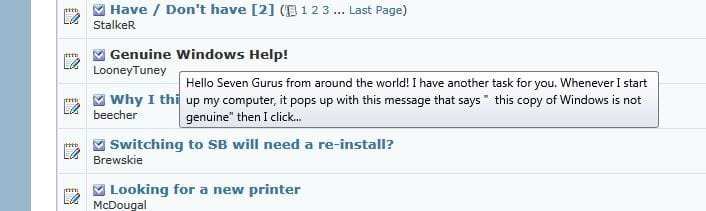
I noticed that when I hit the "New Posts" link here, then hover my mouse cursor over a new thread link to see the content, it looks very grainy.

As a matter of fact, the text I'm typing right now looks similarly grainy.

For what it's worth, over the weekend I re-ran my monitor color profile on all three monitors, which includes the True Type tuning.

Edit: Grabbed a screenshot, but when it's pasted into Paint it looks OK. :confused:
 

Attachments

  • HW Accel Check.JPG
    HW Accel Check.JPG
    27.6 KB · Views: 20

My Computer My Computer

Computer Manufacturer/Model Number
Self
OS
Main - Windows 7 Pro SP1 64-Bit; 2nd - Windows Server 2008 R2
CPU
Main - Core i7 2600K; 2nd - Core i7 920
Motherboard
Main - Asus P8Z68-V Pro/Gen3; 2nd - Gigabyte GA-EX58-UDR3
Memory
Main - 16GB Corsair Vengeance; 2nd - 12GB Corsair Vengeance
Graphics Card(s)
Main - XFX Radeon 6870 1GB; 2nd - XFX Radeon 4870 1GB
Sound Card
Both: Onboard Realtek Azalia
Monitor(s) Displays
Main - Hann 25" + I-INC 25" + Acer 23"; 2nd - Upgrading Soon
Screen Resolution
Main - 1920x1080 (All Three Monitors); 2nd - Upgrading Soon
Hard Drives
Main - (1) Crucial M4 128GB (Boot)
Main - (1) Seagate 2TB 64MB Cache (Data)
Main - (1) Seagate 2TB 64MB Cache (Data Backup)
2nd - (1) Intel X25-M SSD 80GB (Boot)
2nd - (3) Seagate 1TB 32MB Cache (Data Backup)
2nd - (1) Seagate 320GB (Because)
PSU
Main - OCZ 600W Modular; 2nd - OCZ 600W
Case
Main - Thermaltake Element G; 2nd - NZXT something or other
Cooling
Main - Corsair H80; 2nd - Prolimatech Megahalems
Keyboard
Main - Razer Reclusa; 2nd - Old MS Keyboard
Mouse
Main - Logitech MX Revolution; 2nd - Old MS Mouse
Internet Speed
20Mbps Time-Warner Cable
I noticed that when I hit the "New Posts" link here, then hover my mouse cursor over a new thread link to see the content, it looks very grainy.

As a matter of fact, the text I'm typing right now looks similarly grainy.

For what it's worth, over the weekend I re-ran my monitor color profile on all three monitors, which includes the True Type tuning.

Looks clear as bell here :huh:

I just realized I haven't touch any colour profiles, tuning etc with this installation.

H/W is definitely on and working for me too as Afterburner is showing load activity while browsing.

I won't be satisfied now until I discover an issue :p

Maybe it's something that shows up to varying degrees on different panel types?
 

My Computer My Computer

Computer type
PC/Desktop
Computer Manufacturer/Model Number
Systems by SmartEyeball
OS
8 Pro x64
CPU
i7 3770K 4.6GHz
Motherboard
ASUS P8Z77 WS
Memory
16GB G.Skill Trident X 2666mhz
Graphics Card(s)
x2 EVGA 780 Ti Superclocked SLI
Sound Card
SB X-FI Surround 5.1 PRO USB / ATH-AD900 Headphones
Monitor(s) Displays
x3 Dell U2410 / 58" Samsung
Screen Resolution
5760*1200/ 1920*1200
Hard Drives
2x Intel 520 240GB (RAID 0) * 2x WD Caviar Blacks 2TB (RAID 0) * 2TB WD Caviar Black * Sony Optirac DVD
PSU
Silverstone Strider Evolution 1200W
Case
Thermaltake Level 10 GT Snow Edition
Cooling
Noctua NH-D14
Keyboard
Topre Realforce // Ducky Shine MX Black // Filco Ninja TKL
Mouse
Thermaltake Theron (Highly Recommended) + Razer Imperator
Antivirus
MSE
Browser
IE, FF, WaterFox
Other Info
GT Extreme V2 Sim Racing Cockpit + 40" LCD and K/B Mouse stand ▼
Fanatec CSR Elite Wheel + Clubsport V1 Pedals + CSR shifter/7G-H ▼Saitek X52 Pro ▼ TrackIR 5 Pro
Buttkicker v2 Seat Rumbler with Dedicated 5.1 and Sub Woofer attached to frame ▼
=
Bloody Big Grin
well i found that vimeo ain't working with FF4? seems there is no controls when you try to watch a video.

Damn i wanted to watch Blinky lol

Blinky
 

My Computer My Computer

Computer Manufacturer/Model Number
Goonie Build 8 2010
OS
Windows 7 64bit Ultimate SP1, VMware Windows 7 64bit Ultimate SP1
CPU
Intel Core i7 920 @ 3.8 or 4.2 when i need it
Motherboard
Gigabyte GA-X58-UD5
Memory
Corsair XMS3 12GB DDR3 1600 1.5v
Graphics Card(s)
MSI GeForce GTX 560Ti OC Twin FrozR II
Sound Card
7.1 HD
Monitor(s) Displays
2x BenQ 24 LED 1080p + LG 50PK590 1080p
Screen Resolution
3840 x 1080p
Hard Drives
Intel X25-M 80GB OS/
Intel X25-M 160GB
Data Robotics Drobo V2 8TB
PSU
Corsair AX 750W ATX Modular
Case
Antec Fusion Remote Max
Cooling
Noctua NH D14
Keyboard
Logitech
Mouse
Logitech
Internet Speed
15Mbs Down 1.3Mbs Up
Other Info
Hauppauge HD PVR/
Pioneer 1017-k - 7.1 THX/
Xbox 360 250 Slim
SkyHD/LG 50PK590 TV
well i found that vimeo ain't working with FF4? seems there is no controls when you try to watch a video.

Damn i wanted to watch Blinky lol

Blinky


Working fine here mate, so it's not a FF4 issue.
 

My Computer My Computer

Computer type
PC/Desktop
Computer Manufacturer/Model Number
Systems by SmartEyeball
OS
8 Pro x64
CPU
i7 3770K 4.6GHz
Motherboard
ASUS P8Z77 WS
Memory
16GB G.Skill Trident X 2666mhz
Graphics Card(s)
x2 EVGA 780 Ti Superclocked SLI
Sound Card
SB X-FI Surround 5.1 PRO USB / ATH-AD900 Headphones
Monitor(s) Displays
x3 Dell U2410 / 58" Samsung
Screen Resolution
5760*1200/ 1920*1200
Hard Drives
2x Intel 520 240GB (RAID 0) * 2x WD Caviar Blacks 2TB (RAID 0) * 2TB WD Caviar Black * Sony Optirac DVD
PSU
Silverstone Strider Evolution 1200W
Case
Thermaltake Level 10 GT Snow Edition
Cooling
Noctua NH-D14
Keyboard
Topre Realforce // Ducky Shine MX Black // Filco Ninja TKL
Mouse
Thermaltake Theron (Highly Recommended) + Razer Imperator
Antivirus
MSE
Browser
IE, FF, WaterFox
Other Info
GT Extreme V2 Sim Racing Cockpit + 40" LCD and K/B Mouse stand ▼
Fanatec CSR Elite Wheel + Clubsport V1 Pedals + CSR shifter/7G-H ▼Saitek X52 Pro ▼ TrackIR 5 Pro
Buttkicker v2 Seat Rumbler with Dedicated 5.1 and Sub Woofer attached to frame ▼
=
Bloody Big Grin
Back
Top