
Thanks everyone for taking the time to help me, I really appreciate it. 
haha, that would be funny but I wouldnt do that. Originally I had tried to because I thought it would be the easiest way to see if he is visiting the same sites I was but I gave up, it was to difficult to learn and I didnt feel comfortable doing something like that.
The network was insecure when I first moved in so I set it up, I created the passwords for both the wireless and to log in. I only gave the wireless password out. I did email the landlord the passwords for both.
haha did you mean loosen his connection to the router to confuse him? That would be so funny and I will probably do that if I find out he is watching, he can just connect to the wireless.
If he is watching, especially if its from when I moved in, I will probably refuse him access to the internet and tell the landlord to evict him or evict me.
I looked up the router (netgear wnr2000 v2) and these are the firewall specs. It does not seem old so Im guessing it has that feature. Ive actually just thought now, I used a transfer cable to transfer all my old user, files, ect to my new machine. So there could be something.
I wouldnt mind if I just used facebook and email, I guess I would mind just not a lot. The problem I have is that I work online and if someone is watching what I do they can easily replicate it. A couple things I do Im the only person doing them, which is probably my biggest concern.
He is definitely unusual, I dont want to say bad stuff about the guy unless he is watching.
He could come into my room but I always switch users if I go to the kitchen for coffee or food and if I go out the house I switch users and put the computer to sleep.
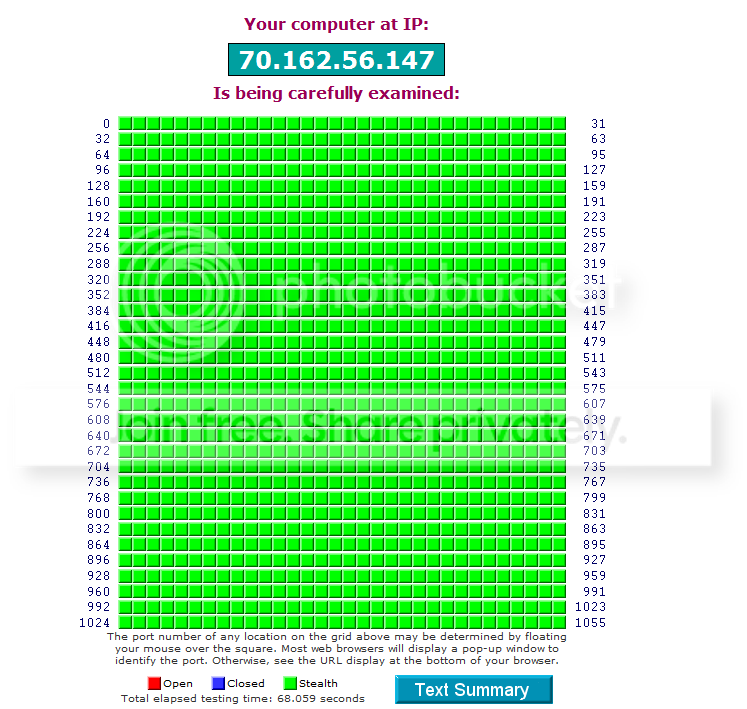
test results
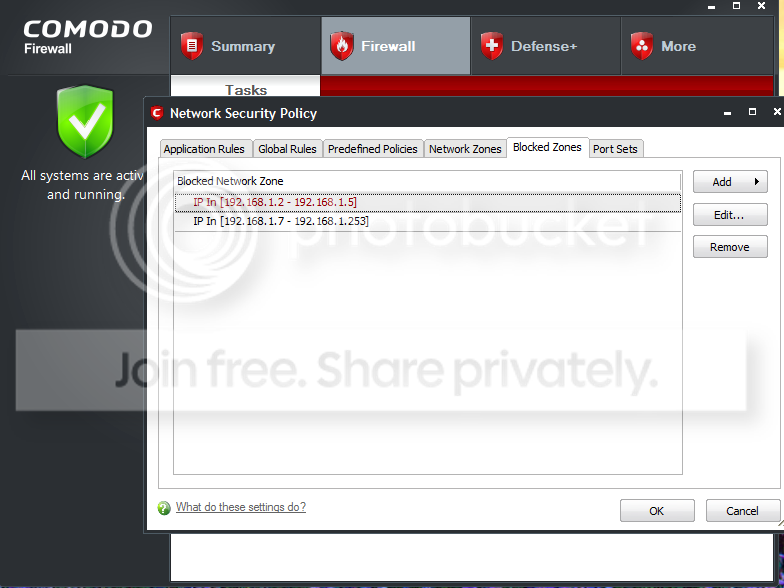
I assume the 192.168.1.6 is the dchp? Anyway there is a active connection under 'system' then 'TCP'. The soures is me (192.168.1.6) and the destination is 192.168.1.255. I have blocked up to 253, last picture shows what I mean.

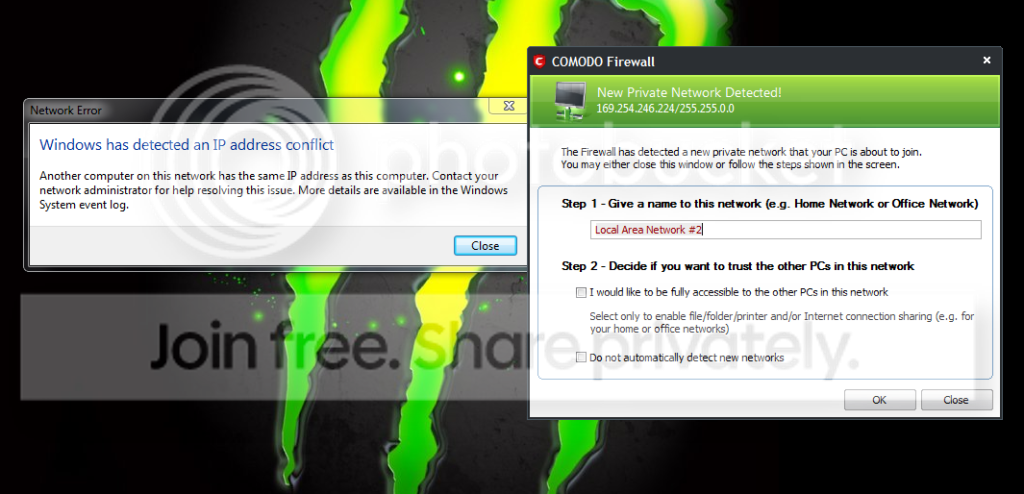
This is the weird thing that popped up today. We were the only people at home at the time. Another computer has the same ip as mine!
These are my settings, I set these a day or two ago...
Thanks for letting me know. Thats good to hear! Actually my new computer does not have a wireless card, which was a shame but Im next to the router so no problem. Anyway Im going to read about the httpsWireshark only picks up wireless traffic. If you connect your computer via ethernet cable, your roommate can't snoop. If you want to keep wireless going, a good way to prevent snooping is to always connect to a website via SSL (ie: https).
Since you control the router, you could simply unplug the cable going to his room, and force him to use wireless. Install wireshark yourself and do a little snooping yourself.
haha, that would be funny but I wouldnt do that. Originally I had tried to because I thought it would be the easiest way to see if he is visiting the same sites I was but I gave up, it was to difficult to learn and I didnt feel comfortable doing something like that.
Thanks! I unchecked that.I would make sure that allow remote connections is unchecked under-- system advanced setting, also do not allow connection to this computer. Check your router logs also for ip addresses you do not recognize.When you say you are the only one who knows the login info is it the default info or new user name and password.
The network was insecure when I first moved in so I set it up, I created the passwords for both the wireless and to log in. I only gave the wireless password out. I did email the landlord the passwords for both.
Hey thanks! I dont use wireless anymore but I will definitely keep that in mind for the future.another thing you can do since you control the router is mac address filtering, yes it may only work for wireless but you can at least have peace of mind that there will be lower chance of anyone else using wireless to watch you, and set it up to block all and only allow your mac address. also if you got comodo personial fire wall put it in paranoid mode and go through and block all connections and only allow things you recognize/need to talk to your family/email or what ever you have to do on the web, and of course unplug the ethernet cable just enough so it looses connection to the router but appears to still be plugged in
other ideas will be posted as i think of them...
oh yea could always set your router to only allow him access to the internet at specific times of the day, if you really wanted to start getting evil set up a home built firewall like PFsense or ClearOS (I use clearOS) and get really restrictive with his/her connection...

haha did you mean loosen his connection to the router to confuse him? That would be so funny and I will probably do that if I find out he is watching, he can just connect to the wireless.
If he is watching, especially if its from when I moved in, I will probably refuse him access to the internet and tell the landlord to evict him or evict me.
I wish it was easy! Arranging somewhere before when I moved from Europe was difficult and I couldnt be picky. Im never having roommates again lol.Personally, I'd say just find a new room mate, or a new place to live. He sounds creepy.
However, given that rarely is that an ideal option, I'll provide a different avenue of approach:
Firstly, your router has four ports on the back, correct? If so, it's most likely a switch that's built in.
Switches, by their nature, do not share information to every port like an older hub would. He would, therefore, have to have some means of actively monitoring your usage. This would require either access to the router or your machine (i.e: something on your machine that sends him logs of your activity). I would change the password on the router, and check to see if your machine has any unidentified software.
Secondly, are you sure your paranoia is justified? I mean, if you post things to Facebook, or just leave your door open a lot, he'd know about them just as readily as if he was a creepy, creepy, awkward individual, wouldn't he? We can probably tell you how to figure out if he's monitoring you, but I'd say that it's most likely just a wierd concidence.

I looked up the router (netgear wnr2000 v2) and these are the firewall specs. It does not seem old so Im guessing it has that feature. Ive actually just thought now, I used a transfer cable to transfer all my old user, files, ect to my new machine. So there could be something.
It seems then like everything is fine and with the comodo firewall I guess I should be good to go. One weird thing did pop up today with comodo and I attached a screen print below. At the time we both were home, no one else.Routing/ Firewall Protocols
-tcp/ip
-dhcp
-network address translation (nat)
Firewall Featueres
-MAC address filtering
-URL filtering
-domain blocking, scheduling
-stateful packet inspecions (spi)
I wouldnt mind if I just used facebook and email, I guess I would mind just not a lot. The problem I have is that I work online and if someone is watching what I do they can easily replicate it. A couple things I do Im the only person doing them, which is probably my biggest concern.
He is definitely unusual, I dont want to say bad stuff about the guy unless he is watching.
None of those are on there. I had originally gone through the programs on 'processes' in the task manager and googled everything that I had not heard of. I am going to go through it later and check, I transferred my user, files, ect from my old computer. That was wireless so something could have made it across. The entire time I have thought the machine is new so he couldnt have got anything on.Check your computer for software like logmein, team viewer, or any other well known remote viewers. Does he have physical access to your machine? Have you changed your password lately?
He could come into my room but I always switch users if I go to the kitchen for coffee or food and if I go out the house I switch users and put the computer to sleep.
Yea, I got into the habit of doing that a few years ago. Like above I always switch users when I go to the kitchen. I also always close my door.do you even lock your computer when you walk away?
Thanks. These are the results...Hi,
Once thing that hasn't yet been mentioned is whether you have any vulneabilities in your network ports.
Please go to ShieldsUp, click Proceed, and then run a scan using the ALL SERVICE PORTS option. Post the results here once its done.
Regards,
Golden
test results
Two weird things.[FONT=Verdana,Arial,Helvetica,Sans-Serif,MS Sans Serif][SIZE=-1][FONT=courier new,courier]GRC Port Authority Report created on UTC: 2011-03-24 at 01:15:48
Results from scan of ports: 0-1055
0 Ports Open
0 Ports Closed
1056 Ports Stealth
---------------------
1056 Ports Tested
ALL PORTS tested were found to be: STEALTH.
TruStealth: PASSED - ALL tested ports were STEALTH,
- NO unsolicited packets were received,
- NO Ping reply (ICMP Echo) was received.
[/FONT][/SIZE][/FONT]
I assume the 192.168.1.6 is the dchp? Anyway there is a active connection under 'system' then 'TCP'. The soures is me (192.168.1.6) and the destination is 192.168.1.255. I have blocked up to 253, last picture shows what I mean.
This is the weird thing that popped up today. We were the only people at home at the time. Another computer has the same ip as mine!
These are my settings, I set these a day or two ago...
My Computer
At a glance
64 home premiumIntel i7 9309gbati radeon hd 5850
- OS
- 64 home premium
- CPU
- Intel i7 930
- Memory
- 9gb
- Graphics Card(s)
- ati radeon hd 5850
- Hard Drives
- 1.5tb


