
I cannot find a right scheme to fit my needs

MartyMcFly42

New member
Local time
1:59 PM
Messages
13
Location
Czech Europe, Middle Europe
Hello,

My specs tells that I have Toshiba laptop. It's not 4 core gaming "canon", but it's quite powerful (enough to play all games on reasonable details). And as such, it heats a lot. I have constantly running app to check these temperatures, but even when using all graphic memory/cpu, temperatures doesn't go over 60 degrees of celsius, usually 50-60 (one core is 5 degrees colder, graphic card stays at 50-55).

But the problem is that I cannot find a right scheme to fit my needs. I created some, carefully choosing attributes, but how to make one that would

1)use all graphic/cpu/memory potential if needed
and
2)use fan only when temperature goes over certain threshold, like 70. I think that 100 is maximum, but I don't want to get close to it. 80 is very lot I suppose.


But this fan noise is simply too annoying. It's good that notebook is cool, but I would like to have more freedom over how to control it. When I'm at school and have a lot of applications running, it sometimes goes wild and it's really embarrassing to have so noisy fan in quiet classroom. In such cases, I would like to have an option to have both

power
and quiet notebook.

Yes, it would overheat a little bit, but nothing fatal.


I hope there is a way. Somehow.
 
Last edited by a moderator:

My Computer My Computer

At a glance

Windows 7 Home Premiumi5-4604GBATI 5650, 1GB
Computer Manufacturer/Model Number
Toshiba Satellite L670
OS
Windows 7 Home Premium
CPU
i5-460
Motherboard
?
Memory
4GB
Graphics Card(s)
ATI 5650, 1GB
Sound Card
?
Monitor(s) Displays
17''
Screen Resolution
1600x900
Hard Drives
640GB
PSU
?
Case
?
Cooling
?
Keyboard
?
Mouse
?
Internet Speed
1.5 mbit/s home, 100 mbit/s school
Other Info
Using computers since 1992, using Windows since 1997, using XP since 2005 and using 7 since 2011.
Use a cooling pad or elevate the rear about an inch to get air underneath at all times. Never have the intake or exhaust blocked by a bed, sofa or lap top.

Google how to clean out the dust in your laptop and follow the videos for doing so. Check the heatsink and repaste if necessary, or hire someone to do it for you. The thermal paste dissipates processor heat but can erode.

If this doesn't help, buy a cooling pad and ground your laptop there.
 
Dear Gregrocker,
That was a top point; If i were you(which i can't as you're way too above me), i would urge the @OP to buy the Cooling pad ASAP! Why i said "top point" is because any cooling pad with fans positioned at the under surface will have the rear
side elevated. Since any good quality cooling pad will have noice-free fans, it may take out a bit more power from the battery, but on the whole is an excellent suggestion!

regards,
Sreedhav
 

My Computer My Computer

At a glance

MS Windows 7 Home Premium 64-bit SP1IntelCore [email protected]; Sandy Bridge 32nm Tech.4096Mb RAM; Single ChannelDDR3@665MHz; DRAM F...AMD Radeon HD 6630M; GPU:Whistler;BIOS Core&m...
Computer Manufacturer/Model Number
Sony Vaio C series VPCCB35FN laptop
OS
MS Windows 7 Home Premium 64-bit SP1
CPU
IntelCore [email protected]; Sandy Bridge 32nm Tech.
Motherboard
Sony Vaio Version:C609NJYJ
Memory
4096Mb RAM; Single ChannelDDR3@665MHz; DRAM Freq:662MHz
Graphics Card(s)
AMD Radeon HD 6630M; GPU:Whistler;BIOS Core&mem Clock:123.36
Sound Card
REALTEK High Definition Audio Device; INTEL Display Card
Monitor(s) Displays
Generic PnP Intel HD;Resolution:1920*1040 Pixels; BPP:32bits
Screen Resolution
Current Resolution:1920*1080 Pixels; Monitor Frequency:60Hz
Hard Drives
Internal HD:TOSHIBA MK5061GSY; Real Size:488 GB;NTFS; 3 Partitions; SATA; HEADS:16

External HDD: WD Elements 1023 PORTABLE; Estimated Size: 1TB; NTFS; 3 Partitions
Cooling
Lateral Exhaust with a Cooling Pad Placed Beneath.
Keyboard
Logitech Bluetooth+ Generic Integrated K-B
Mouse
Logitech Bluetooth
Internet Speed
2MBPS
Other Info
1)Trend Micro Titanium Maximum Security Suite Version:3
2)SAS-PRO

3)MBAM--PRO


4)WATERFOX+IE9 +WOT+LINKEXTEND+ DRWEBCUREIT LINK CHECKER

5)SPYWAREBLASTER

6) WINPATROL PLUS

7) SANDBOXIE and
8) A BIT OF COMMON SENSE.
Well, thanks for posts. Cooling pad is probably the best solution, but also the one that's quite tough for me. You know, buying it isn't difficult, but using it easily for me is too much right now. Maybe I'll be forced to do so though.

The funny thing is that when I'm with my girl, she cannot sit on by my left side because of all the heat that is coming out of fan hole:
Toshiba-Satellite-L670-12J-.jpg


But the good thing is that bottom side of this laptop is very cool.


I remember having Asus EEE 904 HD (1Ghz Atom, 1GB RAM, integrated graphic card) and this little beast was overheating very much. Internal heat sensor was detecting sometimes even 70-80°C, with fan running on max.
Well, I should be glad for nice cooling design & system of this one.
 

My Computer My Computer

At a glance

Windows 7 Home Premiumi5-4604GBATI 5650, 1GB
Computer Manufacturer/Model Number
Toshiba Satellite L670
OS
Windows 7 Home Premium
CPU
i5-460
Motherboard
?
Memory
4GB
Graphics Card(s)
ATI 5650, 1GB
Sound Card
?
Monitor(s) Displays
17''
Screen Resolution
1600x900
Hard Drives
640GB
PSU
?
Case
?
Cooling
?
Keyboard
?
Mouse
?
Internet Speed
1.5 mbit/s home, 100 mbit/s school
Other Info
Using computers since 1992, using Windows since 1997, using XP since 2005 and using 7 since 2011.
But guys, no dust to be found here. This laptop is 2 weeks old :-| I know it's probably one of the things I shouldn't be asking (if I want to be responsible owner of laptops), but having average power would be sufficient in such cases where I CANNOT (sorry for caps) afford to be noisy, like when my girl is sleeping next to me, like when I'm in quiet classroom, or where this fan is so loud that I cannot even hear words in music I'm listening (out of reproductors).

You know, prevent the fan from spinning AND/OR from spinning over % threshold I will set to it. Automatically, or manually control it. How and when (and if ever) will fan start, set some critical temperatures, like 60-70°C when it will start and run until it reaches 50-60 and then it will quit. These things.

Because there are really times where I desire ... not just desire, I need notebook to be quiet even if it means that it will heat a little bit more. I don't mind temporary heating in such cases.
 

My Computer My Computer

At a glance

Windows 7 Home Premiumi5-4604GBATI 5650, 1GB
Computer Manufacturer/Model Number
Toshiba Satellite L670
OS
Windows 7 Home Premium
CPU
i5-460
Motherboard
?
Memory
4GB
Graphics Card(s)
ATI 5650, 1GB
Sound Card
?
Monitor(s) Displays
17''
Screen Resolution
1600x900
Hard Drives
640GB
PSU
?
Case
?
Cooling
?
Keyboard
?
Mouse
?
Internet Speed
1.5 mbit/s home, 100 mbit/s school
Other Info
Using computers since 1992, using Windows since 1997, using XP since 2005 and using 7 since 2011.
Fan noise is often due to poor bearing lubrication, or imbalance of rotor due to a foreign body (e.g a fiber), or dust caking on impeller blades or within the impeller casing.

The best solution is replacement of fan unit with the manufacturer's recommended part.

The next best, and often temporary, option is to follow the manufacturer's guides to dismantle the laptop, remove the fan and open the housing to remove (using a soft brush and compressed air, not vacuum cleaner) any fluff hair dust and lint that has accumulated there, and to lubricate the bearing - which is likely to be a sintered phosphor bronze sleeve. This is a porous metal bearing that retains a small amount of light machine oil to lubricate the shaft of the spinning fan.

Depending on construction, it may be possible to remove the rotor shaft or a rubber plug that covers the bearing lubrication point, and apply a tiny drop of light machine oil (sewing machine oil is good, or even 3-in-1, but avoid WD-40 type lubricants) either to the shaft or the lubrication access hole.

After reassembly the difference will often be amazing - for a while - but noise will creep back if the bearing or shaft has become worn.

Here's a guide.

The funny thing is that when I'm with my girl, she cannot sit on by my left side because of all the heat that is coming out of fan hole

-are you allowed to say that on here? :D
 
Last edited:

My Computer My Computer

At a glance

Win 7 Ult + Starter, XP Pro +Home, 2kAS, Linu...AMD 64 Athlon X2 , Intel Atom N450, Intel Cel...2.5GB ; 1GB; 2GBNvidia GeForce7000m; Intel; Intel
Computer Manufacturer/Model Number
Acer 7520, Packard Bell dot se, Acer travelmate 2423
OS
Win 7 Ult + Starter, XP Pro +Home, 2kAS, Linux Mint 8, SuperOS
CPU
AMD 64 Athlon X2 , Intel Atom N450, Intel Celeron M 1.50 Ghz
Motherboard
Acer Fuquene
Memory
2.5GB ; 1GB; 2GB
Graphics Card(s)
Nvidia GeForce7000m; Intel; Intel
Sound Card
Realtek AC57
Monitor(s) Displays
17" ;10.1"; 19"
Screen Resolution
1440x900;1024x600;1440x900;
Hard Drives
WD 80, WD 320;
PSU
19v
Case
Laptop
Cooling
Air
Internet Speed
9.7Mb/s down 0.99Mb/s up
Other Info
ISP VIRGINMEDIA 10M cable broadband - D-Link DIR615 wireless router, 3Com OfficeConnect ASDL router used as wireless extender switch
^ As long as she doesn't know about it, it's fine. And even if she will know this, then we'll just laugh over it. On a side note, she's one year user (and quite defending of) user of Xubuntu, so this place is like hell for angels (or something like that).

fafhrd, sorry for confusing you (I'm not native speaker), by noise, I meant just that it's loud because of fan, not that there are some unnatural sounds, those that would indicate fan not working properly. Oh this fan is working properly, only too loud => spinning too fast. This is gaming notebook (more or less) and I plan to use it for gaming. So besides replacing parts, cleaning and buying cooling device (I suspect that future will bring these needs),

is there some kind of application that can control fan speed ? Can it be set up in Windows 7 directly ? Can I just shut down fan at will ? But this notebook, common guys, it's brand new, few weeks old. Maybe it was lying in some kind of warehouse for few months, but sealed and in a crate (or where shops store their ware).

Right now, when typing this message, Task manager tells me that CPU usage is 6% and Memory usage is 49%. My apps takes this, most of memory is taken by Opera (and a lot of windows in it, too many things I want to read and Bookmark section is already overcrowded). So right now, temp of cores is 35° and 42°, temp of 5650 is 45°. These are average running speeds I suppose. I don't hear a thing from this fan now, but every once a while, it spins up to I suppose 33-50% speed and stays there for few seconds. Probably when temps rises over threshold. Which threshold ? I don't know, it's nowhere to be found where to set it :- I

I like setting things, because I know that if I do something wrong, it's my responsibility and I have to deal with consequenes.

Hope I've cleared myself. Keep thoughts running guys, we can make nice think tank, heh.
 

My Computer My Computer

At a glance

Windows 7 Home Premiumi5-4604GBATI 5650, 1GB
Computer Manufacturer/Model Number
Toshiba Satellite L670
OS
Windows 7 Home Premium
CPU
i5-460
Motherboard
?
Memory
4GB
Graphics Card(s)
ATI 5650, 1GB
Sound Card
?
Monitor(s) Displays
17''
Screen Resolution
1600x900
Hard Drives
640GB
PSU
?
Case
?
Cooling
?
Keyboard
?
Mouse
?
Internet Speed
1.5 mbit/s home, 100 mbit/s school
Other Info
Using computers since 1992, using Windows since 1997, using XP since 2005 and using 7 since 2011.
Well, thanks for posts. Cooling pad is probably the best solution, but also the one that's quite tough for me. You know, buying it isn't difficult, but using it easily for me is too much right now. Maybe I'll be forced to do so though.

The funny thing is that when I'm with my girl, she cannot sit on by my left side because of all the heat that is coming out of fan hole:
Toshiba-Satellite-L670-12J-.jpg


But the good thing is that bottom side of this laptop is very cool.


I remember having Asus EEE 904 HD (1Ghz Atom, 1GB RAM, integrated graphic card) and this little beast was overheating very much. Internal heat sensor was detecting sometimes even 70-80°C, with fan running on max.
Well, I should be glad for nice cooling design & system of this one.

Your's is a Toshiba Laptop and resembles the one i have quite closely! You mentioned that your girl friend can feel the hot air coming from the exhaust vent from the side.It's ideal for you (like me) to use a cooling pad with the fans at the underside to blow in the cool air and accelerate the hot air exhaust! I am not a whizkid at managing hardware and if i can use a cooling pad, so can you!!

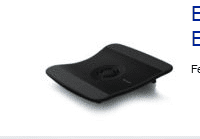
All you have to do is sit the lappy on the cooling pad and connect a USB cable coming out of it into a USB port of the lappy! I am posting a snapshot of a belkin cooling pad which costs roughly 20$ USA.

As far as your query regarding any software to control the built-in fan, there is SpeedFan! You have to be careful while using this. link : |MG| SpeedFan 4.43 Download

Regards,
Sreedhav
 

Attachments

  • Belkin laptop cooling pad.png
    Belkin laptop cooling pad.png
    2.9 KB · Views: 244

My Computer My Computer

At a glance

MS Windows 7 Home Premium 64-bit SP1IntelCore [email protected]; Sandy Bridge 32nm Tech.4096Mb RAM; Single ChannelDDR3@665MHz; DRAM F...AMD Radeon HD 6630M; GPU:Whistler;BIOS Core&m...
Computer Manufacturer/Model Number
Sony Vaio C series VPCCB35FN laptop
OS
MS Windows 7 Home Premium 64-bit SP1
CPU
IntelCore [email protected]; Sandy Bridge 32nm Tech.
Motherboard
Sony Vaio Version:C609NJYJ
Memory
4096Mb RAM; Single ChannelDDR3@665MHz; DRAM Freq:662MHz
Graphics Card(s)
AMD Radeon HD 6630M; GPU:Whistler;BIOS Core&mem Clock:123.36
Sound Card
REALTEK High Definition Audio Device; INTEL Display Card
Monitor(s) Displays
Generic PnP Intel HD;Resolution:1920*1040 Pixels; BPP:32bits
Screen Resolution
Current Resolution:1920*1080 Pixels; Monitor Frequency:60Hz
Hard Drives
Internal HD:TOSHIBA MK5061GSY; Real Size:488 GB;NTFS; 3 Partitions; SATA; HEADS:16

External HDD: WD Elements 1023 PORTABLE; Estimated Size: 1TB; NTFS; 3 Partitions
Cooling
Lateral Exhaust with a Cooling Pad Placed Beneath.
Keyboard
Logitech Bluetooth+ Generic Integrated K-B
Mouse
Logitech Bluetooth
Internet Speed
2MBPS
Other Info
1)Trend Micro Titanium Maximum Security Suite Version:3
2)SAS-PRO

3)MBAM--PRO


4)WATERFOX+IE9 +WOT+LINKEXTEND+ DRWEBCUREIT LINK CHECKER

5)SPYWAREBLASTER

6) WINPATROL PLUS

7) SANDBOXIE and
8) A BIT OF COMMON SENSE.
I don't know your laptop model, MartyMcFly42, but if you can hear the fan on a 2-week-old machine, and it is not whisper-quiet, then there is almost certainly a fault with the fan - perhaps a plastic lug on the impeller that was not removed at manufacture, causing some air noise as it rotates.

If you are near a Toshiba repair centre, I'd get it checked out for a warranty repair, in case it causes problems later. Otherwise at a local shop, or where you bought it.

As far as the heat venting is concerned - that is what it should be doing - keeping CPU and GPU cool at the expense of the environment ;) - and a laptop cooler is an option. My 2-month-old Packard Bell netbook is like a furnace on my left knee, where the heat is pumped out.

In the UK there is a store called "Poundland" where everything costs £1.00 (1GBP), where I bought a simple, usb-powered, illuminated Laptop Cooler with a single fan, which works fine (and quietly) as a supplementary cooler. These things don't sit well on laps though.

Speedfan is a good program, but with powerful overclocking features that need to be used wisely.
 

My Computer My Computer

At a glance

Win 7 Ult + Starter, XP Pro +Home, 2kAS, Linu...AMD 64 Athlon X2 , Intel Atom N450, Intel Cel...2.5GB ; 1GB; 2GBNvidia GeForce7000m; Intel; Intel
Computer Manufacturer/Model Number
Acer 7520, Packard Bell dot se, Acer travelmate 2423
OS
Win 7 Ult + Starter, XP Pro +Home, 2kAS, Linux Mint 8, SuperOS
CPU
AMD 64 Athlon X2 , Intel Atom N450, Intel Celeron M 1.50 Ghz
Motherboard
Acer Fuquene
Memory
2.5GB ; 1GB; 2GB
Graphics Card(s)
Nvidia GeForce7000m; Intel; Intel
Sound Card
Realtek AC57
Monitor(s) Displays
17" ;10.1"; 19"
Screen Resolution
1440x900;1024x600;1440x900;
Hard Drives
WD 80, WD 320;
PSU
19v
Case
Laptop
Cooling
Air
Internet Speed
9.7Mb/s down 0.99Mb/s up
Other Info
ISP VIRGINMEDIA 10M cable broadband - D-Link DIR615 wireless router, 3Com OfficeConnect ASDL router used as wireless extender switch
If you place a laptop on your Lap top without an intermediary flat surface, it will often clog a critical underside air vent and cause it to overheat. This is true of any irregular surface other than a flat smooth table-like surface, without a table cloth or stack of papers, for example.

Laptops which run hot may need more than the tiny clearance space normally underneath. Just propping up the rear with a wooden block or pencil (if that's all you have) may be enough.
 
Win7 power management has some neat features that can be tweaked. For your current plan, click on "Change plan settings", click on "Change Advanced power settings" and in the window that opens scroll down to locate the following:

Minimum Processor State
System Cooling Policy
Maximum Processor State

The processor state is the CPU speed. So if E.g. you change max state to 75%, it'll run a fraction slower but also cooler and the battery life will be somewhat longer. Cooler means fan noise will be reduced.

Again, under "System Cooling policy", there are 2 options - active and passive. Active cranks up fan speed before throttling the processor to cool, passive is the reverse.

You can create different custom plans for the classroom/gaming/surfing etc., you'll need to experiment to determine the best settings. Speedfan may or may not detect your fans, you can also try out Notebook hardware control. There used to be a Toshiba fan control utility, look around for that too.
 

My Computer My Computer

At a glance

Windows 7 x64 pro/ Windows 7 x86 Pro/ XP SP3 x86
Computer Manufacturer/Model Number
Too many to describe...
OS
Windows 7 x64 pro/ Windows 7 x86 Pro/ XP SP3 x86
If I had a laptop that loud just two weeks old I would go back to where I bought it and see if they can help. IMHO any laptop needs a cooling pad.
 

My Computer My Computer

At a glance

Windows 10 Pro. 64/ version 1709 Windows 7 Pr...Intel i7-6800K @ 4.3Corsair Platinum 16 gig @2400EVGA GTX 1070 OC
Computer type
PC/Desktop
Computer Manufacturer/Model Number
Home made Desktop
OS
Windows 10 Pro. 64/ version 1709 Windows 7 Pro/64
CPU
Intel i7-6800K @ 4.3
Motherboard
ASUS X-99 Deluxe II
Memory
Corsair Platinum 16 gig @2400
Graphics Card(s)
EVGA GTX 1070 OC
Monitor(s) Displays
Asus 27" LED LCD/VE278Q
Screen Resolution
1920-1080 or 1280-720 HDMI
Hard Drives
INTEL SSD 730-240 Gb Sata 3.0/
PSU
EVGA Platium 1200W
Case
Phanteks Luxe Tempered Glass 8 fans/ one radiator
Cooling
XSPC/ Water Cooled CPU
Keyboard
Das 4 Professional
Mouse
Logitech M705/MX Anywhere 2-S
Internet Speed
100 mbits
Antivirus
Microsoft Security Essentials/ Malwarebytes Premium 3.0/ SAS
Browser
I.E. 11 default/Firefox/ ISP Time Warner Cable/Spectrum
Other Info
LG BluRay Burner/
Sound system-KLipsch-THX/
Icy Dock ssd Hot Swap bays.
Well, I'm not easy user. When I use laptop, I use most of its resources, meaning that CPU is usually 50% busy and RAM are 46% on "internet browsing" mode and close to 100% when gaming - about 89%

Note that I have laptop usually in my lap, BUT (and it's important point) - This is 17'' screen, so I can put left edge (where fan and most of heat is) slightly to the left, so it's overlapping my thigh. This means that bottom of laptop is in the air, there is space around it.

But I still think that when using on "internet mode", which means half of resources being used, temperatures of 50 degrees aren't bad, when room temperature is 20 degrees of Celsius. But when gaming, and by gaming I currently mean Crysis 2 (so very demanding game), increased temperatures are normal. It's not too hot to be touched, so it shouldn't be worry I think.


And by no means it's broken (or full of dust), it certainly doesn't need cleaning. Why ? Because when doing "nothing", it's very, very quiet. But when gaming, increased temperature forces fan to spin and so it's not that quiet. Bad thing would be if fan didn't work at all, that would be bad. Or if fan would work at all times. But as it is now, I'm satisfied.

Gaming = heat, no gaming = quiet, this formula still works.
 

My Computer My Computer

At a glance

Windows 7 Home Premiumi5-4604GBATI 5650, 1GB
Computer Manufacturer/Model Number
Toshiba Satellite L670
OS
Windows 7 Home Premium
CPU
i5-460
Motherboard
?
Memory
4GB
Graphics Card(s)
ATI 5650, 1GB
Sound Card
?
Monitor(s) Displays
17''
Screen Resolution
1600x900
Hard Drives
640GB
PSU
?
Case
?
Cooling
?
Keyboard
?
Mouse
?
Internet Speed
1.5 mbit/s home, 100 mbit/s school
Other Info
Using computers since 1992, using Windows since 1997, using XP since 2005 and using 7 since 2011.
If I had a laptop that loud just two weeks old I would go back to where I bought it and see if they can help. IMHO any laptop needs a cooling pad.

Sorry for confusing you, I probably chosen wrong word. You know, I can speak English quite well, but sometimes error happens.


Loud as in I can speak with my girl on the other side of the room (7 meters away) in normal voice and still hear her over fan noise.

It doesn't matter in this case how old this laptop is. It's spinning only when working on MAX specs. I've played GTA IV, I've played Garry's Mode (trying to have hundreds of objects at once), I'm playing Crysis 2 and also Metro 2033.

This is why the noise.


By noise I mean that I can hear fan spinning, not that it's out of synchronization, that it's spinning badly. You know - I used to have Asus EEE (1GB RAM, 1Ghz CPU) and there was problem with extremely noisy fan when spinning. At first it was fine, but after few seconds, there was noise as when something mechanical is beating there in high speed. Like chainsaw.

This is not the case.
 

My Computer My Computer

At a glance

Windows 7 Home Premiumi5-4604GBATI 5650, 1GB
Computer Manufacturer/Model Number
Toshiba Satellite L670
OS
Windows 7 Home Premium
CPU
i5-460
Motherboard
?
Memory
4GB
Graphics Card(s)
ATI 5650, 1GB
Sound Card
?
Monitor(s) Displays
17''
Screen Resolution
1600x900
Hard Drives
640GB
PSU
?
Case
?
Cooling
?
Keyboard
?
Mouse
?
Internet Speed
1.5 mbit/s home, 100 mbit/s school
Other Info
Using computers since 1992, using Windows since 1997, using XP since 2005 and using 7 since 2011.
You are a naughty fella, playing games when the class is on,are you not?LOL! Just kidding!In a 20 degrees room, a 50 degrees temp of the cpu is ummm,a bit on the higher side! I too would agree that any issues with the fan be considered, since you are still in the warranty period, but before that why not buy a cooling pad and check out the temperatures?I agree with the post that says"imho ,a cooling pad is essential for every laptop"!

Regards,
Sreedhav:)
 

My Computer My Computer

At a glance

MS Windows 7 Home Premium 64-bit SP1IntelCore [email protected]; Sandy Bridge 32nm Tech.4096Mb RAM; Single ChannelDDR3@665MHz; DRAM F...AMD Radeon HD 6630M; GPU:Whistler;BIOS Core&m...
Computer Manufacturer/Model Number
Sony Vaio C series VPCCB35FN laptop
OS
MS Windows 7 Home Premium 64-bit SP1
CPU
IntelCore [email protected]; Sandy Bridge 32nm Tech.
Motherboard
Sony Vaio Version:C609NJYJ
Memory
4096Mb RAM; Single ChannelDDR3@665MHz; DRAM Freq:662MHz
Graphics Card(s)
AMD Radeon HD 6630M; GPU:Whistler;BIOS Core&mem Clock:123.36
Sound Card
REALTEK High Definition Audio Device; INTEL Display Card
Monitor(s) Displays
Generic PnP Intel HD;Resolution:1920*1040 Pixels; BPP:32bits
Screen Resolution
Current Resolution:1920*1080 Pixels; Monitor Frequency:60Hz
Hard Drives
Internal HD:TOSHIBA MK5061GSY; Real Size:488 GB;NTFS; 3 Partitions; SATA; HEADS:16

External HDD: WD Elements 1023 PORTABLE; Estimated Size: 1TB; NTFS; 3 Partitions
Cooling
Lateral Exhaust with a Cooling Pad Placed Beneath.
Keyboard
Logitech Bluetooth+ Generic Integrated K-B
Mouse
Logitech Bluetooth
Internet Speed
2MBPS
Other Info
1)Trend Micro Titanium Maximum Security Suite Version:3
2)SAS-PRO

3)MBAM--PRO


4)WATERFOX+IE9 +WOT+LINKEXTEND+ DRWEBCUREIT LINK CHECKER

5)SPYWAREBLASTER

6) WINPATROL PLUS

7) SANDBOXIE and
8) A BIT OF COMMON SENSE.
Back
Top