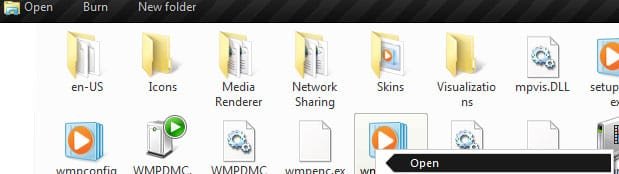
Open Application Toolbar and Context Menu Icon - Fix

How to Fix the Windows Explorer "Open" Application Toolbar and Context Menu Icon in Windows 7

   Information
This will show you how to fix the Windows Explorer Open application toolbar and context menu icon when you select an application (ex: EXE) file in Windows Explorer to the correct icon in Windows 7.


EXAMPLE: Open application Toolbar and Context Menu icon
NOTE: This is before and after you fix the icon when you have an application (ex: .exe) file selected in Windows Explorer.
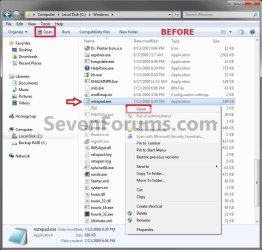
Before.jpg

Fixed.jpg


Here's How: 1. Click on the Download button below to download the file below. Application_Icon.zip

Download


2. Click on Save, and save the .zip file to the desktop.

3. Open the Zip file, and extract the Application_Icon.ico file to your desktop.

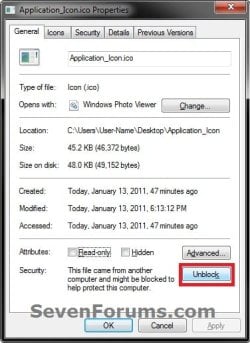
4. Right click on the extracted Application_Icon.ico file, and click on Properties, General tab, and on the Unblock button. (see screenshot below)
NOTE: If you do not have a Unblock button under the General tab, then the file is already unblocked and you can continue on to step 5. Unblock.jpg
5. Move the downloaded Application_Icon.ico file into the C:\Windows\System32 folder. (see screenshot below) System32.jpg
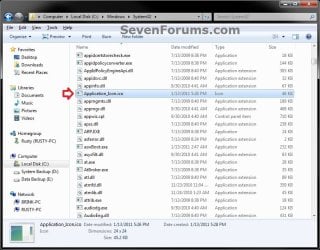
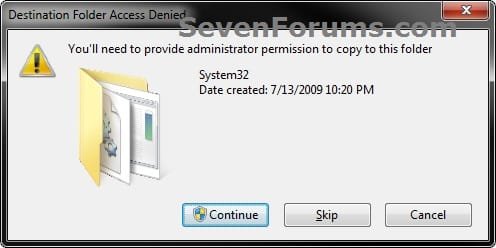
6. If prompted, click on Continue and Yes to approve moving the .ico file. Afterwards, do either step 7 or 8 below.

7. To Automatically Fix the Icon with a REG File Download
A) Click on the Download button below to download the file below. Fix_Open_Toolbar_Context_Menu_Icon.reg


Download


B) Click on Save, and save the .reg file to the desktop.

C) Right click on the downloaded .reg file and click on Merge.

D) Click on Run, Yes, Yes, and OK when prompted.

E) When done, you can delete the downloaded .reg file if you like.

F) Go to step 9.
8. To Manually Fix the Icon in Registry Editor
NOTE: This option will also allow you to use a custom icon of your own instead if you like. A) Open the Start Menu, then type regedit and press Enter.

B) If prompted by UAC, then click on Yes.
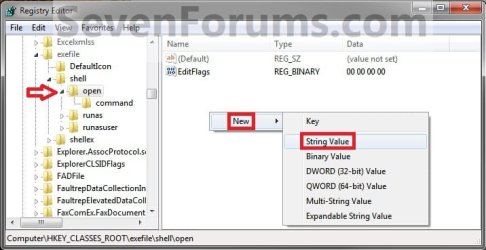
C) In regedit, go to: (see screenshot below step 8D) HKEY_CLASSES_ROOT\exefile\shell\open
D) In the right pane, right click on a empty space and click on New and String Value. (see screenshot below) Step2.jpg
E) Type Icon and press enter. (see screenshot below) Step3.jpg
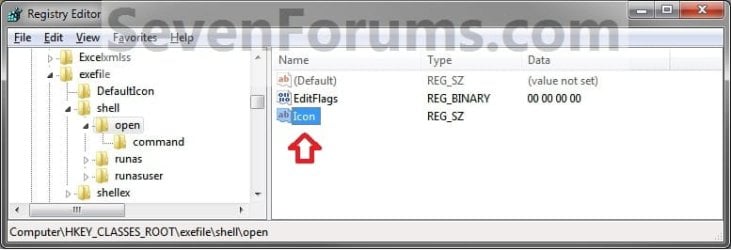
F) In the right pane, right click on Icon and click on Modify. (See screenshot below) Step4.jpg
G) Copy and Past the location below into the Edit String box and click on OK. (See screenshot below)
NOTE: If you like, you could also enter the full path of a different icon (.ico file) that you would like to use instead with ",-1" (no quotes) at the end like below.
%Windir%\System32\Application_Icon.ico,-1
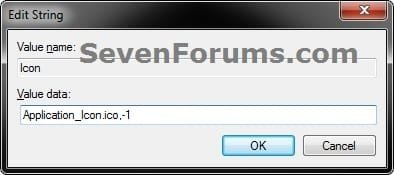
Modify.jpg
H) Regedit will now look this. (see screenshot below)
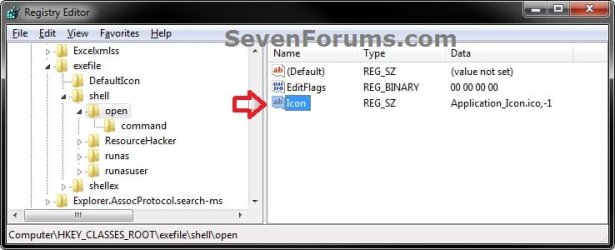
Step6.jpg
I) Close regedit.
9. If you have not already, close and reopen all Windows Explorer windows to apply.
That's it,
Shawn
 

Attachments
Last edited:
Yes, but blank in context menu and explorer icon on toolbar so that wouldn't have worked.
 

My Computer

OS
Windows 7
Yes, but blank in context menu and explorer icon on toolbar so that wouldn't have worked.
Which context menu?
 

My Computer

Computer Manufacturer/Model Number
Averatec 6130HS-20
OS
Windows 7 Professional 32-bit (6.1, Build 7600)
CPU
Intel(R) Pentium(R) 4 3.00 GHz HT
Memory
2.0 GB
Graphics Card(s)
ATI Mobility Radeon 9600 64MB
Sound Card
Realtek AC'97 Audio
Screen Resolution
1280 x 800
Hard Drives
Seagate 96023A 60GB 7200RPM -
Seagate FreeAgentDesktop 250GB
Cooling
20 Inch Box Fan
Mouse
Targus PAWM10 Wireless Optical Laptop Mouse

My Computer

Computer type
PC/Desktop
Computer Manufacturer/Model Number
Self built custom
OS
64-bit Windows 11 Pro for Workstations
CPU
Intel i7-8700K OC'd to 5 GHz
Motherboard
ASUS ROG Maximus XI Formula Z390
Memory
64 GB (4x16GB) G.SKILL TridentZ RGB DDR4 3600 MHz
Graphics Card(s)
ASUS ROG-STRIX-GTX1080TI-O11G-GAMING
Sound Card
Integrated
Monitor(s) Displays
2 x Samsung Odyssey G7 27"
Screen Resolution
2560x1440
Hard Drives
1TB Samsung 990 PRO M.2,
4TB Samsung 990 PRO PRO M.2,
TerraMaster F8 SSD Plus NAS
PSU
Seasonic Prime Titanium 850W
Case
Thermaltake Core P3
Cooling
Corsair Hydro H115i
Keyboard
Logitech wireless K800
Mouse
Logitech MX Master 4
Internet Speed
2 Gb/s Download and 100 Mb/s Upload
Antivirus
Malwarebyte Anti-Malware Premium
Browser
Google Chrome
Other Info
Logitech Z625 speaker system,
Logitech BRIO 4K Pro webcam,
HP Color LaserJet Pro MFP M477fdn,
APC SMART-UPS RT 1000 XL - SURT1000XLI,
Galaxy S23 Plus phone
@Greg S
Well the one we talk about in this thread. See topic title and images from first post.

@Brink

OK, maybe my English is bad I'm sorry about that, but I don't want blank icons in both locations just in context menu. I like the open application toolbar to have explorer icon and the only way I now how to do that is to reshack explorer which I did.

Here is what I have and I'm just saying how I did it if there is an alternate or easier way please feel free to share. I think I'll :zip: it now.
 

Attachments

  • explorer.jpg
    explorer.jpg
    27.6 KB · Views: 726

My Computer

OS
Windows 7
I think this a real bug anyway.
I say this because by default HKEY_CLASSES_ROOT\exefile\DefaultIcon = %1 that should be "use the currently selected" icon... but it doesn't and falls back to the first icon in shell32.dll (i.e. the horrible generic W95-like file icon).
 

My Computer

Computer type
Laptop
Computer Manufacturer/Model Number
MSI GX660-262it
OS
Windows 7 Home Premium x64 SP1
CPU
Intel Core i7 840QM
Memory
8GB DDR3 1333MHz
Graphics Card(s)
ATI Mobility HD 7970M 2GB DDR5
Screen Resolution
1920x1080
Hard Drives
Intel SSDSA2CT040G3
Hybrid ST750LX0ST750LX003
Antivirus
360 Internet Security
Browser
IE10
Hello Hexaae, and welcome to Seven Forums.

They used %1 so that every EXE file will use it's own icon (first one included in it) instead of a specified one for all EXE files. Unfortunately, we get this as a result. :(
 

My Computer

Computer type
PC/Desktop
Computer Manufacturer/Model Number
Self built custom
OS
64-bit Windows 11 Pro for Workstations
CPU
Intel i7-8700K OC'd to 5 GHz
Motherboard
ASUS ROG Maximus XI Formula Z390
Memory
64 GB (4x16GB) G.SKILL TridentZ RGB DDR4 3600 MHz
Graphics Card(s)
ASUS ROG-STRIX-GTX1080TI-O11G-GAMING
Sound Card
Integrated
Monitor(s) Displays
2 x Samsung Odyssey G7 27"
Screen Resolution
2560x1440
Hard Drives
1TB Samsung 990 PRO M.2,
4TB Samsung 990 PRO PRO M.2,
TerraMaster F8 SSD Plus NAS
PSU
Seasonic Prime Titanium 850W
Case
Thermaltake Core P3
Cooling
Corsair Hydro H115i
Keyboard
Logitech wireless K800
Mouse
Logitech MX Master 4
Internet Speed
2 Gb/s Download and 100 Mb/s Upload
Antivirus
Malwarebyte Anti-Malware Premium
Browser
Google Chrome
Other Info
Logitech Z625 speaker system,
Logitech BRIO 4K Pro webcam,
HP Color LaserJet Pro MFP M477fdn,
APC SMART-UPS RT 1000 XL - SURT1000XLI,
Galaxy S23 Plus phone
They used %1 so that every EXE file will use it's own icon (first one included in it)

Thank you. Hello world :geek:
Yes, that's why I see this as a "bug": looks like the idea was to use the selected exe own icon in the toolbar, but it doesn't work and the sys falls back to first icon in shell32.exe... Should we report this to MS?
 

My Computer

Computer type
Laptop
Computer Manufacturer/Model Number
MSI GX660-262it
OS
Windows 7 Home Premium x64 SP1
CPU
Intel Core i7 840QM
Memory
8GB DDR3 1333MHz
Graphics Card(s)
ATI Mobility HD 7970M 2GB DDR5
Screen Resolution
1920x1080
Hard Drives
Intel SSDSA2CT040G3
Hybrid ST750LX0ST750LX003
Antivirus
360 Internet Security
Browser
IE10
Yes, reporting it to MS may help to get a fix faster for it one day in a Windows Update. :)
 

My Computer

Computer type
PC/Desktop
Computer Manufacturer/Model Number
Self built custom
OS
64-bit Windows 11 Pro for Workstations
CPU
Intel i7-8700K OC'd to 5 GHz
Motherboard
ASUS ROG Maximus XI Formula Z390
Memory
64 GB (4x16GB) G.SKILL TridentZ RGB DDR4 3600 MHz
Graphics Card(s)
ASUS ROG-STRIX-GTX1080TI-O11G-GAMING
Sound Card
Integrated
Monitor(s) Displays
2 x Samsung Odyssey G7 27"
Screen Resolution
2560x1440
Hard Drives
1TB Samsung 990 PRO M.2,
4TB Samsung 990 PRO PRO M.2,
TerraMaster F8 SSD Plus NAS
PSU
Seasonic Prime Titanium 850W
Case
Thermaltake Core P3
Cooling
Corsair Hydro H115i
Keyboard
Logitech wireless K800
Mouse
Logitech MX Master 4
Internet Speed
2 Gb/s Download and 100 Mb/s Upload
Antivirus
Malwarebyte Anti-Malware Premium
Browser
Google Chrome
Other Info
Logitech Z625 speaker system,
Logitech BRIO 4K Pro webcam,
HP Color LaserJet Pro MFP M477fdn,
APC SMART-UPS RT 1000 XL - SURT1000XLI,
Galaxy S23 Plus phone
No matter what icon I choose I always get the 3d flip icon in windows explorer, ie: Imageres.dll,-32, should be a disk drive but doesn' t show like so.

I've done some testing and I've found out that if you do the registry change what it really changes is the context menu icon, that's the right click on an exe program , th eicon next to the open entry. But it doesn't change the icon in th eopen button in windows explorer. in the windows explorer it shows the 3d-flip icon because it's the 1st icon in the imageres.dll so I think it's a bug in the windows exploere program
 
Last edited:

My Computer

OS
Windows 7 Ultimate x64
Hello Persep, and welcome to Seven Forums.

This is normal. While the context menu will use the icon # (ex: imageres.dll,-15) you selected in a file, the toolbar button will always only use the "first" icon included in the file. :(

properties.jpg


You can use the file that Greg posted at the link below instead in the path in the tutorial to have the (imageres.dll,-15) icon at both locations though.

http://www.sevenforums.com/tutorial...olbar-context-menu-icon-fix-2.html#post796877
 

My Computer

Computer type
PC/Desktop
Computer Manufacturer/Model Number
Self built custom
OS
64-bit Windows 11 Pro for Workstations
CPU
Intel i7-8700K OC'd to 5 GHz
Motherboard
ASUS ROG Maximus XI Formula Z390
Memory
64 GB (4x16GB) G.SKILL TridentZ RGB DDR4 3600 MHz
Graphics Card(s)
ASUS ROG-STRIX-GTX1080TI-O11G-GAMING
Sound Card
Integrated
Monitor(s) Displays
2 x Samsung Odyssey G7 27"
Screen Resolution
2560x1440
Hard Drives
1TB Samsung 990 PRO M.2,
4TB Samsung 990 PRO PRO M.2,
TerraMaster F8 SSD Plus NAS
PSU
Seasonic Prime Titanium 850W
Case
Thermaltake Core P3
Cooling
Corsair Hydro H115i
Keyboard
Logitech wireless K800
Mouse
Logitech MX Master 4
Internet Speed
2 Gb/s Download and 100 Mb/s Upload
Antivirus
Malwarebyte Anti-Malware Premium
Browser
Google Chrome
Other Info
Logitech Z625 speaker system,
Logitech BRIO 4K Pro webcam,
HP Color LaserJet Pro MFP M477fdn,
APC SMART-UPS RT 1000 XL - SURT1000XLI,
Galaxy S23 Plus phone
@Brink
I've reported the "bug" to MS but they simply ignored it and didn't even fully understand the problem.
If you can, as MVP, please report this problem.
The OS should display the selected application as the icon for the "Open" button (as a matter of fact the registry uses 'DefaultIcon=%1'), not fall back to a generic file icon...
For sure they have more important things to fix in the OS, but if they fix too would be better :)

What MS really needs is a direct contact with the users... That's what makes great and constantly evolving for example Linux. You can contact the author and report a bug and it will be fixed for sure. When will MS fully understand this? :(
 

My Computer

Computer type
Laptop
Computer Manufacturer/Model Number
MSI GX660-262it
OS
Windows 7 Home Premium x64 SP1
CPU
Intel Core i7 840QM
Memory
8GB DDR3 1333MHz
Graphics Card(s)
ATI Mobility HD 7970M 2GB DDR5
Screen Resolution
1920x1080
Hard Drives
Intel SSDSA2CT040G3
Hybrid ST750LX0ST750LX003
Antivirus
360 Internet Security
Browser
IE10
Hello Hexaae,

I have updated the tutorial to fix it for once and for all. :)
 
Last edited:

My Computer

Computer type
PC/Desktop
Computer Manufacturer/Model Number
Self built custom
OS
64-bit Windows 11 Pro for Workstations
CPU
Intel i7-8700K OC'd to 5 GHz
Motherboard
ASUS ROG Maximus XI Formula Z390
Memory
64 GB (4x16GB) G.SKILL TridentZ RGB DDR4 3600 MHz
Graphics Card(s)
ASUS ROG-STRIX-GTX1080TI-O11G-GAMING
Sound Card
Integrated
Monitor(s) Displays
2 x Samsung Odyssey G7 27"
Screen Resolution
2560x1440
Hard Drives
1TB Samsung 990 PRO M.2,
4TB Samsung 990 PRO PRO M.2,
TerraMaster F8 SSD Plus NAS
PSU
Seasonic Prime Titanium 850W
Case
Thermaltake Core P3
Cooling
Corsair Hydro H115i
Keyboard
Logitech wireless K800
Mouse
Logitech MX Master 4
Internet Speed
2 Gb/s Download and 100 Mb/s Upload
Antivirus
Malwarebyte Anti-Malware Premium
Browser
Google Chrome
Other Info
Logitech Z625 speaker system,
Logitech BRIO 4K Pro webcam,
HP Color LaserJet Pro MFP M477fdn,
APC SMART-UPS RT 1000 XL - SURT1000XLI,
Galaxy S23 Plus phone
Why use an exe if all we want is an icon file? Because we don't. I've used the excellent program Iconsextract to extract the icon from imageres.dll. You can copy it to \windows\system32 and all you have to do is to modify the registry value to "imageres_15.ico,-1". For this you will have had to change the registry like it's explained in the first post.

I've included the icon as an attachment
 

Attachments

My Computer

OS
Windows 7 Ultimate x64
That's a good idea Persep. I like using a .ico file better than an .exe as well. The tutorial has been updated for this.

Thank you. :)
 

My Computer

Computer type
PC/Desktop
Computer Manufacturer/Model Number
Self built custom
OS
64-bit Windows 11 Pro for Workstations
CPU
Intel i7-8700K OC'd to 5 GHz
Motherboard
ASUS ROG Maximus XI Formula Z390
Memory
64 GB (4x16GB) G.SKILL TridentZ RGB DDR4 3600 MHz
Graphics Card(s)
ASUS ROG-STRIX-GTX1080TI-O11G-GAMING
Sound Card
Integrated
Monitor(s) Displays
2 x Samsung Odyssey G7 27"
Screen Resolution
2560x1440
Hard Drives
1TB Samsung 990 PRO M.2,
4TB Samsung 990 PRO PRO M.2,
TerraMaster F8 SSD Plus NAS
PSU
Seasonic Prime Titanium 850W
Case
Thermaltake Core P3
Cooling
Corsair Hydro H115i
Keyboard
Logitech wireless K800
Mouse
Logitech MX Master 4
Internet Speed
2 Gb/s Download and 100 Mb/s Upload
Antivirus
Malwarebyte Anti-Malware Premium
Browser
Google Chrome
Other Info
Logitech Z625 speaker system,
Logitech BRIO 4K Pro webcam,
HP Color LaserJet Pro MFP M477fdn,
APC SMART-UPS RT 1000 XL - SURT1000XLI,
Galaxy S23 Plus phone
I see that there are 3 ways, on the first page of this tutorial to fix this problem. I was wondering Which of the 3 ways is safest, so that if Windows Update has a future fix, this fix will not interfere with the possible MS fix??

Thanks in advance,
Don
 

My Computer

Computer Manufacturer/Model Number
Aus G73JH-RBBX05
OS
Windows 7 SP1 Home Premium x64
CPU
Intel Core i7 720QM
Motherboard
Asus (Intel HM55 Chipset)
Memory
Kingston 8 GB
Graphics Card(s)
ATI Mobility Radeon HD 5870
Sound Card
Realtek
Monitor(s) Displays
LG
Screen Resolution
1600X900
Hard Drives
Crucial M4 256GB
(Seagate Momentus ST9500420AS)Currently Disabled
Mouse
Razer Naga
Internet Speed
Cable
Hello Don, and welcome to Seven Forums.

Both ways (step 7 or 8) do exactly the same thing by referencing the downloaded Application_Icon.ico file to be displayed on the toolbar for the Open button. Personally, using the tutorial with step 7 would be the easiest way to fix it.

It will not interefere with anything since it's only a reference added to the registry to the downloaded icon. If MS comes out with a fix, it would most likely change the same reference entry to be referenced to there file instead. :)
 

My Computer

Computer type
PC/Desktop
Computer Manufacturer/Model Number
Self built custom
OS
64-bit Windows 11 Pro for Workstations
CPU
Intel i7-8700K OC'd to 5 GHz
Motherboard
ASUS ROG Maximus XI Formula Z390
Memory
64 GB (4x16GB) G.SKILL TridentZ RGB DDR4 3600 MHz
Graphics Card(s)
ASUS ROG-STRIX-GTX1080TI-O11G-GAMING
Sound Card
Integrated
Monitor(s) Displays
2 x Samsung Odyssey G7 27"
Screen Resolution
2560x1440
Hard Drives
1TB Samsung 990 PRO M.2,
4TB Samsung 990 PRO PRO M.2,
TerraMaster F8 SSD Plus NAS
PSU
Seasonic Prime Titanium 850W
Case
Thermaltake Core P3
Cooling
Corsair Hydro H115i
Keyboard
Logitech wireless K800
Mouse
Logitech MX Master 4
Internet Speed
2 Gb/s Download and 100 Mb/s Upload
Antivirus
Malwarebyte Anti-Malware Premium
Browser
Google Chrome
Other Info
Logitech Z625 speaker system,
Logitech BRIO 4K Pro webcam,
HP Color LaserJet Pro MFP M477fdn,
APC SMART-UPS RT 1000 XL - SURT1000XLI,
Galaxy S23 Plus phone
Thanks for this tutorial :)
For some reason the automatic method did not work. I had to manually specify the full .ico file path in regedit
 

My Computer

Computer type
PC/Desktop
Computer Manufacturer/Model Number
Custom Build
OS
Windows 10 Pro x64, Arch Linux
CPU
Intel Core 2 Quad Q8200 OC'd 3.08GHz
Motherboard
Asus Rampage formula LGA775
Memory
8GB DDR2 900Mhz
Graphics Card(s)
MSI GT730 2GB GDDR5 (Kepler)
Sound Card
Supreme FX2
Monitor(s) Displays
Samsung LS22F350 LED
Screen Resolution
1080P
Hard Drives
Kingston SSDNow UV400 120GB, 500GB Hitachi, 2TB Samsung, 500GB Seagate FreeAgent, 640GB Samsung, 160GB Toshiba (Arch)
PSU
AeroCool 500W Bronze
Cooling
Cooler Master V6 + 3X fans
Keyboard
Prolink keyboard
Mouse
Logitech M705
Internet Speed
1MiB/s
Browser
Chrome Beta
Hello Yowan,

Strange, the REG file does the same thing as step 8 but automatically. Did you do step 9 after doing step 7?
 

My Computer

Computer type
PC/Desktop
Computer Manufacturer/Model Number
Self built custom
OS
64-bit Windows 11 Pro for Workstations
CPU
Intel i7-8700K OC'd to 5 GHz
Motherboard
ASUS ROG Maximus XI Formula Z390
Memory
64 GB (4x16GB) G.SKILL TridentZ RGB DDR4 3600 MHz
Graphics Card(s)
ASUS ROG-STRIX-GTX1080TI-O11G-GAMING
Sound Card
Integrated
Monitor(s) Displays
2 x Samsung Odyssey G7 27"
Screen Resolution
2560x1440
Hard Drives
1TB Samsung 990 PRO M.2,
4TB Samsung 990 PRO PRO M.2,
TerraMaster F8 SSD Plus NAS
PSU
Seasonic Prime Titanium 850W
Case
Thermaltake Core P3
Cooling
Corsair Hydro H115i
Keyboard
Logitech wireless K800
Mouse
Logitech MX Master 4
Internet Speed
2 Gb/s Download and 100 Mb/s Upload
Antivirus
Malwarebyte Anti-Malware Premium
Browser
Google Chrome
Other Info
Logitech Z625 speaker system,
Logitech BRIO 4K Pro webcam,
HP Color LaserJet Pro MFP M477fdn,
APC SMART-UPS RT 1000 XL - SURT1000XLI,
Galaxy S23 Plus phone
Hello Yowan,

Strange, the REG file does the same thing as step 8 but automatically. Did you do step 9 after doing step 7?
Yes I killed explorer.exe but the icon did not change even with the 'Application_Icon.ico,-1', I had to add 'C:\Windows\System32\Application_Icon.ico,-1' to make it work
 

My Computer

Computer type
PC/Desktop
Computer Manufacturer/Model Number
Custom Build
OS
Windows 10 Pro x64, Arch Linux
CPU
Intel Core 2 Quad Q8200 OC'd 3.08GHz
Motherboard
Asus Rampage formula LGA775
Memory
8GB DDR2 900Mhz
Graphics Card(s)
MSI GT730 2GB GDDR5 (Kepler)
Sound Card
Supreme FX2
Monitor(s) Displays
Samsung LS22F350 LED
Screen Resolution
1080P
Hard Drives
Kingston SSDNow UV400 120GB, 500GB Hitachi, 2TB Samsung, 500GB Seagate FreeAgent, 640GB Samsung, 160GB Toshiba (Arch)
PSU
AeroCool 500W Bronze
Cooling
Cooler Master V6 + 3X fans
Keyboard
Prolink keyboard
Mouse
Logitech M705
Internet Speed
1MiB/s
Browser
Chrome Beta
Strange, Application_Icon.ico,-1 worked for me and should have it look for the icon file in the C:\Windows\System32 folder by default.

I changed it to use the location below instead to make it more universal to help though. :)

%Windir%\System32\Application_Icon.ico,-1
 

My Computer

Computer type
PC/Desktop
Computer Manufacturer/Model Number
Self built custom
OS
64-bit Windows 11 Pro for Workstations
CPU
Intel i7-8700K OC'd to 5 GHz
Motherboard
ASUS ROG Maximus XI Formula Z390
Memory
64 GB (4x16GB) G.SKILL TridentZ RGB DDR4 3600 MHz
Graphics Card(s)
ASUS ROG-STRIX-GTX1080TI-O11G-GAMING
Sound Card
Integrated
Monitor(s) Displays
2 x Samsung Odyssey G7 27"
Screen Resolution
2560x1440
Hard Drives
1TB Samsung 990 PRO M.2,
4TB Samsung 990 PRO PRO M.2,
TerraMaster F8 SSD Plus NAS
PSU
Seasonic Prime Titanium 850W
Case
Thermaltake Core P3
Cooling
Corsair Hydro H115i
Keyboard
Logitech wireless K800
Mouse
Logitech MX Master 4
Internet Speed
2 Gb/s Download and 100 Mb/s Upload
Antivirus
Malwarebyte Anti-Malware Premium
Browser
Google Chrome
Other Info
Logitech Z625 speaker system,
Logitech BRIO 4K Pro webcam,
HP Color LaserJet Pro MFP M477fdn,
APC SMART-UPS RT 1000 XL - SURT1000XLI,
Galaxy S23 Plus phone
Back
Top