
Just looking before I leap...new PC final thoughts.

GARoss

New member
Power User
VIP
Local time
2:04 PM
Messages
359
Location
Michigan - USA
I've ordered the monitor (NEC EA232WMi) which is scheduled to arrive today & think I have selected a good case, MB, RAM, power supply & CPU. I thought I'd ask those with more experience for their commits as I've never built a PC before.

· Intel Core i5-2500K Sandy Bridge 3.3GHz
· Gigabyte GA-P67A-UD3-B3
· Corsair 8Gb (2x4Gb) 240-Pin DDR3 1600 Cas Latency:8
· Antec Sonata Elite Black Case
· Antec TruePower Supply TP-650 650W
The HDDs & Graphic card are carried over from the old PC. I don't know if I need overclock hardware but at least I could if I wanted to. As for RAM, I'm not sure what Cas Latency:8 means. I did want only 2 for now so I could expand to 16GB later if needed. Antec Sonata Elite case is said to be quieter than most cases.

Please post your thoughts; especially dos & don'ts.
 

My Computer My Computer

Computer type
PC/Desktop
Computer Manufacturer/Model Number
Custom built 2011
OS
Windows 7 64-bit
CPU
Intel Core i5-2500K 3300 Mhz
Motherboard
Gigabyte P67A-UD3-B3
Memory
16Gb Patriot PC3-12800 1600 Mhz
Graphics Card(s)
EVGA GeForce GTX 560 Ti (Fermi)
Sound Card
On Motherboard
Monitor(s) Displays
Dell U2412M & NEC EA232WMi
Screen Resolution
DELL 1920x1200 - NEC 1920x1080
Hard Drives
Crucial 128 Gb SSD
Hitachi Deskstar 2Tb 7200 RPM 32MB Cache
Seagate Barracuda 500Gb 7200 RPM
Hitachi GST Deskstar 1.5TB 7200 RPM 64MB Cache
PSU
Seasonic M1211-620 Bronze
Case
Antec Solo
Cooling
Tuniq Tower 120 Extreme Rev 1
Keyboard
Apple
Mouse
Microsoft
Internet Speed
5mbs
Other Info
Sunbeam PL-RS-3 Rheosmart 3 Fan Controller 3.5" Bay 3 Channel 30W Fan Controller Panel
Hi GARoss

Here is one of the best discriptions for Cas latency:

Column Address Strobe (CAS) latency, or CL, is the delay time between the moment a memory controller tells the memory module to access a particular memory column on a RAM memory module, and the moment the data from given array location is available on the module's output pins. In general, the lower the CAS latency, the better.

As for the RAM you might just take a look at the G-Skill RipJawsX RAM; these sticks were developed primarily for the Sandy Bridge.
 

My Computer My Computer

Computer Manufacturer/Model Number
My Build
OS
win7 Ult 64
CPU
i7 3930K & 3960X
Motherboard
ASUS P9X79 Deluxe
Memory
16GB G-Skill 2133MHz
Graphics Card(s)
Sapphire HD 7970
Sound Card
On-board
Monitor(s) Displays
ASUS 27 inch
Screen Resolution
1920X1080
Hard Drives
Crucial M4 256GB, 1.5TB WD Black for Data/Images
PSU
Corsair AX1200
Case
NZXT 810
Cooling
Custom Loop, Swiftech HDBlock
Keyboard
Mionix
Mouse
Mionix
Internet Speed
Cable
Looks like you have a pretty good system in the works! The only issue would be the old hard drive. It will be the weakest link.

A SSD would work great with a system like this, but of course it will cost you. Depending on what you do with your machine 8 GB is a bit extreme, perhaps cut it down to 4 GB and use the money towards a SSD?
 

My Computer My Computer

Computer type
PC/Desktop
Computer Manufacturer/Model Number
Custom Build
OS
Windows 7 Home Premium 64 bit SP1
CPU
Intel i7 4790k
Motherboard
MSI Z97-G55 SLI
Memory
16 GB Corsair 2400 MHz DDR3
Graphics Card(s)
Visiontek Radeon R9 285
Sound Card
None
Monitor(s) Displays
Gateway FHX2402L
Screen Resolution
1920 X 1080
Hard Drives
Samsung 840 EVO 500GB
PSU
Corsair 750 TX
Case
Fractal Design
Cooling
Stock fans
Keyboard
Logitech K800
Mouse
Logitech M510
Internet Speed
60.88 Mbps download 10.47 Mbps upload (Speedtest.net)
Antivirus
Norton
Browser
Opera
Other Info
First Computer used: A Commodore Pet of course
Love using Manjaro KDE Linux 64 bit and Windows 7/10 64 bit
Hi GARoss

Here is one of the best discriptions for Cas latency:

Column Address Strobe (CAS) latency, or CL, is the delay time between the moment a memory controller tells the memory module to access a particular memory column on a RAM memory module, and the moment the data from given array location is available on the module's output pins. In general, the lower the CAS latency, the better.

As for the RAM you might just take a look at the G-Skill RipJawsX RAM; these sticks were developed primarily for the Sandy Bridge.

Thanks Kipper,

Corsair is described as "Only qualified 1.5V XMP RAM on Intel Core i3/i5/i7", whatever that means. G-Skill RipJawsX RAM says "Designed for Intel P67 motherboard". G-Skill it is.

Updated:

· Intel Core i5-2500K Sandy Bridge 3.3GHz
· Gigabyte GA-P67A-UD3-B3
· G-Skill RipJawsX 8Gb (2x4Gb) 240-Pin DDR3 1600 Cas Latency:8
· Antec Sonata Elite Black Case
· Antec TruePower Supply TP-650 650W
 

My Computer My Computer

Computer type
PC/Desktop
Computer Manufacturer/Model Number
Custom built 2011
OS
Windows 7 64-bit
CPU
Intel Core i5-2500K 3300 Mhz
Motherboard
Gigabyte P67A-UD3-B3
Memory
16Gb Patriot PC3-12800 1600 Mhz
Graphics Card(s)
EVGA GeForce GTX 560 Ti (Fermi)
Sound Card
On Motherboard
Monitor(s) Displays
Dell U2412M & NEC EA232WMi
Screen Resolution
DELL 1920x1200 - NEC 1920x1080
Hard Drives
Crucial 128 Gb SSD
Hitachi Deskstar 2Tb 7200 RPM 32MB Cache
Seagate Barracuda 500Gb 7200 RPM
Hitachi GST Deskstar 1.5TB 7200 RPM 64MB Cache
PSU
Seasonic M1211-620 Bronze
Case
Antec Solo
Cooling
Tuniq Tower 120 Extreme Rev 1
Keyboard
Apple
Mouse
Microsoft
Internet Speed
5mbs
Other Info
Sunbeam PL-RS-3 Rheosmart 3 Fan Controller 3.5" Bay 3 Channel 30W Fan Controller Panel
I recently built an i-2500 with the H67A Gigabyte board that is a first cousin to yours.

The Gigabyte BIOS will probably ask you if you want to use AHCI controllers early in the installation. Opinions are mixed on it, but most say to choose AHCI. I did and have no issues.

I'd advise you to avoid all the Gigabyte software on the supplied disc. It's mostly for overclocking and said to be buggy.

Get all of the latest drivers from Gigabyte website direct. They are likely newer than on any disc you will get with the board.

Install the Intel Chipset INF file immediately after Windows and before any other drivers.

Your setup will be pretty easy on power, depending on your graphics card. I use only 80 watts at idle and 165 at full load. I don't use a graphics card at all.

Not sure what the standard fan setup is on the Sonata case. You might end up replacing some fans? Did you reject the Antec Solo for any particular reason? It's the quietest Antec case out there.

You may or may not be satisfied with the standard Intel cooler. It's fine for stock clocks or mild overclocking. It has a particular high pitched noise that might bother you. I just ordered a Scythe Big Shuriken heatsink to replace it and will swap when I get my replacement motherboard (due to the chipset recall issue) in a week or two. The Shuriken has a big slow fan that is effectively inaudible.

You probably won't notice the speed advantage of the new system under most circumstances if your prior PC is only a few years old.

Unless you have an unusual situation, you may not use more than 4 GB of RAM. I considered 8, but chose 4 and don't regret it.
 

My Computer My Computer

Computer type
PC/Desktop
Computer Manufacturer/Model Number
Ignatz Special; 4 speed manual gearbox; factory air conditioning; one of one
OS
Windows 7 Home Premium SP1, 64-bit
CPU
Intel Skylake i5-6600K, not overclocked
Motherboard
AsRock Z170M Extreme 4, micro ATX
Memory
8 GB HyperX DDR4-2666 (2 x 4 GB)
Graphics Card(s)
none; graphics are integrated on CPU
Sound Card
onboard: Realtek ALC1150; external: USB Behringer UF0-202
Monitor(s) Displays
Dell S2340M 23 inch IPS
Screen Resolution
1600 x 900
Hard Drives
System: Crucial MX100 series SSD, 128 GB;
Data: Samsung Spinpoint 103SJ, 1 TB;
Backup: WD Caviar Green WD30EZRX-00D8PB0, 3 TB
PSU
Rosewill SilentNight 500 watt fanless, semi-modular
Case
Antec Solo II
Cooling
Noctua NH-U12S; Noctua F12 intake, Noctua S12A exhaust
Keyboard
Microsoft 200 6JH-00001 USB
Mouse
Dell or Microsoft optical wired; USB
Antivirus
Microsoft Security Essentials and Malwarebytes Premium
Browser
Pale Moon
Other Info
All fans PWM; speeds at idle: CPU circa 500 rpm; intake circa 600 rpm; exhaust circa 600 rpm; CPU temps 27 idle and 47 C load in a warm room (27 C/81 F) when running Intel Extreme Tuning Utility stress test.
I recently built an i-2500 with the H67A Gigabyte board that is a first cousin to yours.

The Gigabyte BIOS will probably ask you if you want to use AHCI controllers early in the installation. Opinions are mixed on it, but most say to choose AHCI. I did and have no issues.

I'd advise you to avoid all the Gigabyte software on the supplied disc. It's mostly for overclocking and said to be buggy.

Get all of the latest drivers from Gigabyte website direct. They are likely newer than on any disc you will get with the board.

Install the Intel Chipset INF file immediately after Windows and before any other drivers.

Your setup will be pretty easy on power, depending on your graphics card. I use only 80 watts at idle and 165 at full load. I don't use a graphics card at all.

Not sure what the standard fan setup is on the Sonata case. You might end up replacing some fans? Did you reject the Antec Solo for any particular reason? It's the quietest Antec case out there.

You may or may not be satisfied with the standard Intel cooler. It's fine for stock clocks or mild overclocking. It has a particular high pitched noise that might bother you. I just ordered a Scythe Big Shuriken heatsink to replace it and will swap when I get my replacement motherboard (due to the chipset recall issue) in a week or two. The Shuriken has a big slow fan that is effectively inaudible.

You probably won't notice the speed advantage of the new system under most circumstances if your prior PC is only a few years old.

Unless you have an unusual situation, you may not use more than 4 GB of RAM. I considered 8, but chose 4 and don't regret it.

My system specs are similar to your old PC.

CPU 2.4 Ghz Intel Core2
Motherboard Intel DG965RY
Memory 4Gb

I could go with the Intel i5-2500 instaed of the "K" & save $20.

I though 8Gb of RAM @ $100-130 wasn't bad & I do video editing which could us it.

I have an ATI-GIGABYTE GV-R567OC-1GI graphic card.

I do want quiet & Antec specs both as quiet http://www.antec.com/Believe_it/product.php?id=MTk= with Solo as better. I'll check out the Solo & Scythe Big Shuriken. I like quiet PCs.
 

My Computer My Computer

Computer type
PC/Desktop
Computer Manufacturer/Model Number
Custom built 2011
OS
Windows 7 64-bit
CPU
Intel Core i5-2500K 3300 Mhz
Motherboard
Gigabyte P67A-UD3-B3
Memory
16Gb Patriot PC3-12800 1600 Mhz
Graphics Card(s)
EVGA GeForce GTX 560 Ti (Fermi)
Sound Card
On Motherboard
Monitor(s) Displays
Dell U2412M & NEC EA232WMi
Screen Resolution
DELL 1920x1200 - NEC 1920x1080
Hard Drives
Crucial 128 Gb SSD
Hitachi Deskstar 2Tb 7200 RPM 32MB Cache
Seagate Barracuda 500Gb 7200 RPM
Hitachi GST Deskstar 1.5TB 7200 RPM 64MB Cache
PSU
Seasonic M1211-620 Bronze
Case
Antec Solo
Cooling
Tuniq Tower 120 Extreme Rev 1
Keyboard
Apple
Mouse
Microsoft
Internet Speed
5mbs
Other Info
Sunbeam PL-RS-3 Rheosmart 3 Fan Controller 3.5" Bay 3 Channel 30W Fan Controller Panel

My Computer My Computer

OS
Several, including Windows 7 x64 Ultimate
Looks like you have a pretty good system in the works! The only issue would be the old hard drive. It will be the weakest link.

A SSD would work great with a system like this, but of course it will cost you. Depending on what you do with your machine 8 GB is a bit extreme, perhaps cut it down to 4 GB and use the money towards a SSD?

Hey! I owned an Amiga computer!

I asked lots of questions, http://www.sevenforums.com/hardware-devices/149106-pc-refresh-possible.html, about transfering Win 7 to a new MB, etc. If this could be done without needing the old C: I'll take a look but SSDs are lots of $$$ for the GB.:eek:
 

My Computer My Computer

Computer type
PC/Desktop
Computer Manufacturer/Model Number
Custom built 2011
OS
Windows 7 64-bit
CPU
Intel Core i5-2500K 3300 Mhz
Motherboard
Gigabyte P67A-UD3-B3
Memory
16Gb Patriot PC3-12800 1600 Mhz
Graphics Card(s)
EVGA GeForce GTX 560 Ti (Fermi)
Sound Card
On Motherboard
Monitor(s) Displays
Dell U2412M & NEC EA232WMi
Screen Resolution
DELL 1920x1200 - NEC 1920x1080
Hard Drives
Crucial 128 Gb SSD
Hitachi Deskstar 2Tb 7200 RPM 32MB Cache
Seagate Barracuda 500Gb 7200 RPM
Hitachi GST Deskstar 1.5TB 7200 RPM 64MB Cache
PSU
Seasonic M1211-620 Bronze
Case
Antec Solo
Cooling
Tuniq Tower 120 Extreme Rev 1
Keyboard
Apple
Mouse
Microsoft
Internet Speed
5mbs
Other Info
Sunbeam PL-RS-3 Rheosmart 3 Fan Controller 3.5" Bay 3 Channel 30W Fan Controller Panel

My Computer My Computer

Computer type
PC/Desktop
Computer Manufacturer/Model Number
Custom built 2011
OS
Windows 7 64-bit
CPU
Intel Core i5-2500K 3300 Mhz
Motherboard
Gigabyte P67A-UD3-B3
Memory
16Gb Patriot PC3-12800 1600 Mhz
Graphics Card(s)
EVGA GeForce GTX 560 Ti (Fermi)
Sound Card
On Motherboard
Monitor(s) Displays
Dell U2412M & NEC EA232WMi
Screen Resolution
DELL 1920x1200 - NEC 1920x1080
Hard Drives
Crucial 128 Gb SSD
Hitachi Deskstar 2Tb 7200 RPM 32MB Cache
Seagate Barracuda 500Gb 7200 RPM
Hitachi GST Deskstar 1.5TB 7200 RPM 64MB Cache
PSU
Seasonic M1211-620 Bronze
Case
Antec Solo
Cooling
Tuniq Tower 120 Extreme Rev 1
Keyboard
Apple
Mouse
Microsoft
Internet Speed
5mbs
Other Info
Sunbeam PL-RS-3 Rheosmart 3 Fan Controller 3.5" Bay 3 Channel 30W Fan Controller Panel
OK. No need to OC anyway!

If you get a K CPU and a K board, you can still overclock your brains out---you just would do it directly through the BIOS rather than through the Gigabyte software.

New Egg price on the Solo is 110 shipped. The Sonata is 105 shipped. I'd go Solo no question unless there is a particular feature on the Sonata you just have to have.

I assume the Sonata is sold without a PSU. I know the Solo has no PSU.
 

My Computer My Computer

Computer type
PC/Desktop
Computer Manufacturer/Model Number
Ignatz Special; 4 speed manual gearbox; factory air conditioning; one of one
OS
Windows 7 Home Premium SP1, 64-bit
CPU
Intel Skylake i5-6600K, not overclocked
Motherboard
AsRock Z170M Extreme 4, micro ATX
Memory
8 GB HyperX DDR4-2666 (2 x 4 GB)
Graphics Card(s)
none; graphics are integrated on CPU
Sound Card
onboard: Realtek ALC1150; external: USB Behringer UF0-202
Monitor(s) Displays
Dell S2340M 23 inch IPS
Screen Resolution
1600 x 900
Hard Drives
System: Crucial MX100 series SSD, 128 GB;
Data: Samsung Spinpoint 103SJ, 1 TB;
Backup: WD Caviar Green WD30EZRX-00D8PB0, 3 TB
PSU
Rosewill SilentNight 500 watt fanless, semi-modular
Case
Antec Solo II
Cooling
Noctua NH-U12S; Noctua F12 intake, Noctua S12A exhaust
Keyboard
Microsoft 200 6JH-00001 USB
Mouse
Dell or Microsoft optical wired; USB
Antivirus
Microsoft Security Essentials and Malwarebytes Premium
Browser
Pale Moon
Other Info
All fans PWM; speeds at idle: CPU circa 500 rpm; intake circa 600 rpm; exhaust circa 600 rpm; CPU temps 27 idle and 47 C load in a warm room (27 C/81 F) when running Intel Extreme Tuning Utility stress test.
OK. No need to OC anyway!

If you get a K CPU and a K board, you can still overclock your brains out---you just would do it directly through the BIOS rather than through the Gigabyte software.

New Egg price on the Solo is 110 shipped. The Sonata is 105 shipped. I'd go Solo no question unless there is a particular feature on the Sonata you just have to have.

I assume the Sonata is sold without a PSU. I know the Solo has no PSU.

My take is they are basically the same; inside at least. Sonata Elite is described as "Two layer, steel with polycarbonate, side and top panels to deaden noise" & Antec Solo as "Dual-layer steel & plastic sound-deadening panels". They are both in the same family of cases listed here http://www.antec.com/Believe_it/product.php?id=MTk= with SOLO listed 1st & Sonata Elite mid-way down the list. Neither comes with an PSU.
 

My Computer My Computer

Computer type
PC/Desktop
Computer Manufacturer/Model Number
Custom built 2011
OS
Windows 7 64-bit
CPU
Intel Core i5-2500K 3300 Mhz
Motherboard
Gigabyte P67A-UD3-B3
Memory
16Gb Patriot PC3-12800 1600 Mhz
Graphics Card(s)
EVGA GeForce GTX 560 Ti (Fermi)
Sound Card
On Motherboard
Monitor(s) Displays
Dell U2412M & NEC EA232WMi
Screen Resolution
DELL 1920x1200 - NEC 1920x1080
Hard Drives
Crucial 128 Gb SSD
Hitachi Deskstar 2Tb 7200 RPM 32MB Cache
Seagate Barracuda 500Gb 7200 RPM
Hitachi GST Deskstar 1.5TB 7200 RPM 64MB Cache
PSU
Seasonic M1211-620 Bronze
Case
Antec Solo
Cooling
Tuniq Tower 120 Extreme Rev 1
Keyboard
Apple
Mouse
Microsoft
Internet Speed
5mbs
Other Info
Sunbeam PL-RS-3 Rheosmart 3 Fan Controller 3.5" Bay 3 Channel 30W Fan Controller Panel
Here is the case I have, Fractal Design R3. I really like it. You used to only be able to get them trough a Canadian company. It is a very nice, soundproofed case with plenty of options for 120mm and 140mm fans (side, 2 top, 2 bottom, two front, 1 rear (with a front and r provided and soundproof covers on the others.

There is plenty of support for cable routing including behind the motherboard.

Newegg.com - Fractal Design Define R3 Black ATX Mid Tower Silent PC Computer Case

Here is the manufacturers site.

http://www.fractal-design.com/?view=product&prod=48
 

My Computer My Computer

Computer type
PC/Desktop
Computer Manufacturer/Model Number
Home built (GeneO industries)/Model 4
OS
Windows 10 Pro. EFI boot partition, full EFI boot
CPU
i7 4770k 4.4GHz (44-44-43-43 turbo) @ 1.248V
Motherboard
ASUS Maximus VI Hero
Memory
16GB (8GBx2) @2200 MHz G.skill Sniper 10-11-10-30-1, 1.6V
Graphics Card(s)
MSI GTX 970 Gaming 4G
Sound Card
Onboard SupremeFX Audio
Monitor(s) Displays
NEC Spectraview 2490WUXi-SV
Screen Resolution
1920 x 1200
Hard Drives
Samsung 850 Pro 256GB (OS), Samsung 2x 128GB 840 Pro SSD in RAID0, 3x WD Blue 6Gb/s 1TB RAID0, WD 2TB Black external USB 3.0, 2TB WD20EARS Green external USB 3.0, 2x 500GB Seagate and 1 750 GB external USB, 1x 350GB external USB3
PSU
Seasonic X-850 (2012 KM3 model)
Case
Fractal Design Define R4
Cooling
NH-D14, NF-F12, NF-A15; NF-P14, NF-P12,NF-A14, S12A PWM
Keyboard
Cooler Master Storm Quickfire Rapid - Brown
Mouse
Logitech G602
Internet Speed
126.4 Mb/s down, 24.3 Mb/s up
Other Info
USB 3.0 x8 , SATA III x8, eSATA, USB 2.0 x6. Samsung DVD R/W drive.

WEI: CPU 7.8, Memory 7.9, Graphics 7.9, Disk 7.9
My take is they are basically the same; inside at least. Sonata Elite is described as "Two layer, steel with polycarbonate, side and top panels to deaden noise" & Antec Solo as "Dual-layer steel & plastic sound-deadening panels". They are both in the same family of cases listed here http://www.antec.com/Believe_it/product.php?id=MTk= with SOLO listed 1st & Sonata Elite mid-way down the list. Neither comes with an PSU.

They are quite similar. I think the only significant difference is that the Solo gives you the option of mounting the hard drives in a "bungee cord" arrangement that keeps the drive vibrations from being transferred to the case. I don't think the Sonata has that feature.

The drive cages in the Sonata are sideways and can impede air flow.

I think the Antec P150 is a Solo with a different paint scheme.

The Fractal cases are well thought of from a silence perspective also.

You would most likely be happy with any of these choices.

Here is a Sonata review:

Antec Sonata Elite ATX Mid-Tower Case | silentpcreview.com


Here is a thread on how to make the Sonata better than the Solo:

SPCR • View topic - How to make the Antec Sonata better than the Solo! [Guide!]
 

My Computer My Computer

Computer type
PC/Desktop
Computer Manufacturer/Model Number
Ignatz Special; 4 speed manual gearbox; factory air conditioning; one of one
OS
Windows 7 Home Premium SP1, 64-bit
CPU
Intel Skylake i5-6600K, not overclocked
Motherboard
AsRock Z170M Extreme 4, micro ATX
Memory
8 GB HyperX DDR4-2666 (2 x 4 GB)
Graphics Card(s)
none; graphics are integrated on CPU
Sound Card
onboard: Realtek ALC1150; external: USB Behringer UF0-202
Monitor(s) Displays
Dell S2340M 23 inch IPS
Screen Resolution
1600 x 900
Hard Drives
System: Crucial MX100 series SSD, 128 GB;
Data: Samsung Spinpoint 103SJ, 1 TB;
Backup: WD Caviar Green WD30EZRX-00D8PB0, 3 TB
PSU
Rosewill SilentNight 500 watt fanless, semi-modular
Case
Antec Solo II
Cooling
Noctua NH-U12S; Noctua F12 intake, Noctua S12A exhaust
Keyboard
Microsoft 200 6JH-00001 USB
Mouse
Dell or Microsoft optical wired; USB
Antivirus
Microsoft Security Essentials and Malwarebytes Premium
Browser
Pale Moon
Other Info
All fans PWM; speeds at idle: CPU circa 500 rpm; intake circa 600 rpm; exhaust circa 600 rpm; CPU temps 27 idle and 47 C load in a warm room (27 C/81 F) when running Intel Extreme Tuning Utility stress test.

My Computer My Computer

Computer type
PC/Desktop
Computer Manufacturer/Model Number
Ignatz Special; 4 speed manual gearbox; factory air conditioning; one of one
OS
Windows 7 Home Premium SP1, 64-bit
CPU
Intel Skylake i5-6600K, not overclocked
Motherboard
AsRock Z170M Extreme 4, micro ATX
Memory
8 GB HyperX DDR4-2666 (2 x 4 GB)
Graphics Card(s)
none; graphics are integrated on CPU
Sound Card
onboard: Realtek ALC1150; external: USB Behringer UF0-202
Monitor(s) Displays
Dell S2340M 23 inch IPS
Screen Resolution
1600 x 900
Hard Drives
System: Crucial MX100 series SSD, 128 GB;
Data: Samsung Spinpoint 103SJ, 1 TB;
Backup: WD Caviar Green WD30EZRX-00D8PB0, 3 TB
PSU
Rosewill SilentNight 500 watt fanless, semi-modular
Case
Antec Solo II
Cooling
Noctua NH-U12S; Noctua F12 intake, Noctua S12A exhaust
Keyboard
Microsoft 200 6JH-00001 USB
Mouse
Dell or Microsoft optical wired; USB
Antivirus
Microsoft Security Essentials and Malwarebytes Premium
Browser
Pale Moon
Other Info
All fans PWM; speeds at idle: CPU circa 500 rpm; intake circa 600 rpm; exhaust circa 600 rpm; CPU temps 27 idle and 47 C load in a warm room (27 C/81 F) when running Intel Extreme Tuning Utility stress test.
One thing about that TP new 650 power supply - I have it - is that even though it is modular, there are a lot of non-modular cables coming out of it and the cable shrouds are very stiff and hard to manage, especially the SATA data and power cables. You can't use the successive connectors on the cable to got to neighboring drives (or even every other drive without forcing it) because the length between the connectors on the cable is too long and the cable is too stiff. While this power supply performs great, I wouldn't recommend it because of the cable management.
 

My Computer My Computer

Computer type
PC/Desktop
Computer Manufacturer/Model Number
Home built (GeneO industries)/Model 4
OS
Windows 10 Pro. EFI boot partition, full EFI boot
CPU
i7 4770k 4.4GHz (44-44-43-43 turbo) @ 1.248V
Motherboard
ASUS Maximus VI Hero
Memory
16GB (8GBx2) @2200 MHz G.skill Sniper 10-11-10-30-1, 1.6V
Graphics Card(s)
MSI GTX 970 Gaming 4G
Sound Card
Onboard SupremeFX Audio
Monitor(s) Displays
NEC Spectraview 2490WUXi-SV
Screen Resolution
1920 x 1200
Hard Drives
Samsung 850 Pro 256GB (OS), Samsung 2x 128GB 840 Pro SSD in RAID0, 3x WD Blue 6Gb/s 1TB RAID0, WD 2TB Black external USB 3.0, 2TB WD20EARS Green external USB 3.0, 2x 500GB Seagate and 1 750 GB external USB, 1x 350GB external USB3
PSU
Seasonic X-850 (2012 KM3 model)
Case
Fractal Design Define R4
Cooling
NH-D14, NF-F12, NF-A15; NF-P14, NF-P12,NF-A14, S12A PWM
Keyboard
Cooler Master Storm Quickfire Rapid - Brown
Mouse
Logitech G602
Internet Speed
126.4 Mb/s down, 24.3 Mb/s up
Other Info
USB 3.0 x8 , SATA III x8, eSATA, USB 2.0 x6. Samsung DVD R/W drive.

WEI: CPU 7.8, Memory 7.9, Graphics 7.9, Disk 7.9
They are quite similar. I think the only significant difference is that the Solo gives you the option of mounting the hard drives in a "bungee cord" arrangement that keeps the drive vibrations from being transferred to the case. I don't think the Sonata has that feature.

After reading the reviews the Solo seems to be the better of the 2 cases. :)
 

My Computer My Computer

Computer type
PC/Desktop
Computer Manufacturer/Model Number
Custom built 2011
OS
Windows 7 64-bit
CPU
Intel Core i5-2500K 3300 Mhz
Motherboard
Gigabyte P67A-UD3-B3
Memory
16Gb Patriot PC3-12800 1600 Mhz
Graphics Card(s)
EVGA GeForce GTX 560 Ti (Fermi)
Sound Card
On Motherboard
Monitor(s) Displays
Dell U2412M & NEC EA232WMi
Screen Resolution
DELL 1920x1200 - NEC 1920x1080
Hard Drives
Crucial 128 Gb SSD
Hitachi Deskstar 2Tb 7200 RPM 32MB Cache
Seagate Barracuda 500Gb 7200 RPM
Hitachi GST Deskstar 1.5TB 7200 RPM 64MB Cache
PSU
Seasonic M1211-620 Bronze
Case
Antec Solo
Cooling
Tuniq Tower 120 Extreme Rev 1
Keyboard
Apple
Mouse
Microsoft
Internet Speed
5mbs
Other Info
Sunbeam PL-RS-3 Rheosmart 3 Fan Controller 3.5" Bay 3 Channel 30W Fan Controller Panel
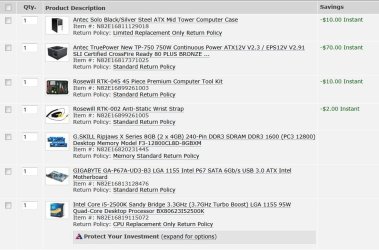
OK, almost ready! I've attached my order in from New Egg but have pushed the button yet. I'd like to get some final thoughts. As ignatzatsonic pointed out, there's some good deals going on until 4/7/2011. I could sub a 650w PSU & save $20. Also, Corsair RAM is on sale & would save $25. Both are listed @ Gigabyte's site for tested RAM http://download.gigabyte.us/FileList/Memory/mb_memory_ga-p67a-ud3-b3.pdf , at least G.Skills is but a lesser Gb version of Corsair's is listed which I would assume is the same.

Also, Commodore Pet made a suggestion to channel savings into an SSD drive. This would go good with silent PC goal in mind. The question is can I do this with an Win 7 upgrade disc as I have posted these concerns before http://www.sevenforums.com/hardware-devices/149106-pc-refresh-possible.html . I think the answer is yes because HDDs & other hardware do go bad & there is a need to transfer product keys. My current C: is 75Gb so I wouldn't need a large one; 80-120Gb. SSDs of that size range $100-200.

I'll order on 4/4 or 4/5 so please post your final thoughts. Thanks.
 

Attachments

  • New PC.JPG
    New PC.JPG
    95.3 KB · Views: 33

My Computer My Computer

Computer type
PC/Desktop
Computer Manufacturer/Model Number
Custom built 2011
OS
Windows 7 64-bit
CPU
Intel Core i5-2500K 3300 Mhz
Motherboard
Gigabyte P67A-UD3-B3
Memory
16Gb Patriot PC3-12800 1600 Mhz
Graphics Card(s)
EVGA GeForce GTX 560 Ti (Fermi)
Sound Card
On Motherboard
Monitor(s) Displays
Dell U2412M & NEC EA232WMi
Screen Resolution
DELL 1920x1200 - NEC 1920x1080
Hard Drives
Crucial 128 Gb SSD
Hitachi Deskstar 2Tb 7200 RPM 32MB Cache
Seagate Barracuda 500Gb 7200 RPM
Hitachi GST Deskstar 1.5TB 7200 RPM 64MB Cache
PSU
Seasonic M1211-620 Bronze
Case
Antec Solo
Cooling
Tuniq Tower 120 Extreme Rev 1
Keyboard
Apple
Mouse
Microsoft
Internet Speed
5mbs
Other Info
Sunbeam PL-RS-3 Rheosmart 3 Fan Controller 3.5" Bay 3 Channel 30W Fan Controller Panel
Looks pretty good.

I'd definitely downgrade to the $70 TP-650 power supply. Even that will be overkill, but it's a great price.

The toolkit is an OK idea, but all you really need is a small Phillips head screwdriver.

I'd order a set of thumbscrews for the case if the Solo doesn't already employ them. Makes it much quicker and easier to get inside the case.

You might order some Arctic Silver 5. The CPU will include one batch of thermal paste, but you would need more if you ever had to remount or change the heatsink.

It appears you are going with the stock Intel heatsink to start with. That's fine as long as you understand you may not like its noise profile and you will have to upgrade if you do more than mild overclocking.

The wrist strap is a good idea. As I understand it, static discharges have a cumulative negative effect, even if they are so small as to not be felt.

Go to Gigabyte and get all the downloads.

You won't have any issues with an SSD if you choose to go that route.
 

My Computer My Computer

Computer type
PC/Desktop
Computer Manufacturer/Model Number
Ignatz Special; 4 speed manual gearbox; factory air conditioning; one of one
OS
Windows 7 Home Premium SP1, 64-bit
CPU
Intel Skylake i5-6600K, not overclocked
Motherboard
AsRock Z170M Extreme 4, micro ATX
Memory
8 GB HyperX DDR4-2666 (2 x 4 GB)
Graphics Card(s)
none; graphics are integrated on CPU
Sound Card
onboard: Realtek ALC1150; external: USB Behringer UF0-202
Monitor(s) Displays
Dell S2340M 23 inch IPS
Screen Resolution
1600 x 900
Hard Drives
System: Crucial MX100 series SSD, 128 GB;
Data: Samsung Spinpoint 103SJ, 1 TB;
Backup: WD Caviar Green WD30EZRX-00D8PB0, 3 TB
PSU
Rosewill SilentNight 500 watt fanless, semi-modular
Case
Antec Solo II
Cooling
Noctua NH-U12S; Noctua F12 intake, Noctua S12A exhaust
Keyboard
Microsoft 200 6JH-00001 USB
Mouse
Dell or Microsoft optical wired; USB
Antivirus
Microsoft Security Essentials and Malwarebytes Premium
Browser
Pale Moon
Other Info
All fans PWM; speeds at idle: CPU circa 500 rpm; intake circa 600 rpm; exhaust circa 600 rpm; CPU temps 27 idle and 47 C load in a warm room (27 C/81 F) when running Intel Extreme Tuning Utility stress test.
Looks good. Just tell me what you think of the TP once you get it LOL
 

My Computer My Computer

Computer type
PC/Desktop
Computer Manufacturer/Model Number
Home built (GeneO industries)/Model 4
OS
Windows 10 Pro. EFI boot partition, full EFI boot
CPU
i7 4770k 4.4GHz (44-44-43-43 turbo) @ 1.248V
Motherboard
ASUS Maximus VI Hero
Memory
16GB (8GBx2) @2200 MHz G.skill Sniper 10-11-10-30-1, 1.6V
Graphics Card(s)
MSI GTX 970 Gaming 4G
Sound Card
Onboard SupremeFX Audio
Monitor(s) Displays
NEC Spectraview 2490WUXi-SV
Screen Resolution
1920 x 1200
Hard Drives
Samsung 850 Pro 256GB (OS), Samsung 2x 128GB 840 Pro SSD in RAID0, 3x WD Blue 6Gb/s 1TB RAID0, WD 2TB Black external USB 3.0, 2TB WD20EARS Green external USB 3.0, 2x 500GB Seagate and 1 750 GB external USB, 1x 350GB external USB3
PSU
Seasonic X-850 (2012 KM3 model)
Case
Fractal Design Define R4
Cooling
NH-D14, NF-F12, NF-A15; NF-P14, NF-P12,NF-A14, S12A PWM
Keyboard
Cooler Master Storm Quickfire Rapid - Brown
Mouse
Logitech G602
Internet Speed
126.4 Mb/s down, 24.3 Mb/s up
Other Info
USB 3.0 x8 , SATA III x8, eSATA, USB 2.0 x6. Samsung DVD R/W drive.

WEI: CPU 7.8, Memory 7.9, Graphics 7.9, Disk 7.9
Looks good. Just tell me what you think of the TP once you get it LOL

Both 750 & 650 are that way? What PSU would you recommend?

BTW - Love your nature photos. We have a Red Tail Hawk near us but I haven't been quick enough to get good photos of him. Awesome bird!
 

My Computer My Computer

Computer type
PC/Desktop
Computer Manufacturer/Model Number
Custom built 2011
OS
Windows 7 64-bit
CPU
Intel Core i5-2500K 3300 Mhz
Motherboard
Gigabyte P67A-UD3-B3
Memory
16Gb Patriot PC3-12800 1600 Mhz
Graphics Card(s)
EVGA GeForce GTX 560 Ti (Fermi)
Sound Card
On Motherboard
Monitor(s) Displays
Dell U2412M & NEC EA232WMi
Screen Resolution
DELL 1920x1200 - NEC 1920x1080
Hard Drives
Crucial 128 Gb SSD
Hitachi Deskstar 2Tb 7200 RPM 32MB Cache
Seagate Barracuda 500Gb 7200 RPM
Hitachi GST Deskstar 1.5TB 7200 RPM 64MB Cache
PSU
Seasonic M1211-620 Bronze
Case
Antec Solo
Cooling
Tuniq Tower 120 Extreme Rev 1
Keyboard
Apple
Mouse
Microsoft
Internet Speed
5mbs
Other Info
Sunbeam PL-RS-3 Rheosmart 3 Fan Controller 3.5" Bay 3 Channel 30W Fan Controller Panel
Back
Top