Solved How do you make IE9 look like IE8

hollyoaks777

New member
Member
VIP
Local time
9:29 PM
Messages
340
How do you make IE9 look like IE8. I hate IE9 but they have forced it apon me as downloads are corrupted unexpected end to your download and so on. I tried a repair to IE8 and reinstalled it as well still same problem. So is there a way to add my favourites to the far bottom left in IE9 and how do i get google search bar add on so I can pick from yahoo or google from the same page. Thank you in advance ps the add on's are enabled.
 

My Computer My Computer

At a glance

windows 7
OS
windows 7

My Computer My Computer

At a glance

Win 7 Pro 64-bitIntel i5 2.4 Ghz8GB DDR3Intel HD 3000
Computer type
Laptop
Computer Manufacturer/Model Number
Sony Vaio VPCEB47GM Laptop
OS
Win 7 Pro 64-bit
CPU
Intel i5 2.4 Ghz
Memory
8GB DDR3
Graphics Card(s)
Intel HD 3000
Sound Card
IDT High Definition
Monitor(s) Displays
15.6 WGXA Anti-Glare LED
Screen Resolution
1280x800
Hard Drives
640Gb 7200rpm
Antivirus
MSE
Browser
Opera (primary) with IE9 backup
Have you uninstalled IE9 from Control Panel > Programs and Features? IE8 will automatically be reinstalled. You can then permanently hide the IE9 in Windows Update by right clicking > hide. Or use the Microsoft Toolkit to block IE9 update.

How do I install or uninstall Internet Explorer 9?

Download details: Toolkit to Disable Automatic Delivery of Internet Explorer 9
Yes done that too mate really hate this being forced upon me. I am going to give IE7 a go. Sorry I have a bad memory I have went to advaned options reset and retore advanced as well. I have now unistalled IE9 via updates installed and the icon is still IE9 but i am on IE8 won't even let me download firefox says corrupt file. I have also ran the fix it tool from Microsoft still have the same problems.
 
Last edited:

My Computer My Computer

At a glance

windows 7
OS
windows 7
I really wouldn't go back to IE7. Too many security issues. Please forgive my confusion. Are you still running IE9? If so, it should appear as an installed update. Did you happen to install SP1 after the IE9? That might be preventing you from uninstalling it. You could try uninstalling SP1 and then see if IE9 is showing.

If you're running a corrupted version of IE8 (without SP1) you could try using System File Checker to replace incorrect, corrupted, changed, or damaged files with the correct versions if possible. Then hide or block IE9.

http://www.sevenforums.com/tutorials/1538-sfc-scannow-command-system-file-checker.html
 

My Computer My Computer

At a glance

Win 7 Pro 64-bitIntel i5 2.4 Ghz8GB DDR3Intel HD 3000
Computer type
Laptop
Computer Manufacturer/Model Number
Sony Vaio VPCEB47GM Laptop
OS
Win 7 Pro 64-bit
CPU
Intel i5 2.4 Ghz
Memory
8GB DDR3
Graphics Card(s)
Intel HD 3000
Sound Card
IDT High Definition
Monitor(s) Displays
15.6 WGXA Anti-Glare LED
Screen Resolution
1280x800
Hard Drives
640Gb 7200rpm
Antivirus
MSE
Browser
Opera (primary) with IE9 backup
I installed IE9 after sp1 on windows 7 professional mate
 

My Computer My Computer

At a glance

windows 7
OS
windows 7
I know this will be a hassle but I think under the circumstances you need to make sure you don't have any corrupt system files. There have been a few posts here and other articles elsewhere about issues with SP1 and IE9 not playing nice with each other. FWIW, I'd uninstall SP1 and then try running System File Checker. If it finds any damaged, corrupt, etc files run it 3 times to see if you can get a clean scan. If you still have issues with your system files then you might consider a Repair Install to fix your currently installed Windows 7 and preserve your user accounts, data, programs, system drivers, etc. Either SFC or Repair Install should get your OS back to a like new condition with only IE8 installed. From there you can hide/block IE9 and reinstall FF.

http://www.sevenforums.com/tutorials/3413-repair-install.html
 

My Computer My Computer

At a glance

Win 7 Pro 64-bitIntel i5 2.4 Ghz8GB DDR3Intel HD 3000
Computer type
Laptop
Computer Manufacturer/Model Number
Sony Vaio VPCEB47GM Laptop
OS
Win 7 Pro 64-bit
CPU
Intel i5 2.4 Ghz
Memory
8GB DDR3
Graphics Card(s)
Intel HD 3000
Sound Card
IDT High Definition
Monitor(s) Displays
15.6 WGXA Anti-Glare LED
Screen Resolution
1280x800
Hard Drives
640Gb 7200rpm
Antivirus
MSE
Browser
Opera (primary) with IE9 backup
I know this will be a hassle but I think under the circumstances you need to make sure you don't have any corrupt system files. There have been a few posts here and other articles elsewhere about issues with SP1 and IE9 not playing nice with each other. FWIW, I'd uninstall SP1 and then try running System File Checker. If it finds any damaged, corrupt, etc files run it 3 times to see if you can get a clean scan. If you still have issues with your system files then you might consider a Repair Install to fix your currently installed Windows 7 and preserve your user accounts, data, programs, system drivers, etc. Either SFC or Repair Install should get your OS back to a like new condition with only IE8 installed. From there you can hide/block IE9 and reinstall FF.

http://www.sevenforums.com/tutorials/3413-repair-install.html
going for the SFC after i uninstall service pack 1 thanks mate. SFC no errors IE8 still won't work don't Microsoft get it people use IE use it becauase they like the look of it. And to me it looks like IE9 is based on the look of firefox which I don't like but it's better than IE9 so i a have no option but to install IE9 and then download Firefox Microsoft need Bill Gates back badly.


See before I do a reinstall will it be IE8 that installs? because I am thinking of doing an install with no updates at all. I had a thinkpad years ago and ran it for 2 years and no updates.
 
Last edited:

My Computer My Computer

At a glance

windows 7
OS
windows 7
I know this will be a hassle but I think under the circumstances you need to make sure you don't have any corrupt system files. There have been a few posts here and other articles elsewhere about issues with SP1 and IE9 not playing nice with each other. FWIW, I'd uninstall SP1 and then try running System File Checker. If it finds any damaged, corrupt, etc files run it 3 times to see if you can get a clean scan. If you still have issues with your system files then you might consider a Repair Install to fix your currently installed Windows 7 and preserve your user accounts, data, programs, system drivers, etc. Either SFC or Repair Install should get your OS back to a like new condition with only IE8 installed. From there you can hide/block IE9 and reinstall FF.

http://www.sevenforums.com/tutorials/3413-repair-install.html
going for the SFC after i uninstall service pack 1 thanks mate. SFC no errors IE8 still won't work don't Microsoft get it people use IE use it becauase they like the look of it. And to me it looks like IE9 is based on the look of firefox which I don't like but it's better than IE9 so i a have no option but to install IE9 and then download Firefox Microsoft need Bill Gates back badly.


See before I do a reinstall will it be IE8 that installs? because I am thinking of doing an install with no updates at all. I had a thinkpad years ago and ran it for 2 years and no updates.

As far as I know, if you're talking about a Repair Install using the original installation media (one that does not contain SP1 or IE9), you should be left with a basic install of Windows 7. That means you will not have any updates on your machine and IE8 would be the default (installed) browser. (See the third "Tip" box in the Repair Install tutorial, "ITEMS THAT WILL BE RESET TO DEFAULT OR AFFECTED".)
 

My Computer My Computer

At a glance

Win 7 Pro 64-bitIntel i5 2.4 Ghz8GB DDR3Intel HD 3000
Computer type
Laptop
Computer Manufacturer/Model Number
Sony Vaio VPCEB47GM Laptop
OS
Win 7 Pro 64-bit
CPU
Intel i5 2.4 Ghz
Memory
8GB DDR3
Graphics Card(s)
Intel HD 3000
Sound Card
IDT High Definition
Monitor(s) Displays
15.6 WGXA Anti-Glare LED
Screen Resolution
1280x800
Hard Drives
640Gb 7200rpm
Antivirus
MSE
Browser
Opera (primary) with IE9 backup
I know this will be a hassle but I think under the circumstances you need to make sure you don't have any corrupt system files. There have been a few posts here and other articles elsewhere about issues with SP1 and IE9 not playing nice with each other. FWIW, I'd uninstall SP1 and then try running System File Checker. If it finds any damaged, corrupt, etc files run it 3 times to see if you can get a clean scan. If you still have issues with your system files then you might consider a Repair Install to fix your currently installed Windows 7 and preserve your user accounts, data, programs, system drivers, etc. Either SFC or Repair Install should get your OS back to a like new condition with only IE8 installed. From there you can hide/block IE9 and reinstall FF.

http://www.sevenforums.com/tutorials/3413-repair-install.html
going for the SFC after i uninstall service pack 1 thanks mate. SFC no errors IE8 still won't work don't Microsoft get it people use IE use it becauase they like the look of it. And to me it looks like IE9 is based on the look of firefox which I don't like but it's better than IE9 so i a have no option but to install IE9 and then download Firefox Microsoft need Bill Gates back badly.


See before I do a reinstall will it be IE8 that installs? because I am thinking of doing an install with no updates at all. I had a thinkpad years ago and ran it for 2 years and no updates.

As far as I know, if you're talking about a Repair Install using the original installation media (one that does not contain SP1 or IE9), you should be left with a basic install of Windows 7. That means you will not have any updates on your machine and IE8 would be the default (installed) browser. (See the third "Tip" box in the Repair Install tutorial, "ITEMS THAT WILL BE RESET TO DEFAULT OR AFFECTED".)
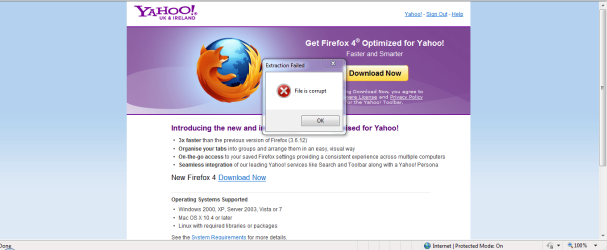
done reinstall mate and they are forcing it apon you just type in firefox and download you will get a corrupt file alert on no matter what link you choose. So i am stuck with IE9
 

My Computer My Computer

At a glance

windows 7
OS
windows 7
"Corrupt file alert" is the key thing here.

That's not normal at all.

Can you post a screen shot or something? Sounds more like an issue with your ISP, network, bad hardware or a virus or something...
 

My Computer My Computer

At a glance

Windows 7 x64 Ultimatei7 96012 Gig Corsair DominatorNvidia 480
Computer Manufacturer/Model Number
Scratch built
OS
Windows 7 x64 Ultimate
CPU
i7 960
Motherboard
Asus P6X58D
Memory
12 Gig Corsair Dominator
Graphics Card(s)
Nvidia 480
Sound Card
Maudio Delta 44 + breakout box
Monitor(s) Displays
Dell UltraSharp U2410 24in and Samsung 21 dual monitors
Screen Resolution
1920x1200 and 1280x1024
Hard Drives
Primary: Intel X-25M G2 160G SSD
Secondary: Segate baracuda 1.0 TB
HDs in AHCI mode.
PSU
Corasair TX850
Case
Cooler Master HAF
Cooling
Corsair H50
Keyboard
Logitech G15 + N52 game pad
Mouse
Logitech MX518
Internet Speed
15kbs down 4.5kbps up
Other Info
WEI 7.6
CPU & RAM 7.6
Graphics 7.9
Hard disk 7.7
"Corrupt file alert" is the key thing here.

That's not normal at all.

Can you post a screen shot or something? Sounds more like an issue with your ISP, network, bad hardware or a virus or something...
I will do it later mate as i have a load of updates to do.
 

Attachments

  • corrupt firefox download.PNG
    corrupt firefox download.PNG
    57.8 KB · Views: 54
Last edited:

My Computer My Computer

At a glance

windows 7
OS
windows 7
I agree with fseal, hollyoaks, that something else might be at fault. I'm trying to run a time line though my head and thinking out loud here. If I get something wrong or out of sequence, please feel free to chastise me or beat me soundly around the head and shoulders with a usb cable. And in no way am I being critical or trying to find fault with anything you've done.

1. Your computer had Windows 7 installed along with the default IE8 for a period of time and all was good.
2. Presumably around the time IE9 was released to the public, "I hate IE9 but they have forced it apon me as downloads are corrupted..." I take that to mean Microsoft (through Windows Update) installed IE9 before you had a chance to decline it. And once IE9 was on your machine it wasn't working right.
3. "I tried a repair to IE8 and reinstalled it..." When you realized IE9 was borked you tried to repair/reinstall IE8, presumably from an official Microsoft website like this. But it didn't fix the problem. For clarification, did you attempt to uninstall IE9 first?
4. Eventually, "I have now unistalled IE9 via updates installed and the icon is still IE9 but i am on IE8 won't even let me download firefox says corrupt file." So apparently there was a problem with the uninstall process and you were not able to use the reinstated IE8 to download Firefox.
5. Finally, you also uninstalled SP1 and, "done reinstall mate and they are forcing it apon you just type in firefox and download you will get a corrupt file alert on no matter what link you choose. So i am stuck with IE9". Again, for clarification, when you say you "reinstalled" you're saying you did the Repair Install and even that didn't work.

If this accurately represents everything you've tried, it sounds like something is terribly wrong with your Windows 7 installation. Unless one of our resident experts can offer another repair option to try, I'm leaning towards a clean install of the operating system. That would virtually guarantee (short of computer hardware issues) elimination of all the problems you're having. And it would be your choice if you want to turn Windows Updates off and stay with the basic OS and IE8.

ADDED: In researching this problem I came across a registry tweak that might help. I tried it on my machine and it successfully removed my currently installed IE9. When I rebooted, IE8 was reinstalled. Your mileage (kilometers?) may vary. And you can disregard the instructions for removing Outlook Express. As always, if a mistake is made in editing the registry,your computer could become an expensive paperweight.

How to uninstall Internet Explorer/Outlook Express from Windows Registry | Windows Reference

 

My Computer My Computer

At a glance

Win 7 Pro 64-bitIntel i5 2.4 Ghz8GB DDR3Intel HD 3000
Computer type
Laptop
Computer Manufacturer/Model Number
Sony Vaio VPCEB47GM Laptop
OS
Win 7 Pro 64-bit
CPU
Intel i5 2.4 Ghz
Memory
8GB DDR3
Graphics Card(s)
Intel HD 3000
Sound Card
IDT High Definition
Monitor(s) Displays
15.6 WGXA Anti-Glare LED
Screen Resolution
1280x800
Hard Drives
640Gb 7200rpm
Antivirus
MSE
Browser
Opera (primary) with IE9 backup
I agree with fseal, hollyoaks, that something else might be at fault. I'm trying to run a time line though my head and thinking out loud here. If I get something wrong or out of sequence, please feel free to chastise me or beat me soundly around the head and shoulders with a usb cable. And in no way am I being critical or trying to find fault with anything you've done.

1. Your computer had Windows 7 installed along with the default IE8 for a period of time and all was good.
2. Presumably around the time IE9 was released to the public, "I hate IE9 but they have forced it apon me as downloads are corrupted..." I take that to mean Microsoft (through Windows Update) installed IE9 before you had a chance to decline it. And once IE9 was on your machine it wasn't working right.
3. "I tried a repair to IE8 and reinstalled it..." When you realized IE9 was borked you tried to repair/reinstall IE8, presumably from an official Microsoft website like this. But it didn't fix the problem. For clarification, did you attempt to uninstall IE9 first?
4. Eventually, "I have now unistalled IE9 via updates installed and the icon is still IE9 but i am on IE8 won't even let me download firefox says corrupt file." So apparently there was a problem with the uninstall process and you were not able to use the reinstated IE8 to download Firefox.
5. Finally, you also uninstalled SP1 and, "done reinstall mate and they are forcing it apon you just type in firefox and download you will get a corrupt file alert on no matter what link you choose. So i am stuck with IE9". Again, for clarification, when you say you "reinstalled" you're saying you did the Repair Install and even that didn't work.

If this accurately represents everything you've tried, it sounds like something is terribly wrong with your Windows 7 installation. Unless one of our resident experts can offer another repair option to try, I'm leaning towards a clean install of the operating system. That would virtually guarantee (short of computer hardware issues) elimination of all the problems you're having. And it would be your choice if you want to turn Windows Updates off and stay with the basic OS and IE8.

ADDED: In researching this problem I came across a registry tweak that might help. I tried it on my machine and it successfully removed my currently installed IE9. When I rebooted, IE8 was reinstalled. Your mileage (kilometers?) may vary. And you can disregard the instructions for removing Outlook Express. As always, if a mistake is made in editing the registry,your computer could become an expensive paperweight.

How to uninstall Internet Explorer/Outlook Express from Windows Registry | Windows Reference
correct but I did a clean install not repair buddy
 

My Computer My Computer

At a glance

windows 7
OS
windows 7
I guess that explains why you earlier told fseal that you had a load of updates to do. Did these updates come from the Windows Update site and did they include IE9 again? If so, the only other thing that comes to mind is perhaps you have a damaged or corrupt installation media that is somehow interfering with a good IE9 download. I'm totally perplexed. :confused:
 

My Computer My Computer

At a glance

Win 7 Pro 64-bitIntel i5 2.4 Ghz8GB DDR3Intel HD 3000
Computer type
Laptop
Computer Manufacturer/Model Number
Sony Vaio VPCEB47GM Laptop
OS
Win 7 Pro 64-bit
CPU
Intel i5 2.4 Ghz
Memory
8GB DDR3
Graphics Card(s)
Intel HD 3000
Sound Card
IDT High Definition
Monitor(s) Displays
15.6 WGXA Anti-Glare LED
Screen Resolution
1280x800
Hard Drives
640Gb 7200rpm
Antivirus
MSE
Browser
Opera (primary) with IE9 backup
I guess that explains why you earlier told fseal that you had a load of updates to do. Did these updates come from the Windows Update site and did they include IE9 again? If so, the only other thing that comes to mind is perhaps you have a damaged or corrupt installation media that is somehow interfering with a good IE9 download. I'm totally perplexed. :confused:

Thinking the same mate :confused:
 

My Computer My Computer

At a glance

windows 7
OS
windows 7
Couple of things to consider/try. If you can borrow someone elses installation media you could give that a go. It would have to be the exact same version and bit (32 or 64) as you have installed so your product key would work if reactivation is necessary.

Or, you could create a universal installation disk. There's a tutorial here or you could google "windows 7 universal installation disk mydigitallife" (can't give links -against forum rules.) They have official Microsoft links to all of the Win 7 versions and bits as well as instructions on how to put all versions of Win 7 on one DVD.

I'm really sorry we haven't been able to find a solution. It's frustrating.
 

My Computer My Computer

At a glance

Win 7 Pro 64-bitIntel i5 2.4 Ghz8GB DDR3Intel HD 3000
Computer type
Laptop
Computer Manufacturer/Model Number
Sony Vaio VPCEB47GM Laptop
OS
Win 7 Pro 64-bit
CPU
Intel i5 2.4 Ghz
Memory
8GB DDR3
Graphics Card(s)
Intel HD 3000
Sound Card
IDT High Definition
Monitor(s) Displays
15.6 WGXA Anti-Glare LED
Screen Resolution
1280x800
Hard Drives
640Gb 7200rpm
Antivirus
MSE
Browser
Opera (primary) with IE9 backup
I have just spent an hour and a half on the phone to my ISP they are sending out new hub. I don't think it's that does anyone else think it could be that?
 

My Computer My Computer

At a glance

windows 7
OS
windows 7
Have you noticed any other problems with your internet connection like intermittent loss of connectivity?
 

My Computer My Computer

At a glance

Win 7 Pro 64-bitIntel i5 2.4 Ghz8GB DDR3Intel HD 3000
Computer type
Laptop
Computer Manufacturer/Model Number
Sony Vaio VPCEB47GM Laptop
OS
Win 7 Pro 64-bit
CPU
Intel i5 2.4 Ghz
Memory
8GB DDR3
Graphics Card(s)
Intel HD 3000
Sound Card
IDT High Definition
Monitor(s) Displays
15.6 WGXA Anti-Glare LED
Screen Resolution
1280x800
Hard Drives
640Gb 7200rpm
Antivirus
MSE
Browser
Opera (primary) with IE9 backup
Back
Top