Show us your SSD performance

Status
Not open for further replies.
If you take an image of a complete drive, it is called a clone. That is different to imaging which goes per partition. And most free imaging programs cannot do cloning. For that you usually need the commercial versions.
 

My Computer My Computer

At a glance

Vista, Windows7, Mint Mate, Zorin, Windows 8from 1.6GHz Duo to i7
Computer Manufacturer/Model Number
HP, Dell, Gateway, Toshiba - 4 laptops and 2 desktops
OS
Vista, Windows7, Mint Mate, Zorin, Windows 8
CPU
from 1.6GHz Duo to i7
Monitor(s) Displays
2x HP w2207
Hard Drives
5x HDD, 7x SSD, 12x Externals
Keyboard
with trackball - no mices
Mouse
Trackball mice
Internet Speed
DSL 6000
If you take an image of a complete drive, it is called a clone. That is different to imaging which goes per partition. And most free imaging programs cannot do cloning. For that you usually need the commercial versions.

I beg to differ with you on this. Most all imaging program can make a image of a complete drive and restore that image at any time, a hour/day/week/month/whatever time later, and preserve the structure of the drive as it was when the image was made. That is not cloning.
Cloning is a direct copy from one drive to another in REAL time, Now.
So if you want to call a image of a complete drive that is store for any length time a clone you can but it really isn't the same thing.

I don't know of any program that does cloning to store that clone for use at a later time/date.
And cloning is a bit by bit copy where as a image is compressed and then expanded on restoring that image.
 

My Computer My Computer

At a glance

Windows 7 Pro x64i5 76016GBNvidia GTS450
Computer Manufacturer/Model Number
Built be Me
OS
Windows 7 Pro x64
CPU
i5 760
Motherboard
Asus P7P55D-E Pro
Memory
16GB
Graphics Card(s)
Nvidia GTS450
Sound Card
On board
Monitor(s) Displays
Dell 2007WFP Dell 1800FP
Screen Resolution
1680x1050 1280x1024
Hard Drives
Seagate 250GB & 750GB
WD 1TB
PSU
Antec 750
Case
In Win
Cooling
Cooler Master Hyper 212+
Keyboard
IBM
Mouse
MS
If you take an image of a complete drive, it is called a clone. That is different to imaging which goes per partition. And most free imaging programs cannot do cloning. For that you usually need the commercial versions.

I beg to differ with you on this. Most all imaging program can make a image of a complete drive and restore that image at any time, a hour/day/week/month/whatever time later, and preserve the structure of the drive as it was when the image was made. That is not cloning.
Cloning is a direct copy from one drive to another in REAL time, Now.
So if you want to call a image of a complete drive that is store for any length time a clone you can but it really isn't the same thing.

I don't know of any program that does cloning to store that clone for use at a later time/date.
And cloning is a bit by bit copy where as a image is compressed and then expanded on restoring that image.
Well, since you know all this stuff, no need for ma to comment any further.
 

My Computer My Computer

At a glance

Vista, Windows7, Mint Mate, Zorin, Windows 8from 1.6GHz Duo to i7
Computer Manufacturer/Model Number
HP, Dell, Gateway, Toshiba - 4 laptops and 2 desktops
OS
Vista, Windows7, Mint Mate, Zorin, Windows 8
CPU
from 1.6GHz Duo to i7
Monitor(s) Displays
2x HP w2207
Hard Drives
5x HDD, 7x SSD, 12x Externals
Keyboard
with trackball - no mices
Mouse
Trackball mice
Internet Speed
DSL 6000
Sorry if somehow I pissed you off. I wasn't trying to.

No I don't know all this. I am learning as I go. Yes somethings I do know, others I learn and hopefully retain.

Thanks for all your help.
 

My Computer My Computer

At a glance

Windows 7 Pro x64i5 76016GBNvidia GTS450
Computer Manufacturer/Model Number
Built be Me
OS
Windows 7 Pro x64
CPU
i5 760
Motherboard
Asus P7P55D-E Pro
Memory
16GB
Graphics Card(s)
Nvidia GTS450
Sound Card
On board
Monitor(s) Displays
Dell 2007WFP Dell 1800FP
Screen Resolution
1680x1050 1280x1024
Hard Drives
Seagate 250GB & 750GB
WD 1TB
PSU
Antec 750
Case
In Win
Cooling
Cooler Master Hyper 212+
Keyboard
IBM
Mouse
MS
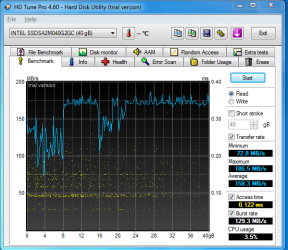
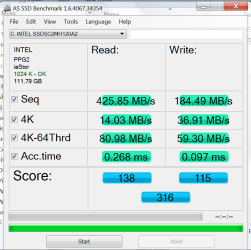
Here's the test on my new intel X25-V...
 

Attachments

  • SSD.PNG
    SSD.PNG
    23.8 KB · Views: 12

My Computer My Computer

At a glance

Windows 7 ultimate X64Core i7 870 Lynnfield4GB Corsair XMS 3 1600MhzGeForce 8800 GTS (for the time being)
Computer Manufacturer/Model Number
Custom
OS
Windows 7 ultimate X64
CPU
Core i7 870 Lynnfield
Motherboard
MSI P55-GD55
Memory
4GB Corsair XMS 3 1600Mhz
Graphics Card(s)
GeForce 8800 GTS (for the time being)
Sound Card
Onboard 7.1 digital
Monitor(s) Displays
Dell 19"
Screen Resolution
1280x1024
Hard Drives
Barracuda 750Gb
PSU
Corsair TX 650w
Case
Thermaltake Armour Extreme Edition
Cooling
Corsair H50
Keyboard
Dell XPS slim
Mouse
Dell XPS mouse (only good product)
Internet Speed
100 Mbps +/-
Great SSD, mine is now in my laptop, adds some serious zoom ;)

Sequential Read seems alright, maybe even on the high side.

The access times should be in the 0.09....ms range.

Updated firmware?
ACHI or IDE?
Driver?
Intel Toolbox? Did you run the optimization?
Any tweaks?

You can get most of this info from the AS SSD benchmark, you don't have to run the benchmark, it is in the upper left corner when you open it.
 

My Computer My Computer

At a glance

Windows 7 Ult x64 - SP1/ Windows 8 Pro x64Intel Core i5-3570K 4.6GHz8GB (2X4GB) DDR3 1600 Corsair Vengeance CL8 1.5vSapphire HD 7770 Vapor-X OC 1GB DDR5
Computer type
PC/Desktop
Computer Manufacturer/Model Number
76~2.0
OS
Windows 7 Ult x64 - SP1/ Windows 8 Pro x64
CPU
Intel Core i5-3570K 4.6GHz
Motherboard
Gigabyte GA-Z77X UD3H, f18
Memory
8GB (2X4GB) DDR3 1600 Corsair Vengeance CL8 1.5v
Graphics Card(s)
Sapphire HD 7770 Vapor-X OC 1GB DDR5
Sound Card
Onboard VIA VT2021
Monitor(s) Displays
22" LCD Dell
Screen Resolution
1680x1050
Hard Drives
Samsung 840Pro 128GB SSD,
Seagate Barracuda 500GB SATA2 7200rpm 32MB cache, Seagate Barracuda 1TB SATA2 7200rpm 32MB cache,
PSU
Corsair HX650W
Case
Cooler Master Storm Scout
Cooling
Corsair H80 2x12cm Noctua NF P12 , 2x14cm case fans
Keyboard
Logitech Wave
Mouse
CM Sentinel
Internet Speed
Dismal
Antivirus
Avast
Browser
Opera Next
Other Info
Haswell laptop: HP Envy 17t-j, i7-4700MQ, GeForce 740M 2GB DDR3, 17.3" Full HD 1920x1080, 16GB RAM, Samsung 840 Pro 128GB, 1TB Hitachi 7200 HDD,
Desktop: eSATA ports,
External eSATA Seagate 500GB SATA2 7200rpm,
External WD USB 500GB
If you take an image of a complete drive, it is called a clone. That is different to imaging which goes per partition. And most free imaging programs cannot do cloning. For that you usually need the commercial versions.

I beg to differ with you on this. Most all imaging program can make a image of a complete drive and restore that image at any time, a hour/day/week/month/whatever time later, and preserve the structure of the drive as it was when the image was made. That is not cloning.

That is correct Shootist but you first must individually select/tick the box of each partition to image the whole drive but also having the option of restoring fewer partitions than backed up. In which case you are imaging all partitions of the drive.

A true Clone to which whs is referring to backs up the entire selected drive without asking for partition selection then asks for a destination where the data is immediately transferred.

@ whs some free versions of Acronis will also clone the drive, My Western Digital version does both imaging and cloning wheras the Intel - data migration tool (also Acronis) will only immediately clone one drive to another offering to upgrade to the full version if you want more features.


Cloning is a direct copy from one drive to another in REAL time, Now.
So if you want to call a image of a complete drive that is store for any length time a clone you can but it really isn't the same thing.

I don't know of any program that does cloning to store that clone for use at a later time/date.
And cloning is a bit by bit copy where as a image is compressed and then expanded on restoring that image.
 

My Computer My Computer

At a glance

Windows 10 Pro x 2/Windows 11 HomeIntel i7 2600K @ 3.40 GHzCorsair Vengeance 16GB DDR3 1600MHz CL8 Dual ...EVGA GeForce RTX 3080 XC3 ULTRA GAMING 10GB G...
Computer type
PC/Desktop
Computer Manufacturer/Model Number
My own abomination, I call it the Money Pit
OS
Windows 10 Pro x 2/Windows 11 Home
CPU
Intel i7 2600K @ 3.40 GHz
Motherboard
ASUS Sabertooth P67
Memory
Corsair Vengeance 16GB DDR3 1600MHz CL8 Dual Channel Kit
Graphics Card(s)
EVGA GeForce RTX 3080 XC3 ULTRA GAMING 10GB GDDR6X
Sound Card
Onboard Realtek or Nvidia High Definition Audio (HDMI)
Monitor(s) Displays
Samsung JS7000 50" SUHD TV or Samsung 27" FHD 60Hz 8ms GTG V
Screen Resolution
1920 x 1080
Hard Drives
1 x Samsung 870 EVO 250 GB SSD (Windows 10 Pro), 1 x Samsung 850 EVO 250 GB SSD (Windows 10 Pro)
PSU
Corsair AX860 - 860W Modular Power Supply
Case
Phanteks Enthoo Luxe Full Tower Case - Black
Cooling
CORSAIR Hydro Series H150i PRO RGB 360mm Liquid CPU Cooler
Keyboard
Logitech K830 Illuminated Living-Room Keyboard
Mouse
Logitech MX Anywhere 2S Wireless Mouse
Internet Speed
100 Mbps
Antivirus
ESET Internet Security
Browser
Latest Version Of Firefox & Microsoft Edge Chromium Stable
Other Info
LG Super Multi Blue Internal Blu-ray Disk Rewriter - BH10LS30
6x2 HDMI Switcher (6 inputs, 2 outputs) so I can send the output of my Cable Box, Roku, or any my 4 computers to either my TV or Monitor separately or simultaneously.
:focus: 2011-04-12_002514.png
 

My Computer My Computer

At a glance

Windows 10 Pro x 2/Windows 11 HomeIntel i7 2600K @ 3.40 GHzCorsair Vengeance 16GB DDR3 1600MHz CL8 Dual ...EVGA GeForce RTX 3080 XC3 ULTRA GAMING 10GB G...
Computer type
PC/Desktop
Computer Manufacturer/Model Number
My own abomination, I call it the Money Pit
OS
Windows 10 Pro x 2/Windows 11 Home
CPU
Intel i7 2600K @ 3.40 GHz
Motherboard
ASUS Sabertooth P67
Memory
Corsair Vengeance 16GB DDR3 1600MHz CL8 Dual Channel Kit
Graphics Card(s)
EVGA GeForce RTX 3080 XC3 ULTRA GAMING 10GB GDDR6X
Sound Card
Onboard Realtek or Nvidia High Definition Audio (HDMI)
Monitor(s) Displays
Samsung JS7000 50" SUHD TV or Samsung 27" FHD 60Hz 8ms GTG V
Screen Resolution
1920 x 1080
Hard Drives
1 x Samsung 870 EVO 250 GB SSD (Windows 10 Pro), 1 x Samsung 850 EVO 250 GB SSD (Windows 10 Pro)
PSU
Corsair AX860 - 860W Modular Power Supply
Case
Phanteks Enthoo Luxe Full Tower Case - Black
Cooling
CORSAIR Hydro Series H150i PRO RGB 360mm Liquid CPU Cooler
Keyboard
Logitech K830 Illuminated Living-Room Keyboard
Mouse
Logitech MX Anywhere 2S Wireless Mouse
Internet Speed
100 Mbps
Antivirus
ESET Internet Security
Browser
Latest Version Of Firefox & Microsoft Edge Chromium Stable
Other Info
LG Super Multi Blue Internal Blu-ray Disk Rewriter - BH10LS30
6x2 HDMI Switcher (6 inputs, 2 outputs) so I can send the output of my Cable Box, Roku, or any my 4 computers to either my TV or Monitor separately or simultaneously.
That is correct Shootist but you first must individually select/tick the box of each partition to image the whole drive but also having the option of restoring fewer partitions than backed up. In which case you are imaging all partitions of the drive.

A true Clone to which whs is referring to backs up the entire selected drive without asking for partition selection then asks for a destination where the data is immediately transferred.

@ whs some free versions of Acronis will also clone the drive, My Western Digital version does both imaging and cloning wheras the Intel - data migration tool (also Acronis) will only immediately clone one drive to another offering to upgrade to the full version if you want more features.

Honestly I haven't Cloned a drive in years. I tried it once with some proprietary drive makers software, back when big drives were 1-5GBs, and it took hours and hours. I could of and did do a reinstall of the OS and all my software in less time.

Yes all Aconis TI versions I have used have the ability to clone a drive but I have never used that feature so I have no idea how it work with TI. After my first experiences with cloning I opted for imaging as my method of moving OS programs and data from one drive to another or direct copying from drive to drive in the case of Data only.
If you and whs say the cloning feature in TI can save a clone of one drive to later be placed on another drive then OK I take your word on that. But that was not my original experience with cloning software. You had to connect both drives, boot the PC from a disk (floppy or CD) with the software, select the source disk then the destination disk and click OK. Then wait.

I'm going to reimage my main drive tonight in preparation for the arrival of the SSD so I'll give the clone feature a try. I'm going to take that image & load it on another 250GB drive, Make all the changes to the partitions sizes so all the partitions will fit on the SSD without having to resize them during the restore then make another image of that drive to load on the SSD. Making sure the alignment stays in the correct place with each image/restore.
 

My Computer My Computer

At a glance

Windows 7 Pro x64i5 76016GBNvidia GTS450
Computer Manufacturer/Model Number
Built be Me
OS
Windows 7 Pro x64
CPU
i5 760
Motherboard
Asus P7P55D-E Pro
Memory
16GB
Graphics Card(s)
Nvidia GTS450
Sound Card
On board
Monitor(s) Displays
Dell 2007WFP Dell 1800FP
Screen Resolution
1680x1050 1280x1024
Hard Drives
Seagate 250GB & 750GB
WD 1TB
PSU
Antec 750
Case
In Win
Cooling
Cooler Master Hyper 212+
Keyboard
IBM
Mouse
MS
You are right. The WD version of Acronis does have a clone feature. I used it recently. It takes about 10 minutes and works perfectly.
 

My Computers My Computers

  • At a glance

    Windows 11 ProRyzen 9 5900X32GB G Skill DDR4-3600EVGA RTX 3080 FTW 3 Ultra
    Computer type
    PC/Desktop
    Computer Manufacturer/Model Number
    ALWAYS UNDER CONSTRUCTION
    OS
    Windows 11 Pro
    CPU
    Ryzen 9 5900X
    Motherboard
    Asus X570 Crosshair Viii Hero
    Memory
    32GB G Skill DDR4-3600
    Graphics Card(s)
    EVGA RTX 3080 FTW 3 Ultra
    Sound Card
    On Board/Sennheiser PC37X Headset
    Monitor(s) Displays
    3 X Asus 27"
    Screen Resolution
    2560x1440
    Hard Drives
    2 X 1 TB NVME drives
    PSU
    EVGA 850
    Case
    Phanteks Eclipse P400A
    Cooling
    EVGA 280 AIO
    Keyboard
    Logitech G510s/ Logitech G13
    Mouse
    Logitech G502
    Internet Speed
    24/1
    Antivirus
    ESET/MBAM Pro/SAS Pro
    Browser
    Chrome/ Firefox/ Edge
  • At a glance

    Windows 11 ProIntel Ultra 9 288V32 GB LPDDR5X 8533
    Computer type
    Laptop
    System Manufacturer/Model Number
    Dell 16 Plus
    OS
    Windows 11 Pro
    CPU
    Intel Ultra 9 288V
    Memory
    32 GB LPDDR5X 8533
    Monitor(s) Displays
    16" Mini-LED HDR600 Touch 90 Hz
    Screen Resolution
    2560X1600
    Hard Drives
    1 TB NVME
Great SSD, mine is now in my laptop, adds some serious zoom ;)

Sequential Read seems alright, maybe even on the high side.

The access times should be in the 0.09....ms range.

Updated firmware?
ACHI or IDE?
Driver?
Intel Toolbox? Did you run the optimization?
Any tweaks?

You can get most of this info from the AS SSD benchmark, you don't have to run the benchmark, it is in the upper left corner when you open it.
lol no I just installed the OS and ran test. Its a SATAII I believe. This is my first SSD so I'm in new territory here. :) Thanks for the heads up.
 

My Computer My Computer

At a glance

Windows 7 ultimate X64Core i7 870 Lynnfield4GB Corsair XMS 3 1600MhzGeForce 8800 GTS (for the time being)
Computer Manufacturer/Model Number
Custom
OS
Windows 7 ultimate X64
CPU
Core i7 870 Lynnfield
Motherboard
MSI P55-GD55
Memory
4GB Corsair XMS 3 1600Mhz
Graphics Card(s)
GeForce 8800 GTS (for the time being)
Sound Card
Onboard 7.1 digital
Monitor(s) Displays
Dell 19"
Screen Resolution
1280x1024
Hard Drives
Barracuda 750Gb
PSU
Corsair TX 650w
Case
Thermaltake Armour Extreme Edition
Cooling
Corsair H50
Keyboard
Dell XPS slim
Mouse
Dell XPS mouse (only good product)
Internet Speed
100 Mbps +/-
Great SSD, mine is now in my laptop, adds some serious zoom ;)

Sequential Read seems alright, maybe even on the high side.

The access times should be in the 0.09....ms range.

Updated firmware?
ACHI or IDE?
Driver?
Intel Toolbox? Did you run the optimization?
Any tweaks?

You can get most of this info from the AS SSD benchmark, you don't have to run the benchmark, it is in the upper left corner when you open it.
lol no I just installed the OS and ran test. Its a SATAII I believe. This is my first SSD so I'm in new territory here. :) Thanks for the heads up.

Well your motherboard BIOS has a setting that may make it run faster.
AHCI is a setting that adds some extra features. It is the drive setup screen and in the same place as IDE. Not sure of your board so I'm not going to tell you how to get to it. Buit if you find that setting enable it.
SSDs are basically the same as spinning hard drives except they don't spin and there are other things you should and should not do with them.
I'm new to SSDs also. Will be installing my first tomorrow night. But I have read up on them.
Good luck with yours.
 

My Computer My Computer

At a glance

Windows 7 Pro x64i5 76016GBNvidia GTS450
Computer Manufacturer/Model Number
Built be Me
OS
Windows 7 Pro x64
CPU
i5 760
Motherboard
Asus P7P55D-E Pro
Memory
16GB
Graphics Card(s)
Nvidia GTS450
Sound Card
On board
Monitor(s) Displays
Dell 2007WFP Dell 1800FP
Screen Resolution
1680x1050 1280x1024
Hard Drives
Seagate 250GB & 750GB
WD 1TB
PSU
Antec 750
Case
In Win
Cooling
Cooler Master Hyper 212+
Keyboard
IBM
Mouse
MS
Thanks guys for the update of Acronis. There are so many versions floating arouns that I cannot keep track of all of them. And I myself have not used Acronis in a long time, so I am grateful for your inputs.
 

My Computer My Computer

At a glance

Vista, Windows7, Mint Mate, Zorin, Windows 8from 1.6GHz Duo to i7
Computer Manufacturer/Model Number
HP, Dell, Gateway, Toshiba - 4 laptops and 2 desktops
OS
Vista, Windows7, Mint Mate, Zorin, Windows 8
CPU
from 1.6GHz Duo to i7
Monitor(s) Displays
2x HP w2207
Hard Drives
5x HDD, 7x SSD, 12x Externals
Keyboard
with trackball - no mices
Mouse
Trackball mice
Internet Speed
DSL 6000
Just got done installing and loading my most recent image on the Intel 320 120GB SSD.

Booted system from a Mustang PE boot USB stick. Opened CMD and made one partition, 100MB offset 1024 active. checked and everything looked good

Then I closed that and opened TI 2011. Loaded up the image and it took maybe 7 minutes.
Closed TI opened CMD did the check and everything is aligned.

Rebooted, entered BIOS, set first boot device Intel, save/exit. Had to reboot one more time after 7 loaded for the first time.

Average of 230+MBs. Access time .01MS

Sorry don't had a SS, forgot to save it.
So when you make a FULL image of a spinning drive that has correct alignment and then load that full image on a SSD the alignment is carried over.

Been opening some of my programs, Photoshop CS5, Live mail (which took forever before), Word and the like.
Quick Quick Quick.

Thanks.
 

My Computer My Computer

At a glance

Windows 7 Pro x64i5 76016GBNvidia GTS450
Computer Manufacturer/Model Number
Built be Me
OS
Windows 7 Pro x64
CPU
i5 760
Motherboard
Asus P7P55D-E Pro
Memory
16GB
Graphics Card(s)
Nvidia GTS450
Sound Card
On board
Monitor(s) Displays
Dell 2007WFP Dell 1800FP
Screen Resolution
1680x1050 1280x1024
Hard Drives
Seagate 250GB & 750GB
WD 1TB
PSU
Antec 750
Case
In Win
Cooling
Cooler Master Hyper 212+
Keyboard
IBM
Mouse
MS
You might want to check the basic SSD settings have been made.

Win7 does this when installed on a SSD, but using an image I'm not sure if it does.


Have you run the Intel SSD Toolbox?
The Intel SSD Mangement Tools > System Configuration Tuner will optimize your Win7 settings for the SSD.

Basics:
Turn off Defrag on the SSD
Disable Superfetch, this is recommended by Intel
Enable write caching
Turn off write cache buffer flushing if you have a UPS
With lots of RAM reduce the Page File


If you make a lot of image backups consider turning off system restore.
 

My Computer My Computer

At a glance

Windows 7 Ult x64 - SP1/ Windows 8 Pro x64Intel Core i5-3570K 4.6GHz8GB (2X4GB) DDR3 1600 Corsair Vengeance CL8 1.5vSapphire HD 7770 Vapor-X OC 1GB DDR5
Computer type
PC/Desktop
Computer Manufacturer/Model Number
76~2.0
OS
Windows 7 Ult x64 - SP1/ Windows 8 Pro x64
CPU
Intel Core i5-3570K 4.6GHz
Motherboard
Gigabyte GA-Z77X UD3H, f18
Memory
8GB (2X4GB) DDR3 1600 Corsair Vengeance CL8 1.5v
Graphics Card(s)
Sapphire HD 7770 Vapor-X OC 1GB DDR5
Sound Card
Onboard VIA VT2021
Monitor(s) Displays
22" LCD Dell
Screen Resolution
1680x1050
Hard Drives
Samsung 840Pro 128GB SSD,
Seagate Barracuda 500GB SATA2 7200rpm 32MB cache, Seagate Barracuda 1TB SATA2 7200rpm 32MB cache,
PSU
Corsair HX650W
Case
Cooler Master Storm Scout
Cooling
Corsair H80 2x12cm Noctua NF P12 , 2x14cm case fans
Keyboard
Logitech Wave
Mouse
CM Sentinel
Internet Speed
Dismal
Antivirus
Avast
Browser
Opera Next
Other Info
Haswell laptop: HP Envy 17t-j, i7-4700MQ, GeForce 740M 2GB DDR3, 17.3" Full HD 1920x1080, 16GB RAM, Samsung 840 Pro 128GB, 1TB Hitachi 7200 HDD,
Desktop: eSATA ports,
External eSATA Seagate 500GB SATA2 7200rpm,
External WD USB 500GB
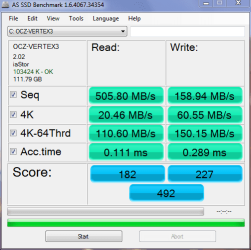
Here's a benchmark for the OCZ Vertex 3, 120 GBs:

OCZ_V_3.PNG

The motherboard is P8P67 LE , CPU i5-2500K. no OC...

The values are not as advertised and the access time should be in 0.06 area instead of the 0.111.

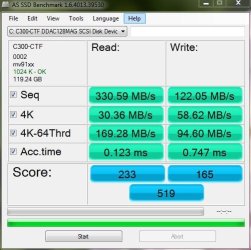
And if I compare it to the Crucial C300 128 GBs SSD that my machine has:

AS P7P55D-E Pro_no OC.JPG

Crucial beats OCZ Vertex 3 in the overall score and there isn't much noticeable difference in speed using the two machines. The machine with the OCZ SSD seems a shade faster in standard use, but that could be contributed to the CPU and the different chipset as well. At this point, I don't really see much value in the OCZ Vertex 3...

I am not sure why the OCZ doesn't perform better; all drivers are at the latest version, write-cache is enabled, etc...
 

My Computer My Computer

At a glance

Windows 7 64-bit, Windows 8.1 64-bit, OSX El ...Intel i5-3350P 3.1 GHz16 GBs GSkill SniperRadeon HD 7850
Computer type
PC/Desktop
Computer Manufacturer/Model Number
Custom built at Home
OS
Windows 7 64-bit, Windows 8.1 64-bit, OSX El Capitan, Windows 10 (VMware)
CPU
Intel i5-3350P 3.1 GHz
Motherboard
Gigabyte GA-Z77X-UP5 TH
Memory
16 GBs GSkill Sniper
Graphics Card(s)
Radeon HD 7850
Sound Card
VIA HD Audio
Monitor(s) Displays
Dell U2410 24"
Screen Resolution
1920x1200
Hard Drives
1 x Intel 520 240 GBs
1 x Seagate 1TBs SATA 2.0,
1 x Seagate 1TBs eSATA 2.0
PSU
Thermaltake 850W
Case
Antec P183
Cooling
Noctua NH-D14 Heatsink 2 x 120mm fans, 4 x 120mm case fans
Keyboard
Dell Multimedia keyboard
Mouse
Logitech Trackball
Internet Speed
28.5 Mb/s
i think that proves again that the access time rules and the R/W speeds are of secondary importance for the OS. That will be different once we can afford SSDs for massive data storage/transfer.
 

My Computer My Computer

At a glance

Vista, Windows7, Mint Mate, Zorin, Windows 8from 1.6GHz Duo to i7
Computer Manufacturer/Model Number
HP, Dell, Gateway, Toshiba - 4 laptops and 2 desktops
OS
Vista, Windows7, Mint Mate, Zorin, Windows 8
CPU
from 1.6GHz Duo to i7
Monitor(s) Displays
2x HP w2207
Hard Drives
5x HDD, 7x SSD, 12x Externals
Keyboard
with trackball - no mices
Mouse
Trackball mice
Internet Speed
DSL 6000
Agree with whs, access times are important.

Those access times look about right for OCZ, the Intel SSDs have always had better access times than other SSDs.

One review shows them at 0.213/0.248, others 0.0820/0.280, which are better than the OCZ Gen2s I've seen.
 

My Computer My Computer

At a glance

Windows 7 Ult x64 - SP1/ Windows 8 Pro x64Intel Core i5-3570K 4.6GHz8GB (2X4GB) DDR3 1600 Corsair Vengeance CL8 1.5vSapphire HD 7770 Vapor-X OC 1GB DDR5
Computer type
PC/Desktop
Computer Manufacturer/Model Number
76~2.0
OS
Windows 7 Ult x64 - SP1/ Windows 8 Pro x64
CPU
Intel Core i5-3570K 4.6GHz
Motherboard
Gigabyte GA-Z77X UD3H, f18
Memory
8GB (2X4GB) DDR3 1600 Corsair Vengeance CL8 1.5v
Graphics Card(s)
Sapphire HD 7770 Vapor-X OC 1GB DDR5
Sound Card
Onboard VIA VT2021
Monitor(s) Displays
22" LCD Dell
Screen Resolution
1680x1050
Hard Drives
Samsung 840Pro 128GB SSD,
Seagate Barracuda 500GB SATA2 7200rpm 32MB cache, Seagate Barracuda 1TB SATA2 7200rpm 32MB cache,
PSU
Corsair HX650W
Case
Cooler Master Storm Scout
Cooling
Corsair H80 2x12cm Noctua NF P12 , 2x14cm case fans
Keyboard
Logitech Wave
Mouse
CM Sentinel
Internet Speed
Dismal
Antivirus
Avast
Browser
Opera Next
Other Info
Haswell laptop: HP Envy 17t-j, i7-4700MQ, GeForce 740M 2GB DDR3, 17.3" Full HD 1920x1080, 16GB RAM, Samsung 840 Pro 128GB, 1TB Hitachi 7200 HDD,
Desktop: eSATA ports,
External eSATA Seagate 500GB SATA2 7200rpm,
External WD USB 500GB
It would be hard not to agree with a guy, who lives in the summer at the origin of Danube river, but I'll try... :)

The part I disagree with is when "we can afford SSDs for massive data storage/transfer"...

First, it's doubtful that SSDs will be affordable for massive storage anytime soon, at least not for home users yet; say, about 3-5 years we are looking at. During this time, they should work on the network connections as well that is the limiting factor in data transfers over the network. The current and widely used 100 Mb/s networks' bandwidth can easily be saturated with a traditional HDD; the SATA 2 SSDs can easily exhaust the gigi network connection, more so the SATA 3 SSDs. We'd need 10 gigi network connection to exceed the current Vertex 3 SSD read throughput. In 3-5 years I am pretty sure that we'll have SATA X, or whatever, that will also saturate the bandwidth of the high end network connection whatever that maybe.

Internally, within the machine, it is obviously different and there's something where OCZ Vertex 3 performs better than Crucial C300.

Doing an image creation with Macrium Reflect takes two minutes and thirty seconds, despite that the 120 GBs drive has 34 GBs of it used up. The same image creation takes close to six minutes on the Crucial C300 128 GBs drive that has 30 GBs used.

Or maybe it's the Sandy Bridge architecture...

 

My Computer My Computer

At a glance

Windows 7 64-bit, Windows 8.1 64-bit, OSX El ...Intel i5-3350P 3.1 GHz16 GBs GSkill SniperRadeon HD 7850
Computer type
PC/Desktop
Computer Manufacturer/Model Number
Custom built at Home
OS
Windows 7 64-bit, Windows 8.1 64-bit, OSX El Capitan, Windows 10 (VMware)
CPU
Intel i5-3350P 3.1 GHz
Motherboard
Gigabyte GA-Z77X-UP5 TH
Memory
16 GBs GSkill Sniper
Graphics Card(s)
Radeon HD 7850
Sound Card
VIA HD Audio
Monitor(s) Displays
Dell U2410 24"
Screen Resolution
1920x1200
Hard Drives
1 x Intel 520 240 GBs
1 x Seagate 1TBs SATA 2.0,
1 x Seagate 1TBs eSATA 2.0
PSU
Thermaltake 850W
Case
Antec P183
Cooling
Noctua NH-D14 Heatsink 2 x 120mm fans, 4 x 120mm case fans
Keyboard
Dell Multimedia keyboard
Mouse
Logitech Trackball
Internet Speed
28.5 Mb/s
It would be hard not to agree with a guy, who lives in the summer at the origin of Danube river, but I'll try... :)

The part I disagree with is when "we can afford SSDs for massive data storage/transfer"...

First, it's doubtful that SSDs will be affordable for massive storage anytime soon, at least not for home users yet; say, about 3-5 years we are looking at. During this time, they should work on the network connections as well that is the limiting factor in data transfers over the network. The current and widely used 100 Mb/s networks' bandwidth can easily be saturated with a traditional HDD; the SATA 2 SSDs can easily exhaust the gigi network connection, more so the SATA 3 SSDs. We'd need 10 gigi network connection to exceed the current Vertex 3 SSD read throughput. In 3-5 years I am pretty sure that we'll have SATA X, or whatever, that will also saturate the bandwidth of the high end network connection whatever that maybe.

Internally, within the machine, it is obviously different and there's something where OCZ Vertex 3 performs better than Crucial C300.

Doing an image creation with Macrium Reflect takes two minutes and thirty seconds, despite that the 120 GBs drive has 34 GBs of it used up. The same image creation takes close to six minutes on the Crucial C300 128 GBs drive that has 30 GBs used.

Or maybe it's the Sandy Bridge architecture...
I don't think we disagree. I was only pointing out the significance of access time versus R/W times for the OS. And then went on to say that R/W speeds will have a bearing once we use SSDs for large data transfers.

For images you run at the speed of the receiving disk which is most likely a HDD or an external drive. The best times I have achieved with a Vertex2 to HDD was 3.6 min for an image of a 21GB OS (about 11GB compressed).
 

My Computer My Computer

At a glance

Vista, Windows7, Mint Mate, Zorin, Windows 8from 1.6GHz Duo to i7
Computer Manufacturer/Model Number
HP, Dell, Gateway, Toshiba - 4 laptops and 2 desktops
OS
Vista, Windows7, Mint Mate, Zorin, Windows 8
CPU
from 1.6GHz Duo to i7
Monitor(s) Displays
2x HP w2207
Hard Drives
5x HDD, 7x SSD, 12x Externals
Keyboard
with trackball - no mices
Mouse
Trackball mice
Internet Speed
DSL 6000
Status
Not open for further replies.
Back
Top