Physical Ram Usage Spikes to 99%

oureuphoriant

New member
Local time
3:13 PM
Messages
1
On occasion my physical memory usage will quickly rise form between 1 to 2 gigs of memory usage to over four until it reaches 98-99% percent of memory usage. I am running on 5 gigs of ram. This problem has even occurred while the computer was essentially idle. When this happens the computer loses almost all functionality. I've tried ending all non-essential processes to alleviate this problem but it makes no difference. Any help with this would be greatly appreciated.
 

My Computer My Computer

At a glance

Windows 7 Ultimate 64bit
OS
Windows 7 Ultimate 64bit
On occasion my physical memory usage will quickly rise form between 1 to 2 gigs of memory usage to over four until it reaches 98-99% percent of memory usage. I am running on 5 gigs of ram. This problem has even occurred while the computer was essentially idle. When this happens the computer loses almost all functionality. I've tried ending all non-essential processes to alleviate this problem but it makes no difference. Any help with this would be greatly appreciated.

i had a problem like that a while ago on vista. It turns out i had some files to be printed but never cancelled them. Try checking that yourself.
 

My Computer My Computer

At a glance

Windows Seven Ultimate x64 SP1Intel Core i7 x980 @ 3.33GHz12.0 GBNvidia GeForce GTX 260
Computer type
PC/Desktop
Computer Manufacturer/Model Number
HP
OS
Windows Seven Ultimate x64 SP1
CPU
Intel Core i7 x980 @ 3.33GHz
Memory
12.0 GB
Graphics Card(s)
Nvidia GeForce GTX 260
See if you can figure out where the memory is being allocated, or which task/program has done this to you... using the Resource Monitor in Win7.

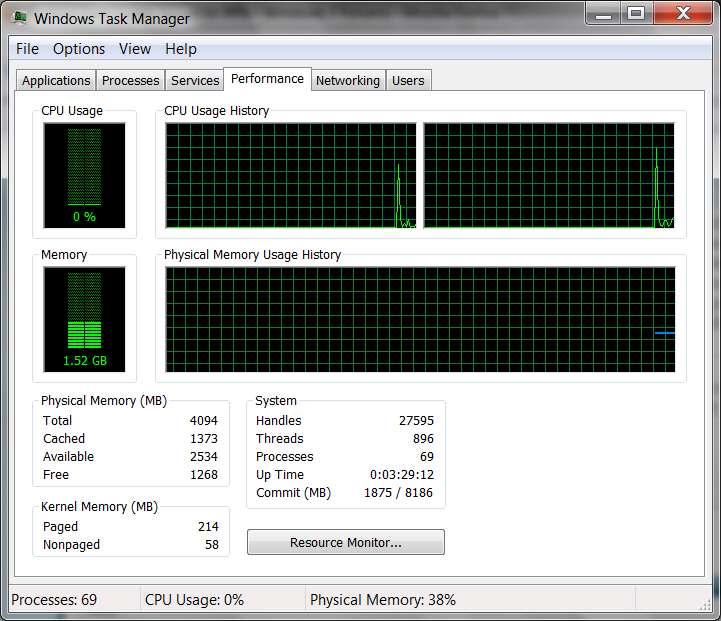
Start -> Run -> TASKMGR to get the Task Manager window.

Then select the "Performance" tab on that window.

taskmgr1.jpg


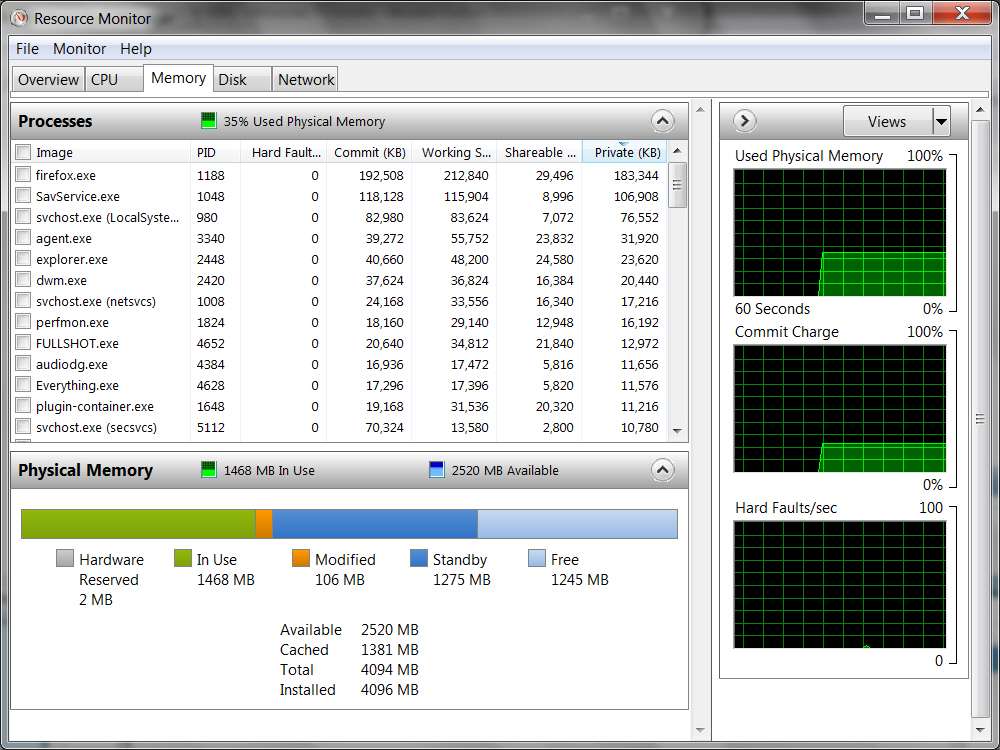
Then push the "Resource Monitor" button at the bottom of the window, to get a second Resource Monitor window.

Then select the "Memory" tab on that window.

taskmgr2.jpg


The presentation of tasks shown will by default be in reverse order by "most memory used" first. Your "culprit" should be right at the top. But if it doesn't look that way, you can also click on any of the column headings to sort the rows into order by that column's values... either ascending or descending sequence as you repeatedly click on the column heading to toggle the sort sequence.

Hope this helps you find your "culprit"... assuming you can get into Task Manager when your memory gets consumed like you describe. Of course, you can always pre-launch Task Manager and the Performance Monitor and then minimize the windows to the taskbar, just to have them already started and running should you ever need to restore them to see what's going on when your memory usage suddenly spikes as you describe. That way it doesn't seem there'd be any risk of not being able to launch them when you really wanted them.

 

My Computer My Computer

At a glance

Windows 7 Pro x64 (1), Win7 Pro X64 (2)i5-3350p 3.1Ghz/6MB-cache (1); E8400 3.0Ghz/6...8GB PC3-12800 DDR3 (1); 4GB PC3-10600 DDR3 (2)ATI HD7750 (1), (see TV cards); ATI R7 250 (2)
Computer type
PC/Desktop
Computer Manufacturer/Model Number
Home-built, two systems (1) and (2)
OS
Windows 7 Pro x64 (1), Win7 Pro X64 (2)
CPU
i5-3350p 3.1Ghz/6MB-cache (1); E8400 3.0Ghz/6MB-cache (2)
Motherboard
ASUS P8Z77-V Pro (1); ASUS P5Q3 (2)
Memory
8GB PC3-12800 DDR3 (1); 4GB PC3-10600 DDR3 (2)
Graphics Card(s)
ATI HD7750 (1), (see TV cards); ATI R7 250 (2)
Sound Card
Realtek ALC892 HD Audio (1); Realtek ALC1200 HD Audio (2)
Monitor(s) Displays
Eizo HD2441W LCD, Eizo S2433W (1); Eizo 24" S2433W (2)
Screen Resolution
1920x1200, 1920x1200 (1); 1920x1200 (2)
Hard Drives
(1) 1TB SATA-II (7200RPM), 2x2TB SATA-III (7200RPM), 250GB SATA-III (10000RPM) for OS; 2x2TB external USB 3.0

(2) 320GB SATA-II (7200RPM), 750GB SATA-II (7200RPM), 150GB SATA-II (10000RPM) for OS; 2TB external USB 3.0
PSU
Nesteq ECS-6001 600W (1); Nesteq ECS-5001 500W (2)
Case
Acousti-Case 360 (1) and (2)
Cooling
Noctua NH-U12P SE2 for CPU, 2x120mm case fans (1) and (2)
Keyboard
IBM PS/2 (1) and (2)
Mouse
Logitech MX Revolution wireless (1); Microsoft wired (2)
Internet Speed
100mbps down / 10mbps up
Antivirus
Microsoft Security Essentials; Malwarebyte Anti-Malware Pro
Browser
Firefox
Other Info
Ceton InfiniTV 4-tuner cablecard-enabled TV card as well as Hauppauge HVR-2250 OTA/ATSC 2-tuner TV card in (1), running under Win7 WMC
Back
Top