More RAM doesn't always amount to better performance

i have 8 gigs of ram in here and all i use this for really is browsing the web and chatting tell you what i tell you i wouldnt go back down to four either way
 

My Computer My Computer

Computer Manufacturer/Model Number
TripOG - Kwamathon
OS
windows 7 X64
CPU
amd phenom II x4 940
Motherboard
GIGABYTE GA-MA790GP-UD4H
Memory
8GB
Graphics Card(s)
integrated radeon hd3300
Sound Card
Realtek ALC889A
Monitor(s) Displays
ASUS VH222H
Screen Resolution
1920 x 1080
Hard Drives
PQI DK9320GD3R000A03
Internet Speed
30Mbps down / 2Mbps up
disable your swapfile and you'll see how more ram is WAY better.
 

My Computer My Computer

Computer Manufacturer/Model Number
ME!
OS
Windows 7 SP1 Ultimate 64bit
CPU
AMD Phenom II X4 940
Motherboard
ASUS M4A79 Deluxe (BIOS 3603)
Memory
OCZ PC8500 Platinum 4GB
Graphics Card(s)
Sapphire HD4870 1GB 256-bit GDDR5
Sound Card
HT Omega Claro
Monitor(s) Displays
ViewSonic G220fb still rocks
Screen Resolution
1600x1200@85hz
Hard Drives
160GB Seagate 7200.10 Sata
150GB WD Raptor 10,000rpm Sata
PSU
Corsair TX950W
Cooling
Zalman 9700NT
Keyboard
Logitech Standard
Mouse
Microsoft SideWinder
Internet Speed
5.26MB down 0.86MB up
Other Info
APC BackUps 900VA
ive got 8 gigs... while it may be a little un necessary, ( i got 4gb dual channel free) i enjoy it.
I agree, you wont see much of a difference in a program, but when you are running multiple program's / processes, constantly, it definitely helps, at any given time i am running 6 different applications, that i am switching between very frequently. ... granted the multi core processors help this as well
 

My Computer My Computer

Computer Manufacturer/Model Number
Custom Built - TheTeZ
OS
Windows 7 -x6
CPU
Intel Core 2 Extreme QX9650 Processor- (Quad)
Motherboard
Asus P5N-D Motherboard
Memory
OCZ Platnum 8gb(2gbx4) PC 6400 DDR2 800MHz
Graphics Card(s)
EVGA 01G-P3-1145-TR GeForce GTS 250 Video Card
Sound Card
Realtek ALC883
Monitor(s) Displays
19" WideScreen Mag Innovision & Acer X203H Vertical Mount
Screen Resolution
1440x900 & 1600x900
Hard Drives
Western Digital WD7500AADS Caviar Green Hard Drive - 750GB
Western Digital WD500
Hitachi 1TB Serial ATA HD
PSU
Kingwin Mach 1 Modular Power Supply
Case
NZXT Tempest ATX Mid-Tower Case -- AKA Flow Master
Cooling
Thermaltake SpinQ CPU Cooler - Aerocool Touch 1000 LCD Panel
i have 8 gigs of ram in here and all i use this for really is browsing the web and chatting tell you what i tell you i wouldnt go back down to four either way

If that's all you are using your machine for -- well in another life I'd love to sell you Double Glazing or Life Insurance as I'd be RICH. :D

You could do your browsing on a 512MB netbook quite easily -- Web browsing is normally so I/O bound (even Video streaming) you could probably run your web browser totally in the CPU's Cache areas -- with Zero RAM for all the amount of processing required.

Internet browsing speed has very little to do with the amount of RAM in your system.

Hi The Tez
I did say one use for more RAM was if you want to run a LOT of concurrent applications -- but you need a LOT of concurrent apps to make use of much more than 4GB of RAM however do remember that most applications are currently 32 bit so you've still got "Adress mapping" translations to perform as the 32 bit apps won't see an address > 4GB.

Remember Windows is designed as a single USER system. On a Multi-user server type system where multiple users need their own "Address spaces" then RAM IS required as I posted previously.

Typically desktop single user applications (apart from some hi intensive graphical games / video editing) are so I/O bound anyway that even if you do incur an amount of paging you won't really notice it with the speed of modern processors. Most of the time your computer is just sitting there waiting for user input.

I still stand by my thesis that for MOST typical users increasing RAM significantly (especially much above 4GB) won't yield any significant performance gain whereas fast Disks most certainly will.

Future applications and computer architecture might well change this but as of the current state of the art in single user OS design I stand by the OP.

Cheers
jimbo
 

My Computer My Computer

Computer type
PC/Desktop
Computer Manufacturer/Model Number
Custom built, several laptops HP/ASUS
OS
Linux CENTOS 7 / various Windows OS'es and servers
CPU
Intel i7 Intel i5
Memory
8GB, 16GB
Graphics Card(s)
On Motherboard
Sound Card
Realtek HD audio
Monitor(s) Displays
Apple Cinema display, Samsung LCD
Screen Resolution
1920 X 1080
Hard Drives
4 X 1TB SATA
Mouse
Toshiba wireless laser
Internet Speed
> 20MB up
This topic neatly touches on something that bugs me:

After startup my RAM usage lies at about 30%. Once I start working (I use Solidworks, Rhinoceros, occasionally other CAD/CAM software) the RAM usage creeps up to about 55%. Usually, if possible rather, I only run one application at a time. Sometimes however it's necessary to flip between three or four and I notice a dip in performance.

So here's my question to all of you: would it be worthwhile to exchange my 2x1GB RAM modules with 2x2GB RAM modules? Some say yes, some say no. My mind tells me it'll be slightly better but not mindblowingly so... I'd like to get some opinions before I spend money.

Bear in mind I'm actually very satisfied with my laptop, it's just that nagging lag...
 

My Computer My Computer

Computer type
PC/Desktop
Computer Manufacturer/Model Number
Own build
OS
Windows 7 x64 Professional
CPU
Intel Core i7-870 Lynnfield 2.93 GHz
Motherboard
Intel Whitesburg P55 LGA1156
Memory
Kingston Hyper X 1333MHz DDR3 4x4Gb
Graphics Card(s)
Nvidia GTS 250
Monitor(s) Displays
AOC Q3279VWF 31.5"
Screen Resolution
2560x1440
Hard Drives
Western Digital 1000GB Hard Drive (SATA 3.0Gb/s, 7200rpm, 32MB Cache)
Verbatim 500GB (External)
PSU
650W
Case
Coolermaster HAF 912
Cooling
Stock
Keyboard
Logitech
Mouse
Logitech
Antivirus
Avira
Browser
Firefox
Other Info
LG OptDrive 24x SATA DVDRW Lightscribe
This topic neatly touches on something that bugs me:

After startup my RAM usage lies at about 30%. Once I start working (I use Solidworks, Rhinoceros, occasionally other CAD/CAM software) the RAM usage creeps up to about 55%. Usually, if possible rather, I only run one application at a time. Sometimes however it's necessary to flip between three or four and I notice a dip in performance.

So here's my question to all of you: would it be worthwhile to exchange my 2x1GB RAM modules with 2x2GB RAM modules? Some say yes, some say no. My mind tells me it'll be slightly better but not mindblowingly so... I'd like to get some opinions before I spend money.

Bear in mind I'm actually very satisfied with my laptop, it's just that nagging lag...

To be completely honest -- it's your apps. The folks that put them out think they are the hot stuff but really they are just bit players. When you assume too much then there you are.
 

My Computer My Computer

Computer type
Laptop
Computer Manufacturer/Model Number
Apple
OS
El Capitan / Windows 10
CPU
i7-4980HQ
Memory
16GB
Graphics Card(s)
Iris 5200
To be completely honest -- it's your apps. The folks that put them out think they are the hot stuff but really they are just bit players. When you assume too much then there you are.

You think you can be a bit clearer... 'cos I have no idea what your point is...
 

My Computer My Computer

Computer type
PC/Desktop
Computer Manufacturer/Model Number
Own build
OS
Windows 7 x64 Professional
CPU
Intel Core i7-870 Lynnfield 2.93 GHz
Motherboard
Intel Whitesburg P55 LGA1156
Memory
Kingston Hyper X 1333MHz DDR3 4x4Gb
Graphics Card(s)
Nvidia GTS 250
Monitor(s) Displays
AOC Q3279VWF 31.5"
Screen Resolution
2560x1440
Hard Drives
Western Digital 1000GB Hard Drive (SATA 3.0Gb/s, 7200rpm, 32MB Cache)
Verbatim 500GB (External)
PSU
650W
Case
Coolermaster HAF 912
Cooling
Stock
Keyboard
Logitech
Mouse
Logitech
Antivirus
Avira
Browser
Firefox
Other Info
LG OptDrive 24x SATA DVDRW Lightscribe
Ok... upgraded from 2GB to 4GB... lets see...
 

My Computer My Computer

Computer type
PC/Desktop
Computer Manufacturer/Model Number
Own build
OS
Windows 7 x64 Professional
CPU
Intel Core i7-870 Lynnfield 2.93 GHz
Motherboard
Intel Whitesburg P55 LGA1156
Memory
Kingston Hyper X 1333MHz DDR3 4x4Gb
Graphics Card(s)
Nvidia GTS 250
Monitor(s) Displays
AOC Q3279VWF 31.5"
Screen Resolution
2560x1440
Hard Drives
Western Digital 1000GB Hard Drive (SATA 3.0Gb/s, 7200rpm, 32MB Cache)
Verbatim 500GB (External)
PSU
650W
Case
Coolermaster HAF 912
Cooling
Stock
Keyboard
Logitech
Mouse
Logitech
Antivirus
Avira
Browser
Firefox
Other Info
LG OptDrive 24x SATA DVDRW Lightscribe
More RAM = less pagefile usage.
Less pagefile usage = less HD thrashing.
Less HD trashing = less time waiting.

You should notice a difference with a few resource hungry apps open.
 

My Computer My Computer

Computer type
PC/Desktop
Computer Manufacturer/Model Number
Systems by SmartEyeball
OS
8 Pro x64
CPU
i7 3770K 4.6GHz
Motherboard
ASUS P8Z77 WS
Memory
16GB G.Skill Trident X 2666mhz
Graphics Card(s)
x2 EVGA 780 Ti Superclocked SLI
Sound Card
SB X-FI Surround 5.1 PRO USB / ATH-AD900 Headphones
Monitor(s) Displays
x3 Dell U2410 / 58" Samsung
Screen Resolution
5760*1200/ 1920*1200
Hard Drives
2x Intel 520 240GB (RAID 0) * 2x WD Caviar Blacks 2TB (RAID 0) * 2TB WD Caviar Black * Sony Optirac DVD
PSU
Silverstone Strider Evolution 1200W
Case
Thermaltake Level 10 GT Snow Edition
Cooling
Noctua NH-D14
Keyboard
Topre Realforce // Ducky Shine MX Black // Filco Ninja TKL
Mouse
Thermaltake Theron (Highly Recommended) + Razer Imperator
Antivirus
MSE
Browser
IE, FF, WaterFox
Other Info
GT Extreme V2 Sim Racing Cockpit + 40" LCD and K/B Mouse stand ▼
Fanatec CSR Elite Wheel + Clubsport V1 Pedals + CSR shifter/7G-H ▼Saitek X52 Pro ▼ TrackIR 5 Pro
Buttkicker v2 Seat Rumbler with Dedicated 5.1 and Sub Woofer attached to frame ▼
=
Bloody Big Grin
Ok... upgraded from 2GB to 4GB... lets see...
.
I noticed a difference when I upgraded from 2 to 3 gigs in Vista 32 bit. Later I went from 3 to 4 gigs so I could restore dual channel mode, but the difference wasn't noticeable.
 

My Computer My Computer

Computer type
PC/Desktop
OS
Windows 7 x64
CPU
Intel Core2 Extreme Q6850 3.00GHz
Motherboard
EVGA 132-CK-NF79
Memory
8 GB
Graphics Card(s)
Radeon R7 260X
Sound Card
Xonar DS
Hard Drives
Hitachi Deskstar 1 tb
.
I noticed a difference when I upgraded from 2 to 3 gigs in Vista 32 bit. Later I went from 3 to 4 gigs so I could restore dual channel mode, but the difference wasn't noticeable.

So far so good... definitely an improvement... only thing is on my system page it says total RAM is 4GB then in brackets 3GB usable... huh?... I read in another thread about a poster that had the same problem so I'm off to find that now... see what I can do to fix it...
 

My Computer My Computer

Computer type
PC/Desktop
Computer Manufacturer/Model Number
Own build
OS
Windows 7 x64 Professional
CPU
Intel Core i7-870 Lynnfield 2.93 GHz
Motherboard
Intel Whitesburg P55 LGA1156
Memory
Kingston Hyper X 1333MHz DDR3 4x4Gb
Graphics Card(s)
Nvidia GTS 250
Monitor(s) Displays
AOC Q3279VWF 31.5"
Screen Resolution
2560x1440
Hard Drives
Western Digital 1000GB Hard Drive (SATA 3.0Gb/s, 7200rpm, 32MB Cache)
Verbatim 500GB (External)
PSU
650W
Case
Coolermaster HAF 912
Cooling
Stock
Keyboard
Logitech
Mouse
Logitech
Antivirus
Avira
Browser
Firefox
Other Info
LG OptDrive 24x SATA DVDRW Lightscribe
So far so good... definitely an improvement... only thing is on my system page it says total RAM is 4GB then in brackets 3GB usable... huh?... I read in another thread about a poster that had the same problem so I'm off to find that now... see what I can do to fix it...
.
Are you running the 32 bit (x86) version of Windows 7? If so it's normal for the OS to only be able to use part of the fourth gig of ram - memory addresses are needed for hardware, such as the memory on the video adapter.
 

My Computer My Computer

Computer type
PC/Desktop
OS
Windows 7 x64
CPU
Intel Core2 Extreme Q6850 3.00GHz
Motherboard
EVGA 132-CK-NF79
Memory
8 GB
Graphics Card(s)
Radeon R7 260X
Sound Card
Xonar DS
Hard Drives
Hitachi Deskstar 1 tb
.
Are you running the 32 bit (x86) version of Windows 7? If so it's normal for the OS to only be able to use part of the fourth gig of ram - memory addresses are needed for hardware, such as the memory on the video adapter.

32bit... but it should be at 3,25GB... not a hell of a lot more I know but that's not the point... The Sly Assassin reckons this is because of WEI and I have to do a fresh install... looking for a better solution...

Any ideas?...
 

My Computer My Computer

Computer type
PC/Desktop
Computer Manufacturer/Model Number
Own build
OS
Windows 7 x64 Professional
CPU
Intel Core i7-870 Lynnfield 2.93 GHz
Motherboard
Intel Whitesburg P55 LGA1156
Memory
Kingston Hyper X 1333MHz DDR3 4x4Gb
Graphics Card(s)
Nvidia GTS 250
Monitor(s) Displays
AOC Q3279VWF 31.5"
Screen Resolution
2560x1440
Hard Drives
Western Digital 1000GB Hard Drive (SATA 3.0Gb/s, 7200rpm, 32MB Cache)
Verbatim 500GB (External)
PSU
650W
Case
Coolermaster HAF 912
Cooling
Stock
Keyboard
Logitech
Mouse
Logitech
Antivirus
Avira
Browser
Firefox
Other Info
LG OptDrive 24x SATA DVDRW Lightscribe
32bit... but it should be at 3,25GB... not a hell of a lot more I know but that's not the point... The Sly Assassin reckons this is because of WEI and I have to do a fresh install... looking for a better solution...

Any ideas?...
.
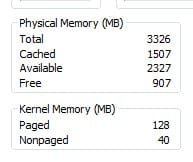
For more precise information open the task manager, switch to the performance tab and see the total available memory entry. I've attached a screenshot from my system showing total memory as 3326 kb, which is about right for a 32 bit OS with a 512 meg video adapter.
 

Attachments

  • memory.jpg
    memory.jpg
    5.6 KB · Views: 283

My Computer My Computer

Computer type
PC/Desktop
OS
Windows 7 x64
CPU
Intel Core2 Extreme Q6850 3.00GHz
Motherboard
EVGA 132-CK-NF79
Memory
8 GB
Graphics Card(s)
Radeon R7 260X
Sound Card
Xonar DS
Hard Drives
Hitachi Deskstar 1 tb
.
For more precise information open the task manager, switch to the performance tab and see the total available memory entry. I've attached a screenshot from my system showing total memory as 3326 kb, which is about right for a 32 bit OS with a 512 meg video adapter.


No mate... even there it shows my total physical memory as 3070MB... somewhere 250MB have gone astray... :(
 

My Computer My Computer

Computer type
PC/Desktop
Computer Manufacturer/Model Number
Own build
OS
Windows 7 x64 Professional
CPU
Intel Core i7-870 Lynnfield 2.93 GHz
Motherboard
Intel Whitesburg P55 LGA1156
Memory
Kingston Hyper X 1333MHz DDR3 4x4Gb
Graphics Card(s)
Nvidia GTS 250
Monitor(s) Displays
AOC Q3279VWF 31.5"
Screen Resolution
2560x1440
Hard Drives
Western Digital 1000GB Hard Drive (SATA 3.0Gb/s, 7200rpm, 32MB Cache)
Verbatim 500GB (External)
PSU
650W
Case
Coolermaster HAF 912
Cooling
Stock
Keyboard
Logitech
Mouse
Logitech
Antivirus
Avira
Browser
Firefox
Other Info
LG OptDrive 24x SATA DVDRW Lightscribe
No mate... even there it shows my total physical memory as 3070MB... somewhere 250MB have gone astray... :(
.
Do you have a dedicated video card, or motherboard graphics? If you have mobo graphics you may be able to adjust the amount of shared memory in the BIOS. Posting a list of your hardware may give us a clue.
 

My Computer My Computer

Computer type
PC/Desktop
OS
Windows 7 x64
CPU
Intel Core2 Extreme Q6850 3.00GHz
Motherboard
EVGA 132-CK-NF79
Memory
8 GB
Graphics Card(s)
Radeon R7 260X
Sound Card
Xonar DS
Hard Drives
Hitachi Deskstar 1 tb
.
Do you have a dedicated video card, or motherboard graphics? If you have mobo graphics you may be able to adjust the amount of shared memory in the BIOS. Posting a list of your hardware may give us a clue.

Have graphics card with 256MB... tell me what info you need and I'll give it... would really like to get to the bottom of this...
 

My Computer My Computer

Computer type
PC/Desktop
Computer Manufacturer/Model Number
Own build
OS
Windows 7 x64 Professional
CPU
Intel Core i7-870 Lynnfield 2.93 GHz
Motherboard
Intel Whitesburg P55 LGA1156
Memory
Kingston Hyper X 1333MHz DDR3 4x4Gb
Graphics Card(s)
Nvidia GTS 250
Monitor(s) Displays
AOC Q3279VWF 31.5"
Screen Resolution
2560x1440
Hard Drives
Western Digital 1000GB Hard Drive (SATA 3.0Gb/s, 7200rpm, 32MB Cache)
Verbatim 500GB (External)
PSU
650W
Case
Coolermaster HAF 912
Cooling
Stock
Keyboard
Logitech
Mouse
Logitech
Antivirus
Avira
Browser
Firefox
Other Info
LG OptDrive 24x SATA DVDRW Lightscribe
Have graphics card with 256MB... tell me what info you need and I'll give it... would really like to get to the bottom of this...

A 32bit OS can only address 4Gbs TOTAL...this includes any & everything that uses Memory!
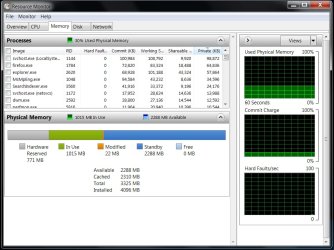
Look at what your graphics card is using in "Shared Memory" & this will more than likely show you where the extra has gone. That's where mine is being used which is good because it's needed by my games. ;)

If you look in Resource Monitor it will show you what is using what for the most part.
My "Usable" RAM is 3325 with Hardware using 771Mbs.
 

Attachments

  • Resource Monitor Memory Usage with 4GBs installed Memory.jpg
    Resource Monitor Memory Usage with 4GBs installed Memory.jpg
    97.6 KB · Views: 24

My Computer My Computer

Computer Manufacturer/Model Number
ABS Tech Ultimate X9
OS
Windows® 7 Ultimate x64 SP1
CPU
Intel Core 2 Duo E8400 (E0) @ 4.0GHz
Motherboard
ASUS P5Q Pro Turbo / 1780 FSB
Memory
G.SKILL-F2-8500CL5D-4GBPK (2x2Gbs) (5-5-5-15) @ 1067Mhz
Graphics Card(s)
EVGA GTX 470 SC (845/1690/2000) 160Gbs
Sound Card
VIA HD Audio / Boston Acoustics
Monitor(s) Displays
Acer X222W HD 22" LCD 2500:1 / 5ms
Screen Resolution
1680x1050
Hard Drives
Seagate Barracuda SATAII 2 x 320GB
Seagate Barracuda SATAII 1Tb
Intel® Rapid Storage Technology v10.1.0.1008
AHCI-NCQ Enabled
PSU
Silent Pro GOLD 80 PLUS 800w /95% efficiency / SLI-Crossfire
Case
ABS Stealth Black-Custom
Cooling
CoolerMaster V6GT 6 Heatpipe 200w CPU Cooler
Keyboard
Logitech G15 Gaming Keyboard (Old Style Blue!)
Mouse
Logitech MX518 Gaming Mouse
Internet Speed
1Mbs-up/ 6Mbs-down
A 32bit OS can only address 4Gbs TOTAL...this includes any & everything that uses Memory!
Look at what your graphics card is using in "Shared Memory" & this will more than likely show you where the extra has gone. That's where mine is being used which is good because it's needed by my games. ;)

If you look in Resource Monitor it will show you what is using what for the most part.
My "Usable" RAM is 3325 with Hardware using 771Mbs.


Ok... my graphics card has 256MB dedicated memory... that means it shouldn't dip into my RAM... or did I get that backwards?... as far as I know of the 4GB RAM I have installed 3,25GB should be available to use with a 32bit OS... of that 3.25GB the graphics card uses none as it has its own RAM... that's what I've had explained to me... right or wrong... please help... willing to learn...

Untitled.jpg
 

My Computer My Computer

Computer type
PC/Desktop
Computer Manufacturer/Model Number
Own build
OS
Windows 7 x64 Professional
CPU
Intel Core i7-870 Lynnfield 2.93 GHz
Motherboard
Intel Whitesburg P55 LGA1156
Memory
Kingston Hyper X 1333MHz DDR3 4x4Gb
Graphics Card(s)
Nvidia GTS 250
Monitor(s) Displays
AOC Q3279VWF 31.5"
Screen Resolution
2560x1440
Hard Drives
Western Digital 1000GB Hard Drive (SATA 3.0Gb/s, 7200rpm, 32MB Cache)
Verbatim 500GB (External)
PSU
650W
Case
Coolermaster HAF 912
Cooling
Stock
Keyboard
Logitech
Mouse
Logitech
Antivirus
Avira
Browser
Firefox
Other Info
LG OptDrive 24x SATA DVDRW Lightscribe
Ok... my graphics card has 256MB dedicated memory... that means it shouldn't dip into my RAM... or did I get that backwards?... as far as I know of the 4GB RAM I have installed 3,25GB should be available to use with a 32bit OS... of that 3.25GB the graphics card uses none as it has its own RAM... that's what I've had explained to me... right or wrong... please help... willing to learn...

View attachment 15356
.
Unfortunately, a 32 bit OS can only address a total of four gigs. The 256 megs on your video card is using part of that four gigs. That means 256 megs of you ram is unavailable. It's sitting there in your computer but can't be used because Windows does not have enough memory addresses to map it. There are other devices in the computer that also have memory address space set aside for them. The total address space dedicated to hardware is unavailable to the OS. That's why a system with four gigs of ram can only use 3+ gigs. I hope this is more clear. The only way to resolve this is to switch to a 64 OS - it can address a much larger amount of ram.
 

My Computer My Computer

Computer type
PC/Desktop
OS
Windows 7 x64
CPU
Intel Core2 Extreme Q6850 3.00GHz
Motherboard
EVGA 132-CK-NF79
Memory
8 GB
Graphics Card(s)
Radeon R7 260X
Sound Card
Xonar DS
Hard Drives
Hitachi Deskstar 1 tb
Back
Top