Just looking before I leap...new PC final thoughts.

I have to say the Solo case is terrific! I was surprised how heavy it was but a look inside explained why. Both sides are lined with plastic sound dampening, the tray for the SSD has rubber screw sleeves to isolate any vibration & all sheet metal is of a heavy gage. Everything is easy to get to. Very nice!

You got that suspended drive mounting thing figured out yet? I've never seen good pictures of it...

I'd have been driven nuts by the lack of RAM over a weekend---probably keeping you from mounting the motherboard.

The plan was to finish everything this weekend. Now...I gotta wait until the RAM arrives. I want to be able install it properly & don't think I can do this with the motherboard installed. Maybe it's no big deal. It would be great to have everything ready for Monday; just plug in the RAM & go. But, I've planned & waited a long time so what's a few more days?

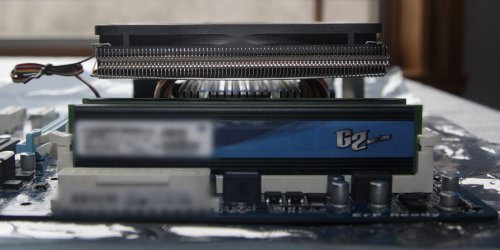
I have some old DDR2 RAM (removed after an upgrade) that is about the size of the incoming Patriot RAM. It looks like the Patriot RAM will be easy to install with a little interference but would clear the fan without too much effort.

The Solo came with 4 pairs of HDD mounting slides. I have two 300Gb data drives to install & figured all along that I'd try the suspended mount 1st but can always fall back to the slides. I'll try to get some good close-up pics for you.
 

My Computer My Computer

At a glance

Windows 7 64-bitIntel Core i5-2500K 3300 Mhz16Gb Patriot PC3-12800 1600 MhzEVGA GeForce GTX 560 Ti (Fermi)
Computer type
PC/Desktop
Computer Manufacturer/Model Number
Custom built 2011
OS
Windows 7 64-bit
CPU
Intel Core i5-2500K 3300 Mhz
Motherboard
Gigabyte P67A-UD3-B3
Memory
16Gb Patriot PC3-12800 1600 Mhz
Graphics Card(s)
EVGA GeForce GTX 560 Ti (Fermi)
Sound Card
On Motherboard
Monitor(s) Displays
Dell U2412M & NEC EA232WMi
Screen Resolution
DELL 1920x1200 - NEC 1920x1080
Hard Drives
Crucial 128 Gb SSD
Hitachi Deskstar 2Tb 7200 RPM 32MB Cache
Seagate Barracuda 500Gb 7200 RPM
Hitachi GST Deskstar 1.5TB 7200 RPM 64MB Cache
PSU
Seasonic M1211-620 Bronze
Case
Antec Solo
Cooling
Tuniq Tower 120 Extreme Rev 1
Keyboard
Apple
Mouse
Microsoft
Internet Speed
5mbs
Other Info
Sunbeam PL-RS-3 Rheosmart 3 Fan Controller 3.5" Bay 3 Channel 30W Fan Controller Panel
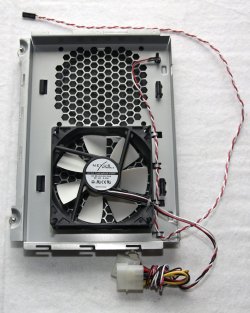
Front fan. Rubber isolators makes it easy to install & hopefully, quiet running.
 

Attachments

  • _MG_9262.JPG
    _MG_9262.JPG
    196 KB · Views: 7

My Computer My Computer

At a glance

Windows 7 64-bitIntel Core i5-2500K 3300 Mhz16Gb Patriot PC3-12800 1600 MhzEVGA GeForce GTX 560 Ti (Fermi)
Computer type
PC/Desktop
Computer Manufacturer/Model Number
Custom built 2011
OS
Windows 7 64-bit
CPU
Intel Core i5-2500K 3300 Mhz
Motherboard
Gigabyte P67A-UD3-B3
Memory
16Gb Patriot PC3-12800 1600 Mhz
Graphics Card(s)
EVGA GeForce GTX 560 Ti (Fermi)
Sound Card
On Motherboard
Monitor(s) Displays
Dell U2412M & NEC EA232WMi
Screen Resolution
DELL 1920x1200 - NEC 1920x1080
Hard Drives
Crucial 128 Gb SSD
Hitachi Deskstar 2Tb 7200 RPM 32MB Cache
Seagate Barracuda 500Gb 7200 RPM
Hitachi GST Deskstar 1.5TB 7200 RPM 64MB Cache
PSU
Seasonic M1211-620 Bronze
Case
Antec Solo
Cooling
Tuniq Tower 120 Extreme Rev 1
Keyboard
Apple
Mouse
Microsoft
Internet Speed
5mbs
Other Info
Sunbeam PL-RS-3 Rheosmart 3 Fan Controller 3.5" Bay 3 Channel 30W Fan Controller Panel
What is that fan going to blow onto--a few inches from it?

Normally, you try to get it to blow on a spinning hard drive and I'm wondering if that fan location is better for that purpose than the one above it? Might be or might not be, depending on the Solo layout and where you plan to install drives.

Good high quality pic.
 

My Computer My Computer

At a glance

Windows 7 Home Premium SP1, 64-bitIntel Skylake i5-6600K, not overclocked8 GB HyperX DDR4-2666 (2 x 4 GB)none; graphics are integrated on CPU
Computer type
PC/Desktop
Computer Manufacturer/Model Number
Ignatz Special; 4 speed manual gearbox; factory air conditioning; one of one
OS
Windows 7 Home Premium SP1, 64-bit
CPU
Intel Skylake i5-6600K, not overclocked
Motherboard
AsRock Z170M Extreme 4, micro ATX
Memory
8 GB HyperX DDR4-2666 (2 x 4 GB)
Graphics Card(s)
none; graphics are integrated on CPU
Sound Card
onboard: Realtek ALC1150; external: USB Behringer UF0-202
Monitor(s) Displays
Dell S2340M 23 inch IPS
Screen Resolution
1600 x 900
Hard Drives
System: Crucial MX100 series SSD, 128 GB;
Data: Samsung Spinpoint 103SJ, 1 TB;
Backup: WD Caviar Green WD30EZRX-00D8PB0, 3 TB
PSU
Rosewill SilentNight 500 watt fanless, semi-modular
Case
Antec Solo II
Cooling
Noctua NH-U12S; Noctua F12 intake, Noctua S12A exhaust
Keyboard
Microsoft 200 6JH-00001 USB
Mouse
Dell or Microsoft optical wired; USB
Antivirus
Microsoft Security Essentials and Malwarebytes Premium
Browser
Pale Moon
Other Info
All fans PWM; speeds at idle: CPU circa 500 rpm; intake circa 600 rpm; exhaust circa 600 rpm; CPU temps 27 idle and 47 C load in a warm room (27 C/81 F) when running Intel Extreme Tuning Utility stress test.
What is that fan going to blow onto--a few inches from it?

Normally, you try to get it to blow on a spinning hard drive and I'm wondering if that fan location is better for that purpose than the one above it? Might be or might not be, depending on the Solo layout and where you plan to install drives.

Good high quality pic.

That's where the spinning drives will be; on the bottom. Should be no problem to move upwards if necessary.
 

My Computer My Computer

At a glance

Windows 7 64-bitIntel Core i5-2500K 3300 Mhz16Gb Patriot PC3-12800 1600 MhzEVGA GeForce GTX 560 Ti (Fermi)
Computer type
PC/Desktop
Computer Manufacturer/Model Number
Custom built 2011
OS
Windows 7 64-bit
CPU
Intel Core i5-2500K 3300 Mhz
Motherboard
Gigabyte P67A-UD3-B3
Memory
16Gb Patriot PC3-12800 1600 Mhz
Graphics Card(s)
EVGA GeForce GTX 560 Ti (Fermi)
Sound Card
On Motherboard
Monitor(s) Displays
Dell U2412M & NEC EA232WMi
Screen Resolution
DELL 1920x1200 - NEC 1920x1080
Hard Drives
Crucial 128 Gb SSD
Hitachi Deskstar 2Tb 7200 RPM 32MB Cache
Seagate Barracuda 500Gb 7200 RPM
Hitachi GST Deskstar 1.5TB 7200 RPM 64MB Cache
PSU
Seasonic M1211-620 Bronze
Case
Antec Solo
Cooling
Tuniq Tower 120 Extreme Rev 1
Keyboard
Apple
Mouse
Microsoft
Internet Speed
5mbs
Other Info
Sunbeam PL-RS-3 Rheosmart 3 Fan Controller 3.5" Bay 3 Channel 30W Fan Controller Panel
New RAM finally installed. Got at least 5mm clearance. MB is mounted as well as Graphic card. Photo has lens distortion so disregard curvature in photos. Steady as she goes.:)
 

Attachments

  • _MG_9336-FIXED.jpg
    _MG_9336-FIXED.jpg
    286.1 KB · Views: 13
  • _MG_9339_FIXED.jpg
    _MG_9339_FIXED.jpg
    209.3 KB · Views: 13

My Computer My Computer

At a glance

Windows 7 64-bitIntel Core i5-2500K 3300 Mhz16Gb Patriot PC3-12800 1600 MhzEVGA GeForce GTX 560 Ti (Fermi)
Computer type
PC/Desktop
Computer Manufacturer/Model Number
Custom built 2011
OS
Windows 7 64-bit
CPU
Intel Core i5-2500K 3300 Mhz
Motherboard
Gigabyte P67A-UD3-B3
Memory
16Gb Patriot PC3-12800 1600 Mhz
Graphics Card(s)
EVGA GeForce GTX 560 Ti (Fermi)
Sound Card
On Motherboard
Monitor(s) Displays
Dell U2412M & NEC EA232WMi
Screen Resolution
DELL 1920x1200 - NEC 1920x1080
Hard Drives
Crucial 128 Gb SSD
Hitachi Deskstar 2Tb 7200 RPM 32MB Cache
Seagate Barracuda 500Gb 7200 RPM
Hitachi GST Deskstar 1.5TB 7200 RPM 64MB Cache
PSU
Seasonic M1211-620 Bronze
Case
Antec Solo
Cooling
Tuniq Tower 120 Extreme Rev 1
Keyboard
Apple
Mouse
Microsoft
Internet Speed
5mbs
Other Info
Sunbeam PL-RS-3 Rheosmart 3 Fan Controller 3.5" Bay 3 Channel 30W Fan Controller Panel
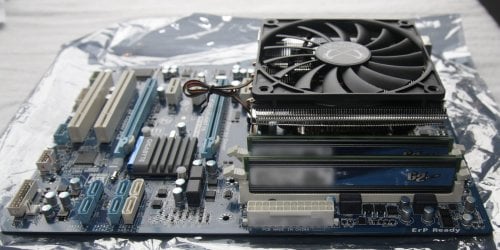
Looks good.

Ready for the next pictures ;)
 

My Computer My Computer

At a glance

Windows 7 Ult x64 - SP1/ Windows 8 Pro x64Intel Core i5-3570K 4.6GHz8GB (2X4GB) DDR3 1600 Corsair Vengeance CL8 1.5vSapphire HD 7770 Vapor-X OC 1GB DDR5
Computer type
PC/Desktop
Computer Manufacturer/Model Number
76~2.0
OS
Windows 7 Ult x64 - SP1/ Windows 8 Pro x64
CPU
Intel Core i5-3570K 4.6GHz
Motherboard
Gigabyte GA-Z77X UD3H, f18
Memory
8GB (2X4GB) DDR3 1600 Corsair Vengeance CL8 1.5v
Graphics Card(s)
Sapphire HD 7770 Vapor-X OC 1GB DDR5
Sound Card
Onboard VIA VT2021
Monitor(s) Displays
22" LCD Dell
Screen Resolution
1680x1050
Hard Drives
Samsung 840Pro 128GB SSD,
Seagate Barracuda 500GB SATA2 7200rpm 32MB cache, Seagate Barracuda 1TB SATA2 7200rpm 32MB cache,
PSU
Corsair HX650W
Case
Cooler Master Storm Scout
Cooling
Corsair H80 2x12cm Noctua NF P12 , 2x14cm case fans
Keyboard
Logitech Wave
Mouse
CM Sentinel
Internet Speed
Dismal
Antivirus
Avast
Browser
Opera Next
Other Info
Haswell laptop: HP Envy 17t-j, i7-4700MQ, GeForce 740M 2GB DDR3, 17.3" Full HD 1920x1080, 16GB RAM, Samsung 840 Pro 128GB, 1TB Hitachi 7200 HDD,
Desktop: eSATA ports,
External eSATA Seagate 500GB SATA2 7200rpm,
External WD USB 500GB
Got a question. It appears that the Seasonic power supply (Welcome to Seasonic USA) has an unused EPS 12v 8P connector. I don't see any connector for this to be plugged into & I'm guessing that the PSU is used on servers or other types of MB that would need this.

Am I correct or am I missing something? :huh:
 

My Computer My Computer

At a glance

Windows 7 64-bitIntel Core i5-2500K 3300 Mhz16Gb Patriot PC3-12800 1600 MhzEVGA GeForce GTX 560 Ti (Fermi)
Computer type
PC/Desktop
Computer Manufacturer/Model Number
Custom built 2011
OS
Windows 7 64-bit
CPU
Intel Core i5-2500K 3300 Mhz
Motherboard
Gigabyte P67A-UD3-B3
Memory
16Gb Patriot PC3-12800 1600 Mhz
Graphics Card(s)
EVGA GeForce GTX 560 Ti (Fermi)
Sound Card
On Motherboard
Monitor(s) Displays
Dell U2412M & NEC EA232WMi
Screen Resolution
DELL 1920x1200 - NEC 1920x1080
Hard Drives
Crucial 128 Gb SSD
Hitachi Deskstar 2Tb 7200 RPM 32MB Cache
Seagate Barracuda 500Gb 7200 RPM
Hitachi GST Deskstar 1.5TB 7200 RPM 64MB Cache
PSU
Seasonic M1211-620 Bronze
Case
Antec Solo
Cooling
Tuniq Tower 120 Extreme Rev 1
Keyboard
Apple
Mouse
Microsoft
Internet Speed
5mbs
Other Info
Sunbeam PL-RS-3 Rheosmart 3 Fan Controller 3.5" Bay 3 Channel 30W Fan Controller Panel
Got a question. It appears that the Seasonic power supply (Welcome to Seasonic USA) has an unused EPS 12v 8P connector. I don't see any connector for this to be plugged into & I'm guessing that the PSU is used on servers or other types of MB that would need this.

Am I correct or am I missing something? :huh:

I think you are correct.

It's probably for a dual CPU motherboard?

All you should need is:

Main 24 pin to the mobo

Auxiliary 4 pin to the mobo (note: the motherboard connection for this could have 8 pins--in which case you will use only 4 of the 8. In my case (recent install of Seasonic 560 modular), I used the top 4 pins of the 8 pin on the mobo. The lower 4 pins were in fact unusable (keyed the wrong way).

Fans: molex cable if not direct to the mobo

Drives: the SATA cable. If you are lucky, you can get all of your drives to fit on one cable. Try to mount your HDs close to each other so the connectors on a single PSU cable can reach them. Normally, those SATA connectors are only 5 or 6 inches apart, so if your drives are 7 inches apart, you would have to use a second cable.

If your video card has power inputs, you should have something to connect to it as well.
 

My Computer My Computer

At a glance

Windows 7 Home Premium SP1, 64-bitIntel Skylake i5-6600K, not overclocked8 GB HyperX DDR4-2666 (2 x 4 GB)none; graphics are integrated on CPU
Computer type
PC/Desktop
Computer Manufacturer/Model Number
Ignatz Special; 4 speed manual gearbox; factory air conditioning; one of one
OS
Windows 7 Home Premium SP1, 64-bit
CPU
Intel Skylake i5-6600K, not overclocked
Motherboard
AsRock Z170M Extreme 4, micro ATX
Memory
8 GB HyperX DDR4-2666 (2 x 4 GB)
Graphics Card(s)
none; graphics are integrated on CPU
Sound Card
onboard: Realtek ALC1150; external: USB Behringer UF0-202
Monitor(s) Displays
Dell S2340M 23 inch IPS
Screen Resolution
1600 x 900
Hard Drives
System: Crucial MX100 series SSD, 128 GB;
Data: Samsung Spinpoint 103SJ, 1 TB;
Backup: WD Caviar Green WD30EZRX-00D8PB0, 3 TB
PSU
Rosewill SilentNight 500 watt fanless, semi-modular
Case
Antec Solo II
Cooling
Noctua NH-U12S; Noctua F12 intake, Noctua S12A exhaust
Keyboard
Microsoft 200 6JH-00001 USB
Mouse
Dell or Microsoft optical wired; USB
Antivirus
Microsoft Security Essentials and Malwarebytes Premium
Browser
Pale Moon
Other Info
All fans PWM; speeds at idle: CPU circa 500 rpm; intake circa 600 rpm; exhaust circa 600 rpm; CPU temps 27 idle and 47 C load in a warm room (27 C/81 F) when running Intel Extreme Tuning Utility stress test.
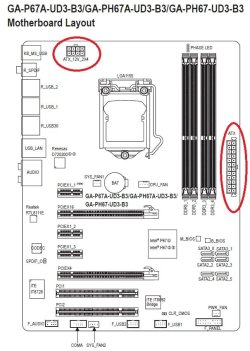
I have ATX 24P / 20P plugged into the ATX of the MB. I'm at work but I think I have the ATX 12v 4P plugged into the ATX_12V_2X4. This is a single 8 prong plug that I assumed went there.

There is another cable with a couple smaller connectors that I thought was EPS 12v 8P. When I get home I'll take a better look.
 

Attachments

  • GA-P67A-UD3-B3.jpg
    GA-P67A-UD3-B3.jpg
    68.2 KB · Views: 6

My Computer My Computer

At a glance

Windows 7 64-bitIntel Core i5-2500K 3300 Mhz16Gb Patriot PC3-12800 1600 MhzEVGA GeForce GTX 560 Ti (Fermi)
Computer type
PC/Desktop
Computer Manufacturer/Model Number
Custom built 2011
OS
Windows 7 64-bit
CPU
Intel Core i5-2500K 3300 Mhz
Motherboard
Gigabyte P67A-UD3-B3
Memory
16Gb Patriot PC3-12800 1600 Mhz
Graphics Card(s)
EVGA GeForce GTX 560 Ti (Fermi)
Sound Card
On Motherboard
Monitor(s) Displays
Dell U2412M & NEC EA232WMi
Screen Resolution
DELL 1920x1200 - NEC 1920x1080
Hard Drives
Crucial 128 Gb SSD
Hitachi Deskstar 2Tb 7200 RPM 32MB Cache
Seagate Barracuda 500Gb 7200 RPM
Hitachi GST Deskstar 1.5TB 7200 RPM 64MB Cache
PSU
Seasonic M1211-620 Bronze
Case
Antec Solo
Cooling
Tuniq Tower 120 Extreme Rev 1
Keyboard
Apple
Mouse
Microsoft
Internet Speed
5mbs
Other Info
Sunbeam PL-RS-3 Rheosmart 3 Fan Controller 3.5" Bay 3 Channel 30W Fan Controller Panel
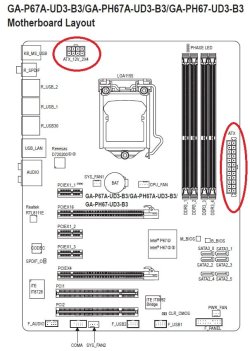
I think those 2 circled in red are all you need on a normal setup.

The smaller one is an auxiliary 12 volt. On my Gigabyte board, I used ONLY 4 pins of it. The connector from the PSU was an 8 pin split into 4 plus 4. The unused 4 are left flapping in the breeze. You'll have to check very closely regarding the keyways on the plug to see which 4 pins from the PSU will match up to which 4 pins on the mobo connector. At least, that is how it was on my very similar board. For all I know, your entire 8 pin may connect.

I connected my exhaust fan to a molex, but I did connect the RPM sensor on it to the sensor connector on the sys fan 2 header located at 7 oclock. Get out your eyeglasses to read which pin that is on your header in the manual.

Note that sys fan 2 is the only 4 pin connector you have, so it is probably the only fan header other than CPU for which you can monitor RPM.

When are you gonna actually flip the switch and see if it fires up?
 

My Computer My Computer

At a glance

Windows 7 Home Premium SP1, 64-bitIntel Skylake i5-6600K, not overclocked8 GB HyperX DDR4-2666 (2 x 4 GB)none; graphics are integrated on CPU
Computer type
PC/Desktop
Computer Manufacturer/Model Number
Ignatz Special; 4 speed manual gearbox; factory air conditioning; one of one
OS
Windows 7 Home Premium SP1, 64-bit
CPU
Intel Skylake i5-6600K, not overclocked
Motherboard
AsRock Z170M Extreme 4, micro ATX
Memory
8 GB HyperX DDR4-2666 (2 x 4 GB)
Graphics Card(s)
none; graphics are integrated on CPU
Sound Card
onboard: Realtek ALC1150; external: USB Behringer UF0-202
Monitor(s) Displays
Dell S2340M 23 inch IPS
Screen Resolution
1600 x 900
Hard Drives
System: Crucial MX100 series SSD, 128 GB;
Data: Samsung Spinpoint 103SJ, 1 TB;
Backup: WD Caviar Green WD30EZRX-00D8PB0, 3 TB
PSU
Rosewill SilentNight 500 watt fanless, semi-modular
Case
Antec Solo II
Cooling
Noctua NH-U12S; Noctua F12 intake, Noctua S12A exhaust
Keyboard
Microsoft 200 6JH-00001 USB
Mouse
Dell or Microsoft optical wired; USB
Antivirus
Microsoft Security Essentials and Malwarebytes Premium
Browser
Pale Moon
Other Info
All fans PWM; speeds at idle: CPU circa 500 rpm; intake circa 600 rpm; exhaust circa 600 rpm; CPU temps 27 idle and 47 C load in a warm room (27 C/81 F) when running Intel Extreme Tuning Utility stress test.
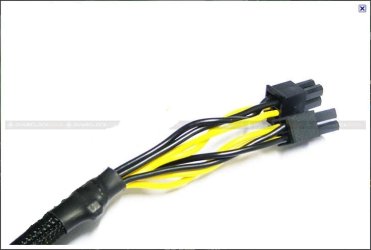
OK, not real sure as nothing is marked. On the MB is an 8 pin connector marked ATX_12V_2X4. All 8 male pins a used; none are blank or missing a pin. One of he PSU cable has an 8 pin & also two 4 pin. These are hard wired, not modular. The 8 pin looks like a perfect fit for the MBs ATX_12V_2X4 connector. The two 4 pin connectors are a slightly different shape. I'm betting on the 8 pin but how else can I be sure?

I'm hoping to try everything Friday; that is if I can lose my fear of frying something!:zip:
 
Last edited:

My Computer My Computer

At a glance

Windows 7 64-bitIntel Core i5-2500K 3300 Mhz16Gb Patriot PC3-12800 1600 MhzEVGA GeForce GTX 560 Ti (Fermi)
Computer type
PC/Desktop
Computer Manufacturer/Model Number
Custom built 2011
OS
Windows 7 64-bit
CPU
Intel Core i5-2500K 3300 Mhz
Motherboard
Gigabyte P67A-UD3-B3
Memory
16Gb Patriot PC3-12800 1600 Mhz
Graphics Card(s)
EVGA GeForce GTX 560 Ti (Fermi)
Sound Card
On Motherboard
Monitor(s) Displays
Dell U2412M & NEC EA232WMi
Screen Resolution
DELL 1920x1200 - NEC 1920x1080
Hard Drives
Crucial 128 Gb SSD
Hitachi Deskstar 2Tb 7200 RPM 32MB Cache
Seagate Barracuda 500Gb 7200 RPM
Hitachi GST Deskstar 1.5TB 7200 RPM 64MB Cache
PSU
Seasonic M1211-620 Bronze
Case
Antec Solo
Cooling
Tuniq Tower 120 Extreme Rev 1
Keyboard
Apple
Mouse
Microsoft
Internet Speed
5mbs
Other Info
Sunbeam PL-RS-3 Rheosmart 3 Fan Controller 3.5" Bay 3 Channel 30W Fan Controller Panel
OK, not real sure as nothing is marked. On the MB is an 8 pin connector marked ATX_12V_2X4. All 8 male pins a used; none are blank or missing a pin. One of he PSU cable has an 8 pin & also two 4 pin. These are hard wired, not modular. The 8 pin looks like a perfect fit for the MBs ATX_12V_2X4 connector. The two 4 pin connectors are a slightly different shape. I'm betting on the 8 pin but how else can I be sure?

I'm hoping the try everything Friday; that is if I can lose my fear of frying something!:zip:

The mobo connector with 8 male pins is just like mine. I did not mean to imply that the motherboard 12 v connector had missing pins. It does not.

The only question is which of the 2 PSU cables fits it.

Look closely at the shape of the connectors on the PSU cables--or at the mobo connector. Some of the 8 pins are probably U shaped and some are probably square. Those shapes amount to keyways in that you can't put a U shaped female onto a square male, etc.

So it MAY be that only one of the 2 possible cables has the right females in the right order to match the mobo plug. In that case, you know which one to use.

Look at the PSU cable with the two 4 pin connectors and again look at U shaped versus square. Can either of those two 4 pin connectors fit either on the left end or the right end of the mobo connector?? If not, you know the other cable is correct.

If both PSU cables will fit on the mobo connector, I would think that the cable with two 4 pin connectors is the right one. That is the way it was on my PSU. Only 1 of the two 4 pin connectors would fit and there was only 1 way it could be oriented to fit. My best guess is that this is the proper connector, but you have to hope that the keyways force you to conclude only one of the two cables will even fit at all.

Try to fit both in all possible ways. If only one fits, that's it.

My best guess is that the PSU 8 pin is for server motherboards with 2 CPUs.
 

My Computer My Computer

At a glance

Windows 7 Home Premium SP1, 64-bitIntel Skylake i5-6600K, not overclocked8 GB HyperX DDR4-2666 (2 x 4 GB)none; graphics are integrated on CPU
Computer type
PC/Desktop
Computer Manufacturer/Model Number
Ignatz Special; 4 speed manual gearbox; factory air conditioning; one of one
OS
Windows 7 Home Premium SP1, 64-bit
CPU
Intel Skylake i5-6600K, not overclocked
Motherboard
AsRock Z170M Extreme 4, micro ATX
Memory
8 GB HyperX DDR4-2666 (2 x 4 GB)
Graphics Card(s)
none; graphics are integrated on CPU
Sound Card
onboard: Realtek ALC1150; external: USB Behringer UF0-202
Monitor(s) Displays
Dell S2340M 23 inch IPS
Screen Resolution
1600 x 900
Hard Drives
System: Crucial MX100 series SSD, 128 GB;
Data: Samsung Spinpoint 103SJ, 1 TB;
Backup: WD Caviar Green WD30EZRX-00D8PB0, 3 TB
PSU
Rosewill SilentNight 500 watt fanless, semi-modular
Case
Antec Solo II
Cooling
Noctua NH-U12S; Noctua F12 intake, Noctua S12A exhaust
Keyboard
Microsoft 200 6JH-00001 USB
Mouse
Dell or Microsoft optical wired; USB
Antivirus
Microsoft Security Essentials and Malwarebytes Premium
Browser
Pale Moon
Other Info
All fans PWM; speeds at idle: CPU circa 500 rpm; intake circa 600 rpm; exhaust circa 600 rpm; CPU temps 27 idle and 47 C load in a warm room (27 C/81 F) when running Intel Extreme Tuning Utility stress test.
I have ATX 24P / 20P plugged into the ATX of the MB. I'm at work but I think I have the ATX 12v 4P plugged into the ATX_12V_2X4. This is a single 8 prong plug that I assumed went there.

There is another cable with a couple smaller connectors that I thought was EPS 12v 8P. When I get home I'll take a better look.

I think you want the EPS 12V into that 8P header. You might not need the additional power now (8 vs 4 pin) but maybe in the future. Just check with the Gigabyte manual - I am pretty sure it accepts EPS. Your Power supply manual or info on Seasonic's web site should pin it down for you.

Lookin good there.
 

My Computer My Computer

At a glance

Windows 10 Pro. EFI boot partition, full EFI ...i7 4770k 4.4GHz (44-44-43-43 turbo) @ 1.248V16GB (8GBx2) @2200 MHz G.skill Sniper 10-11-1...MSI GTX 970 Gaming 4G
Computer type
PC/Desktop
Computer Manufacturer/Model Number
Home built (GeneO industries)/Model 4
OS
Windows 10 Pro. EFI boot partition, full EFI boot
CPU
i7 4770k 4.4GHz (44-44-43-43 turbo) @ 1.248V
Motherboard
ASUS Maximus VI Hero
Memory
16GB (8GBx2) @2200 MHz G.skill Sniper 10-11-10-30-1, 1.6V
Graphics Card(s)
MSI GTX 970 Gaming 4G
Sound Card
Onboard SupremeFX Audio
Monitor(s) Displays
NEC Spectraview 2490WUXi-SV
Screen Resolution
1920 x 1200
Hard Drives
Samsung 850 Pro 256GB (OS), Samsung 2x 128GB 840 Pro SSD in RAID0, 3x WD Blue 6Gb/s 1TB RAID0, WD 2TB Black external USB 3.0, 2TB WD20EARS Green external USB 3.0, 2x 500GB Seagate and 1 750 GB external USB, 1x 350GB external USB3
PSU
Seasonic X-850 (2012 KM3 model)
Case
Fractal Design Define R4
Cooling
NH-D14, NF-F12, NF-A15; NF-P14, NF-P12,NF-A14, S12A PWM
Keyboard
Cooler Master Storm Quickfire Rapid - Brown
Mouse
Logitech G602
Internet Speed
126.4 Mb/s down, 24.3 Mb/s up
Other Info
USB 3.0 x8 , SATA III x8, eSATA, USB 2.0 x6. Samsung DVD R/W drive.

WEI: CPU 7.8, Memory 7.9, Graphics 7.9, Disk 7.9
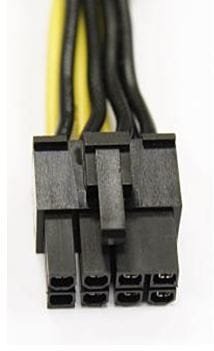
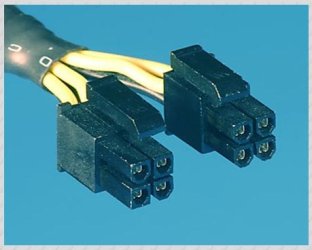
Thanks. There are 3 hardwired cables with connectors. One can only go into the ATX 24 pin connector. One of the other cables has an 8 pin shown in the pic. This single 8 pin connector fits perfectly into the ATX_12V_2X4. The other cable has two 4 pin connectors similar to the pic. They are not identical but close. Put together, these two 4 pins might plug into the 8 pin MB connection.

I believe the 8 pin is correct. Even the wire coding is the same which makes me believe the voltages would be the same (thanks high school electronics class! :) ).
 

Attachments

  • GA-P67A-UD3-B3.jpg
    GA-P67A-UD3-B3.jpg
    68.2 KB · Views: 2
  • ESP 12v 8P.JPG
    ESP 12v 8P.JPG
    15.4 KB · Views: 3
  • ATX 12v 4P.JPG
    ATX 12v 4P.JPG
    28.2 KB · Views: 2

My Computer My Computer

At a glance

Windows 7 64-bitIntel Core i5-2500K 3300 Mhz16Gb Patriot PC3-12800 1600 MhzEVGA GeForce GTX 560 Ti (Fermi)
Computer type
PC/Desktop
Computer Manufacturer/Model Number
Custom built 2011
OS
Windows 7 64-bit
CPU
Intel Core i5-2500K 3300 Mhz
Motherboard
Gigabyte P67A-UD3-B3
Memory
16Gb Patriot PC3-12800 1600 Mhz
Graphics Card(s)
EVGA GeForce GTX 560 Ti (Fermi)
Sound Card
On Motherboard
Monitor(s) Displays
Dell U2412M & NEC EA232WMi
Screen Resolution
DELL 1920x1200 - NEC 1920x1080
Hard Drives
Crucial 128 Gb SSD
Hitachi Deskstar 2Tb 7200 RPM 32MB Cache
Seagate Barracuda 500Gb 7200 RPM
Hitachi GST Deskstar 1.5TB 7200 RPM 64MB Cache
PSU
Seasonic M1211-620 Bronze
Case
Antec Solo
Cooling
Tuniq Tower 120 Extreme Rev 1
Keyboard
Apple
Mouse
Microsoft
Internet Speed
5mbs
Other Info
Sunbeam PL-RS-3 Rheosmart 3 Fan Controller 3.5" Bay 3 Channel 30W Fan Controller Panel
The other cable has two 4 pin connectors similar to the pic. They are not identical but close. Put together, these two 4 pins might plug into the 8 pin MB connection.

Find out if they will or will not fit combined or if either half will or will not fit anywhere into the 8 pin mobo connection.

If they will not, then the other 8 pin cable is clearly correct.

If either half or both will, the question remains open, but I am not sure it would matter if both choices supply 12 volts.
 

My Computer My Computer

At a glance

Windows 7 Home Premium SP1, 64-bitIntel Skylake i5-6600K, not overclocked8 GB HyperX DDR4-2666 (2 x 4 GB)none; graphics are integrated on CPU
Computer type
PC/Desktop
Computer Manufacturer/Model Number
Ignatz Special; 4 speed manual gearbox; factory air conditioning; one of one
OS
Windows 7 Home Premium SP1, 64-bit
CPU
Intel Skylake i5-6600K, not overclocked
Motherboard
AsRock Z170M Extreme 4, micro ATX
Memory
8 GB HyperX DDR4-2666 (2 x 4 GB)
Graphics Card(s)
none; graphics are integrated on CPU
Sound Card
onboard: Realtek ALC1150; external: USB Behringer UF0-202
Monitor(s) Displays
Dell S2340M 23 inch IPS
Screen Resolution
1600 x 900
Hard Drives
System: Crucial MX100 series SSD, 128 GB;
Data: Samsung Spinpoint 103SJ, 1 TB;
Backup: WD Caviar Green WD30EZRX-00D8PB0, 3 TB
PSU
Rosewill SilentNight 500 watt fanless, semi-modular
Case
Antec Solo II
Cooling
Noctua NH-U12S; Noctua F12 intake, Noctua S12A exhaust
Keyboard
Microsoft 200 6JH-00001 USB
Mouse
Dell or Microsoft optical wired; USB
Antivirus
Microsoft Security Essentials and Malwarebytes Premium
Browser
Pale Moon
Other Info
All fans PWM; speeds at idle: CPU circa 500 rpm; intake circa 600 rpm; exhaust circa 600 rpm; CPU temps 27 idle and 47 C load in a warm room (27 C/81 F) when running Intel Extreme Tuning Utility stress test.
Thanks. There are 3 hardwired cables with connectors. One can only go into the ATX 24 pin connector. One of the other cables has an 8 pin shown in the pic. This single 8 pin connector fits perfectly into the ATX_12V_2X4. The other cable has two 4 pin connectors similar to the pic. They are not identical but close. Put together, these two 4 pins might plug into the 8 pin MB connection.

I believe the 8 pin is correct. Even the wire coding is the same which makes me believe the voltages would be the same (thanks high school electronics class! :) ).
What Seasonic has done is combined old with new to cover all bases. Just use the 8 pin connector as it will be a slightly easier connection, and cable tie the other off to the side since it's hard rather than modular. If you care to, you can read a little about cable versions and history at this site.

Hope you're having fun with your first build. :)
 

My Computer My Computer

At a glance

Windows 10 Pro 64 bitCore i7 6700K Skylake 4.0GHzCorsair Vengeance LPX DDR4 32GB 3000MHzAsus Radeon RX480 Strix 8GB
Computer type
PC/Desktop
Computer Manufacturer/Model Number
Wordsworth 5000
OS
Windows 10 Pro 64 bit
CPU
Core i7 6700K Skylake 4.0GHz
Motherboard
Asus Z170 Pro
Memory
Corsair Vengeance LPX DDR4 32GB 3000MHz
Graphics Card(s)
Asus Radeon RX480 Strix 8GB
Sound Card
Asus Xonar DSX
Monitor(s) Displays
HP 2709m
Screen Resolution
1920x1080
Hard Drives
Intel 600p M.2 PCIe NVMe SSD 512GB; Intel 335 SSD 240GB ;Western Digital Caviar Black 1TB
PSU
Thermaltake Toughpower Grand Platinum 850W
Case
Lian Li PC-B70
Cooling
CPU-Noctua NH D15, GPU-Stock, Case-Noctua 2x140, 2x120
Keyboard
Microsoft Natural Ergo 4000
Mouse
Microsoft Wireless Optical 1000
Internet Speed
Cable
Other Info
HP bd 340,
HP bd 240,
Klipsch Promedia 5.1 THX

My Computer My Computer

At a glance

Windows 7 64-bitIntel Core i5-2500K 3300 Mhz16Gb Patriot PC3-12800 1600 MhzEVGA GeForce GTX 560 Ti (Fermi)
Computer type
PC/Desktop
Computer Manufacturer/Model Number
Custom built 2011
OS
Windows 7 64-bit
CPU
Intel Core i5-2500K 3300 Mhz
Motherboard
Gigabyte P67A-UD3-B3
Memory
16Gb Patriot PC3-12800 1600 Mhz
Graphics Card(s)
EVGA GeForce GTX 560 Ti (Fermi)
Sound Card
On Motherboard
Monitor(s) Displays
Dell U2412M & NEC EA232WMi
Screen Resolution
DELL 1920x1200 - NEC 1920x1080
Hard Drives
Crucial 128 Gb SSD
Hitachi Deskstar 2Tb 7200 RPM 32MB Cache
Seagate Barracuda 500Gb 7200 RPM
Hitachi GST Deskstar 1.5TB 7200 RPM 64MB Cache
PSU
Seasonic M1211-620 Bronze
Case
Antec Solo
Cooling
Tuniq Tower 120 Extreme Rev 1
Keyboard
Apple
Mouse
Microsoft
Internet Speed
5mbs
Other Info
Sunbeam PL-RS-3 Rheosmart 3 Fan Controller 3.5" Bay 3 Channel 30W Fan Controller Panel
This looks like the 4x4 connector. I don't believe both connectors would fit into the ATX_12v_2X4 connector. Maybe one side but not both. The 8 pin does so I'll go with that one.
 

Attachments

  • 4+4 pin +12 volt power cable.JPG
    4+4 pin +12 volt power cable.JPG
    25.9 KB · Views: 0

My Computer My Computer

At a glance

Windows 7 64-bitIntel Core i5-2500K 3300 Mhz16Gb Patriot PC3-12800 1600 MhzEVGA GeForce GTX 560 Ti (Fermi)
Computer type
PC/Desktop
Computer Manufacturer/Model Number
Custom built 2011
OS
Windows 7 64-bit
CPU
Intel Core i5-2500K 3300 Mhz
Motherboard
Gigabyte P67A-UD3-B3
Memory
16Gb Patriot PC3-12800 1600 Mhz
Graphics Card(s)
EVGA GeForce GTX 560 Ti (Fermi)
Sound Card
On Motherboard
Monitor(s) Displays
Dell U2412M & NEC EA232WMi
Screen Resolution
DELL 1920x1200 - NEC 1920x1080
Hard Drives
Crucial 128 Gb SSD
Hitachi Deskstar 2Tb 7200 RPM 32MB Cache
Seagate Barracuda 500Gb 7200 RPM
Hitachi GST Deskstar 1.5TB 7200 RPM 64MB Cache
PSU
Seasonic M1211-620 Bronze
Case
Antec Solo
Cooling
Tuniq Tower 120 Extreme Rev 1
Keyboard
Apple
Mouse
Microsoft
Internet Speed
5mbs
Other Info
Sunbeam PL-RS-3 Rheosmart 3 Fan Controller 3.5" Bay 3 Channel 30W Fan Controller Panel
I have an Gigabyte GV-R567OC-1GI rev2.0 graphic card which doesn't require additional power.
 

Attachments

  • Gigabyte GV-R567OC-1GI rev2.0.JPG
    Gigabyte GV-R567OC-1GI rev2.0.JPG
    95.7 KB · Views: 10

My Computer My Computer

At a glance

Windows 7 64-bitIntel Core i5-2500K 3300 Mhz16Gb Patriot PC3-12800 1600 MhzEVGA GeForce GTX 560 Ti (Fermi)
Computer type
PC/Desktop
Computer Manufacturer/Model Number
Custom built 2011
OS
Windows 7 64-bit
CPU
Intel Core i5-2500K 3300 Mhz
Motherboard
Gigabyte P67A-UD3-B3
Memory
16Gb Patriot PC3-12800 1600 Mhz
Graphics Card(s)
EVGA GeForce GTX 560 Ti (Fermi)
Sound Card
On Motherboard
Monitor(s) Displays
Dell U2412M & NEC EA232WMi
Screen Resolution
DELL 1920x1200 - NEC 1920x1080
Hard Drives
Crucial 128 Gb SSD
Hitachi Deskstar 2Tb 7200 RPM 32MB Cache
Seagate Barracuda 500Gb 7200 RPM
Hitachi GST Deskstar 1.5TB 7200 RPM 64MB Cache
PSU
Seasonic M1211-620 Bronze
Case
Antec Solo
Cooling
Tuniq Tower 120 Extreme Rev 1
Keyboard
Apple
Mouse
Microsoft
Internet Speed
5mbs
Other Info
Sunbeam PL-RS-3 Rheosmart 3 Fan Controller 3.5" Bay 3 Channel 30W Fan Controller Panel
Looks like you are home free!!

I don't know how much you intend to do with cable management, but I'd think your first task would be to ensure you don't have any DOA parts--before you spend any time tidying things up just right only to find out you have to regroup or send something back.

Front panel connections, fans, and drives and you are ready.

I'd say you are within an hour or so of FIRING IT UP!! Which we all want to see.
 

My Computer My Computer

At a glance

Windows 7 Home Premium SP1, 64-bitIntel Skylake i5-6600K, not overclocked8 GB HyperX DDR4-2666 (2 x 4 GB)none; graphics are integrated on CPU
Computer type
PC/Desktop
Computer Manufacturer/Model Number
Ignatz Special; 4 speed manual gearbox; factory air conditioning; one of one
OS
Windows 7 Home Premium SP1, 64-bit
CPU
Intel Skylake i5-6600K, not overclocked
Motherboard
AsRock Z170M Extreme 4, micro ATX
Memory
8 GB HyperX DDR4-2666 (2 x 4 GB)
Graphics Card(s)
none; graphics are integrated on CPU
Sound Card
onboard: Realtek ALC1150; external: USB Behringer UF0-202
Monitor(s) Displays
Dell S2340M 23 inch IPS
Screen Resolution
1600 x 900
Hard Drives
System: Crucial MX100 series SSD, 128 GB;
Data: Samsung Spinpoint 103SJ, 1 TB;
Backup: WD Caviar Green WD30EZRX-00D8PB0, 3 TB
PSU
Rosewill SilentNight 500 watt fanless, semi-modular
Case
Antec Solo II
Cooling
Noctua NH-U12S; Noctua F12 intake, Noctua S12A exhaust
Keyboard
Microsoft 200 6JH-00001 USB
Mouse
Dell or Microsoft optical wired; USB
Antivirus
Microsoft Security Essentials and Malwarebytes Premium
Browser
Pale Moon
Other Info
All fans PWM; speeds at idle: CPU circa 500 rpm; intake circa 600 rpm; exhaust circa 600 rpm; CPU temps 27 idle and 47 C load in a warm room (27 C/81 F) when running Intel Extreme Tuning Utility stress test.
Back
Top