
CLASS_FLV_SERVICE: FLVSrvc.exe - Corrupt File

Themanhunt

New member
Local time
11:11 PM
Messages
15
Hello.

Since yesterday (19.04.11) I have been getting a popup message saying that a .bin file is corrupt inside the folder "Users\<username>\AppData\Local\FLVService\057E9915.bin"

It recommend a run of the chkdsk utility, I do so but it reports no problems. Although, at the beginning of my PC starting up and chkdsk running, it says it cannot because of a recent software package.

Can anyone help?
 

Attachments
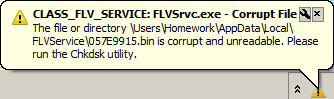
  • Corrupt file.png
    Corrupt file.png
    3.2 KB · Views: 6

My Computer My Computer

OS
Windows 7
Last edited:

My Computer My Computer

Computer type
PC/Desktop
OS
openSUSE 13.1 64bit
CPU
i7
Motherboard
Gigabyte UD5
Memory
6gb Gskill matched DDR3
Graphics Card(s)
Radeon HD4600
Sound Card
All onboard
Monitor(s) Displays
HP 2159v
Hard Drives
120gb Samsung SSD for the OS
2 * 1tb WD Caviar Black for storage
PSU
Corsair 750w
Case
Antec 920
Cooling
Aksas Nero
Do you think uninstalling any recent flash software, and then re-installing them would help?
 

My Computer My Computer

OS
Windows 7
Do you think uninstalling any recent flash software, and then re-installing them would help?

Have you installed any flash s/ware recently? If you have, then yes, I would start there.
Also any video software.

I could be that one piece of software is causing compatibility issues with another...I have a similar issue with Camtasia and Divx Pro corrupting each others codecs.
 

My Computer My Computer

Computer type
PC/Desktop
OS
openSUSE 13.1 64bit
CPU
i7
Motherboard
Gigabyte UD5
Memory
6gb Gskill matched DDR3
Graphics Card(s)
Radeon HD4600
Sound Card
All onboard
Monitor(s) Displays
HP 2159v
Hard Drives
120gb Samsung SSD for the OS
2 * 1tb WD Caviar Black for storage
PSU
Corsair 750w
Case
Antec 920
Cooling
Aksas Nero
Well I uninstalled Freecorder 4 by Applian technologies and the problem is no longer with me. Unluckily the folder in which the corrupt file is stored is still there and has not been removed when I uninstalled it.
 

My Computer My Computer

OS
Windows 7
I would be tempted to manually remove the FLV service folder, then reinstall freecorder.
 

My Computer My Computer

Computer type
PC/Desktop
OS
openSUSE 13.1 64bit
CPU
i7
Motherboard
Gigabyte UD5
Memory
6gb Gskill matched DDR3
Graphics Card(s)
Radeon HD4600
Sound Card
All onboard
Monitor(s) Displays
HP 2159v
Hard Drives
120gb Samsung SSD for the OS
2 * 1tb WD Caviar Black for storage
PSU
Corsair 750w
Case
Antec 920
Cooling
Aksas Nero
Me also. However I cannot do so because of the corrupt file inside the folder :s
 

My Computer My Computer

OS
Windows 7
Back
Top