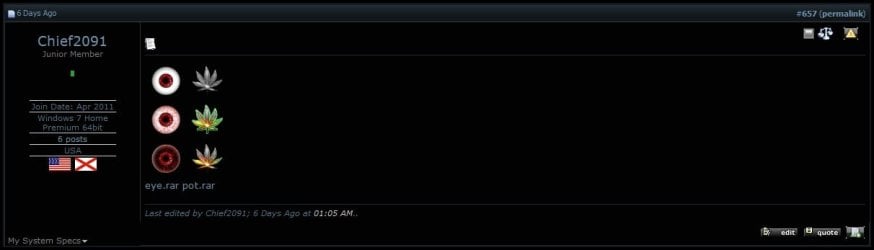
I was wondering, how can I get glow effects for these in gimp? When I tried and saved as bitmap it turned the glow into a hard colored splotch. And also, how do i get the boxes that say "Attached Images" and "Attached Files" at the top in my posts?
Thanks
For attaching pictures to your posts, have a look at this tutorial here on SevenForums: http://www.sevenforums.com/tutorials/9733-screenshots-files-upload-post-seven-forums.html
In PhotoShop there's a layer effect called 'Outer Glow', but I don't think GIMP has that... Closest I can think of (and I apologise if it's wrong, I haven't used GIMP in ages), is to duplicate the layer and apply a blur effect to the layer below (or above and play with layer style).
Otherwise, this tutorial looks like it might work: Glow Effect | Gimp-tutorials.net - Gimp , tutorials , brushes , downloads, forum.
My Computer
At a glance
Win 10 x64 Pro x64 / Ubuntu 15.10 x64Intel i7-4960X4x8GB Corsair Dominator Platinum @2400MHz 10-...2x MSI GTX780Ti 3GB (SLI)
- Computer type
- PC/Desktop
- OS
- Win 10 x64 Pro x64 / Ubuntu 15.10 x64
- CPU
- Intel i7-4960X
- Motherboard
- Asus Rampage IV Black Edition
- Memory
- 4x8GB Corsair Dominator Platinum @2400MHz 10-12-12-31
- Graphics Card(s)
- 2x MSI GTX780Ti 3GB (SLI)
- Sound Card
- Onboard SupremeFX (Cirrus Logic CS4398)
- Monitor(s) Displays
- 3x LG Cinema 27" IPS LED (27MP65)
- Screen Resolution
- [1920x1080]x3
- Hard Drives
- Crucial M500 120GB, Crucial M500 480GB, Toshiba DT01ACA200 2TB
- PSU
- CoolerMaster V1000
- Case
- Corsair Obsidian 750D
- Cooling
- ThermalTake Water 3.0 Extreme, 4xSP120, 3xAF120
- Keyboard
- Moshi Luna
- Mouse
- Logitech G700s / Roccat Tyon
- Internet Speed
- 4Mb uncapped ADSL (Afrihost)
- Antivirus
- MS Security Essentials
- Browser
- Chrome... Duh. (: