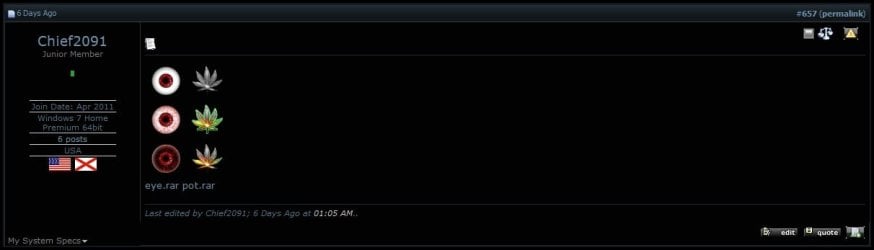
Custom Start Menu Button Collection

I was wondering, how can I get glow effects for these in gimp? When I tried and saved as bitmap it turned the glow into a hard colored splotch. And also, how do i get the boxes that say "Attached Images" and "Attached Files" at the top in my posts?

Thanks

For attaching pictures to your posts, have a look at this tutorial here on SevenForums: http://www.sevenforums.com/tutorials/9733-screenshots-files-upload-post-seven-forums.html

In PhotoShop there's a layer effect called 'Outer Glow', but I don't think GIMP has that... Closest I can think of (and I apologise if it's wrong, I haven't used GIMP in ages), is to duplicate the layer and apply a blur effect to the layer below (or above and play with layer style).

Otherwise, this tutorial looks like it might work: Glow Effect | Gimp-tutorials.net - Gimp , tutorials , brushes , downloads, forum.
 

My Computer

Computer type
PC/Desktop
OS
Win 10 x64 Pro x64 / Ubuntu 15.10 x64
CPU
Intel i7-4960X
Motherboard
Asus Rampage IV Black Edition
Memory
4x8GB Corsair Dominator Platinum @2400MHz 10-12-12-31
Graphics Card(s)
2x MSI GTX780Ti 3GB (SLI)
Sound Card
Onboard SupremeFX (Cirrus Logic CS4398)
Monitor(s) Displays
3x LG Cinema 27" IPS LED (27MP65)
Screen Resolution
[1920x1080]x3
Hard Drives
Crucial M500 120GB, Crucial M500 480GB, Toshiba DT01ACA200 2TB
PSU
CoolerMaster V1000
Case
Corsair Obsidian 750D
Cooling
ThermalTake Water 3.0 Extreme, 4xSP120, 3xAF120
Keyboard
Moshi Luna
Mouse
Logitech G700s / Roccat Tyon
Internet Speed
4Mb uncapped ADSL (Afrihost)
Antivirus
MS Security Essentials
Browser
Chrome... Duh. (:
Lots of great new creations pinched them all
Thankyou
Danny
 

My Computer

Computer Manufacturer/Model Number
acer aspire 5935g
OS
Windows 7 Home Premium x64 SP1
CPU
intel(R)core(TM)2 duo CPU T6600 @ 2.20GHz
Motherboard
intel gm45/gm47 revision 07
Memory
3 gb ddr3
Graphics Card(s)
ati radeon hd4570/512mb
Monitor(s) Displays
lop156wh2-tle1 15.3 flat
Screen Resolution
1366x768
Hard Drives
OCZ-Agility3 60gig ssd
320gig external hdd
500gig external hdd
Mouse
Optical
Internet Speed
30Mbps Down/30Mbps Up
no on the glow i mean this lol View attachment pot2.rar
and that forum didn't say anything about the boxes that say "attached files" and "attached images" <.<
 

My Computer

Computer Manufacturer/Model Number
Self Assembled ATI
OS
Windows 7 Ultimate 64bit
CPU
AMD Athlon II x4 3.10 GHz
Motherboard
N-Alvorix-RS880-uATX
Memory
6GB DDR3
Graphics Card(s)
ATI Radeon x1600 512MB
Sound Card
Onboard
Monitor(s) Displays
21in Acer S231HL LED
Screen Resolution
1920x1080
Hard Drives
Western Digital 80gb x2, Western Digital 160gb, Western Digital My Book Essentials 2TB
PSU
250watt
Case
Cooler Master HAF X Blue 942
Cooling
4 standard size case fans
Keyboard
Alienware Tact X
Mouse
Logitech Performance MX
Internet Speed
Unfortunately...hughesnet...

My Computer

Computer type
PC/Desktop
Computer Manufacturer/Model Number
Self Assembled
OS
Microsoft Windows 10 Pro Insider Preview 64-bit
CPU
Intel(R) Core(TM) i3-4130 CPU @ 3.40GHz
Motherboard
Gigabyte Technology Co., Ltd. B85M-D3H
Memory
Corsair Vengence 4GB x2 (8.00GB Dual-Channel DDR3 @ 798MHz)
Graphics Card(s)
2047MB GeForce GTS 450 (ZOTAC International)
Sound Card
Onboard (Realtek High Definition Audio)
Monitor(s) Displays
LG Flatron E2040T
Screen Resolution
1600x900
Hard Drives
Western Digital 1 TB
Seagate 500 GB
PSU
Corsair VS550
Case
Cooler Master K380
Cooling
Cooler Master Seidon 120V Plus
Keyboard
Logitech MK260r
Mouse
Logitech MK260r
Internet Speed
PMPL Broadband
Antivirus
Windows Defender + MBAM
Browser
Firefox
Other Info
Dell Studio 15" Laptop
no on the glow i mean this lol View attachment 150455
and that forum didn't say anything about the boxes that say "attached files" and "attached images" <.<
Try this : GIMP: How to make an outer glow | UserLogos.org

Tried, i usually do it the manual way that that link describes, and it always gives me that hard green splotchy edge instead of a glow, and when it did "work" the leaf was washed out white after applyin it as an orb.
 

My Computer

Computer Manufacturer/Model Number
Self Assembled ATI
OS
Windows 7 Ultimate 64bit
CPU
AMD Athlon II x4 3.10 GHz
Motherboard
N-Alvorix-RS880-uATX
Memory
6GB DDR3
Graphics Card(s)
ATI Radeon x1600 512MB
Sound Card
Onboard
Monitor(s) Displays
21in Acer S231HL LED
Screen Resolution
1920x1080
Hard Drives
Western Digital 80gb x2, Western Digital 160gb, Western Digital My Book Essentials 2TB
PSU
250watt
Case
Cooler Master HAF X Blue 942
Cooling
4 standard size case fans
Keyboard
Alienware Tact X
Mouse
Logitech Performance MX
Internet Speed
Unfortunately...hughesnet...
For small bar/icons...

SpiralKnights.png
 

Attachments

My Computer

Computer type
PC/Desktop
OS
Windows 7
no on the glow i mean this lol View attachment 150455
and that forum didn't say anything about the boxes that say "attached files" and "attached images" <.<
Try this : GIMP: How to make an outer glow | UserLogos.org

Tried, i usually do it the manual way that that link describes, and it always gives me that hard green splotchy edge instead of a glow, and when it did "work" the leaf was washed out white after applyin it as an orb.

I normally find it better to save Orbs as a .PNG file as it preserves transparency which can lead to better glow effects :)
 

My Computer

Computer Manufacturer/Model Number
Compaq Desktop
OS
Windows 7 Ultimate x64
CPU
AMD Sempron Dual Core
Memory
3GB
Graphics Card(s)
NVIDIA GeForce 6150SE nForce 430
Screen Resolution
1024x768
Hard Drives
150GB Sata

Tried, i usually do it the manual way that that link describes, and it always gives me that hard green splotchy edge instead of a glow, and when it did "work" the leaf was washed out white after applyin it as an orb.

I normally find it better to save Orbs as a .PNG file as it preserves transparency which can lead to better glow effects :)

i didn't know the new version of the changer could use pngs >_<
 
Last edited:

My Computer

Computer Manufacturer/Model Number
Self Assembled ATI
OS
Windows 7 Ultimate 64bit
CPU
AMD Athlon II x4 3.10 GHz
Motherboard
N-Alvorix-RS880-uATX
Memory
6GB DDR3
Graphics Card(s)
ATI Radeon x1600 512MB
Sound Card
Onboard
Monitor(s) Displays
21in Acer S231HL LED
Screen Resolution
1920x1080
Hard Drives
Western Digital 80gb x2, Western Digital 160gb, Western Digital My Book Essentials 2TB
PSU
250watt
Case
Cooler Master HAF X Blue 942
Cooling
4 standard size case fans
Keyboard
Alienware Tact X
Mouse
Logitech Performance MX
Internet Speed
Unfortunately...hughesnet...
Hello guys :)
Can you tell me, please, if there is a solution to make this Start button to "fit" in there ?
As you can see in the image, it's not until the bottom.
Thanks :D
 

Attachments

  • start button.jpg
    start button.jpg
    1.5 KB · Views: 1,290

My Computer

Computer type
PC/Desktop
OS
Windows 7 Ultimate x64
CPU
Intel7 4790K
Motherboard
Gigabyte GA-Z97X UD5H
Memory
8 GB DDR3
Graphics Card(s)
GTX 980Ti G1
Sound Card
SoundBlaster X-FI XtremeGamer
Monitor(s) Displays
Samsung UE40JU6550 UHD
Screen Resolution
3840 X 2160
Hard Drives
1 SSD Intel 330
2 x Western Digital 6400 AAKS
1 x Western Digital 3200 AAKS
PSU
Corsair 750W
Case
Cooler Master HAF 922
and that forum didn't say anything about the boxes that say "attached files" and "attached images" <.<
The tutorial I gave you a link for is for attaching files to a post on SevenForums, once you've attached a file or picture to your comment and 'posted' it, you'll see the 'attached files' and 'attached images' on your post.

Tried, i usually do it the manual way that that link describes, and it always gives me that hard green splotchy edge instead of a glow, and when it did "work" the leaf was washed out white after applyin it as an orb.

I normally find it better to save Orbs as a .PNG file as it preserves transparency which can lead to better glow effects :)

i didn't know the new version of the changer could use pngs >_<
You might want to be a bit more specific when talking about "the changer", there are many ways and many programs used to change the start orb. While one program can use PNG files, the next one might not.

At the end of the day, Windows itself uses BMP files with an alpha layer to display the start orb, so creating it in that format to start with will prevent the image having to be converted by what ever program you use when the orb is applied.
 

My Computer

Computer type
PC/Desktop
OS
Win 10 x64 Pro x64 / Ubuntu 15.10 x64
CPU
Intel i7-4960X
Motherboard
Asus Rampage IV Black Edition
Memory
4x8GB Corsair Dominator Platinum @2400MHz 10-12-12-31
Graphics Card(s)
2x MSI GTX780Ti 3GB (SLI)
Sound Card
Onboard SupremeFX (Cirrus Logic CS4398)
Monitor(s) Displays
3x LG Cinema 27" IPS LED (27MP65)
Screen Resolution
[1920x1080]x3
Hard Drives
Crucial M500 120GB, Crucial M500 480GB, Toshiba DT01ACA200 2TB
PSU
CoolerMaster V1000
Case
Corsair Obsidian 750D
Cooling
ThermalTake Water 3.0 Extreme, 4xSP120, 3xAF120
Keyboard
Moshi Luna
Mouse
Logitech G700s / Roccat Tyon
Internet Speed
4Mb uncapped ADSL (Afrihost)
Antivirus
MS Security Essentials
Browser
Chrome... Duh. (:
and that forum didn't say anything about the boxes that say "attached files" and "attached images" <.<
The tutorial I gave you a link for is for attaching files to a post on SevenForums, once you've attached a file or picture to your comment and 'posted' it, you'll see the 'attached files' and 'attached images' on your post.

I normally find it better to save Orbs as a .PNG file as it preserves transparency which can lead to better glow effects :)

i didn't know the new version of the changer could use pngs >_<
You might want to be a bit more specific when talking about "the changer", there are many ways and many programs used to change the start orb. While one program can use PNG files, the next one might not.

At the end of the day, Windows itself uses BMP files with an alpha layer to display the start orb, so creating it in that format to start with will prevent the image having to be converted by what ever program you use when the orb is applied.

post1.jpg

I dont see the boxes there <.< and I WAS using Windows 7 start orb changer v2.6, which can only use bitmaps, i'm now using v4 (door2windows.com) which uses both, when saving an image with a glow effect as a bitmap, the glow turns splotchy, which obviously in a png it does not, so thanks to v4, problem solved.
 

My Computer

Computer Manufacturer/Model Number
Self Assembled ATI
OS
Windows 7 Ultimate 64bit
CPU
AMD Athlon II x4 3.10 GHz
Motherboard
N-Alvorix-RS880-uATX
Memory
6GB DDR3
Graphics Card(s)
ATI Radeon x1600 512MB
Sound Card
Onboard
Monitor(s) Displays
21in Acer S231HL LED
Screen Resolution
1920x1080
Hard Drives
Western Digital 80gb x2, Western Digital 160gb, Western Digital My Book Essentials 2TB
PSU
250watt
Case
Cooler Master HAF X Blue 942
Cooling
4 standard size case fans
Keyboard
Alienware Tact X
Mouse
Logitech Performance MX
Internet Speed
Unfortunately...hughesnet...
Hello guys :)
Can you tell me, please, if there is a solution to make this Start button to "fit" in there ?
As you can see in the image, it's not until the bottom.
Thanks :D
Nobody can help me, guys ?
The attached image is on #669
 

My Computer

Computer type
PC/Desktop
OS
Windows 7 Ultimate x64
CPU
Intel7 4790K
Motherboard
Gigabyte GA-Z97X UD5H
Memory
8 GB DDR3
Graphics Card(s)
GTX 980Ti G1
Sound Card
SoundBlaster X-FI XtremeGamer
Monitor(s) Displays
Samsung UE40JU6550 UHD
Screen Resolution
3840 X 2160
Hard Drives
1 SSD Intel 330
2 x Western Digital 6400 AAKS
1 x Western Digital 3200 AAKS
PSU
Corsair 750W
Case
Cooler Master HAF 922
Hello guys :)
Can you tell me, please, if there is a solution to make this Start button to "fit" in there ?
As you can see in the image, it's not until the bottom.
Thanks :D
Nobody can help me, guys ?
The attached image is on #669

maybe it would help if you posted the original orb rather than a screen cap of it...
 

My Computer

Computer Manufacturer/Model Number
Self Assembled ATI
OS
Windows 7 Ultimate 64bit
CPU
AMD Athlon II x4 3.10 GHz
Motherboard
N-Alvorix-RS880-uATX
Memory
6GB DDR3
Graphics Card(s)
ATI Radeon x1600 512MB
Sound Card
Onboard
Monitor(s) Displays
21in Acer S231HL LED
Screen Resolution
1920x1080
Hard Drives
Western Digital 80gb x2, Western Digital 160gb, Western Digital My Book Essentials 2TB
PSU
250watt
Case
Cooler Master HAF X Blue 942
Cooling
4 standard size case fans
Keyboard
Alienware Tact X
Mouse
Logitech Performance MX
Internet Speed
Unfortunately...hughesnet...

My Computer

Computer type
PC/Desktop
OS
Windows 7 Ultimate x64
CPU
Intel7 4790K
Motherboard
Gigabyte GA-Z97X UD5H
Memory
8 GB DDR3
Graphics Card(s)
GTX 980Ti G1
Sound Card
SoundBlaster X-FI XtremeGamer
Monitor(s) Displays
Samsung UE40JU6550 UHD
Screen Resolution
3840 X 2160
Hard Drives
1 SSD Intel 330
2 x Western Digital 6400 AAKS
1 x Western Digital 3200 AAKS
PSU
Corsair 750W
Case
Cooler Master HAF 922

Attachments

My Computer

Computer type
PC/Desktop
Computer Manufacturer/Model Number
Self Built
OS
Win 10 Pro x64
CPU
Intel I5-2500K @3.3GHz
Motherboard
Asrock P67 Extreme4
Memory
16GB G.Skill Ripjaws X (4x4GB)
Graphics Card(s)
EVGA GeForce 750 Ti SC 2GB
Sound Card
ASUS Xonar DG 5.1 Channels 24-bit 96KHz PCI Interface Sound
Monitor(s) Displays
auria eq2367
Screen Resolution
1920 x 1080
Hard Drives
250GB Samsung 850 EVO SSD
1TB WD Blue
1TB Hitachi
PSU
SeaSonic X 650W 80 Plus Gold
Case
Corsair Obsidian 750D
Cooling
Corsair H60, Three 140mm case fans
Keyboard
Logitech Wireless Keyboard K520
Mouse
Logitech Wireless Mouse M310
Internet Speed
Wave Broadband ~ 100 dn 5 up
Antivirus
Windows Defender, Malwarebytes Premium
Browser
Edge, IE11, Chrome
Other Info
Laptop specs: HP g7-1365dx /
CPU: AMD A6-3420M APU with Radeon(tm) HD Graphics /
RAM: Crucial 8Gb (2x4Gb) /
SSD: Crucial M4-CT128M4SSD2 ATA Device/ FW 000F /
GFX: AMD Radeon HD 6520G /
OS: Windows 10 Pro x64
But they are the same.
I thought this button could be modified, to fit exactly until the bottom of the taskbar.
But thanks, anyway :)
 

My Computer

Computer type
PC/Desktop
OS
Windows 7 Ultimate x64
CPU
Intel7 4790K
Motherboard
Gigabyte GA-Z97X UD5H
Memory
8 GB DDR3
Graphics Card(s)
GTX 980Ti G1
Sound Card
SoundBlaster X-FI XtremeGamer
Monitor(s) Displays
Samsung UE40JU6550 UHD
Screen Resolution
3840 X 2160
Hard Drives
1 SSD Intel 330
2 x Western Digital 6400 AAKS
1 x Western Digital 3200 AAKS
PSU
Corsair 750W
Case
Cooler Master HAF 922
But they are the same.
I thought this button could be modified, to fit exactly until the bottom of the taskbar.
But thanks, anyway :)

try this
start.png
 

My Computer

Computer Manufacturer/Model Number
Self Assembled ATI
OS
Windows 7 Ultimate 64bit
CPU
AMD Athlon II x4 3.10 GHz
Motherboard
N-Alvorix-RS880-uATX
Memory
6GB DDR3
Graphics Card(s)
ATI Radeon x1600 512MB
Sound Card
Onboard
Monitor(s) Displays
21in Acer S231HL LED
Screen Resolution
1920x1080
Hard Drives
Western Digital 80gb x2, Western Digital 160gb, Western Digital My Book Essentials 2TB
PSU
250watt
Case
Cooler Master HAF X Blue 942
Cooling
4 standard size case fans
Keyboard
Alienware Tact X
Mouse
Logitech Performance MX
Internet Speed
Unfortunately...hughesnet...
But they are the same.
I thought this button could be modified, to fit exactly until the bottom of the taskbar.
But thanks, anyway :)

It is the same, I grabbed it from your link and put it here. just easier.

I didn't do anything but attach it here so they don't have to wait on mediafire to

see it, that's why I linked that tutorial on how to attach right here on this forum.
 

My Computer

Computer type
PC/Desktop
Computer Manufacturer/Model Number
Self Built
OS
Win 10 Pro x64
CPU
Intel I5-2500K @3.3GHz
Motherboard
Asrock P67 Extreme4
Memory
16GB G.Skill Ripjaws X (4x4GB)
Graphics Card(s)
EVGA GeForce 750 Ti SC 2GB
Sound Card
ASUS Xonar DG 5.1 Channels 24-bit 96KHz PCI Interface Sound
Monitor(s) Displays
auria eq2367
Screen Resolution
1920 x 1080
Hard Drives
250GB Samsung 850 EVO SSD
1TB WD Blue
1TB Hitachi
PSU
SeaSonic X 650W 80 Plus Gold
Case
Corsair Obsidian 750D
Cooling
Corsair H60, Three 140mm case fans
Keyboard
Logitech Wireless Keyboard K520
Mouse
Logitech Wireless Mouse M310
Internet Speed
Wave Broadband ~ 100 dn 5 up
Antivirus
Windows Defender, Malwarebytes Premium
Browser
Edge, IE11, Chrome
Other Info
Laptop specs: HP g7-1365dx /
CPU: AMD A6-3420M APU with Radeon(tm) HD Graphics /
RAM: Crucial 8Gb (2x4Gb) /
SSD: Crucial M4-CT128M4SSD2 ATA Device/ FW 000F /
GFX: AMD Radeon HD 6520G /
OS: Windows 10 Pro x64

Attachments

  • Clipboard01.jpg
    Clipboard01.jpg
    1,000 bytes · Views: 1,510

My Computer

Computer type
PC/Desktop
OS
Windows 7 Ultimate x64
CPU
Intel7 4790K
Motherboard
Gigabyte GA-Z97X UD5H
Memory
8 GB DDR3
Graphics Card(s)
GTX 980Ti G1
Sound Card
SoundBlaster X-FI XtremeGamer
Monitor(s) Displays
Samsung UE40JU6550 UHD
Screen Resolution
3840 X 2160
Hard Drives
1 SSD Intel 330
2 x Western Digital 6400 AAKS
1 x Western Digital 3200 AAKS
PSU
Corsair 750W
Case
Cooler Master HAF 922

My Computer

Computer Manufacturer/Model Number
Self Assembled ATI
OS
Windows 7 Ultimate 64bit
CPU
AMD Athlon II x4 3.10 GHz
Motherboard
N-Alvorix-RS880-uATX
Memory
6GB DDR3
Graphics Card(s)
ATI Radeon x1600 512MB
Sound Card
Onboard
Monitor(s) Displays
21in Acer S231HL LED
Screen Resolution
1920x1080
Hard Drives
Western Digital 80gb x2, Western Digital 160gb, Western Digital My Book Essentials 2TB
PSU
250watt
Case
Cooler Master HAF X Blue 942
Cooling
4 standard size case fans
Keyboard
Alienware Tact X
Mouse
Logitech Performance MX
Internet Speed
Unfortunately...hughesnet...
Back
Top