mynameisinuse
New member
- Local time
- 3:35 PM
- Messages
- 13
Hey guys,
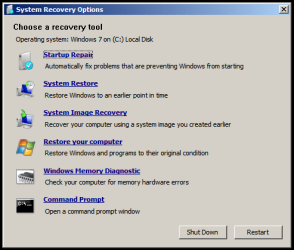
I'm currently using an Asus X42JY and it fails to startup, windows cant repair the problem so I've been trying to restore the computer to its factory settings. I didn't make a restore point when i first got the laptop nor do i have a recovery disk, I've been trying to access the hidden partition using the F9 key on the boot up. When i run through this i get stuck at the "system recovery options" where it says
"...If your operating system isn't listed, click load drivers and then install drivers for your hardisks."
Under that it displays the OS, partition size and location, its defaul its windows 7 home premium, when i click next it just takes me to the regular system restore point.
Or in other words I don't know how to get from
-Press [Enter] to select Windows Setup [EMS Enabled]
TO - Read the “ASUS Preload Wizard” screen and click Next
Also on the handbook i got with the laptop it says that i could access the hidden partition for restoring factory settings using alt+f10 but that comes up with something along the lines of:
"[/NONEXECUTE/.... i cant remember the rest.
i know there are a few forums for asus laptops but non of them have been able to help could someone please help me step by step?
I'm currently using an Asus X42JY and it fails to startup, windows cant repair the problem so I've been trying to restore the computer to its factory settings. I didn't make a restore point when i first got the laptop nor do i have a recovery disk, I've been trying to access the hidden partition using the F9 key on the boot up. When i run through this i get stuck at the "system recovery options" where it says
"...If your operating system isn't listed, click load drivers and then install drivers for your hardisks."
Under that it displays the OS, partition size and location, its defaul its windows 7 home premium, when i click next it just takes me to the regular system restore point.
Or in other words I don't know how to get from
-Press [Enter] to select Windows Setup [EMS Enabled]
TO - Read the “ASUS Preload Wizard” screen and click Next
Also on the handbook i got with the laptop it says that i could access the hidden partition for restoring factory settings using alt+f10 but that comes up with something along the lines of:
"[/NONEXECUTE/.... i cant remember the rest.
i know there are a few forums for asus laptops but non of them have been able to help
could someone please help me step by step?My Computer
At a glance
64 bit windows 7 home premium
- Computer Manufacturer/Model Number
- Asus X42JY
- OS
- 64 bit windows 7 home premium