Hi Roomies,
I have been having problems with my laptop since 1 months due to network problems since it was official that Lenovo has Adspyware installed in their laptops.
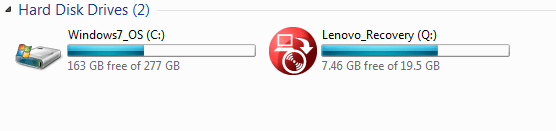
I'm here today cause I would like to install WIN7-PRO from my hard drive. I don't have the original cds, but I have the original key license that came with my laptop. Here is an image of my HDD. Please let me know the steps that I need to do that.
Thanks
I have been having problems with my laptop since 1 months due to network problems since it was official that Lenovo has Adspyware installed in their laptops.
I'm here today cause I would like to install WIN7-PRO from my hard drive. I don't have the original cds, but I have the original key license that came with my laptop. Here is an image of my HDD. Please let me know the steps that I need to do that.
Thanks
My Computer
At a glance
Windows 7 PRO x64Intel Core i3 2367M4 GBIntel HD graphics 3000
- Computer type
- PC/Desktop
- Computer Manufacturer/Model Number
- Lenevo ThinkPad X131e
- OS
- Windows 7 PRO x64
- CPU
- Intel Core i3 2367M
- Motherboard
- Lenevo 33682FU
- Memory
- 4 GB
- Graphics Card(s)
- Intel HD graphics 3000
- Screen Resolution
- 11