Just looking before I leap...new PC final thoughts.

Looks like you are home free!!

I don't know how much you intend to do with cable management, but I'd think your first task would be to ensure you don't have any DOA parts--before you spend any time tidying things up just right only to find out you have to regroup or send something back.

Front panel connections, fans, and drives and you are ready.

I'd say you are within an hour or so of FIRING IT UP!! Which we all want to see.

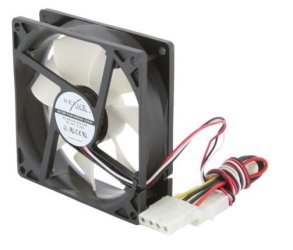
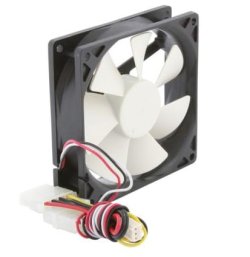
Got a question about fan wiring. I ran a power line from the PSU (has three 4 pin male connectors) to one of the female 4 pins of the front fan (shown in the 2nd pic) then connected the far end to the female 4 pin of the rear fan (the rear fan also has a LMH switch for fan speed & has only one 4 pin connector). But, then I see a connector on the MB for "PWR_FAN". Wouldn't you know the front fan wire's length is just right to go there. So, I think it's either or, but not both. That is just the large 4 pin or just the smaller 3 pin into PWR_FAN but not both; or is it? :confused:

Once this is settled I'm ready to fire it up! :zip: ...I mean... :party: !

As suggested I'll tidy up once everything is proven OK.
 

Attachments
  • Fan 1.jpg
    Fan 1.jpg
    30 KB · Views: 1
  • fan2.jpg
    fan2.jpg
    35.3 KB · Views: 1
  • MB.jpg
    MB.jpg
    73.4 KB · Views: 4

My Computer My Computer

At a glance

Windows 7 64-bitIntel Core i5-2500K 3300 Mhz16Gb Patriot PC3-12800 1600 MhzEVGA GeForce GTX 560 Ti (Fermi)
Computer type
PC/Desktop
Computer Manufacturer/Model Number
Custom built 2011
OS
Windows 7 64-bit
CPU
Intel Core i5-2500K 3300 Mhz
Motherboard
Gigabyte P67A-UD3-B3
Memory
16Gb Patriot PC3-12800 1600 Mhz
Graphics Card(s)
EVGA GeForce GTX 560 Ti (Fermi)
Sound Card
On Motherboard
Monitor(s) Displays
Dell U2412M & NEC EA232WMi
Screen Resolution
DELL 1920x1200 - NEC 1920x1080
Hard Drives
Crucial 128 Gb SSD
Hitachi Deskstar 2Tb 7200 RPM 32MB Cache
Seagate Barracuda 500Gb 7200 RPM
Hitachi GST Deskstar 1.5TB 7200 RPM 64MB Cache
PSU
Seasonic M1211-620 Bronze
Case
Antec Solo
Cooling
Tuniq Tower 120 Extreme Rev 1
Keyboard
Apple
Mouse
Microsoft
Internet Speed
5mbs
Other Info
Sunbeam PL-RS-3 Rheosmart 3 Fan Controller 3.5" Bay 3 Channel 30W Fan Controller Panel
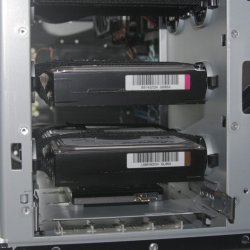
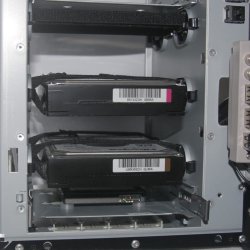
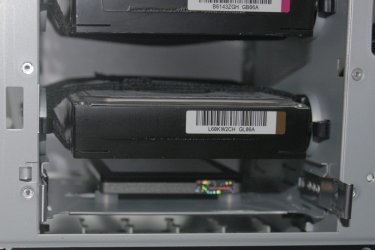
Here are some pics of the Solo's suspension HDD mounts with front fan removed (white paper added to improve photo quality). SSD on bottom is mounted to sliding tray. Other sliding tray mounts have been removed to improve fan ventilation.
 

Attachments

  • 1.jpg
    1.jpg
    124.4 KB · Views: 3
  • 2.jpg
    2.jpg
    130.1 KB · Views: 1
  • 3.jpg
    3.jpg
    155.3 KB · Views: 1

My Computer My Computer

At a glance

Windows 7 64-bitIntel Core i5-2500K 3300 Mhz16Gb Patriot PC3-12800 1600 MhzEVGA GeForce GTX 560 Ti (Fermi)
Computer type
PC/Desktop
Computer Manufacturer/Model Number
Custom built 2011
OS
Windows 7 64-bit
CPU
Intel Core i5-2500K 3300 Mhz
Motherboard
Gigabyte P67A-UD3-B3
Memory
16Gb Patriot PC3-12800 1600 Mhz
Graphics Card(s)
EVGA GeForce GTX 560 Ti (Fermi)
Sound Card
On Motherboard
Monitor(s) Displays
Dell U2412M & NEC EA232WMi
Screen Resolution
DELL 1920x1200 - NEC 1920x1080
Hard Drives
Crucial 128 Gb SSD
Hitachi Deskstar 2Tb 7200 RPM 32MB Cache
Seagate Barracuda 500Gb 7200 RPM
Hitachi GST Deskstar 1.5TB 7200 RPM 64MB Cache
PSU
Seasonic M1211-620 Bronze
Case
Antec Solo
Cooling
Tuniq Tower 120 Extreme Rev 1
Keyboard
Apple
Mouse
Microsoft
Internet Speed
5mbs
Other Info
Sunbeam PL-RS-3 Rheosmart 3 Fan Controller 3.5" Bay 3 Channel 30W Fan Controller Panel
Got a question about fan wiring. I ran a power line from the PSU (has three 4 pin male connectors) to one of the female 4 pins of the front fan (shown in the 2nd pic) then connected the far end to the female 4 pin of the rear fan (the rear fan also has a LMH switch for fan speed & has only one 4 pin connector). But, then I see a connector on the MB for "PWR_FAN". Wouldn't you know the front fan wire's length is just right to go there. So, I think it's either or, but not both. That is just the large 4 pin or just the smaller 3 pin into PWR_FAN but not both; or is it? :confused:

.

Not sure I am following you, but:

Female connectors on fans generally go directly to male connectors on the motherboard. You have 3 males on the motherboard, only one of which has 4 pins.

Any 3 pin fan should work on any of those 3 connectors.

If you have a 4 pin fan, it has to go to the 4 pin connector IF you want the rpm monitoring to work. You could probably get a 4 pin fan to work on a 3 pin connector, but you wouldn't be able to monitor rpm.

The fan connectors on the mobo are effectively equivalent--you use the ones you can reach (ignoring any rpm monitoring issues and excluding the CPU fan, which should go to the CPU fan connector).

You can also connect fans directly to the PSU, bypassing the motherboard, by using the Molex connection--if your fan has that Molex connector available--and I see that the Nexus fan does.

If you do use a Molex, you can still monitor RPM if the Molex wiring has a single spare (probably yellow) thin wire--connect it to the rpm sensor pin on a 4 pin motherboard header.

Not sure I answered your question. Perhaps you can restate it?
 

My Computer My Computer

At a glance

Windows 7 Home Premium SP1, 64-bitIntel Skylake i5-6600K, not overclocked8 GB HyperX DDR4-2666 (2 x 4 GB)none; graphics are integrated on CPU
Computer type
PC/Desktop
Computer Manufacturer/Model Number
Ignatz Special; 4 speed manual gearbox; factory air conditioning; one of one
OS
Windows 7 Home Premium SP1, 64-bit
CPU
Intel Skylake i5-6600K, not overclocked
Motherboard
AsRock Z170M Extreme 4, micro ATX
Memory
8 GB HyperX DDR4-2666 (2 x 4 GB)
Graphics Card(s)
none; graphics are integrated on CPU
Sound Card
onboard: Realtek ALC1150; external: USB Behringer UF0-202
Monitor(s) Displays
Dell S2340M 23 inch IPS
Screen Resolution
1600 x 900
Hard Drives
System: Crucial MX100 series SSD, 128 GB;
Data: Samsung Spinpoint 103SJ, 1 TB;
Backup: WD Caviar Green WD30EZRX-00D8PB0, 3 TB
PSU
Rosewill SilentNight 500 watt fanless, semi-modular
Case
Antec Solo II
Cooling
Noctua NH-U12S; Noctua F12 intake, Noctua S12A exhaust
Keyboard
Microsoft 200 6JH-00001 USB
Mouse
Dell or Microsoft optical wired; USB
Antivirus
Microsoft Security Essentials and Malwarebytes Premium
Browser
Pale Moon
Other Info
All fans PWM; speeds at idle: CPU circa 500 rpm; intake circa 600 rpm; exhaust circa 600 rpm; CPU temps 27 idle and 47 C load in a warm room (27 C/81 F) when running Intel Extreme Tuning Utility stress test.
Sorry. I'm probably making this more complicated than it really is. :o

The front fan has 3 connectors; a male & female Molex connection & a small 3 pin. The more I think about it I believe the 3 pin is connected to the MB & the remaining male & female Molex connections are to bridge power to the rear fan. But, I want to be sure.

So, my question is which one is used for power? The 3 pin of the front fan will fit to the MB + the rear fan can also connect to the Molex connection of the front fan. If that is the case, I wouldn't need to run a cable from the PSU.

But, I can also run from the PSU & connect with a female Molex connection of both front & rear fans.

Another possibility is the small 3 pin of the front fan is plugged into the MB & a cable from the PSU is plugged into one of the Molex connections of the front fan, then the end is plugged into the rear fan's Molex connection. I don't think that is the case, but ...?

Just a little confused.:confused:
 

My Computer My Computer

At a glance

Windows 7 64-bitIntel Core i5-2500K 3300 Mhz16Gb Patriot PC3-12800 1600 MhzEVGA GeForce GTX 560 Ti (Fermi)
Computer type
PC/Desktop
Computer Manufacturer/Model Number
Custom built 2011
OS
Windows 7 64-bit
CPU
Intel Core i5-2500K 3300 Mhz
Motherboard
Gigabyte P67A-UD3-B3
Memory
16Gb Patriot PC3-12800 1600 Mhz
Graphics Card(s)
EVGA GeForce GTX 560 Ti (Fermi)
Sound Card
On Motherboard
Monitor(s) Displays
Dell U2412M & NEC EA232WMi
Screen Resolution
DELL 1920x1200 - NEC 1920x1080
Hard Drives
Crucial 128 Gb SSD
Hitachi Deskstar 2Tb 7200 RPM 32MB Cache
Seagate Barracuda 500Gb 7200 RPM
Hitachi GST Deskstar 1.5TB 7200 RPM 64MB Cache
PSU
Seasonic M1211-620 Bronze
Case
Antec Solo
Cooling
Tuniq Tower 120 Extreme Rev 1
Keyboard
Apple
Mouse
Microsoft
Internet Speed
5mbs
Other Info
Sunbeam PL-RS-3 Rheosmart 3 Fan Controller 3.5" Bay 3 Channel 30W Fan Controller Panel
Sorry. I'm probably making this more complicated than it really is. :o

The front fan has 3 connectors; a male & female Molex connection & a small 3 pin. The more I think about it I believe the 3 pin is connected to the MB & the remaining male & female Molex connections are to bridge power to the rear fan. But, I want to be sure.

So, my question is which one is used for power? The 3 pin of the front fan will fit to the MB + the rear fan can also connect to the Molex connection of the front fan. If that is the case, I wouldn't need to run a cable from the PSU.


Your second sentence above is correct.

I'd think of each fan independently of the other.

Take the front fan. Connect its 3 pin to any 3 pin fan header on the mobo. You're done with that fan.

The only reason you would need to pay attention to that fan's Molex's is IF you wanted (or needed) to daisy chain ("bridge" in your terms). As you say, you COULD connect the rear fan to the front fan's Molex. That's a daisy chain and fine, but it's normally not done UNLESS you must do it---you've got 14 fans and not enough headers, your cables are too short, etc.

Likewise, think of the rear fan in isolation. If it is 4 pin and you want to use rpm monitoring, it has to go to a 4 pin on the mobo. If it is 3 pin, it can go anywhere, most likely the nearest connector. But you COULD daisy chain to the front fan Molex if it made the case neater, your wires are too short, whatever.

The only reason the Molex's are there is to give you an alternate way of connecting or to daisy chain. Some people like to use Molex for all fans and there's nothing wrong with that.

Some fans don't come with a Molex.

You may find that the small female 3 pin connectors on some fans are keyed the wrong way for your motherboard male 3 pin header. The keyway forces you to install in only one orientation. You can't rotate 180 degrees because the keyway blocks you. In that case, you instead use a Molex.

You have to get out a magnifying glass to read in the manual which side of the mobo fan header is ground and then connect the appropriate (black) wire from the female fan connector.
 

My Computer My Computer

At a glance

Windows 7 Home Premium SP1, 64-bitIntel Skylake i5-6600K, not overclocked8 GB HyperX DDR4-2666 (2 x 4 GB)none; graphics are integrated on CPU
Computer type
PC/Desktop
Computer Manufacturer/Model Number
Ignatz Special; 4 speed manual gearbox; factory air conditioning; one of one
OS
Windows 7 Home Premium SP1, 64-bit
CPU
Intel Skylake i5-6600K, not overclocked
Motherboard
AsRock Z170M Extreme 4, micro ATX
Memory
8 GB HyperX DDR4-2666 (2 x 4 GB)
Graphics Card(s)
none; graphics are integrated on CPU
Sound Card
onboard: Realtek ALC1150; external: USB Behringer UF0-202
Monitor(s) Displays
Dell S2340M 23 inch IPS
Screen Resolution
1600 x 900
Hard Drives
System: Crucial MX100 series SSD, 128 GB;
Data: Samsung Spinpoint 103SJ, 1 TB;
Backup: WD Caviar Green WD30EZRX-00D8PB0, 3 TB
PSU
Rosewill SilentNight 500 watt fanless, semi-modular
Case
Antec Solo II
Cooling
Noctua NH-U12S; Noctua F12 intake, Noctua S12A exhaust
Keyboard
Microsoft 200 6JH-00001 USB
Mouse
Dell or Microsoft optical wired; USB
Antivirus
Microsoft Security Essentials and Malwarebytes Premium
Browser
Pale Moon
Other Info
All fans PWM; speeds at idle: CPU circa 500 rpm; intake circa 600 rpm; exhaust circa 600 rpm; CPU temps 27 idle and 47 C load in a warm room (27 C/81 F) when running Intel Extreme Tuning Utility stress test.
I think too much! Will do 2nd. The connector is slotted & can only connect one way.

Time to fire-up! I'll start BIOS to get the correct HDD (AHCI) setting & check things; then install Windows 7. Prey for me!
 

My Computer My Computer

At a glance

Windows 7 64-bitIntel Core i5-2500K 3300 Mhz16Gb Patriot PC3-12800 1600 MhzEVGA GeForce GTX 560 Ti (Fermi)
Computer type
PC/Desktop
Computer Manufacturer/Model Number
Custom built 2011
OS
Windows 7 64-bit
CPU
Intel Core i5-2500K 3300 Mhz
Motherboard
Gigabyte P67A-UD3-B3
Memory
16Gb Patriot PC3-12800 1600 Mhz
Graphics Card(s)
EVGA GeForce GTX 560 Ti (Fermi)
Sound Card
On Motherboard
Monitor(s) Displays
Dell U2412M & NEC EA232WMi
Screen Resolution
DELL 1920x1200 - NEC 1920x1080
Hard Drives
Crucial 128 Gb SSD
Hitachi Deskstar 2Tb 7200 RPM 32MB Cache
Seagate Barracuda 500Gb 7200 RPM
Hitachi GST Deskstar 1.5TB 7200 RPM 64MB Cache
PSU
Seasonic M1211-620 Bronze
Case
Antec Solo
Cooling
Tuniq Tower 120 Extreme Rev 1
Keyboard
Apple
Mouse
Microsoft
Internet Speed
5mbs
Other Info
Sunbeam PL-RS-3 Rheosmart 3 Fan Controller 3.5" Bay 3 Channel 30W Fan Controller Panel
Sorry. I'm probably making this more complicated than it really is. :o

The front fan has 3 connectors; a male & female Molex connection & a small 3 pin. The more I think about it I believe the 3 pin is connected to the MB & the remaining male & female Molex connections are to bridge power to the rear fan. But, I want to be sure.

So, my question is which one is used for power? The 3 pin of the front fan will fit to the MB + the rear fan can also connect to the Molex connection of the front fan. If that is the case, I wouldn't need to run a cable from the PSU.

But, I can also run from the PSU & connect with a female Molex connection of both front & rear fans.

Another possibility is the small 3 pin of the front fan is plugged into the MB & a cable from the PSU is plugged into one of the Molex connections of the front fan, then the end is plugged into the rear fan's Molex connection. I don't think that is the case, but ...?

Just a little confused.:confused:

This is giving you the option of power your fan from either a motherboard header or a molex connector. If you use the molex, it allows you to chain something else of of the molex. However, you should not power the fan off of the MB header and try to use the molex to power a second fan from it. It is not meant for that. Only power one fan off of a MB fan header.

BTW the fact that the MB header is labeled PWR_FAN because its speed is not controllable through the BIOS like other MB fan headers (power supplies control their fan speed internally).

Looking good! Nice drive isolation.
 

My Computer My Computer

At a glance

Windows 10 Pro. EFI boot partition, full EFI ...i7 4770k 4.4GHz (44-44-43-43 turbo) @ 1.248V16GB (8GBx2) @2200 MHz G.skill Sniper 10-11-1...MSI GTX 970 Gaming 4G
Computer type
PC/Desktop
Computer Manufacturer/Model Number
Home built (GeneO industries)/Model 4
OS
Windows 10 Pro. EFI boot partition, full EFI boot
CPU
i7 4770k 4.4GHz (44-44-43-43 turbo) @ 1.248V
Motherboard
ASUS Maximus VI Hero
Memory
16GB (8GBx2) @2200 MHz G.skill Sniper 10-11-10-30-1, 1.6V
Graphics Card(s)
MSI GTX 970 Gaming 4G
Sound Card
Onboard SupremeFX Audio
Monitor(s) Displays
NEC Spectraview 2490WUXi-SV
Screen Resolution
1920 x 1200
Hard Drives
Samsung 850 Pro 256GB (OS), Samsung 2x 128GB 840 Pro SSD in RAID0, 3x WD Blue 6Gb/s 1TB RAID0, WD 2TB Black external USB 3.0, 2TB WD20EARS Green external USB 3.0, 2x 500GB Seagate and 1 750 GB external USB, 1x 350GB external USB3
PSU
Seasonic X-850 (2012 KM3 model)
Case
Fractal Design Define R4
Cooling
NH-D14, NF-F12, NF-A15; NF-P14, NF-P12,NF-A14, S12A PWM
Keyboard
Cooler Master Storm Quickfire Rapid - Brown
Mouse
Logitech G602
Internet Speed
126.4 Mb/s down, 24.3 Mb/s up
Other Info
USB 3.0 x8 , SATA III x8, eSATA, USB 2.0 x6. Samsung DVD R/W drive.

WEI: CPU 7.8, Memory 7.9, Graphics 7.9, Disk 7.9
So far so good! It took an hour to get Microsoft product key fixed. Main problem was I didn't have the LAN driver installed yet so no internet connection could be made. The pre-downloaded LAN driver couldn't install because it thought the OS was 32 bit. Once it was pointed to the 64 bit driver, it worked.

I'll need to change the rear fan to a separate Molex connector & get the older HDDs plugged in.

On to other driver installs. So far so good! :)
 

My Computer My Computer

At a glance

Windows 7 64-bitIntel Core i5-2500K 3300 Mhz16Gb Patriot PC3-12800 1600 MhzEVGA GeForce GTX 560 Ti (Fermi)
Computer type
PC/Desktop
Computer Manufacturer/Model Number
Custom built 2011
OS
Windows 7 64-bit
CPU
Intel Core i5-2500K 3300 Mhz
Motherboard
Gigabyte P67A-UD3-B3
Memory
16Gb Patriot PC3-12800 1600 Mhz
Graphics Card(s)
EVGA GeForce GTX 560 Ti (Fermi)
Sound Card
On Motherboard
Monitor(s) Displays
Dell U2412M & NEC EA232WMi
Screen Resolution
DELL 1920x1200 - NEC 1920x1080
Hard Drives
Crucial 128 Gb SSD
Hitachi Deskstar 2Tb 7200 RPM 32MB Cache
Seagate Barracuda 500Gb 7200 RPM
Hitachi GST Deskstar 1.5TB 7200 RPM 64MB Cache
PSU
Seasonic M1211-620 Bronze
Case
Antec Solo
Cooling
Tuniq Tower 120 Extreme Rev 1
Keyboard
Apple
Mouse
Microsoft
Internet Speed
5mbs
Other Info
Sunbeam PL-RS-3 Rheosmart 3 Fan Controller 3.5" Bay 3 Channel 30W Fan Controller Panel
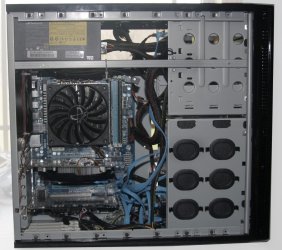
Looks like success! The included pic is my final wiring. There are 4 SATA wires & they are hard to hide at the bottom. They do not interfere with air flow, however, though it looks like they would in the pic. I tried to install BIOS from Gigabyte (mb_bios_ga-p67a-ud3-b3_f3.exe) but failed because Win 7 is 64-bit. :huh: What's the deal?

I'm about to test E: & F: drives & will button everything up once I'm satisfied everything is OK & see how quiet, quiet is!

BTW, I did do a Win 7 backup on F:. Can I just select which software I want to transfer/re-install? I'll start on that tomorrow.

Thanks everyone! :cool:
 

Attachments

  • 4.jpg
    4.jpg
    180.6 KB · Views: 11

My Computer My Computer

At a glance

Windows 7 64-bitIntel Core i5-2500K 3300 Mhz16Gb Patriot PC3-12800 1600 MhzEVGA GeForce GTX 560 Ti (Fermi)
Computer type
PC/Desktop
Computer Manufacturer/Model Number
Custom built 2011
OS
Windows 7 64-bit
CPU
Intel Core i5-2500K 3300 Mhz
Motherboard
Gigabyte P67A-UD3-B3
Memory
16Gb Patriot PC3-12800 1600 Mhz
Graphics Card(s)
EVGA GeForce GTX 560 Ti (Fermi)
Sound Card
On Motherboard
Monitor(s) Displays
Dell U2412M & NEC EA232WMi
Screen Resolution
DELL 1920x1200 - NEC 1920x1080
Hard Drives
Crucial 128 Gb SSD
Hitachi Deskstar 2Tb 7200 RPM 32MB Cache
Seagate Barracuda 500Gb 7200 RPM
Hitachi GST Deskstar 1.5TB 7200 RPM 64MB Cache
PSU
Seasonic M1211-620 Bronze
Case
Antec Solo
Cooling
Tuniq Tower 120 Extreme Rev 1
Keyboard
Apple
Mouse
Microsoft
Internet Speed
5mbs
Other Info
Sunbeam PL-RS-3 Rheosmart 3 Fan Controller 3.5" Bay 3 Channel 30W Fan Controller Panel
Looks like success! The included pic is my final wiring. There are 4 SATA wires & they are hard to hide at the bottom. They do not interfere with air flow, however, though it looks like they would in the pic. I tried to install BIOS from Gigabyte (mb_bios_ga-p67a-ud3-b3_f3.exe) but failed because Win 7 is 64-bit. :huh: What's the deal?

I'm about to test E: & F: drives & will button everything up once I'm satisfied everything is OK & see how quiet, quiet is!

BTW, I did do a Win 7 backup on F:. Can I just select which software I want to transfer/re-install? I'll start on that tomorrow.

Thanks everyone! :cool:

I would emphatically NOT try to flash the BIOS unless I was having specific problems known to be fixed by an updated BIOS. You're better off you failed. All I can guess is that you had the wrong BIOS. What BIOS are you running now? I think it is shown in the overclocker's area and on the post screen.

Not sure I understand your last question, but you will have to reinstall ALL software. Your "backup" (whatever it was), won't do you any good other than for personal data if it was included in the backup.

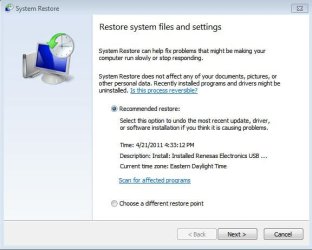
Get Windows updated, get antivirus going. Confirm defrag is turned off for your SSD. Confirm alignment of the SSD. Check System Restore config as it eats up a lot of space. Probably turn off hibernation to save space on the SSD if you don't use hibernation.

You done good!

When you get it buttoned up, run something like Wininfo32 to get your CPU temps, drive temps, and fan speeds.

You should be able to look at fan speeds in the PC Health area of the BIOS. You might want to set the alarms there to sound if they fail.
 

My Computer My Computer

At a glance

Windows 7 Home Premium SP1, 64-bitIntel Skylake i5-6600K, not overclocked8 GB HyperX DDR4-2666 (2 x 4 GB)none; graphics are integrated on CPU
Computer type
PC/Desktop
Computer Manufacturer/Model Number
Ignatz Special; 4 speed manual gearbox; factory air conditioning; one of one
OS
Windows 7 Home Premium SP1, 64-bit
CPU
Intel Skylake i5-6600K, not overclocked
Motherboard
AsRock Z170M Extreme 4, micro ATX
Memory
8 GB HyperX DDR4-2666 (2 x 4 GB)
Graphics Card(s)
none; graphics are integrated on CPU
Sound Card
onboard: Realtek ALC1150; external: USB Behringer UF0-202
Monitor(s) Displays
Dell S2340M 23 inch IPS
Screen Resolution
1600 x 900
Hard Drives
System: Crucial MX100 series SSD, 128 GB;
Data: Samsung Spinpoint 103SJ, 1 TB;
Backup: WD Caviar Green WD30EZRX-00D8PB0, 3 TB
PSU
Rosewill SilentNight 500 watt fanless, semi-modular
Case
Antec Solo II
Cooling
Noctua NH-U12S; Noctua F12 intake, Noctua S12A exhaust
Keyboard
Microsoft 200 6JH-00001 USB
Mouse
Dell or Microsoft optical wired; USB
Antivirus
Microsoft Security Essentials and Malwarebytes Premium
Browser
Pale Moon
Other Info
All fans PWM; speeds at idle: CPU circa 500 rpm; intake circa 600 rpm; exhaust circa 600 rpm; CPU temps 27 idle and 47 C load in a warm room (27 C/81 F) when running Intel Extreme Tuning Utility stress test.
Agree with the above, especially the SSD checks.
Check your BIOS version, no need to update unless you have issues that you can't fix any other way, so it is best to leave that as it is. An un-successful BIOS flash will leave your motherboard unusable.

I would make the System Restore size smaller than default.

With 8GB RAM I would make the page file smaller as well, keep it on the SSD, reduce the initial size to 1024 and max 2048.

Let us know if you have any crashes or issues related to RAM, with 8GB RAM you might need to make a small CPU integrated memory controller voltage bump.
 

My Computer My Computer

At a glance

Windows 7 Ult x64 - SP1/ Windows 8 Pro x64Intel Core i5-3570K 4.6GHz8GB (2X4GB) DDR3 1600 Corsair Vengeance CL8 1.5vSapphire HD 7770 Vapor-X OC 1GB DDR5
Computer type
PC/Desktop
Computer Manufacturer/Model Number
76~2.0
OS
Windows 7 Ult x64 - SP1/ Windows 8 Pro x64
CPU
Intel Core i5-3570K 4.6GHz
Motherboard
Gigabyte GA-Z77X UD3H, f18
Memory
8GB (2X4GB) DDR3 1600 Corsair Vengeance CL8 1.5v
Graphics Card(s)
Sapphire HD 7770 Vapor-X OC 1GB DDR5
Sound Card
Onboard VIA VT2021
Monitor(s) Displays
22" LCD Dell
Screen Resolution
1680x1050
Hard Drives
Samsung 840Pro 128GB SSD,
Seagate Barracuda 500GB SATA2 7200rpm 32MB cache, Seagate Barracuda 1TB SATA2 7200rpm 32MB cache,
PSU
Corsair HX650W
Case
Cooler Master Storm Scout
Cooling
Corsair H80 2x12cm Noctua NF P12 , 2x14cm case fans
Keyboard
Logitech Wave
Mouse
CM Sentinel
Internet Speed
Dismal
Antivirus
Avast
Browser
Opera Next
Other Info
Haswell laptop: HP Envy 17t-j, i7-4700MQ, GeForce 740M 2GB DDR3, 17.3" Full HD 1920x1080, 16GB RAM, Samsung 840 Pro 128GB, 1TB Hitachi 7200 HDD,
Desktop: eSATA ports,
External eSATA Seagate 500GB SATA2 7200rpm,
External WD USB 500GB
Get Windows updated, get antivirus going. Confirm defrag is turned off for your SSD. Confirm alignment of the SSD. Check System Restore config as it eats up a lot of space. Probably turn off hibernation to save space on the SSD if you don't use hibernation.

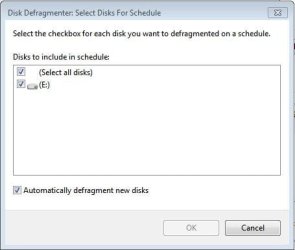
Apparently, Win 7 recognizes the SSD & it isn't on the defrag list - see pic. I don't believe this needs to be turned off.

I use Microsoft Security Essentials for antivirus which is up & running.

"Confirm alignment of the SSD" - I'm not sure what this is. :confused: Doing a Google to find out.

Check System Restore; on or off?

I was using hibernation before after being idol 30 minutes.

BTW - my main storage HDD isn't working! I've tried various combos but it appears to be dead. I'm pretty sure I have a back-up stored away. I hope so! Don't know how else to check it. :cry:
 

Attachments

  • Capture.JPG
    Capture.JPG
    22 KB · Views: 2
  • Capture 2.JPG
    Capture 2.JPG
    38.7 KB · Views: 3

My Computer My Computer

At a glance

Windows 7 64-bitIntel Core i5-2500K 3300 Mhz16Gb Patriot PC3-12800 1600 MhzEVGA GeForce GTX 560 Ti (Fermi)
Computer type
PC/Desktop
Computer Manufacturer/Model Number
Custom built 2011
OS
Windows 7 64-bit
CPU
Intel Core i5-2500K 3300 Mhz
Motherboard
Gigabyte P67A-UD3-B3
Memory
16Gb Patriot PC3-12800 1600 Mhz
Graphics Card(s)
EVGA GeForce GTX 560 Ti (Fermi)
Sound Card
On Motherboard
Monitor(s) Displays
Dell U2412M & NEC EA232WMi
Screen Resolution
DELL 1920x1200 - NEC 1920x1080
Hard Drives
Crucial 128 Gb SSD
Hitachi Deskstar 2Tb 7200 RPM 32MB Cache
Seagate Barracuda 500Gb 7200 RPM
Hitachi GST Deskstar 1.5TB 7200 RPM 64MB Cache
PSU
Seasonic M1211-620 Bronze
Case
Antec Solo
Cooling
Tuniq Tower 120 Extreme Rev 1
Keyboard
Apple
Mouse
Microsoft
Internet Speed
5mbs
Other Info
Sunbeam PL-RS-3 Rheosmart 3 Fan Controller 3.5" Bay 3 Channel 30W Fan Controller Panel
Get Windows updated, get antivirus going. Confirm defrag is turned off for your SSD. Confirm alignment of the SSD. Check System Restore config as it eats up a lot of space. Probably turn off hibernation to save space on the SSD if you don't use hibernation.

Apparently, Win 7 recognizes the SSD & it isn't on the defrag list - see pic. I don't believe this needs to be turned off.

"Confirm alignment of the SSD" - I'm not sure what this is. :confused: Doing a Google to find out.

Check System Restore; on or off?

BTW - my main storage HDD isn't working! I've tried various combos but it appears to be dead. I'm pretty sure I have a back-up stored away. I hope so! Don't know how else to check it. :cry:

Verify the alignment for a SSD using the following commands from a prompt:

Diskpart
List disk
Select disk n (where n is the number of the SSD)
List partition

You should see a result like this:

Partition 1 Primary 59 GB 1024 KB

The offset has to be divisible by 4.

In this case, 1024 is the offset and is divisible by 4, so you are good to go.

Re defrag: you just want to be sure that C is not being defragged.

Re system restore; you want it on. Go to control panel/system/system protection and poke the "configure" button to see how much space is devoted to it. You can move the slider to change the setting. A setting of 10 GB should allow at least 10 restore points. How many you want is personal choice, but in the real world you rarely want to restore to a 2 week old point. Usually, you want to restore to one no more than 3 or 4 days old. I use a setting of 8, but it's up to you. If you had a real small SSD, you'd probably want to keep it quite low.

Re hibernation: it takes up quite a bit of space too, but no problem if you want to use it.


Did you get AHCI enabled in the BIOS??????????
 

My Computer My Computer

At a glance

Windows 7 Home Premium SP1, 64-bitIntel Skylake i5-6600K, not overclocked8 GB HyperX DDR4-2666 (2 x 4 GB)none; graphics are integrated on CPU
Computer type
PC/Desktop
Computer Manufacturer/Model Number
Ignatz Special; 4 speed manual gearbox; factory air conditioning; one of one
OS
Windows 7 Home Premium SP1, 64-bit
CPU
Intel Skylake i5-6600K, not overclocked
Motherboard
AsRock Z170M Extreme 4, micro ATX
Memory
8 GB HyperX DDR4-2666 (2 x 4 GB)
Graphics Card(s)
none; graphics are integrated on CPU
Sound Card
onboard: Realtek ALC1150; external: USB Behringer UF0-202
Monitor(s) Displays
Dell S2340M 23 inch IPS
Screen Resolution
1600 x 900
Hard Drives
System: Crucial MX100 series SSD, 128 GB;
Data: Samsung Spinpoint 103SJ, 1 TB;
Backup: WD Caviar Green WD30EZRX-00D8PB0, 3 TB
PSU
Rosewill SilentNight 500 watt fanless, semi-modular
Case
Antec Solo II
Cooling
Noctua NH-U12S; Noctua F12 intake, Noctua S12A exhaust
Keyboard
Microsoft 200 6JH-00001 USB
Mouse
Dell or Microsoft optical wired; USB
Antivirus
Microsoft Security Essentials and Malwarebytes Premium
Browser
Pale Moon
Other Info
All fans PWM; speeds at idle: CPU circa 500 rpm; intake circa 600 rpm; exhaust circa 600 rpm; CPU temps 27 idle and 47 C load in a warm room (27 C/81 F) when running Intel Extreme Tuning Utility stress test.
BTW - my main storage HDD isn't working! I've tried various combos but it appears to be dead. I'm pretty sure I have a back-up stored away. I hope so! Don't know how else to check it. :cry:

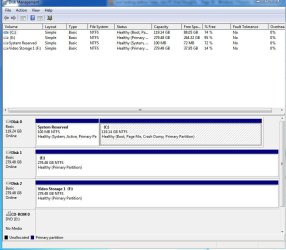
Does the storage HDD appear in Disk Management?

Before I gave up on it, I would connect any other drive you may have and see if you can access it. You need to eliminate the possibility of a bad cable or a bad motherboard port, as well as a bad drive.
 

My Computer My Computer

At a glance

Windows 7 Home Premium SP1, 64-bitIntel Skylake i5-6600K, not overclocked8 GB HyperX DDR4-2666 (2 x 4 GB)none; graphics are integrated on CPU
Computer type
PC/Desktop
Computer Manufacturer/Model Number
Ignatz Special; 4 speed manual gearbox; factory air conditioning; one of one
OS
Windows 7 Home Premium SP1, 64-bit
CPU
Intel Skylake i5-6600K, not overclocked
Motherboard
AsRock Z170M Extreme 4, micro ATX
Memory
8 GB HyperX DDR4-2666 (2 x 4 GB)
Graphics Card(s)
none; graphics are integrated on CPU
Sound Card
onboard: Realtek ALC1150; external: USB Behringer UF0-202
Monitor(s) Displays
Dell S2340M 23 inch IPS
Screen Resolution
1600 x 900
Hard Drives
System: Crucial MX100 series SSD, 128 GB;
Data: Samsung Spinpoint 103SJ, 1 TB;
Backup: WD Caviar Green WD30EZRX-00D8PB0, 3 TB
PSU
Rosewill SilentNight 500 watt fanless, semi-modular
Case
Antec Solo II
Cooling
Noctua NH-U12S; Noctua F12 intake, Noctua S12A exhaust
Keyboard
Microsoft 200 6JH-00001 USB
Mouse
Dell or Microsoft optical wired; USB
Antivirus
Microsoft Security Essentials and Malwarebytes Premium
Browser
Pale Moon
Other Info
All fans PWM; speeds at idle: CPU circa 500 rpm; intake circa 600 rpm; exhaust circa 600 rpm; CPU temps 27 idle and 47 C load in a warm room (27 C/81 F) when running Intel Extreme Tuning Utility stress test.
Does the storage HDD appear in Disk Management?

Before I gave up on it, I would connect any other drive you may have and see if you can access it. You need to eliminate the possibility of a bad cable or a bad motherboard port, as well as a bad drive.

No to disk management; just C: & E: .

I've switched cables & plug positions on MB, power connectors, too. Nothing.

Both storage drives were the same make & size. Really odd that transfering could mess it up. I mean, nothing was bumped into, took precautions to avoid static discharge, etc. Weird!

Could it be a setting in BIOS?
 

My Computer My Computer

At a glance

Windows 7 64-bitIntel Core i5-2500K 3300 Mhz16Gb Patriot PC3-12800 1600 MhzEVGA GeForce GTX 560 Ti (Fermi)
Computer type
PC/Desktop
Computer Manufacturer/Model Number
Custom built 2011
OS
Windows 7 64-bit
CPU
Intel Core i5-2500K 3300 Mhz
Motherboard
Gigabyte P67A-UD3-B3
Memory
16Gb Patriot PC3-12800 1600 Mhz
Graphics Card(s)
EVGA GeForce GTX 560 Ti (Fermi)
Sound Card
On Motherboard
Monitor(s) Displays
Dell U2412M & NEC EA232WMi
Screen Resolution
DELL 1920x1200 - NEC 1920x1080
Hard Drives
Crucial 128 Gb SSD
Hitachi Deskstar 2Tb 7200 RPM 32MB Cache
Seagate Barracuda 500Gb 7200 RPM
Hitachi GST Deskstar 1.5TB 7200 RPM 64MB Cache
PSU
Seasonic M1211-620 Bronze
Case
Antec Solo
Cooling
Tuniq Tower 120 Extreme Rev 1
Keyboard
Apple
Mouse
Microsoft
Internet Speed
5mbs
Other Info
Sunbeam PL-RS-3 Rheosmart 3 Fan Controller 3.5" Bay 3 Channel 30W Fan Controller Panel
Not sure I am following you.

You have 1 spinning drive that is not being recognized.

Are you saying that another spinning drive, when connected to the same cables and same port, is recognized?

Regardless, post a Disk Management picture with the "bad" drive connected.
 

My Computer My Computer

At a glance

Windows 7 Home Premium SP1, 64-bitIntel Skylake i5-6600K, not overclocked8 GB HyperX DDR4-2666 (2 x 4 GB)none; graphics are integrated on CPU
Computer type
PC/Desktop
Computer Manufacturer/Model Number
Ignatz Special; 4 speed manual gearbox; factory air conditioning; one of one
OS
Windows 7 Home Premium SP1, 64-bit
CPU
Intel Skylake i5-6600K, not overclocked
Motherboard
AsRock Z170M Extreme 4, micro ATX
Memory
8 GB HyperX DDR4-2666 (2 x 4 GB)
Graphics Card(s)
none; graphics are integrated on CPU
Sound Card
onboard: Realtek ALC1150; external: USB Behringer UF0-202
Monitor(s) Displays
Dell S2340M 23 inch IPS
Screen Resolution
1600 x 900
Hard Drives
System: Crucial MX100 series SSD, 128 GB;
Data: Samsung Spinpoint 103SJ, 1 TB;
Backup: WD Caviar Green WD30EZRX-00D8PB0, 3 TB
PSU
Rosewill SilentNight 500 watt fanless, semi-modular
Case
Antec Solo II
Cooling
Noctua NH-U12S; Noctua F12 intake, Noctua S12A exhaust
Keyboard
Microsoft 200 6JH-00001 USB
Mouse
Dell or Microsoft optical wired; USB
Antivirus
Microsoft Security Essentials and Malwarebytes Premium
Browser
Pale Moon
Other Info
All fans PWM; speeds at idle: CPU circa 500 rpm; intake circa 600 rpm; exhaust circa 600 rpm; CPU temps 27 idle and 47 C load in a warm room (27 C/81 F) when running Intel Extreme Tuning Utility stress test.
Wow! This is really weird. After my last post I checked Disk Management/Action/Refresh but nothing changed. Then tried Disk Management/Action/Rescan Disks & it appeared! Hallelujah!:party:

On to lots of Windows updates.
 

Attachments

  • Capture 3.JPG
    Capture 3.JPG
    85.4 KB · Views: 6

My Computer My Computer

At a glance

Windows 7 64-bitIntel Core i5-2500K 3300 Mhz16Gb Patriot PC3-12800 1600 MhzEVGA GeForce GTX 560 Ti (Fermi)
Computer type
PC/Desktop
Computer Manufacturer/Model Number
Custom built 2011
OS
Windows 7 64-bit
CPU
Intel Core i5-2500K 3300 Mhz
Motherboard
Gigabyte P67A-UD3-B3
Memory
16Gb Patriot PC3-12800 1600 Mhz
Graphics Card(s)
EVGA GeForce GTX 560 Ti (Fermi)
Sound Card
On Motherboard
Monitor(s) Displays
Dell U2412M & NEC EA232WMi
Screen Resolution
DELL 1920x1200 - NEC 1920x1080
Hard Drives
Crucial 128 Gb SSD
Hitachi Deskstar 2Tb 7200 RPM 32MB Cache
Seagate Barracuda 500Gb 7200 RPM
Hitachi GST Deskstar 1.5TB 7200 RPM 64MB Cache
PSU
Seasonic M1211-620 Bronze
Case
Antec Solo
Cooling
Tuniq Tower 120 Extreme Rev 1
Keyboard
Apple
Mouse
Microsoft
Internet Speed
5mbs
Other Info
Sunbeam PL-RS-3 Rheosmart 3 Fan Controller 3.5" Bay 3 Channel 30W Fan Controller Panel
Re system restore; you want it on. Go to control panel/system/system protection and poke the "configure" button to see how much space is devoted to it. You can move the slider to change the setting. A setting of 10 GB should allow at least 10 restore points. How many you want is personal choice, but in the real world you rarely want to restore to a 2 week old point. Usually, you want to restore to one no more than 3 or 4 days old. I use a setting of 8, but it's up to you. If you had a real small SSD, you'd probably want to keep it quite low.

Did you get AHCI enabled in the BIOS??????????

I enabled AHCI in BIOS before installing Windows 7. Are we good or is more needed to be done?

See pic of Diskpart. I think it's the same as yours.

Looks like default is 10% of total or 1.26Gb ( C: is 128Gb). " I use a setting of 8, but it's up to you." Do you mean 8Gb?
 

Attachments

  • Capture 2.JPG
    Capture 2.JPG
    41 KB · Views: 6
  • Capture 3.JPG
    Capture 3.JPG
    37.8 KB · Views: 2

My Computer My Computer

At a glance

Windows 7 64-bitIntel Core i5-2500K 3300 Mhz16Gb Patriot PC3-12800 1600 MhzEVGA GeForce GTX 560 Ti (Fermi)
Computer type
PC/Desktop
Computer Manufacturer/Model Number
Custom built 2011
OS
Windows 7 64-bit
CPU
Intel Core i5-2500K 3300 Mhz
Motherboard
Gigabyte P67A-UD3-B3
Memory
16Gb Patriot PC3-12800 1600 Mhz
Graphics Card(s)
EVGA GeForce GTX 560 Ti (Fermi)
Sound Card
On Motherboard
Monitor(s) Displays
Dell U2412M & NEC EA232WMi
Screen Resolution
DELL 1920x1200 - NEC 1920x1080
Hard Drives
Crucial 128 Gb SSD
Hitachi Deskstar 2Tb 7200 RPM 32MB Cache
Seagate Barracuda 500Gb 7200 RPM
Hitachi GST Deskstar 1.5TB 7200 RPM 64MB Cache
PSU
Seasonic M1211-620 Bronze
Case
Antec Solo
Cooling
Tuniq Tower 120 Extreme Rev 1
Keyboard
Apple
Mouse
Microsoft
Internet Speed
5mbs
Other Info
Sunbeam PL-RS-3 Rheosmart 3 Fan Controller 3.5" Bay 3 Channel 30W Fan Controller Panel
Your alignment per diskpart is OK. You can also check this way: type msinfo32 into start/search and hit Enter. Then in the left pane open Components, then Storage and go to Disks. There you can see the offset when you scroll down to the relevant drive. You want it divisible by 4.

Yes, I meant 8 GB; that usually gives me about 10 restore points dating back a couple of weeks. You can set it at 8 GB if you want and of course can change it at any time. It’s all a matter of how scarce space is on your SSD and I think you have plans to put some data on it??

You should be done on the AHCI thing. You can check it in the BIOS where it is listed under “SATA controller” or something like that. I can’t remember exactly.

Same thing with hibernation. No problem keeping it enabled if space is not an issue, but I think it takes up 8 GB (same as RAM) in your case.

You should be able to read your BIOS version in the tweaker’s section of the BIOS (MIT or whatever it is called?).

I’d run Windows Experience Index as a check to see that stuff is performing about as expected.

Look in BIOS “PC Health” to see what fans are being monitored and what their speeds are. You should be able to check temps there too.

Or use HWinfo32 to check speeds and temps in Windows, without going to BIOS.
Any readings yet on how quiet it is? My Shuriken fan is normally in the high 800s at idle, but yours might be different based on your internal temps.
 

My Computer My Computer

At a glance

Windows 7 Home Premium SP1, 64-bitIntel Skylake i5-6600K, not overclocked8 GB HyperX DDR4-2666 (2 x 4 GB)none; graphics are integrated on CPU
Computer type
PC/Desktop
Computer Manufacturer/Model Number
Ignatz Special; 4 speed manual gearbox; factory air conditioning; one of one
OS
Windows 7 Home Premium SP1, 64-bit
CPU
Intel Skylake i5-6600K, not overclocked
Motherboard
AsRock Z170M Extreme 4, micro ATX
Memory
8 GB HyperX DDR4-2666 (2 x 4 GB)
Graphics Card(s)
none; graphics are integrated on CPU
Sound Card
onboard: Realtek ALC1150; external: USB Behringer UF0-202
Monitor(s) Displays
Dell S2340M 23 inch IPS
Screen Resolution
1600 x 900
Hard Drives
System: Crucial MX100 series SSD, 128 GB;
Data: Samsung Spinpoint 103SJ, 1 TB;
Backup: WD Caviar Green WD30EZRX-00D8PB0, 3 TB
PSU
Rosewill SilentNight 500 watt fanless, semi-modular
Case
Antec Solo II
Cooling
Noctua NH-U12S; Noctua F12 intake, Noctua S12A exhaust
Keyboard
Microsoft 200 6JH-00001 USB
Mouse
Dell or Microsoft optical wired; USB
Antivirus
Microsoft Security Essentials and Malwarebytes Premium
Browser
Pale Moon
Other Info
All fans PWM; speeds at idle: CPU circa 500 rpm; intake circa 600 rpm; exhaust circa 600 rpm; CPU temps 27 idle and 47 C load in a warm room (27 C/81 F) when running Intel Extreme Tuning Utility stress test.
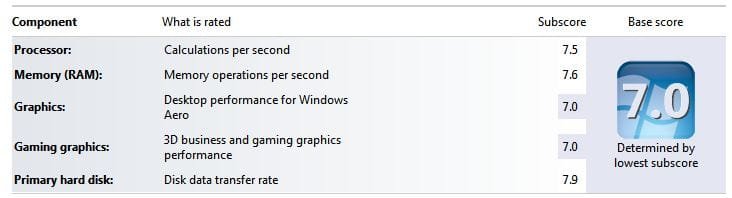
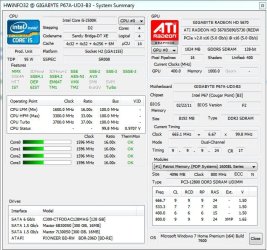
Here's HWinfo32 info & Windows Experience Index. ???

Overall this PC is much quieter than the old one. I can definitely hear the rear fan. It has 3 speeds & is set to "HI" per user manual recommendations. Like to turn that down if possible.
 

Attachments

  • Capture.JPG
    Capture.JPG
    24.3 KB · Views: 11
  • Capture 2.JPG
    Capture 2.JPG
    82 KB · Views: 13
  • Capture 3.JPG
    Capture 3.JPG
    85.5 KB · Views: 13

My Computer My Computer

At a glance

Windows 7 64-bitIntel Core i5-2500K 3300 Mhz16Gb Patriot PC3-12800 1600 MhzEVGA GeForce GTX 560 Ti (Fermi)
Computer type
PC/Desktop
Computer Manufacturer/Model Number
Custom built 2011
OS
Windows 7 64-bit
CPU
Intel Core i5-2500K 3300 Mhz
Motherboard
Gigabyte P67A-UD3-B3
Memory
16Gb Patriot PC3-12800 1600 Mhz
Graphics Card(s)
EVGA GeForce GTX 560 Ti (Fermi)
Sound Card
On Motherboard
Monitor(s) Displays
Dell U2412M & NEC EA232WMi
Screen Resolution
DELL 1920x1200 - NEC 1920x1080
Hard Drives
Crucial 128 Gb SSD
Hitachi Deskstar 2Tb 7200 RPM 32MB Cache
Seagate Barracuda 500Gb 7200 RPM
Hitachi GST Deskstar 1.5TB 7200 RPM 64MB Cache
PSU
Seasonic M1211-620 Bronze
Case
Antec Solo
Cooling
Tuniq Tower 120 Extreme Rev 1
Keyboard
Apple
Mouse
Microsoft
Internet Speed
5mbs
Other Info
Sunbeam PL-RS-3 Rheosmart 3 Fan Controller 3.5" Bay 3 Channel 30W Fan Controller Panel
Back
Top