Word 2010 Portrait Orientation - Possible Bug

If i print that I end up getting a 2x2 label because I have 2" label tape in my printer. The printer cuts according to the page size in my document. If it could be set to portrait 2"wide by 1" high then my printer would cut after 1inch and I would have the result I need.
 

My Computer My Computer

At a glance

Windows 7 Professional 32-Bit
OS
Windows 7 Professional 32-Bit
Do you want your text to be sideways on the page as if it were portrait, but the page to show up on the screen as if it were landscape? Like my last screenshot?
 

My Computer My Computer

At a glance

Win7 Ultimate x64, Server 2008 R2AMD Phenom II X6 1055T Thuban 2.8GHz8GB G.SKILL Ripjaws Series DDR3 1600 (PC3 12800)2x HIS/Sapphire ATI Radeon HD 5830 in CrossfireX
Computer Manufacturer/Model Number
Myself
OS
Win7 Ultimate x64, Server 2008 R2
CPU
AMD Phenom II X6 1055T Thuban 2.8GHz
Motherboard
GIGABYTE GA-890FXA-UD5
Memory
8GB G.SKILL Ripjaws Series DDR3 1600 (PC3 12800)
Graphics Card(s)
2x HIS/Sapphire ATI Radeon HD 5830 in CrossfireX
Sound Card
Sound Blaster X-Fi Xtreme
Monitor(s) Displays
Dell 2407WFP 24", Dell 22"
Screen Resolution
1920x1200
Hard Drives
Patriot Torqx 128GB SSD
3TB other HD
PSU
CORSAIR HX Series CMPSU-750HX 750W
Case
Antec Nine Hundred
Cooling
Cooler Master Hyper 212 Plus CPU cooler
Keyboard
SteelSeries MercStealth
Mouse
Razer Lachesis
Internet Speed
HAHA NO MOAR COMCAST. Now, FiOS :D
Other Info
I am a virtualization enthusiast. I like Hyper-V. It's free.
I'm a Windows 7 fangirl. I will teach a class for you or write a custom course for you RIGHT NOW.
I love EVE Online. I'm Sayra Sainer. I play Starcraft II. My gamertag is Tal0nn. I'm trying not to play Minecraft.
I also like coffee. I'll take a basic triple grande extra-hot breve stirred ristretto caramel machiatto.
The problem is that Word recognizes something that is longer than it is tall as being "landscape". This actually makes sense...unfortunately a few versions too late. :(

Can you change the properties of the printer so that it accommodates landscape orientation?
 

My Computer My Computer

At a glance

Win7 Ultimate x64, Server 2008 R2AMD Phenom II X6 1055T Thuban 2.8GHz8GB G.SKILL Ripjaws Series DDR3 1600 (PC3 12800)2x HIS/Sapphire ATI Radeon HD 5830 in CrossfireX
Computer Manufacturer/Model Number
Myself
OS
Win7 Ultimate x64, Server 2008 R2
CPU
AMD Phenom II X6 1055T Thuban 2.8GHz
Motherboard
GIGABYTE GA-890FXA-UD5
Memory
8GB G.SKILL Ripjaws Series DDR3 1600 (PC3 12800)
Graphics Card(s)
2x HIS/Sapphire ATI Radeon HD 5830 in CrossfireX
Sound Card
Sound Blaster X-Fi Xtreme
Monitor(s) Displays
Dell 2407WFP 24", Dell 22"
Screen Resolution
1920x1200
Hard Drives
Patriot Torqx 128GB SSD
3TB other HD
PSU
CORSAIR HX Series CMPSU-750HX 750W
Case
Antec Nine Hundred
Cooling
Cooler Master Hyper 212 Plus CPU cooler
Keyboard
SteelSeries MercStealth
Mouse
Razer Lachesis
Internet Speed
HAHA NO MOAR COMCAST. Now, FiOS :D
Other Info
I am a virtualization enthusiast. I like Hyper-V. It's free.
I'm a Windows 7 fangirl. I will teach a class for you or write a custom course for you RIGHT NOW.
I love EVE Online. I'm Sayra Sainer. I play Starcraft II. My gamertag is Tal0nn. I'm trying not to play Minecraft.
I also like coffee. I'll take a basic triple grande extra-hot breve stirred ristretto caramel machiatto.
If i print that I end up getting a 2x2 label because I have 2" label tape in my printer. The printer cuts according to the page size in my document. If it could be set to portrait 2"wide by 1" high then my printer would cut after 1inch and I would have the result I need.

OK, your screen shot really helped me...to agree with you - looks like a bug.

I retraced my steps and it LOOKED like "portrait" as it was selected when I clicked OK. Then I reopened the page setup dialog and, just as you posted, it was changed to landscape!

Not suer what's next.

Regards,
GEWB
 

My Computer My Computer

At a glance

Linux Mint / XP / Win7 Home, Pro, Ultimate / ...
Computer type
PC/Desktop
Computer Manufacturer/Model Number
(7 different computers booting up to 10 systems)
OS
Linux Mint / XP / Win7 Home, Pro, Ultimate / Win8.1 / Win10
Other Info
Four desktops, two laptops, one notebook and one tablet

My Computer My Computer

At a glance

Windows 7 Home Premium 64bitIntel(R) Core(TM) i3-2120 CPU @ 3.30GHz3.00 GB(1) Intel(R) HD Graphics (2) VNC Mirror Driver
Computer type
PC/Desktop
Computer Manufacturer/Model Number
Packard Bell
OS
Windows 7 Home Premium 64bit
CPU
Intel(R) Core(TM) i3-2120 CPU @ 3.30GHz
Motherboard
Packard Bell IPISB-AG
Memory
3.00 GB
Graphics Card(s)
(1) Intel(R) HD Graphics (2) VNC Mirror Driver
Sound Card
Realtek High Definition Audio
Monitor(s) Displays
AIO LCD
Screen Resolution
1920 x 1080
Hard Drives
WDC WD10EADX-22TDHB0 ATA Device
Fixed hard disk media
4 partitions
931.51 GB
Keyboard
Wireless
Mouse
Wireless
Antivirus
Microsoft Security Essentials
Browser
IE; Firefox
Other Info
Also:
Samsung N220 Plus Netbook - Windows 7 Home
HP laptop
iPad 5
I am sorry to repeat myself, but the procedure for printing labels is as follows:
Make labels for a mass mailing - Word - Microsoft Office

Having printed hundreds of them from Word 2010, I can assure you that the basic principles are there.

DISCLAIMER: I haven't printed labels in many years. Irene probably has pointed you in the right direction.

That being said, it is still curious that Word didn't honor the user settings, opting instead to know what's better for the user.

Regards,
GEWB
 

My Computer My Computer

At a glance

Linux Mint / XP / Win7 Home, Pro, Ultimate / ...
Computer type
PC/Desktop
Computer Manufacturer/Model Number
(7 different computers booting up to 10 systems)
OS
Linux Mint / XP / Win7 Home, Pro, Ultimate / Win8.1 / Win10
Other Info
Four desktops, two laptops, one notebook and one tablet
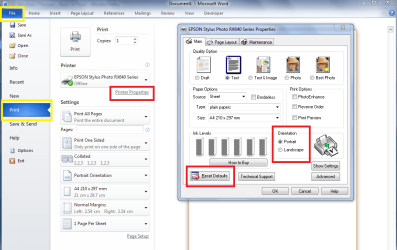
Having given the matter some further thought, I think that the orientation problem is down to the default settings in the printer properties.

Open Word - File - Print - Printer Properties - Select desired 'Portrait' orientation - then ensure that you press Reset Defaults.

This combined with the correct label in Word Mailings will produce perfect labels. :D
(If you need any help selecting the label option, please let me know).
.
.
 

Attachments

  • printer defaults.PNG
    printer defaults.PNG
    53.6 KB · Views: 60

My Computer My Computer

At a glance

Windows 7 Home Premium 64bitIntel(R) Core(TM) i3-2120 CPU @ 3.30GHz3.00 GB(1) Intel(R) HD Graphics (2) VNC Mirror Driver
Computer type
PC/Desktop
Computer Manufacturer/Model Number
Packard Bell
OS
Windows 7 Home Premium 64bit
CPU
Intel(R) Core(TM) i3-2120 CPU @ 3.30GHz
Motherboard
Packard Bell IPISB-AG
Memory
3.00 GB
Graphics Card(s)
(1) Intel(R) HD Graphics (2) VNC Mirror Driver
Sound Card
Realtek High Definition Audio
Monitor(s) Displays
AIO LCD
Screen Resolution
1920 x 1080
Hard Drives
WDC WD10EADX-22TDHB0 ATA Device
Fixed hard disk media
4 partitions
931.51 GB
Keyboard
Wireless
Mouse
Wireless
Antivirus
Microsoft Security Essentials
Browser
IE; Firefox
Other Info
Also:
Samsung N220 Plus Netbook - Windows 7 Home
HP laptop
iPad 5
I think its funny that Word 2003 allows this but 2010 or 2007 do not. I found a work around solution! I can open the document with Open Office Write and then change the orientation to Portrait. Open Office then allows me to save it back as a .doc Word document. If I open that document back up in Word 2010 the portrait setting sticks!

The mailing feature you describe Irene is a good idea but its a little clunky... I'm not sure it was intended for use with my style of label printer since it uses a continuous roll of solid tape. Also Word likes to override my driver stock settings. I could have my driver set to 2x4 and have a 2x10 label created in word and when I print I get a 2x10. My driver is set to portrait but because word is set to landscape I get a landscape print.
 

My Computer My Computer

At a glance

Windows 7 Professional 32-Bit
OS
Windows 7 Professional 32-Bit
I found a work around solution! I can open the document with Open Office Write and then change the orientation to Portrait. Open Office then allows me to save it back as a .doc Word document. If I open that document back up in Word 2010 the portrait setting sticks!

Good news about that. :D

Sorry I was unable to help any more.
 

My Computer My Computer

At a glance

Windows 7 Home Premium 64bitIntel(R) Core(TM) i3-2120 CPU @ 3.30GHz3.00 GB(1) Intel(R) HD Graphics (2) VNC Mirror Driver
Computer type
PC/Desktop
Computer Manufacturer/Model Number
Packard Bell
OS
Windows 7 Home Premium 64bit
CPU
Intel(R) Core(TM) i3-2120 CPU @ 3.30GHz
Motherboard
Packard Bell IPISB-AG
Memory
3.00 GB
Graphics Card(s)
(1) Intel(R) HD Graphics (2) VNC Mirror Driver
Sound Card
Realtek High Definition Audio
Monitor(s) Displays
AIO LCD
Screen Resolution
1920 x 1080
Hard Drives
WDC WD10EADX-22TDHB0 ATA Device
Fixed hard disk media
4 partitions
931.51 GB
Keyboard
Wireless
Mouse
Wireless
Antivirus
Microsoft Security Essentials
Browser
IE; Firefox
Other Info
Also:
Samsung N220 Plus Netbook - Windows 7 Home
HP laptop
iPad 5
hi techguy222, and welcome to sevenforums,

if a document is wider than it's tall, then it's landscape, surely.

Mickey Megabyte is not entirely correct. The definition of what's landscape and portrait is not simply wider than tall. It's direction of writing. If you write horizontally it is portrait. If you write from left bottom to left top it is landscape. For convenience a Word processor rotates the sheet for you so you can still write horizontally and you do not have to hold you head at a 90 degree angle. :D

We are using an industrial paper size 11.5 x 11 with fanfold strips. So you can't simply insert this format as landscape into the printer. Hence, we can't print from O2010 either because of this Orientation bug in Office 2010.

There is a bug in Office 2010, or at least Office 2010 is behaving differently than all the other Offices. There is no cure about this problem yet and we are waiting for this to be fixed.
 

My Computer My Computer

At a glance

W764
OS
W764
I think its funny that Word 2003 allows this but 2010 or 2007 do not. I found a work around solution! I can open the document with Open Office Write and then change the orientation to Portrait. Open Office then allows me to save it back as a .doc Word document. If I open that document back up in Word 2010 the portrait setting sticks!
.

Hi Techguy222,

you can help yourself before printing like this:
1.) rename <your doc>.docx to <your doc>.zip
2.) open the zip folder and open word/document.xml in notepad
3.) change w: orient="landscape" to w: orient="portrait"
4.) save and update the zip folder.
5.) rename back to <your doc>.docx
6.) open in Office 2010 and print. It's fine.
 

My Computer My Computer

At a glance

W764
OS
W764
Quoted:
you can help yourself before printing like this:
1.) rename <your doc>.docx to <your doc>.zip
2.) open the zip folder and open word/document.xml in notepad
3.) change w: orient="landscape" to w: orient="portrait"
4.) save and update the zip folder.
5.) rename back to <your doc>.docx
6.) open in Office 2010 and print. It's fine.


This looks like a pretty creative idea but following your steps does not leave me with a w: orient value to change.

My xml file converted to a text document is attached.

Using open office still seems to be the easiest method to take care of the orientation issue but i'm curious if your on to something.
 

Attachments

My Computer My Computer

At a glance

Windows 7 Professional 32-Bit
OS
Windows 7 Professional 32-Bit
Just to let every one else know: I am trying to use a previous Word document ~5 x 3 cm in portrait and Word just overrides the orientation to landscape every time. I also am using a roll of labels on a laber printer. And no, we are not loosing our minds! The label is really supposed to be in portrait mode. Does Microsoft know about this issue and how do we find that out?
 

My Computer My Computer

At a glance

Windows 7 Prof 64-bit
OS
Windows 7 Prof 64-bit
There is no option in Word 2010 to fix this. :(

The only option you may have is to adjust a setting in the printer driver itself. Zebra label printers have an option:
override the default settings of the application/always use driver defaults
 

My Computer My Computer

At a glance

Windows 7 Professional 32bit/64bitIntel/AMDusually >2GBvarious
Computer type
PC/Desktop
Computer Manufacturer/Model Number
HP,Dell,custom build
OS
Windows 7 Professional 32bit/64bit
CPU
Intel/AMD
Motherboard
various
Memory
usually >2GB
Graphics Card(s)
various
Hard Drives
160GB to 3TB
Antivirus
various
Browser
no Safari
Back
Top