Customizing Context Menus

plipz

New member
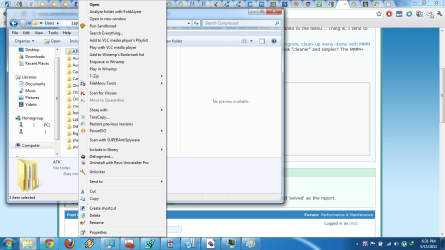
Hi, I'm having a problem with my context menu; as I add more programs, more and more items are added to the menu... Thing is, I tend to use these various menus but I cant stand seeing it so long and tedious.

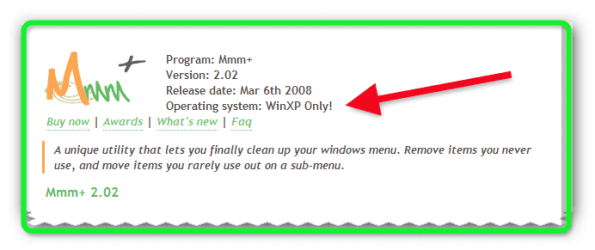
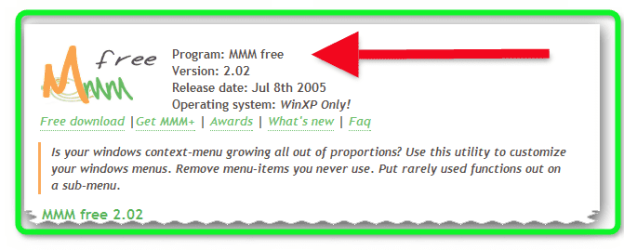
I was wondering if there was a program like MMM+ (Context menu program Mmm+. Windows menu program, clean-up menu-items with MMM Plus.) wherein you can organize various context menus into sub-menus to make the context menu look "cleaner" and simpler? The MMM+ doesnt work on Win7 x64 that's why I'm looking for an alternative... I tried running it in compatibility mode as well, with no results :/

I tried ShellMenuView and ShellExView and it doesnt provide the option I was looking for.. :huh:

I hope you guys can help me on this its kinda annoying now...
 

Attachments
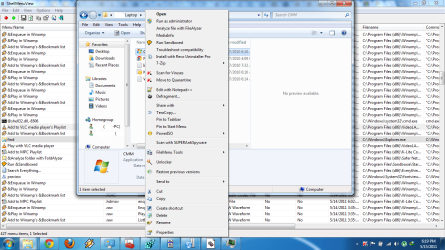
  • Screeny.png
    Screeny.png
    314.6 KB · Views: 96
  • Screeny 1.png
    Screeny 1.png
    248.4 KB · Views: 55
Last edited:

My Computer

OS
Windows 7 Ultimate
CPU
Core i5-750
Motherboard
ASUS Maximum Formula 3
Memory
Corsair Dominator DDR3 2Ghz 4GB
Graphics Card(s)
ATI HD4870X2
Sound Card
X-Fi Soundblaster
Monitor(s) Displays
Hannspree 23" LCD
Hard Drives
2x 128GB SSD in Raid 0
1x 1TB Samsung Spinpoint
PSU
Gigabyte Odin 800W
Case
CoolerMaster HAF 932
Cooling
CoolerMaster Aquagate
hi there :)

so you want to clean the context menu ? take away entries, consolidate them into groups so the context is organized? A-Z? shellexview gives you options i use it to tweak what i have shown and to stop explorer crashes. i have been looking for a program to to organize the list but have not found one. i should think you could alter the listings in the registry but have not attempted it yet.
 

My Computer

Computer Manufacturer/Model Number
packard bell IXTREME M5722
OS
Operating System : Windows 7 Home Premium Edition 6.01.7600 SP1 (x64)
CPU
Processor : Intel Core 2 Quad Q8300 @ 2500 MHz
Motherboard
Mainboard : Packard Bell (Acer EG43M )
Memory
Physical Memory :8GB Corsair4x 2GB 800MHz C5 DDR2
Graphics Card(s)
Video Card : XFX 6700 AMD
Monitor(s) Displays
Maestro 234DL - BenQ V2220 - BenQ VW2420H
Screen Resolution
Current Display :1920x1080p pixels at 60 Hz in HD LED
Hard Drives
Hard Disks : WDC (1000 GB)
Drive C: (Hard Disk) : 428 GB available on 491 GB
Drive D: (Hard Disk) : 426 GB available on 492 GB
SAMSUNG spinpoint HD103SJ 1000.2 GB
(X 2) KINGSTON SSD NOW V 30GB
PSU
XFX ProSeries 550W PSU
Case
PACKARD BELL IXTREME
Cooling
System Blower Current: 150mA Air Flow16CFM ;Akasa 90mm rear
Keyboard
Gigabyte Aivia K8100
Mouse
TRUST-Wireless Laser Mouse - Carbon edition MI-7770C
Internet Speed
TP-LINK > TL-WN951N / AV500 Gigabit Powerline Adapters
Browser
chrome dev
Other Info
EXTRA COOLING>(FAN CONTROLLER) PC Bay Cooler 3 x 40mm fans; Akasa AK-HD-BL Blue hard drive cooler 2 x 40 mm fan 4500 rpm 29.7 dBA
Bios> American Megatrends Inc.
Version : P01-A1
Date : 08/31/2009

My Computer

Computer Manufacturer/Model Number
packard bell IXTREME M5722
OS
Operating System : Windows 7 Home Premium Edition 6.01.7600 SP1 (x64)
CPU
Processor : Intel Core 2 Quad Q8300 @ 2500 MHz
Motherboard
Mainboard : Packard Bell (Acer EG43M )
Memory
Physical Memory :8GB Corsair4x 2GB 800MHz C5 DDR2
Graphics Card(s)
Video Card : XFX 6700 AMD
Monitor(s) Displays
Maestro 234DL - BenQ V2220 - BenQ VW2420H
Screen Resolution
Current Display :1920x1080p pixels at 60 Hz in HD LED
Hard Drives
Hard Disks : WDC (1000 GB)
Drive C: (Hard Disk) : 428 GB available on 491 GB
Drive D: (Hard Disk) : 426 GB available on 492 GB
SAMSUNG spinpoint HD103SJ 1000.2 GB
(X 2) KINGSTON SSD NOW V 30GB
PSU
XFX ProSeries 550W PSU
Case
PACKARD BELL IXTREME
Cooling
System Blower Current: 150mA Air Flow16CFM ;Akasa 90mm rear
Keyboard
Gigabyte Aivia K8100
Mouse
TRUST-Wireless Laser Mouse - Carbon edition MI-7770C
Internet Speed
TP-LINK > TL-WN951N / AV500 Gigabit Powerline Adapters
Browser
chrome dev
Other Info
EXTRA COOLING>(FAN CONTROLLER) PC Bay Cooler 3 x 40mm fans; Akasa AK-HD-BL Blue hard drive cooler 2 x 40 mm fan 4500 rpm 29.7 dBA
Bios> American Megatrends Inc.
Version : P01-A1
Date : 08/31/2009
Thanks for that reply, yeah I thought about just extending them so keep them hidden but I was opting for a sub-menu style you know where I can group say Kaspersky and SuperAntiSpyware in a sub-menu called "Virus Scanners"... I just thought it was possible since MMM+ has that nifty functionality....
 

My Computer

OS
Windows 7 Ultimate
CPU
Core i5-750
Motherboard
ASUS Maximum Formula 3
Memory
Corsair Dominator DDR3 2Ghz 4GB
Graphics Card(s)
ATI HD4870X2
Sound Card
X-Fi Soundblaster
Monitor(s) Displays
Hannspree 23" LCD
Hard Drives
2x 128GB SSD in Raid 0
1x 1TB Samsung Spinpoint
PSU
Gigabyte Odin 800W
Case
CoolerMaster HAF 932
Cooling
CoolerMaster Aquagate
Probably totally off course here, but will MMM+ work in compatibility mode?
 

My Computer

OS
windows 7 ultimate
it may work in compatibility mode worth a try (MMM) i dont use it i see you have to buy it (not freeware)
 

Attachments

  • Brys snap ?15 ?May ?2011 13h20m57s 01.png
    Brys snap ?15 ?May ?2011 13h20m57s 01.png
    30.9 KB · Views: 42

My Computer

Computer Manufacturer/Model Number
packard bell IXTREME M5722
OS
Operating System : Windows 7 Home Premium Edition 6.01.7600 SP1 (x64)
CPU
Processor : Intel Core 2 Quad Q8300 @ 2500 MHz
Motherboard
Mainboard : Packard Bell (Acer EG43M )
Memory
Physical Memory :8GB Corsair4x 2GB 800MHz C5 DDR2
Graphics Card(s)
Video Card : XFX 6700 AMD
Monitor(s) Displays
Maestro 234DL - BenQ V2220 - BenQ VW2420H
Screen Resolution
Current Display :1920x1080p pixels at 60 Hz in HD LED
Hard Drives
Hard Disks : WDC (1000 GB)
Drive C: (Hard Disk) : 428 GB available on 491 GB
Drive D: (Hard Disk) : 426 GB available on 492 GB
SAMSUNG spinpoint HD103SJ 1000.2 GB
(X 2) KINGSTON SSD NOW V 30GB
PSU
XFX ProSeries 550W PSU
Case
PACKARD BELL IXTREME
Cooling
System Blower Current: 150mA Air Flow16CFM ;Akasa 90mm rear
Keyboard
Gigabyte Aivia K8100
Mouse
TRUST-Wireless Laser Mouse - Carbon edition MI-7770C
Internet Speed
TP-LINK > TL-WN951N / AV500 Gigabit Powerline Adapters
Browser
chrome dev
Other Info
EXTRA COOLING>(FAN CONTROLLER) PC Bay Cooler 3 x 40mm fans; Akasa AK-HD-BL Blue hard drive cooler 2 x 40 mm fan 4500 rpm 29.7 dBA
Bios> American Megatrends Inc.
Version : P01-A1
Date : 08/31/2009
Thanks for that reply, yeah I thought about just extending them so keep them hidden but I was opting for a sub-menu style you know where I can group say Kaspersky and SuperAntiSpyware in a sub-menu called "Virus Scanners"... I just thought it was possible since MMM+ has that nifty functionality....

SOME ADVICE Kaspersky and SuperAntiSpyware this is not a good idea to run together Kaspersky is good enough on its own in my opinion
 

My Computer

Computer Manufacturer/Model Number
packard bell IXTREME M5722
OS
Operating System : Windows 7 Home Premium Edition 6.01.7600 SP1 (x64)
CPU
Processor : Intel Core 2 Quad Q8300 @ 2500 MHz
Motherboard
Mainboard : Packard Bell (Acer EG43M )
Memory
Physical Memory :8GB Corsair4x 2GB 800MHz C5 DDR2
Graphics Card(s)
Video Card : XFX 6700 AMD
Monitor(s) Displays
Maestro 234DL - BenQ V2220 - BenQ VW2420H
Screen Resolution
Current Display :1920x1080p pixels at 60 Hz in HD LED
Hard Drives
Hard Disks : WDC (1000 GB)
Drive C: (Hard Disk) : 428 GB available on 491 GB
Drive D: (Hard Disk) : 426 GB available on 492 GB
SAMSUNG spinpoint HD103SJ 1000.2 GB
(X 2) KINGSTON SSD NOW V 30GB
PSU
XFX ProSeries 550W PSU
Case
PACKARD BELL IXTREME
Cooling
System Blower Current: 150mA Air Flow16CFM ;Akasa 90mm rear
Keyboard
Gigabyte Aivia K8100
Mouse
TRUST-Wireless Laser Mouse - Carbon edition MI-7770C
Internet Speed
TP-LINK > TL-WN951N / AV500 Gigabit Powerline Adapters
Browser
chrome dev
Other Info
EXTRA COOLING>(FAN CONTROLLER) PC Bay Cooler 3 x 40mm fans; Akasa AK-HD-BL Blue hard drive cooler 2 x 40 mm fan 4500 rpm 29.7 dBA
Bios> American Megatrends Inc.
Version : P01-A1
Date : 08/31/2009

Attachments

  • Brys snap ?15 ?May ?2011 13h35m06s 02.png
    Brys snap ?15 ?May ?2011 13h35m06s 02.png
    31.1 KB · Views: 19

My Computer

Computer Manufacturer/Model Number
packard bell IXTREME M5722
OS
Operating System : Windows 7 Home Premium Edition 6.01.7600 SP1 (x64)
CPU
Processor : Intel Core 2 Quad Q8300 @ 2500 MHz
Motherboard
Mainboard : Packard Bell (Acer EG43M )
Memory
Physical Memory :8GB Corsair4x 2GB 800MHz C5 DDR2
Graphics Card(s)
Video Card : XFX 6700 AMD
Monitor(s) Displays
Maestro 234DL - BenQ V2220 - BenQ VW2420H
Screen Resolution
Current Display :1920x1080p pixels at 60 Hz in HD LED
Hard Drives
Hard Disks : WDC (1000 GB)
Drive C: (Hard Disk) : 428 GB available on 491 GB
Drive D: (Hard Disk) : 426 GB available on 492 GB
SAMSUNG spinpoint HD103SJ 1000.2 GB
(X 2) KINGSTON SSD NOW V 30GB
PSU
XFX ProSeries 550W PSU
Case
PACKARD BELL IXTREME
Cooling
System Blower Current: 150mA Air Flow16CFM ;Akasa 90mm rear
Keyboard
Gigabyte Aivia K8100
Mouse
TRUST-Wireless Laser Mouse - Carbon edition MI-7770C
Internet Speed
TP-LINK > TL-WN951N / AV500 Gigabit Powerline Adapters
Browser
chrome dev
Other Info
EXTRA COOLING>(FAN CONTROLLER) PC Bay Cooler 3 x 40mm fans; Akasa AK-HD-BL Blue hard drive cooler 2 x 40 mm fan 4500 rpm 29.7 dBA
Bios> American Megatrends Inc.
Version : P01-A1
Date : 08/31/2009
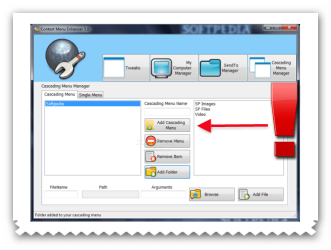
i have found some software here worth a look Context Menu Enhancer


Context Menu Enhancer gives you ability to have total power on your right click context menu. Context Menu Enhancer allows yo to edit your right click menu in the way you want. Now with help of this wonderful tool you can add some good stuffs to your right click context menu. Some of the functions it does described below. Tweaks Manager. As name tells this part of a Context Menu Enhancer does some tweaks stuff. All of this tweaks are very useful for everyday work. It makes your life easier. All of the tweaks are listed below with there functionality.
Copy To Folder & Move To Folder :- When you choose one of the options from the menu, you browse to any place on your hard disk to copy or move the file to that folder. You doesn't have to navigate to the place where you want to paste your file. Create or Print File List :- Allows you to print or create file list of a folder by right clicking on folder and selecting one of the option. Encrypt & Decrypt :- Allows you to encrypt and decrypt your files and folders. Files encrypted can't be operable by another user on the PC. Open In Notepad :- Allows user to open any file in notepad by just right clicking it. Open file location :- Allows user to open the file location by right clicking its shortcut. Administrator Command Prompt :- Allows user to open an elevated command prompt with highest privileges from any folder by right clicking it. Add To MyComputer & Add To ControlPanel & Add to Desktop :- Allows user to add the files (Vista or 7) or folders to their My Computer,Control Panel or Desktop by just right click a file (Vista or 7) or folder and selecting appropriate option. These are not an ordinary folders you can only delete them from the Context Menu Enhancer. Add To SendTo :- Allows user to add folder to their send to menu by just right click the folder and selecting Add To SendTo. So user can copy any files instantly to the selected location. User can remove it from the Context Menu Enhancer's SendTo Manager. Add To Right click (Vista or 7) :- Allows user to add the files or folders to their right click context menu by just right click a file or folder and selecting appropriate option.You can delete them from Context Menu Enhancer. God Mode & System Configuration Utility (Vista or 7) :- Add the options to open System Configuration Utility(msconfig) and famous god mod from user's right click menu.
What's new in this version: Version 5.1 enhances the ability to add files.


Read more: Context Menu Enhancer - Free software downloads and software reviews - CNET Download.com http://download.cnet.com/Context-Me...1.html?tag=recommendedDownloads#ixzz1MQO6XyNB
 

Attachments

  • Brys snap ?15 ?May ?2011 13h43m08s 03.png
    Brys snap ?15 ?May ?2011 13h43m08s 03.png
    87.6 KB · Views: 120

My Computer

Computer Manufacturer/Model Number
packard bell IXTREME M5722
OS
Operating System : Windows 7 Home Premium Edition 6.01.7600 SP1 (x64)
CPU
Processor : Intel Core 2 Quad Q8300 @ 2500 MHz
Motherboard
Mainboard : Packard Bell (Acer EG43M )
Memory
Physical Memory :8GB Corsair4x 2GB 800MHz C5 DDR2
Graphics Card(s)
Video Card : XFX 6700 AMD
Monitor(s) Displays
Maestro 234DL - BenQ V2220 - BenQ VW2420H
Screen Resolution
Current Display :1920x1080p pixels at 60 Hz in HD LED
Hard Drives
Hard Disks : WDC (1000 GB)
Drive C: (Hard Disk) : 428 GB available on 491 GB
Drive D: (Hard Disk) : 426 GB available on 492 GB
SAMSUNG spinpoint HD103SJ 1000.2 GB
(X 2) KINGSTON SSD NOW V 30GB
PSU
XFX ProSeries 550W PSU
Case
PACKARD BELL IXTREME
Cooling
System Blower Current: 150mA Air Flow16CFM ;Akasa 90mm rear
Keyboard
Gigabyte Aivia K8100
Mouse
TRUST-Wireless Laser Mouse - Carbon edition MI-7770C
Internet Speed
TP-LINK > TL-WN951N / AV500 Gigabit Powerline Adapters
Browser
chrome dev
Other Info
EXTRA COOLING>(FAN CONTROLLER) PC Bay Cooler 3 x 40mm fans; Akasa AK-HD-BL Blue hard drive cooler 2 x 40 mm fan 4500 rpm 29.7 dBA
Bios> American Megatrends Inc.
Version : P01-A1
Date : 08/31/2009
Thanks for that reply, yeah I thought about just extending them so keep them hidden but I was opting for a sub-menu style you know where I can group say Kaspersky and SuperAntiSpyware in a sub-menu called "Virus Scanners"... I just thought it was possible since MMM+ has that nifty functionality....

SOME ADVICE Kaspersky and SuperAntiSpyware this is not a good idea to run together Kaspersky is good enough on its own in my opinion


Yup I know, I just use SuperAntiSpyware as a redundancy tool and a cookie remover, I hardly ever use it to scan anything except for maintenance on my computers...
 

My Computer

OS
Windows 7 Ultimate
CPU
Core i5-750
Motherboard
ASUS Maximum Formula 3
Memory
Corsair Dominator DDR3 2Ghz 4GB
Graphics Card(s)
ATI HD4870X2
Sound Card
X-Fi Soundblaster
Monitor(s) Displays
Hannspree 23" LCD
Hard Drives
2x 128GB SSD in Raid 0
1x 1TB Samsung Spinpoint
PSU
Gigabyte Odin 800W
Case
CoolerMaster HAF 932
Cooling
CoolerMaster Aquagate
Probably totally off course here, but will MMM+ work in compatibility mode?


Wont work either. I'm sorry I forgot to state on my 1st post that I tried that, it seems Win7 context menu coding might be diffrent from XP so as keeping the program from working, it does run in the background though, but it does absolutely nothing...
i have found some software here worth a look Context Menu Enhancer


Context Menu Enhancer gives you ability to have total power on your right click context menu. Context Menu Enhancer allows yo to edit your right click menu in the way you want. Now with help of this wonderful tool you can add some good stuffs to your right click context menu. Some of the functions it does described below. Tweaks Manager. As name tells this part of a Context Menu Enhancer does some tweaks stuff. All of this tweaks are very useful for everyday work. It makes your life easier. All of the tweaks are listed below with there functionality.
Copy To Folder & Move To Folder :- When you choose one of the options from the menu, you browse to any place on your hard disk to copy or move the file to that folder. You doesn't have to navigate to the place where you want to paste your file. Create or Print File List :- Allows you to print or create file list of a folder by right clicking on folder and selecting one of the option. Encrypt & Decrypt :- Allows you to encrypt and decrypt your files and folders. Files encrypted can't be operable by another user on the PC. Open In Notepad :- Allows user to open any file in notepad by just right clicking it. Open file location :- Allows user to open the file location by right clicking its shortcut. Administrator Command Prompt :- Allows user to open an elevated command prompt with highest privileges from any folder by right clicking it. Add To MyComputer & Add To ControlPanel & Add to Desktop :- Allows user to add the files (Vista or 7) or folders to their My Computer,Control Panel or Desktop by just right click a file (Vista or 7) or folder and selecting appropriate option. These are not an ordinary folders you can only delete them from the Context Menu Enhancer. Add To SendTo :- Allows user to add folder to their send to menu by just right click the folder and selecting Add To SendTo. So user can copy any files instantly to the selected location. User can remove it from the Context Menu Enhancer's SendTo Manager. Add To Right click (Vista or 7) :- Allows user to add the files or folders to their right click context menu by just right click a file or folder and selecting appropriate option.You can delete them from Context Menu Enhancer. God Mode & System Configuration Utility (Vista or 7) :- Add the options to open System Configuration Utility(msconfig) and famous god mod from user's right click menu.
What's new in this version: Version 5.1 enhances the ability to add files.


Read more: Context Menu Enhancer - Free software downloads and software reviews - CNET Download.com Context Menu Enhancer - Free software downloads and software reviews - CNET Download.com

I tried this and its not really the one I'm looking for, you can create Sub-menus but cant group them like you could in MMM+... Sigh that was such a promising program, I guess no one is bothered as I am when it comes to context menus. Weird nobody has filled this niche when the internet is doused in myriad of programs that cater to the most mundane of tasks :rolleyes:
 

My Computer

OS
Windows 7 Ultimate
CPU
Core i5-750
Motherboard
ASUS Maximum Formula 3
Memory
Corsair Dominator DDR3 2Ghz 4GB
Graphics Card(s)
ATI HD4870X2
Sound Card
X-Fi Soundblaster
Monitor(s) Displays
Hannspree 23" LCD
Hard Drives
2x 128GB SSD in Raid 0
1x 1TB Samsung Spinpoint
PSU
Gigabyte Odin 800W
Case
CoolerMaster HAF 932
Cooling
CoolerMaster Aquagate
Sorry Dude,
I've done a bit of a search around and although I've come across a (very) few software programs for the context menu, I've not found anything that will do as you want. :(
 

My Computer

OS
windows 7 ultimate
Sorry to disappoint you but I've been searching on and off for a MMM equivalent ever since I moved to Windows 7 and my searches have been in vain. MMM is quite simply the most clever tool I've come across to manage context menus, to bad it seems discontinued.
 

My Computer

OS
Windows 7 64
CPU
AMD Phenom II X4 Black Edition 940
Motherboard
Gigabyte GA-MA790X-UD3P
Memory
8 GB
Graphics Card(s)
Nvidia 8800GTS
Monitor(s) Displays
Benq G2420HDBL
Screen Resolution
1920x1080
Case
Lian-Li
Internet Speed
10/10 mb/s
Sorry Dude,
I've done a bit of a search around and although I've come across a (very) few software programs for the context menu, I've not found anything that will do as you want. :(

Sigh yeah I actually invested 6 hours of intense interwebs searching for this kind of tweak I was looking for and it seems atm its non-existent :(

Sorry to disappoint you but I've been searching on and off for a MMM equivalent ever since I moved to Windows 7 and my searches have been in vain. MMM is quite simply the most clever tool I've come across to manage context menus, to bad it seems discontinued.

I feel your pain, it seems the world lost such a valuable (niche) program for that eccentric tweaker... I wish they'd open-source their source code so someone else could pick up where they left :cry:

But I'm still on the lookout for that possibly overlooked tweak that could perform this (I think) relatively simple customization :)
 

My Computer

OS
Windows 7 Ultimate
CPU
Core i5-750
Motherboard
ASUS Maximum Formula 3
Memory
Corsair Dominator DDR3 2Ghz 4GB
Graphics Card(s)
ATI HD4870X2
Sound Card
X-Fi Soundblaster
Monitor(s) Displays
Hannspree 23" LCD
Hard Drives
2x 128GB SSD in Raid 0
1x 1TB Samsung Spinpoint
PSU
Gigabyte Odin 800W
Case
CoolerMaster HAF 932
Cooling
CoolerMaster Aquagate
After some more interwebs search, I came up w/ a program similar to what I was looking for but not exactly the functionality I was hoping. But nonetheless its a very excellent program w/ tons of other useful features. For those who are intersted, you can take a look at the website and d/l the program and give it a go :)

Moo0 RightClicker / Pro - Enhance Your Context Menu

Very ingenious little program with tons of useful features and customization as well.
 

My Computer

OS
Windows 7 Ultimate
CPU
Core i5-750
Motherboard
ASUS Maximum Formula 3
Memory
Corsair Dominator DDR3 2Ghz 4GB
Graphics Card(s)
ATI HD4870X2
Sound Card
X-Fi Soundblaster
Monitor(s) Displays
Hannspree 23" LCD
Hard Drives
2x 128GB SSD in Raid 0
1x 1TB Samsung Spinpoint
PSU
Gigabyte Odin 800W
Case
CoolerMaster HAF 932
Cooling
CoolerMaster Aquagate
Good Find! Nice to see a smiley at the end of your post at last as well!
 

My Computer

OS
windows 7 ultimate
FileMenu Tools (freeware) is probably your best option if you can't get MMM to play nicely.

You won't be able to re-order items for third party and/or Windows entries, though you can remove most unwanted items.

The program adds a single context entry of it's own via which you can customise a range of additional functions and built-in utilities, which can be re-ordered to your liking. You can manage the SendTo menu, and add your own sub-menus and custom commands.

Some of the things I like include;

Built-in file shredder with x1, x3, x10, x35 options

Change file and folder attributes faster (such as view hidden items)

Advanced renamer

Run a program with attributes

FileMenu-Tools.png


Once installed go to Programs > Lopesoft > Configure FileMenu Tools

Enjoy...
 

My Computer

Computer type
PC/Desktop
OS
Windows 7
Back
Top