Show us your SSD performance

Status
Not open for further replies.
My C300 is running off an ASUS U3S6 card. A lot of people say the Marvell drivers are crap but for me, it out performs MSAHCI by quite a bit.
crucial_20101106_msahci.PNG crucial_20100825a.PNG
 

My Computer My Computer

Computer Manufacturer/Model Number
tw33k
OS
Windows 7 Ultimate (x64) SP1
CPU
Intel 3770k 4.6GHz
Motherboard
ASUS Maximus V Formula
Memory
8GB (2x 4GB) Crucial Ballistix
Graphics Card(s)
Sapphire 7950 (1060/1600)
Sound Card
On Board Realtek HD Audio
Monitor(s) Displays
27" Acer B273HU (via HDMI)
Screen Resolution
2048 x 1152
Hard Drives
Crucial M4 128GB
2TB WD Black
1TB Samsung F3 SATA
1TB WD Elite External
2TB WD USB 3.0
PSU
Corsair AX750 Gold
Case
Corsair Obsidian 800DW
Cooling
Corsair H100 (2x AP-121/2x UK-3000 push/pull)
Keyboard
Microsoft Wireless 5000
Mouse
Microsoft Wireless 5000
Internet Speed
5mb/s
Other Info
Logitech z-2300 2.1 speakers
Lamptron FC-5 v2
Agree Marvell has not been getting the recognition it deserves.
Whether this has been from the start or their drivers have improved, I don't know.
If they are improving I hope they continue as I have a Marvell 6Gbps onboard chip.

You can compare some C300 AS SSD benchmarks with different drivers here: AS SSD Benchmark thread
 

My Computer My Computer

Computer type
PC/Desktop
Computer Manufacturer/Model Number
76~2.0
OS
Windows 7 Ult x64 - SP1/ Windows 8 Pro x64
CPU
Intel Core i5-3570K 4.6GHz
Motherboard
Gigabyte GA-Z77X UD3H, f18
Memory
8GB (2X4GB) DDR3 1600 Corsair Vengeance CL8 1.5v
Graphics Card(s)
Sapphire HD 7770 Vapor-X OC 1GB DDR5
Sound Card
Onboard VIA VT2021
Monitor(s) Displays
22" LCD Dell
Screen Resolution
1680x1050
Hard Drives
Samsung 840Pro 128GB SSD,
Seagate Barracuda 500GB SATA2 7200rpm 32MB cache, Seagate Barracuda 1TB SATA2 7200rpm 32MB cache,
PSU
Corsair HX650W
Case
Cooler Master Storm Scout
Cooling
Corsair H80 2x12cm Noctua NF P12 , 2x14cm case fans
Keyboard
Logitech Wave
Mouse
CM Sentinel
Internet Speed
Dismal
Antivirus
Avast
Browser
Opera Next
Other Info
Haswell laptop: HP Envy 17t-j, i7-4700MQ, GeForce 740M 2GB DDR3, 17.3" Full HD 1920x1080, 16GB RAM, Samsung 840 Pro 128GB, 1TB Hitachi 7200 HDD,
Desktop: eSATA ports,
External eSATA Seagate 500GB SATA2 7200rpm,
External WD USB 500GB
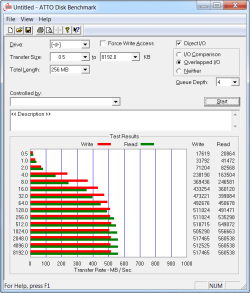
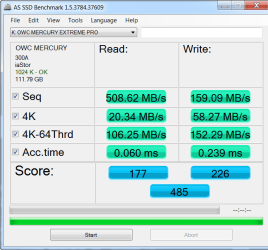
Just playing with a new OWC Mercury Pro SSD it is impressing me so far.
 

Attachments

  • ATTO.png
    ATTO.png
    15.3 KB · Views: 11
  • New Merc ASSD bench.png
    New Merc ASSD bench.png
    20.4 KB · Views: 7

My Computer My Computer

Computer Manufacturer/Model Number
My Build
OS
win7 Ult 64
CPU
i7 3930K & 3960X
Motherboard
ASUS P9X79 Deluxe
Memory
16GB G-Skill 2133MHz
Graphics Card(s)
Sapphire HD 7970
Sound Card
On-board
Monitor(s) Displays
ASUS 27 inch
Screen Resolution
1920X1080
Hard Drives
Crucial M4 256GB, 1.5TB WD Black for Data/Images
PSU
Corsair AX1200
Case
NZXT 810
Cooling
Custom Loop, Swiftech HDBlock
Keyboard
Mionix
Mouse
Mionix
Internet Speed
Cable
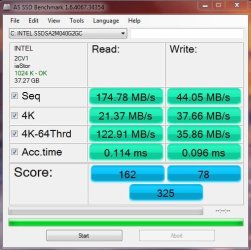
Heres my Intel X25-V 40GB after a Year and a half of service.
intel SSD 40GB.JPG

No where near as impressive as some of the newer SSDs, and benchmarks being posted but ...
Still showing numbers as good as it did from day 1. Granted I just had to do a Secure Erase on it after a bit of trouble.


Which leads to me one question in reference to updating to AHCI driver.
Maybe its just me, or failing memory, but I found it odd.

Anytime I have ever updated the AHCI Driver from the MS one to Intels, I would have to reboot after updating it via Device manager.

After the reboot, it would install the AHCI driver, and ask for another reboot.

Then, it would install drivers for each HD I have, and ask for a final reboot.

This is the same process I go through now, when I remove the Intel AHCI driver to revert to the MS one.


Oddly, when I update to the Intel one now, It asks for a reboot, Right after updating via Device manager

And then thats it. No further installs or reboots. It just boots back to Windows and shows its installed.


I just re-installed Windows, and updated the AHCI driver after SP1 was installed if that makes any difference.
It doesnt seem to be affecrting anything, and benchmarks show as fine. it was just a bit confusing is all.

Anyone else notice this by chance?
 

My Computer My Computer

Computer Manufacturer/Model Number
Custom (Self Build)
OS
Windows 7 Home Premium 64bit
CPU
Intel Core i7 2700k
Motherboard
eVGA P67 SLI
Memory
8GB Mushkin Redline Ridgebacks @1866
Graphics Card(s)
EVGA GTX570 SC
Sound Card
XiFi Titanium HD
Monitor(s) Displays
LG W2453V
Screen Resolution
1920x1080
Hard Drives
Intel 320 80GB -- Intel X25-V 40GB --WD Black 1TB x2 -- WD Blue 640GB
PSU
Seasonic x750
Case
Corsair 600T SE White
Cooling
eVGA Superclocked CPU Cooler
Keyboard
Saitek Cyborg
Antivirus
Kaspersky
Browser
IE
Other Info
LG BD/DVD
You have to remember that the X25V was a "low cost" offering at the time. And as long as your access times stays in the 0.1ms area, there is nothing to worry about. The R/W time for 4K is a bit slow, but then the system does not write that much to the disk anyhow.

I do not worry about AHCI any more. In my experience it does not buy you much in real life.
 

My Computer My Computer

Computer Manufacturer/Model Number
HP, Dell, Gateway, Toshiba - 4 laptops and 2 desktops
OS
Vista, Windows7, Mint Mate, Zorin, Windows 8
CPU
from 1.6GHz Duo to i7
Monitor(s) Displays
2x HP w2207
Hard Drives
5x HDD, 7x SSD, 12x Externals
Keyboard
with trackball - no mices
Mouse
Trackball mice
Internet Speed
DSL 6000
Very true. It was/is the cheapest SSD intel offers.
More less a Entry Level product.

Sadly, I do not think you can even buy these anymore. Its replacement is the 320 Series, which theoretically should be faster.
Even it is only a $99 SSD.

I'll upgrade it at some point, but for now it does well enough for me :)
Certainly leaps and bounds faster than any mechanical HD, at least for the purpose of the OS.
 

My Computer My Computer

Computer Manufacturer/Model Number
Custom (Self Build)
OS
Windows 7 Home Premium 64bit
CPU
Intel Core i7 2700k
Motherboard
eVGA P67 SLI
Memory
8GB Mushkin Redline Ridgebacks @1866
Graphics Card(s)
EVGA GTX570 SC
Sound Card
XiFi Titanium HD
Monitor(s) Displays
LG W2453V
Screen Resolution
1920x1080
Hard Drives
Intel 320 80GB -- Intel X25-V 40GB --WD Black 1TB x2 -- WD Blue 640GB
PSU
Seasonic x750
Case
Corsair 600T SE White
Cooling
eVGA Superclocked CPU Cooler
Keyboard
Saitek Cyborg
Antivirus
Kaspersky
Browser
IE
Other Info
LG BD/DVD
AS-SSD benchmark with Vertex 3

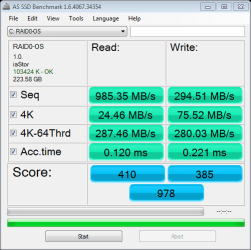
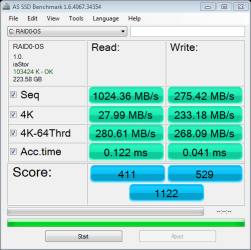
FYI here's what I'm getting with the following config:

Asus P8P67 Deluxe
2 x 120gb OCZ Vertex 3 in RAID 0 using on-board Intel controller
Intel RST v10101008 driver

The first test was taken with one of the drives in AHCI mode (before the RAID 0 setup). This was a fresh drive that hadn't had an OS installed on it. The stats were a little better than the same test run on a drive that had the OS installed (and several benchmarks already run on it).

The second was taken shortly after I rebuilt the system with the OS on the two devices configured in RAID 0.

The third test was taken today, 10 days later. I have had some periods of very light usage, but haven't yet left it at the login screen yet (unfortunately I don't know of a way to tell whether Garbage Collection has run yet or not).

as-ssd-bench OCZ-VERTEX3 5.5.2011 6-22-52 PM drive F.png

as-ssd-bench RAID0-OS 5.5.2011 7-45-06 PM RAID-0.png

as-ssd-bench RAID0-OS 5.15.2011 3-07-38 PM.png
 

My Computer My Computer

OS
Windows 7 Ultimate x64
CPU
i7 2600K
Motherboard
Asus P8P67 Deluxe
Memory
16GB Kingston KHX1600C9D3K4/16GX
Graphics Card(s)
Asus GT520 Silent
Sound Card
Auzentech Bravura
Monitor(s) Displays
Vizio 320XVT
Screen Resolution
1920x1080
Hard Drives
2 x OCZ Vertex3 (RAID 0) + 2 x Hitachi 0S03086 3TB (RAID 1)
PSU
Seasonic Xseries 650W
Case
Corsair 600T
Cooling
Corsair H60
Keyboard
Microsoft 600
Mouse
Razer Abyssus
Internet Speed
Cablemodem, 12MB/s sustained, 20mb burst
I wonder what could have happened that the access time for writes improved 5 times in the thid case.
 

My Computer My Computer

Computer Manufacturer/Model Number
HP, Dell, Gateway, Toshiba - 4 laptops and 2 desktops
OS
Vista, Windows7, Mint Mate, Zorin, Windows 8
CPU
from 1.6GHz Duo to i7
Monitor(s) Displays
2x HP w2207
Hard Drives
5x HDD, 7x SSD, 12x Externals
Keyboard
with trackball - no mices
Mouse
Trackball mice
Internet Speed
DSL 6000
I'm not sure leaving it on the login screen will help. Last I heard trim doesn't work on raid arrays.
 

My Computers My Computers

System One System Two

  • Computer type
    PC/Desktop
    Computer Manufacturer/Model Number
    ALWAYS UNDER CONSTRUCTION
    OS
    Windows 11 Pro
    CPU
    Ryzen 9 5900X
    Motherboard
    Asus X570 Crosshair Viii Hero
    Memory
    32GB G Skill DDR4-3600
    Graphics Card(s)
    EVGA RTX 3080 FTW 3 Ultra
    Sound Card
    On Board/Sennheiser PC37X Headset
    Monitor(s) Displays
    3 X Asus 27"
    Screen Resolution
    2560x1440
    Hard Drives
    2 X 1 TB NVME drives
    PSU
    EVGA 850
    Case
    Phanteks Eclipse P400A
    Cooling
    EVGA 280 AIO
    Keyboard
    Logitech G510s/ Logitech G13
    Mouse
    Logitech G502
    Internet Speed
    24/1
    Antivirus
    ESET/MBAM Pro/SAS Pro
    Browser
    Chrome/ Firefox/ Edge
  • Computer type
    Laptop
    System Manufacturer/Model Number
    Dell 16 Plus
    OS
    Windows 11 Pro
    CPU
    Intel Ultra 9 288V
    Memory
    32 GB LPDDR5X 8533
    Monitor(s) Displays
    16" Mini-LED HDR600 Touch 90 Hz
    Screen Resolution
    2560X1600
    Hard Drives
    1 TB NVME
There was talk that the newest Intel AHCI driver would now pass TRIM commands.

I haven't been keeping up with much lately, but last I heard it was not totally confirmed.

Im guessing thats all it was .. a rumor and talk? Anyone know for sure?
 

My Computer My Computer

Computer Manufacturer/Model Number
Custom (Self Build)
OS
Windows 7 Home Premium 64bit
CPU
Intel Core i7 2700k
Motherboard
eVGA P67 SLI
Memory
8GB Mushkin Redline Ridgebacks @1866
Graphics Card(s)
EVGA GTX570 SC
Sound Card
XiFi Titanium HD
Monitor(s) Displays
LG W2453V
Screen Resolution
1920x1080
Hard Drives
Intel 320 80GB -- Intel X25-V 40GB --WD Black 1TB x2 -- WD Blue 640GB
PSU
Seasonic x750
Case
Corsair 600T SE White
Cooling
eVGA Superclocked CPU Cooler
Keyboard
Saitek Cyborg
Antivirus
Kaspersky
Browser
IE
Other Info
LG BD/DVD
There was talk that the newest Intel AHCI driver would now pass TRIM commands.


You mean in a RAID array? Thought it always worked with a single.
 

My Computer My Computer

Computer type
PC/Desktop
Computer Manufacturer/Model Number
Airbot 2.0
OS
Windows 7 Ultimate x64 SP1
CPU
Core i7 920 (D0) @ 4Ghz, *26c idle *65c full load on air
Motherboard
Asus P6X58D Premium - Sata 6Gb/s - USB 3.0
Memory
12GB DDR3 Corsair Dominator -CMD12GX3M6A1600C8 at 1600MHz
Graphics Card(s)
Zotac Geforce GTX 770
Sound Card
ASUS Xonar D2X
Monitor(s) Displays
1 LG 24" Flatron W2453V-PF 1 Samsung 24" P2450H both 2ms RT
Screen Resolution
1920x1080@60hz
Hard Drives
1 Samsung 250GB 840 Evo SSD
1 OCZ Vertex2 180GB SSD
1 TB Samsung Spinpoint F1 7200RPM 32MB cache
2 500GB WD Caviar Blacks 7200RPM 32MB cache (WD5001AALS)

Pioneer DVD Burner DVR-S18M
PSU
Corsair HX1000W
Case
Cooler Master HAF 932
Cooling
Case Fans *3 230mm, *1 140mm/CPU - *Tuniq Tower 120 Extreme
Keyboard
Logitech Wireless MK700
Mouse
Logitech Wireless MK700
Internet Speed
DL 15 Mbps UL 0.98 Mbps
Antivirus
None
Browser
Firefox Nightly
Other Info
Processor-7.7 *RAM- 7.9 *Graphics-7.9 *Gaming Graphics- 7.9 *SSD- 7.8 W.E.I final score= 7.7
*Phone- LG Nexus 5
There was talk that the newest Intel AHCI driver would now pass TRIM commands.


You mean in a RAID array? Thought it always worked with a single.

Yes, I was refering to RAID.
I too thought TRIM was fine on single drives, even with the MS AHCI driver.

But I had read a few reports a while back that it was working now in RAID as well with the Intel driver.
Never really looked further into however, as I do not have a RAID array to test.
 

My Computer My Computer

Computer Manufacturer/Model Number
Custom (Self Build)
OS
Windows 7 Home Premium 64bit
CPU
Intel Core i7 2700k
Motherboard
eVGA P67 SLI
Memory
8GB Mushkin Redline Ridgebacks @1866
Graphics Card(s)
EVGA GTX570 SC
Sound Card
XiFi Titanium HD
Monitor(s) Displays
LG W2453V
Screen Resolution
1920x1080
Hard Drives
Intel 320 80GB -- Intel X25-V 40GB --WD Black 1TB x2 -- WD Blue 640GB
PSU
Seasonic x750
Case
Corsair 600T SE White
Cooling
eVGA Superclocked CPU Cooler
Keyboard
Saitek Cyborg
Antivirus
Kaspersky
Browser
IE
Other Info
LG BD/DVD
According to the intel website, it will pass trim, but not in a raid array. I think the confusion was that before the RST 9, it would not pass trim if there was a raid array even if the SSD was not part of the array. The newer intel drivers will pass trim in a raid array as long as the SSD is not in the array. I hope I made sense.
 

My Computers My Computers

System One System Two

  • Computer type
    PC/Desktop
    Computer Manufacturer/Model Number
    ALWAYS UNDER CONSTRUCTION
    OS
    Windows 11 Pro
    CPU
    Ryzen 9 5900X
    Motherboard
    Asus X570 Crosshair Viii Hero
    Memory
    32GB G Skill DDR4-3600
    Graphics Card(s)
    EVGA RTX 3080 FTW 3 Ultra
    Sound Card
    On Board/Sennheiser PC37X Headset
    Monitor(s) Displays
    3 X Asus 27"
    Screen Resolution
    2560x1440
    Hard Drives
    2 X 1 TB NVME drives
    PSU
    EVGA 850
    Case
    Phanteks Eclipse P400A
    Cooling
    EVGA 280 AIO
    Keyboard
    Logitech G510s/ Logitech G13
    Mouse
    Logitech G502
    Internet Speed
    24/1
    Antivirus
    ESET/MBAM Pro/SAS Pro
    Browser
    Chrome/ Firefox/ Edge
  • Computer type
    Laptop
    System Manufacturer/Model Number
    Dell 16 Plus
    OS
    Windows 11 Pro
    CPU
    Intel Ultra 9 288V
    Memory
    32 GB LPDDR5X 8533
    Monitor(s) Displays
    16" Mini-LED HDR600 Touch 90 Hz
    Screen Resolution
    2560X1600
    Hard Drives
    1 TB NVME
Same for OCZ Revo drives (which are arrays) - they do not support Trim. On the other hand I really wonder how much difference that makes in real life. I still have two Gen1 80GB Intels - one in a desktop and one in a laptop. I am very happy with their performance despite the relatively slow write speeds in the measurements (I guess the 4K is still relatively good). See here:
 

Attachments

  • 2010-12-27_1012.png
    2010-12-27_1012.png
    16.3 KB · Views: 5

My Computer My Computer

Computer Manufacturer/Model Number
HP, Dell, Gateway, Toshiba - 4 laptops and 2 desktops
OS
Vista, Windows7, Mint Mate, Zorin, Windows 8
CPU
from 1.6GHz Duo to i7
Monitor(s) Displays
2x HP w2207
Hard Drives
5x HDD, 7x SSD, 12x Externals
Keyboard
with trackball - no mices
Mouse
Trackball mice
Internet Speed
DSL 6000
I'm not sure leaving it on the login screen will help. Last I heard trim doesn't work on raid arrays.

Based on what I've read on over on the OCZ forum, Trim won't work on raid arrays, but OCZ's garbage collection will. They recommend leaving the computer logged out, at the login prompt, for a few hours (or overnight) a couple times per week.
 

My Computer My Computer

OS
Windows 7 Ultimate x64
CPU
i7 2600K
Motherboard
Asus P8P67 Deluxe
Memory
16GB Kingston KHX1600C9D3K4/16GX
Graphics Card(s)
Asus GT520 Silent
Sound Card
Auzentech Bravura
Monitor(s) Displays
Vizio 320XVT
Screen Resolution
1920x1080
Hard Drives
2 x OCZ Vertex3 (RAID 0) + 2 x Hitachi 0S03086 3TB (RAID 1)
PSU
Seasonic Xseries 650W
Case
Corsair 600T
Cooling
Corsair H60
Keyboard
Microsoft 600
Mouse
Razer Abyssus
Internet Speed
Cablemodem, 12MB/s sustained, 20mb burst
According to the intel website, it will pass trim, but not in a raid array. I think the confusion was that before the RST 9, it would not pass trim if there was a raid array even if the SSD was not part of the array. The newer intel drivers will pass trim in a raid array as long as the SSD is not in the array. I hope I made sense.


Yes it does. Thank You.
That may be where I got a bit mixed up as well.
 

My Computer My Computer

Computer Manufacturer/Model Number
Custom (Self Build)
OS
Windows 7 Home Premium 64bit
CPU
Intel Core i7 2700k
Motherboard
eVGA P67 SLI
Memory
8GB Mushkin Redline Ridgebacks @1866
Graphics Card(s)
EVGA GTX570 SC
Sound Card
XiFi Titanium HD
Monitor(s) Displays
LG W2453V
Screen Resolution
1920x1080
Hard Drives
Intel 320 80GB -- Intel X25-V 40GB --WD Black 1TB x2 -- WD Blue 640GB
PSU
Seasonic x750
Case
Corsair 600T SE White
Cooling
eVGA Superclocked CPU Cooler
Keyboard
Saitek Cyborg
Antivirus
Kaspersky
Browser
IE
Other Info
LG BD/DVD
Extreme Systems is conducting a rather interesting experiment on SSDs, seeing how much you can write to them before they die.
 

My Computers My Computers

System One System Two

  • Computer type
    PC/Desktop
    Computer Manufacturer/Model Number
    ALWAYS UNDER CONSTRUCTION
    OS
    Windows 11 Pro
    CPU
    Ryzen 9 5900X
    Motherboard
    Asus X570 Crosshair Viii Hero
    Memory
    32GB G Skill DDR4-3600
    Graphics Card(s)
    EVGA RTX 3080 FTW 3 Ultra
    Sound Card
    On Board/Sennheiser PC37X Headset
    Monitor(s) Displays
    3 X Asus 27"
    Screen Resolution
    2560x1440
    Hard Drives
    2 X 1 TB NVME drives
    PSU
    EVGA 850
    Case
    Phanteks Eclipse P400A
    Cooling
    EVGA 280 AIO
    Keyboard
    Logitech G510s/ Logitech G13
    Mouse
    Logitech G502
    Internet Speed
    24/1
    Antivirus
    ESET/MBAM Pro/SAS Pro
    Browser
    Chrome/ Firefox/ Edge
  • Computer type
    Laptop
    System Manufacturer/Model Number
    Dell 16 Plus
    OS
    Windows 11 Pro
    CPU
    Intel Ultra 9 288V
    Memory
    32 GB LPDDR5X 8533
    Monitor(s) Displays
    16" Mini-LED HDR600 Touch 90 Hz
    Screen Resolution
    2560X1600
    Hard Drives
    1 TB NVME
That will interesting to see the results.
 

My Computer My Computer

Computer type
PC/Desktop
Computer Manufacturer/Model Number
76~2.0
OS
Windows 7 Ult x64 - SP1/ Windows 8 Pro x64
CPU
Intel Core i5-3570K 4.6GHz
Motherboard
Gigabyte GA-Z77X UD3H, f18
Memory
8GB (2X4GB) DDR3 1600 Corsair Vengeance CL8 1.5v
Graphics Card(s)
Sapphire HD 7770 Vapor-X OC 1GB DDR5
Sound Card
Onboard VIA VT2021
Monitor(s) Displays
22" LCD Dell
Screen Resolution
1680x1050
Hard Drives
Samsung 840Pro 128GB SSD,
Seagate Barracuda 500GB SATA2 7200rpm 32MB cache, Seagate Barracuda 1TB SATA2 7200rpm 32MB cache,
PSU
Corsair HX650W
Case
Cooler Master Storm Scout
Cooling
Corsair H80 2x12cm Noctua NF P12 , 2x14cm case fans
Keyboard
Logitech Wave
Mouse
CM Sentinel
Internet Speed
Dismal
Antivirus
Avast
Browser
Opera Next
Other Info
Haswell laptop: HP Envy 17t-j, i7-4700MQ, GeForce 740M 2GB DDR3, 17.3" Full HD 1920x1080, 16GB RAM, Samsung 840 Pro 128GB, 1TB Hitachi 7200 HDD,
Desktop: eSATA ports,
External eSATA Seagate 500GB SATA2 7200rpm,
External WD USB 500GB
That will interesting to see the results.

I think so too. It looks like they are writing close to 3TB a day to a 40GB disk. Trim better work.
 

My Computers My Computers

System One System Two

  • Computer type
    PC/Desktop
    Computer Manufacturer/Model Number
    ALWAYS UNDER CONSTRUCTION
    OS
    Windows 11 Pro
    CPU
    Ryzen 9 5900X
    Motherboard
    Asus X570 Crosshair Viii Hero
    Memory
    32GB G Skill DDR4-3600
    Graphics Card(s)
    EVGA RTX 3080 FTW 3 Ultra
    Sound Card
    On Board/Sennheiser PC37X Headset
    Monitor(s) Displays
    3 X Asus 27"
    Screen Resolution
    2560x1440
    Hard Drives
    2 X 1 TB NVME drives
    PSU
    EVGA 850
    Case
    Phanteks Eclipse P400A
    Cooling
    EVGA 280 AIO
    Keyboard
    Logitech G510s/ Logitech G13
    Mouse
    Logitech G502
    Internet Speed
    24/1
    Antivirus
    ESET/MBAM Pro/SAS Pro
    Browser
    Chrome/ Firefox/ Edge
  • Computer type
    Laptop
    System Manufacturer/Model Number
    Dell 16 Plus
    OS
    Windows 11 Pro
    CPU
    Intel Ultra 9 288V
    Memory
    32 GB LPDDR5X 8533
    Monitor(s) Displays
    16" Mini-LED HDR600 Touch 90 Hz
    Screen Resolution
    2560X1600
    Hard Drives
    1 TB NVME
This will be interesting to see.


It would seem OEM wanted a guarantee of 20GB per day.

OEMs wanted assurances that a user could write 20GB of data per day to these drives and still have them last, guaranteed, for five years. Intel had no problems with that..
Intel went one step further and delivered 5x what the OEMs requested. Thus Intel will guarantee that you can write 100GB of data to one of its MLC SSDs every day, for the next five years, and your data will remain intact. The drives only ship with a 3 year warranty but I suspect that there'd be some recourse if you could prove that Intel's 100GB/day promise was false.

Full article: AnandTech - Intel X25-M SSD: Intel Delivers One of the World's Fastest Drives


Lets see how close these figures actually are :)
 

My Computer My Computer

Computer Manufacturer/Model Number
Custom (Self Build)
OS
Windows 7 Home Premium 64bit
CPU
Intel Core i7 2700k
Motherboard
eVGA P67 SLI
Memory
8GB Mushkin Redline Ridgebacks @1866
Graphics Card(s)
EVGA GTX570 SC
Sound Card
XiFi Titanium HD
Monitor(s) Displays
LG W2453V
Screen Resolution
1920x1080
Hard Drives
Intel 320 80GB -- Intel X25-V 40GB --WD Black 1TB x2 -- WD Blue 640GB
PSU
Seasonic x750
Case
Corsair 600T SE White
Cooling
eVGA Superclocked CPU Cooler
Keyboard
Saitek Cyborg
Antivirus
Kaspersky
Browser
IE
Other Info
LG BD/DVD
Status
Not open for further replies.
Back
Top