music has disappeared from wmp

Corey78

New member
Local time
12:05 PM
Messages
5
yes i am sitting here panicing because i had several thousand songs in my wmp and after i shut my computer down when i went to bed the night before last, the next day i went to get on my wmp and everything was gone HELP!!!!!!!!!!!!!:cry::mad::(:confused:
 

My Computer My Computer

At a glance

windows 7
Computer Manufacturer/Model Number
Dell
OS
windows 7
yes i am sitting here panicing because i had several thousand songs in my wmp and after i shut my computer down when i went to bed the night before last, the next day i went to get on my wmp and everything was gone HELP!!!!!!!!!!!!!:cry::mad::(:confused:

Think we need a little bit more information dont you?
 

My Computer My Computer

At a glance

Win 8 Release candidate 8400[email protected]4 gigsNvidia 9600M
Computer Manufacturer/Model Number
HP Pavillion dv-7 1005 Tx
OS
Win 8 Release candidate 8400
CPU
[email protected]
Memory
4 gigs
Graphics Card(s)
Nvidia 9600M
Sound Card
HD built-in
Monitor(s) Displays
17" Wxga
Screen Resolution
1440x900
Cooling
none
Internet Speed
45Mb down 5Mb up
i wish i really knew what to explain, all i know is it's gone from my wmp, it still is listed in my libraries but i can't get it to show up i have played and played with trying to fix it and nothing....it just says there is no music in your music library
 

My Computer My Computer

At a glance

windows 7
Computer Manufacturer/Model Number
Dell
OS
windows 7
Have you tried disabling then re-enabling WMP from the control panel > programs and features > turn windows features on or off > Media

This will require 2 sysem restarts and may debug media library faults.
 

My Computer My Computer

At a glance

Windows 7 Ultimate x64Intel Core2 Quad Q8300 2.5GhzKingston HyperX 4x1GB DDR2 1066MhzAsus/Nvidia 9500GT 1GB
Computer type
PC/Desktop
Computer Manufacturer/Model Number
Self Build
OS
Windows 7 Ultimate x64
CPU
Intel Core2 Quad Q8300 2.5Ghz
Motherboard
Asus P5QD Turbo
Memory
Kingston HyperX 4x1GB DDR2 1066Mhz
Graphics Card(s)
Asus/Nvidia 9500GT 1GB
Sound Card
On-Board HD
Monitor(s) Displays
22" Widescreen TFT
Screen Resolution
1920x1080
Hard Drives
2x 320Gb Seagate SATAII RAID 0
2x 80Gb Seagate SATAII RAID 0
1x 1tb hybrid (8gb ssd)
PSU
650w
Case
ATX
Cooling
140mm front, 120mm Rear, 80mm Chipset + stock CPU and GPU
Keyboard
Plastic one
Mouse
Plastic one
Internet Speed
4Mbps
Other Info
Laptop: HP Elitebook 2560p
i5 @2.7Ghz 4GB DDR3
thanks i'll give a try
 

My Computer My Computer

At a glance

windows 7
Computer Manufacturer/Model Number
Dell
OS
windows 7
Corey,

Please look to make sure WMP is looking in the right location for your media.
Open WMP, and Right Click "Music".
Choose "Manage Music Library" and make sure it lists the folder where your Music is located.
If not, Click "ADD" and add the location you keep your Music.
Untitled.jpg


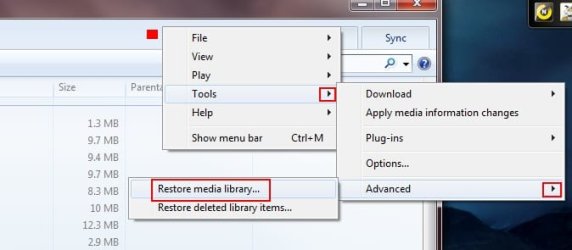
If it does have the proper directories listed it may be corrupted for some reason. There are 2 ways to force WMP to rebuild its library.

Method 1)
-Right click the empty space at the top of WMP.
-Right Click and choose: Tools--> Advanced --> Restore Media Library
-Close WMP. Re-Open it and it should rebuild your library.
Untitled1.jpg

If this fails, Method 2)

-Close WMP.
-Make sure "Show Hidden" Files is enabled the Control Panel (In folder options)

-Go to the following location:
C:/ Users / your user name / AppData / Local / Microsoft / Media Player

-Inside the Media Player folder delete all the files, as shown below.
Capture1.JPG

Re-Open WMP and it will now be forced to rebuild the entire library.

 

My Computer My Computer

At a glance

Windows 7 Home Premium 64bitIntel Core i7 2700k8GB Mushkin Redline Ridgebacks @1866EVGA GTX570 SC
Computer Manufacturer/Model Number
Custom (Self Build)
OS
Windows 7 Home Premium 64bit
CPU
Intel Core i7 2700k
Motherboard
eVGA P67 SLI
Memory
8GB Mushkin Redline Ridgebacks @1866
Graphics Card(s)
EVGA GTX570 SC
Sound Card
XiFi Titanium HD
Monitor(s) Displays
LG W2453V
Screen Resolution
1920x1080
Hard Drives
Intel 320 80GB -- Intel X25-V 40GB --WD Black 1TB x2 -- WD Blue 640GB
PSU
Seasonic x750
Case
Corsair 600T SE White
Cooling
eVGA Superclocked CPU Cooler
Keyboard
Saitek Cyborg
Antivirus
Kaspersky
Browser
IE
Other Info
LG BD/DVD
method #2 worked thank you very, very,very much! now for a hair transplant from pulling it all out lol!
 

My Computer My Computer

At a glance

windows 7
Computer Manufacturer/Model Number
Dell
OS
windows 7
i'm just curious what would cause this though
 

My Computer My Computer

At a glance

windows 7
Computer Manufacturer/Model Number
Dell
OS
windows 7
i'm just curious what would cause this though

Glad it worked for you :)


Its really hard to tell why.

Ive noticed if you rename or delete Music or Videos from thier host folder without going through WMP, it can sometimes cause weird things. Like old entires that can not be deleted etc.

Perhaps you were doing something along this line at some point?
Whatever the cause, this is the easiest way to repair it IMO.


For future reference:
If I want to rename folders/files that WMP has in its library, I use Method 1 and clear the library 1st.
But before re-opening WMP to re-build, make all the changes I want. Then afterwards, open it up & let it rebuild.
Less chance of getting broken links etc.


If you are worried about some other possible corruption issues, open a cmd prompt as ADMIN and type:
sfc /scannow

Let it run a file integrity check.
If errors are found and fixed, run it again until it comes back as clean.
 

My Computer My Computer

At a glance

Windows 7 Home Premium 64bitIntel Core i7 2700k8GB Mushkin Redline Ridgebacks @1866EVGA GTX570 SC
Computer Manufacturer/Model Number
Custom (Self Build)
OS
Windows 7 Home Premium 64bit
CPU
Intel Core i7 2700k
Motherboard
eVGA P67 SLI
Memory
8GB Mushkin Redline Ridgebacks @1866
Graphics Card(s)
EVGA GTX570 SC
Sound Card
XiFi Titanium HD
Monitor(s) Displays
LG W2453V
Screen Resolution
1920x1080
Hard Drives
Intel 320 80GB -- Intel X25-V 40GB --WD Black 1TB x2 -- WD Blue 640GB
PSU
Seasonic x750
Case
Corsair 600T SE White
Cooling
eVGA Superclocked CPU Cooler
Keyboard
Saitek Cyborg
Antivirus
Kaspersky
Browser
IE
Other Info
LG BD/DVD
@Corey78, you may bookmark this tutorial in this forum. You may also bookmark http://www.hack7mc.com/2009/02/fix-corrupt-windows-media-player.html for future reference.

This problem is frequenly encountered by many and if you haven't bookmarked these, you can just google "rebuilding WMP library in Windows 7" and you will get all the above including the ones from the horse, Microsoft.:)
 

My Computer My Computer

At a glance

Windows 7 Ultimate 32bitAMD Phenom II X3 720 ProcessorTranscend DDR2 (PC2 6400) 4 X 1GBIntegrated + ATI Radeon 4550
Computer Manufacturer/Model Number
self-assembled
OS
Windows 7 Ultimate 32bit
CPU
AMD Phenom II X3 720 Processor
Motherboard
Gigabyte GA-MA78GM-S2H Revision 1.0
Memory
Transcend DDR2 (PC2 6400) 4 X 1GB
Graphics Card(s)
Integrated + ATI Radeon 4550
Sound Card
Integrated Realtek ALC 889A
Monitor(s) Displays
DELL 1704 FPT
Screen Resolution
1280 x 1024
Hard Drives
Western Digital Caviar SE16 250 GB x2 in RAID 0
PSU
Coolermaster 400 W
Case
Zebronics Cube
Cooling
stock
Keyboard
Microsoft - wired
Mouse
Microsoft - wired
Internet Speed
ADSL 256-512Kbps
Back
Top