WINDOWS 7 search bar/registry help!

phw8558

New member
Local time
11:55 PM
Messages
11
Hello all. This is my first time posting. I have been having a recent problem with my windows search bar in the start menu and I cannot explain exactly what has caused it. When you try to search for anything you get a list of blank file icons labeled as programs, files, computer ect.. that do not go anywhere when clicked on. I know there are numerous posts about this problem and I have tried them all to no avail. However the newest one I found was an exported registry key from this post http://www.sevenforums.com/installation-setup/91875-windows-registry.html. I believe that the key "foldertypes" is my problem. Whenever I try to merge the new .reg files I get the following error. "cannot import 'filename' Not all data was succesfully written to the registry. Some keys are open by the system or other processes." Can anyone help me figure out what to close to get this to merge succesfully? Or could anyone export a new zip of this key? I am running home premium 64bit. I have been browsing forums for days trying to fix this any help would be much appreciated!
 

My Computer My Computer

OS
windows 7 home premium 64bit
Have you recently scanned for malware?
This sounds like a hijack just from what you describe on the surface.
 

My Computer My Computer

Computer Manufacturer/Model Number
Insane hobo technologies. ;-)
OS
Windows 7 x64
CPU
Intel i7 2600k
Motherboard
Asrock z68 extreme 4 gen 3
Memory
G.skill Ripjaw 16gigs @ 1866
Graphics Card(s)
Nvidia gtx580 (evga)
Sound Card
Integrated HD audio + hdmi
Monitor(s) Displays
24" ASUS widescreen + 42" insignia
Screen Resolution
1080p (1920x1080)
Hard Drives
128 Samsung 830
256 Samsung 840
3 x 1tb storage drive (various)
1 western digital 1tb (eSATA)
1 Seagate 1tb (eSATA)
PSU
1 kilowatt SLI/Crossfire rated Silverstone modular
Case
NZXT Phantom + additional 220 fan
Cooling
Zalmann
Keyboard
Microsoft wireless 3000 (v2)
Mouse
MS - wireless 5000 (bluetrack)
Internet Speed
depends on if you ask me or my provider.
Other Info
The above information is provided as is, and the author assumes no responsibility for issues it may cause with your sanity or fanboyism.
In addition to the malware check, I would try a System Restore, choosing a restore point pre-dating the issue. This will also clear out the broken reg entries.

If that doesn't resolve your problem, check Control Panel\Indexing Options. Is indexing complete, running, turned on?

James
 

My Computer My Computer

OS
Win7U 64 RTM
CPU
Q9550
Motherboard
GA-EP45-UD3R
Memory
8GB Gskill
Graphics Card(s)
ASUS|EAH4850/HTDI/1GD3/A
Sound Card
xfi Plat
Monitor(s) Displays
Dell 2405fpw
Screen Resolution
1920x1200
Hard Drives
Seagate & WD sata Drives
PSU
Antec
Case
Antec
Keyboard
MS Natural Ergonomic 4000
Mouse
Logitech MX610 USB Cordless
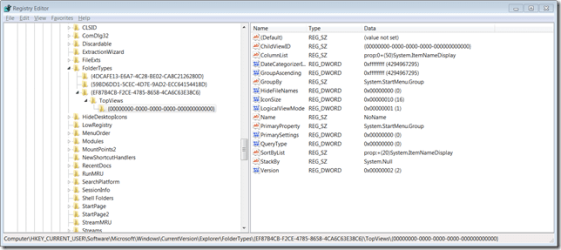
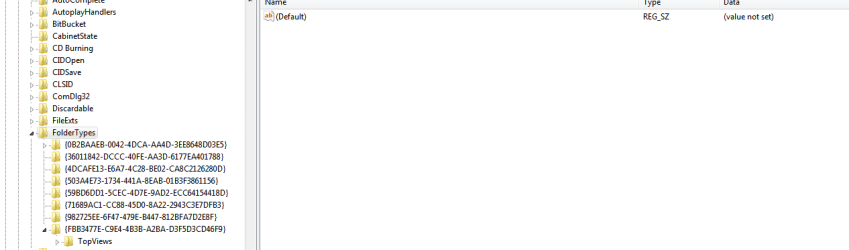
Yes there was a malware attack and for a while my security service center did not work because it destroyed the reg key for it. I fixed that issue succesfully with a .reg file merge someone had posted online. Now I believe I can do the same for this issue if I could succesfully merge a new key for Hkey_currentuser/software/microsoft/windows/currentversion/explorer/foldertypes. Have seen some registry pics online as to what should be in the right hand column of this folder and I have none of them. Thanks for the replies. ..oh yeah don't have a restore point back far enough for that to work. Did make a new user account and it worked until I transfered everything and experienced similar issues.
 

My Computer My Computer

OS
windows 7 home premium 64bit
James, I have rebuilt index, turned index and searching on and off with rebooting to no avail.
 

My Computer My Computer

OS
windows 7 home premium 64bit
seven forums image.png

seven forums image2.PNG

First image is from a different registry.
Second image is from my registry.

Ok I have an unexpected update. I took a snap shot of my registry and one from google images which I will include in this post. However I went to take a snapshot of the problem in the search bar and search results actually came up. It is however a little different then before perhaps because of indexing. At least I can search something instead of getting blank files though. I'm afraid to mess with anything at this point, I will definitly setup a system restore. Question about how to merge the .reg file without error is still open. Thanks.
 

My Computer My Computer

OS
windows 7 home premium 64bit
Yes there was a malware attack

Are you sure you've completely cleaned your system up? Full scan with free Malwarebytes?

James, I have rebuilt index, turned index and searching on and off with rebooting to no avail.
It is however a little different then before perhaps because of indexing

But what was the state of the index? Was it indexing, completed, turned off? If indexing or completed, that's expected. If turned off or disabled (not by you), that's another story.

Question about how to merge the .reg file without error is still open.

I suppose you could manually enter it, but I would back up the registry first. If you downloaded this from CarlTR6 in the thread you link to, then I have no doubt that the file is safe (although maybe the download was corrupted), so I'm not sure why it won't merge.

I wasn't aware that the FolderTypes key was relevant to this issue, so I'll be interested to hear how this comes out.

James
 

My Computer My Computer

OS
Win7U 64 RTM
CPU
Q9550
Motherboard
GA-EP45-UD3R
Memory
8GB Gskill
Graphics Card(s)
ASUS|EAH4850/HTDI/1GD3/A
Sound Card
xfi Plat
Monitor(s) Displays
Dell 2405fpw
Screen Resolution
1920x1200
Hard Drives
Seagate & WD sata Drives
PSU
Antec
Case
Antec
Keyboard
MS Natural Ergonomic 4000
Mouse
Logitech MX610 USB Cordless

My Computer My Computer

Computer Manufacturer/Model Number
Insane hobo technologies. ;-)
OS
Windows 7 x64
CPU
Intel i7 2600k
Motherboard
Asrock z68 extreme 4 gen 3
Memory
G.skill Ripjaw 16gigs @ 1866
Graphics Card(s)
Nvidia gtx580 (evga)
Sound Card
Integrated HD audio + hdmi
Monitor(s) Displays
24" ASUS widescreen + 42" insignia
Screen Resolution
1080p (1920x1080)
Hard Drives
128 Samsung 830
256 Samsung 840
3 x 1tb storage drive (various)
1 western digital 1tb (eSATA)
1 Seagate 1tb (eSATA)
PSU
1 kilowatt SLI/Crossfire rated Silverstone modular
Case
NZXT Phantom + additional 220 fan
Cooling
Zalmann
Keyboard
Microsoft wireless 3000 (v2)
Mouse
MS - wireless 5000 (bluetrack)
Internet Speed
depends on if you ask me or my provider.
Other Info
The above information is provided as is, and the author assumes no responsibility for issues it may cause with your sanity or fanboyism.
taskbar.png
Here is a screenshot of my taskbar now that search is working again. As you can see I typed in reg as an example and got a ton of extra stuff. I think I can play around with the indexing settings to remove some of these extra results. I also realized my windows defender wasn't working and found out that the registry key for that got removed just like the security center. I found one online to merge and that is back to good now. I will try the safemode/malware bytes scan and post results.
 

My Computer My Computer

OS
windows 7 home premium 64bit
Malwarebytes safe mode - 0 files infected
 

My Computer My Computer

OS
windows 7 home premium 64bit

My Computer My Computer

Computer Manufacturer/Model Number
Insane hobo technologies. ;-)
OS
Windows 7 x64
CPU
Intel i7 2600k
Motherboard
Asrock z68 extreme 4 gen 3
Memory
G.skill Ripjaw 16gigs @ 1866
Graphics Card(s)
Nvidia gtx580 (evga)
Sound Card
Integrated HD audio + hdmi
Monitor(s) Displays
24" ASUS widescreen + 42" insignia
Screen Resolution
1080p (1920x1080)
Hard Drives
128 Samsung 830
256 Samsung 840
3 x 1tb storage drive (various)
1 western digital 1tb (eSATA)
1 Seagate 1tb (eSATA)
PSU
1 kilowatt SLI/Crossfire rated Silverstone modular
Case
NZXT Phantom + additional 220 fan
Cooling
Zalmann
Keyboard
Microsoft wireless 3000 (v2)
Mouse
MS - wireless 5000 (bluetrack)
Internet Speed
depends on if you ask me or my provider.
Other Info
The above information is provided as is, and the author assumes no responsibility for issues it may cause with your sanity or fanboyism.
Yeah I ran that two times over the course of my attempts to fix. I think I'll leave it as is since I can search for files and that is all I needed. I'll hold off on the registry merge unless it ever acts up again. Thanks for the suggestions/time.
 

My Computer My Computer

OS
windows 7 home premium 64bit
Back
Top