Removing the de facto sort into files and folders

trh01

New member
Local time
5:50 PM
Messages
3
Location
Ross-on-Wye, UK
In Win 7 explorer, I note that whatever settings I use for file/folder sorting - it all appears to get over-ridden by an initial sort into a) folders and b) files. Even if a file and a folder have the same name (bar the extension) I cannot get the files and folders to intermingle as I expect.

What I get is a list of folders separately from the list of files. This is the same whether I choose List, Details, Content, etc views. I have attached a pic of a test folder I just put together to illustrate what I mean. The files and folders stubbornly insist on staying within their own groups - even though the "Group By" is set to "none".

Can this behaviour be over-ridden by some means?


Richard
 

Attachments

  • File-Folder_Sort-1.JPG
    File-Folder_Sort-1.JPG
    30.1 KB · Views: 33

My Computer My Computer

At a glance

Windows 7 Home Premium x64Intel Core i3-370M4GB
Computer Manufacturer/Model Number
Acer 5742
OS
Windows 7 Home Premium x64
CPU
Intel Core i3-370M
Memory
4GB
Untitled.png
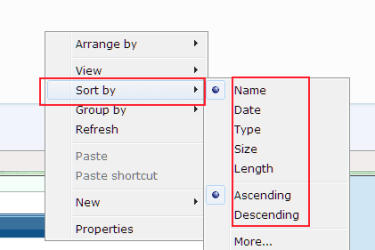
Try right clicking in an empty space in the folder and change around these Sort by options, see if that gets what you want.
Welcome to Seven forums.:)
 

My Computer My Computer

At a glance

Windows 7 Ultimate X64 SP1Intel i5-2550K, Differing ~4.4-4.8GHz No buil...16GB G.Skill Sniper 1866MHz @ 2133MHz 2x8GBASUS GTX650TIB-DC2OC-2GD5, (650TI Boost)
Computer type
PC/Desktop
Computer Manufacturer/Model Number
Home Built Desktop By DataTech
OS
Windows 7 Ultimate X64 SP1
CPU
Intel i5-2550K, Differing ~4.4-4.8GHz No built in GPU
Motherboard
ASUS P8Z68-V PRO/GEN3
Memory
16GB G.Skill Sniper 1866MHz @ 2133MHz 2x8GB
Graphics Card(s)
ASUS GTX650TIB-DC2OC-2GD5, (650TI Boost)
Sound Card
Onboard Realtek 5-1
Monitor(s) Displays
Samsung P2570HD
Screen Resolution
1920x1080
Hard Drives
Samsung 840 Pro 256GB SSD for OS, 500GB Seagate Constellation (Enterprise drive) for Data
PSU
Corsair HX650W
Case
Inwin Dragon Rider
Cooling
Hyper 212 EVO w/two Noctua fans, push-pull, @1300 RPM
Keyboard
E-Z Eyes, bright yellow keys with large characters
Mouse
steelseries SENSEI Laser Pro Gaming
Internet Speed
48-51Mbs Mbs down, 11 Mbs up Xfinity Cable
Antivirus
Norton Internet Security 2013
Browser
IE 10, Opera, Pale Moon if needed
Other Info
4 case fans, LG BluRay-RE, ASUS DVD-RW, Mr. Fusion power supply, 1.21 gigawatts.
Can this behaviour be over-ridden by some means?

No, it has always kept folders and files separated from one another. Unless you Group by Name or some other factor the files and folder share. However in most cases the folders will remain on top and separated.

Use a third-party or the command line, dir command mixes folders and files.
 

My Computer My Computer

At a glance

Windows 10 Pro (x64)Intel Core i7-3930K (3.2GHz - 4.5GHz)4x Samsung 4GB PC3-12800 DDR3 (16GB 1600MHz)Nvidia Geforce GTX 690
Computer type
PC/Desktop
Computer Manufacturer/Model Number
Alienware Aurora ALX R4
OS
Windows 10 Pro (x64)
CPU
Intel Core i7-3930K (3.2GHz - 4.5GHz)
Motherboard
Alienware Aurora-R4 x79
Memory
4x Samsung 4GB PC3-12800 DDR3 (16GB 1600MHz)
Graphics Card(s)
Nvidia Geforce GTX 690
Sound Card
SteelSeries Siberia Elite
Monitor(s) Displays
Dell UltraSharp U3011
Screen Resolution
2560x1600
Hard Drives
Samsung 850 Pro 256 GB, Seagate 1TB Desktop Hybrid HDD, 2x Western Digital 4TB Green HDD
PSU
875W Some Dell PSU <.<
Case
Alienware Aurora ALX
Cooling
Custom Liquid Cooling (EK CPU & GPU blocks) dual EK 480RAD
Keyboard
Logitech G710+ Mechanical
Mouse
Logitech G700s
Internet Speed
Verizon Fios (50 mbps average)
Other Info
Server: Intel NUC D54250WYK: i5-4250U, 16GB, 256 GB mSATA, Windows Server 2012 R2
Try right clicking in an empty space in the folder and change around these Sort by options, see if that gets what you want.
Welcome to Seven forums.:)


Thanks for the welcome. I was aware of these sorting options. None of them work at all, I'm afraid. What we have here is a first level sort by type (into folders and files), followed by whatever other sort you want at a second level.

Richard
 

My Computer My Computer

At a glance

Windows 7 Home Premium x64Intel Core i3-370M4GB
Computer Manufacturer/Model Number
Acer 5742
OS
Windows 7 Home Premium x64
CPU
Intel Core i3-370M
Memory
4GB
No, it has always kept folders and files separated from one another. Unless you Group by Name or some other factor the files and folder share. However in most cases the folders will remain on top and separated.

Use a third-party or the command line, dir command mixes folders and files.


Thanks for this info - that was what I was afraid of. Its inherent in Windows 7.

Any ideas which 3rd party app will over-ride this?

Richard
 

My Computer My Computer

At a glance

Windows 7 Home Premium x64Intel Core i3-370M4GB
Computer Manufacturer/Model Number
Acer 5742
OS
Windows 7 Home Premium x64
CPU
Intel Core i3-370M
Memory
4GB
Hate to revive threads, but anyone got an answer for this?
 

My Computer My Computer

At a glance

Windows 7 Ultimate 64bitIntel i5 7508GB (4x2GB) Corsair DominatorATI 5850
Computer Manufacturer/Model Number
Custom
OS
Windows 7 Ultimate 64bit
CPU
Intel i5 750
Motherboard
Gigabyte P55a-UD6
Memory
8GB (4x2GB) Corsair Dominator
Graphics Card(s)
ATI 5850
Sound Card
Intergrated in Motherboard
Monitor(s) Displays
BenQ HD2412D (x2)
Screen Resolution
1920x1080
Hard Drives
Samsung 320GB
Samsung 500GB
WD 1TB
Seagate 1TB
PSU
650W Chieftec
Case
Cooler Master Elite 310
Cooling
Noctua NH-U12P SE2
Keyboard
Fujitsu Siemens Wireless Keyboard
Mouse
Fujitsu Siemens Wireless Mouse
Internet Speed
10/10Mbits
The only 3rd party app that I know of is Classic Shell, but you might also try taking a look at these tutorials:

How to Change the Group By - Sort By - Stack By - Arrange By View in Windows 7 Explorer

How to Enable or Disable Numerical Sorting in Windows Explorer

Windows Explorer Auto Arrange - Disable (By the way, free sorting is only possible in the following Views:
Extra Large Icons, Large Icons, Medium Icons, Small Icons, and Details, and NOT in the List, Extended Tiles, and Content Views.)
 

My Computer My Computer

At a glance

Vista 64 bit and 32 bit (SP2)Intel(R) Core(TM)2 Duo Processor T9400 (2.53 GHz4GB DDR2 System Memory (2 Dimm)512 MB NVIDIA GeForce 9600M GT
Computer Manufacturer/Model Number
HP Pavillion dv5t (generation 1)
OS
Vista 64 bit and 32 bit (SP2)
CPU
Intel(R) Core(TM)2 Duo Processor T9400 (2.53 GHz
Memory
4GB DDR2 System Memory (2 Dimm)
Graphics Card(s)
512 MB NVIDIA GeForce 9600M GT
Monitor(s) Displays
15.4" diagonal WSXGA+ High-Definition HP BrightView Widescre
Screen Resolution
1680 x 1050
Hard Drives
320GB 5400RPM SATA Hard Drive with HP ProtectSmart Hard Drive Protection
Keyboard
Built-in HP
Mouse
Built in - Synaptics TouchPad V6.5 on PS/2 Port
Internet Speed
Max
Other Info
~ Intel Next-Gen Wireless-N Mini-card w/Bluetooth ~ Blu-Ray ROM DVD+/-R/RW ~ Integ. HDTV Hybrid Tuner ~ 12 Cell Battery ~ MS Office (Home Premium) 2007 ~
The only 3rd party app that I know of is Classic Shell,
I have just confirmed with the developers that this feature does NOT exist in Classic Shell.
 

My Computer My Computer

At a glance

Win 7 Pro, 32bit and 64bit
OS
Win 7 Pro, 32bit and 64bit
Back
Top