Solved How to restore right click menu options for taskbar

Faldo

New member
Local time
1:32 PM
Messages
5
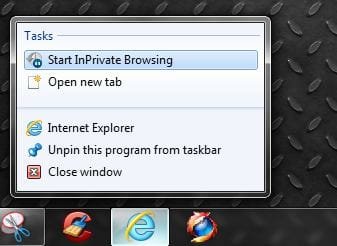
I'd like to have my right click menu option restored for Internet Explorer. In the past, when I right clicked on the IE icon in the taskbar, it used to show "Launch IE In-Private" mode or some such wording. Now it's gone.

Basically what happened was that I was randomly losing my pinned items for Windows Explorer. I Googled for a solution and found one thread:
Randomly the Windows Explorer jumplist will disappear in Windows 7 - Microsoft Answers

In that thread, the solution given is to delete all items in the following 2 folders:

%APPDATA%\Microsoft\Windows\Recent\AutomaticDestinations
and
%APPDATA%\Microsoft\Windows\Recent\CustomDestinations

Basically, it resets all the jump lists. Well now the problem is that the "Launch In-Private" mode is gone. See screenshot.
I know that I can just launch IE normally and then choose menu 'Safety" > "In-Private Browsing" but I would like to have that option restored on the taskbar.

untitled3.png

http://imgboot.com/images/grabmypics/untitled3.png
 

My Computer My Computer

OS
Win7 Pro

My Computer My Computer

Computer type
PC/Desktop
Computer Manufacturer/Model Number
Self built custom
OS
64-bit Windows 11 Pro for Workstations
CPU
Intel i7-8700K OC'd to 5 GHz
Motherboard
ASUS ROG Maximus XI Formula Z390
Memory
64 GB (4x16GB) G.SKILL TridentZ RGB DDR4 3600 MHz
Graphics Card(s)
ASUS ROG-STRIX-GTX1080TI-O11G-GAMING
Sound Card
Integrated
Monitor(s) Displays
2 x Samsung Odyssey G7 27"
Screen Resolution
2560x1440
Hard Drives
1TB Samsung 990 PRO M.2,
4TB Samsung 990 PRO PRO M.2,
TerraMaster F8 SSD Plus NAS
PSU
Seasonic Prime Titanium 850W
Case
Thermaltake Core P3
Cooling
Corsair Hydro H115i
Keyboard
Logitech wireless K800
Mouse
Logitech MX Master 4
Internet Speed
2 Gb/s Download and 100 Mb/s Upload
Antivirus
Malwarebyte Anti-Malware Premium
Browser
Google Chrome
Other Info
Logitech Z625 speaker system,
Logitech BRIO 4K Pro webcam,
HP Color LaserJet Pro MFP M477fdn,
APC SMART-UPS RT 1000 XL - SURT1000XLI,
Galaxy S23 Plus phone
Is that with IE8, or IE9?

I seem to have the Inprivate Browsing mode under Tasks on mine with 32 bit IE9, even after clearing the jumplist. :huh:


I do not have the option on the taskbar jumplist with using the 64 bit IE though, only the 32 bit. Is that the pinned icon for the 64 bit IE you're using?

x86

Capture23.JPG

x64 IE

Capture24.JPG
 

My Computer My Computer

Computer type
PC/Desktop
Computer Manufacturer/Model Number
Airbot 2.0
OS
Windows 7 Ultimate x64 SP1
CPU
Core i7 920 (D0) @ 4Ghz, *26c idle *65c full load on air
Motherboard
Asus P6X58D Premium - Sata 6Gb/s - USB 3.0
Memory
12GB DDR3 Corsair Dominator -CMD12GX3M6A1600C8 at 1600MHz
Graphics Card(s)
Zotac Geforce GTX 770
Sound Card
ASUS Xonar D2X
Monitor(s) Displays
1 LG 24" Flatron W2453V-PF 1 Samsung 24" P2450H both 2ms RT
Screen Resolution
1920x1080@60hz
Hard Drives
1 Samsung 250GB 840 Evo SSD
1 OCZ Vertex2 180GB SSD
1 TB Samsung Spinpoint F1 7200RPM 32MB cache
2 500GB WD Caviar Blacks 7200RPM 32MB cache (WD5001AALS)

Pioneer DVD Burner DVR-S18M
PSU
Corsair HX1000W
Case
Cooler Master HAF 932
Cooling
Case Fans *3 230mm, *1 140mm/CPU - *Tuniq Tower 120 Extreme
Keyboard
Logitech Wireless MK700
Mouse
Logitech Wireless MK700
Internet Speed
DL 15 Mbps UL 0.98 Mbps
Antivirus
None
Browser
Firefox Nightly
Other Info
Processor-7.7 *RAM- 7.9 *Graphics-7.9 *Gaming Graphics- 7.9 *SSD- 7.8 W.E.I final score= 7.7
*Phone- LG Nexus 5
Is that with IE8, or IE9?

I seem to have the Inprivate Browsing mode under Tasks on mine with IE9, even after clearing the jumplist. :huh:


I do not have the option on the taskbar jumplist with using the 64 bit IE though, only the 32 bit. Is that the pinned icon for the 64 bit IE you're using?

View attachment 158286

Currently running IE v8 64-bit.

I used to have that option on the 32-bit version as well. Now it's gone.
 

My Computer My Computer

OS
Win7 Pro
Strangeness... now it's back. I swear to god earlier before I posted, I had the 32-bit version of IE pinned to my taskbar. Launch In Private mode was NOT there... strangely enough it's returned on me now that I decided to come here & post.

Alright well on a related note, do you guys have any idea why my jumplist for Windows Explorer keeps disappearing? I've googled this one around and it seems to be a common "glitch" in Windows 7. Any experiences to share between the two of you?
 

My Computer My Computer

OS
Win7 Pro
That's great news Faldo.

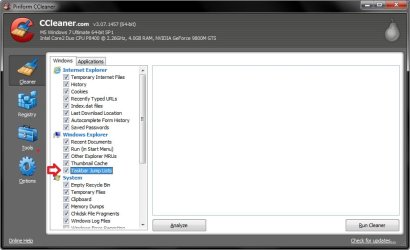
If you use CCleaner, or a program like it, it has an option to clear the jump lists. You might check to see if this may be the case.

CCleaner.jpg
 

My Computer My Computer

Computer type
PC/Desktop
Computer Manufacturer/Model Number
Self built custom
OS
64-bit Windows 11 Pro for Workstations
CPU
Intel i7-8700K OC'd to 5 GHz
Motherboard
ASUS ROG Maximus XI Formula Z390
Memory
64 GB (4x16GB) G.SKILL TridentZ RGB DDR4 3600 MHz
Graphics Card(s)
ASUS ROG-STRIX-GTX1080TI-O11G-GAMING
Sound Card
Integrated
Monitor(s) Displays
2 x Samsung Odyssey G7 27"
Screen Resolution
2560x1440
Hard Drives
1TB Samsung 990 PRO M.2,
4TB Samsung 990 PRO PRO M.2,
TerraMaster F8 SSD Plus NAS
PSU
Seasonic Prime Titanium 850W
Case
Thermaltake Core P3
Cooling
Corsair Hydro H115i
Keyboard
Logitech wireless K800
Mouse
Logitech MX Master 4
Internet Speed
2 Gb/s Download and 100 Mb/s Upload
Antivirus
Malwarebyte Anti-Malware Premium
Browser
Google Chrome
Other Info
Logitech Z625 speaker system,
Logitech BRIO 4K Pro webcam,
HP Color LaserJet Pro MFP M477fdn,
APC SMART-UPS RT 1000 XL - SURT1000XLI,
Galaxy S23 Plus phone
Hello to everybody and yes, I am aware that this is an old Thread... ;)
Anyway, I decided to post it right here, since this is totally related to this very subject, and this subject related stuff is a little bit rare to find over Net...

Well, the "vanishing" problemo with the Windows 7 Taskbar right mouse click on:

a) IE9:
- Start InPrivate Browsing
- Open new tab

b) Mozilla Firefox 12
- Enter Private Browsing
- Open new tab
- Open new window

is like the @Brink says - some privacy cleaning software like "CCleaner" and/or, I says "Privacy Eraser Pro" can do this very easily...


So, how can we repair it?
One customer of mine has this problem just yesterday, and I successfully resolve it.

Well, first I create a System Restore point, before and tamperings of mine as a caution measures all here...

Then I try first to clean all the garbage in Web browsers (IE, MF) and reopened them (since the upper mentioned both privacy software also deletes the very well known "index.dat" file in IE browser...) , so I thought that this also might produce upper mentioned problemo all here...

Nope, that was not the problem, so I further try to recreate IE9 and MF12 Shortcut icons via Win 7 Taskbar (pin it again in to the Taskbar and delete the old ones). And that do some help for MF, but, IE9 was still big problemo...

Then I go via Accessories - Disk Cleanup, and clean everything...

Finally, I try to go via "Taskbar and Start Menu Properties, and play (engage/disengage) with the Privacy options all here ("Store and Display recently opened programs in the Start Menu" and "Store and display recently opened items in the Start menu and the taskbar")

Finally, the last one just mentioned above do some real help all here in a second, and now my customer have again the Private browsing mode, both in IE and MF Shortcut icons right mouse clicks on it.... :)


Anyway, I hope that this will help to all others with the same problemo!

Cheers to all! ;)
 

My Computer My Computer

OS
MSWin7UltSp132-bit & 64-bit OS
Back
Top