After trying a repair install per the Repair Install Tutoiral...I can no longer boot my PC. If I boot to the Win 7 install CD I get a "Windows can not boot error" with a message about the boot file being corrupted.
If I let the system boot directly...I get a screen with 2 choices for the operating system:
Windows Setup
Windows 7
This started after a repair install failed to complete. If I choose Windows Setup I get a Windows Repair Install screen with a pop up message saying Windows can not start (boot) ?
If I choose the second option on the boot screen...I get my normal Win 7 system...whether clicking Windows 7 OS...or using the more options link choosing boot from last good installation...or start up normally via the F8 option.
Is there a way to undo whatever the repair install did to the system before it failed to complete the repair install ?
Thanks
My Computer
At a glance
Windows 7 Pro 64bit SP1AMD FX-6100 Six-Core Processor2ea Corsair-1333MHz-PC3-10666-240-pin-CMX4GX3...NVIDIA GeForce GT 630 - 1023MB (EVGA)
EXTRA COOLING>(FAN CONTROLLER) PC Bay Cooler 3 x 40mm fans; Akasa AK-HD-BL Blue hard drive cooler 2 x 40 mm fan 4500 rpm 29.7 dBA
Bios> American Megatrends Inc.
Version : P01-A1
Date : 08/31/2009
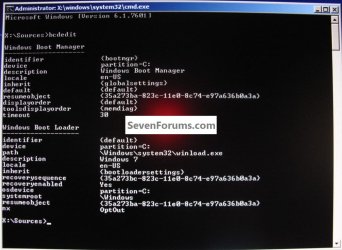
You may be able to use bcdedit to remove the "Windows Setup" entry from the boot menu if you can't boot the PC normally to do it in msconfig, the OP isn't clear whether Windows will actually start normally.
Use the method in this tutorial at the link below to boot the Windows 7 DVD and open a command window, though instead of entering diskpart when the command window opens enter bcdedit, then from there you can edit the entries.
Then you may need to do the 3 separate startup repairs to Windows to get it booting normally; have a look at this tutorial at the link below, be sure that Windows 7 is the Active partition first, have a look at Option Two for that.
Yes...I can boot normally to the second of 2 item at the OS select operating system screen...which is Windows 7.
Everything seems to be running/working fine in Windows 7 (second choice at startup)...but..Windows setup is the default OS because if I do notheing...the Windows Setup (1st option at startup) screens starts up...not normal Win 7.
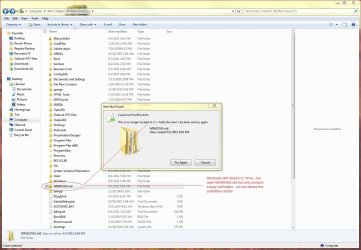
Thanks guys...before I start on this there's one more thing...I deleted the other folders created during the failed repair install...but I can not remove/delete the Windows.old folder (see attached jpgs) I keep getting an error that the folder no longer is there...but obviously...it's still listed in the C:\ directory ?
Is this and issue and should I correct this firs...if so...how ?
Tim
Attachments
repaiarfolders.jpg
142.6 KB
· Views: 41
subfolders.jpg
28.3 KB
· Views: 11
My Computer
At a glance
Windows 7 Pro 64bit SP1AMD FX-6100 Six-Core Processor2ea Corsair-1333MHz-PC3-10666-240-pin-CMX4GX3...NVIDIA GeForce GT 630 - 1023MB (EVGA)
Yes...if I choose the second OS (Windows 7) the system boots OK and seems to run fine...If I reboot and do NOT select either option ( (1)Windows Setup or (2) Windows 7)...the system reverts to the Windows Setup startup type screen.
My Computer
At a glance
Windows 7 Pro 64bit SP1AMD FX-6100 Six-Core Processor2ea Corsair-1333MHz-PC3-10666-240-pin-CMX4GX3...NVIDIA GeForce GT 630 - 1023MB (EVGA)
Please post back a screenshot of your full Disk Mgmt drive map with listings showing all columns, using the Snipping Tool in Start Menu. Explain what is on each partition to your knowledge.
Well...wierd problem solved...it wasn't Windows...it wasn't anything I was doing was wrong...and I don't believe I screwed anything up...
What it was was a loose connection inside my box that was causing intermittent errors in the DVD drive !!
A couple times in the last year my system wouldn't boot up...and I discovered (aka...remembered) that I Had a similar issue a decade or so ago.
Seems somehow or some reason the cables on the HDD in the case came...or would come....loose. In the original case years and years ago...some forum said that "heat" can cause this from time to time.
Sure enough...I reseated the sata and power cables to the DVD and presto...everything worked fine...no boot errors...and no issues with repair install !!!
Thanks to all that helped on this !!
My Computer
At a glance
Windows 7 Pro 64bit SP1AMD FX-6100 Six-Core Processor2ea Corsair-1333MHz-PC3-10666-240-pin-CMX4GX3...NVIDIA GeForce GT 630 - 1023MB (EVGA)