
You are using an out of date browser. It may not display this or other websites correctly.
You should upgrade or use an alternative browser.
You should upgrade or use an alternative browser.
Solved Antivirus/Antispyware for Windows 7
- Thread starter fullgrownnut
- Start date

If there are conflicts post and I tell you how to avoid them.
My Computer
At a glance
Windows 10, Home Clean InstallIntel Core2 processsor Q8200(2.33Ghz 1333FSB)...6 gbATI Radeon 256MB HD3650
- Computer type
- PC/Desktop
- Computer Manufacturer/Model Number
- Dell XPS 420
- OS
- Windows 10, Home Clean Install
- CPU
- Intel Core2 processsor Q8200(2.33Ghz 1333FSB) Quad Core Tech
- Motherboard
- Dell
- Memory
- 6 gb
- Graphics Card(s)
- ATI Radeon 256MB HD3650
- Sound Card
- Intergrated 7.1 Channel Audio
- Monitor(s) Displays
- Dell SP2009W 20"
- Hard Drives
- 640 GB Serial ATA Hard drive
- Cooling
- Fan
- Keyboard
- Dell USB Keyboard
- Mouse
- Dell Premium Optical USB
- Internet Speed
- DSL 2.85

Hi FullGrown,
It is definately possibly to do a schedule scan with Malwarebytes Pro. Unfortunately, I'm at work at the moment and don't have access to my home PC, but when I get home this evening, I'll put a short tutorial together for you - its very easy to do.
The way I have Malwarebytes setup, is to:
1. Immediately update the malware database when the PC boots up.
2. Perform a QUICK scan once the database is updated at boot-up.
3. Check for and update the database hourly.
4. Weekly, run a FULL system scan.
I'll reply here with a quick tutorial to show you how to do that.
As mentioned earlier, I have never encountered conflicts between MSE and MBAM either, but as Rich alludes to, its very easy to avoid them - essentially, you tell MSE to ignore the MBAM executable, and vice versa. Very simple to do, but I have never had the need to.
Rest assured you have made a good investment with MBAM.
Regards,
Golden
It is definately possibly to do a schedule scan with Malwarebytes Pro. Unfortunately, I'm at work at the moment and don't have access to my home PC, but when I get home this evening, I'll put a short tutorial together for you - its very easy to do.
The way I have Malwarebytes setup, is to:
1. Immediately update the malware database when the PC boots up.
2. Perform a QUICK scan once the database is updated at boot-up.
3. Check for and update the database hourly.
4. Weekly, run a FULL system scan.
I'll reply here with a quick tutorial to show you how to do that.
As mentioned earlier, I have never encountered conflicts between MSE and MBAM either, but as Rich alludes to, its very easy to avoid them - essentially, you tell MSE to ignore the MBAM executable, and vice versa. Very simple to do, but I have never had the need to.
Rest assured you have made a good investment with MBAM.
Regards,
Golden
My Computer
At a glance
Windows 10 Pro x64 ; Xubuntu x64Intel i7 860 @ 2.80 GHz O/C'ed to 4.0GHz16GB Corsair Vengance DDR3 @ 661 MHz Dual Cha...EVGA NVidia GTX 560 1024MB
- Computer type
- PC/Desktop
- Computer Manufacturer/Model Number
- Golden Mk. I.4
- OS
- Windows 10 Pro x64 ; Xubuntu x64
- CPU
- Intel i7 860 @ 2.80 GHz O/C'ed to 4.0GHz
- Motherboard
- Gigabyte P55A-UD3R Rev.1. Award BIOS F13
- Memory
- 16GB Corsair Vengance DDR3 @ 661 MHz Dual Channel (9-9-9-24)
- Graphics Card(s)
- EVGA NVidia GTX 560 1024MB
- Sound Card
- Realtek Integrated
- Monitor(s) Displays
- Dual Samsung SyncMaster 2494HS
- Screen Resolution
- 1920*1080 and 1920*1080
- Hard Drives
- 1*Samsung 840 EVO 120GB SSD;
1*OCZ Vertex 2 60GB SSD;
2*Samsung F3 SpinPoint 1TB in RAID0;
1*Samsung F1 SpinPoint 1TB;
2*Western Digital 1TB External USB 3.0
1*Western Digital 500GB External USB 3.0
1*Seagate 500GB External USB 2.0
- PSU
- Thermaltake ToughPower QFan 750W
- Case
- Thermaltake Element S VK60001W2Z
- Cooling
- Corsair H60 Water Cooling, 2*230mm and 2*80mm case fans
- Keyboard
- Logitech G110
- Mouse
- Logitech MX518
Golden is probably right about the scheduled scans. I am not aware of the procedure, since I have the free version.
My Computer
At a glance
Windows 10, Home Clean InstallIntel Core2 processsor Q8200(2.33Ghz 1333FSB)...6 gbATI Radeon 256MB HD3650
- Computer type
- PC/Desktop
- Computer Manufacturer/Model Number
- Dell XPS 420
- OS
- Windows 10, Home Clean Install
- CPU
- Intel Core2 processsor Q8200(2.33Ghz 1333FSB) Quad Core Tech
- Motherboard
- Dell
- Memory
- 6 gb
- Graphics Card(s)
- ATI Radeon 256MB HD3650
- Sound Card
- Intergrated 7.1 Channel Audio
- Monitor(s) Displays
- Dell SP2009W 20"
- Hard Drives
- 640 GB Serial ATA Hard drive
- Cooling
- Fan
- Keyboard
- Dell USB Keyboard
- Mouse
- Dell Premium Optical USB
- Internet Speed
- DSL 2.85
Hi FullGrown,
I'm putting some together for now - I'll edit this same post over the next 10 minutes - please check back then.
Regards,
Golden
I'm putting some together for now - I'll edit this same post over the next 10 minutes - please check back then.
Regards,
Golden
My Computer
At a glance
Windows 10 Pro x64 ; Xubuntu x64Intel i7 860 @ 2.80 GHz O/C'ed to 4.0GHz16GB Corsair Vengance DDR3 @ 661 MHz Dual Cha...EVGA NVidia GTX 560 1024MB
- Computer type
- PC/Desktop
- Computer Manufacturer/Model Number
- Golden Mk. I.4
- OS
- Windows 10 Pro x64 ; Xubuntu x64
- CPU
- Intel i7 860 @ 2.80 GHz O/C'ed to 4.0GHz
- Motherboard
- Gigabyte P55A-UD3R Rev.1. Award BIOS F13
- Memory
- 16GB Corsair Vengance DDR3 @ 661 MHz Dual Channel (9-9-9-24)
- Graphics Card(s)
- EVGA NVidia GTX 560 1024MB
- Sound Card
- Realtek Integrated
- Monitor(s) Displays
- Dual Samsung SyncMaster 2494HS
- Screen Resolution
- 1920*1080 and 1920*1080
- Hard Drives
- 1*Samsung 840 EVO 120GB SSD;
1*OCZ Vertex 2 60GB SSD;
2*Samsung F3 SpinPoint 1TB in RAID0;
1*Samsung F1 SpinPoint 1TB;
2*Western Digital 1TB External USB 3.0
1*Western Digital 500GB External USB 3.0
1*Seagate 500GB External USB 2.0
- PSU
- Thermaltake ToughPower QFan 750W
- Case
- Thermaltake Element S VK60001W2Z
- Cooling
- Corsair H60 Water Cooling, 2*230mm and 2*80mm case fans
- Keyboard
- Logitech G110
- Mouse
- Logitech MX518

Hi FullGrown,
It is definately possibly to do a schedule scan with Malwarebytes Pro. Unfortunately, I'm at work at the moment and don't have access to my home PC, but when I get home this evening, I'll put a short tutorial together for you - its very easy to do.
Thank you for letting me know that it is possible because I just figured it out myself... Lol... under the Scheduler Settings tab, I never had explored the Add button there, but when clicked, it has the option to add in a Scheduled Scan in addition to the existing Scheduled Update feature... I set it up like yours... Full System Scan on a Weekly Basis, and check all the desired other options in the boxes down below the way i wanted them... kinda strange that the Scheduled System Scan option is hidden until you HAVE to add it yourself into the Scheduler, but at least it's there.
The way I have Malwarebytes setup, is to:
1. Immediately update the malware database when the PC boots up.
2. Perform a QUICK scan once the database is updated at boot-up.
3. Check for and update the database hourly.
4. Weekly, run a FULL system scan.
I'll reply here with a quick tutorial to show you how to do that.
I didn't see any settings for your #1 here, but I assume if I have the Update set to Realtime, it will update the database as soon as the system boots up and connects to the Internet... In #2, when you say that you perform a Quick scan once the database is updated at boot-up, are you referring to a manual Quick scan?... because I didn't see any settings to set it to go automatically after the database is updated... as far as #3 and #4, I have those set too like you do now.
As mentioned earlier, I have never encountered conflicts between MSE and MBAM either, but as Rich alludes to, its very easy to avoid them - essentially, you tell MSE to ignore the MBAM executable, and vice versa. Very simple to do, but I have never had the need to.
Rest assured you have made a good investment with MBAM.
Hmmm Ok, that's interesting... I guess if I need to do the same, I'll follow this advice, but hopefully like you, I will never have the need to...
I do have one last question about MSE Settings for the Scheduled System Scan... should I check the second box on the bottom that says "Start the scheduled scan only when my computer is on but not in use"?... If I have the CPU usage set at 50% during scan, will it really matter if it's running while in use?...
and BTW, the link to the article that Rich posted to Microsoft Security Essentials (MSE) Scheduled Scan Tips for Sleeping-Hibernated Computers was EXTREMELY helpful and fixed my problem... I did another test scheduled scan, and it performed on it's own... didn't realize that the sleep/hibernation modes had an effect on that, so THANK you for that Rich!...
and THANKS Golden for another incredibly helpful post to my questions/concerns... hope you're having a good day at work

My Computer
At a glance
32 bitIntel® Atom™ Processor N4551gb
- Computer Manufacturer/Model Number
- Dell Inspiron Mini 10
- OS
- 32 bit
- CPU
- Intel® Atom™ Processor N455
- Memory
- 1gb
Try it with the box both ticked and then unticked. Your answer is very subjective. What is good for me, might not be good for you. I do not tick the box to only run when computer is not in use and that is great for me. I have 6GB ram.
My Computer
At a glance
Windows 10, Home Clean InstallIntel Core2 processsor Q8200(2.33Ghz 1333FSB)...6 gbATI Radeon 256MB HD3650
- Computer type
- PC/Desktop
- Computer Manufacturer/Model Number
- Dell XPS 420
- OS
- Windows 10, Home Clean Install
- CPU
- Intel Core2 processsor Q8200(2.33Ghz 1333FSB) Quad Core Tech
- Motherboard
- Dell
- Memory
- 6 gb
- Graphics Card(s)
- ATI Radeon 256MB HD3650
- Sound Card
- Intergrated 7.1 Channel Audio
- Monitor(s) Displays
- Dell SP2009W 20"
- Hard Drives
- 640 GB Serial ATA Hard drive
- Cooling
- Fan
- Keyboard
- Dell USB Keyboard
- Mouse
- Dell Premium Optical USB
- Internet Speed
- DSL 2.85
Hi,
Haha, I just took some screen capture images to post You seem to have managed the other scheduled items. I schedule the update first, the scan at bootup second, and then the rest.
For these options, do the following:
1. Immediately update the malware database when the PC boots up.
Here are the settings to pick.
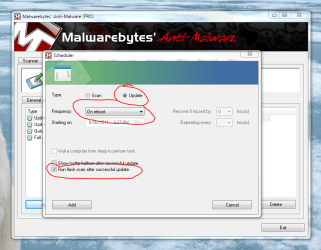
2. Perform a QUICK scan once the database is updated at boot-up.
This is an automatic scan, not manual. Here is how you do it.

Notice I also use the flash scan option during database update in screen capture A.
See Rich's advice on MSE.
Let me know if you need anything else.
Regards,
Golden
Haha, I just took some screen capture images to post
You seem to have managed the other scheduled items. I schedule the update first, the scan at bootup second, and then the rest.For these options, do the following:
1. Immediately update the malware database when the PC boots up.
Here are the settings to pick.
2. Perform a QUICK scan once the database is updated at boot-up.
This is an automatic scan, not manual. Here is how you do it.
Notice I also use the flash scan option during database update in screen capture A.
See Rich's advice on MSE.
Let me know if you need anything else.
Regards,
Golden
Last edited:
My Computer
At a glance
Windows 10 Pro x64 ; Xubuntu x64Intel i7 860 @ 2.80 GHz O/C'ed to 4.0GHz16GB Corsair Vengance DDR3 @ 661 MHz Dual Cha...EVGA NVidia GTX 560 1024MB
- Computer type
- PC/Desktop
- Computer Manufacturer/Model Number
- Golden Mk. I.4
- OS
- Windows 10 Pro x64 ; Xubuntu x64
- CPU
- Intel i7 860 @ 2.80 GHz O/C'ed to 4.0GHz
- Motherboard
- Gigabyte P55A-UD3R Rev.1. Award BIOS F13
- Memory
- 16GB Corsair Vengance DDR3 @ 661 MHz Dual Channel (9-9-9-24)
- Graphics Card(s)
- EVGA NVidia GTX 560 1024MB
- Sound Card
- Realtek Integrated
- Monitor(s) Displays
- Dual Samsung SyncMaster 2494HS
- Screen Resolution
- 1920*1080 and 1920*1080
- Hard Drives
- 1*Samsung 840 EVO 120GB SSD;
1*OCZ Vertex 2 60GB SSD;
2*Samsung F3 SpinPoint 1TB in RAID0;
1*Samsung F1 SpinPoint 1TB;
2*Western Digital 1TB External USB 3.0
1*Western Digital 500GB External USB 3.0
1*Seagate 500GB External USB 2.0
- PSU
- Thermaltake ToughPower QFan 750W
- Case
- Thermaltake Element S VK60001W2Z
- Cooling
- Corsair H60 Water Cooling, 2*230mm and 2*80mm case fans
- Keyboard
- Logitech G110
- Mouse
- Logitech MX518
This is my second post that does not deal directly with your questions, but I think will be very helpful, just like Secunia.
Take a look at this post and take what is appropriate for you.
http://www.sevenforums.com/performa...uggestions-proper-maintenance.html#post764471
Take a look at this post and take what is appropriate for you.
http://www.sevenforums.com/performa...uggestions-proper-maintenance.html#post764471
My Computer
At a glance
Windows 10, Home Clean InstallIntel Core2 processsor Q8200(2.33Ghz 1333FSB)...6 gbATI Radeon 256MB HD3650
- Computer type
- PC/Desktop
- Computer Manufacturer/Model Number
- Dell XPS 420
- OS
- Windows 10, Home Clean Install
- CPU
- Intel Core2 processsor Q8200(2.33Ghz 1333FSB) Quad Core Tech
- Motherboard
- Dell
- Memory
- 6 gb
- Graphics Card(s)
- ATI Radeon 256MB HD3650
- Sound Card
- Intergrated 7.1 Channel Audio
- Monitor(s) Displays
- Dell SP2009W 20"
- Hard Drives
- 640 GB Serial ATA Hard drive
- Cooling
- Fan
- Keyboard
- Dell USB Keyboard
- Mouse
- Dell Premium Optical USB
- Internet Speed
- DSL 2.85
Try it with the box both ticked and then unticked. Your answer is very subjective. What is good for me, might not be good for you. I do not tick the box to only run when computer is not in use and that is great for me. I have 6GB ram.
Wow, 6GB of RAM... MUST be nice!... Lol... yeah, you definitely have nothing to worry about with that...
Well, I unchecked the box (with the 50% CPU usage selected), and I'm doing a test scheduled scan right now on my son's computer while opening/using other programs, and it does not seem to be effecting anything that much at all, so I guess I'll just keep it at that... I feel better having it perform while he' either using or not using the computer cuz this way I KNOW it's getting done...
I basically have everything set up on his PC now to run quietly in the background without him even knowing what is going on... I also deactivated any notification bubbles, because those will be nothing more than a distraction for him... Once again, thanks Rich.
My Computer
At a glance
32 bitIntel® Atom™ Processor N4551gb
- Computer Manufacturer/Model Number
- Dell Inspiron Mini 10
- OS
- 32 bit
- CPU
- Intel® Atom™ Processor N455
- Memory
- 1gb
BTW : you can employ the "hide notification bubbles" and "run silently" options in Malwarebytes too if you wish - just look at the various options on the schedule panels.
Regards,
Golden
Regards,
Golden
My Computer
At a glance
Windows 10 Pro x64 ; Xubuntu x64Intel i7 860 @ 2.80 GHz O/C'ed to 4.0GHz16GB Corsair Vengance DDR3 @ 661 MHz Dual Cha...EVGA NVidia GTX 560 1024MB
- Computer type
- PC/Desktop
- Computer Manufacturer/Model Number
- Golden Mk. I.4
- OS
- Windows 10 Pro x64 ; Xubuntu x64
- CPU
- Intel i7 860 @ 2.80 GHz O/C'ed to 4.0GHz
- Motherboard
- Gigabyte P55A-UD3R Rev.1. Award BIOS F13
- Memory
- 16GB Corsair Vengance DDR3 @ 661 MHz Dual Channel (9-9-9-24)
- Graphics Card(s)
- EVGA NVidia GTX 560 1024MB
- Sound Card
- Realtek Integrated
- Monitor(s) Displays
- Dual Samsung SyncMaster 2494HS
- Screen Resolution
- 1920*1080 and 1920*1080
- Hard Drives
- 1*Samsung 840 EVO 120GB SSD;
1*OCZ Vertex 2 60GB SSD;
2*Samsung F3 SpinPoint 1TB in RAID0;
1*Samsung F1 SpinPoint 1TB;
2*Western Digital 1TB External USB 3.0
1*Western Digital 500GB External USB 3.0
1*Seagate 500GB External USB 2.0
- PSU
- Thermaltake ToughPower QFan 750W
- Case
- Thermaltake Element S VK60001W2Z
- Cooling
- Corsair H60 Water Cooling, 2*230mm and 2*80mm case fans
- Keyboard
- Logitech G110
- Mouse
- Logitech MX518
Haha, I just took some screen capture images to post
WOW!... yeah, I SHOULD have been able to figure the automatic Quick Scan out if I figured out the Scheduled Full System Scan... Ok, so you just keep adding whatever other types of scans you want, and adjusting the settings...
I BET all the people with the Free Version MBAM that see this will probably want to upgrade now since these features basically put the entire program on auto-pilot and you never have to worry about performing anything manually... AND MANY people who have the Pro Version like you and I probably don't even know how to add all these additional scans and updates...
Well, I'm DEFINITELY going to set mine and my son's up like this too right now... NOW I know why they call you "Golden," because THAT is what your advice is... Lol... THANKS SOOO MUCH Again!
My Computer
At a glance
32 bitIntel® Atom™ Processor N4551gb
- Computer Manufacturer/Model Number
- Dell Inspiron Mini 10
- OS
- 32 bit
- CPU
- Intel® Atom™ Processor N455
- Memory
- 1gb
BTW : you can employ the "hide notification bubbles" and "run silently" options in Malwarebytes too if you wish - just look at the various options on the schedule panels.
Regards,
Golden
Thanks Golden, and YES, I did at least figure that out too on my own, and I do have those bubbles deactivated
My Computer
At a glance
32 bitIntel® Atom™ Processor N4551gb
- Computer Manufacturer/Model Number
- Dell Inspiron Mini 10
- OS
- 32 bit
- CPU
- Intel® Atom™ Processor N455
- Memory
- 1gb
Ok, so you just keep adding whatever other types of scans you want, and adjusting the settings...
Correct.
No trouble helping you at all, thats what we are here for.
Regards,
Golden
My Computer
At a glance
Windows 10 Pro x64 ; Xubuntu x64Intel i7 860 @ 2.80 GHz O/C'ed to 4.0GHz16GB Corsair Vengance DDR3 @ 661 MHz Dual Cha...EVGA NVidia GTX 560 1024MB
- Computer type
- PC/Desktop
- Computer Manufacturer/Model Number
- Golden Mk. I.4
- OS
- Windows 10 Pro x64 ; Xubuntu x64
- CPU
- Intel i7 860 @ 2.80 GHz O/C'ed to 4.0GHz
- Motherboard
- Gigabyte P55A-UD3R Rev.1. Award BIOS F13
- Memory
- 16GB Corsair Vengance DDR3 @ 661 MHz Dual Channel (9-9-9-24)
- Graphics Card(s)
- EVGA NVidia GTX 560 1024MB
- Sound Card
- Realtek Integrated
- Monitor(s) Displays
- Dual Samsung SyncMaster 2494HS
- Screen Resolution
- 1920*1080 and 1920*1080
- Hard Drives
- 1*Samsung 840 EVO 120GB SSD;
1*OCZ Vertex 2 60GB SSD;
2*Samsung F3 SpinPoint 1TB in RAID0;
1*Samsung F1 SpinPoint 1TB;
2*Western Digital 1TB External USB 3.0
1*Western Digital 500GB External USB 3.0
1*Seagate 500GB External USB 2.0
- PSU
- Thermaltake ToughPower QFan 750W
- Case
- Thermaltake Element S VK60001W2Z
- Cooling
- Corsair H60 Water Cooling, 2*230mm and 2*80mm case fans
- Keyboard
- Logitech G110
- Mouse
- Logitech MX518
I DO have one more question regarding how you have your Scans set up... I've noticed that you do not have the box checked for "Perform scheduled scan silently from system account"... I checked this box off because it seems like what it's saying is to silently run in the background, but maybe I'm misinterpreting this??... Thanks
My Computer
At a glance
32 bitIntel® Atom™ Processor N4551gb
- Computer Manufacturer/Model Number
- Dell Inspiron Mini 10
- OS
- 32 bit
- CPU
- Intel® Atom™ Processor N455
- Memory
- 1gb
Hi,
Silent scan means that the GUI (the graphical interface) doesn't pop-up during the scan - so yes, it runs in the background.
I had mine turned off to see what it was scanning.
Regards,
Golden
Silent scan means that the GUI (the graphical interface) doesn't pop-up during the scan - so yes, it runs in the background.
I had mine turned off to see what it was scanning.
Regards,
Golden
My Computer
At a glance
Windows 10 Pro x64 ; Xubuntu x64Intel i7 860 @ 2.80 GHz O/C'ed to 4.0GHz16GB Corsair Vengance DDR3 @ 661 MHz Dual Cha...EVGA NVidia GTX 560 1024MB
- Computer type
- PC/Desktop
- Computer Manufacturer/Model Number
- Golden Mk. I.4
- OS
- Windows 10 Pro x64 ; Xubuntu x64
- CPU
- Intel i7 860 @ 2.80 GHz O/C'ed to 4.0GHz
- Motherboard
- Gigabyte P55A-UD3R Rev.1. Award BIOS F13
- Memory
- 16GB Corsair Vengance DDR3 @ 661 MHz Dual Channel (9-9-9-24)
- Graphics Card(s)
- EVGA NVidia GTX 560 1024MB
- Sound Card
- Realtek Integrated
- Monitor(s) Displays
- Dual Samsung SyncMaster 2494HS
- Screen Resolution
- 1920*1080 and 1920*1080
- Hard Drives
- 1*Samsung 840 EVO 120GB SSD;
1*OCZ Vertex 2 60GB SSD;
2*Samsung F3 SpinPoint 1TB in RAID0;
1*Samsung F1 SpinPoint 1TB;
2*Western Digital 1TB External USB 3.0
1*Western Digital 500GB External USB 3.0
1*Seagate 500GB External USB 2.0
- PSU
- Thermaltake ToughPower QFan 750W
- Case
- Thermaltake Element S VK60001W2Z
- Cooling
- Corsair H60 Water Cooling, 2*230mm and 2*80mm case fans
- Keyboard
- Logitech G110
- Mouse
- Logitech MX518
Since my son's computer is the first computer I ever dealt with with Windows 7 (my desktop has Vista Home Premium), I did some research regarding firewall protection and discovered that it's just part of the Windows system, which is ABOUT TIME they did... Lol...
I checked the setting, and the firewall is turned ON by default, but there is an additional box that was not checked which says, "Block all incoming connections, including those in the list of allowed programs"... do you recommend that I check this box also for his computer firewall settings, or do you think it will be too high of security and cause some problems?... Thank you.
I checked the setting, and the firewall is turned ON by default, but there is an additional box that was not checked which says, "Block all incoming connections, including those in the list of allowed programs"... do you recommend that I check this box also for his computer firewall settings, or do you think it will be too high of security and cause some problems?... Thank you.
My Computer
At a glance
32 bitIntel® Atom™ Processor N4551gb
- Computer Manufacturer/Model Number
- Dell Inspiron Mini 10
- OS
- 32 bit
- CPU
- Intel® Atom™ Processor N455
- Memory
- 1gb
Hi,
Silent scan means that the GUI (the graphical interface) doesn't pop-up during the scan - so yes, it runs in the background.
I had mine turned off to see what it was scanning.
Regards,
Golden
OK, makes sense... thanks!
My Computer
At a glance
32 bitIntel® Atom™ Processor N4551gb
- Computer Manufacturer/Model Number
- Dell Inspiron Mini 10
- OS
- 32 bit
- CPU
- Intel® Atom™ Processor N455
- Memory
- 1gb
Hi,
No, don't check that option - if you do, then all his connections will be blocked, so he won't be able to access the internet.
Unless you have a specific reason to not do this, then leave the Windows Firewall settings at its default setting.
Regards,
Golden
No, don't check that option - if you do, then all his connections will be blocked, so he won't be able to access the internet.
Unless you have a specific reason to not do this, then leave the Windows Firewall settings at its default setting.
Regards,
Golden
My Computer
At a glance
Windows 10 Pro x64 ; Xubuntu x64Intel i7 860 @ 2.80 GHz O/C'ed to 4.0GHz16GB Corsair Vengance DDR3 @ 661 MHz Dual Cha...EVGA NVidia GTX 560 1024MB
- Computer type
- PC/Desktop
- Computer Manufacturer/Model Number
- Golden Mk. I.4
- OS
- Windows 10 Pro x64 ; Xubuntu x64
- CPU
- Intel i7 860 @ 2.80 GHz O/C'ed to 4.0GHz
- Motherboard
- Gigabyte P55A-UD3R Rev.1. Award BIOS F13
- Memory
- 16GB Corsair Vengance DDR3 @ 661 MHz Dual Channel (9-9-9-24)
- Graphics Card(s)
- EVGA NVidia GTX 560 1024MB
- Sound Card
- Realtek Integrated
- Monitor(s) Displays
- Dual Samsung SyncMaster 2494HS
- Screen Resolution
- 1920*1080 and 1920*1080
- Hard Drives
- 1*Samsung 840 EVO 120GB SSD;
1*OCZ Vertex 2 60GB SSD;
2*Samsung F3 SpinPoint 1TB in RAID0;
1*Samsung F1 SpinPoint 1TB;
2*Western Digital 1TB External USB 3.0
1*Western Digital 500GB External USB 3.0
1*Seagate 500GB External USB 2.0
- PSU
- Thermaltake ToughPower QFan 750W
- Case
- Thermaltake Element S VK60001W2Z
- Cooling
- Corsair H60 Water Cooling, 2*230mm and 2*80mm case fans
- Keyboard
- Logitech G110
- Mouse
- Logitech MX518
Hi,
No, don't check that option - if you do, then all his connections will be blocked, so he won't be able to access the internet.
Unless you have a specific reason to not do this, then leave the Windows Firewall settings at its default setting.
Regards,
Golden
Ok THAT is what I figured, but I wanted to just double-check with you first... I think I have most of my questions/concerned with these two programs answered by now, and I can't tell you HOW much I benefited from all the advice you and the others have given... have a wonderful day
My Computer
At a glance
32 bitIntel® Atom™ Processor N4551gb
- Computer Manufacturer/Model Number
- Dell Inspiron Mini 10
- OS
- 32 bit
- CPU
- Intel® Atom™ Processor N455
- Memory
- 1gb
Similar threads

- Replies
- 6
- Views
- 8K

- Replies
- 2
- Views
- 2K
