Outlook 2010 Error message "This data file has not been configured"

Helen Tenisson

New member
Local time
4:11 AM
Messages
12
Outlook 2010 Error message "This data file has not been configured"

All of a sudden I could not find my sent mails in the Sent Items Folder. I looked for help from the forums and got a suggestion to create another profile to test whether I can see my sent mails there. I followed the instructions but there was not enough to lead me through so I don't think I completed creating a profile. Then I got another suggestion to purchase the Registry Booster to clean up my registry. After I did that I was able to see my sent mails again.

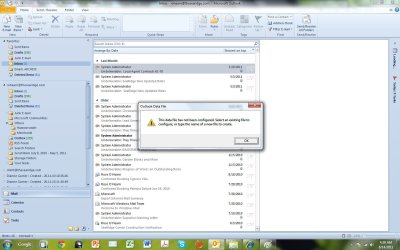
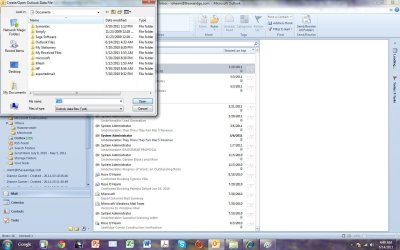
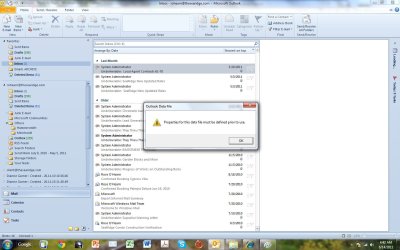
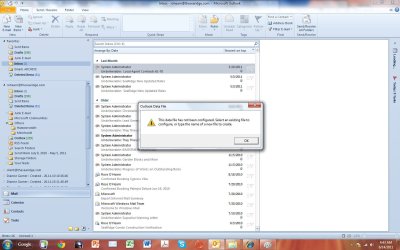
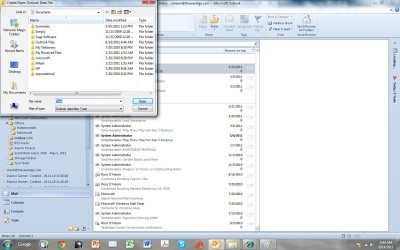
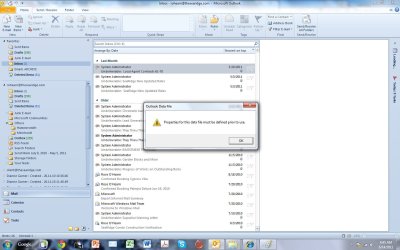
However I still continue to see the Outlook Data File Popup with the message "This data file has not been configured. Select an existing file to configure or try the name of a new file to create". After I clicked "OK" then I got another pop up to prompting me to choose a file from the Libraries.Documents directory. I clicked "Cancel" then I got another pop up with "Properities for this data file must be defined prior to use". I clicked "OK" and then I got the Outlook Data File Popup and the same subsequent popups again. After clicking through I was able to start my Outlook but when use the registry Booster to scan I got more error messages. So apparently these errors from Outlook is mucking up my registry. Anyone has any idea about this problem? Please help. Your assistance is greatly appreciated. Thank you. Helen.
 

My Computer My Computer

Computer Manufacturer/Model Number
DELL Latitude D630
OS
Windows 7 professional 32 bit
Memory
2 MB
Monitor(s) Displays
14 inch
Hi Helen,

Firstly, you certainly do not need any registry boosters to solve Outlook data file issues - was this a recommendation made by someone, or was this suggested to you by an automated pop-up? If its the latter, is there any chance you could be infected by some sort of malware?

To solve the Outlook issue, do you know where your Outlook data file is being stored? Can you do a search on your computer for all files with this extension:

.pst

Post back here with your findings. Also, can you tell us about your current system : what anti-virus software are you using. I'm a bit concerned about this Registry Booster : generally speaking, in most cases you really do not need/want to be mucking with the registry at all.

Regards,
Golden
 

My Computer My Computer

Computer type
PC/Desktop
Computer Manufacturer/Model Number
Golden Mk. I.4
OS
Windows 10 Pro x64 ; Xubuntu x64
CPU
Intel i7 860 @ 2.80 GHz O/C'ed to 4.0GHz
Motherboard
Gigabyte P55A-UD3R Rev.1. Award BIOS F13
Memory
16GB Corsair Vengance DDR3 @ 661 MHz Dual Channel (9-9-9-24)
Graphics Card(s)
EVGA NVidia GTX 560 1024MB
Sound Card
Realtek Integrated
Monitor(s) Displays
Dual Samsung SyncMaster 2494HS
Screen Resolution
1920*1080 and 1920*1080
Hard Drives
1*Samsung 840 EVO 120GB SSD;
1*OCZ Vertex 2 60GB SSD;
2*Samsung F3 SpinPoint 1TB in RAID0;
1*Samsung F1 SpinPoint 1TB;
2*Western Digital 1TB External USB 3.0
1*Western Digital 500GB External USB 3.0
1*Seagate 500GB External USB 2.0
PSU
Thermaltake ToughPower QFan 750W
Case
Thermaltake Element S VK60001W2Z
Cooling
Corsair H60 Water Cooling, 2*230mm and 2*80mm case fans
Keyboard
Logitech G110
Mouse
Logitech MX518
Outlook 2010 Error Message "This data file has not been configured"

Hi Golden,

Thank you kindly for your help. I'm afraid I have purchased the software online and used it. It found more than 300 errors fromt the registry and fixed it. After that, I was able to see the latest sent mails from the Sent Items folder again.

When I checked with Microsoft support I got a pop up about this Registry Booster. They claimed that they are Microsoft Partner. I thought that they are legit. I'm using Norton antivirus, do you think Norton would detect the malware from the registry?

When I did a search on PST file, I found the following:

  1. For 3 email accounts that have not been active under my original Profile the files are stored under C:\Users\UserName\My Documents\Outlook Files.
  2. For the current active email account under the same original Profile, the files are stored under C:\Users\UserName\AppData\Local\Microsoft\Outlook.
  3. For the new Profile (I don't think got as far to create a user account yet) that I tried to create for testing purposes, the files are also stored under C:\Users\UserName\My Documents\Outlook Files.
Do you have any idea why I am getting these error messages?

Many thanks and best regards. Helen.
 

My Computer My Computer

Computer Manufacturer/Model Number
DELL Latitude D630
OS
Windows 7 professional 32 bit
Memory
2 MB
Monitor(s) Displays
14 inch
Hi Helen

You could try performing a repair on you .pst file:
Repair Outlook Data Files (.pst and .ost) - Outlook - Office.com
.
.

Inbox Repair tool (scanpst.exe)

Scanpst.exe is installed on your computer when you install Microsoft Outlook 2010. The Inbox Repair tool tries to correct any problems by resetting the data file structure and rebuilding the headers for Outlook items. If you are using an Exchange account, the tool does not connect to or analyze the data saved on the Exchange server.

Important
You must exit Outlook before using the Inbox Repair tool. It is not accessible within Outlook.

  1. Open Windows Explorer and select the drive:\Program Files\Microsoft Office\OFFICE14 folder.
  2. Double-click Scanpst.exe.
  3. In the Enter the name of the file you want to scan box, enter the name of the .pst or .ost file that you want to check, or click Browse to select the file.
  4. To specify the scan log options, click Options, and then click the option that you want.
  5. Click Start.
  6. If errors are found, you are prompted to start the repair process to fix the errors.
A backup file is created during the repair process. To change the default name or location of this backup file, in the Enter name of backup file box, enter a new name, or click Browse to select the file that you want to use.

  1. Click Repair.
  2. Start Outlook with the profile that contains the .pst file that you tried to repair.
  3. In the Navigation Pane, click Folder List.
Keyboard shortcut To open switch to the Folder List, press CTRL+6.

In the Folder List, you might see a folder named Recovered Personal Folders that contains your default Outlook folders or a Lost and Found folder. The recovered folders are usually empty, because this is a rebuilt .pst file. The Lost and Found folder contains the folders and items recovered by the Inbox Repair tool.

You can create an Outlook Data File (.pst), and drag the items in the Lost and Found folder into the new data file. When you have finished moving all the items, you can remove the Recovered Personal Folders (.pst) file, including the Lost and Found folder, from your profile.

Notes


  • If you are able to open the original Outlook Data File (.pst), you may be able to recover additional items from your damaged .pst file. By default, the Inbox Repair tool creates a file with the same name, but with the file extension of .bak. The .bak file is located in the same folder as your original .pst file. You may be able to recover items from the .bak file that the Inbox Repair tool could not recover. Make a copy of the .bak file, and give the file a new name with a .pst extension, such as bak.pst. Import the bak.pst file, and then move any additional recovered items to the new .pst file that you created.

  • A copy of the log file is saved to the same folder as the .pst file.
 

My Computer My Computer

Computer type
PC/Desktop
Computer Manufacturer/Model Number
Packard Bell
OS
Windows 7 Home Premium 64bit
CPU
Intel(R) Core(TM) i3-2120 CPU @ 3.30GHz
Motherboard
Packard Bell IPISB-AG
Memory
3.00 GB
Graphics Card(s)
(1) Intel(R) HD Graphics (2) VNC Mirror Driver
Sound Card
Realtek High Definition Audio
Monitor(s) Displays
AIO LCD
Screen Resolution
1920 x 1080
Hard Drives
WDC WD10EADX-22TDHB0 ATA Device
Fixed hard disk media
4 partitions
931.51 GB
Keyboard
Wireless
Mouse
Wireless
Antivirus
Microsoft Security Essentials
Browser
IE; Firefox
Other Info
Also:
Samsung N220 Plus Netbook - Windows 7 Home
HP laptop
iPad 5
Hi Helen,

From your description, it doesn't sound malware related so I wouldn't be overly concerned with that.

The apparent registry errors are more of a concern. What is the name of this software that you purchased? I concur with Irene : try the repair she suggested.

In addition, can you also try to scan for system errors on your PC. To do this, please follow these steps:

1. Click Start Orb, and then type cmd in the search box
2. Right-click on cmd and choose the Run as administrator option
3. This will open up a cmd (DOS) window
4. Type sfc /scannow anf hit enter

This will check and attempt to repair any issues with the system files. Let the process finish, and then post the results here. Open Outlook and see if you get the same pop-up message. If you do, please post a screen capture image of the message here.

Regards,
Golden
 

My Computer My Computer

Computer type
PC/Desktop
Computer Manufacturer/Model Number
Golden Mk. I.4
OS
Windows 10 Pro x64 ; Xubuntu x64
CPU
Intel i7 860 @ 2.80 GHz O/C'ed to 4.0GHz
Motherboard
Gigabyte P55A-UD3R Rev.1. Award BIOS F13
Memory
16GB Corsair Vengance DDR3 @ 661 MHz Dual Channel (9-9-9-24)
Graphics Card(s)
EVGA NVidia GTX 560 1024MB
Sound Card
Realtek Integrated
Monitor(s) Displays
Dual Samsung SyncMaster 2494HS
Screen Resolution
1920*1080 and 1920*1080
Hard Drives
1*Samsung 840 EVO 120GB SSD;
1*OCZ Vertex 2 60GB SSD;
2*Samsung F3 SpinPoint 1TB in RAID0;
1*Samsung F1 SpinPoint 1TB;
2*Western Digital 1TB External USB 3.0
1*Western Digital 500GB External USB 3.0
1*Seagate 500GB External USB 2.0
PSU
Thermaltake ToughPower QFan 750W
Case
Thermaltake Element S VK60001W2Z
Cooling
Corsair H60 Water Cooling, 2*230mm and 2*80mm case fans
Keyboard
Logitech G110
Mouse
Logitech MX518
Outlook 2010 Error Message "This data file has not been configured"

Dear Irene,

Thank you so much for your kind help. I tried the Scanpst on all the files and it hung a few times but finally manage to complete the repair. However, after the repair, I started Outlook again but still got the same error.

I think the error was caused by me creating a new profile but the activity was incomplete so it's still looking for some files. I did go in and delete this profile from Outlook by going into the Control panel, Mail, Show Profile and Remove. Now I only see 1 profile from the Control panel. But when I used the Scanpst and browsed I could see that the outlook files associated with the new profile are still there. So the Remove did not remove everything cleanly. If my assumption is correct, is there anyway I can go in and delete the new profile and all of the related files associated with it so that hopefully I can remove these error messages. I'm concerned that whenever Outlook start up looking for these files it will muck up the Registry. I think that's why I did not see the latest sent mails before and after I ran the REGISTRY BOOSTER it cleaned up the registry and I could see the latest sent mails again.

Thank you kindly for all your help.

Best regards,

Helen
 

My Computer My Computer

Computer Manufacturer/Model Number
DELL Latitude D630
OS
Windows 7 professional 32 bit
Memory
2 MB
Monitor(s) Displays
14 inch
Outlook 2010 Error Message "This data file has not been configured"

Dear Golden,

Thank you very much for your suggestion. I just tried Irene's suggestion to run the SCANPST. It took a long time, so I ran out of time and I have to go to work now. I will try your suggestion later on today and report back to you.

However, the SCANPST did not remove the error messages. I am almost certain that these have something to do with my creating a new profile but not completing properly. Could you offer some insight?

Your help is greatly appreciated.

Best regards,

Helen
 

My Computer My Computer

Computer Manufacturer/Model Number
DELL Latitude D630
OS
Windows 7 professional 32 bit
Memory
2 MB
Monitor(s) Displays
14 inch

My Computer My Computer

Computer type
PC/Desktop
Computer Manufacturer/Model Number
Packard Bell
OS
Windows 7 Home Premium 64bit
CPU
Intel(R) Core(TM) i3-2120 CPU @ 3.30GHz
Motherboard
Packard Bell IPISB-AG
Memory
3.00 GB
Graphics Card(s)
(1) Intel(R) HD Graphics (2) VNC Mirror Driver
Sound Card
Realtek High Definition Audio
Monitor(s) Displays
AIO LCD
Screen Resolution
1920 x 1080
Hard Drives
WDC WD10EADX-22TDHB0 ATA Device
Fixed hard disk media
4 partitions
931.51 GB
Keyboard
Wireless
Mouse
Wireless
Antivirus
Microsoft Security Essentials
Browser
IE; Firefox
Other Info
Also:
Samsung N220 Plus Netbook - Windows 7 Home
HP laptop
iPad 5
Outlook 2010 Error Message "This data file has not been configured"

Dear Irene and Golden,

Thank you both for your help with my problem with Outlook. I have continued to receive the same error messages from Outlook 2010 due to the fact that I did not add another Profile correctly. Eventhough I have removed the profle I still continue to receive the error messages every time I started Outlook.

These error messages seem to have caused user related errors in the registry which subsequently caused Outlook not to display the latest sent messages in the Sent Folder. When I did the Scanpst before I could still see file from the 2nd profile still there. I think that's why the system keeps complaining and gives me these errors. Is there any way that I can completely clean up the 2nd profile that I did not correctly created?

Many thanks for your help and best regards,

Helen
 

My Computer My Computer

Computer Manufacturer/Model Number
DELL Latitude D630
OS
Windows 7 professional 32 bit
Memory
2 MB
Monitor(s) Displays
14 inch
  1. In Outlook 2010, click the File tab.
  2. Click Account Settings, and then click Account Settings.
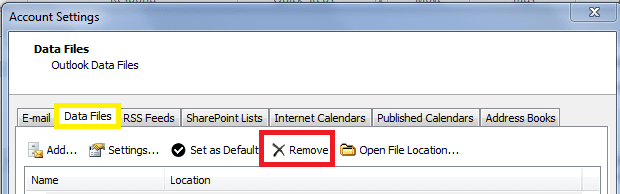
  3. Then select the Data files tab - If you can see any data files listed which are related to the unwanted profile, you can delete them by touching/highlighting them, then touch "X Remove".
 

Attachments

  • file tab.PNG
    file tab.PNG
    31.1 KB · Views: 31
  • OL data files.PNG
    OL data files.PNG
    9.2 KB · Views: 33

My Computer My Computer

Computer type
PC/Desktop
Computer Manufacturer/Model Number
Packard Bell
OS
Windows 7 Home Premium 64bit
CPU
Intel(R) Core(TM) i3-2120 CPU @ 3.30GHz
Motherboard
Packard Bell IPISB-AG
Memory
3.00 GB
Graphics Card(s)
(1) Intel(R) HD Graphics (2) VNC Mirror Driver
Sound Card
Realtek High Definition Audio
Monitor(s) Displays
AIO LCD
Screen Resolution
1920 x 1080
Hard Drives
WDC WD10EADX-22TDHB0 ATA Device
Fixed hard disk media
4 partitions
931.51 GB
Keyboard
Wireless
Mouse
Wireless
Antivirus
Microsoft Security Essentials
Browser
IE; Firefox
Other Info
Also:
Samsung N220 Plus Netbook - Windows 7 Home
HP laptop
iPad 5
Dear Irene and Golden,

Thank you both for your reply, but I did follow Irene's instruction and removed the profile as above in the first place, about 2 weeks ago. However, the remove did not do the job cleanly and I still get the error messages whenever I start up Outlook 2010. I think this is because I did not create the profile properly in the first place, ie, I just skipped the prompt to create files that I did not understand. When I ran Scanpst I could see a pst file from the profile that I deleted. Can I just go in and delete this so hopefully I don't see these error messages anymore? The user error messages kept mucking up my registry and I could not see the latest Sent mails until I ran the Registry Booster to remove the errors.

Many thanks for your help and best regards,

Helen
 

My Computer My Computer

Computer Manufacturer/Model Number
DELL Latitude D630
OS
Windows 7 professional 32 bit
Memory
2 MB
Monitor(s) Displays
14 inch
Outlook 2010 Error Message "This data file has not been configured"

Dear Irene,

When I did File, Accounting Settings I did not see the new profile that I added incorrectly because I already removed the profile. But when I ran the Scanpst and clicked on browse file I saw it in the list of pst files in C:\Users\Helen\Documents\Outlook Files. There are 3 entries for the profile: bak, pst, and log files. Can I just delete these entries so that I won't get the error messages again?

Many thanks for your help and best regards,

Helen
 

My Computer My Computer

Computer Manufacturer/Model Number
DELL Latitude D630
OS
Windows 7 professional 32 bit
Memory
2 MB
Monitor(s) Displays
14 inch
Dear Irene,

When I did File, Accounting Settings I did not see the new profile that I added incorrectly because I already removed the profile. But when I ran the Scanpst and clicked on browse file I saw it in the list of pst files in C:\Users\Helen\Documents\Outlook Files. There are 3 entries for the profile: bak, pst, and log files. Can I just delete these entries so that I won't get the error messages again?

Many thanks for your help and best regards,

Helen

I would think so Helen, but let me ask others for reassurance. ;)
 

My Computer My Computer

Computer type
PC/Desktop
Computer Manufacturer/Model Number
Packard Bell
OS
Windows 7 Home Premium 64bit
CPU
Intel(R) Core(TM) i3-2120 CPU @ 3.30GHz
Motherboard
Packard Bell IPISB-AG
Memory
3.00 GB
Graphics Card(s)
(1) Intel(R) HD Graphics (2) VNC Mirror Driver
Sound Card
Realtek High Definition Audio
Monitor(s) Displays
AIO LCD
Screen Resolution
1920 x 1080
Hard Drives
WDC WD10EADX-22TDHB0 ATA Device
Fixed hard disk media
4 partitions
931.51 GB
Keyboard
Wireless
Mouse
Wireless
Antivirus
Microsoft Security Essentials
Browser
IE; Firefox
Other Info
Also:
Samsung N220 Plus Netbook - Windows 7 Home
HP laptop
iPad 5
Hi Helen,

I serached and don't have a .bak and .log file related to my Outlook profile. I suggest instead of deleting them, simply rename them and move them to a different location (this includes the .pst). If everything works as normal after that, I would say it appears that it would be safe to then delete them.

Regards,
Golden
 

My Computer My Computer

Computer type
PC/Desktop
Computer Manufacturer/Model Number
Golden Mk. I.4
OS
Windows 10 Pro x64 ; Xubuntu x64
CPU
Intel i7 860 @ 2.80 GHz O/C'ed to 4.0GHz
Motherboard
Gigabyte P55A-UD3R Rev.1. Award BIOS F13
Memory
16GB Corsair Vengance DDR3 @ 661 MHz Dual Channel (9-9-9-24)
Graphics Card(s)
EVGA NVidia GTX 560 1024MB
Sound Card
Realtek Integrated
Monitor(s) Displays
Dual Samsung SyncMaster 2494HS
Screen Resolution
1920*1080 and 1920*1080
Hard Drives
1*Samsung 840 EVO 120GB SSD;
1*OCZ Vertex 2 60GB SSD;
2*Samsung F3 SpinPoint 1TB in RAID0;
1*Samsung F1 SpinPoint 1TB;
2*Western Digital 1TB External USB 3.0
1*Western Digital 500GB External USB 3.0
1*Seagate 500GB External USB 2.0
PSU
Thermaltake ToughPower QFan 750W
Case
Thermaltake Element S VK60001W2Z
Cooling
Corsair H60 Water Cooling, 2*230mm and 2*80mm case fans
Keyboard
Logitech G110
Mouse
Logitech MX518
Hi Helen,

I serached and don't have a .bak and .log file related to my Outlook profile. I suggest instead of deleting them, simply rename them and move them to a different location (this includes the .pst). If everything works as normal after that, I would say it appears that it would be safe to then delete them.

Regards,
Golden
Great idea, Golden! :D
 

My Computer My Computer

Computer type
PC/Desktop
Computer Manufacturer/Model Number
Packard Bell
OS
Windows 7 Home Premium 64bit
CPU
Intel(R) Core(TM) i3-2120 CPU @ 3.30GHz
Motherboard
Packard Bell IPISB-AG
Memory
3.00 GB
Graphics Card(s)
(1) Intel(R) HD Graphics (2) VNC Mirror Driver
Sound Card
Realtek High Definition Audio
Monitor(s) Displays
AIO LCD
Screen Resolution
1920 x 1080
Hard Drives
WDC WD10EADX-22TDHB0 ATA Device
Fixed hard disk media
4 partitions
931.51 GB
Keyboard
Wireless
Mouse
Wireless
Antivirus
Microsoft Security Essentials
Browser
IE; Firefox
Other Info
Also:
Samsung N220 Plus Netbook - Windows 7 Home
HP laptop
iPad 5
Outlook 2010 error message "This data file has not been configured"

Dear Golden and Irene,

Thank you kindly for your help to date. However, per Golden's suggestion, I renamed the 3 files (pst, bak and log) for the new outlook profile that was not properly created from C:\Users\Helen\Documents\Outlook Files and then started Outlook again but I continued to get the same error messages, which I attached below. Could you please take a look in case you can suggest something? Every 2 days I have had to run the Registry Booster software to clean the user related errors that caused the latest Sent messages not to be shown on the Sent Mail. I know that these errors occured because I skipped steps creating files for the 2nd profile that I added.

For the error messages below, I either click OK or cancel and then got the next error pop up.

Error Pop up #1:

Outlook 2010 Error Message 1.jpg

I clicked OK. Then I got the next screen (#2).

Outlook 2010 Error Message 2.jpg

I clicked "Cancel". Then I got the next screen (#3).

Outlook 2010 Error Message 3.jpg

I clicked OK. Then I got the next screen (#4).

Outlook 2010 Error Message 4.jpg

I clicked OK. Then I got the next screen (#5).

Outlook 2010 Error Message 5.jpg

I clicked "Cancel". Then I got the next screen (#6).

Outlook 2010 Error Message 6.jpg

I clicked OK. Then I got the next screen (#7).

Outlook 2010 Error Message 7.jpg

I clicked OK. Then I got the next screen (#8).

Outlook 2010 Error Message 8.jpg

I clicked "Cancel". Then I got the next screen (#9).

Outlook 2010 Error Message 9.jpg

Thank you for all your help and best regards,

Helen
 

My Computer My Computer

Computer Manufacturer/Model Number
DELL Latitude D630
OS
Windows 7 professional 32 bit
Memory
2 MB
Monitor(s) Displays
14 inch
Helen, the following information is quoting for an earlier version of Outlook, but the principles are the same:
Error message in Outlook 2003 or in Outlook 2002: "This information service has not been configured"


To resolve this issue, use one of the following methods to remove the reference to the missing Outlook data file.
Method 1


  1. Start Outlook.
  2. In the navigation pane, right-click the folder that is associated with the missing Outlook data file.
  3. Click Close Folder_Name.

    Note Folder_Name is the folder that is associated with the missing Outlook data file.
  4. Restart Outlook.

Method 2


  1. Start Outlook.
  2. On the File menu, click Data File Management.
  3. Click the folder that is associated with the missing Outlook data file, and then click Remove.
  4. Restart Outlook.
This, I believe, should remove the rogue files.
 

My Computer My Computer

Computer type
PC/Desktop
Computer Manufacturer/Model Number
Packard Bell
OS
Windows 7 Home Premium 64bit
CPU
Intel(R) Core(TM) i3-2120 CPU @ 3.30GHz
Motherboard
Packard Bell IPISB-AG
Memory
3.00 GB
Graphics Card(s)
(1) Intel(R) HD Graphics (2) VNC Mirror Driver
Sound Card
Realtek High Definition Audio
Monitor(s) Displays
AIO LCD
Screen Resolution
1920 x 1080
Hard Drives
WDC WD10EADX-22TDHB0 ATA Device
Fixed hard disk media
4 partitions
931.51 GB
Keyboard
Wireless
Mouse
Wireless
Antivirus
Microsoft Security Essentials
Browser
IE; Firefox
Other Info
Also:
Samsung N220 Plus Netbook - Windows 7 Home
HP laptop
iPad 5
Outlook 2010 error message "This data file has not been configured"

Dear Irene,

Thank you kindly for your reply. Unfortunately, for Method 1, I can no longer see any folder associated with the incorrectly created Outlook profile since I already removed the profile in the first place using "Show Profile" and then "Remove". For method 2, I do not see any Data File Management under the File menu for Outlook 2010. Also, similar to Method 1, I can no longer see any see any folder of or the profile itself since it was removed from the beginning. To me, this seems to be a problem with Outlook 2010 removing the Outlook Profile file but not cleanly removing all the associated work files for such profile. Are you aware of anyone else reporting this problem with Microsoft? Please advise.

Thank you and best regards,

Helen
 

My Computer My Computer

Computer Manufacturer/Model Number
DELL Latitude D630
OS
Windows 7 professional 32 bit
Memory
2 MB
Monitor(s) Displays
14 inch
Helen, this is becoming increasingly complex. I would advise not to use the Registry Booster - this type of action can do infinitely more damage which is difficult, if not impossible to trace.

In my research I came across some Outlook command-line switches, which I could well clear out the residual files from your deleted profile:
Follow the instructions carefully using the /cleanprofile switch.

There are times when maintaining Outlook can be an overwhelming experience. Not only do you have to manage the massive amounts of email that can accumulate in your inbox, you also have to manage Search Folders, reminders, subscriptions, outdated rules etc. You can utilize Outlook’s command-line switches to help clean things up and get things running the way you want them to.


1. Close Outlook.


2. Press WinKey+R to bring up the Run dialog box.


3. Input “C:\Program Files\Microsoft Office\Office14\OUTLOOK.EXE” followed by a space and then the switch that you wish to run. If your path is other than the default, input it instead (remember to use the quotes).

Some of the switches you can use to clean up your Outlook are:


/cleanfinders – to remove Search Folders from the Microsoft Exchange mailbox.

/cleanfreebusy – to clear and recreate free/busy information. (Note: To use this switch, you must be able to connect to the Exchange server)

/cleanprofile – to remove invalid profile keys and regenerate default registry keys.


/cleanreminders – to clear and recreate reminders.
/cleanrules – to delete rules on the client and server.


/cleanserverrules – to delete rules on the server only.


/cleansharing – to remove all subscriptions from Account Settings. (This will not remove any downloaded content)


/cleanviews – to restore default views, custom views are removed.
Once this is complete, check for the error message, which hopefully will not reappear.

If it does, then I suggest you run the Office Repair:

Repair Office 2010:

  • Open Control Panel and click Programs and Features.
  • Right click the Office 2010 program that you want to repair, and select Change.
  • Next click Repair > Continue.
  • Restart your computer.
 

My Computer My Computer

Computer type
PC/Desktop
Computer Manufacturer/Model Number
Packard Bell
OS
Windows 7 Home Premium 64bit
CPU
Intel(R) Core(TM) i3-2120 CPU @ 3.30GHz
Motherboard
Packard Bell IPISB-AG
Memory
3.00 GB
Graphics Card(s)
(1) Intel(R) HD Graphics (2) VNC Mirror Driver
Sound Card
Realtek High Definition Audio
Monitor(s) Displays
AIO LCD
Screen Resolution
1920 x 1080
Hard Drives
WDC WD10EADX-22TDHB0 ATA Device
Fixed hard disk media
4 partitions
931.51 GB
Keyboard
Wireless
Mouse
Wireless
Antivirus
Microsoft Security Essentials
Browser
IE; Firefox
Other Info
Also:
Samsung N220 Plus Netbook - Windows 7 Home
HP laptop
iPad 5
I would advise not to use the Registry Booster - this type of action can do infinitely more damage which is difficult, if not impossible to trace.

I couldn't agree more. We shouldn't, nor do we, require registry boosters to fix this issue. Please don't use these as suggested in my post #2.

Regards,
Golden
 

My Computer My Computer

Computer type
PC/Desktop
Computer Manufacturer/Model Number
Golden Mk. I.4
OS
Windows 10 Pro x64 ; Xubuntu x64
CPU
Intel i7 860 @ 2.80 GHz O/C'ed to 4.0GHz
Motherboard
Gigabyte P55A-UD3R Rev.1. Award BIOS F13
Memory
16GB Corsair Vengance DDR3 @ 661 MHz Dual Channel (9-9-9-24)
Graphics Card(s)
EVGA NVidia GTX 560 1024MB
Sound Card
Realtek Integrated
Monitor(s) Displays
Dual Samsung SyncMaster 2494HS
Screen Resolution
1920*1080 and 1920*1080
Hard Drives
1*Samsung 840 EVO 120GB SSD;
1*OCZ Vertex 2 60GB SSD;
2*Samsung F3 SpinPoint 1TB in RAID0;
1*Samsung F1 SpinPoint 1TB;
2*Western Digital 1TB External USB 3.0
1*Western Digital 500GB External USB 3.0
1*Seagate 500GB External USB 2.0
PSU
Thermaltake ToughPower QFan 750W
Case
Thermaltake Element S VK60001W2Z
Cooling
Corsair H60 Water Cooling, 2*230mm and 2*80mm case fans
Keyboard
Logitech G110
Mouse
Logitech MX518
Back
Top