restoring system image to a new SSD

Hi. I've tried it with disk 0. No luck either... Always the same error "no disk that can be used for recovering the system disk can be found"

@bare foot kid - still not working using your suggestion. Is there something very specific I should be doing before the SSD goes into the laptop? Something that I can't do from the command line? I'm asking so that I can go back upstairs with it the xp machine and start over..
 

My Computer My Computer

At a glance

Windows 7 64bit
OS
Windows 7 64bit
I've just plugged it back into my xp machine and it popped up saying the drive wasn't formatted.. So i formatted it.

There is currently just the single partition now that is acting as a flash drive at the moment. What's the best steps to take before i travel downstairs again?

Thanks guys.

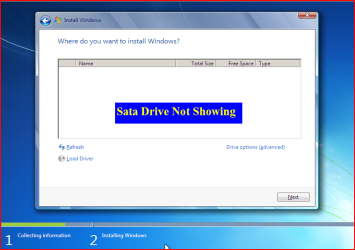
I'm at this stage currently

wiz01.jpg
 
Last edited:

My Computer My Computer

At a glance

Windows 7 64bit
OS
Windows 7 64bit
Specific to your Notebook.
 

My Computer My Computer

At a glance

ME/XP/Vista/Win7
OS
ME/XP/Vista/Win7
@bare foot kid - still not working using your suggestion. Is there something very specific I should be doing before the SSD goes into the laptop? Something that I can't do from the command line? I'm asking so that I can go back upstairs with it the xp machine and start over..


My apologies mate, I've never actually done exactly what you are attempting so I'm not much help there.
 

My Computer My Computer

At a glance

W 7 64-bit UltimateIntel Q9550 Yorkfield8GB Dominator 8500C5DATI : XFX 5870
Computer Manufacturer/Model Number
* BFK Customs *
OS
W 7 64-bit Ultimate
CPU
Intel Q9550 Yorkfield
Motherboard
ASUS P5Q Pro
Memory
8GB Dominator 8500C5D
Graphics Card(s)
ATI : XFX 5870
Sound Card
Realtek HD Audio 7-1
Monitor(s) Displays
1x 47" LCD HDMI & 3x 26" LCD HDMI
Screen Resolution
1920x1080P & 1920x1200
Hard Drives
1x 80GB Intel X25-M G2 SSD : 1x 500GB & 1x 640GB WD Caviar Black(s)
PSU
Corsair 620HX
Case
Cooler Master RC-690
Cooling
Tuniq Tower 120, 2x 140mm and 3x 120mm case fans
Keyboard
Microsoft 500
Mouse
Razer Diamondback 3G
Internet Speed
14 Mb/s
Other Info
1x Koutech 3Gb/s SATA HDD Hot Swap Rack
Specific to your Notebook.


I can boot my old windows 7 installation. If you would kind enough to point me in the right direction so that I can copy them to USB flash drive?
 

My Computer My Computer

At a glance

Windows 7 64bit
OS
Windows 7 64bit
You will need to download the drivers.

As you have the Windows 7 DVD, see if the HD will show here:
1.PNG
 

My Computer My Computer

At a glance

ME/XP/Vista/Win7
OS
ME/XP/Vista/Win7
@bare foot kid - still not working using your suggestion. Is there something very specific I should be doing before the SSD goes into the laptop? Something that I can't do from the command line? I'm asking so that I can go back upstairs with it the xp machine and start over..


My apologies mate, I've never actually done exactly what you are attempting so I'm not much help there.

No worries. I appreciate all the help either way. I'm dying to get this SSD up and running, ha!
 

My Computer My Computer

At a glance

Windows 7 64bit
OS
Windows 7 64bit
You will need to download the drivers.

As you have the Windows 7 DVD, see if the HD will show here:
View attachment 158993

The drive is showing up everywhere as expected, but will not take the system restore.

I think I may have to resort to paying a Pro to get this working. Really didn't think it would be a problem.
 

My Computer My Computer

At a glance

Windows 7 64bit
OS
Windows 7 64bit
What size was the old HD?
 

My Computer My Computer

At a glance

ME/XP/Vista/Win7
OS
ME/XP/Vista/Win7

My Computer My Computer

At a glance

W 7 64-bit UltimateIntel Q9550 Yorkfield8GB Dominator 8500C5DATI : XFX 5870
Computer Manufacturer/Model Number
* BFK Customs *
OS
W 7 64-bit Ultimate
CPU
Intel Q9550 Yorkfield
Motherboard
ASUS P5Q Pro
Memory
8GB Dominator 8500C5D
Graphics Card(s)
ATI : XFX 5870
Sound Card
Realtek HD Audio 7-1
Monitor(s) Displays
1x 47" LCD HDMI & 3x 26" LCD HDMI
Screen Resolution
1920x1080P & 1920x1200
Hard Drives
1x 80GB Intel X25-M G2 SSD : 1x 500GB & 1x 640GB WD Caviar Black(s)
PSU
Corsair 620HX
Case
Cooler Master RC-690
Cooling
Tuniq Tower 120, 2x 140mm and 3x 120mm case fans
Keyboard
Microsoft 500
Mouse
Razer Diamondback 3G
Internet Speed
14 Mb/s
Other Info
1x Koutech 3Gb/s SATA HDD Hot Swap Rack
What size was the old HD?

The hard drive was 300gig. But I removed everything and just left windows bare-bones.... left it at about 50gb

I think I see what you're about to say though...

Could my restore image be a 'clone' of the old drive? nearly 300gb, while my new SSD is only 120?
 

My Computer My Computer

At a glance

Windows 7 64bit
OS
Windows 7 64bit

My Computer My Computer

At a glance

Windows 7 64bit
OS
Windows 7 64bit
;)
If you can find an exact Windows version that the PC shipped with you can do a clean install using the activation key on the COA sticker attached to the PC though it may require a robo-call to MS to sort the OEM batch-key.

How to Activate Windows 7 by Phone


If you can't find an exact same version, you could use the info in this tutorial to create an "all versions" installer of any version Windows installer, to install using the same method I posted above.

Windows 7 Universal Installation Disc - Create
 

My Computer My Computer

At a glance

W 7 64-bit UltimateIntel Q9550 Yorkfield8GB Dominator 8500C5DATI : XFX 5870
Computer Manufacturer/Model Number
* BFK Customs *
OS
W 7 64-bit Ultimate
CPU
Intel Q9550 Yorkfield
Motherboard
ASUS P5Q Pro
Memory
8GB Dominator 8500C5D
Graphics Card(s)
ATI : XFX 5870
Sound Card
Realtek HD Audio 7-1
Monitor(s) Displays
1x 47" LCD HDMI & 3x 26" LCD HDMI
Screen Resolution
1920x1080P & 1920x1200
Hard Drives
1x 80GB Intel X25-M G2 SSD : 1x 500GB & 1x 640GB WD Caviar Black(s)
PSU
Corsair 620HX
Case
Cooler Master RC-690
Cooling
Tuniq Tower 120, 2x 140mm and 3x 120mm case fans
Keyboard
Microsoft 500
Mouse
Razer Diamondback 3G
Internet Speed
14 Mb/s
Other Info
1x Koutech 3Gb/s SATA HDD Hot Swap Rack
;)
If you can find an exact Windows version that the PC shipped with you can do a clean install using the activation key on the COA sticker attached to the PC though it may require a robo-call to MS to sort the OEM batch-key.

How to Activate Windows 7 by Phone


If you can't find an exact same version, you could use the info in this tutorial to create an "all versions" installer of any version Windows installer, to install using the same method I posted above.

Windows 7 Universal Installation Disc - Create

Interesting idea. I think I'll look into that option.
 

My Computer My Computer

At a glance

Windows 7 64bit
OS
Windows 7 64bit
What size was the old HD?

The hard drive was 300gig. But I removed everything and just left windows bare-bones.... left it at about 50gb

I think I see what you're about to say though...

Could my restore image be a 'clone' of the old drive? nearly 300gb, while my new SSD is only 120?
Sorry to say, YES.
 

My Computer My Computer

At a glance

ME/XP/Vista/Win7
OS
ME/XP/Vista/Win7
What size was the old HD?

The hard drive was 300gig. But I removed everything and just left windows bare-bones.... left it at about 50gb

I think I see what you're about to say though...

Could my restore image be a 'clone' of the old drive? nearly 300gb, while my new SSD is only 120?
Sorry to say, YES.

Shit!

How do people get around this? clean installs then?
 

My Computer My Computer

At a glance

Windows 7 64bit
OS
Windows 7 64bit
Back
Top