Homegroup over dLAN

kevvyb

New member
Local time
9:33 AM
Messages
77
Location
London UK
Hi

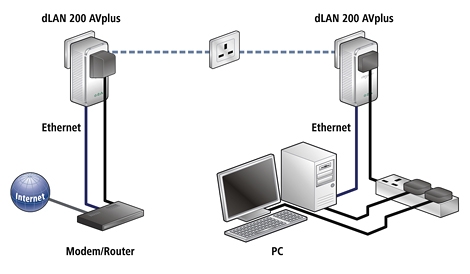
I have been using Windows 7 HomeGroup successfully for some time to share data between my desktop and notebook. However, I have just acquired a Develo DLAN Homeplug 200 AV Plus. I have this connecting ok BUT the HomeGroup does not get 'loaded' or recognised over the dLan

Is there something obvious that I am missing?
 

My Computer My Computer

At a glance

Windows 7 Pro x64Intel i7 2.66GHz @ 3.6GHz6GB Corsair PC10600 1333Mhz DDR31GB nVidia GTX 280
Computer type
PC/Desktop
Computer Manufacturer/Model Number
Arbico Computers
OS
Windows 7 Pro x64
CPU
Intel i7 2.66GHz @ 3.6GHz
Motherboard
Gigabit EX58 UD5
Memory
6GB Corsair PC10600 1333Mhz DDR3
Graphics Card(s)
1GB nVidia GTX 280
Sound Card
Creative X-Fi Xtreme Audio 7.1
Monitor(s) Displays
NEC 22470WNX
Screen Resolution
1920 x 1200
Hard Drives
DISK 0 - System - WDC Blue 149GB ~
DISK 1 - Data - 1TB Samsung F1 Spinpoint (3 platter) ~
DISK 2 - Copy Data - 1TB Samsung F1 Spinpoint (3 platter)
PSU
Corsair HX 1000w
Case
Coolermaster Cosmos S
Cooling
Zalman CNPS 9700 LED
Internet Speed
16 - 17Kbps Down ~ 700 -850Kbps Up
Browser
Using SRWareIron, Google Chrome, Firefox, IE9 in that order
Other Info
Billion 7800 N Wireless Router ~
Develo dLan 200AVPlus HomePlug
System drive and data disks encrypted with truecrypt 7.1a
Hi

I have been using Windows 7 HomeGroup successfully for some time to share data between my desktop and notebook. However, I have just acquired a Develo DLAN Homeplug 200 AV Plus. I have this connecting ok BUT the HomeGroup does not get 'loaded' or recognised over the dLan

Is there something obvious that I am missing?

What OS is the Develo running?

I assume there is a driver and configuration issues to be worked out. Have you gone to their web site for instructions?
 
Last edited:

My Computer My Computer

At a glance

Win 8 Release candidate 8400[email protected]4 gigsNvidia 9600M
Computer Manufacturer/Model Number
HP Pavillion dv-7 1005 Tx
OS
Win 8 Release candidate 8400
CPU
[email protected]
Memory
4 gigs
Graphics Card(s)
Nvidia 9600M
Sound Card
HD built-in
Monitor(s) Displays
17" Wxga
Screen Resolution
1440x900
Cooling
none
Internet Speed
45Mb down 5Mb up
i don't think it runs an os - it's a power line networking thingy

dlan%20200%20av%20plus%20set%20up.jpg
 

My Computer My Computer

At a glance

ultimate 64 sp1i5 2500K [email protected]8 gigs GSkill Ripjaws 1600amd hd6950
Computer Manufacturer/Model Number
mickey megabyte 1234
OS
ultimate 64 sp1
CPU
i5 2500K [email protected]
Motherboard
MSI P67A-GD53
Memory
8 gigs GSkill Ripjaws 1600
Graphics Card(s)
amd hd6950
Sound Card
creative x-fi gamer
Monitor(s) Displays
samsung 24"
Screen Resolution
1920x1080
Hard Drives
ocz vertex 2e 60 gig, samsung f3 1tb, buffalo 2tb ext
PSU
antec 550
Case
antec three hundred
Cooling
i'm a cooling fan
Keyboard
saitek eclipse ii
Mouse
logitech g3
Internet Speed
about 4 Mbps
Other Info
i love win7
Homegroup and dLAn solved

Not sure if it's what I did or HomeGroup just being it's tardy self with a new configuration. The HomeGroup connection came through on both machine after I had set Ethernet MAC Filter to allow the mac addresses of both devices.

However, don't think it was that as prior to that there was no MAC address filtering applied.

I always find HomeGroup just takes it time after boot to become recognised on both machines (wired or wireless). There seems to be no rhyme or reason as to which gets there first. Adding these dLans maybe just seemed to make it even slower. As an aside is there any way to speed up HomeGroup recognition following boot?

UPDATE: Should have said that the fact the dLans were not working previously probably down to using the remote plug on a spur from the ring main which is advised against in the instructions.
 
Last edited:

My Computer My Computer

At a glance

Windows 7 Pro x64Intel i7 2.66GHz @ 3.6GHz6GB Corsair PC10600 1333Mhz DDR31GB nVidia GTX 280
Computer type
PC/Desktop
Computer Manufacturer/Model Number
Arbico Computers
OS
Windows 7 Pro x64
CPU
Intel i7 2.66GHz @ 3.6GHz
Motherboard
Gigabit EX58 UD5
Memory
6GB Corsair PC10600 1333Mhz DDR3
Graphics Card(s)
1GB nVidia GTX 280
Sound Card
Creative X-Fi Xtreme Audio 7.1
Monitor(s) Displays
NEC 22470WNX
Screen Resolution
1920 x 1200
Hard Drives
DISK 0 - System - WDC Blue 149GB ~
DISK 1 - Data - 1TB Samsung F1 Spinpoint (3 platter) ~
DISK 2 - Copy Data - 1TB Samsung F1 Spinpoint (3 platter)
PSU
Corsair HX 1000w
Case
Coolermaster Cosmos S
Cooling
Zalman CNPS 9700 LED
Internet Speed
16 - 17Kbps Down ~ 700 -850Kbps Up
Browser
Using SRWareIron, Google Chrome, Firefox, IE9 in that order
Other Info
Billion 7800 N Wireless Router ~
Develo dLan 200AVPlus HomePlug
System drive and data disks encrypted with truecrypt 7.1a
Back
Top