Show Us Your WEI [3]

Status
Not open for further replies.

My Computers My Computers

System One System Two

  • Computer type
    PC/Desktop
    Computer Manufacturer/Model Number
    ALWAYS UNDER CONSTRUCTION
    OS
    Windows 11 Pro
    CPU
    Ryzen 9 5900X
    Motherboard
    Asus X570 Crosshair Viii Hero
    Memory
    32GB G Skill DDR4-3600
    Graphics Card(s)
    EVGA RTX 3080 FTW 3 Ultra
    Sound Card
    On Board/Sennheiser PC37X Headset
    Monitor(s) Displays
    3 X Asus 27"
    Screen Resolution
    2560x1440
    Hard Drives
    2 X 1 TB NVME drives
    PSU
    EVGA 850
    Case
    Phanteks Eclipse P400A
    Cooling
    EVGA 280 AIO
    Keyboard
    Logitech G510s/ Logitech G13
    Mouse
    Logitech G502
    Internet Speed
    24/1
    Antivirus
    ESET/MBAM Pro/SAS Pro
    Browser
    Chrome/ Firefox/ Edge
  • Computer type
    Laptop
    System Manufacturer/Model Number
    Dell 16 Plus
    OS
    Windows 11 Pro
    CPU
    Intel Ultra 9 288V
    Memory
    32 GB LPDDR5X 8533
    Monitor(s) Displays
    16" Mini-LED HDR600 Touch 90 Hz
    Screen Resolution
    2560X1600
    Hard Drives
    1 TB NVME
spect.jpg
 

My Computer My Computer

Computer Manufacturer/Model Number
HP-Pavilion
OS
Windows 7 Ultimate 32bit
CPU
AY652AA-ABA s5310y
Motherboard
Pegatron Corporation Narra6
Memory
4GB/3.25GB Usable
Graphics Card(s)
NVIDIA GeForce 6150SE nForce 430 (425 MHz)
Sound Card
Realtek High Definition Audio
Monitor(s) Displays
HP 2009 Series Wide LCD Monitor
Screen Resolution
1600 x 900
Hard Drives
Hitachi HDT721064SLA SCSI Disk Device (596 GB)
PSU
240w
Case
Default AY652AA-ABA s5310y's Case
Cooling
Default AY652AA-ABA s5310y's Cooling
Keyboard
HID Keyboard Device
Mouse
HID-compliant mouse
Internet Speed
Average 100 kb/s -300 kb/s
Other Info
I am a computer professional.
Nice rig JoshuaXiog.

Download Speccy (<click) to get all your system specs easily.
 

My Computer My Computer

Computer type
PC/Desktop
Computer Manufacturer/Model Number
76~2.0
OS
Windows 7 Ult x64 - SP1/ Windows 8 Pro x64
CPU
Intel Core i5-3570K 4.6GHz
Motherboard
Gigabyte GA-Z77X UD3H, f18
Memory
8GB (2X4GB) DDR3 1600 Corsair Vengeance CL8 1.5v
Graphics Card(s)
Sapphire HD 7770 Vapor-X OC 1GB DDR5
Sound Card
Onboard VIA VT2021
Monitor(s) Displays
22" LCD Dell
Screen Resolution
1680x1050
Hard Drives
Samsung 840Pro 128GB SSD,
Seagate Barracuda 500GB SATA2 7200rpm 32MB cache, Seagate Barracuda 1TB SATA2 7200rpm 32MB cache,
PSU
Corsair HX650W
Case
Cooler Master Storm Scout
Cooling
Corsair H80 2x12cm Noctua NF P12 , 2x14cm case fans
Keyboard
Logitech Wave
Mouse
CM Sentinel
Internet Speed
Dismal
Antivirus
Avast
Browser
Opera Next
Other Info
Haswell laptop: HP Envy 17t-j, i7-4700MQ, GeForce 740M 2GB DDR3, 17.3" Full HD 1920x1080, 16GB RAM, Samsung 840 Pro 128GB, 1TB Hitachi 7200 HDD,
Desktop: eSATA ports,
External eSATA Seagate 500GB SATA2 7200rpm,
External WD USB 500GB

My Computer My Computer

Computer type
PC/Desktop
Computer Manufacturer/Model Number
Custom Build
OS
Windows 10 Pro - 64 bit
CPU
Intel i7 2600K
Motherboard
Asus P8P67
Memory
8 Gig ddr3 1600 mhz - viper extreme (Patriot)
Graphics Card(s)
EVGA 980 TI
Monitor(s) Displays
2 - Lg 21" LED , sony 48 " bravia LED
Hard Drives
one - samsung 840 series 465.76 GB SSD
two - wd 2 tB black
one - wd 1.5 tb black
one - wb 1 tb black
PSU
1000 Watt Coolmaster : Silent Pro Gold
Case
antec 1200
Cooling
watercooled
Mouse
logitech wireless
Antivirus
Norton Security 2015
Other Info
powerware 3.1 KVA FERRUPS with 4 - 1000 Amp Deep cycle batteries ...

My Computers My Computers

System One System Two

  • Computer type
    PC/Desktop
    Computer Manufacturer/Model Number
    ALWAYS UNDER CONSTRUCTION
    OS
    Windows 11 Pro
    CPU
    Ryzen 9 5900X
    Motherboard
    Asus X570 Crosshair Viii Hero
    Memory
    32GB G Skill DDR4-3600
    Graphics Card(s)
    EVGA RTX 3080 FTW 3 Ultra
    Sound Card
    On Board/Sennheiser PC37X Headset
    Monitor(s) Displays
    3 X Asus 27"
    Screen Resolution
    2560x1440
    Hard Drives
    2 X 1 TB NVME drives
    PSU
    EVGA 850
    Case
    Phanteks Eclipse P400A
    Cooling
    EVGA 280 AIO
    Keyboard
    Logitech G510s/ Logitech G13
    Mouse
    Logitech G502
    Internet Speed
    24/1
    Antivirus
    ESET/MBAM Pro/SAS Pro
    Browser
    Chrome/ Firefox/ Edge
  • Computer type
    Laptop
    System Manufacturer/Model Number
    Dell 16 Plus
    OS
    Windows 11 Pro
    CPU
    Intel Ultra 9 288V
    Memory
    32 GB LPDDR5X 8533
    Monitor(s) Displays
    16" Mini-LED HDR600 Touch 90 Hz
    Screen Resolution
    2560X1600
    Hard Drives
    1 TB NVME
Anybody got any tips on talking the Mrs round when you want new hardware and there is nothing wrong with what you already have installed? It seems like I am cursed to never finish this 3D setup....I just saw a lovely GTX 580 1.5GB for £399.99. I am sure it would not be obsolete for many years, would completely out perform my current hardware and allow me to have full 3D gaming. Would ebay the current graphics cards to get the GeForce 3D glasses.
 

My Computer My Computer

Computer Manufacturer/Model Number
Custom
OS
Windows 7 Ultimate X64
CPU
AMD Phenom II X6 1100T Black Edition @3.6GHz
Motherboard
ASUS AM3+ CROSSHAIR V FORMULA S/L 990FX
Memory
16GB (4 X 4GB) Corsair CMZ8GX3M2A1600C9 1600MHz CL9 DDR3 Ven
Graphics Card(s)
2 X ATI Sapphire HD 5770 1GB DDR5 @850/1200MHz in CrossfireX
Sound Card
Onboard 7.1 HD Audio/Bluetooth Stereo Audio/C-Media USB 5.1
Monitor(s) Displays
LGW2363D 23", HANNspreeXM-S HANNSverona22" & 42"Samsung HDTV
Screen Resolution
2880X900
Hard Drives
Seagate Barracuda LP 1.5TB
SAMSUNG HD154UI 1.5TB
SAMSUNG HD 204UI 2TB
PSU
Evo Labs 900W 80+ 80 plus Dual 12V ATX PC PSU
Case
Cooler Master Mystique 631
Cooling
Corsair H50 With 2X120mm Push/Pull,3X 120mm (FrX1,SideX2).
Keyboard
Accuratus Toughball 2.4GHz
Mouse
Microsoft Laser Mouse 5000/Emprex Cheetah 2000dpi Optical
Internet Speed
5500kbps
Other Info
LG BH10LS30.AUAU10B 10x Internal Blu-Ray BDRW
Corsair H50 Water Cooling With Push/Pull 120mm Fans vent out
Front 120mm Intake
Side Panel 2 X120mm Intake
90mm Extraction fan in top of case.
OCZ - Extreme Thermal Convection
Quiet PC AcoustiPack Lite 2 Ply Sound Deadening both side panels, front, rear, top and bottom.
:roflmao:
Anybody got any tips on talking the Mrs round when you want new hardware and there is nothing wrong with what you already have installed? It seems like I am cursed to never finish this 3D setup....I just saw a lovely GTX 580 1.5GB for £399.99. I am sure it would not be obsolete for many years, would completely out perform my current hardware and allow me to have full 3D gaming. Would ebay the current graphics cards to get the GeForce 3D glasses.
Yeah just tell her that by buying the G card you are keeping all the starving children working.
They always fall for that one.
:roflmao:

Have you seen this missing person?
 

My Computer My Computer

Computer Manufacturer/Model Number
Hopalong/ Godzilla
OS
Windows7 Pro 64bit SP-1; Windows XP Pro 32bit
CPU
Intel Core i7-870 Lynnfield 2.93GHz LGA 1156 95W Quad-Core
Motherboard
ASUS P7P55D-E PRO
Memory
8GB@1400MHz Crucial Ballistix DDR3-1600 4x2GB
Graphics Card(s)
ASUS ENGTX460 DirectCU/2DI/1GD5 1GB 256-bit GDDR5
Sound Card
VIA Onboard
Monitor(s) Displays
Asus VS248H-P 24"; Samsung SyncMaster 941BW 19"ws
Screen Resolution
1920x1080; 1440x900
Hard Drives
Samsung 830 120GB SSD
Intel 320 120GB SSD
Western Digital Caviar Black WD7501AALS 750GB 7200 RPM SATA 3.0Gb/s
Western Digital Caviar Black WD6401AALS 640GB 7200 RPM SATA 3.0Gb/s
PSU
COOLER MASTER Silent Pro RS850-AMBAJ3-US 850W Modular
Case
COOLER MASTER HAF 932 RC-932-KKN5-GP Black
Cooling
Scythe "Mugen-2 Rev.B" (2 ScytheKaze-Jyuni PWM fans)
Keyboard
Logitech K-320
Mouse
Kensington
Antivirus
Avast Inernet Suite
Browser
IE 9 ; Chrome
:roflmao:
Anybody got any tips on talking the Mrs round when you want new hardware and there is nothing wrong with what you already have installed? It seems like I am cursed to never finish this 3D setup....I just saw a lovely GTX 580 1.5GB for £399.99. I am sure it would not be obsolete for many years, would completely out perform my current hardware and allow me to have full 3D gaming. Would ebay the current graphics cards to get the GeForce 3D glasses.
Yeah just tell her that by buying the G card you are keeping all the starving children working.
They always fall for that one.
:roflmao:

Have you seen this missing person?

That will probably work as well as when I was a kid and didn't want to eat my vegetables, my Mother used to say think of all the starving kids in China. I told her she could give them my vegetables.
 

My Computers My Computers

System One System Two

  • Computer type
    PC/Desktop
    Computer Manufacturer/Model Number
    ALWAYS UNDER CONSTRUCTION
    OS
    Windows 11 Pro
    CPU
    Ryzen 9 5900X
    Motherboard
    Asus X570 Crosshair Viii Hero
    Memory
    32GB G Skill DDR4-3600
    Graphics Card(s)
    EVGA RTX 3080 FTW 3 Ultra
    Sound Card
    On Board/Sennheiser PC37X Headset
    Monitor(s) Displays
    3 X Asus 27"
    Screen Resolution
    2560x1440
    Hard Drives
    2 X 1 TB NVME drives
    PSU
    EVGA 850
    Case
    Phanteks Eclipse P400A
    Cooling
    EVGA 280 AIO
    Keyboard
    Logitech G510s/ Logitech G13
    Mouse
    Logitech G502
    Internet Speed
    24/1
    Antivirus
    ESET/MBAM Pro/SAS Pro
    Browser
    Chrome/ Firefox/ Edge
  • Computer type
    Laptop
    System Manufacturer/Model Number
    Dell 16 Plus
    OS
    Windows 11 Pro
    CPU
    Intel Ultra 9 288V
    Memory
    32 GB LPDDR5X 8533
    Monitor(s) Displays
    16" Mini-LED HDR600 Touch 90 Hz
    Screen Resolution
    2560X1600
    Hard Drives
    1 TB NVME
That will probably work as well as when I was a kid and didn't want to eat my vegetables, my Mother used to say think of all the starving kids in China. I told her she could give them my vegetables.

...and when he regained consciousness... :D

A Guy
 

My Computer My Computer

Computer type
PC/Desktop
OS
Windows 10 Home x64
CPU
INTEL Core i5-750 Quad-Core 3.37GHz
Motherboard
ASUS P7P55D
Memory
HyperX Fury Black Series 8GB (2 x 4GB) 1866Mhz
Graphics Card(s)
EVGA GeForce GTX 750 Superclocked 1GB 128-Bit GDDR5
Monitor(s) Displays
LG 32MA68HY 32" IPS
Screen Resolution
1920 x 1080
Hard Drives
Samsung 840 Evo 120GB, SEAGATE 500GB Barracuda® 7200.12, SATA 3 Gb/s, 7200 RPM, 16MB cache
PSU
ANTEC TruePower New TP-550, 80 PLUS, 550W
Case
ANTEC Three Hundred Illusion
Cooling
COOLER MASTER Hyper 212 Plus, 4 x 120mm 1 x 140mm Noctua's
Internet Speed
85 + Mbps
Antivirus
Avast
Browser
Vivaldi
This on my Asus G73JH notebook.

Ignore the 5400rpm spinner will you :o I have OS X and a data partition on my 500GB 7200 at the moment (don't hate me, I'm just experimenting).

The 720QM is at stock, the 5870m is OC'd from 700/1000 to 840/1100. I have to say I was hoping for a 7.4, but I'll see how much further it can be pushed.

RAM is a mixture of 2x4GB KHX 1600 and just 2x2GB Kingston...standard RAM 1333. Mobo only supports up to 1333 though, and I believe the KHX is CL7 at those speeds...the standard RAM is CL9 though which probably holds it back, idk. I need to get around to putting in the other 2x4GB KHX SODIMMs but I need to take it apart to access the 4th slot...and it's scary :(

Note: can somebody buy me an SSD? Please?
 

Attachments

  • wei.png
    wei.png
    27.7 KB · Views: 388

My Computer My Computer

Computer Manufacturer/Model Number
Asus G73JH-RBBX05
OS
Windows 7 Home Premium x64
CPU
Intel Core i7-720QM @ 1.6-2.97GHz
Motherboard
Asus G73JH
Memory
3 x 2GB Kingston 1333MHz 9-9-9-24
Graphics Card(s)
ATI Mobility Radeon HD 5870 (1GB GDDR5, DX11, 700/1000MHz)
Sound Card
ATI HD Audio
Monitor(s) Displays
17.3" LCD Internal, 27" Samsung LCD External
Screen Resolution
1600x900, 1920x1080
Hard Drives
Seagate 500GB 7200rpm
Waiting for cheap SSDs...
PSU
Stock
Case
...it's a damn notebook!
Cooling
The gigantic vents on the back
Keyboard
Stock
Mouse
Microsoft Wireless something-or-other. Looking at Razer's.
Internet Speed
25Mb/s
Other Info
This notebook is beastly.
This on my Asus G73JH notebook.

Ignore the 5400rpm spinner will you :o I have OS X and a data partition on my 500GB 7200 at the moment (don't hate me, I'm just experimenting).
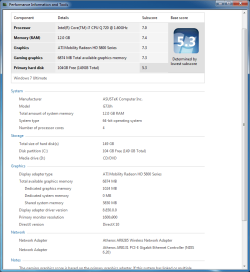
The 720QM is at stock, the 5870m is OC'd from 700/1000 to 840/1100. I have to say I was hoping for a 7.4, but I'll see how much further it can be pushed.

RAM is a mixture of 2x4GB KHX 1600 and just 2x2GB Kingston...standard RAM 1333. Mobo only supports up to 1333 though, and I believe the KHX is CL7 at those speeds...the standard RAM is CL9 though which probably holds it back, idk. I need to get around to putting in the other 2x4GB KHX SODIMMs but I need to take it apart to access the 4th slot...and it's scary :(

Note: can somebody buy me an SSD? Please?

Those are good numbers for a laptop. I know a lot of people who have worse on a desktop. Sorry about the SSD, I'm a little short at the moment.:D
 

My Computers My Computers

System One System Two

  • Computer type
    PC/Desktop
    Computer Manufacturer/Model Number
    ALWAYS UNDER CONSTRUCTION
    OS
    Windows 11 Pro
    CPU
    Ryzen 9 5900X
    Motherboard
    Asus X570 Crosshair Viii Hero
    Memory
    32GB G Skill DDR4-3600
    Graphics Card(s)
    EVGA RTX 3080 FTW 3 Ultra
    Sound Card
    On Board/Sennheiser PC37X Headset
    Monitor(s) Displays
    3 X Asus 27"
    Screen Resolution
    2560x1440
    Hard Drives
    2 X 1 TB NVME drives
    PSU
    EVGA 850
    Case
    Phanteks Eclipse P400A
    Cooling
    EVGA 280 AIO
    Keyboard
    Logitech G510s/ Logitech G13
    Mouse
    Logitech G502
    Internet Speed
    24/1
    Antivirus
    ESET/MBAM Pro/SAS Pro
    Browser
    Chrome/ Firefox/ Edge
  • Computer type
    Laptop
    System Manufacturer/Model Number
    Dell 16 Plus
    OS
    Windows 11 Pro
    CPU
    Intel Ultra 9 288V
    Memory
    32 GB LPDDR5X 8533
    Monitor(s) Displays
    16" Mini-LED HDR600 Touch 90 Hz
    Screen Resolution
    2560X1600
    Hard Drives
    1 TB NVME
That will probably work as well as when I was a kid and didn't want to eat my vegetables, my Mother used to say think of all the starving kids in China. I told her she could give them my vegetables.

...and when he regained consciousness... :D

A Guy

That's about right, but I couldn't help it. I am just that way.
 

My Computers My Computers

System One System Two

  • Computer type
    PC/Desktop
    Computer Manufacturer/Model Number
    ALWAYS UNDER CONSTRUCTION
    OS
    Windows 11 Pro
    CPU
    Ryzen 9 5900X
    Motherboard
    Asus X570 Crosshair Viii Hero
    Memory
    32GB G Skill DDR4-3600
    Graphics Card(s)
    EVGA RTX 3080 FTW 3 Ultra
    Sound Card
    On Board/Sennheiser PC37X Headset
    Monitor(s) Displays
    3 X Asus 27"
    Screen Resolution
    2560x1440
    Hard Drives
    2 X 1 TB NVME drives
    PSU
    EVGA 850
    Case
    Phanteks Eclipse P400A
    Cooling
    EVGA 280 AIO
    Keyboard
    Logitech G510s/ Logitech G13
    Mouse
    Logitech G502
    Internet Speed
    24/1
    Antivirus
    ESET/MBAM Pro/SAS Pro
    Browser
    Chrome/ Firefox/ Edge
  • Computer type
    Laptop
    System Manufacturer/Model Number
    Dell 16 Plus
    OS
    Windows 11 Pro
    CPU
    Intel Ultra 9 288V
    Memory
    32 GB LPDDR5X 8533
    Monitor(s) Displays
    16" Mini-LED HDR600 Touch 90 Hz
    Screen Resolution
    2560X1600
    Hard Drives
    1 TB NVME
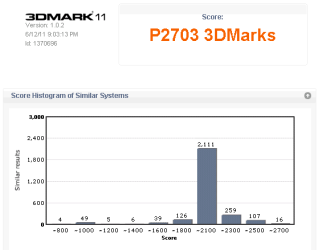
New WEI scores, with the i7 720QM OC'd from 1.6-2.8GHz to 1.77-3.1GHz and the 5870m core/memory speeds up from 700/1000MHz to 810/1105MHz. RAM is up to 1477MHz from 1333. Using W7 from a 7200rpm spinner this time.

Seeing as my mobo limits the RAM to 1333MHz (running at stock FSB speeds), there's no way to OC my Kingston HyperX without changing the FSB speed and thus OCing the CPU too right? Because I really want to see how high these babies can get on the WEI.
 

Attachments

  • wei2.png
    wei2.png
    39.3 KB · Views: 145
  • 3dmark11_2.png
    3dmark11_2.png
    4.1 KB · Views: 36

My Computer My Computer

Computer Manufacturer/Model Number
Asus G73JH-RBBX05
OS
Windows 7 Home Premium x64
CPU
Intel Core i7-720QM @ 1.6-2.97GHz
Motherboard
Asus G73JH
Memory
3 x 2GB Kingston 1333MHz 9-9-9-24
Graphics Card(s)
ATI Mobility Radeon HD 5870 (1GB GDDR5, DX11, 700/1000MHz)
Sound Card
ATI HD Audio
Monitor(s) Displays
17.3" LCD Internal, 27" Samsung LCD External
Screen Resolution
1600x900, 1920x1080
Hard Drives
Seagate 500GB 7200rpm
Waiting for cheap SSDs...
PSU
Stock
Case
...it's a damn notebook!
Cooling
The gigantic vents on the back
Keyboard
Stock
Mouse
Microsoft Wireless something-or-other. Looking at Razer's.
Internet Speed
25Mb/s
Other Info
This notebook is beastly.
I don't know what options you have in bios. Some boards have an option of FSB/Dram ratio. You can try to change that if you have it, but be aware it can cause instability.
 

My Computers My Computers

System One System Two

  • Computer type
    PC/Desktop
    Computer Manufacturer/Model Number
    ALWAYS UNDER CONSTRUCTION
    OS
    Windows 11 Pro
    CPU
    Ryzen 9 5900X
    Motherboard
    Asus X570 Crosshair Viii Hero
    Memory
    32GB G Skill DDR4-3600
    Graphics Card(s)
    EVGA RTX 3080 FTW 3 Ultra
    Sound Card
    On Board/Sennheiser PC37X Headset
    Monitor(s) Displays
    3 X Asus 27"
    Screen Resolution
    2560x1440
    Hard Drives
    2 X 1 TB NVME drives
    PSU
    EVGA 850
    Case
    Phanteks Eclipse P400A
    Cooling
    EVGA 280 AIO
    Keyboard
    Logitech G510s/ Logitech G13
    Mouse
    Logitech G502
    Internet Speed
    24/1
    Antivirus
    ESET/MBAM Pro/SAS Pro
    Browser
    Chrome/ Firefox/ Edge
  • Computer type
    Laptop
    System Manufacturer/Model Number
    Dell 16 Plus
    OS
    Windows 11 Pro
    CPU
    Intel Ultra 9 288V
    Memory
    32 GB LPDDR5X 8533
    Monitor(s) Displays
    16" Mini-LED HDR600 Touch 90 Hz
    Screen Resolution
    2560X1600
    Hard Drives
    1 TB NVME
I have never seen a laptop with all these options in bios, but if they are available you can also increase the FSB and lower the multiplier to bring the CPU back down to near stock speeds, thus raising the ram frequency but not OC the CPU. I'm sure you are aware that doing such things can be hazardous to your hardware.
 

My Computers My Computers

System One System Two

  • Computer type
    PC/Desktop
    Computer Manufacturer/Model Number
    ALWAYS UNDER CONSTRUCTION
    OS
    Windows 11 Pro
    CPU
    Ryzen 9 5900X
    Motherboard
    Asus X570 Crosshair Viii Hero
    Memory
    32GB G Skill DDR4-3600
    Graphics Card(s)
    EVGA RTX 3080 FTW 3 Ultra
    Sound Card
    On Board/Sennheiser PC37X Headset
    Monitor(s) Displays
    3 X Asus 27"
    Screen Resolution
    2560x1440
    Hard Drives
    2 X 1 TB NVME drives
    PSU
    EVGA 850
    Case
    Phanteks Eclipse P400A
    Cooling
    EVGA 280 AIO
    Keyboard
    Logitech G510s/ Logitech G13
    Mouse
    Logitech G502
    Internet Speed
    24/1
    Antivirus
    ESET/MBAM Pro/SAS Pro
    Browser
    Chrome/ Firefox/ Edge
  • Computer type
    Laptop
    System Manufacturer/Model Number
    Dell 16 Plus
    OS
    Windows 11 Pro
    CPU
    Intel Ultra 9 288V
    Memory
    32 GB LPDDR5X 8533
    Monitor(s) Displays
    16" Mini-LED HDR600 Touch 90 Hz
    Screen Resolution
    2560X1600
    Hard Drives
    1 TB NVME
To be honest you should be very happy with this Laptop, it surpasses most Desktop PC's. You seem to be quite adept at tweaking your component settings, but if you push it a hair too far you could end up with burned out components. Most good overclockers tune their system up and then take it back a few notches for fear of doing harm. Perhaps you are at the level that you would knock it back too anyway as it seems you have raised things up a good bit. IMO be very cautious when stretching the last few notches, you don't want it to be the straw that broke the Camels back...
All the same though, that is a really smart piece of portable computing.
 

My Computer My Computer

Computer Manufacturer/Model Number
Custom
OS
Windows 7 Ultimate X64
CPU
AMD Phenom II X6 1100T Black Edition @3.6GHz
Motherboard
ASUS AM3+ CROSSHAIR V FORMULA S/L 990FX
Memory
16GB (4 X 4GB) Corsair CMZ8GX3M2A1600C9 1600MHz CL9 DDR3 Ven
Graphics Card(s)
2 X ATI Sapphire HD 5770 1GB DDR5 @850/1200MHz in CrossfireX
Sound Card
Onboard 7.1 HD Audio/Bluetooth Stereo Audio/C-Media USB 5.1
Monitor(s) Displays
LGW2363D 23", HANNspreeXM-S HANNSverona22" & 42"Samsung HDTV
Screen Resolution
2880X900
Hard Drives
Seagate Barracuda LP 1.5TB
SAMSUNG HD154UI 1.5TB
SAMSUNG HD 204UI 2TB
PSU
Evo Labs 900W 80+ 80 plus Dual 12V ATX PC PSU
Case
Cooler Master Mystique 631
Cooling
Corsair H50 With 2X120mm Push/Pull,3X 120mm (FrX1,SideX2).
Keyboard
Accuratus Toughball 2.4GHz
Mouse
Microsoft Laser Mouse 5000/Emprex Cheetah 2000dpi Optical
Internet Speed
5500kbps
Other Info
LG BH10LS30.AUAU10B 10x Internal Blu-Ray BDRW
Corsair H50 Water Cooling With Push/Pull 120mm Fans vent out
Front 120mm Intake
Side Panel 2 X120mm Intake
90mm Extraction fan in top of case.
OCZ - Extreme Thermal Convection
Quiet PC AcoustiPack Lite 2 Ply Sound Deadening both side panels, front, rear, top and bottom.
To be honest you should be very happy with this Laptop, it surpasses most Desktop PC's. You seem to be quite adept at tweaking your component settings, but if you push it a hair too far you could end up with burned out components. Most good overclockers tune their system up and then take it back a few notches for fear of doing harm. Perhaps you are at the level that you would knock it back too anyway as it seems you have raised things up a good bit. IMO be very cautious when stretching the last few notches, you don't want it to be the straw that broke the Camels back...
All the same though, that is a really smart piece of portable computing.

I agree. Laptops are not good candidates for Overclocking. That one doesn't seem to need it either.
 

My Computers My Computers

System One System Two

  • Computer type
    PC/Desktop
    Computer Manufacturer/Model Number
    ALWAYS UNDER CONSTRUCTION
    OS
    Windows 11 Pro
    CPU
    Ryzen 9 5900X
    Motherboard
    Asus X570 Crosshair Viii Hero
    Memory
    32GB G Skill DDR4-3600
    Graphics Card(s)
    EVGA RTX 3080 FTW 3 Ultra
    Sound Card
    On Board/Sennheiser PC37X Headset
    Monitor(s) Displays
    3 X Asus 27"
    Screen Resolution
    2560x1440
    Hard Drives
    2 X 1 TB NVME drives
    PSU
    EVGA 850
    Case
    Phanteks Eclipse P400A
    Cooling
    EVGA 280 AIO
    Keyboard
    Logitech G510s/ Logitech G13
    Mouse
    Logitech G502
    Internet Speed
    24/1
    Antivirus
    ESET/MBAM Pro/SAS Pro
    Browser
    Chrome/ Firefox/ Edge
  • Computer type
    Laptop
    System Manufacturer/Model Number
    Dell 16 Plus
    OS
    Windows 11 Pro
    CPU
    Intel Ultra 9 288V
    Memory
    32 GB LPDDR5X 8533
    Monitor(s) Displays
    16" Mini-LED HDR600 Touch 90 Hz
    Screen Resolution
    2560X1600
    Hard Drives
    1 TB NVME
I don't know what options you have in bios. Some boards have an option of FSB/Dram ratio. You can try to change that if you have it, but be aware it can cause instability.

I wasn't actually, how comes and what would happen? Surely only OS instability, I could always just go back into BIOS and change it? Not that I'll probably have the options anyway...


As for keeping it down a few notches I have for the CPU from where it starts to BSOD (few PLL lower), need to do some stability testing overnight. The GPU can handle running WEI at 840/1110 but I dropped it down a bit to do the 3DMark11 run. I'll mostly run stock apart from some games which could use a little more oomph (though I haven't tried playing them on this new install yet, I was getting ~2000 before!). Seems like it's pretty much maxing on 2720 now...

And really I'm just an overclocking noob :) I started two days ago now, had looked into it before but just hadn't.
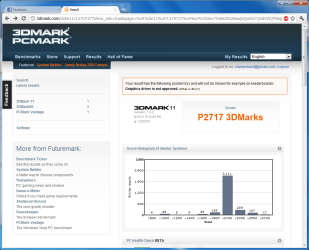
The default PLL for my laptop (the G73JH) is 139, mine can get up to 164 but I am incredibly jealous of a guy's who can handle up to 191. That CPU, despite being mobile, is pretty damn good at handling being OC'd.

Also as soon as I get a desktop I'm going to have to learn properly, as I can't adjust any of the voltages on my laptop so it's pretty basic stuff. No extra cooling systems needed either. I have to admit though, I am in love with this laptop :o
 

Attachments

  • 3dmark11_2.png
    3dmark11_2.png
    57.8 KB · Views: 30

My Computer My Computer

Computer Manufacturer/Model Number
Asus G73JH-RBBX05
OS
Windows 7 Home Premium x64
CPU
Intel Core i7-720QM @ 1.6-2.97GHz
Motherboard
Asus G73JH
Memory
3 x 2GB Kingston 1333MHz 9-9-9-24
Graphics Card(s)
ATI Mobility Radeon HD 5870 (1GB GDDR5, DX11, 700/1000MHz)
Sound Card
ATI HD Audio
Monitor(s) Displays
17.3" LCD Internal, 27" Samsung LCD External
Screen Resolution
1600x900, 1920x1080
Hard Drives
Seagate 500GB 7200rpm
Waiting for cheap SSDs...
PSU
Stock
Case
...it's a damn notebook!
Cooling
The gigantic vents on the back
Keyboard
Stock
Mouse
Microsoft Wireless something-or-other. Looking at Razer's.
Internet Speed
25Mb/s
Other Info
This notebook is beastly.
I don't know what options you have in bios. Some boards have an option of FSB/Dram ratio. You can try to change that if you have it, but be aware it can cause instability.

I wasn't actually, how comes and what would happen? Surely only OS instability, I could always just go back into BIOS and change it? Not that I'll probably have the options anyway...


As for keeping it down a few notches I have for the CPU from where it starts to BSOD (few PLL lower), need to do some stability testing overnight. The GPU can handle running WEI at 840/1110 but I dropped it down a bit to do the 3DMark11 run. I'll mostly run stock apart from some games which could use a little more oomph (though I haven't tried playing them on this new install yet, I was getting ~2000 before!). Seems like it's pretty much maxing on 2720 now...

And really I'm just an overclocking noob :) I started two days ago now, had looked into it before but just hadn't.

The default PLL for my laptop (the G73JH) is 139, mine can get up to 164 but I am incredibly jealous of a guy's who can handle up to 191. That CPU, despite being mobile, is pretty damn good at handling being OC'd.

Also as soon as I get a desktop I'm going to have to learn properly, as I can't adjust any of the voltages on my laptop so it's pretty basic stuff. No extra cooling systems needed either. I have to admit though, I am in love with this laptop :o

If it were mine, I'd be in love with it also. Most laptops are not able to handle the heat OCing creates and that limits them. Actually, that's what limits most desktops. My desktop will overclock more but I can't handle (or don't want to) the heat it causes. Most serious overclockers have pretty elaborite water cooling systems for that reason. I also read on overclockers forums that they record batch numbers for CPUs. Some CPU's of the exact same kind will overclock more than others. I would suggest if you really want to try it, post on the overclockers section of this forum. But, if that were my laptop, I wouldn't want to risk it. It is too good now.

Also, overclocking puts stress on almost all components of the computer and can cause damage. It's a real risk to hardware as well as software.
 

My Computers My Computers

System One System Two

  • Computer type
    PC/Desktop
    Computer Manufacturer/Model Number
    ALWAYS UNDER CONSTRUCTION
    OS
    Windows 11 Pro
    CPU
    Ryzen 9 5900X
    Motherboard
    Asus X570 Crosshair Viii Hero
    Memory
    32GB G Skill DDR4-3600
    Graphics Card(s)
    EVGA RTX 3080 FTW 3 Ultra
    Sound Card
    On Board/Sennheiser PC37X Headset
    Monitor(s) Displays
    3 X Asus 27"
    Screen Resolution
    2560x1440
    Hard Drives
    2 X 1 TB NVME drives
    PSU
    EVGA 850
    Case
    Phanteks Eclipse P400A
    Cooling
    EVGA 280 AIO
    Keyboard
    Logitech G510s/ Logitech G13
    Mouse
    Logitech G502
    Internet Speed
    24/1
    Antivirus
    ESET/MBAM Pro/SAS Pro
    Browser
    Chrome/ Firefox/ Edge
  • Computer type
    Laptop
    System Manufacturer/Model Number
    Dell 16 Plus
    OS
    Windows 11 Pro
    CPU
    Intel Ultra 9 288V
    Memory
    32 GB LPDDR5X 8533
    Monitor(s) Displays
    16" Mini-LED HDR600 Touch 90 Hz
    Screen Resolution
    2560X1600
    Hard Drives
    1 TB NVME
Most laptops don't have such a great or innovative cooling system ;) for starters the vents are massive:

ASUS-G73jh04.jpg

Vents.jpg


Secondly it draws air into the cooling system from above, there's a long 'tray' in front of the monitor which the speakers are housed in, but all of that allows airflow, as well as the vents on the underside. It's neat.
 

My Computer My Computer

Computer Manufacturer/Model Number
Asus G73JH-RBBX05
OS
Windows 7 Home Premium x64
CPU
Intel Core i7-720QM @ 1.6-2.97GHz
Motherboard
Asus G73JH
Memory
3 x 2GB Kingston 1333MHz 9-9-9-24
Graphics Card(s)
ATI Mobility Radeon HD 5870 (1GB GDDR5, DX11, 700/1000MHz)
Sound Card
ATI HD Audio
Monitor(s) Displays
17.3" LCD Internal, 27" Samsung LCD External
Screen Resolution
1600x900, 1920x1080
Hard Drives
Seagate 500GB 7200rpm
Waiting for cheap SSDs...
PSU
Stock
Case
...it's a damn notebook!
Cooling
The gigantic vents on the back
Keyboard
Stock
Mouse
Microsoft Wireless something-or-other. Looking at Razer's.
Internet Speed
25Mb/s
Other Info
This notebook is beastly.
Status
Not open for further replies.
Back
Top