Media center "loses" video library

pieslapper

New member
Local time
11:08 AM
Messages
2
My media center loses its video library. I have video library set up to access files on another computer on the network. This has worked fine for 8 months, but now when accessing the video library it will load ok, folders show up, I start watching a video, finish then go to start another and all the folders have disappeared. I can restart media center with no effect, nothing shows in the library, or restart the machine and it will work as above for a short time then lose it again. All files and folders appear fine and will play if accessed outside media center through explorer, etc. I have tried removing and re adding media libraries, running through the whole media center setup again all to no avail. I hate to reinstall windows but don't see any other option. Again, only seems to be a media center issue, Boxee or XBMC have no problems, nor does straight access through explorer.

Any ideas?

Win 7 ultimate 32 bit
 

My Computer My Computer

OS
Win 7 Ultimate 32 & 64
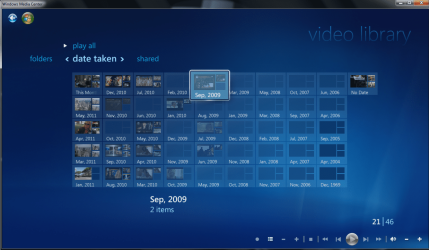
You might find that sorting by DATE will show you your files. As to why or how to fix this, MSFT has offered nothing!!!
 

My Computer My Computer

Computer Manufacturer/Model Number
HP Pavilion a6658f
OS
Windows 7 Home Premium (64 bit)
CPU
Core 2 Quad Q6600 (K) 2.4 GHz (95W) 1066 MHz front side bus
Motherboard
ASUS IPIBL-LB HP/Compaq motherboard name: Benicia-GL8E
Memory
6 GB
Graphics Card(s)
EVGA 01G-P3-N959-TR GeForce 9500 GT 1GB 128-bit DDR2 PCI Exp
Sound Card
Realtek ALC 888S chipset
Monitor(s) Displays
HP w2007 21" Widescreen
Screen Resolution
1680x1050 @59Hz
Hard Drives
(after market) 1TB Western Digital SATA x 2 plus 4 externals of various sizes
Keyboard
Logitech 920-000914 Wired Ultra-thin Illuminated
Mouse
Logitech MX-510
Internet Speed
ping 23ms / ↓ 24.07Mbps / ↑ 2.02Mbps
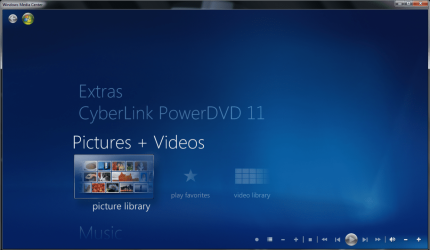
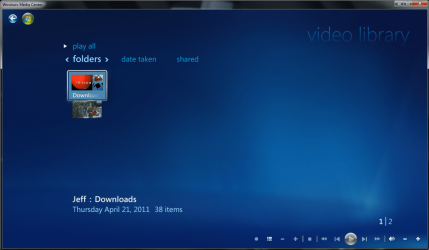
Here's what the problem looks like. SOMEBODY PLEASE HELP!!!
The question is simple: Why did Windows Media Center stop recognizing (video) folders stored on external drives/as well as 1 internal backup drive? What is it going to take to get WMC to perform as it did in Vista and when Windows 7 first came out?
 

Attachments

  • 1.PNG
    1.PNG
    222.7 KB · Views: 4
  • 2.PNG
    2.PNG
    225.3 KB · Views: 6
  • 3.PNG
    3.PNG
    262.1 KB · Views: 11

My Computer My Computer

Computer Manufacturer/Model Number
HP Pavilion a6658f
OS
Windows 7 Home Premium (64 bit)
CPU
Core 2 Quad Q6600 (K) 2.4 GHz (95W) 1066 MHz front side bus
Motherboard
ASUS IPIBL-LB HP/Compaq motherboard name: Benicia-GL8E
Memory
6 GB
Graphics Card(s)
EVGA 01G-P3-N959-TR GeForce 9500 GT 1GB 128-bit DDR2 PCI Exp
Sound Card
Realtek ALC 888S chipset
Monitor(s) Displays
HP w2007 21" Widescreen
Screen Resolution
1680x1050 @59Hz
Hard Drives
(after market) 1TB Western Digital SATA x 2 plus 4 externals of various sizes
Keyboard
Logitech 920-000914 Wired Ultra-thin Illuminated
Mouse
Logitech MX-510
Internet Speed
ping 23ms / ↓ 24.07Mbps / ↑ 2.02Mbps

My Computer My Computer

Computer Manufacturer/Model Number
self-assembled
OS
Windows 7 Ultimate 32bit
CPU
AMD Phenom II X3 720 Processor
Motherboard
Gigabyte GA-MA78GM-S2H Revision 1.0
Memory
Transcend DDR2 (PC2 6400) 4 X 1GB
Graphics Card(s)
Integrated + ATI Radeon 4550
Sound Card
Integrated Realtek ALC 889A
Monitor(s) Displays
DELL 1704 FPT
Screen Resolution
1280 x 1024
Hard Drives
Western Digital Caviar SE16 250 GB x2 in RAID 0
PSU
Coolermaster 400 W
Case
Zebronics Cube
Cooling
stock
Keyboard
Microsoft - wired
Mouse
Microsoft - wired
Internet Speed
ADSL 256-512Kbps

Attachments

  • smileyvault-cute-big-smiley-animated-030.gif
    smileyvault-cute-big-smiley-animated-030.gif
    3.5 KB · Views: 588

My Computer My Computer

Computer Manufacturer/Model Number
HP Pavilion a6658f
OS
Windows 7 Home Premium (64 bit)
CPU
Core 2 Quad Q6600 (K) 2.4 GHz (95W) 1066 MHz front side bus
Motherboard
ASUS IPIBL-LB HP/Compaq motherboard name: Benicia-GL8E
Memory
6 GB
Graphics Card(s)
EVGA 01G-P3-N959-TR GeForce 9500 GT 1GB 128-bit DDR2 PCI Exp
Sound Card
Realtek ALC 888S chipset
Monitor(s) Displays
HP w2007 21" Widescreen
Screen Resolution
1680x1050 @59Hz
Hard Drives
(after market) 1TB Western Digital SATA x 2 plus 4 externals of various sizes
Keyboard
Logitech 920-000914 Wired Ultra-thin Illuminated
Mouse
Logitech MX-510
Internet Speed
ping 23ms / ↓ 24.07Mbps / ↑ 2.02Mbps
Here's what the problem looks like. SOMEBODY PLEASE HELP!!!
The question is simple: Why did Windows Media Center stop recognizing (video) folders stored on external drives/as well as 1 internal backup drive? What is it going to take to get WMC to perform as it did in Vista and when Windows 7 first came out?

On a second reading, the only way that could happen is when the drive letter changes.It is possible in the case of external drives when you plug-in some more of that variety.:)

I am now confused. Why would you try to access media stored on an Internal back-up drive? One would normally call on a back-up only when the original is corrupted or lost and to refurbish it. Is it not?

Or is it some paranormal forces are corrupting my brain cells?
 

My Computer My Computer

Computer Manufacturer/Model Number
self-assembled
OS
Windows 7 Ultimate 32bit
CPU
AMD Phenom II X3 720 Processor
Motherboard
Gigabyte GA-MA78GM-S2H Revision 1.0
Memory
Transcend DDR2 (PC2 6400) 4 X 1GB
Graphics Card(s)
Integrated + ATI Radeon 4550
Sound Card
Integrated Realtek ALC 889A
Monitor(s) Displays
DELL 1704 FPT
Screen Resolution
1280 x 1024
Hard Drives
Western Digital Caviar SE16 250 GB x2 in RAID 0
PSU
Coolermaster 400 W
Case
Zebronics Cube
Cooling
stock
Keyboard
Microsoft - wired
Mouse
Microsoft - wired
Internet Speed
ADSL 256-512Kbps
Here's what the problem looks like. SOMEBODY PLEASE HELP!!!
The question is simple: Why did Windows Media Center stop recognizing (video) folders stored on external drives/as well as 1 internal backup drive? What is it going to take to get WMC to perform as it did in Vista and when Windows 7 first came out?

On a second reading, the only way that could happen is when the drive letter changes.It is possible in the case of external drives when you plug-in some more of that variety.:)

I am now confused. Why would you try to access media stored on an Internal back-up drive? One would normally call on a back-up only when the original is corrupted or lost and to refurbish it. Is it not?

Or is it some paranormal forces are corrupting my brain cells?

re: backup drive letters - You know, that sounds like something that could very well be feasible. BUT, here's the problem with that theory. I actually wiped my C drive (DoD Standard Compliant) and started totally fresh with a new install. Yes, I can hear the chuckles from you all for me having gone to such lengths...but I was determined dammit!;) Anyhow, with a perfectly clean HD and install completed, it was time to set up WMC and start choosing libraries to add. After doing so with great care and double checking everything, I completed the task & rebooted just to be safe. Once booted up, I launched WMC. SAME *#@%$& PROBLEM!!!

re: internal backup - My logic in this case was really more of a test than anything else. I put an exact same HD in (SATA) just to see if perhaps the source of my videos was somehow accessed differently now that they resided on a drive that was actually part of the machine and not a USB. No luck. To run WMC the way it should, I put some of my vids on C drive. That is, until I was warned that I was down to only 18GB free out of 1TB.

Anyway, as you should have gathered by now, the problem still persists. I'm thinking that perhaps an exorcism is my only option left. Oh, and by the way, Microsoft still has not offered up a solution.
 

My Computer My Computer

Computer Manufacturer/Model Number
HP Pavilion a6658f
OS
Windows 7 Home Premium (64 bit)
CPU
Core 2 Quad Q6600 (K) 2.4 GHz (95W) 1066 MHz front side bus
Motherboard
ASUS IPIBL-LB HP/Compaq motherboard name: Benicia-GL8E
Memory
6 GB
Graphics Card(s)
EVGA 01G-P3-N959-TR GeForce 9500 GT 1GB 128-bit DDR2 PCI Exp
Sound Card
Realtek ALC 888S chipset
Monitor(s) Displays
HP w2007 21" Widescreen
Screen Resolution
1680x1050 @59Hz
Hard Drives
(after market) 1TB Western Digital SATA x 2 plus 4 externals of various sizes
Keyboard
Logitech 920-000914 Wired Ultra-thin Illuminated
Mouse
Logitech MX-510
Internet Speed
ping 23ms / ↓ 24.07Mbps / ↑ 2.02Mbps
Fixed...At Least For Me

Well, stranger things have happened. Check this out. I stumbled upon some obscure forum that was mainly about bugs, glitches and such. (I never bookmarked it!):mad:
Anyhoo...sure enough, there was a thread on this very subject. One of the posters, who REALLY sounded quite experienced, said that his trouble with WMC was based on a few corrupted .DLL files. Like me, out of frustration, he re-installed Windows in hopes that the fresh/clean install would do the trick. Apparently it didn't (for me either). Then, just for the hell of it, he thought "maybe the OS disc has corrupt OR outdated files for WMC". So he downloaded a copy of Windows 7 and entered his legit license key. BINGO! I immediately did the same thing and......BINGO AGAIN!

I was partially right about it having to do with a Microsoft update. Whatever it was that was in that update, screwed with certain critical files in WMC. So I'm guessing that the OS we downloaded was more current and somehow installed everything A-OK. I can't be 100% certain that this is the end all to be all answer for everyone, but at least it's better than nothing.

Just thought I'd pass this along to whomever is interested.

CHEERS!
:thumbsup:
 

My Computer My Computer

Computer Manufacturer/Model Number
HP Pavilion a6658f
OS
Windows 7 Home Premium (64 bit)
CPU
Core 2 Quad Q6600 (K) 2.4 GHz (95W) 1066 MHz front side bus
Motherboard
ASUS IPIBL-LB HP/Compaq motherboard name: Benicia-GL8E
Memory
6 GB
Graphics Card(s)
EVGA 01G-P3-N959-TR GeForce 9500 GT 1GB 128-bit DDR2 PCI Exp
Sound Card
Realtek ALC 888S chipset
Monitor(s) Displays
HP w2007 21" Widescreen
Screen Resolution
1680x1050 @59Hz
Hard Drives
(after market) 1TB Western Digital SATA x 2 plus 4 externals of various sizes
Keyboard
Logitech 920-000914 Wired Ultra-thin Illuminated
Mouse
Logitech MX-510
Internet Speed
ping 23ms / ↓ 24.07Mbps / ↑ 2.02Mbps
Back
Top