Solved Gateway recovery disk not repairing mbr

blankenshipma

New member
Local time
1:35 PM
Messages
5
First, sorry for punctuation and grammar. I am writing this on my phone holding my daughter rocking in a chair.

I have a gateway P79 series gaming laptop. It came with no recovery disks, so I had to burn my own when it asked me in Windows. I have Windows 7 premium 64. I for a while chose to use linux instead, and erased my windows partition, and the mbr got converted to grub for Ubuntu.

I am now choosing to go back to Windows 7 with the repair disks. Even though I burned them myself through Windows, they are branded Gateway in the interface. I did the complete recovery option in the disk, but it did not remove the grub from linux in the mbr and replace it with windows bootloader. I am now doing a repair, but it is not like the ones I have seen on the web. I don't get to choose partitions, or select anything. I don't have the option to repair really, just do a restore and backup my personal folders while it does that. I suspect this wont repair the mbr either. I have no other computer to plug this internal laptop hd into. Any ideas on how I can fix the mbr without a command prompt? Like a boot program I can put on my thumb drive to fix it? Thanks.
 

My Computer My Computer

At a glance

Windows 7 home premium 64
OS
Windows 7 home premium 64
All Linux code must be deleted.As you have had linux on the HD you need do a Clean all & full format.
http://www.sevenforums.com/tutorials/52129-disk-clean-clean-all-diskpart-command.html
http://www.sevenforums.com/tutorials/2668-partition-volume-delete.html?ltr=P
http://www.sevenforums.com/tutorials/2674-partition-volume-create-new.html?ltr=P
http://www.sevenforums.com/tutorials/71432-partition-mark-active.html?ltr=P

Do a full clean & full format in command prompt.
1) Boot DVD & Press Shift+F10 (for command prompt)
http://www.sevenforums.com/tutorials/119713-diskpart-pc-startup.html

2) Boot DVD, & http://www.sevenforums.com/tutorials/682-command-prompt-startup.html
(for command prompt)

Type in command line
DISKPART
LIST DISK
SELECT DISK # (win HD)
CLEAN ALL
CREATE PARTITION PRIMARY
SELECT PARTITION 1
ACTIVE
FORMAT fs=NTFS
ASSIGN
EXIT
EXIT

http://www.sevenforums.com/tutorials/91339-ssd-hdd-optimize-windows-reinstallation.html
You will need a Startup Repair Disk:
http://www.sevenforums.com/tutorials/2083-system-repair-disc-create.html

When you have cleaned & formated the HD, use your Gateway Recovery Disks.
 

My Computer My Computer

At a glance

ME/XP/Vista/Win7
OS
ME/XP/Vista/Win7
First, sorry for punctuation and grammar. I am writing this on my phone holding my daughter rocking in a chair.

I have a gateway P79 series gaming laptop. It came with no recovery disks, so I had to burn my own when it asked me in Windows. I have Windows 7 premium 64. I for a while chose to use linux instead, and erased my windows partition, and the mbr got converted to grub for Ubuntu.

I am now choosing to go back to Windows 7 with the repair disks. Even though I burned them myself through Windows, they are branded Gateway in the interface. I did the complete recovery option in the disk, but it did not remove the grub from linux in the mbr and replace it with windows bootloader. I am now doing a repair, but it is not like the ones I have seen on the web. I don't get to choose partitions, or select anything. I don't have the option to repair really, just do a restore and backup my personal folders while it does that. I suspect this wont repair the mbr either. I have no other computer to plug this internal laptop hd into. Any ideas on how I can fix the mbr without a command prompt? Like a boot program I can put on my thumb drive to fix it? Thanks.

Using the Startup repair Disk open up a Command Prompt and then Enter the following codes

Code:
bootrec.exe /Fixboot

And then press enter then type out this

Code:
bootrec.exe /Fixmbr

Press enter then boot up to see if it works

A format should fix the issue

Josh
 

My Computer My Computer

At a glance

Windows 7 Professional x64 SP1 ; Windows Serv...Intel Core i5 2400 @ 3.10GHz8.0GB DDR3 @ 665MHz (2GBx4)AMD Radeon HD 6870
Computer type
PC/Desktop
Computer Manufacturer/Model Number
Custom Built
OS
Windows 7 Professional x64 SP1 ; Windows Server 2012 R2 Standard
CPU
Intel Core i5 2400 @ 3.10GHz
Motherboard
Foxconn H67MP-S/-V/H67MP
Memory
8.0GB DDR3 @ 665MHz (2GBx4)
Graphics Card(s)
AMD Radeon HD 6870
Sound Card
Realtek High Definition Audio
Monitor(s) Displays
AOC 2243W & SMB1930NW
Screen Resolution
1440x900 & 1920x1080
Hard Drives
977GB Seagate ST31000524AS ATA Drive (SATA)
250GB WD iSCSI attached Drive
PSU
750W Gaming PSU
Case
Novatech Night
Cooling
Fan
Keyboard
Dell Standard PS/2 Keyboard
Mouse
R.A.T 07 Gaming Mouse
Internet Speed
Download: 10 Mbps Ping: 30ms Upload: 0.81 Mbps
Browser
Google Chrome
Other Info
Optiarc DVD RW AD-5260S ATA Device
Hello blankenshipma, welcome to Seven Forums!


Use Option Two of this tutorial at the link below to create a bootable Windows repair disk.

How to Create a Windows 7 System Repair Disc


Then use Method Two of this one to boot to Windows diskpart.

DISKPART : At PC Startup


Then at diskpart use Step One of this one to do the wipe secure erase of the entire Hard Disk Drive to completely over-write the Linux/Grub code.

SSD / HDD : Optimize for Windows Reinstallation


Then when the wipe completes exit twice and remove the repair disk and reboot to the Gateway restore disks and reinstall the factory setup and be sure to post back with any further questions you may have and to keep us informed.
 

My Computer My Computer

At a glance

W 7 64-bit UltimateIntel Q9550 Yorkfield8GB Dominator 8500C5DATI : XFX 5870
Computer Manufacturer/Model Number
* BFK Customs *
OS
W 7 64-bit Ultimate
CPU
Intel Q9550 Yorkfield
Motherboard
ASUS P5Q Pro
Memory
8GB Dominator 8500C5D
Graphics Card(s)
ATI : XFX 5870
Sound Card
Realtek HD Audio 7-1
Monitor(s) Displays
1x 47" LCD HDMI & 3x 26" LCD HDMI
Screen Resolution
1920x1080P & 1920x1200
Hard Drives
1x 80GB Intel X25-M G2 SSD : 1x 500GB & 1x 640GB WD Caviar Black(s)
PSU
Corsair 620HX
Case
Cooler Master RC-690
Cooling
Tuniq Tower 120, 2x 140mm and 3x 120mm case fans
Keyboard
Microsoft 500
Mouse
Razer Diamondback 3G
Internet Speed
14 Mb/s
Other Info
1x Koutech 3Gb/s SATA HDD Hot Swap Rack
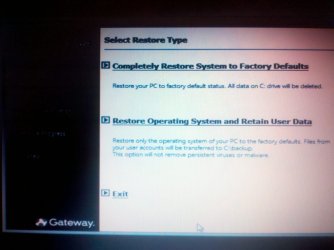
First, I want to say thank you to all the timely replies, unfortunately I can get none of those to work. I have attached a screenshot of what my recovery disk screen looks like when I first boot up. I don't know when I am supposed to try Shift+f11 but I did it at all stages of loading and no luck. This is why I hate proprietary software with each computer company. All other replies are also obsolete, although helpful no doubt to all others except me with these retarded recovery disks. Is there any other way? Thanks again.

P.S. I apologize for the photo quality. Had to take a pic. But you get the point, it is a weird Gateway Recovery disk, not just vanilla Windows disks.
 

Attachments

  • 2011-06-15_20-19-06_126.jpg
    2011-06-15_20-19-06_126.jpg
    177.1 KB · Views: 44

My Computer My Computer

At a glance

Windows 7 home premium 64
OS
Windows 7 home premium 64
That is the point that Shift+f11 is meant to take you to but you found another way okay this is where you Reinstall your OS to when you first brought it

You can do 2 options

Restore Everything - Erase and Install

Restore OS - Partly Reinstall

^^ Retains user Data - Documents, Pictures etc...

If you have backed up all your data then I would seriously suggest to do the First option

   Warning
Whatever option you choose all your programs will be wiped off and will require you to reinstall them


Josh
 

My Computer My Computer

At a glance

Windows 7 Professional x64 SP1 ; Windows Serv...Intel Core i5 2400 @ 3.10GHz8.0GB DDR3 @ 665MHz (2GBx4)AMD Radeon HD 6870
Computer type
PC/Desktop
Computer Manufacturer/Model Number
Custom Built
OS
Windows 7 Professional x64 SP1 ; Windows Server 2012 R2 Standard
CPU
Intel Core i5 2400 @ 3.10GHz
Motherboard
Foxconn H67MP-S/-V/H67MP
Memory
8.0GB DDR3 @ 665MHz (2GBx4)
Graphics Card(s)
AMD Radeon HD 6870
Sound Card
Realtek High Definition Audio
Monitor(s) Displays
AOC 2243W & SMB1930NW
Screen Resolution
1440x900 & 1920x1080
Hard Drives
977GB Seagate ST31000524AS ATA Drive (SATA)
250GB WD iSCSI attached Drive
PSU
750W Gaming PSU
Case
Novatech Night
Cooling
Fan
Keyboard
Dell Standard PS/2 Keyboard
Mouse
R.A.T 07 Gaming Mouse
Internet Speed
Download: 10 Mbps Ping: 30ms Upload: 0.81 Mbps
Browser
Google Chrome
Other Info
Optiarc DVD RW AD-5260S ATA Device
According to this there is a recovery partition and you can do a factory restore this way.
How to Factory Restore a Laptop | eHow.com
I'd be tempted to backup all data and deactivate any paid software. Then do a factory restore.
If you do have a factory restore/recovery partition a "Clean all" will likely wipe it.
 

My Computer My Computer

At a glance

Windows 7x64 Home Premium SP1Intel i7 2600kG.Skill Ripjaws (DDR3-1600) 2x4GBNvidia GeForce GTS 450; Intel HD Graphics 300...
Computer type
PC/Desktop
Computer Manufacturer/Model Number
Own build
OS
Windows 7x64 Home Premium SP1
CPU
Intel i7 2600k
Motherboard
ASUS P8Z68 Deluxe
Memory
G.Skill Ripjaws (DDR3-1600) 2x4GB
Graphics Card(s)
Nvidia GeForce GTS 450; Intel HD Graphics 3000(GT2+)
Monitor(s) Displays
Dell Ultrasharp IPS panel U2311H, Samsung SyncMaster P2350
Screen Resolution
1920x1080
Hard Drives
Samsung 850 Pro SSD 256GB, Samsung SSD 840 120GB, Seagates 1TB Barracuda ST31000528AS x2
PSU
Seasonic M12II 520W
Case
Lian Li Lancool PC-K60
Cooling
Case: 1x120mm, 3x140mm CPU: Hyper 212+
Keyboard
Logitech MK520 (wireless)
Mouse
Logitech MK520
Internet Speed
6-7 Mbps
Antivirus
Norton Security Premium, Malwarebytes on 2 (MSE on 3rd PC)
Browser
FireFox
Other Info
Audio: Logitech Z523 2.1
That is the point that Shift+f11 is meant to take you to but you found another way okay this is where you Reinstall your OS to when you first brought it

You can do 2 options

Restore Everything - Erase and Install

Restore OS - Partly Reinstall

^^ Retains user Data - Documents, Pictures etc...

If you have backed up all your data then I would seriously suggest to do the First option

   Warning
Whatever option you choose all your programs will be wiped off and will require you to reinstall them


Josh

As stated in first post, I have tried both of these, and while the restore successfully completed, I was still unable to reboot computer, hence why I am here asking how to fix. The MBR was still trying to boot linux after the Windows recovery.

All Linux code must be deleted.As you have had linux on the HD you need do a Clean all & full format.
http://www.sevenforums.com/tutorials/52129-disk-clean-clean-all-diskpart-command.html
http://www.sevenforums.com/tutorials/2668-partition-volume-delete.html?ltr=P
http://www.sevenforums.com/tutorials/2674-partition-volume-create-new.html?ltr=P
http://www.sevenforums.com/tutorials/71432-partition-mark-active.html?ltr=P

Do a full clean & full format in command prompt.
1) Boot DVD & Press Shift+F10 (for command prompt)
http://www.sevenforums.com/tutorials/119713-diskpart-pc-startup.html

2) Boot DVD, & http://www.sevenforums.com/tutorials/682-command-prompt-startup.html
(for command prompt)

Type in command line
DISKPART
LIST DISK
SELECT DISK # (win HD)
CLEAN ALL
CREATE PARTITION PRIMARY
SELECT PARTITION 1
ACTIVE
FORMAT fs=NTFS
ASSIGN
EXIT
EXIT

http://www.sevenforums.com/tutorials/91339-ssd-hdd-optimize-windows-reinstallation.html
You will need a Startup Repair Disk:
http://www.sevenforums.com/tutorials/2083-system-repair-disc-create.html

When you have cleaned & formated the HD, use your Gateway Recovery Disks.

This worked, but not how you wanted me to do it. I still had no way of going into the command prompt with these disks. I had to boot into my linux liveCD, and use the "shred" command in terminal to physically wipe the disk. That worked, and after another recovery, I am talking to you on my fresh Windows install now. Thank you.
 

My Computer My Computer

At a glance

Windows 7 home premium 64
OS
Windows 7 home premium 64
You will need a Startup Repair Disk:
http://www.sevenforums.com/tutorials/2083-system-repair-disc-create.html

When you have cleaned & formated the HD, use your Gateway Recovery Disks.

Hello blankenshipma, welcome to Seven Forums!


Use Option Two of this tutorial at the link below to create a bootable Windows repair disk.

How to Create a Windows 7 System Repair Disc

Then when the wipe completes exit twice and remove the repair disk and reboot to the Gateway restore disks and reinstall the factory setup and be sure to post back with any further questions you may have and to keep us informed.

Did you?
 

My Computer My Computer

At a glance

ME/XP/Vista/Win7
OS
ME/XP/Vista/Win7
You will need a Startup Repair Disk:
http://www.sevenforums.com/tutorials/2083-system-repair-disc-create.html

When you have cleaned & formated the HD, use your Gateway Recovery Disks.

Hello blankenshipma, welcome to Seven Forums!


Use Option Two of this tutorial at the link below to create a bootable Windows repair disk.

How to Create a Windows 7 System Repair Disc

Then when the wipe completes exit twice and remove the repair disk and reboot to the Gateway restore disks and reinstall the factory setup and be sure to post back with any further questions you may have and to keep us informed.

Did you?

I only did what you said, but had to do it a different way. You gave me the idea though, and it worked. I had to wipe HD first, then reinstall. I just couldn't get a command prompt from the disks i made and found out why. When I first got my computer, Gateway software prompted me to make recovery disks through THEIR software, not the normal Windows way. Their software gave me no option to get to a command prompt, not with Shift f10 or anything. So I used my linux live cd, ran their command prompt and wiped the drive from there, then reinstalled Windows and it worked. Same thing, different method. Thanks for your help.
 

My Computer My Computer

At a glance

Windows 7 home premium 64
OS
Windows 7 home premium 64
I am glad you got your problem sorted ;)
 

My Computer My Computer

At a glance

Windows 7 Professional x64 SP1 ; Windows Serv...Intel Core i5 2400 @ 3.10GHz8.0GB DDR3 @ 665MHz (2GBx4)AMD Radeon HD 6870
Computer type
PC/Desktop
Computer Manufacturer/Model Number
Custom Built
OS
Windows 7 Professional x64 SP1 ; Windows Server 2012 R2 Standard
CPU
Intel Core i5 2400 @ 3.10GHz
Motherboard
Foxconn H67MP-S/-V/H67MP
Memory
8.0GB DDR3 @ 665MHz (2GBx4)
Graphics Card(s)
AMD Radeon HD 6870
Sound Card
Realtek High Definition Audio
Monitor(s) Displays
AOC 2243W & SMB1930NW
Screen Resolution
1440x900 & 1920x1080
Hard Drives
977GB Seagate ST31000524AS ATA Drive (SATA)
250GB WD iSCSI attached Drive
PSU
750W Gaming PSU
Case
Novatech Night
Cooling
Fan
Keyboard
Dell Standard PS/2 Keyboard
Mouse
R.A.T 07 Gaming Mouse
Internet Speed
Download: 10 Mbps Ping: 30ms Upload: 0.81 Mbps
Browser
Google Chrome
Other Info
Optiarc DVD RW AD-5260S ATA Device
You'd better keep your recovery disks in a safe spot because you have probably wiped your recovery partition.
 

My Computer My Computer

At a glance

Windows 7x64 Home Premium SP1Intel i7 2600kG.Skill Ripjaws (DDR3-1600) 2x4GBNvidia GeForce GTS 450; Intel HD Graphics 300...
Computer type
PC/Desktop
Computer Manufacturer/Model Number
Own build
OS
Windows 7x64 Home Premium SP1
CPU
Intel i7 2600k
Motherboard
ASUS P8Z68 Deluxe
Memory
G.Skill Ripjaws (DDR3-1600) 2x4GB
Graphics Card(s)
Nvidia GeForce GTS 450; Intel HD Graphics 3000(GT2+)
Monitor(s) Displays
Dell Ultrasharp IPS panel U2311H, Samsung SyncMaster P2350
Screen Resolution
1920x1080
Hard Drives
Samsung 850 Pro SSD 256GB, Samsung SSD 840 120GB, Seagates 1TB Barracuda ST31000528AS x2
PSU
Seasonic M12II 520W
Case
Lian Li Lancool PC-K60
Cooling
Case: 1x120mm, 3x140mm CPU: Hyper 212+
Keyboard
Logitech MK520 (wireless)
Mouse
Logitech MK520
Internet Speed
6-7 Mbps
Antivirus
Norton Security Premium, Malwarebytes on 2 (MSE on 3rd PC)
Browser
FireFox
Other Info
Audio: Logitech Z523 2.1
You'd better keep your recovery disks in a safe spot because you have probably wiped your recovery partition.

Thanks, you are right, I deleted that a long time ago though, on purpose. :)
 

My Computer My Computer

At a glance

Windows 7 home premium 64
OS
Windows 7 home premium 64
Hence the reason why Shift+f10 didn't work that is the Command to use to boot into your recovery partition
 

My Computer My Computer

At a glance

Windows 7 Professional x64 SP1 ; Windows Serv...Intel Core i5 2400 @ 3.10GHz8.0GB DDR3 @ 665MHz (2GBx4)AMD Radeon HD 6870
Computer type
PC/Desktop
Computer Manufacturer/Model Number
Custom Built
OS
Windows 7 Professional x64 SP1 ; Windows Server 2012 R2 Standard
CPU
Intel Core i5 2400 @ 3.10GHz
Motherboard
Foxconn H67MP-S/-V/H67MP
Memory
8.0GB DDR3 @ 665MHz (2GBx4)
Graphics Card(s)
AMD Radeon HD 6870
Sound Card
Realtek High Definition Audio
Monitor(s) Displays
AOC 2243W & SMB1930NW
Screen Resolution
1440x900 & 1920x1080
Hard Drives
977GB Seagate ST31000524AS ATA Drive (SATA)
250GB WD iSCSI attached Drive
PSU
750W Gaming PSU
Case
Novatech Night
Cooling
Fan
Keyboard
Dell Standard PS/2 Keyboard
Mouse
R.A.T 07 Gaming Mouse
Internet Speed
Download: 10 Mbps Ping: 30ms Upload: 0.81 Mbps
Browser
Google Chrome
Other Info
Optiarc DVD RW AD-5260S ATA Device
Mouse and Enter key not working on RESTORE TYPE screen

On the screen shot of both ways to restore from the hided partition, from the 1st page. I get the same screen, but, my mouse can high lite, but DOUBLE CLICK of the mouse does not start the restores? Nor does the ENTER key start the program. Nor both at the same time. Any ideas on how to click to start the restore process? Or why the mouse and enter key do not function on that screen?

Is there a CMD path? Or is that the same screen I will get when using the CMD?

In safe mode, it starts the countdown to shutting down. Of course, forget about the normal start.

( I do not mean last restore point).

Thanks for taking the time to read this.
 

My Computer My Computer

At a glance

windows 7 home 32
Computer type
PC/Desktop
OS
windows 7 home 32
Update, FYI and all.

Safe mode would lock, but it was the HELP & SUPPORT program that would freeze or something caused it to freeze, (I noticed that windows would start with the previous started programs)

I was watching a youtube https://www.youtube.com/watch?v=dx-LW8BzZZc

and the member went to control panel then to restore, they did note that the ENTER/Mouse would at times not work.
Then back to the desktop they typed in GATEWAY, and displayed the restore option, picking advanced.

Using that info, I went back into safe mode, types GATEWAY as fast as I could, before I knew I was finished, the SUPPORT program started and froze, I quickly CTRL-ALT-DEL, and turned off the program, then a screen under it displayed another error with COM, closed that, then discovered the GATEWAY menu was up, picked the center option, went to advanced.

Then the RESTORE program came up and the mouse/ENTER key did work.

Right now it's in PROGRESS, with the RETAIN USER DATA, which might be a waste of time.


Anyways, I kinda believe the REGISTER was corrupt, or a virus. I never checked, Not my PC.

I did not find the option to check for lost clusters, as I have never used WIN7. I am thinking if there was a way to delete all new registries, then WIN7 would have worked, The RESTORE to previous date was never turned on. too bad.

A high headed young man owns this PC, Plus FRYS told him he had a bad hard drive. So, you see there were a number of issues, from the very start, there were walls that prevented a quick repair. At least the guy backed up his stuff, but I would have done a complete clone of all partitions. Which I will TELL him to do and virus check.

Now I'm going to tell him to make two copies of his RESTORE disk/s, and I will enable regular restore dates. He may or may not take my advise, hate to see him waste money, but I'm not helping him again, this was all free. I did learn a lot in two hours, next time it will take me under two minutes, but I won't tell him that. He needs to take the time to open up his mind, learn how to find info, then use it

THANK YOU FOR POSTING THIS THREAD AND KEEPING IT OPEN, this was my third helpful source.

-Dad
 
Last edited:

My Computer My Computer

At a glance

windows 7 home 32
Computer type
PC/Desktop
OS
windows 7 home 32
Back
Top