Drive not availabe in Windows Backup

meetdenis

New member
Local time
9:21 AM
Messages
8
Location
127.0.0.1
Hi All,

I have two HDD's installed on my PC.
The 1st one is 500GB and has three partitions, in one of which Windows 7 is installed.
The 2nd one is 160GB and has only one partition. I plan to use this one as a backup drive.

When I go to setup the Windows Backup wizard, in the list of partitions where I can choose to create the backup, it does not show me the 2nd drive partion. It only shows two partitions from the 1st drive.

How do I make the wizard display the 2nd drive as well? :confused:

The second drive is detected by Win 7 and I can also access it from Windows Explorer and other areas. I can read/write files to it. It's just that it is not shown in the Windows Backup options.

I had XP installed on the 2nd drive earlier, and so I think Windows Backup does not show it as it identifies some system-critical files on it(same reason it doesn't show the partition on which 7 is installed).

I have formatted the 2nd drive, but still no luck.
I also tried the Disk Wiper tool in CCleaner to erase all hidden files in the drive, but that takes ages to wipe the disk.

Please help.
 

My Computer My Computer

Computer Manufacturer/Model Number
Custom
OS
Windows 7 Ultimate x64 SP1
CPU
Intel C2D E7400 2.8Ghz
Motherboard
Gigabyte GA-EP45-UD3L
Memory
Kingston 4GB 800MHz
Graphics Card(s)
ZOTAC GTX 260^2 896MB
Sound Card
none
Monitor(s) Displays
Dell E190S
Hard Drives
WD 500GB + 160GB
PSU
Cooler Master 460W
Case
Cooler Master Elite 310
Cooling
12" Chassis fan
I can't answer but Acronis Home Image can see my drives after I clean them but Win 7 can't.. Strange.
 

My Computer My Computer

Computer type
Laptop
Computer Manufacturer/Model Number
Dell Latitude 6530 Notebook ( 15.6 screen)
OS
Win7 64 Bit
CPU
I-5
Memory
8 GB
Graphics Card(s)
Intel 4000
Monitor(s) Displays
FHD 1980 x 1080
Screen Resolution
1980x1280
Hard Drives
Samsung 840 Pro 256 GB for OS Samsung Pro 840 256 GB for Storage.
Keyboard
Backlit Key's
Internet Speed
DSL 1.5 mbps
Thanks for the help, Hopalong X, but this is not the problem I am facing.
The tutorial shows how to create a System Image. This I have already created.

The issue I described is with the Setup Backup option where my actual documents, images, etc. need to be backed up.

I want to set the backup such that it will backup all my files in the second HDD. But the HDD is not shown in the list.

Hope this has clarified and I get a solution.:(
 

My Computer My Computer

Computer Manufacturer/Model Number
Custom
OS
Windows 7 Ultimate x64 SP1
CPU
Intel C2D E7400 2.8Ghz
Motherboard
Gigabyte GA-EP45-UD3L
Memory
Kingston 4GB 800MHz
Graphics Card(s)
ZOTAC GTX 260^2 896MB
Sound Card
none
Monitor(s) Displays
Dell E190S
Hard Drives
WD 500GB + 160GB
PSU
Cooler Master 460W
Case
Cooler Master Elite 310
Cooling
12" Chassis fan
I realized that after reading your post a second time.

You found your way to the proper place but the HD isn't showing.

I have been looking for a tutorial since to show you how to format the storage HD.
That way we know for sure Windows is totally recognizing it. No luck so far.

I know how but explaining it may be a problem.

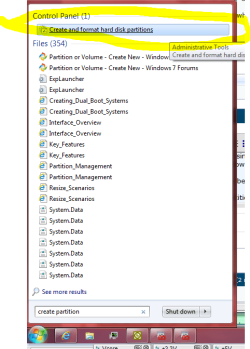
Go to Start and type "create partition" in search bar. Click "Create a Partion".
This will open Disk Management. My second Snip.

You will only show two hard drives if it is showing properly.
 

Attachments

  • Create Part2.PNG
    Create Part2.PNG
    20.6 KB · Views: 10
  • Disk Management3.PNG
    Disk Management3.PNG
    43.4 KB · Views: 99

My Computer My Computer

Computer Manufacturer/Model Number
Hopalong/ Godzilla
OS
Windows7 Pro 64bit SP-1; Windows XP Pro 32bit
CPU
Intel Core i7-870 Lynnfield 2.93GHz LGA 1156 95W Quad-Core
Motherboard
ASUS P7P55D-E PRO
Memory
8GB@1400MHz Crucial Ballistix DDR3-1600 4x2GB
Graphics Card(s)
ASUS ENGTX460 DirectCU/2DI/1GD5 1GB 256-bit GDDR5
Sound Card
VIA Onboard
Monitor(s) Displays
Asus VS248H-P 24"; Samsung SyncMaster 941BW 19"ws
Screen Resolution
1920x1080; 1440x900
Hard Drives
Samsung 830 120GB SSD
Intel 320 120GB SSD
Western Digital Caviar Black WD7501AALS 750GB 7200 RPM SATA 3.0Gb/s
Western Digital Caviar Black WD6401AALS 640GB 7200 RPM SATA 3.0Gb/s
PSU
COOLER MASTER Silent Pro RS850-AMBAJ3-US 850W Modular
Case
COOLER MASTER HAF 932 RC-932-KKN5-GP Black
Cooling
Scythe "Mugen-2 Rev.B" (2 ScytheKaze-Jyuni PWM fans)
Keyboard
Logitech K-320
Mouse
Kensington
Antivirus
Avast Inernet Suite
Browser
IE 9 ; Chrome
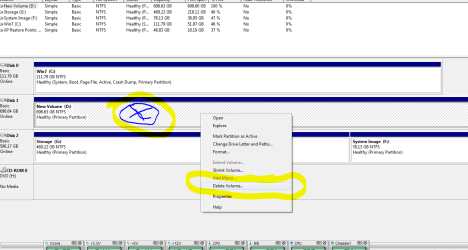
This should erase info on Disk and format.

On the storage hard drive right click where I made the blue X with circle.

Do this on storage drive not the OS!!!

Then click Delete Volume in the pop up window I circled in yellow.

I am making Snips and posting as I do it on mine so this may take a few minutes for everything.
 

Attachments

  • DM2.PNG
    DM2.PNG
    24.1 KB · Views: 18

My Computer My Computer

Computer Manufacturer/Model Number
Hopalong/ Godzilla
OS
Windows7 Pro 64bit SP-1; Windows XP Pro 32bit
CPU
Intel Core i7-870 Lynnfield 2.93GHz LGA 1156 95W Quad-Core
Motherboard
ASUS P7P55D-E PRO
Memory
8GB@1400MHz Crucial Ballistix DDR3-1600 4x2GB
Graphics Card(s)
ASUS ENGTX460 DirectCU/2DI/1GD5 1GB 256-bit GDDR5
Sound Card
VIA Onboard
Monitor(s) Displays
Asus VS248H-P 24"; Samsung SyncMaster 941BW 19"ws
Screen Resolution
1920x1080; 1440x900
Hard Drives
Samsung 830 120GB SSD
Intel 320 120GB SSD
Western Digital Caviar Black WD7501AALS 750GB 7200 RPM SATA 3.0Gb/s
Western Digital Caviar Black WD6401AALS 640GB 7200 RPM SATA 3.0Gb/s
PSU
COOLER MASTER Silent Pro RS850-AMBAJ3-US 850W Modular
Case
COOLER MASTER HAF 932 RC-932-KKN5-GP Black
Cooling
Scythe "Mugen-2 Rev.B" (2 ScytheKaze-Jyuni PWM fans)
Keyboard
Logitech K-320
Mouse
Kensington
Antivirus
Avast Inernet Suite
Browser
IE 9 ; Chrome

My Computer My Computer

Computer type
PC/Desktop
Computer Manufacturer/Model Number
Self Built
OS
Win 10 Pro x64
CPU
Intel I5-2500K @3.3GHz
Motherboard
Asrock P67 Extreme4
Memory
16GB G.Skill Ripjaws X (4x4GB)
Graphics Card(s)
EVGA GeForce 750 Ti SC 2GB
Sound Card
ASUS Xonar DG 5.1 Channels 24-bit 96KHz PCI Interface Sound
Monitor(s) Displays
auria eq2367
Screen Resolution
1920 x 1080
Hard Drives
250GB Samsung 850 EVO SSD
1TB WD Blue
1TB Hitachi
PSU
SeaSonic X 650W 80 Plus Gold
Case
Corsair Obsidian 750D
Cooling
Corsair H60, Three 140mm case fans
Keyboard
Logitech Wireless Keyboard K520
Mouse
Logitech Wireless Mouse M310
Internet Speed
Wave Broadband ~ 100 dn 5 up
Antivirus
Windows Defender, Malwarebytes Premium
Browser
Edge, IE11, Chrome
Other Info
Laptop specs: HP g7-1365dx /
CPU: AMD A6-3420M APU with Radeon(tm) HD Graphics /
RAM: Crucial 8Gb (2x4Gb) /
SSD: Crucial M4-CT128M4SSD2 ATA Device/ FW 000F /
GFX: AMD Radeon HD 6520G /
OS: Windows 10 Pro x64
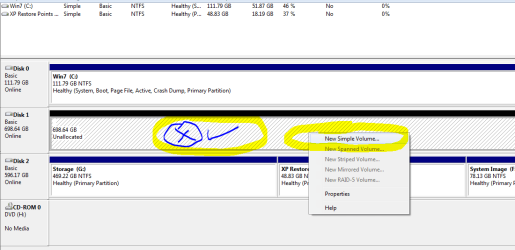
Left top Snip below.
Now the drive will show Unallocated.
Right click where I marked the blue x again then click New Simple Volume.

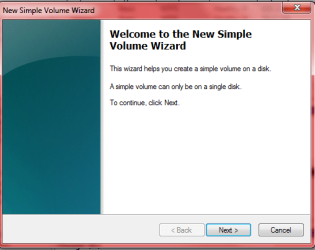
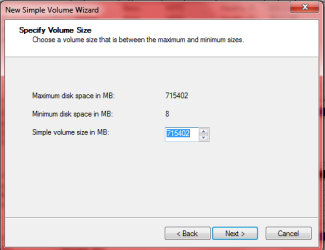
Top middle Snip click next, Top right click Next and all of the windows click "NEXT".
I think there were 4 total to click NEXT.

Then bottom left SNIP will show. It should say as mine Healthy Primary.

Hopefully after all this it will show in Windows Backup. ;)

Let us know if it works or not and we will go from there.
Mike
 

Attachments

  • DM3.PNG
    DM3.PNG
    16.1 KB · Views: 5
  • DM4.PNG
    DM4.PNG
    28.2 KB · Views: 7
  • DM5.PNG
    DM5.PNG
    11.5 KB · Views: 6
  • DM6.PNG
    DM6.PNG
    16.2 KB · Views: 6

My Computer My Computer

Computer Manufacturer/Model Number
Hopalong/ Godzilla
OS
Windows7 Pro 64bit SP-1; Windows XP Pro 32bit
CPU
Intel Core i7-870 Lynnfield 2.93GHz LGA 1156 95W Quad-Core
Motherboard
ASUS P7P55D-E PRO
Memory
8GB@1400MHz Crucial Ballistix DDR3-1600 4x2GB
Graphics Card(s)
ASUS ENGTX460 DirectCU/2DI/1GD5 1GB 256-bit GDDR5
Sound Card
VIA Onboard
Monitor(s) Displays
Asus VS248H-P 24"; Samsung SyncMaster 941BW 19"ws
Screen Resolution
1920x1080; 1440x900
Hard Drives
Samsung 830 120GB SSD
Intel 320 120GB SSD
Western Digital Caviar Black WD7501AALS 750GB 7200 RPM SATA 3.0Gb/s
Western Digital Caviar Black WD6401AALS 640GB 7200 RPM SATA 3.0Gb/s
PSU
COOLER MASTER Silent Pro RS850-AMBAJ3-US 850W Modular
Case
COOLER MASTER HAF 932 RC-932-KKN5-GP Black
Cooling
Scythe "Mugen-2 Rev.B" (2 ScytheKaze-Jyuni PWM fans)
Keyboard
Logitech K-320
Mouse
Kensington
Antivirus
Avast Inernet Suite
Browser
IE 9 ; Chrome
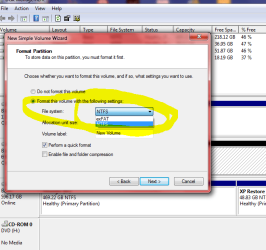
When you get to the below left SNIP make sure NTFS is selected.


Attachments

  • DM7.PNG
    DM7.PNG
    27.4 KB · Views: 4

My Computer My Computer

Computer Manufacturer/Model Number
Hopalong/ Godzilla
OS
Windows7 Pro 64bit SP-1; Windows XP Pro 32bit
CPU
Intel Core i7-870 Lynnfield 2.93GHz LGA 1156 95W Quad-Core
Motherboard
ASUS P7P55D-E PRO
Memory
8GB@1400MHz Crucial Ballistix DDR3-1600 4x2GB
Graphics Card(s)
ASUS ENGTX460 DirectCU/2DI/1GD5 1GB 256-bit GDDR5
Sound Card
VIA Onboard
Monitor(s) Displays
Asus VS248H-P 24"; Samsung SyncMaster 941BW 19"ws
Screen Resolution
1920x1080; 1440x900
Hard Drives
Samsung 830 120GB SSD
Intel 320 120GB SSD
Western Digital Caviar Black WD7501AALS 750GB 7200 RPM SATA 3.0Gb/s
Western Digital Caviar Black WD6401AALS 640GB 7200 RPM SATA 3.0Gb/s
PSU
COOLER MASTER Silent Pro RS850-AMBAJ3-US 850W Modular
Case
COOLER MASTER HAF 932 RC-932-KKN5-GP Black
Cooling
Scythe "Mugen-2 Rev.B" (2 ScytheKaze-Jyuni PWM fans)
Keyboard
Logitech K-320
Mouse
Kensington
Antivirus
Avast Inernet Suite
Browser
IE 9 ; Chrome
How about this for a thought. Windows backup reserves only 30% of the partition for backup. Is 30% of 160GB large enough to hold at least one backup.
 

My Computer My Computer

Computer type
Laptop
Computer Manufacturer/Model Number
Hewlett-Packard/G62-107SA Notebook
OS
Microsoft Windows 7 Home Premium 64-bit Service Pack 1
CPU
Intel(R) Core(TM) i3 CPU M 330 @ 2.13GHz
Motherboard
Hewlett-Packard 1425
Memory
8 GB DDR3
Graphics Card(s)
Intel(R) HD Graphics
Sound Card
Realtek High Definition Audio
Monitor(s) Displays
Builtin
Screen Resolution
1366 x 768 x 32 bits (4294967296 colors) @ 60 Hz
Hard Drives
250 GB SATA Hard Disk Drive 7200 rpm
2TB Seagate GoFlex USB 2 Drive
1TB Iomega Prestige USB 2 Drive
1.5TB Iomega Prestige USB 2 Drive (Samsung)
2TB WD MyBook Live NAS.
Mouse
Logitech Anywhere MX
Internet Speed
152 Mbs download 10 Mbs upload
Antivirus
Norton 360
Browser
Chrome

My Computer My Computer

Computer Manufacturer/Model Number
Custom
OS
Windows 7 Ultimate x64 SP1
CPU
Intel C2D E7400 2.8Ghz
Motherboard
Gigabyte GA-EP45-UD3L
Memory
Kingston 4GB 800MHz
Graphics Card(s)
ZOTAC GTX 260^2 896MB
Sound Card
none
Monitor(s) Displays
Dell E190S
Hard Drives
WD 500GB + 160GB
PSU
Cooler Master 460W
Case
Cooler Master Elite 310
Cooling
12" Chassis fan

My Computer My Computer

Computer Manufacturer/Model Number
Hopalong/ Godzilla
OS
Windows7 Pro 64bit SP-1; Windows XP Pro 32bit
CPU
Intel Core i7-870 Lynnfield 2.93GHz LGA 1156 95W Quad-Core
Motherboard
ASUS P7P55D-E PRO
Memory
8GB@1400MHz Crucial Ballistix DDR3-1600 4x2GB
Graphics Card(s)
ASUS ENGTX460 DirectCU/2DI/1GD5 1GB 256-bit GDDR5
Sound Card
VIA Onboard
Monitor(s) Displays
Asus VS248H-P 24"; Samsung SyncMaster 941BW 19"ws
Screen Resolution
1920x1080; 1440x900
Hard Drives
Samsung 830 120GB SSD
Intel 320 120GB SSD
Western Digital Caviar Black WD7501AALS 750GB 7200 RPM SATA 3.0Gb/s
Western Digital Caviar Black WD6401AALS 640GB 7200 RPM SATA 3.0Gb/s
PSU
COOLER MASTER Silent Pro RS850-AMBAJ3-US 850W Modular
Case
COOLER MASTER HAF 932 RC-932-KKN5-GP Black
Cooling
Scythe "Mugen-2 Rev.B" (2 ScytheKaze-Jyuni PWM fans)
Keyboard
Logitech K-320
Mouse
Kensington
Antivirus
Avast Inernet Suite
Browser
IE 9 ; Chrome
When you get to the below left SNIP make sure NTFS is selected.


^^ Thanks a ton Mike. Will try that and let you know. But I got a feeling this is gonna work aready :D

Tutorial I finally found. This shows doing a partition on the disk but steps are similar to what I posted.
If you need it.
Don't follow it or you will have a partition.
I thought it might help give added info if you don't understand my steps.

Option One.
http://www.sevenforums.com/tutorials/2674-partition-volume-create-new.html
^^ Yes, this I do not require and will not do as I have already created all the partitions I need.
I guess it was only that the existing partition needs to be erased and a Simple New Volume needs to be created to fix the problem. Thanks again for the prompt help.
 

My Computer My Computer

Computer Manufacturer/Model Number
Custom
OS
Windows 7 Ultimate x64 SP1
CPU
Intel C2D E7400 2.8Ghz
Motherboard
Gigabyte GA-EP45-UD3L
Memory
Kingston 4GB 800MHz
Graphics Card(s)
ZOTAC GTX 260^2 896MB
Sound Card
none
Monitor(s) Displays
Dell E190S
Hard Drives
WD 500GB + 160GB
PSU
Cooler Master 460W
Case
Cooler Master Elite 310
Cooling
12" Chassis fan
How about this for a thought. Windows backup reserves only 30% of the partition for backup. Is 30% of 160GB large enough to hold at least one backup.

Whoa! Never knew that. But I am sure there must be some way to increase the %age?
 

My Computer My Computer

Computer Manufacturer/Model Number
Custom
OS
Windows 7 Ultimate x64 SP1
CPU
Intel C2D E7400 2.8Ghz
Motherboard
Gigabyte GA-EP45-UD3L
Memory
Kingston 4GB 800MHz
Graphics Card(s)
ZOTAC GTX 260^2 896MB
Sound Card
none
Monitor(s) Displays
Dell E190S
Hard Drives
WD 500GB + 160GB
PSU
Cooler Master 460W
Case
Cooler Master Elite 310
Cooling
12" Chassis fan

My Computer My Computer

Computer type
Laptop
Computer Manufacturer/Model Number
Hewlett-Packard/G62-107SA Notebook
OS
Microsoft Windows 7 Home Premium 64-bit Service Pack 1
CPU
Intel(R) Core(TM) i3 CPU M 330 @ 2.13GHz
Motherboard
Hewlett-Packard 1425
Memory
8 GB DDR3
Graphics Card(s)
Intel(R) HD Graphics
Sound Card
Realtek High Definition Audio
Monitor(s) Displays
Builtin
Screen Resolution
1366 x 768 x 32 bits (4294967296 colors) @ 60 Hz
Hard Drives
250 GB SATA Hard Disk Drive 7200 rpm
2TB Seagate GoFlex USB 2 Drive
1TB Iomega Prestige USB 2 Drive
1.5TB Iomega Prestige USB 2 Drive (Samsung)
2TB WD MyBook Live NAS.
Mouse
Logitech Anywhere MX
Internet Speed
152 Mbs download 10 Mbs upload
Antivirus
Norton 360
Browser
Chrome
I don't think so. Have you considered using an alternative backup like Macrium Reflect FREE Edition - Information and download

Yes, I have tried backup software like Paragon Drive Backup, Titan Backup & Uranium Backup when I used XP. But I do not want to use a separate software when Windows 7 provides one in-house. :geek:

But I am surprised that Windows does not let the 30% limit be increased.
Especially when you consider that many, to minimize risk, will back up to a separate physical storage like a HDD, USB or a disc. How then, does the 30% limit make sense in this case? Just wondering at the rationale. :rolleyes:
 

My Computer My Computer

Computer Manufacturer/Model Number
Custom
OS
Windows 7 Ultimate x64 SP1
CPU
Intel C2D E7400 2.8Ghz
Motherboard
Gigabyte GA-EP45-UD3L
Memory
Kingston 4GB 800MHz
Graphics Card(s)
ZOTAC GTX 260^2 896MB
Sound Card
none
Monitor(s) Displays
Dell E190S
Hard Drives
WD 500GB + 160GB
PSU
Cooler Master 460W
Case
Cooler Master Elite 310
Cooling
12" Chassis fan
I don't think so. Have you considered using an alternative backup like Macrium Reflect FREE Edition - Information and download

Yes, I have tried backup software like Paragon Drive Backup, Titan Backup & Uranium Backup when I used XP. But I do not want to use a separate software when Windows 7 provides one in-house. :geek:

But I am surprised that Windows does not let the 30% limit be increased.
Especially when you consider that many, to minimize risk, will back up to a separate physical storage like a HDD, USB or a disc. How then, does the 30% limit make sense in this case? Just wondering at the rationale. :rolleyes:

I think the 30% limit only applies to HDD and only when doing a full backup. I think if you set space management to keep one image and just create an image then it doesn't apply but you don't get the scheduling with that.
 

My Computer My Computer

Computer type
Laptop
Computer Manufacturer/Model Number
Hewlett-Packard/G62-107SA Notebook
OS
Microsoft Windows 7 Home Premium 64-bit Service Pack 1
CPU
Intel(R) Core(TM) i3 CPU M 330 @ 2.13GHz
Motherboard
Hewlett-Packard 1425
Memory
8 GB DDR3
Graphics Card(s)
Intel(R) HD Graphics
Sound Card
Realtek High Definition Audio
Monitor(s) Displays
Builtin
Screen Resolution
1366 x 768 x 32 bits (4294967296 colors) @ 60 Hz
Hard Drives
250 GB SATA Hard Disk Drive 7200 rpm
2TB Seagate GoFlex USB 2 Drive
1TB Iomega Prestige USB 2 Drive
1.5TB Iomega Prestige USB 2 Drive (Samsung)
2TB WD MyBook Live NAS.
Mouse
Logitech Anywhere MX
Internet Speed
152 Mbs download 10 Mbs upload
Antivirus
Norton 360
Browser
Chrome
On the storage hard drive right click where I made the blue X with circle.

Do this on storage drive not the OS!!!

Then click Delete Volume in the pop up window I circled in yellow.

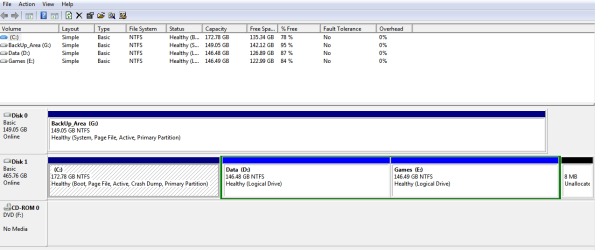
^^ On the storage drive, the Delete Volume option is disabled :(

This is how my disks look. The G: is the storage drive
 

My Computer My Computer

Computer Manufacturer/Model Number
Custom
OS
Windows 7 Ultimate x64 SP1
CPU
Intel C2D E7400 2.8Ghz
Motherboard
Gigabyte GA-EP45-UD3L
Memory
Kingston 4GB 800MHz
Graphics Card(s)
ZOTAC GTX 260^2 896MB
Sound Card
none
Monitor(s) Displays
Dell E190S
Hard Drives
WD 500GB + 160GB
PSU
Cooler Master 460W
Case
Cooler Master Elite 310
Cooling
12" Chassis fan
On the storage hard drive right click where I made the blue X with circle.

Do this on storage drive not the OS!!!

Then click Delete Volume in the pop up window I circled in yellow.

^^ On the storage drive, the Delete Volume option is disabled :(

This is how my disks look. The G: is the storage drive

I believe that has something to do with it being marked active, also your statement here,

I had XP installed on the 2nd drive earlier, and so I think Windows Backup does not show it as it identifies some system-critical files on it

And this,

I have formatted the 2nd drive, but still no luck.
I also tried the Disk Wiper tool in CCleaner to erase all hidden files in the drive, but that takes ages to wipe the disk.

I'm not sure you did that successfully, looking at your disk management window.

And since it still shows almost 7gb still on that drive as well.

The fact that is the first disk listed might be a problem as well.
 

Attachments

  • Jq7CM.png
    Jq7CM.png
    14.7 KB · Views: 5

My Computer My Computer

Computer type
PC/Desktop
Computer Manufacturer/Model Number
Self Built
OS
Win 10 Pro x64
CPU
Intel I5-2500K @3.3GHz
Motherboard
Asrock P67 Extreme4
Memory
16GB G.Skill Ripjaws X (4x4GB)
Graphics Card(s)
EVGA GeForce 750 Ti SC 2GB
Sound Card
ASUS Xonar DG 5.1 Channels 24-bit 96KHz PCI Interface Sound
Monitor(s) Displays
auria eq2367
Screen Resolution
1920 x 1080
Hard Drives
250GB Samsung 850 EVO SSD
1TB WD Blue
1TB Hitachi
PSU
SeaSonic X 650W 80 Plus Gold
Case
Corsair Obsidian 750D
Cooling
Corsair H60, Three 140mm case fans
Keyboard
Logitech Wireless Keyboard K520
Mouse
Logitech Wireless Mouse M310
Internet Speed
Wave Broadband ~ 100 dn 5 up
Antivirus
Windows Defender, Malwarebytes Premium
Browser
Edge, IE11, Chrome
Other Info
Laptop specs: HP g7-1365dx /
CPU: AMD A6-3420M APU with Radeon(tm) HD Graphics /
RAM: Crucial 8Gb (2x4Gb) /
SSD: Crucial M4-CT128M4SSD2 ATA Device/ FW 000F /
GFX: AMD Radeon HD 6520G /
OS: Windows 10 Pro x64
The fact that is the first disk listed might be a problem as well.

I think the problem lies as it says G: is a 'System' drive.
I guess Windows 7 boot critical files might be present on the G: instead of C:

I fear this because when installing Windows 7, I had the G: connected.
Can this be possible? that Windows 7 is installed on C: but the boot critical files are stored in G: ? :huh:

If yes, I think I would need to do a complete format of G: before the OS loads. How to do that?

And if no, then what could be the other cause? and its fix?
 

My Computer My Computer

Computer Manufacturer/Model Number
Custom
OS
Windows 7 Ultimate x64 SP1
CPU
Intel C2D E7400 2.8Ghz
Motherboard
Gigabyte GA-EP45-UD3L
Memory
Kingston 4GB 800MHz
Graphics Card(s)
ZOTAC GTX 260^2 896MB
Sound Card
none
Monitor(s) Displays
Dell E190S
Hard Drives
WD 500GB + 160GB
PSU
Cooler Master 460W
Case
Cooler Master Elite 310
Cooling
12" Chassis fan
You got it meetdenis.

System should be with Boot. As mine is below.

You may need to start over.

Plug in just the main HD to install the OS.
You can install the OS to your "C" and leave the partitions -or- wipe the entire drive and start from scratch. If you do that do not make the extra partitions logical. It isn't necessary if you have only 4 partitions and you cannot change them back to "Primary" without losing your data on the Logical partition..

This will get you thru deleting partion if needed.
http://www.sevenforums.com/tutorials/2668-partition-volume-delete.html

Extend volume- put the partitioned areas back together. Just in case.
http://www.sevenforums.com/tutorials/2670-partition-volume-extend.html

Create volume or parttion.
http://www.sevenforums.com/tutorials/2674-partition-volume-create-new.html

What I would do. My opinion.

1) Get what ever files you want to keep off the PC. Just in case so you have a backup. Flash/thumb drive?

2) I would repartition and get rid of the logical partitions. My prefernce but not a necessity. ;) Go with what you want.

3) Main item. Use one HD installed/plugged in and install Windows. Putting it back on "C" is fine. System, Boot will be together.
Pain in the butt but I see no other choice.

4) Then we can get back to HD number two for storage. Once System is on C then storage can be formated.
Windows is using BOTH HD's right now so we can't change it.


My Computer My Computer

Computer Manufacturer/Model Number
Hopalong/ Godzilla
OS
Windows7 Pro 64bit SP-1; Windows XP Pro 32bit
CPU
Intel Core i7-870 Lynnfield 2.93GHz LGA 1156 95W Quad-Core
Motherboard
ASUS P7P55D-E PRO
Memory
8GB@1400MHz Crucial Ballistix DDR3-1600 4x2GB
Graphics Card(s)
ASUS ENGTX460 DirectCU/2DI/1GD5 1GB 256-bit GDDR5
Sound Card
VIA Onboard
Monitor(s) Displays
Asus VS248H-P 24"; Samsung SyncMaster 941BW 19"ws
Screen Resolution
1920x1080; 1440x900
Hard Drives
Samsung 830 120GB SSD
Intel 320 120GB SSD
Western Digital Caviar Black WD7501AALS 750GB 7200 RPM SATA 3.0Gb/s
Western Digital Caviar Black WD6401AALS 640GB 7200 RPM SATA 3.0Gb/s
PSU
COOLER MASTER Silent Pro RS850-AMBAJ3-US 850W Modular
Case
COOLER MASTER HAF 932 RC-932-KKN5-GP Black
Cooling
Scythe "Mugen-2 Rev.B" (2 ScytheKaze-Jyuni PWM fans)
Keyboard
Logitech K-320
Mouse
Kensington
Antivirus
Avast Inernet Suite
Browser
IE 9 ; Chrome
Back
Top