Dual Boot Installation with Windows 7 and XP

How to Setup a Dual Boot Installation with Windows 7 and XP


   Information
This will show you how to install Windows 7 and XP to dual boot with when you already have either Windows 7 or XP installed first.
   Note
With a dual boot installaton, you will have two operating systems (OS) installed. When you start the computer, you will have the choice to choose which OS you would like to start up to. This method is the easiest way of doing a dual boot with these two operating systems.
   Tip
When dual booting with another OS (ex: Vista or XP), you may not always have that OS partition show up in Computer with a driver letter in Windows 7. If this happens, then you will just need to add a drive letter to the OS (ex: Vista or XP) partition in Windows 7 Disk Management for it to show up in Computer with a driver letter.
   Warning
To stop XP from deleting your Windows 7 System Restore Points everytime XP is started, then see System Restore Points - Stop XP Dual Boot Delete to hide Windows 7 from XP.

Windows 7 Minimum Hardware Requirements


NOTE: For more information on this, see: Windows 7 system requirements
  • 1 GHz 32-bit or 64-bit processor
  • 1 GB RAM for 32-bit Windows 7 OR 2 GB RAM for 64-bit Windows 7
  • 16 GB available disk space 32-bit Windows 7 OR 20 GB for 64-bit Windows 7
  • Support for DirectX 9 graphics with 128 MB memory (in order to enable Aero theme)
  • DVD-R/W Drive
  • Internet or phone access to activate Windows 7.
Windows XP Minimum Hardware Requirements

NOTE: For more information on this, see: System requirements for Windows XP operating systems
  • PC with 300 megahertz (MHz) or higher processor clock speed recommended; 233-MHz minimum required;* Intel Pentium/Celeron family, AMD K6/Athlon/Duron family, or compatible processor recommended
  • 128 megabytes (MB) of RAM or higher recommended (64 MB minimum supported; may limit performance and some features)
  • 1.5 gigabyte (GB) of available hard disk space.*
  • Super VGA (800 × 600) or higher resolution video adapter and monitor
  • CD-ROM or DVD drive
  • Keyboard and Microsoft Mouse or compatible pointing device
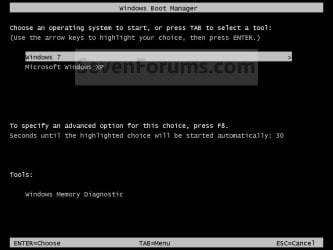
EXAMPLE: Windows Boot Manager
NOTE: This is the boot screen where you select what operating system that you would like to start. By default, you have 30 seconds to choose another operating system before the default operating system will start automatically.
Example.jpg


OPTION ONE

When XP is Installed First


NOTE: If you have a RAID setup, you will need to have the Windows 7 RAID drivers on a USB flash drive available to select and load while installing Windows 7.
1. Do step 2 or 3 below for where you wanted to install Windows 7 at.

2. To Create a New Partition from the XP Hard Disk Drive
A) With your Windows 7 installation disc boot into the Command Prompt from the System Recovery Options screen.
NOTE: Make sure that the CD/DVD drive is selected first in the boot order in the BIOS.

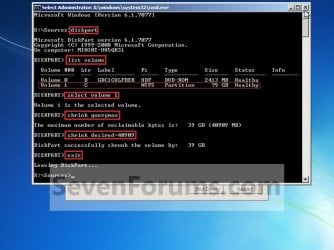
B) In the command prompt, select and shrink the XP volume by how many MB (1024 MB = 1 GB) you want to have for this Windows 7 partition. (See screenshot below)
NOTE: You would do steps 2 to 9 in METHOD TWO at that link. Windows 7 will need a minimum of 16 GB (16384 MB).
XP-W7_1.jpg
C) Click on the X at the top right corner to close the command prompt. (See screenshot above)

D) Click on the X at the top right corner to close System Recovery Options. (See screenshot below)
XP-W7_2.jpg
E) Go to step 4.
3. To Use a Separate Hard Disk Drive than the XP Drive
A) Boot from your Windows 7 installation disc.
NOTE: Make sure that the CD/DVD drive is selected first in the boot order in the BIOS.
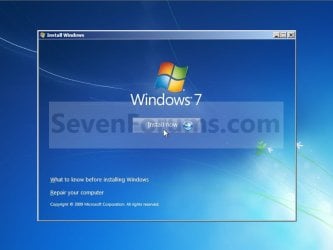
4. Click on the Install now button. (See screenshot below)
XP-W7_3.jpg
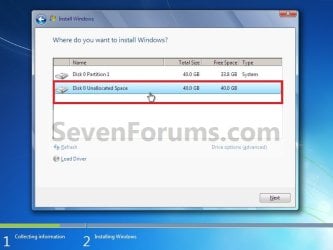
5. When you get to this point, select the partition (step 2) or hard drive to install Windows 7 on. (See screenshot below)
XP-W7_4.jpg
6. Finish installing Windows 7.
NOTE: You would start at step 9 in that link to finish installing Windows 7.

7. When finished, restart the computer to have the option to boot from XP (Earlier Verision of Windows) or Windows 7. (See screenshot below)

   Note
If you are only booting into Windows 7 and do not have XP listed in the Windows Boot Manager, then you can install only EasyBCD (step 8 Option Two below) to add XP (or Windows 7) while started in Windows 7 the same way to the boot list.

Example.jpg


OPTION TWO

When Windows 7 is Installed First


   Warning

1. To Create a New Partition from the Windows 7 Hard Disk Drive
NOTE: If you want to install XP on a separate internal hard drive instead, then skip this step and go to step 2.
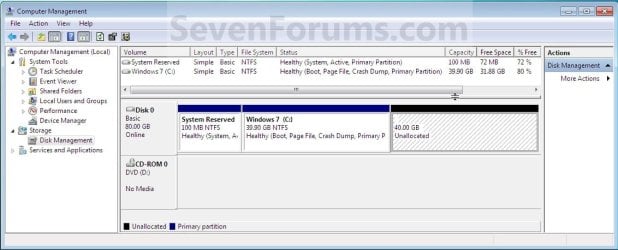
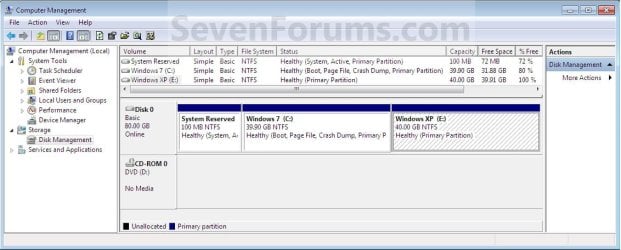
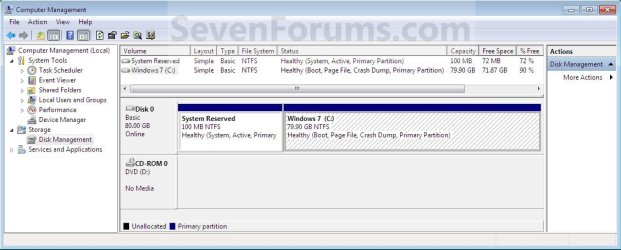
A) In Windows 7, select and shrink the Windows 7 volume in Disk Management by how many MB (1024 MB = 1 GB) you want to have for this XP partition. (See screenshots below)
NOTE: You would do all of Method One at that link.
W7-XP-1.jpg

W7-XP-2.jpg

W7-XP-3.jpg
2. Insert your XP installation disc, then restart the computer and press any key to boot from it when prompted. (See screenshot below)
NOTE: Make sure that the CD/DVD drive is selected first in the boot order in the BIOS.

Step1.jpg
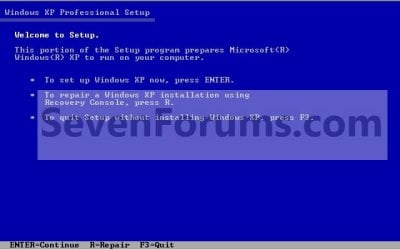
3. From XP Setup, Press Enter. (See screenshot below)


   Warning

W7-XP-4.jpg
4. Press F8. (See screenshot below)
NOTE: On some multimedia keyboards, you may need to press the F-Lock or Function key before pressing F8.
W7-XP-5.jpg
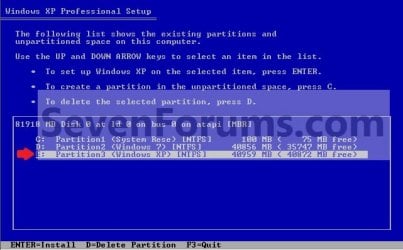
5. Select the partition (step 1) or hard drive that you want to install XP on using the arrow keys and press Enter.
W7-XP-6.jpg
6. Finish installing XP.


   Tip
If you get Error loading Operating System after XP restarts:
  • Using your Windows 7 installation disc, boot to the command prompt at startup.
  • Type in these comands below, and press enter after each one.
    • bootrec /FixMbr
    • bootrec /FixBoot
    • bootrec /RebuildBcd
  • Exit the command prompt and restart the computer.
  • At this point, Windows 7 should boot up the same way before trying to install XP.
  • Continue to step 8 below and run EasyBCD from Windows 7 instead.

7. In XP, download and install .Net Framework 2.0 (32-bit) version or .Net Framework 2.0 (64-bit) version first, and EasyBCD (free version) for your 32-bit (x86) or 64-bit (x86) XP.
NOTE: In XP, Net Framework is required to be installed to run EasyBCD. After you click on Register (at bottom of link) for the free EasyBCD, registration is not required to download it.

8. Run EasyBCD (free version).
NOTE: This is required to repair the Windows 7 boot file and add XP to the Windows Boot Manager list.

9. On the left side of EasyBCD, click on the Add New Entry button. (See screenshot below)
A) In the top section under Operating Systems, click on the Windows tab. (See screenshot below)
B) To the right of Type, select Windows NT/2k/XP/2k3 from the drop down menu. (See screenshot below)
:warn:WARNING: Be sure to leave the Automatically detect correct drive box checked.

C) To the right of Name, you can leave the default Microsoft Windows XP as the name to be displayed in the Windows Boot Manager, or you can type whatever name you would like to have instead. (See screenshot below)
D) Click on the Add Entry button. (See screenshot below)
W7-XP-7.jpg
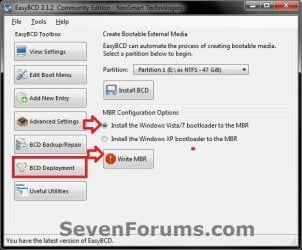
10. On the left side of EasyBCD, click on the BCD Deployment button, select (dot) the Install the Windows Vista/7 bootloader to the MBR option, and click on the Write MBR button. (See screenshot below)
W7-XP-9.jpg
11. Close EasyBCD.

12. Restart the computer to have the option to boot from Microsoft Windows XP or Windows 7. (See screenshot below)
Example2.jpg
   Tip
If Windows 7 will not start up when selected, then use your Windows 7 installation DVD to do a Startup Repair.

That's it,
Shawn


Last edited:
Hm, all right. I'll take a look. I figure I'll just look the names of my devices up in windows 7, download the ones I need, put em onto my flash drive, and then install them.
 

My Computer My Computer

At a glance

Windows 7 Home Premium x64Pentium Dual-Core T4500 @2.30GHz4 GBMobile Intel 4 Series Express Chipset Family
Computer Manufacturer/Model Number
Lenovo G550
OS
Windows 7 Home Premium x64
CPU
Pentium Dual-Core T4500 @2.30GHz
Motherboard
No Idea
Memory
4 GB
Graphics Card(s)
Mobile Intel 4 Series Express Chipset Family
Sound Card
Conexant SmartAudio HD
Monitor(s) Displays
Generic PnP Monitor
Screen Resolution
1366x768
Hard Drives
200GB
Keyboard
Standard PS/2 Keyboard
Mouse
Touchpad or Dynex Optical Mouse
Internet Speed
I dunno. What's Roadrunner's speed?
Other Info
It's a notebook. And I'm a gamer. So, I suffer for my joy. Oblivion on its lowest settings? Hey, it's still Oblivion.
Yes - I think you have download a large pack - not just individual drivers from there.

You might find them individually elsewhere.
 

My Computers My Computers

  • At a glance

    7 X64i5 84002x8gb 3200mhz
    Computer type
    PC/Desktop
    OS
    7 X64
    CPU
    i5 8400
    Motherboard
    gigabyte b365m ds3h
    Memory
    2x8gb 3200mhz
    Hard Drives
    various
    PSU
    pure power 11 400w cm
    Case
    Coolermaster
    Cooling
    cryorig m9i
  • At a glance

    7x64g54008gb ddr4 2400
    Computer type
    PC/Desktop
    OS
    7x64
    CPU
    g5400
    Motherboard
    ga b365m ds3h
    Memory
    8gb ddr4 2400
    PSU
    xfx pro 450w
Check Hardware Windows Updates repeatedly for drivers for your sound once you're online.

If no driver is delivered, check the Support Downloads webpage for your model here: Drivers & Downloads

There are four Conexant sound drivers for XP for your model.

You can also import any other drivers if they are newer, especially if there are any performance problems: hangs, poor resolution, etc.
 
Well, I tried a bunch of different drivers and couldn't seem to get any of them to work. Plus I ended up getting a BSOD a few times. So I give up, all this headache isn't worth it just to play a couple video games.

Thanks for all the help though, I really appreciate it. Perhaps all my frustration can help another person out.
 

My Computer My Computer

At a glance

Windows 7 Home Premium x64Pentium Dual-Core T4500 @2.30GHz4 GBMobile Intel 4 Series Express Chipset Family
Computer Manufacturer/Model Number
Lenovo G550
OS
Windows 7 Home Premium x64
CPU
Pentium Dual-Core T4500 @2.30GHz
Motherboard
No Idea
Memory
4 GB
Graphics Card(s)
Mobile Intel 4 Series Express Chipset Family
Sound Card
Conexant SmartAudio HD
Monitor(s) Displays
Generic PnP Monitor
Screen Resolution
1366x768
Hard Drives
200GB
Keyboard
Standard PS/2 Keyboard
Mouse
Touchpad or Dynex Optical Mouse
Internet Speed
I dunno. What's Roadrunner's speed?
Other Info
It's a notebook. And I'm a gamer. So, I suffer for my joy. Oblivion on its lowest settings? Hey, it's still Oblivion.
Check Hardware Windows Updates repeatedly for drivers for your sound once you're online.

If no driver is delivered, check the Support Downloads webpage for your model here: Drivers & Downloads

There are four Conexant sound drivers for XP for your model.

You can also import any other drivers if they are newer, especially if there are any performance problems: hangs, poor resolution, etc.

Are you downloading the drivers from gregrocker's link?

Okay, let's say my computer didn't come with any windows 7 startup discs. In fact from what I hear, a lot of manufacturers aren't distributing the discs with the PCs anymore. So what would I do then?


You can Order Lenovo Recovery Disks from here:
http://www-307.ibm.com/pc/support/site.wss/migr-4m7hwz.html
 

My Computer My Computer

At a glance

ME/XP/Vista/Win7
OS
ME/XP/Vista/Win7
hi guys,

i'm following method two...
after step 2, i'm waiting for windows finishing loading files until it shows windows setup is starting suddenly a blue screen was appeared saying that "a problem has been detected and windows has been shut down to prevent damage to your computer bla bla bla"....now i'm stuck and dont know what to do next....:confused:

anyone??please help me...
 

My Computer My Computer

At a glance

Windows 7 Home Premium 64bit (main), Windows ...
Computer Manufacturer/Model Number
Dell Inspiron N4010
OS
Windows 7 Home Premium 64bit (main), Windows XP Professional 32bit
so, do i need to burn win xp into disc again???
 

My Computer My Computer

At a glance

Windows 7 Home Premium 64bit (main), Windows ...
Computer Manufacturer/Model Number
Dell Inspiron N4010
OS
Windows 7 Home Premium 64bit (main), Windows XP Professional 32bit
Did you read the tutorials in the blue links I posted above? This will explain what needs to be done.

Consider trying your XP programs in Win7 Compatibility Mode or virtualizing XP using XP Mode which comes with Ultimate or Pro, or freeware like Virtual Box, Virtual Player or VM Ware. It is a lot less trouble.
 
yeah...i read that..since i'm using the laptop i read that one which slipstream...so i want to know that if this step need a new blank cd or win xp cd which already be burned bcoz the step #15 shown "burn" word...

i do not want to using virtualization bcoz some say it uses a lot of ram usage when operating coz 2 OS running at the same time...
 

My Computer My Computer

At a glance

Windows 7 Home Premium 64bit (main), Windows ...
Computer Manufacturer/Model Number
Dell Inspiron N4010
OS
Windows 7 Home Premium 64bit (main), Windows XP Professional 32bit
If you don't have a floppy drive to insert the XP SATA controller drivers at the F6 prompt during "Drivers Loading" phase, then you'll have to slipstream drivers into the CD ISO using Nlite and burn another CD.
 
Issues after dual boot install

Hi folks this is my first post here and i hope you'll excuse me not sifting through the previous 100 odd pages as i just don't have the time! I'm having real issues with a dual boot which has locked me out of my Win 7 OS that i use everyday :confused:.

So the PC is an HP Pavilion which is unlucky enough to have OEM software. The hard drive is 500GB and is split into three partions. Roughly 200MB for SYSTEM, 12GB for RECOVERY and about 450GB to HP. I proceeded to shrink the HP partition to creat a 15GB opening for XP Pro which i then went on to install. Here is where the problems started.

After install i was having intermittent problems with the USB ports not working and consequently leaving me without a keyboard and mouse as this hideous motherboard doesn't have a PS2 port! So i eventually had to reinstall the OS again and so far it seems to work. Sadly though XP is the only OS which boots infact there is no option to choose, so i then proceeded to install EasyBCD. After following the procedure on the first page i am having no joy with seeing any kind of boot menu!

Another problem i'm facing is the fact the OEM recovery disks offer a fool proof design which basically disables you doing any kind of advanced tasks such as startup repair etc. I do have a retail disk for 7 Home x64 so i tried this with a startup repair and it did detect that there was infact a fault with the boot options. Sadly though this has done nothing and upon restart i was in XP again.

So i'm really quite stuck as to where i go now! I cannot even find drivers for the Realtek LAN so i can't even get online with it! I really do hate OEM software, i've installed retail 7 before then split it for XP and its been flawless!
 

My Computer My Computer

At a glance

Windows 7 Home Premium 64 BitAMD Athlon II x3 4353GB DDR-1333ATI X1650 Pro 512MB DDR2
Computer Manufacturer/Model Number
HP Pavilion p6313UK
OS
Windows 7 Home Premium 64 Bit
CPU
AMD Athlon II x3 435
Motherboard
M2N68-LA
Memory
3GB DDR-1333
Graphics Card(s)
ATI X1650 Pro 512MB DDR2
Sound Card
Realtek ALC662
Monitor(s) Displays
Samsung P2270HD
Hard Drives
500GB Samsung Spinpoint F3
PSU
Factory 300 watt
Case
Factory HP case
Cooling
Factory coolers
Thanks for the heads up. Luckily the retail disk came to my rescue and the start up recovery worked. I then tidyed the boot menu up with EasyBCD and its working fine now! Also thanks to those who created this topic, its extremely helpful and works very well.
 

My Computer My Computer

At a glance

Windows 7 Home Premium 64 BitAMD Athlon II x3 4353GB DDR-1333ATI X1650 Pro 512MB DDR2
Computer Manufacturer/Model Number
HP Pavilion p6313UK
OS
Windows 7 Home Premium 64 Bit
CPU
AMD Athlon II x3 435
Motherboard
M2N68-LA
Memory
3GB DDR-1333
Graphics Card(s)
ATI X1650 Pro 512MB DDR2
Sound Card
Realtek ALC662
Monitor(s) Displays
Samsung P2270HD
Hard Drives
500GB Samsung Spinpoint F3
PSU
Factory 300 watt
Case
Factory HP case
Cooling
Factory coolers
Floppy Drives?

I am trying to install Win XP over Win 7 (64bit) on my Lenovo Z560.
Most (if not all) laptops does not have Floppy Drive any more and the tutorial suggests that I have to use a floppy disk to install Win XP SATA Driver/s just before I start to install Win XP to my laptop.
How important to do this step? Can it be done later?
The only way seems to be is using an external USB Floppy Drive?
Then again, if I CAN NOT use a USB Flash drive to load the driver/s, will the external USB floppy drive work at this stage of Win XP installation?
 

My Computer My Computer

At a glance

Windows 7
OS
Windows 7
I am trying to install Win XP over Win 7 (64bit) on my Lenovo Z560.
Most (if not all) laptops does not have Floppy Drive any more and the tutorial suggests that I have to use a floppy disk to install Win XP SATA Driver/s just before I start to install Win XP to my laptop.
How important to do this step? Can it be done later?
The only way seems to be is using an external USB Floppy Drive?
Then again, if I CAN NOT use a USB Flash drive to load the driver/s, will the external USB floppy drive work at this stage of Win XP installation?

Yes, you use a external USB floppy drive.

First check for all the Win XP drivers for your hardware on the manufacturer's web site.
Lenovo Support - Drivers & Downloads
If your Win XP CD, does not support your Sata Controller, you will need to load drivers to uses at F6.
Load Sata Controller drivers with a floppy disk is the best way.
http://www.sevenforums.com/tutorials/66010-sata-drivers-load-windows-xp-setup-dual-boot.html
OR
http://www.sevenforums.com/tutorials/72185-sata-drivers-slipstream-into-windows-xp-cd.html

You can download your F6 Sata Controller drivers from here:
Lenovo Support - Drivers & Downloads
 

My Computer My Computer

At a glance

ME/XP/Vista/Win7
OS
ME/XP/Vista/Win7
Thank you very much for this tutorial :D !!! Sometimes i wonder what would u do without the geeks!!
 

My Computer My Computer

At a glance

Windows 7 Ultimate 64bit and Windows 7 Home P...3.2 Ghz4096MB of RAMRadeon HD 6850
OS
Windows 7 Ultimate 64bit and Windows 7 Home Premium on laptop
CPU
3.2 Ghz
Motherboard
ASUSTeK M4A87TD/USB3
Memory
4096MB of RAM
Graphics Card(s)
Radeon HD 6850
Sound Card
AMD HD Audio Device & VIA HD Audio
Monitor(s) Displays
BenQ G2220 HD
Screen Resolution
1900 x 1080
Hard Drives
C: 931 GB, D: 99.9 MB + 1 TB External
Keyboard
Logitech G110
Mouse
Microsoft
Internet Speed
100.0 Mbps
Followed Shawn's tutorial but install still failing

Hi all,

I have been trying to install XP pro (SP1) on my PC that already has Win7. I am not an IT professional, but have tried to follow Shawn's instructions as best I can.

I do not have a floppy drive, so I used nLite to slipstream the extra items I needed, but have a had a series of failures. I can create the bootable ISO disk just fine, and the XP installation completes, but when I reboot, I get the XP logo screen for just a second and then a BSOD, with instructions to check for viruses, new HD drivers, etc.

I checked the specs on my motherboard and have confirmed that my HD is plugged into the SATA ports for the Marvell SATA controller. At first I tried slipstreaming just the Marvell drivers. I got these drivers from the Asus website for my board.

When that didn't work I read somewhere that XP would not recognize the SATA drives unless it was upgraded to SP2 or better, so I downloaded SP3 and slipstreamed that along with the Marvell drivers - no go - same BSOD after completing the install.

Then I read somehere else that I needed to install the Intel AHCI drivers. I tried to download the drivers from Asus, but when I pulled them up in nLite, I could not find the text mode driver for my controller (I think). According to my device manager, the Intel controller is: "Intel(R) 5 Series/3400 Series SATA AHCI Controller", but I could not find that one listed in the drivers from Asus, so I downloaded what I hope is the right driver from Intel. When I ran nLite and selected the driver from Intel, I did find the test mode driver listed for my controller. I created the ISO, completed the install and still got BSOD on reboot.

The error code I get on the blue screen is:0x0000007B, which I think corresponds to the wrong drivers, but now I'm lost.

I have filled out the system specs and I read about downloading the BSOD data, but I'm nots ure if I can do that without a working install of XP.

Please let me know if I can provide more information that will help resolve this.

Thanks in advance!
 

My Computer My Computer

At a glance

Windows 7 Home Premium 64-biti5-760 quad 2.80GHz8GB DDR3-1333GeForce GTX460
Computer Manufacturer/Model Number
Velocity Micro - Vector Holiday Edition
OS
Windows 7 Home Premium 64-bit
CPU
i5-760 quad 2.80GHz
Motherboard
Asus P7P55D-E
Memory
8GB DDR3-1333
Graphics Card(s)
GeForce GTX460
Sound Card
integrated audio
Hard Drives
1TB Sata
Hi all,

I have been trying to install XP pro (SP1) on my PC that already has Win7. I am not an IT professional, but have tried to follow Shawn's instructions as best I can.

I do not have a floppy drive, so I used nLite to slipstream the extra items I needed, but have a had a series of failures. I can create the bootable ISO disk just fine, and the XP installation completes, but when I reboot, I get the XP logo screen for just a second and then a BSOD, with instructions to check for viruses, new HD drivers, etc.

I checked the specs on my motherboard and have confirmed that my HD is plugged into the SATA ports for the Marvell SATA controller. At first I tried slipstreaming just the Marvell drivers. I got these drivers from the Asus website for my board.

When that didn't work I read somewhere that XP would not recognize the SATA drives unless it was upgraded to SP2 or better, so I downloaded SP3 and slipstreamed that along with the Marvell drivers - no go - same BSOD after completing the install.

Then I read somehere else that I needed to install the Intel AHCI drivers. I tried to download the drivers from Asus, but when I pulled them up in nLite, I could not find the text mode driver for my controller (I think). According to my device manager, the Intel controller is: "Intel(R) 5 Series/3400 Series SATA AHCI Controller", but I could not find that one listed in the drivers from Asus, so I downloaded what I hope is the right driver from Intel. When I ran nLite and selected the driver from Intel, I did find the test mode driver listed for my controller. I created the ISO, completed the install and still got BSOD on reboot.

The error code I get on the blue screen is:0x0000007B, which I think corresponds to the wrong drivers, but now I'm lost.

I have filled out the system specs and I read about downloading the BSOD data, but I'm nots ure if I can do that without a working install of XP.

Please let me know if I can provide more information that will help resolve this.

Thanks in advance!

1) Win xp is not happy using the Marvell controller, use the Intel.
2) Win xp is not happy with more than 4gb of ram.
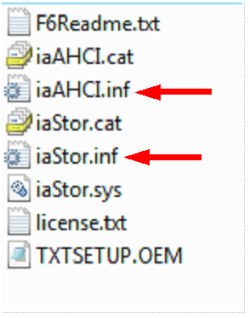
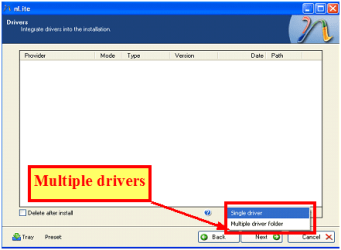
3) When slipstreaming the Intel drivers, best to add all the controllers,
using both setup inf files.

Capture3-1.PNG

Capture222.PNG
 

My Computer My Computer

At a glance

ME/XP/Vista/Win7
OS
ME/XP/Vista/Win7
Theog - thanks for the quick reply!

1) Win xp is not happy using the Marvell controller, use the Intel.
Does this mean that I will need to disconnect my HD from the Marvell SATA connector on my motherboard, and plug it into one of the Intel SATA connectors?
Will that cause any problems with my current install of Windows7?

2) Win xp is not happy with more than 4gb of ram.
I am probably not going to take out RAM, so does that mean I should abandon trying a dual boot of XP? I read on one site that I should pull some RAM, install XP and then re-insert the RAM after the install is complete. Is that good advice? It seemed a little scary to me.

3) When slipstreaming the Intel drivers, best to add all the controllers,
using both setup inf files.
Thanks! I can give this a try. Should I avoid slipstreaming the Marvell drivers altogether and only slipstream the Intel drivers?

Thanks for the help!
 

My Computer My Computer

At a glance

Windows 7 Home Premium 64-biti5-760 quad 2.80GHz8GB DDR3-1333GeForce GTX460
Computer Manufacturer/Model Number
Velocity Micro - Vector Holiday Edition
OS
Windows 7 Home Premium 64-bit
CPU
i5-760 quad 2.80GHz
Motherboard
Asus P7P55D-E
Memory
8GB DDR3-1333
Graphics Card(s)
GeForce GTX460
Sound Card
integrated audio
Hard Drives
1TB Sata
Back
Top