Dual Boot Installation with Windows 7 and XP

How to Setup a Dual Boot Installation with Windows 7 and XP


   Information
This will show you how to install Windows 7 and XP to dual boot with when you already have either Windows 7 or XP installed first.
   Note
With a dual boot installaton, you will have two operating systems (OS) installed. When you start the computer, you will have the choice to choose which OS you would like to start up to. This method is the easiest way of doing a dual boot with these two operating systems.
   Tip
When dual booting with another OS (ex: Vista or XP), you may not always have that OS partition show up in Computer with a driver letter in Windows 7. If this happens, then you will just need to add a drive letter to the OS (ex: Vista or XP) partition in Windows 7 Disk Management for it to show up in Computer with a driver letter.
   Warning
To stop XP from deleting your Windows 7 System Restore Points everytime XP is started, then see System Restore Points - Stop XP Dual Boot Delete to hide Windows 7 from XP.

Windows 7 Minimum Hardware Requirements


NOTE: For more information on this, see: Windows 7 system requirements
  • 1 GHz 32-bit or 64-bit processor
  • 1 GB RAM for 32-bit Windows 7 OR 2 GB RAM for 64-bit Windows 7
  • 16 GB available disk space 32-bit Windows 7 OR 20 GB for 64-bit Windows 7
  • Support for DirectX 9 graphics with 128 MB memory (in order to enable Aero theme)
  • DVD-R/W Drive
  • Internet or phone access to activate Windows 7.
Windows XP Minimum Hardware Requirements

NOTE: For more information on this, see: System requirements for Windows XP operating systems
  • PC with 300 megahertz (MHz) or higher processor clock speed recommended; 233-MHz minimum required;* Intel Pentium/Celeron family, AMD K6/Athlon/Duron family, or compatible processor recommended
  • 128 megabytes (MB) of RAM or higher recommended (64 MB minimum supported; may limit performance and some features)
  • 1.5 gigabyte (GB) of available hard disk space.*
  • Super VGA (800 × 600) or higher resolution video adapter and monitor
  • CD-ROM or DVD drive
  • Keyboard and Microsoft Mouse or compatible pointing device
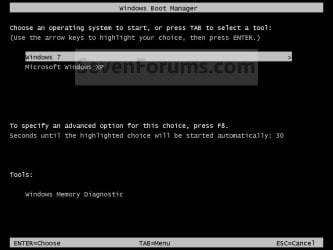
EXAMPLE: Windows Boot Manager
NOTE: This is the boot screen where you select what operating system that you would like to start. By default, you have 30 seconds to choose another operating system before the default operating system will start automatically.
Example.jpg


OPTION ONE

When XP is Installed First


NOTE: If you have a RAID setup, you will need to have the Windows 7 RAID drivers on a USB flash drive available to select and load while installing Windows 7.
1. Do step 2 or 3 below for where you wanted to install Windows 7 at.

2. To Create a New Partition from the XP Hard Disk Drive
A) With your Windows 7 installation disc boot into the Command Prompt from the System Recovery Options screen.
NOTE: Make sure that the CD/DVD drive is selected first in the boot order in the BIOS.

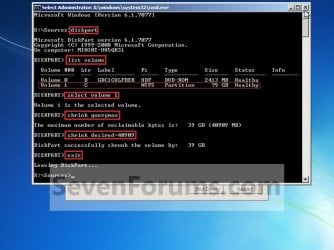
B) In the command prompt, select and shrink the XP volume by how many MB (1024 MB = 1 GB) you want to have for this Windows 7 partition. (See screenshot below)
NOTE: You would do steps 2 to 9 in METHOD TWO at that link. Windows 7 will need a minimum of 16 GB (16384 MB).
XP-W7_1.jpg
C) Click on the X at the top right corner to close the command prompt. (See screenshot above)

D) Click on the X at the top right corner to close System Recovery Options. (See screenshot below)
XP-W7_2.jpg
E) Go to step 4.
3. To Use a Separate Hard Disk Drive than the XP Drive
A) Boot from your Windows 7 installation disc.
NOTE: Make sure that the CD/DVD drive is selected first in the boot order in the BIOS.
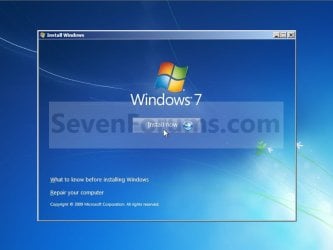
4. Click on the Install now button. (See screenshot below)
XP-W7_3.jpg
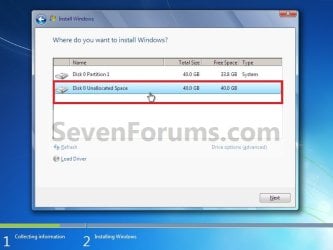
5. When you get to this point, select the partition (step 2) or hard drive to install Windows 7 on. (See screenshot below)
XP-W7_4.jpg
6. Finish installing Windows 7.
NOTE: You would start at step 9 in that link to finish installing Windows 7.

7. When finished, restart the computer to have the option to boot from XP (Earlier Verision of Windows) or Windows 7. (See screenshot below)

   Note
If you are only booting into Windows 7 and do not have XP listed in the Windows Boot Manager, then you can install only EasyBCD (step 8 Option Two below) to add XP (or Windows 7) while started in Windows 7 the same way to the boot list.

Example.jpg


OPTION TWO

When Windows 7 is Installed First


   Warning

1. To Create a New Partition from the Windows 7 Hard Disk Drive
NOTE: If you want to install XP on a separate internal hard drive instead, then skip this step and go to step 2.
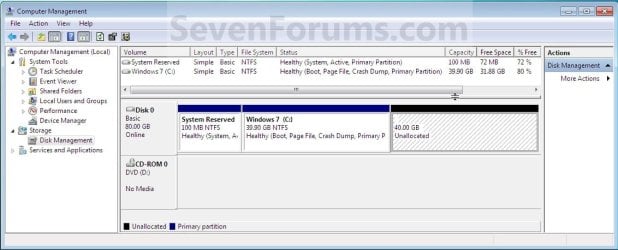
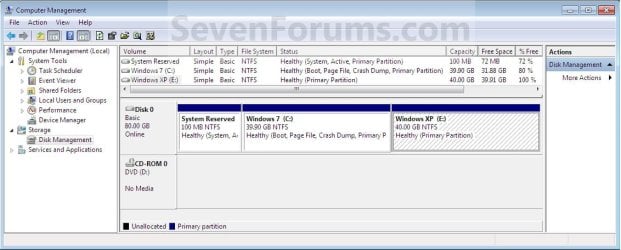
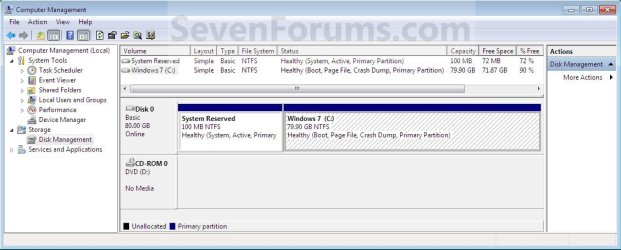
A) In Windows 7, select and shrink the Windows 7 volume in Disk Management by how many MB (1024 MB = 1 GB) you want to have for this XP partition. (See screenshots below)
NOTE: You would do all of Method One at that link.
W7-XP-1.jpg

W7-XP-2.jpg

W7-XP-3.jpg
2. Insert your XP installation disc, then restart the computer and press any key to boot from it when prompted. (See screenshot below)
NOTE: Make sure that the CD/DVD drive is selected first in the boot order in the BIOS.

Step1.jpg
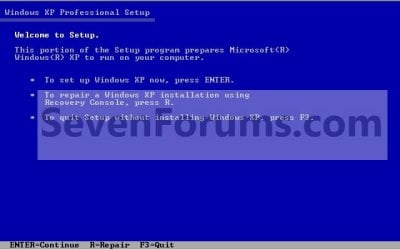
3. From XP Setup, Press Enter. (See screenshot below)


   Warning

W7-XP-4.jpg
4. Press F8. (See screenshot below)
NOTE: On some multimedia keyboards, you may need to press the F-Lock or Function key before pressing F8.
W7-XP-5.jpg
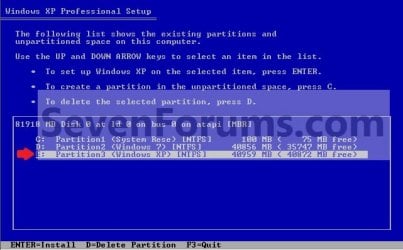
5. Select the partition (step 1) or hard drive that you want to install XP on using the arrow keys and press Enter.
W7-XP-6.jpg
6. Finish installing XP.


   Tip
If you get Error loading Operating System after XP restarts:
  • Using your Windows 7 installation disc, boot to the command prompt at startup.
  • Type in these comands below, and press enter after each one.
    • bootrec /FixMbr
    • bootrec /FixBoot
    • bootrec /RebuildBcd
  • Exit the command prompt and restart the computer.
  • At this point, Windows 7 should boot up the same way before trying to install XP.
  • Continue to step 8 below and run EasyBCD from Windows 7 instead.

7. In XP, download and install .Net Framework 2.0 (32-bit) version or .Net Framework 2.0 (64-bit) version first, and EasyBCD (free version) for your 32-bit (x86) or 64-bit (x86) XP.
NOTE: In XP, Net Framework is required to be installed to run EasyBCD. After you click on Register (at bottom of link) for the free EasyBCD, registration is not required to download it.

8. Run EasyBCD (free version).
NOTE: This is required to repair the Windows 7 boot file and add XP to the Windows Boot Manager list.

9. On the left side of EasyBCD, click on the Add New Entry button. (See screenshot below)
A) In the top section under Operating Systems, click on the Windows tab. (See screenshot below)
B) To the right of Type, select Windows NT/2k/XP/2k3 from the drop down menu. (See screenshot below)
:warn:WARNING: Be sure to leave the Automatically detect correct drive box checked.

C) To the right of Name, you can leave the default Microsoft Windows XP as the name to be displayed in the Windows Boot Manager, or you can type whatever name you would like to have instead. (See screenshot below)
D) Click on the Add Entry button. (See screenshot below)
W7-XP-7.jpg
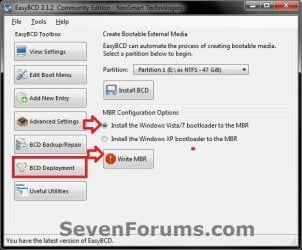
10. On the left side of EasyBCD, click on the BCD Deployment button, select (dot) the Install the Windows Vista/7 bootloader to the MBR option, and click on the Write MBR button. (See screenshot below)
W7-XP-9.jpg
11. Close EasyBCD.

12. Restart the computer to have the option to boot from Microsoft Windows XP or Windows 7. (See screenshot below)
Example2.jpg
   Tip
If Windows 7 will not start up when selected, then use your Windows 7 installation DVD to do a Startup Repair.

That's it,
Shawn


Last edited:
Perfect, Theog. IReboot installs to the taskbar a Reboot Menu.

Least "choosey" method I know of is to set Win7 as default with 5-10 second menu timeout, so that you really don't have to do anything or wait long unless you know you want to boot into XP.

View attachment 153619(click to enlarge)

Hi Greg

Or the OP can add iReboot to EasyBCD.

View attachment 153743
I tested this on a dual boot machine I use often and find that it works good for me. Thanks for the tip Ray.

You are both welcome.
 

My Computer My Computer

At a glance

ME/XP/Vista/Win7
OS
ME/XP/Vista/Win7
Hi,
I just bought a Sony Vayo VPCF1 with i7 processor and whish to install in one partition the WIN XP. I followed the advise given in your tutorial, exept that I di not press F6 to enter the Toshiba HDD drives, as I was not able to get them.
When the XP started to install it self, after loading all his drives a message appeared (see enclosed Pdf file).
Any advice?

Swiss regards: Reto
 

Attachments

My Computer My Computer

At a glance

Window 7 Home Premiumi7 Q7408.0 GB
Computer Manufacturer/Model Number
Sony Vayo VPCF1
OS
Window 7 Home Premium
CPU
i7 Q740
Motherboard
unknown (ACPI x64-based PC)
Memory
8.0 GB
Hard Drives
Toshiba MK6461 GSY
Case
Notebook
What you must add at the F6 prompt is the XP Sata Controller, however XP only recognizes floppy drives via the F6 prompt. SATA Drivers - Load in Windows XP Setup on Dual Boot

So unless you have available a floppy drive to load in the XP SATA controller driver, what's required if you want to install XP is to slipstream the driver into the XP installer: SATA Drivers - Slipstream into Windows XP CD

What I would do first to avoid a lot of work is try installing my XP programs in Win7 Compatibility Mode. Next try running XP from Win7 virtually using XP Mode (if Ultimate or Prof), or freeware like Virtual Box, Virtual Player or VMWare. http://www.vmware.com/products/player/
 
Sorry for caps in title, trying to point out to people

I went to get assistance from a HP's official stores, and I explained to them what I was trying to do.

(Extra Info - My problem was that when I come to choosing were to install windows XP, the setup does not show any partitions.)

The guy said " is your computer i7 ? or i5? " I said its i7. he said straight away " you can totally forget about installing or dual booting windows XP on this Laptop".

( Its a HP Pavilion dv6 - 2.8 Ghz - i7 - 8 Gbs ram - 1 TB hard disk - ATI card - Windows 7 Ultimate 64 bit)

He then explained : " Most new computers ( Desk and Laptops) hard disk's are new, and Windows XP setup can not recognize the hard disk."

Moreover he said : " Those people who keep talking about SATA and RAID setup, still use older computers, and therefore, the SATA/RAID system works for them."


TO SUM UP, IF YOUR COMPUTER IS i5 or i7 - YOU CAN CLOSE THIS THREAD BECAUSE NO MATTER WHAT YOU DO, YOU WILL NOT BE ABLE TO INSTALL/ DUAL BOOT WINDOWS XP.
I know its a big disappointment, but I just thought I might help some one else, before they waste 3 days of their life pointlessly.

First check for all the Win XP drivers for your hardware.

You can check your HP notebook here:
General XP Downgrade Guide for HP Laptops - HP Support Forum

My Point STILL STANDS..
I checked the website you gave me
and HP DOES NOT support ANY DRIVERS for Win XP for my dv6 Notebook...
 

My Computer My Computer

At a glance

Windows 7 Ultimate x64
OS
Windows 7 Ultimate x64
Well, this stinks. I finally get around to doing this dual boot install, and after all that prep work of making sure there was plenty of room for an install of XP as well as space for installed games, it turns out I can't make any more partitions on my hard drive. Since I have no idea which ones are necessary for the system to run, and I can't delete the Logical drive since it holds all of my one key recovery files, looks like I'm stuck without XP.
 

My Computer My Computer

At a glance

Windows 7 Home Premium x64Pentium Dual-Core T4500 @2.30GHz4 GBMobile Intel 4 Series Express Chipset Family
Computer Manufacturer/Model Number
Lenovo G550
OS
Windows 7 Home Premium x64
CPU
Pentium Dual-Core T4500 @2.30GHz
Motherboard
No Idea
Memory
4 GB
Graphics Card(s)
Mobile Intel 4 Series Express Chipset Family
Sound Card
Conexant SmartAudio HD
Monitor(s) Displays
Generic PnP Monitor
Screen Resolution
1366x768
Hard Drives
200GB
Keyboard
Standard PS/2 Keyboard
Mouse
Touchpad or Dynex Optical Mouse
Internet Speed
I dunno. What's Roadrunner's speed?
Other Info
It's a notebook. And I'm a gamer. So, I suffer for my joy. Oblivion on its lowest settings? Hey, it's still Oblivion.
Post a screenie of Disk Mgmt window - there is probably a solution.

Installing a new o/s ( even xp ) will probably stop the usual access methods to your recovery partition anyway.
 

My Computers My Computers

  • At a glance

    7 X64i5 84002x8gb 3200mhz
    Computer type
    PC/Desktop
    OS
    7 X64
    CPU
    i5 8400
    Motherboard
    gigabyte b365m ds3h
    Memory
    2x8gb 3200mhz
    Hard Drives
    various
    PSU
    pure power 11 400w cm
    Case
    Coolermaster
    Cooling
    cryorig m9i
  • At a glance

    7x64g54008gb ddr4 2400
    Computer type
    PC/Desktop
    OS
    7x64
    CPU
    g5400
    Motherboard
    ga b365m ds3h
    Memory
    8gb ddr4 2400
    PSU
    xfx pro 450w
All right, here's the screen shot. So, if I install XP, my recovery button on my keyboard isn't going to work?
 

Attachments

  • diskmgmt.jpg
    diskmgmt.jpg
    73.3 KB · Views: 141

My Computer My Computer

At a glance

Windows 7 Home Premium x64Pentium Dual-Core T4500 @2.30GHz4 GBMobile Intel 4 Series Express Chipset Family
Computer Manufacturer/Model Number
Lenovo G550
OS
Windows 7 Home Premium x64
CPU
Pentium Dual-Core T4500 @2.30GHz
Motherboard
No Idea
Memory
4 GB
Graphics Card(s)
Mobile Intel 4 Series Express Chipset Family
Sound Card
Conexant SmartAudio HD
Monitor(s) Displays
Generic PnP Monitor
Screen Resolution
1366x768
Hard Drives
200GB
Keyboard
Standard PS/2 Keyboard
Mouse
Touchpad or Dynex Optical Mouse
Internet Speed
I dunno. What's Roadrunner's speed?
Other Info
It's a notebook. And I'm a gamer. So, I suffer for my joy. Oblivion on its lowest settings? Hey, it's still Oblivion.
Depends how the oem have set it up.

Quite likely the f key won't work after you install another o/s.

If they are using a custom winre.wim in the hidden recovery folder on your windows partition ( C) you should be able to get it back.

If they are using disk code to hook to their bootable wim - then probably not.

Hard to tell from here.
 

My Computers My Computers

  • At a glance

    7 X64i5 84002x8gb 3200mhz
    Computer type
    PC/Desktop
    OS
    7 X64
    CPU
    i5 8400
    Motherboard
    gigabyte b365m ds3h
    Memory
    2x8gb 3200mhz
    Hard Drives
    various
    PSU
    pure power 11 400w cm
    Case
    Coolermaster
    Cooling
    cryorig m9i
  • At a glance

    7x64g54008gb ddr4 2400
    Computer type
    PC/Desktop
    OS
    7x64
    CPU
    g5400
    Motherboard
    ga b365m ds3h
    Memory
    8gb ddr4 2400
    PSU
    xfx pro 450w
I could always just create a recovery disk I suppose, so I guess losing the recovery button isn't that big of a deal. But is there anything I can remove partition wise so that I can finally get this install over with?
 

My Computer My Computer

At a glance

Windows 7 Home Premium x64Pentium Dual-Core T4500 @2.30GHz4 GBMobile Intel 4 Series Express Chipset Family
Computer Manufacturer/Model Number
Lenovo G550
OS
Windows 7 Home Premium x64
CPU
Pentium Dual-Core T4500 @2.30GHz
Motherboard
No Idea
Memory
4 GB
Graphics Card(s)
Mobile Intel 4 Series Express Chipset Family
Sound Card
Conexant SmartAudio HD
Monitor(s) Displays
Generic PnP Monitor
Screen Resolution
1366x768
Hard Drives
200GB
Keyboard
Standard PS/2 Keyboard
Mouse
Touchpad or Dynex Optical Mouse
Internet Speed
I dunno. What's Roadrunner's speed?
Other Info
It's a notebook. And I'm a gamer. So, I suffer for my joy. Oblivion on its lowest settings? Hey, it's still Oblivion.
Have a look at the contents of the recovery partition - and post a screenie.

There are a lot of ways to see inside.

Often a 3rd party explorer like freecommander will let you see inside ( run it as admin )

Or give it a drive letter in Disk Maganement.

That is if you really want to keep it - also - I would like to know what is in there.

If there is a bootable wim - should be no problem adding something for that after installing xp.
 

My Computers My Computers

  • At a glance

    7 X64i5 84002x8gb 3200mhz
    Computer type
    PC/Desktop
    OS
    7 X64
    CPU
    i5 8400
    Motherboard
    gigabyte b365m ds3h
    Memory
    2x8gb 3200mhz
    Hard Drives
    various
    PSU
    pure power 11 400w cm
    Case
    Coolermaster
    Cooling
    cryorig m9i
  • At a glance

    7x64g54008gb ddr4 2400
    Computer type
    PC/Desktop
    OS
    7x64
    CPU
    g5400
    Motherboard
    ga b365m ds3h
    Memory
    8gb ddr4 2400
    PSU
    xfx pro 450w
The 200mb system partition could go - probably easiest - especially if you would prefer to keep the recov partition.
 

My Computers My Computers

  • At a glance

    7 X64i5 84002x8gb 3200mhz
    Computer type
    PC/Desktop
    OS
    7 X64
    CPU
    i5 8400
    Motherboard
    gigabyte b365m ds3h
    Memory
    2x8gb 3200mhz
    Hard Drives
    various
    PSU
    pure power 11 400w cm
    Case
    Coolermaster
    Cooling
    cryorig m9i
  • At a glance

    7x64g54008gb ddr4 2400
    Computer type
    PC/Desktop
    OS
    7x64
    CPU
    g5400
    Motherboard
    ga b365m ds3h
    Memory
    8gb ddr4 2400
    PSU
    xfx pro 450w
Honestly there's nothing much inside the recovery partition than some drivers and whatever programs Lenovo decided to bloat the initial system with. After I make a recovery disk I really won't need it. But it would be nice to have just in case. Are you sure it'd be okay to get rid of that 200 mb partition? I just want to make sure, since it says it's a system partition.
 

My Computer My Computer

At a glance

Windows 7 Home Premium x64Pentium Dual-Core T4500 @2.30GHz4 GBMobile Intel 4 Series Express Chipset Family
Computer Manufacturer/Model Number
Lenovo G550
OS
Windows 7 Home Premium x64
CPU
Pentium Dual-Core T4500 @2.30GHz
Motherboard
No Idea
Memory
4 GB
Graphics Card(s)
Mobile Intel 4 Series Express Chipset Family
Sound Card
Conexant SmartAudio HD
Monitor(s) Displays
Generic PnP Monitor
Screen Resolution
1366x768
Hard Drives
200GB
Keyboard
Standard PS/2 Keyboard
Mouse
Touchpad or Dynex Optical Mouse
Internet Speed
I dunno. What's Roadrunner's speed?
Other Info
It's a notebook. And I'm a gamer. So, I suffer for my joy. Oblivion on its lowest settings? Hey, it's still Oblivion.
Always run off the manufacturer recovery discs - should be the first thing anyone does.


Are you sure it'd be okay to get rid of that 200 mb partition? I just want to make sure, since it says it's a system partition.

Yes, it is fine.

Make your main windows partition "system" first:

In disk management rt click your win7 partition and mark it active.

Then boot the win 7 dvd /repair cd and run startup repair a couple of times.

Then restart - you will see disk management showing your win 7 partition as both Boot and Sytem - and you don't need the 200mb anymore.

When you install XP - it will write it's boot files to the system partition ( that is now the same as your win7 partition ).

That is why after installing XP - you can't boot straight into win 7 again.

The tutorial uses Easybcd to fix that.
 

My Computers My Computers

  • At a glance

    7 X64i5 84002x8gb 3200mhz
    Computer type
    PC/Desktop
    OS
    7 X64
    CPU
    i5 8400
    Motherboard
    gigabyte b365m ds3h
    Memory
    2x8gb 3200mhz
    Hard Drives
    various
    PSU
    pure power 11 400w cm
    Case
    Coolermaster
    Cooling
    cryorig m9i
  • At a glance

    7x64g54008gb ddr4 2400
    Computer type
    PC/Desktop
    OS
    7x64
    CPU
    g5400
    Motherboard
    ga b365m ds3h
    Memory
    8gb ddr4 2400
    PSU
    xfx pro 450w
Okay, let's say my computer didn't come with any windows 7 startup discs. In fact from what I hear, a lot of manufacturers aren't distributing the discs with the PCs anymore. So what would I do then?
 

My Computer My Computer

At a glance

Windows 7 Home Premium x64Pentium Dual-Core T4500 @2.30GHz4 GBMobile Intel 4 Series Express Chipset Family
Computer Manufacturer/Model Number
Lenovo G550
OS
Windows 7 Home Premium x64
CPU
Pentium Dual-Core T4500 @2.30GHz
Motherboard
No Idea
Memory
4 GB
Graphics Card(s)
Mobile Intel 4 Series Express Chipset Family
Sound Card
Conexant SmartAudio HD
Monitor(s) Displays
Generic PnP Monitor
Screen Resolution
1366x768
Hard Drives
200GB
Keyboard
Standard PS/2 Keyboard
Mouse
Touchpad or Dynex Optical Mouse
Internet Speed
I dunno. What's Roadrunner's speed?
Other Info
It's a notebook. And I'm a gamer. So, I suffer for my joy. Oblivion on its lowest settings? Hey, it's still Oblivion.
You will usually find the MS startup repair options on the manufacturer discs you are about to run off.

Otherwise, you can (normally ) run one off from within win 7 - just type the word create in start search box.

Click create recovery disc when it pops up.

That will be a standard win7 repair disc - startup repair options only - you can't install from it.

Some oem's disable that. So , if you don't have it - then just download the win 7 repair .iso and burn it to cd.

Download bottom of this page get the same bit version as you have installed-click HERE

Click the link for your bit version (64 bit ) - in your browser download window click Save File ok
 

My Computers My Computers

  • At a glance

    7 X64i5 84002x8gb 3200mhz
    Computer type
    PC/Desktop
    OS
    7 X64
    CPU
    i5 8400
    Motherboard
    gigabyte b365m ds3h
    Memory
    2x8gb 3200mhz
    Hard Drives
    various
    PSU
    pure power 11 400w cm
    Case
    Coolermaster
    Cooling
    cryorig m9i
  • At a glance

    7x64g54008gb ddr4 2400
    Computer type
    PC/Desktop
    OS
    7x64
    CPU
    g5400
    Motherboard
    ga b365m ds3h
    Memory
    8gb ddr4 2400
    PSU
    xfx pro 450w
Hey there,

You don't actually need a disc to do Startup Repair. Starting with Win7, Microsoft decided to stop being annoying and install WinRE on the hard drive when you install the OS. Just hit F8 at startup, then select Repair my Computer. WinRE will launch, and you will be able to run Startup Repair from there, no disc required.

Heather

Sent from my Evo 4G. Please to excuse my engrish typing
 

My Computer My Computer

At a glance

Win7 Ultimate x64, Server 2008 R2AMD Phenom II X6 1055T Thuban 2.8GHz8GB G.SKILL Ripjaws Series DDR3 1600 (PC3 12800)2x HIS/Sapphire ATI Radeon HD 5830 in CrossfireX
Computer Manufacturer/Model Number
Myself
OS
Win7 Ultimate x64, Server 2008 R2
CPU
AMD Phenom II X6 1055T Thuban 2.8GHz
Motherboard
GIGABYTE GA-890FXA-UD5
Memory
8GB G.SKILL Ripjaws Series DDR3 1600 (PC3 12800)
Graphics Card(s)
2x HIS/Sapphire ATI Radeon HD 5830 in CrossfireX
Sound Card
Sound Blaster X-Fi Xtreme
Monitor(s) Displays
Dell 2407WFP 24", Dell 22"
Screen Resolution
1920x1200
Hard Drives
Patriot Torqx 128GB SSD
3TB other HD
PSU
CORSAIR HX Series CMPSU-750HX 750W
Case
Antec Nine Hundred
Cooling
Cooler Master Hyper 212 Plus CPU cooler
Keyboard
SteelSeries MercStealth
Mouse
Razer Lachesis
Internet Speed
HAHA NO MOAR COMCAST. Now, FiOS :D
Other Info
I am a virtualization enthusiast. I like Hyper-V. It's free.
I'm a Windows 7 fangirl. I will teach a class for you or write a custom course for you RIGHT NOW.
I love EVE Online. I'm Sayra Sainer. I play Starcraft II. My gamertag is Tal0nn. I'm trying not to play Minecraft.
I also like coffee. I'll take a basic triple grande extra-hot breve stirred ristretto caramel machiatto.
Great, got the repair disc created, so I'll go ahead and change my partitions around. I'll come back if I need any more help or if everything goes to plan. Wish me luck!
 

My Computer My Computer

At a glance

Windows 7 Home Premium x64Pentium Dual-Core T4500 @2.30GHz4 GBMobile Intel 4 Series Express Chipset Family
Computer Manufacturer/Model Number
Lenovo G550
OS
Windows 7 Home Premium x64
CPU
Pentium Dual-Core T4500 @2.30GHz
Motherboard
No Idea
Memory
4 GB
Graphics Card(s)
Mobile Intel 4 Series Express Chipset Family
Sound Card
Conexant SmartAudio HD
Monitor(s) Displays
Generic PnP Monitor
Screen Resolution
1366x768
Hard Drives
200GB
Keyboard
Standard PS/2 Keyboard
Mouse
Touchpad or Dynex Optical Mouse
Internet Speed
I dunno. What's Roadrunner's speed?
Other Info
It's a notebook. And I'm a gamer. So, I suffer for my joy. Oblivion on its lowest settings? Hey, it's still Oblivion.
Keep us posted.

I hope you ran off the oem recov discs aleready .
 

My Computers My Computers

  • At a glance

    7 X64i5 84002x8gb 3200mhz
    Computer type
    PC/Desktop
    OS
    7 X64
    CPU
    i5 8400
    Motherboard
    gigabyte b365m ds3h
    Memory
    2x8gb 3200mhz
    Hard Drives
    various
    PSU
    pure power 11 400w cm
    Case
    Coolermaster
    Cooling
    cryorig m9i
  • At a glance

    7x64g54008gb ddr4 2400
    Computer type
    PC/Desktop
    OS
    7x64
    CPU
    g5400
    Motherboard
    ga b365m ds3h
    Memory
    8gb ddr4 2400
    PSU
    xfx pro 450w
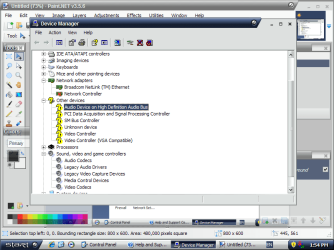
Well, I got it installed, and got the operating system selection working. But now I'm having a different issue. I'm getting no sound other than an ear spitting beep when things happen, and I have no choices of audio devices in the sound menu. And a lot of devices in device manager aren't working. I've included the screenshot of device manager.

*Edit: Now that I think about it. It's possible that I'm having problems because my Windows 7 install is 64 bit and my XP install is 32 bit. Also, the sounds, wireless card and everything else are working just fine in windows 7
 

Attachments

  • deviceissues.png
    deviceissues.png
    41.1 KB · Views: 131
Last edited:

My Computer My Computer

At a glance

Windows 7 Home Premium x64Pentium Dual-Core T4500 @2.30GHz4 GBMobile Intel 4 Series Express Chipset Family
Computer Manufacturer/Model Number
Lenovo G550
OS
Windows 7 Home Premium x64
CPU
Pentium Dual-Core T4500 @2.30GHz
Motherboard
No Idea
Memory
4 GB
Graphics Card(s)
Mobile Intel 4 Series Express Chipset Family
Sound Card
Conexant SmartAudio HD
Monitor(s) Displays
Generic PnP Monitor
Screen Resolution
1366x768
Hard Drives
200GB
Keyboard
Standard PS/2 Keyboard
Mouse
Touchpad or Dynex Optical Mouse
Internet Speed
I dunno. What's Roadrunner's speed?
Other Info
It's a notebook. And I'm a gamer. So, I suffer for my joy. Oblivion on its lowest settings? Hey, it's still Oblivion.

My Computers My Computers

  • At a glance

    7 X64i5 84002x8gb 3200mhz
    Computer type
    PC/Desktop
    OS
    7 X64
    CPU
    i5 8400
    Motherboard
    gigabyte b365m ds3h
    Memory
    2x8gb 3200mhz
    Hard Drives
    various
    PSU
    pure power 11 400w cm
    Case
    Coolermaster
    Cooling
    cryorig m9i
  • At a glance

    7x64g54008gb ddr4 2400
    Computer type
    PC/Desktop
    OS
    7x64
    CPU
    g5400
    Motherboard
    ga b365m ds3h
    Memory
    8gb ddr4 2400
    PSU
    xfx pro 450w
Back
Top