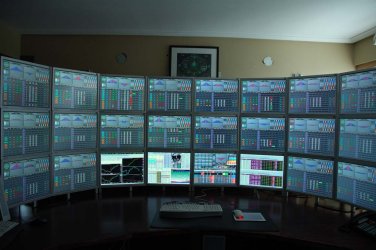
How many people own more than one monitor?

magnetite

New member
Member
Local time
3:30 PM
Messages
93
Location
Calgary, Alberta, Canada
I've never owned more than one monitor although I always thought it would be nice to have. How many people that you know have more than one monitor at home? Is this kind of setup really popular nowadays since LCDs are really cheap? Or do people still use one monitor?

I am a fan of flight simulation and up until recently I've always used one big monitor (27 inch LCD).
 

My Computer My Computer

At a glance

Windows 10 Pro 64-bitIntel Core i7 6700K 4.5 GHz w/TurboBoost & HT...16 GB DDR4 RAM 2133 MHzEVGA GTX 1080 Ti 11 GB
Computer type
PC/Desktop
Computer Manufacturer/Model Number
Custom
OS
Windows 10 Pro 64-bit
CPU
Intel Core i7 6700K 4.5 GHz w/TurboBoost & HT enabled
Motherboard
Asus ROG Strix Z270E
Memory
16 GB DDR4 RAM 2133 MHz
Graphics Card(s)
EVGA GTX 1080 Ti 11 GB
Sound Card
Realtek
Monitor(s) Displays
Acer S243HL
Screen Resolution
1920x1080
Hard Drives
WD Caviar Black 2 TB, WD Black 4 TB, WD Caviar Green 2 TB (x3), WD Caviar Green 3 TB, Crucial M4 256 GB SSD, Samsung 850 Pro SSD
PSU
Corsair 850W
Case
Fractal Design Define R5
Cooling
Cooler Master Hyper 212 Evo
Internet Speed
300 Mbps Shaw Broadband 300
I have seriously been considering a 3 monitor setup recently , I own 3 monitors but 2 are old and all different makes/sizes , I decided I would test it out to see what it was like , I have a HD 5850 graphics card which supports 3 monitors.

It has 2 DVI outputs , 1 HDMI and 1 Display port output.

After reading up on it I found that I needed to buy a display port to dvi connector as you can only use 1 of the actual DVI outputs. Sadly I didn't read up enough lol , I ordered 1 , it came and it didn't work , reason being it wasn't an "active" adapter , it was a passive. (Didn't realize there were different types)

Anyway gonna order the correct one next week or also a display port to vga will work.

Sorry for the long story , was a total pain it the ass lol.

Don't know how many screens you were thinking of or how easy it is with your card , check it out before you go any further tho based on my mishaps lol.

Anyway the plan is , if it looks good then I will get a couple of new monitors to match my newest LG LED.

I mainly play car games such as Dirt 2 and 3 , NFS Shift and also FPS games such as Battlefield bad company 2 etc

I understand 3 screens gives you certain advantages in FPS games seeing as you have a much wider field of view and can see the enemies before they see you.

Not sure how it would be in flight sims , perhaps do a search on youtube for flight sim 3 screen setup's or something?

Cheers

Paul.
 

My Computer My Computer

At a glance

Windows 7 Professional 64 bit
OS
Windows 7 Professional 64 bit

My Computer My Computer

At a glance

Win 7 Ultimate x64FX-8350 @ 4.6 GHz so farADATA XPG V1 Series Black 8GB DDR3 1600Sapphire R9 270x Dual-X
Computer type
PC/Desktop
Computer Manufacturer/Model Number
Me
OS
Win 7 Ultimate x64
CPU
FX-8350 @ 4.6 GHz so far
Motherboard
Asus M5A97 EVO
Memory
ADATA XPG V1 Series Black 8GB DDR3 1600
Graphics Card(s)
Sapphire R9 270x Dual-X
Sound Card
Xonar DGX w/ Corsair Vengence 1300
Monitor(s) Displays
Acer S232HL Abid
Screen Resolution
1920x1080
Hard Drives
120 GB OCZ Vertex 3
500 GB Seagate 7200.12
PSU
Antec Earthwatts 650W Green
Case
Antec Three Hundred
Cooling
Cooler Master 212 EVO
Keyboard
Logitech G510
Mouse
Logitech G500s
Internet Speed
35000/3000
i've got four around the house, but rarely use more than one at the same time, unlike this user:

42i35fm.jpg
 

My Computer My Computer

At a glance

ultimate 64 sp1i5 2500K [email protected]8 gigs GSkill Ripjaws 1600amd hd6950
Computer Manufacturer/Model Number
mickey megabyte 1234
OS
ultimate 64 sp1
CPU
i5 2500K [email protected]
Motherboard
MSI P67A-GD53
Memory
8 gigs GSkill Ripjaws 1600
Graphics Card(s)
amd hd6950
Sound Card
creative x-fi gamer
Monitor(s) Displays
samsung 24"
Screen Resolution
1920x1080
Hard Drives
ocz vertex 2e 60 gig, samsung f3 1tb, buffalo 2tb ext
PSU
antec 550
Case
antec three hundred
Cooling
i'm a cooling fan
Keyboard
saitek eclipse ii
Mouse
logitech g3
Internet Speed
about 4 Mbps
Other Info
i love win7
i've got four around the house, but rarely use more than one at the same time, unlike this user:

View attachment 161324

I'd just like to see the inside of the computer thay are hooked up to.

I don't think this was the real question, but I have more than one, but they are hooked up to different computers. 1 each.
 

My Computers My Computers

  • At a glance

    Windows 11 ProRyzen 9 5900X32GB G Skill DDR4-3600EVGA RTX 3080 FTW 3 Ultra
    Computer type
    PC/Desktop
    Computer Manufacturer/Model Number
    ALWAYS UNDER CONSTRUCTION
    OS
    Windows 11 Pro
    CPU
    Ryzen 9 5900X
    Motherboard
    Asus X570 Crosshair Viii Hero
    Memory
    32GB G Skill DDR4-3600
    Graphics Card(s)
    EVGA RTX 3080 FTW 3 Ultra
    Sound Card
    On Board/Sennheiser PC37X Headset
    Monitor(s) Displays
    3 X Asus 27"
    Screen Resolution
    2560x1440
    Hard Drives
    2 X 1 TB NVME drives
    PSU
    EVGA 850
    Case
    Phanteks Eclipse P400A
    Cooling
    EVGA 280 AIO
    Keyboard
    Logitech G510s/ Logitech G13
    Mouse
    Logitech G502
    Internet Speed
    24/1
    Antivirus
    ESET/MBAM Pro/SAS Pro
    Browser
    Chrome/ Firefox/ Edge
  • At a glance

    Windows 11 ProIntel Ultra 9 288V32 GB LPDDR5X 8533
    Computer type
    Laptop
    System Manufacturer/Model Number
    Dell 16 Plus
    OS
    Windows 11 Pro
    CPU
    Intel Ultra 9 288V
    Memory
    32 GB LPDDR5X 8533
    Monitor(s) Displays
    16" Mini-LED HDR600 Touch 90 Hz
    Screen Resolution
    2560X1600
    Hard Drives
    1 TB NVME
Two 22 inchers

I have had a dual setup with my ATI 5770 for about 8 months now and would hate to go back to single.

I use P2P to watch sports on one while doing my computing chores on the other (generally), and also as a full screen tutorial when learning new video editing techniques in various programs such as DVDLab Pro and others.

Also, my newest monitor is TV/Monitor Hi Def, so I have my satellite receiver hooked up to it as well. (Samsung Syncmaster T220HD). Very nice so far but if you get one, Google it to find out what caps you need to replace right off the bat, because they will go bad. Guaranteed. Mine were already bulging. So if you can get your hands on one not working for cheap, you can have a really nice TV/Monitor with a really easy fix.

Lovin' it.
 
Last edited:

My Computer My Computer

At a glance

windows 7 x 64 ultPhenom II x4 840Corsair XMS3 2x4 GBHIS Radeon 5770
Computer Manufacturer/Model Number
Microsoft
OS
windows 7 x 64 ult
CPU
Phenom II x4 840
Motherboard
Gigabyte GA-990FXA-UD3
Memory
Corsair XMS3 2x4 GB
Graphics Card(s)
HIS Radeon 5770
Sound Card
Realtek onboard
Monitor(s) Displays
Acer P221w + Samsung T220 HD
Screen Resolution
1024x768
Hard Drives
Various
PSU
430w Corsair Builders Series
Case
HP
Cooling
Freezer 64 Pro v1
Keyboard
Logitech G15 v1 + Belkin n52te SpeedPad
Mouse
Logitech M570 Wireless Trackball
Internet Speed
1000mbs
Other Info
Extra front intake fan installed in two of my 5.2" bays which blows directly into my Freezer Pro CPU fan. Dropped temp nearly 10c.
I have a GTX 570, which has two DVI ports, and one HDMI port, so I guess it would be capable of running three displays. However, when playing GPU intensive games (eg. Mass Effect 2 isn't state of the art, but it's from 2010), that I don't know how much of a performance hit I would take. I'm also not sure whether it's possible to daisy chain power bars, because my UPS is all used up, and my wall outlet only has one plug left. Don't know how much I can plug in without causing an overload.
 

My Computer My Computer

At a glance

Windows 10 Pro 64-bitIntel Core i7 6700K 4.5 GHz w/TurboBoost & HT...16 GB DDR4 RAM 2133 MHzEVGA GTX 1080 Ti 11 GB
Computer type
PC/Desktop
Computer Manufacturer/Model Number
Custom
OS
Windows 10 Pro 64-bit
CPU
Intel Core i7 6700K 4.5 GHz w/TurboBoost & HT enabled
Motherboard
Asus ROG Strix Z270E
Memory
16 GB DDR4 RAM 2133 MHz
Graphics Card(s)
EVGA GTX 1080 Ti 11 GB
Sound Card
Realtek
Monitor(s) Displays
Acer S243HL
Screen Resolution
1920x1080
Hard Drives
WD Caviar Black 2 TB, WD Black 4 TB, WD Caviar Green 2 TB (x3), WD Caviar Green 3 TB, Crucial M4 256 GB SSD, Samsung 850 Pro SSD
PSU
Corsair 850W
Case
Fractal Design Define R5
Cooling
Cooler Master Hyper 212 Evo
Internet Speed
300 Mbps Shaw Broadband 300
I have had a dual setup with my ATI 5770 for about 8 months now and would hate to go back to single.

I use P2P to watch sports on one while doing my computing chores on the other (generally), and also as a full screen tutorial when learning new video editing techniques in various programs such as DVDLab Pro and others.

Lovin' it.


I have run 2 screens for general purposes , and I have to agree with you its very good for general multi tasking , I used it as an extended desktop so I could monitor other things whilst playing games and it worked great , however I tried it out for gaming on both screens and oh man its a no go big time!

In racing games the middle of the track is where the 2 screens meet and it makes it a total nightmare , 3 screens is fine due to the fact you seen the main part of the track on the middle screen and the 2 other screens meet off the main field of view. I would imagine this problem to be the same with a flight sim like the OP want's to use it for.
 

My Computer My Computer

At a glance

Windows 7 Professional 64 bit
OS
Windows 7 Professional 64 bit
Well since my GTX 570 supports dual DVI plus one HDMI, then maybe I should get three monitors. Like I said before, the only issue I was concerned about was plugging in too many monitors which may cause an overload. I don't know much about electricity, so maybe it's not so bad.
 

My Computer My Computer

At a glance

Windows 10 Pro 64-bitIntel Core i7 6700K 4.5 GHz w/TurboBoost & HT...16 GB DDR4 RAM 2133 MHzEVGA GTX 1080 Ti 11 GB
Computer type
PC/Desktop
Computer Manufacturer/Model Number
Custom
OS
Windows 10 Pro 64-bit
CPU
Intel Core i7 6700K 4.5 GHz w/TurboBoost & HT enabled
Motherboard
Asus ROG Strix Z270E
Memory
16 GB DDR4 RAM 2133 MHz
Graphics Card(s)
EVGA GTX 1080 Ti 11 GB
Sound Card
Realtek
Monitor(s) Displays
Acer S243HL
Screen Resolution
1920x1080
Hard Drives
WD Caviar Black 2 TB, WD Black 4 TB, WD Caviar Green 2 TB (x3), WD Caviar Green 3 TB, Crucial M4 256 GB SSD, Samsung 850 Pro SSD
PSU
Corsair 850W
Case
Fractal Design Define R5
Cooling
Cooler Master Hyper 212 Evo
Internet Speed
300 Mbps Shaw Broadband 300
Well since my GTX 570 supports dual DVI plus one HDMI, then maybe I should get three monitors. Like I said before, the only issue I was concerned about was plugging in too many monitors which may cause an overload. I don't know much about electricity, so maybe it's not so bad.


Lol I can say with some extreme experience you will be fine with a few monitors plugged in.

I have my pc in a big log cabin in my garden , the cabin has 2 plug sockets inside , I run my pc , monitor , speakers , printer , modem , heater , lights and also run a 2nd pc side by side including another monitor all plugged into a multi plug adapter haha.

Been running 5 years and counting without a problem :D

Paul.

Edited to add - Worst case scenario a fuse will blow.
 

My Computer My Computer

At a glance

Windows 7 Professional 64 bit
OS
Windows 7 Professional 64 bit
Well since my GTX 570 supports dual DVI plus one HDMI, then maybe I should get three monitors.

Unless you have or are going to get another video card to plug the 3rd monitor into, don't bother buying a 3rd as no Nvidia card supports more than 2 monitors at a time (not counting any of the dual cards).
 

My Computer My Computer

At a glance

Win 7 Ultimate x64FX-8350 @ 4.6 GHz so farADATA XPG V1 Series Black 8GB DDR3 1600Sapphire R9 270x Dual-X
Computer type
PC/Desktop
Computer Manufacturer/Model Number
Me
OS
Win 7 Ultimate x64
CPU
FX-8350 @ 4.6 GHz so far
Motherboard
Asus M5A97 EVO
Memory
ADATA XPG V1 Series Black 8GB DDR3 1600
Graphics Card(s)
Sapphire R9 270x Dual-X
Sound Card
Xonar DGX w/ Corsair Vengence 1300
Monitor(s) Displays
Acer S232HL Abid
Screen Resolution
1920x1080
Hard Drives
120 GB OCZ Vertex 3
500 GB Seagate 7200.12
PSU
Antec Earthwatts 650W Green
Case
Antec Three Hundred
Cooling
Cooler Master 212 EVO
Keyboard
Logitech G510
Mouse
Logitech G500s
Internet Speed
35000/3000
Well since my GTX 570 supports dual DVI plus one HDMI, then maybe I should get three monitors.

Unless you have or are going to get another video card to plug the 3rd monitor into, don't bother buying a 3rd as no Nvidia card supports more than 2 monitors at a time (not counting any of the dual cards).


I am really out of touch with nvidia , Stormy! That really surprises me , I always had Nvidia up until I got my HD 5850 then I sort assumed that all new gpu's would support 3 screen especially within the last 12 months seeing as it really seems to be a growing trend.

I have been throwing round a few ideas about upgrading my graphics card lately , 1 option was to get another HD 5850 , 1 option was to sell mine and buy a couple of 6870s another option was 2 x GTX 560s but the last option and the option I was gonna go for was to sell mine and go for a single GTX 570 (Mainly due to being able to upgrade to 2 in the future)

You may have changed my plans a bit now seeing as I was thinking of a 3 screen set up fairly soon.

Like I say I am surprised indeed!
 

My Computer My Computer

At a glance

Windows 7 Professional 64 bit
OS
Windows 7 Professional 64 bit
I've never owned more than one monitor although I always thought it would be nice to have. How many people that you know have more than one monitor at home? Is this kind of setup really popular nowadays since LCDs are really cheap? Or do people still use one monitor?

I am a fan of flight simulation and up until recently I've always used one big monitor (27 inch LCD).

With my HTPC, I use two monitors.
One to watch TV, while doing other things with the second monitor.
 

My Computer My Computer

At a glance

Windows 7 Home Premium 64 bitIntel Core i7-4790G.SKILL 8GB (2 x 4GB) DDR3 F3-10666CL9D-8GBNTAMD Radeon R7 250
Computer type
PC/Desktop
Computer Manufacturer/Model Number
Custom Build
OS
Windows 7 Home Premium 64 bit
CPU
Intel Core i7-4790
Motherboard
GA-Z87X-D3H
Memory
G.SKILL 8GB (2 x 4GB) DDR3 F3-10666CL9D-8GBNT
Graphics Card(s)
AMD Radeon R7 250
Sound Card
Realtek ALC892
Monitor(s) Displays
Samsung UN32EH5000, Dell 1703FPT
Screen Resolution
1920 x 1080, 1280 x 1024
Hard Drives
WD5003AZEX
WD10EZEX
Samsung HD103SJ
Samsung 128 GB 840 PRO
PSU
SeaSonic M12II SS-500GM
Case
Fractal Design Define R4
Cooling
Zalman CNPS9900ALED
Keyboard
Logitech K800
Mouse
Logitech M705
Internet Speed
16 Mbps
Antivirus
Avast
Browser
Firefox
Other Info
Bose Companion 2 Multimedia Speakers
I'm running two 19 inch LCD's on a GT 220 here at home. If I was going to go back to just a single display it would have to be a BIG display.
 

My Computer My Computer

At a glance

Windows 10 Education 64 bitAMD Phenom II X4 980 Black Edition Deneb 3.7GHz8GB 4GBx2 Kingston PC10600 DDR3 1333 MemoryZotac NVIDIA Geforce GT640 2 Gig DDR3 PCIe
Computer type
PC/Desktop
Computer Manufacturer/Model Number
Home Built
OS
Windows 10 Education 64 bit
CPU
AMD Phenom II X4 980 Black Edition Deneb 3.7GHz
Motherboard
Asus M4N68T-M V2 µATX Motherboard
Memory
8GB 4GBx2 Kingston PC10600 DDR3 1333 Memory
Graphics Card(s)
Zotac NVIDIA Geforce GT640 2 Gig DDR3 PCIe
Sound Card
VIA VT1708s High Definition Audio 8-channel Onboard
Monitor(s) Displays
22" LG E2242 1080p and 2 19" I-INC AG191D
Screen Resolution
1280x1024 - 1920x1080 - 1280x1024
Hard Drives
Crucial M100 256 GB SSD and 500 GB WD Blue SATA
PSU
Thermaltake TR 620
Case
Power Up Black ATX Mid-Tower Case
Cooling
Stock heatsink and fan
Keyboard
Logitech Wireless K350 Wave
Mouse
Logitech Wireless M570 Trackman Wheel
Internet Speed
80 Mbps Down 30 Mbps Up
Antivirus
Windows Defender
Browser
Internet Explorer 11
Other Info
HP DVD1040e Lightscribe - External USB2
With my HTPC, I use two monitors.
One to watch TV, while doing other things with the second monitor.
Ditto, for the most part. I mostly watch TV/HDTV in a window rather than full-screen, to leave much of that 24" LCD also available for additional open program windows (even if they overlap the TV window somewhat, which is not a problem if it's talk/news programs, etc.).

ATI HD4850 video, and Ceton 4-tuner/cablecard TV card plus ATI TV Wonder 650 PCI 1-tuner/OTA-ATSC TV card, lots of everyday TV recorded by Windows Media Center to watch while I work. Eizo HD2441W 24" 16:10 LCD on the side for HDTV watching from the HTPC (and even sometimes through its external HDMI hardware input option), plus an old IBM P275 21" 4:3 CRT straight ahead. Sometimes, depending on my needs, I may swap things... pulling the TV/HDTV window over to the CRT monitor and working on the big 24" LCD, if that's more appropriate for what I'm doing at the moment. "Overlay" allows the TV window to be on either monitor.

Been using two monitors like this (one for TV watching, even when it was also a 4x3 CRT) for about 15 years now, going way way back when I had an old Hauppauge WinTV (ISA) card, upgrading TV and video cards along the way ever since. Been using dual-head video cards (e.g. from Matrox!) forever.
 

My Computer My Computer

At a glance

Windows 7 Pro x64 (1), Win7 Pro X64 (2)i5-3350p 3.1Ghz/6MB-cache (1); E8400 3.0Ghz/6...8GB PC3-12800 DDR3 (1); 4GB PC3-10600 DDR3 (2)ATI HD7750 (1), (see TV cards); ATI R7 250 (2)
Computer type
PC/Desktop
Computer Manufacturer/Model Number
Home-built, two systems (1) and (2)
OS
Windows 7 Pro x64 (1), Win7 Pro X64 (2)
CPU
i5-3350p 3.1Ghz/6MB-cache (1); E8400 3.0Ghz/6MB-cache (2)
Motherboard
ASUS P8Z77-V Pro (1); ASUS P5Q3 (2)
Memory
8GB PC3-12800 DDR3 (1); 4GB PC3-10600 DDR3 (2)
Graphics Card(s)
ATI HD7750 (1), (see TV cards); ATI R7 250 (2)
Sound Card
Realtek ALC892 HD Audio (1); Realtek ALC1200 HD Audio (2)
Monitor(s) Displays
Eizo HD2441W LCD, Eizo S2433W (1); Eizo 24" S2433W (2)
Screen Resolution
1920x1200, 1920x1200 (1); 1920x1200 (2)
Hard Drives
(1) 1TB SATA-II (7200RPM), 2x2TB SATA-III (7200RPM), 250GB SATA-III (10000RPM) for OS; 2x2TB external USB 3.0

(2) 320GB SATA-II (7200RPM), 750GB SATA-II (7200RPM), 150GB SATA-II (10000RPM) for OS; 2TB external USB 3.0
PSU
Nesteq ECS-6001 600W (1); Nesteq ECS-5001 500W (2)
Case
Acousti-Case 360 (1) and (2)
Cooling
Noctua NH-U12P SE2 for CPU, 2x120mm case fans (1) and (2)
Keyboard
IBM PS/2 (1) and (2)
Mouse
Logitech MX Revolution wireless (1); Microsoft wired (2)
Internet Speed
100mbps down / 10mbps up
Antivirus
Microsoft Security Essentials; Malwarebyte Anti-Malware Pro
Browser
Firefox
Other Info
Ceton InfiniTV 4-tuner cablecard-enabled TV card as well as Hauppauge HVR-2250 OTA/ATSC 2-tuner TV card in (1), running under Win7 WMC
A NEC 2490 WuXI 1920x1200 for photoshopping and a 1600x1200 DELL for gadgets, aux windows, movies, etc.
 

My Computer My Computer

At a glance

Windows 10 Pro. EFI boot partition, full EFI ...i7 4770k 4.4GHz (44-44-43-43 turbo) @ 1.248V16GB (8GBx2) @2200 MHz G.skill Sniper 10-11-1...MSI GTX 970 Gaming 4G
Computer type
PC/Desktop
Computer Manufacturer/Model Number
Home built (GeneO industries)/Model 4
OS
Windows 10 Pro. EFI boot partition, full EFI boot
CPU
i7 4770k 4.4GHz (44-44-43-43 turbo) @ 1.248V
Motherboard
ASUS Maximus VI Hero
Memory
16GB (8GBx2) @2200 MHz G.skill Sniper 10-11-10-30-1, 1.6V
Graphics Card(s)
MSI GTX 970 Gaming 4G
Sound Card
Onboard SupremeFX Audio
Monitor(s) Displays
NEC Spectraview 2490WUXi-SV
Screen Resolution
1920 x 1200
Hard Drives
Samsung 850 Pro 256GB (OS), Samsung 2x 128GB 840 Pro SSD in RAID0, 3x WD Blue 6Gb/s 1TB RAID0, WD 2TB Black external USB 3.0, 2TB WD20EARS Green external USB 3.0, 2x 500GB Seagate and 1 750 GB external USB, 1x 350GB external USB3
PSU
Seasonic X-850 (2012 KM3 model)
Case
Fractal Design Define R4
Cooling
NH-D14, NF-F12, NF-A15; NF-P14, NF-P12,NF-A14, S12A PWM
Keyboard
Cooler Master Storm Quickfire Rapid - Brown
Mouse
Logitech G602
Internet Speed
126.4 Mb/s down, 24.3 Mb/s up
Other Info
USB 3.0 x8 , SATA III x8, eSATA, USB 2.0 x6. Samsung DVD R/W drive.

WEI: CPU 7.8, Memory 7.9, Graphics 7.9, Disk 7.9
I've used two monitors as long as I can remember. It's just more convenient to have a place to do one thing and a place to do another.
 

My Computer My Computer

At a glance

W7 Professional x64AMD Athlon II X3 445 Rana 3.10 GHzPNY XLR DDR3 1600 4x2GBNVIDIA GeForce GTS 450 (fermi) 1GB GDDR5
Computer Manufacturer/Model Number
Pugh Technologies
OS
W7 Professional x64
CPU
AMD Athlon II X3 445 Rana 3.10 GHz
Motherboard
MSI 870A-G54
Memory
PNY XLR DDR3 1600 4x2GB
Graphics Card(s)
NVIDIA GeForce GTS 450 (fermi) 1GB GDDR5
Sound Card
Realtek ALC892 onboard
Monitor(s) Displays
ASUS VE205t, Viewsonic VX2035WM
Screen Resolution
1600x900, 1600x1050
Hard Drives
977GB Hitachi Hitachi HDS721010CLA332
244GB Western Digital WDC WD2500AAJS-65B4A0
488GB Western Digital WDC WD5000AAJS-00A8B0
488GB Western Digital WDC WD5000AAKS-00UU3A0
PSU
Antec EarthWatts EA650 650W
Case
ThermalTake Armor A90 Mid Tower
Cooling
3x 120mm in, 1x 120mm & 200mm out, self built hydro-cooler
Keyboard
Logitec 55
Mouse
Razer Deathadder
Internet Speed
20 Mbps D/L, 9 Mbps U/L
Well since my GTX 570 supports dual DVI plus one HDMI, then maybe I should get three monitors.

Unless you have or are going to get another video card to plug the 3rd monitor into, don't bother buying a 3rd as no Nvidia card supports more than 2 monitors at a time (not counting any of the dual cards).

That's got me wondering. I suppose the most economical solution would be to go dual monitor. If I went with three, then another GTX 570 might strain my 850W power supply, so that would also mean another power supply in addition to the monitors and the GTX 570 on top of that.

Maybe not span the display during FSX, but for regular use it's probably fine since like you said, the runway centerline might be blocked because the monitors are split. The second display could be used for things like the GPS or the FMC.
 

My Computer My Computer

At a glance

Windows 10 Pro 64-bitIntel Core i7 6700K 4.5 GHz w/TurboBoost & HT...16 GB DDR4 RAM 2133 MHzEVGA GTX 1080 Ti 11 GB
Computer type
PC/Desktop
Computer Manufacturer/Model Number
Custom
OS
Windows 10 Pro 64-bit
CPU
Intel Core i7 6700K 4.5 GHz w/TurboBoost & HT enabled
Motherboard
Asus ROG Strix Z270E
Memory
16 GB DDR4 RAM 2133 MHz
Graphics Card(s)
EVGA GTX 1080 Ti 11 GB
Sound Card
Realtek
Monitor(s) Displays
Acer S243HL
Screen Resolution
1920x1080
Hard Drives
WD Caviar Black 2 TB, WD Black 4 TB, WD Caviar Green 2 TB (x3), WD Caviar Green 3 TB, Crucial M4 256 GB SSD, Samsung 850 Pro SSD
PSU
Corsair 850W
Case
Fractal Design Define R5
Cooling
Cooler Master Hyper 212 Evo
Internet Speed
300 Mbps Shaw Broadband 300
I have a GTX 570, which has two DVI ports, and one HDMI port, so I guess it would be capable of running three displays. However, when playing GPU intensive games (eg. Mass Effect 2 isn't state of the art, but it's from 2010), that I don't know how much of a performance hit I would take. I'm also not sure whether it's possible to daisy chain power bars, because my UPS is all used up, and my wall outlet only has one plug left. Don't know how much I can plug in without causing an overload.

I have a GTX 570sc, you can only run up to 2 monitors off of it in any port configuration i.e. dvi/dvi or hdmi/dvi. The only nVidia cards that will let you have three are the 590's (dual cards). When I play games I only use 1 monitor @ 1920x1080 and I can play any game out there at max settings. I have never tried to play a game across both my monitors, I'm pretty sure that to do it with nVidia cards you must have 2 for "nVidia surround"
 
Last edited:

My Computer My Computer

At a glance

Windows 7 Ultimate 64bitIntel Core i7-2600K Sandy Bridge 3.4GHz (@4.5...G.SKILL Ripjaws X Series 16GB 1600Mhz (4 x 4G...x2 EVGA GeForce GTX 760's w/ACXCoolers in SLI...
Computer type
PC/Desktop
Computer Manufacturer/Model Number
Jeepmann/Custom Built
OS
Windows 7 Ultimate 64bit
CPU
Intel Core i7-2600K Sandy Bridge 3.4GHz (@[email protected])
Motherboard
Asus Maximus IV Extreme LGA 1155 Intel P67
Memory
G.SKILL Ripjaws X Series 16GB 1600Mhz (4 x 4GB) (Stock)
Graphics Card(s)
x2 EVGA GeForce GTX 760's w/ACXCoolers in SLI Surround
Sound Card
On-Board
Monitor(s) Displays
3x Acer 24" HDMI Widescreen LCD Monitor
Screen Resolution
3@ 1920x1080 (5760x1080 In Surround)
Hard Drives
Samsung 830 128gb ssd
Western Digital Caviar Black 640GB 7200 RPM
Western Digital Caviar Black 500GB 7200 RPM
Seagate 2tb 7200 RPM
PSU
COOLER MASTER Silent Pro 1000W
Case
COOLER MASTER HAF X Black
Cooling
CORSAIR Hydro H70
Keyboard
Logitech G510
Mouse
Zalman M300
Internet Speed
100mbps-ish Down & 5mbps-ish Up
Other Info
I installed the stock 140mm case fan outside of case then installed the H70+ 1 of its 120mm fans inside case. Used the 2nd 120mm from the H70 to go in the Gpu tunnel.
230mm Front,200mm side,200mm top,120mm Gpu tunnel,120mm&140mm on H70.
3 monitors for Surround (2D) or 3D Vision Surround and two cards in SLI (or a single GTX 295/590),

System Requirements
 

My Computer My Computer

At a glance

Win 7 Ultimate x64FX-8350 @ 4.6 GHz so farADATA XPG V1 Series Black 8GB DDR3 1600Sapphire R9 270x Dual-X
Computer type
PC/Desktop
Computer Manufacturer/Model Number
Me
OS
Win 7 Ultimate x64
CPU
FX-8350 @ 4.6 GHz so far
Motherboard
Asus M5A97 EVO
Memory
ADATA XPG V1 Series Black 8GB DDR3 1600
Graphics Card(s)
Sapphire R9 270x Dual-X
Sound Card
Xonar DGX w/ Corsair Vengence 1300
Monitor(s) Displays
Acer S232HL Abid
Screen Resolution
1920x1080
Hard Drives
120 GB OCZ Vertex 3
500 GB Seagate 7200.12
PSU
Antec Earthwatts 650W Green
Case
Antec Three Hundred
Cooling
Cooler Master 212 EVO
Keyboard
Logitech G510
Mouse
Logitech G500s
Internet Speed
35000/3000
Back
Top