Solved Avira Antivirus NOT detected by Windows ?

ayahirano

New member
Local time
4:48 PM
Messages
12
Hey everyone,

I've been using Avira ever since I got my laptop which was 2 years ago.

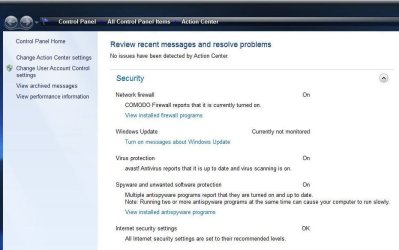
For some reason, Windows no longer detects Avira and is giving me the message :

Windows did not find antivirus software on this computer.

Is there a way to 'reset' the Windows antivirus detection so I no longer get this in my Action Center?

My computer specs / general information are :


  • Windows 7 Home Premium x64 (SP1 not installed)
  • Originally came with Windows Vista but the laptop manufacturer, Sony, provided a free upgrade from an install disc
    • Windows 7 was installed about 1 year and 9 months ago
  • laptop will be 2 years old at the end of July
  • Sony VAIO VGN-FW340D/W
  • Updated to most recent version of Avira along with the newest detection database
Thanks in advance,

ayahirano
 

My Computer My Computer

At a glance

Windows 7 Home Premium x64Intel Core 2 Duo T64004GBMobile Intel GMA X4500 HD
Computer type
Laptop
Computer Manufacturer/Model Number
Sony VAIO VGN-FW340D/W
OS
Windows 7 Home Premium x64
CPU
Intel Core 2 Duo T6400
Memory
4GB
Graphics Card(s)
Mobile Intel GMA X4500 HD
Sound Card
Realtek High Definition Audio
Hard Drives
320 GB Hitachi Hard Drive
Antivirus
Avira (Free) for real time AV, MBAM (not real time)
Dont worry, thats a known bug. It does not always recognize. Just make sure that your AV reports that it is protecting your system
 

My Computer My Computer

At a glance

Windows 10, Home Clean InstallIntel Core2 processsor Q8200(2.33Ghz 1333FSB)...6 gbATI Radeon 256MB HD3650
Computer type
PC/Desktop
Computer Manufacturer/Model Number
Dell XPS 420
OS
Windows 10, Home Clean Install
CPU
Intel Core2 processsor Q8200(2.33Ghz 1333FSB) Quad Core Tech
Motherboard
Dell
Memory
6 gb
Graphics Card(s)
ATI Radeon 256MB HD3650
Sound Card
Intergrated 7.1 Channel Audio
Monitor(s) Displays
Dell SP2009W 20"
Hard Drives
640 GB Serial ATA Hard drive
Cooling
Fan
Keyboard
Dell USB Keyboard
Mouse
Dell Premium Optical USB
Internet Speed
DSL 2.85
Dont worry, thats a known bug. It does not always recognize. Just make sure that your AV reports that it is protecting your system

Gotcha :D
 

My Computer My Computer

At a glance

Windows 7 Home Premium x64Intel Core 2 Duo T64004GBMobile Intel GMA X4500 HD
Computer type
Laptop
Computer Manufacturer/Model Number
Sony VAIO VGN-FW340D/W
OS
Windows 7 Home Premium x64
CPU
Intel Core 2 Duo T6400
Memory
4GB
Graphics Card(s)
Mobile Intel GMA X4500 HD
Sound Card
Realtek High Definition Audio
Hard Drives
320 GB Hitachi Hard Drive
Antivirus
Avira (Free) for real time AV, MBAM (not real time)
+1 richc46

Windows shows the same with my Avast. No AV detected but it is working.
 

My Computer My Computer

At a glance

Windows7 Pro 64bit SP-1; Windows XP Pro 32bitIntel Core i7-870 Lynnfield 2.93GHz LGA 1156 ...8GB@1400MHz Crucial Ballistix DDR3-1600 4x2GBASUS ENGTX460 DirectCU/2DI/1GD5 1GB 256-bit G...
Computer Manufacturer/Model Number
Hopalong/ Godzilla
OS
Windows7 Pro 64bit SP-1; Windows XP Pro 32bit
CPU
Intel Core i7-870 Lynnfield 2.93GHz LGA 1156 95W Quad-Core
Motherboard
ASUS P7P55D-E PRO
Memory
8GB@1400MHz Crucial Ballistix DDR3-1600 4x2GB
Graphics Card(s)
ASUS ENGTX460 DirectCU/2DI/1GD5 1GB 256-bit GDDR5
Sound Card
VIA Onboard
Monitor(s) Displays
Asus VS248H-P 24"; Samsung SyncMaster 941BW 19"ws
Screen Resolution
1920x1080; 1440x900
Hard Drives
Samsung 830 120GB SSD
Intel 320 120GB SSD
Western Digital Caviar Black WD7501AALS 750GB 7200 RPM SATA 3.0Gb/s
Western Digital Caviar Black WD6401AALS 640GB 7200 RPM SATA 3.0Gb/s
PSU
COOLER MASTER Silent Pro RS850-AMBAJ3-US 850W Modular
Case
COOLER MASTER HAF 932 RC-932-KKN5-GP Black
Cooling
Scythe "Mugen-2 Rev.B" (2 ScytheKaze-Jyuni PWM fans)
Keyboard
Logitech K-320
Mouse
Kensington
Antivirus
Avast Inernet Suite
Browser
IE 9 ; Chrome
Very, very strange. No one, including myself, has this problem with Microsoft Security Essentials.
 

My Computer My Computer

At a glance

Windows 10, Home Clean InstallIntel Core2 processsor Q8200(2.33Ghz 1333FSB)...6 gbATI Radeon 256MB HD3650
Computer type
PC/Desktop
Computer Manufacturer/Model Number
Dell XPS 420
OS
Windows 10, Home Clean Install
CPU
Intel Core2 processsor Q8200(2.33Ghz 1333FSB) Quad Core Tech
Motherboard
Dell
Memory
6 gb
Graphics Card(s)
ATI Radeon 256MB HD3650
Sound Card
Intergrated 7.1 Channel Audio
Monitor(s) Displays
Dell SP2009W 20"
Hard Drives
640 GB Serial ATA Hard drive
Cooling
Fan
Keyboard
Dell USB Keyboard
Mouse
Dell Premium Optical USB
Internet Speed
DSL 2.85

My Computer My Computer

At a glance

Windows 10 Home x64INTEL Core i5-750 Quad-Core 3.37GHzHyperX Fury Black Series 8GB (2 x 4GB) 1866MhzEVGA GeForce GTX 750 Superclocked 1GB 128-Bit...
Computer type
PC/Desktop
OS
Windows 10 Home x64
CPU
INTEL Core i5-750 Quad-Core 3.37GHz
Motherboard
ASUS P7P55D
Memory
HyperX Fury Black Series 8GB (2 x 4GB) 1866Mhz
Graphics Card(s)
EVGA GeForce GTX 750 Superclocked 1GB 128-Bit GDDR5
Monitor(s) Displays
LG 32MA68HY 32" IPS
Screen Resolution
1920 x 1080
Hard Drives
Samsung 840 Evo 120GB, SEAGATE 500GB Barracuda® 7200.12, SATA 3 Gb/s, 7200 RPM, 16MB cache
PSU
ANTEC TruePower New TP-550, 80 PLUS, 550W
Case
ANTEC Three Hundred Illusion
Cooling
COOLER MASTER Hyper 212 Plus, 4 x 120mm 1 x 140mm Noctua's
Internet Speed
85 + Mbps
Antivirus
Avast
Browser
Vivaldi
Very, very strange. No one, including myself, has this problem with Microsoft Security Essentials.
There have been posters on this forum with the problem using Microsoft Security Essentials.
 

My Computer My Computer

At a glance

Arch Linux 64-bit
OS
Arch Linux 64-bit

My Computer My Computer

At a glance

Windows 7 Enterprise x64Intel Core i5-2410MSamsung DDR3 4 GBytesAMD Radeon HD 7470M, Intel(R) HD Grpuic Family
Computer type
Laptop
Computer Manufacturer/Model Number
Hp Probook 4530s
OS
Windows 7 Enterprise x64
CPU
Intel Core i5-2410M
Motherboard
Hewlet-packard 167c
Memory
Samsung DDR3 4 GBytes
Graphics Card(s)
AMD Radeon HD 7470M, Intel(R) HD Grpuic Family
Hard Drives
Hitachi HTS547564A9E384
Antivirus
Avira AntiVir Free Antivirus
Browser
Opera Next, Opera, Mozilla Firefox, Google Chrome
Fix for Windows Action Center not recognizing Avira

These are instructions from Avira website: The Windows Action Center reports that no security software has been installed or is disabled

Download this file if using 64-Bit-Version of Windows: regfix_64.zip http://www.avira.com/files/en/regfix_64.zip

Download this file if using 32-Bit-Version of Windows: regfix_32.zip
http://www.avira.com/files/en/regfix_32.zip

Instructions

Unzip the appropriate downloaded file (e.g. regfix_64.zip) on your computer in a folder of your choice.
The password is: avirareg
Open the Avira Control Center → Extras → Configuration
Open the menu General → Security and disable the Option Product protection → Protect files and registry entries from manipulation as seen in the screenshot above
Confirm the change by clicking OK
Run the previously extracted file by double-clicking (e.g. regfix_64.reg), and confirm the following message with Yes
Terminate and restart the Real-Time Protection via the Avira Control Center
Activate again the option you have previously disabled: Protect files and registry entries from manipulation
Close the configuration by clicking OK
The file you downloaded (e.g. regfix_64.zip) is no longer needed and can be deleted

The notification of the Windows Action Center should no longer be present. When opening the Action Center, the Avira software should be listed.
 

My Computer My Computer

At a glance

Windows 7 Professional 64 bit
Computer type
Laptop
Computer Manufacturer/Model Number
Alienware
OS
Windows 7 Professional 64 bit
Back
Top