Solved Drive letters changed by Windows 7 now can't boot

hodsontony

New member
Local time
6:21 PM
Messages
4
I turned on my PC this morning and it took me to a start up repair option screen which I now can't get past. I've had this PC for 15 months and this is the first problem I've had. I have made no changes to the PC, so all I can think of is that somehow since closing last night and restarting today something has happened eith via a windows update or ...

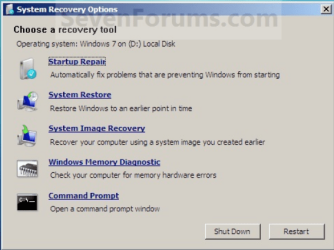
I have noticed that the above repair option seems to be looking at D drive Which I haven't got. I just have one large C drive which contains the system and data.

You will tell I'm not overly familiar with the technical terms, but in a nutshell my PC won't boot and the repair tool is looking for the start up files in the wrong place (ie D)

Would really appreciate any help or advice to remedy the situation.

Thanks in advance.
 

My Computer My Computer

At a glance

Windows 7 Home Premium 64bit
Computer Manufacturer/Model Number
Acer Inspire
OS
Windows 7 Home Premium 64bit
Welcome to Windows Seven Forums.

If you're happy working at the Command Prompt Window use this tut to repair your boot record and drive lettering:

http://www.sevenforums.com/tutorial...ool-how-use-windows-recovery-environment.html

Next, boot into safe mode and run the system file checker to see what that shows up:

http://www.sevenforums.com/tutorials/1538-sfc-scannow-command-system-file-checker.html

Lastly, go back into safe mode and run a full anti-virus scan:

Malwarebytes is a good choice for this.
 

My Computer My Computer

At a glance

Windows 7 Ultimate SP1 64-BitIntel Core i7 870 @ 2.93GHz8Gb Dual-Channel DDR3 @ 664MHznVidia GeForce GTX 460 1024MB dedicated RAM
Computer Manufacturer/Model Number
HP Pavilion Elite 495UK
OS
Windows 7 Ultimate SP1 64-Bit
CPU
Intel Core i7 870 @ 2.93GHz
Motherboard
MSI 2A9C (CPU1)
Memory
8Gb Dual-Channel DDR3 @ 664MHz
Graphics Card(s)
nVidia GeForce GTX 460 1024MB dedicated RAM
Sound Card
Realtek HD Audio
Monitor(s) Displays
HP2310i
Screen Resolution
1920 x 1080
Hard Drives
1x1954GB Hitachi HDS22020ALA 330 (RAID), 1x1954GB Hitachi External for backup and storage
PSU
460W
Case
HP Elite
Cooling
Air cooled
Keyboard
Logitech K750 solar-powered keyboard
Mouse
Logitech Wireless M180 mouse
Internet Speed
2Mb
Other Info
Pure Avanti Flow Internet Radio with iPod Dock, 64Gb iPod, HP USB Speakers, Sony MDR-V500 Headphones, Sony Vaio F-Series Laptop
As you have Acer, there are two patitions on HD, Recovery & Windows. in the repair option D: will be Windows.

Press the F8 key repeatedly at boot up or use the Startup disk.

Try this:
http://www.sevenforums.com/tutorials/681-startup-repair.html?ltr=S
Note: You may need to do startup repair 3 to 4 times.
http://www.sevenforums.com/tutorials/105541-startup-repair-run-3-separate-times.html

http://www.sevenforums.com/tutorials/139576-startup-repair-infinite-loop-recovery.html
http://www.sevenforums.com/tutorials/668-system-recovery-options.html
http://www.sevenforums.com/tutorials/700-system-restore.html?ltr=S


Did you make your ACER Recovery Disks?
 

My Computer My Computer

At a glance

ME/XP/Vista/Win7
OS
ME/XP/Vista/Win7
Thanks for the quick reply. I'll give it a go, I'm not sure I'd call myself 'happy' with the command prompt interface but the instructions look clear, so will try it and let you know. Am rather puzzled as to what could cause it without any 'manual' intervention from me, the sole user...
 

My Computer My Computer

At a glance

Windows 7 Home Premium 64bit
Computer Manufacturer/Model Number
Acer Inspire
OS
Windows 7 Home Premium 64bit
Thanks for the quick reply. I'll give it a go, I'm not sure I'd call myself 'happy' with the command prompt interface but the instructions look clear, so will try it and let you know. Am rather puzzled as to what could cause it without any 'manual' intervention from me, the sole user...

You're welcome. It could be virus related so running a scan as well should find it if there is anything untoward.
 

My Computer My Computer

At a glance

Windows 7 Ultimate SP1 64-BitIntel Core i7 870 @ 2.93GHz8Gb Dual-Channel DDR3 @ 664MHznVidia GeForce GTX 460 1024MB dedicated RAM
Computer Manufacturer/Model Number
HP Pavilion Elite 495UK
OS
Windows 7 Ultimate SP1 64-Bit
CPU
Intel Core i7 870 @ 2.93GHz
Motherboard
MSI 2A9C (CPU1)
Memory
8Gb Dual-Channel DDR3 @ 664MHz
Graphics Card(s)
nVidia GeForce GTX 460 1024MB dedicated RAM
Sound Card
Realtek HD Audio
Monitor(s) Displays
HP2310i
Screen Resolution
1920 x 1080
Hard Drives
1x1954GB Hitachi HDS22020ALA 330 (RAID), 1x1954GB Hitachi External for backup and storage
PSU
460W
Case
HP Elite
Cooling
Air cooled
Keyboard
Logitech K750 solar-powered keyboard
Mouse
Logitech Wireless M180 mouse
Internet Speed
2Mb
Other Info
Pure Avanti Flow Internet Radio with iPod Dock, 64Gb iPod, HP USB Speakers, Sony MDR-V500 Headphones, Sony Vaio F-Series Laptop
As you have Acer, there are two patitions on HD, Recovery & Windows. in the repair option D: will be Windows.

Press the F8 key repeatedly at boot up or use the Startup disk.

Try this:
http://www.sevenforums.com/tutorials/681-startup-repair.html?ltr=S
Note: You may need to do startup repair 3 to 4 times.
http://www.sevenforums.com/tutorials/105541-startup-repair-run-3-separate-times.html

http://www.sevenforums.com/tutorials/139576-startup-repair-infinite-loop-recovery.html
http://www.sevenforums.com/tutorials/668-system-recovery-options.html
http://www.sevenforums.com/tutorials/700-system-restore.html?ltr=S


Did you make your ACER Recovery Disks?

I did try the recovery disks created when I bought the PC, but after 90 minutes I cancelled the process it didn't seem to be doing anything. Not sure how long it should take but felt 90 mins was long enough. I didn't however try the 3/4 times suggested, so will try that and report back. Thanks
 

My Computer My Computer

At a glance

Windows 7 Home Premium 64bit
Computer Manufacturer/Model Number
Acer Inspire
OS
Windows 7 Home Premium 64bit
You may need to run Startup Repair up to 3 separate times with reboots from the Win7 Repair CD or Installation DVD so that it doesn't rely on possibly corrupt System files.

System Repair Disc - Create
Startup Repair - Run 3 Separate Times

You can copy out your files using DVD/Repair CD: Copy & Paste - in Windows Recovery Console
or using Paragon Rescue CD.

From the DVD/Repair CD Command line, also run manually: Disk Check and
SFC -SCANNOW Run in Command Prompt at Boot

If these fail, run Acer eRecovery from its partition (most stable method): Acer Support: Frequently Asked Questions list for Recovery media and Restoring a system to factory load

If this fails, wipe the HD of possibly corrupt code: SSD - HDD Optimize for Windows Reinstallation then run Factory Recovery Disks or locate a Win7 installation DVD for your version to clean reinstall with the Product Key on the COA sticker: Reinstalling Windows 7
 
Reinstall the only solution

After literaly hours and hours of trying to fix this the final solution was a full reinstall of the o/s, fortunately all files were recovered ok.

The problem for me was i couldn'y get into the command prompt screen any way i tried, so many of the recommends couldn't be used.

Thanks for the help and hopefully that's it for now.

One thing i did notice is that the problem occured after an overnight windows update, so careful...

Thanks, Tony
 

My Computer My Computer

At a glance

Windows 7 Home Premium 64bit
Computer Manufacturer/Model Number
Acer Inspire
OS
Windows 7 Home Premium 64bit
Wrong drive letter

seavixen32

You are AWESOME! I had a laptop issue with wrong drive letter and your step by step was beautiful! Thanks for saving me hours!!!
 

My Computer My Computer

At a glance

7 home 32 premium
Computer type
PC/Desktop
OS
7 home 32 premium
Back
Top