drive letters change after system restore

turneyreed

New member
Local time
5:15 AM
Messages
2
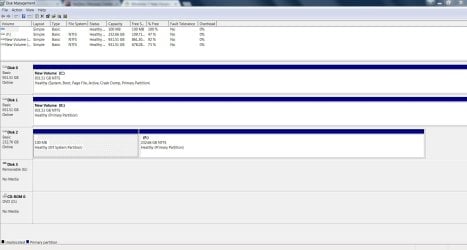
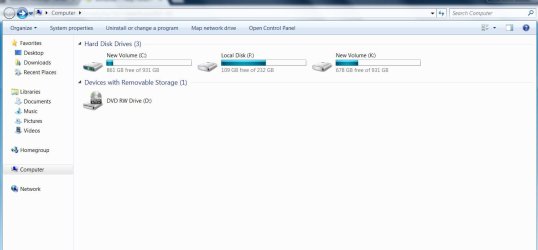
Friends.. after a system restore try due to 'system found unauthorized changes on firmware, operating system, or UEFI drivers', the drive letters on my three drives (one 250 gb ssd for OS, two 1 tb hdd storage) have changed.. 'C' is now hdd 'Local Disk 'F', and 'New Volume 'C' is hdd.. the second hdd isn't problem but i've had to reactivate windows again... first 'system found..' problem was solved by removal of kb3133977, an issue of compatability with my asus m5a97 r2.0 board bios.. looking at installed updates, it is not shown still.. i've changed boot menu in bios to the samsung 840 evo, but drive letter is the same and my old desktop screen is still not showing.. i'm hesitant to use the MS Regedt method if there is a possibly simpler fix.. not sure how to proceed now.. any help would be greatly appreciated...
 

Attachments
  • drives issue 01.JPG
    drives issue 01.JPG
    81.5 KB · Views: 0
  • drive issue 02.JPG
    drive issue 02.JPG
    202.5 KB · Views: 1

My Computer

Computer type
PC/Desktop
Computer Manufacturer/Model Number
custom build
OS
Windows 7 Pro 64
CPU
amd fx-6300
Motherboard
asus m5a97 r2.0
Memory
16 gb gskill sniper 1866 (@ 1600)
Graphics Card(s)
gigabyte gtx 750ti
Sound Card
onboard
Monitor(s) Displays
asus vh238
Screen Resolution
1920 x 1080
Hard Drives
samsung 840 evo 250 gb, two wd 1 tb hdd
PSU
corsair rm750
Case
haf 912
Cooling
five fans
Keyboard
old dell
Mouse
logitech m570
Internet Speed
75mb
Antivirus
norton security 2018
Browser
google
You can use Windows disk management to re-assign the drive letters back to what you are used to seeing.
 

My Computer

Computer type
PC/Desktop
Computer Manufacturer/Model Number
Antec desktop; Acer Aspire laptops
OS
Windows 7 Professional 64-bit
CPU
Desktop i5; Acers i5 & i7
Memory
desktop 16GB; 1 Acer 8GB & 1 Acer 16GB
Hard Drives
1TB split into 2 equal partitions [OS and data] usable by RJS
Internet Speed
AT&T DSL
Browser
FF, GChrome, msIE
Other Info
Windows 7 Firewall, Emsisoft AM/AV, MSE [scan-only], SpywareBlaster, Ruiware/BillP combine
Roland.. that was one of the first things i tried to do. it succeeded in changing the letter of my third drive, however when i go through disk management, select the drive, select change drive letter/path, and select an available drive letter, it states that the 'parameters are incorrect'...
 

My Computer

Computer type
PC/Desktop
Computer Manufacturer/Model Number
custom build
OS
Windows 7 Pro 64
CPU
amd fx-6300
Motherboard
asus m5a97 r2.0
Memory
16 gb gskill sniper 1866 (@ 1600)
Graphics Card(s)
gigabyte gtx 750ti
Sound Card
onboard
Monitor(s) Displays
asus vh238
Screen Resolution
1920 x 1080
Hard Drives
samsung 840 evo 250 gb, two wd 1 tb hdd
PSU
corsair rm750
Case
haf 912
Cooling
five fans
Keyboard
old dell
Mouse
logitech m570
Internet Speed
75mb
Antivirus
norton security 2018
Browser
google
You might need something similar to, but free, Acronis Disk Director. Something from AOMEI or EaseUS or MiniTool -- a partition and drive utility that you can boot from USB or DVD if need be -- that can re-assign the drive letters. I don't know why the error invalid parameters is coming up, hopefully, others here can lead the way to a solution.
 

My Computer

Computer type
PC/Desktop
Computer Manufacturer/Model Number
Antec desktop; Acer Aspire laptops
OS
Windows 7 Professional 64-bit
CPU
Desktop i5; Acers i5 & i7
Memory
desktop 16GB; 1 Acer 8GB & 1 Acer 16GB
Hard Drives
1TB split into 2 equal partitions [OS and data] usable by RJS
Internet Speed
AT&T DSL
Browser
FF, GChrome, msIE
Other Info
Windows 7 Firewall, Emsisoft AM/AV, MSE [scan-only], SpywareBlaster, Ruiware/BillP combine
Back
Top